Windows Hell No for Business
Black Hat USA 2025 · Day 1 · Briefings
Overview
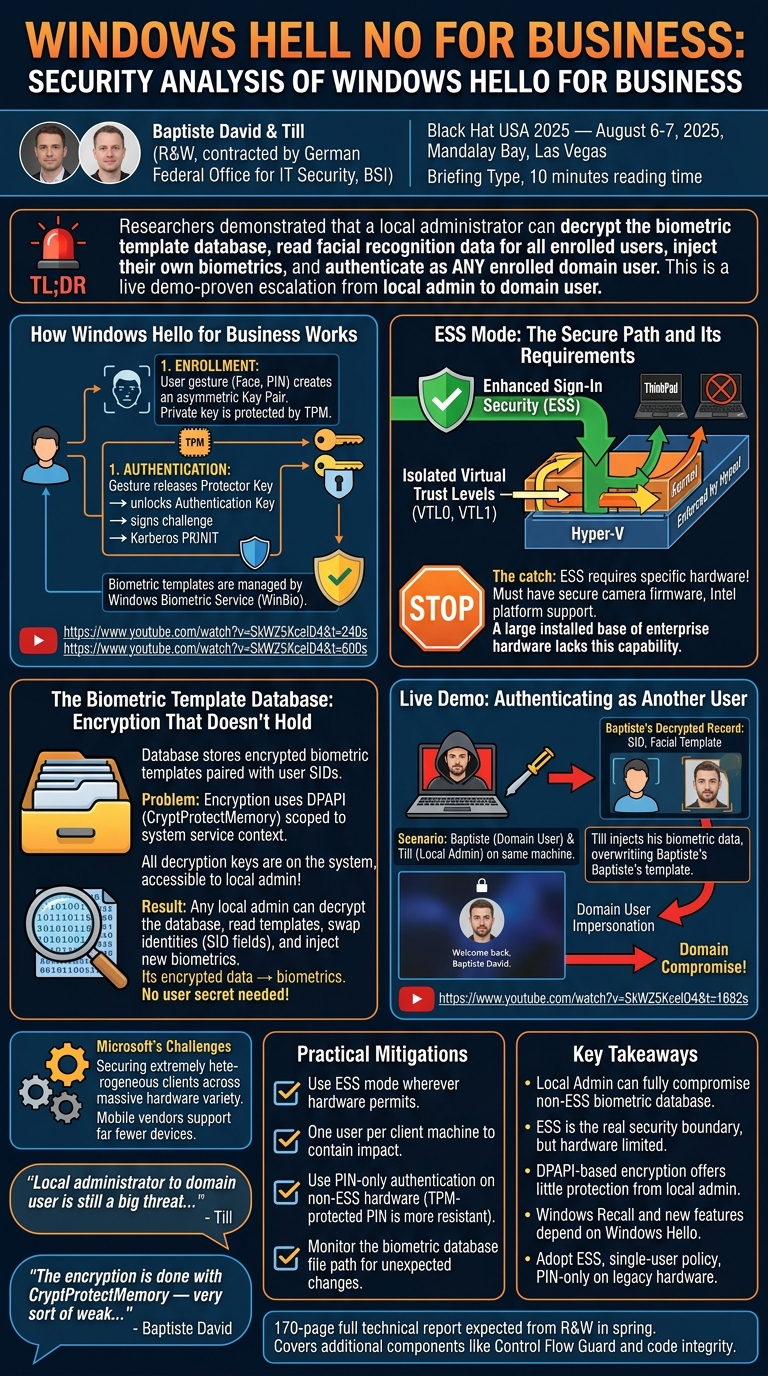
Researchers contracted by Germany's Federal Office for IT Security (BSI) conducted an in-depth security analysis of Windows Hello for Business and demonstrated that a local administrator can decrypt the biometric template database, read facial recognition data for all enrolled users, and inject their own biometrics — authenticating as any enrolled user on the domain. The attack is a live demo-proven escalation path from local admin to domain user, with implications for domain compromise. ---
Key moments
- 2:00 Stakes raised: Windows Hello now gates Windows Recall database and passkey authentication
- 3:59 Architecture: protector keys per gesture each cipher a shared authentication key
- 5:59 Weak fallback: without TPM, private key stored in registry with CryptProtectMemory only
- 6:59 Attack surface: Windows Biometric Service runs as SYSTEM with third-party manufacturer DLLs
- 7:59 Two device models: hardware-processed vs. software-processed biometric pipeline differences
- 9:00 Reverse engineering: 170-page report produced from deep Windows Hello internals analysis
- 9:59 Vulnerabilities found: implementation flaws in Windows Hello for Business authentication chain
Windows Hell No for Business
Speakers: Baptiste David and Till (R&W, contracted by the German Federal Office for IT Security, BSI)
Conference: Black Hat USA 2025 — August 6-7, 2025, Mandalay Bay, Las Vegas
YouTube: https://www.youtube.com/watch?v=SkWZ5KcelD4
Reading time: 10 minutes
Type: Briefing
TL;DR
Researchers contracted by Germany's Federal Office for IT Security (BSI) conducted an in-depth security analysis of Windows Hello for Business and demonstrated that a local administrator can decrypt the biometric template database, read facial recognition data for all enrolled users, and inject their own biometrics — authenticating as any enrolled user on the domain. The attack is a live demo-proven escalation path from local admin to domain user, with implications for domain compromise.
Introduction
Microsoft is aggressively pushing passwordless authentication. Windows Hello for Business — which ties biometric gestures (face recognition, fingerprints, iris) or a TPM-protected PIN to asymmetric cryptographic keys — is increasingly the mechanism behind features like Windows Recall, and it is becoming the default authentication pathway for enterprise users moving away from passwords.
This shift makes Windows Hello for Business one of the most security-critical components in modern Windows. Researchers Baptiste David and Till, working at R&W under contract from Germany's Federal Office for IT Security (BSI), spent over a year reverse-engineering it — producing a 170-page technical report — and presented their most significant findings at Black Hat USA 2025. Their title, "Windows Hell No for Business," signals the conclusion: the biometric template database is not protected from local administrators, and that gap has serious consequences for enterprise security.
How Windows Hello for Business Works
▶ Watch: Architecture and enrollment overview (04:00)
Windows Hello for Business rests on two pillars: identification (recognizing who is in front of the machine) and authentication (using a cryptographic key to prove that identity to a remote service like Active Directory or Entra ID).
During enrollment, the system creates a user ID key pair — one public key, registered with the identity provider, and one private key protected by the TPM. Each biometric gesture (face, fingerprint, PIN) is associated with a protector key that is unique to that gesture. Each protector key encrypts a shared authentication key, meaning all gestures for a given user unlock the same authentication key. When a gesture is successfully verified, the authentication key is released, the TPM signs a cryptographic challenge using the private key, and authentication proceeds — typically via Kerberos PKINIT.
The Windows Biometric Service (WinBio) sits at the center of this architecture. It runs as a system service in Session 0, communicates with biometric hardware through a layered adapter model (sensor adapter, engine adapter, storage adapter), and handles the matching of captured biometric data against stored templates. Client applications access the service only through an RPC interface, meaning biometric data never leaves WinBio's memory space during a normal interaction.
▶ Watch: Windows Biometric Service internals (10:00)
ESS Mode: The Secure Path and Its Requirements
Enhanced Sign-In Security (ESS) mode adds a hypervisor layer to the authentication flow. Under ESS, hardware requests from the biometric device bypass the normal kernel path and are rerouted through VTL0 and VTL1 — two isolated virtual trust levels enforced by Hyper-V. VTL1 processes the most sensitive operations, and only VTL1 components can access VTL1 memory. This architecture, combined with TPM integration, provides a genuinely strong security posture for biometric authentication.
The catch is that ESS requires hardware support. For face recognition, the camera must advertise secure device capabilities from its firmware. The researchers' own ThinkPads — bought approximately 18 months before the presentation — lack this capability because they use AMD chips rather than Intel chips with the required secure camera support. This is not a niche problem: a large installed base of enterprise hardware cannot use ESS mode, meaning millions of Windows Hello for Business deployments operate without the hypervisor protection that makes the design robust.
The Biometric Template Database: Encryption That Doesn't Hold
▶ Watch: Database structure and encryption analysis (26:02)
Microsoft's documentation states that biometric data is accessible only to the Windows Hello service and is encrypted with a per-database AES-CBC key. The researchers found this to be technically accurate but practically insufficient.
The template database is stored on disk with the following structure: an encrypted header containing an integrity hash, the per-database AES key, and an initialization vector; an unencrypted management header with metadata; and records — each pairing a Windows Security Identifier (SID) with an encrypted biometric template.
The critical detail is how the database key is protected. The key is encrypted using DPAPI (Data Protection API) with a CryptProtectMemory-equivalent mechanism — a protection scheme scoped to the system service context. Because WinBio is a system service, all the data needed to decrypt the key is already present on the system and accessible to local administrators through standard Windows APIs. There is no user-provided entropy in the key derivation path; the encryption is entirely determined by system state, not by any secret the user holds.
This means any local administrator can decrypt the biometric template database, read the facial recognition templates of all enrolled users, modify the SID fields to map one user's template to another user's identity, add arbitrary biometric templates, and recalculate and re-encrypt the integrity hash to conceal the tampering.
Live Demo: Authenticating as Another User
▶ Watch: Live exploitation demo (28:02)
The researchers demonstrated this attack live on stage. The scenario: a machine with two enrolled users, Baptiste and Till. Baptiste is logged in; Till is a local administrator on the machine.
Starting from Till's session, the team ran their decryption tool against the biometric database. The tool displayed the database headers — the hash, the initialization vector, the AES key — and then the decrypted record containing Baptiste's SID and the first portion of his decrypted facial recognition template.
Till then injected his own pre-extracted biometric template into the database, overwriting the record linked to Baptiste's SID. The lock screen appeared. Baptiste's face, which had previously authenticated correctly, was now denied. Till's face — now mapped to Baptiste's SID — authenticated successfully. The screen displayed "Welcome back, Baptiste David."
The attack escalated from local administrator on a single machine to authenticated domain user. As the researchers noted, in the worst case, this path could extend from local admin to domain admin, depending on what domain-level access the impersonated user holds.
Microsoft's Challenges and Practical Mitigations
The researchers were careful to contextualize Microsoft's position. Unlike mobile device vendors, who support a narrow hardware matrix, Microsoft must maintain compatibility across an enormous variety of hardware configurations — including machines that cannot support nested virtualization and therefore cannot run ESS mode at all. The encryption scheme that looks weak for administrators is a reasonable design choice given the need to support biometric matching on hardware that lacks a secure enclave.
▶ Watch: Recommendations (34:03)
Practical mitigations recommended by the researchers include:
- Use ESS mode wherever hardware permits. It moves key management into a hypervisor-protected enclave that local administrators cannot reach.
- One user per client machine. Sharing a Windows Hello-enrolled machine between multiple users dramatically increases the impact of a local admin compromise — the attacker can impersonate any enrolled user.
- Use PIN-only authentication on non-ESS hardware. The TPM-backed PIN introduces real entropy into the key release path and benefits from TPM anti-hammering protection, making it meaningfully more resistant than biometric-only modes on older hardware.
- Monitor the biometric database for unexpected changes. The database path is known; file integrity monitoring can detect tampering.
The full 170-page technical report is expected to be published on R&W's website when the project concludes in spring of the following year, covering Windows Hello for Business alongside additional components including Control Flow Guard and code integrity.
Notable Quotes
"Local administrator to domain user is still a big threat, as we have just seen. I became Baptiste, and I'm now in the domain, not just on the local machine. In the worst case, this could lead to local admin to domain admin."
— Till ▶ 32:03
"The encryption is done with CryptProtectMemory — very sort of weak cryptography procedures, easy to decode."
— Baptiste David ▶ 06:00
"Microsoft is securing really heterogeneous clients. That's a big challenge. Mobile device vendors don't support as many devices as Microsoft is doing."
— Till ▶ 32:03
"If you can use ESS mode and you're using Windows Hello for Business, yes, use it. That's the key takeaway."
— Till ▶ 34:03
Key Takeaways
- A local administrator can fully compromise the Windows Hello for Business biometric database on machines not running ESS mode — decrypting templates, swapping user identities, and injecting arbitrary biometrics.
- ESS mode is the real security boundary, but it requires specific hardware (secure camera firmware, Intel platform support, Hyper-V nested virtualization) that a substantial installed base lacks.
- The encryption protecting biometric templates is DPAPI-based and scoped to system context, meaning any local admin can decrypt it without any user-held secret.
- Windows Recall and other new Microsoft security features now depend on Windows Hello for Business, raising the stakes for vulnerabilities in this component significantly.
- Practical defenses include ESS mode adoption, single-user-per-device policies, PIN-only fallback on legacy hardware, and file integrity monitoring on the biometric database path.
Slides were not listed as available for this talk. A 170-page full technical report is expected to be published by R&W upon project completion.
Reviews
Dr. Zero (Offensive Security Researcher) — MUST SEE
A year-plus of BSI-funded reverse engineering, a 170-page technical report, and a live demo where Till logs in as Baptiste — Windows Hello for Business's biometric database is wide open to any local admin, and this talk proves it cold. The ESS hardware gap is the real punch: most enterprise hardware can't run the one mode that actually works.
Heather Calloway (CISO) — MUST SEE
A local administrator on a Windows machine without ESS mode support can decrypt the biometric template database, read facial recognition data for all enrolled users, and inject their own face to authenticate as any enrolled domain user. This is a demonstrated local-to-domain escalation path, and most enterprise hardware cannot run the mode that prevents it.