BitUnlocker: Leveraging Windows Recovery to Extract BitLocker Secrets
Black Hat USA 2025 · Day 1 · Briefings
Overview
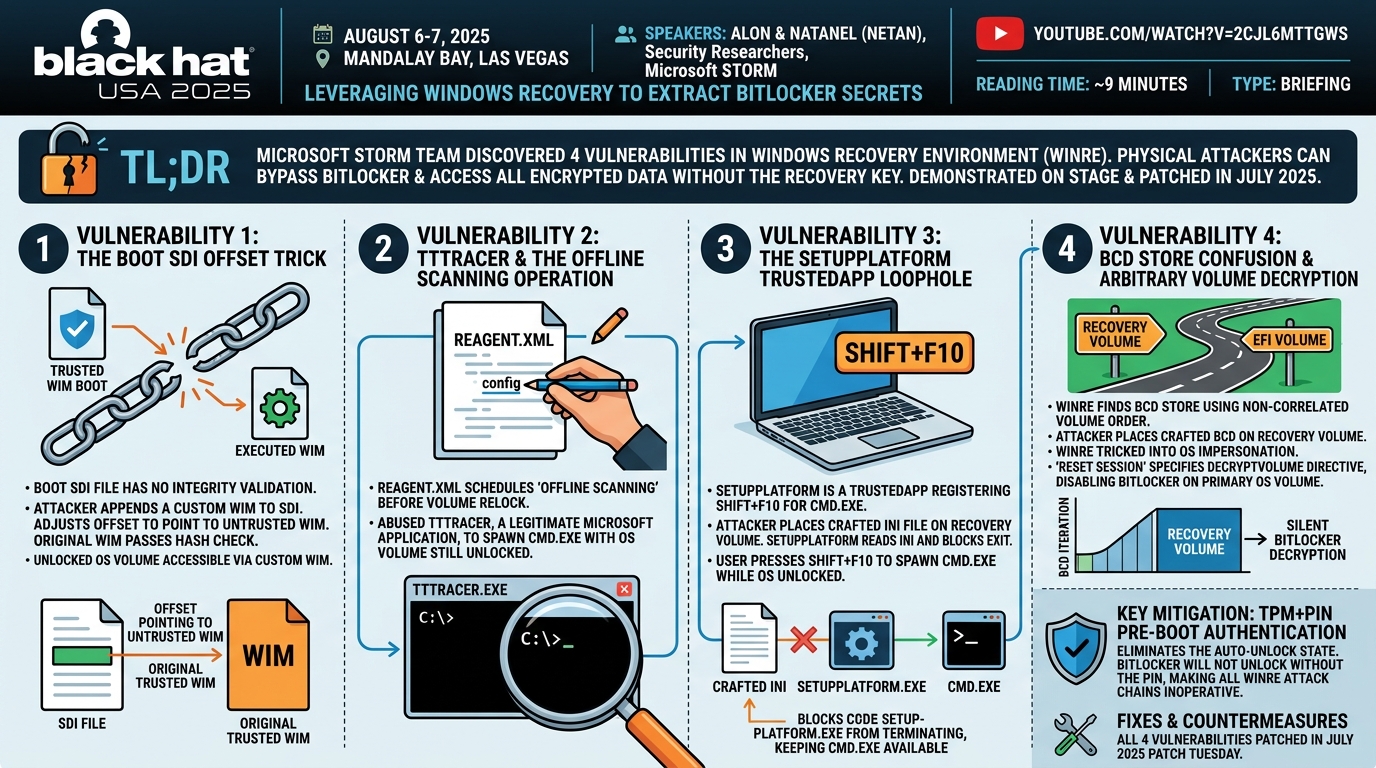
Microsoft's own offensive security team discovered four vulnerabilities in the Windows Recovery Environment (WinRE) that allow a physical attacker to bypass BitLocker and access all encrypted data without knowing the recovery key. Three distinct exploitation techniques — manipulating the boot SDI file, abusing the offline scanning scheduled operation via TTTracer, and hijacking the SetupPlatform TrustedApp — were demonstrated live on stage and patched in July 2025 Patch Tuesday. ---
Key moments
- 4:00 BitLocker threat model: WinRE auto-unlock state grants full OS volume access pre-boot
- 5:59 Microsoft's Trusted WIM Boot: WinRE WIM modification breaks trust and triggers relock
- 9:59 New attack surface: WinRE parses unprotected EFI/recovery volume files during auto-unlock
- 11:59 Bug in boot SDI parsing: attacker-controlled WIM appended, hash validation bypassed
- 13:59 Demo: exploit executes from recovery volume, BitLocker auto-unlocks, secrets extracted
- 17:59 Demo: Shift+F10 spawns CMD, BitLocker status shows unlocked, all C: drive files visible
- 21:59 Second bypass: ReAgent XML manipulation tricks WinRE into trusted-app infinite loop
- 26:00 Third attack: BCD store manipulation confuses WinRE about which volume is BitLocker-protected
BitUnlocker: Leveraging Windows Recovery to Extract BitLocker Secrets
Speakers: Alon and Natanel (Netan), Security Researchers, Microsoft STORM (Security Testing and Offensive Research)
Conference: Black Hat USA 2025 — August 6-7, 2025, Mandalay Bay, Las Vegas
YouTube: https://www.youtube.com/watch?v=2CJl6mTtgws
Reading Time: ~9 minutes
Type: Briefing
TL;DR
Microsoft's own offensive security team discovered four vulnerabilities in the Windows Recovery Environment (WinRE) that allow a physical attacker to bypass BitLocker and access all encrypted data without knowing the recovery key. Three distinct exploitation techniques — manipulating the boot SDI file, abusing the offline scanning scheduled operation via TTTracer, and hijacking the SetupPlatform TrustedApp — were demonstrated live on stage and patched in July 2025 Patch Tuesday.
Introduction
BitLocker is Windows' full-volume encryption feature, designed to protect sensitive data against the "common thief" threat model: an attacker with physical access to a device but no valid credentials. Studies cited during the talk put the odds of laptop theft at one in ten, with the average cost of a stolen laptop reaching roughly $49,000 when accounting for replacement, productivity loss, legal expenses, and intellectual property loss. BitLocker's promise is simple — even if the laptop is stolen, the data remains unreadable.
That promise rested on an assumption that turned out to be flawed. Alon and Natanel from Microsoft's STORM team — a group focused on pre-boot security research covering the boot stages, Secure Boot, and BitLocker — conducted a dedicated security review of the Windows Recovery Environment, an attack surface they identified as largely unexamined despite sitting squarely within the BitLocker threat model. What they found were four exploitable vulnerabilities that, in combination, allowed complete BitLocker bypass. The talk walked through each technique, backed by live demonstrations on password-protected machines.
The WinRE Architecture: Why It's a Problem for BitLocker
▶ Watch: WinRE Overview and Design Changes (04:00)
WinRE is Windows' recovery platform, handling startup failures, persistent crashes, and BitLocker errors. Architecturally, it runs its own standalone "Recovery OS" — a lean Windows image loaded into a RAM disk from a WIM file. Critically, WinRE boots while the main OS volume is in an auto-unlock state: as long as WinRE's WIM file passes integrity validation (called Trusted WIM Boot), BitLocker automatically unlocks the OS volume without requiring the user's recovery key.
When BitLocker was introduced, three design changes were made to WinRE:
- The WinRE WIM file was moved from the (now-encrypted) OS volume to a separate, unencrypted recovery volume, so recovery could function even if the OS volume was inaccessible.
- Trusted WIM Boot was introduced — a hash comparison that verifies WinRE's integrity before the OS volume is auto-unlocked.
- A volume relock mechanism was added to WinRE, so that launching risky tools (like the command prompt) would lock the OS volume again, requiring the recovery key.
The attack surface the researchers targeted was the set of external files that WinRE reads from unprotected volumes: the ReAgent.xml configuration file, the boot.sdi file, and the Boot Configuration Data (BCD) store. Any of these files can be modified by a physical attacker with access to the recovery partition. The key question was whether modifying them could yield code execution while the OS volume remained in the auto-unlock state.
Vulnerability 1: The Boot SDI Offset Trick
▶ Watch: Boot SDI Vulnerability and Demo (12:02)
The System Deployment Image (SDI) file prepends to the WIM in memory at boot time. It contains a WIM blob with an offset that tells the boot loader where the actual WinRE WIM begins within the RAM disk buffer. During loading, the API computes the WIM's hash for Trusted WIM Boot validation — but there is no cryptographic binding between the WIM being hashed and the WIM actually executed. The offset can be set to an arbitrary location.
Since the SDI file itself undergoes no validation whatsoever, an attacker can append a custom untrusted WIM to the SDI, adjust the offset to point to that untrusted WIM, and allow the original trusted WIM to pass hash validation. The result: a fully attacker-controlled WIM boots while the OS volume remains unlocked.
The live demo showed this on a password-protected machine with an unknown password. After writing the exploit to the unprotected recovery partition and rebooting into WinRE, the custom WIM launched a command prompt with the C drive fully accessible. BitLocker status confirmed: protection still on, volume unlocked. All files on the encrypted volume were readable.
Vulnerability 2: TTTracer and the Offline Scanning Operation
▶ Watch: ReAgent.xml and TTTracer Exploitation (14:03)
The ReAgent.xml file defines WinRE's recovery state and is consumed immediately on startup. When configured to schedule a specific operation, WinRE executes that operation before reaching the recovery UI — and before triggering the volume relock mechanism. One such scheduled operation is "offline scanning," which allows an antivirus scan from within WinRE against the main OS volume.
The offline scanning operation can execute arbitrary applications, subject to two constraints: the application must reside on the main OS volume, and it must be digitally signed by Microsoft or WHQL with an embedded signature. The researchers enumerated approximately 30 applications meeting these requirements and reviewed them one by one until they reached TTTracer — the Time Travel Debugger utility included in Windows.
TTTracer's function is to trace an arbitrary executable. By scheduling the offline scanning operation via ReAgent.xml and pointing TTTracer at cmd.exe, the researchers obtained a shell with the OS volume still in auto-unlock state. The demo again showed a BitLocker-protected machine that — after the exploit was written to the recovery volume and the machine rebooted — launched TTTracer, which in turn launched a command prompt with full access to the encrypted C drive.
Vulnerability 3: The SetupPlatform TrustedApp Loophole
▶ Watch: TrustedApp Exploitation via SetupPlatform (22:04)
WinRE's "WinRE Applications" feature allows scheduled execution of applications while keeping the OS volume in auto-unlock state — provided the application is registered as a TrustedApp in the Windows registry. The trust validation compares the application's hash to a registry entry; if it matches, the OS volume remains unlocked during execution.
The researchers found a legitimate registered TrustedApp: SetupPlatform, used during Windows upgrades. After a Windows upgrade completes, the TrustedApp registry entry for SetupPlatform is never removed. SetupPlatform registers a Shift+F10 hotkey to launch cmd.exe at startup — but ordinarily fails immediately because a required configuration file resides on the BitLocker-protected OS volume, which SetupPlatform cannot reach if that volume is locked.
The exploitation insight was subtle: if the attacker places a SetupPlatform INI file on the recovery volume (now impersonating the OS volume via the BCD confusion primitive described below), SetupPlatform reads it and displays a message box — blocking process termination indefinitely, extending the Shift+F10 hotkey's availability. The attacker presses Shift+F10 before the process exits, spawning cmd.exe while the OS volume is still unlocked.
Vulnerability 4: BCD Store Confusion and Arbitrary Volume Decryption
▶ Watch: BCD Confusion Primitive and Full Bypass Demo (28:04)
The most sophisticated attack chain used a logic flaw in how WinRE locates the Boot Configuration Data (BCD) store. WinRE iterates over disk volumes to find the BCD store using the Windows API functions FindFirstVolume and FindNextVolume. The documentation for these functions explicitly warns that the volume order returned is not correlated to the physical order of volumes on disk.
In practice, this inconsistency meant WinRE's iteration logic checked the recovery volume for a BCD store before checking the EFI volume where the real store resides. By placing a crafted, attacker-controlled BCD store on the recovery volume, the researchers tricked WinRE into treating the recovery volume as the trusted BitLocker-encrypted OS volume.
This "OS impersonation primitive" unlocked a devastating chained attack. WinRE's Push Button Reset (PBR) feature reads a ResetSession.xml configuration file from what it believes is the trusted OS volume — which the attacker now controls. That configuration file can specify a DecryptVolume directive instructing PBR to decrypt any BitLocker-encrypted volume. The exploit chain:
- Modify
ReAgent.xmlto scheduleOnlinePBR. - Place an attacker-controlled BCD store on the recovery volume pointing its OS device entry to the recovery volume.
- Place a
ResetSession.xmlon the recovery volume with aDecryptVolumedirective targeting the actual OS volume.
On the next boot, PBR finds the attacker BCD store, treats the recovery volume as the OS device, loads the attacker's ResetSession.xml, and decrypts the legitimate OS volume. The machine reboots into Windows normally — with BitLocker disabled. The demo showed a machine proceeding through PBR's "Resetting this PC" screen, then booting to the login screen and successfully reading the formerly encrypted drive in its entirety.
Fixes and Countermeasures
All four vulnerabilities were patched in July 2025 Patch Tuesday. The CVEs were displayed on screen during the closing remarks.
The researchers recommended two mitigations for users who want maximum protection:
- Enable TPM+PIN pre-boot authentication. This eliminates the auto-unlock state entirely — BitLocker will not unlock without the correct PIN, regardless of WinRE's behavior or any manipulation of recovery volume files. According to the presenters, TPM+PIN fully protects against all WinRE-originating BitLocker bypasses, including those affecting the boot process and the login screen.
- Enable the revised downgrade mitigation. This enforces secure versioning across critical boot components, preventing attackers from rolling back patches to reintroduce known vulnerabilities in BitLocker and Secure Boot.
Notable Quotes
"WinRE is the recovery platform. It needs to be able to recover from BitLocker-related failures — and to do that, it must operate while the OS volume is automatically unlocked. Any code execution within WinRE during the auto-unlock state can be utilized to bypass BitLocker and extract all the protected secrets."
— Alon, ▶ 10:01
"There is no verification linking between the WIM being used to the one that was hashed earlier, allowing the offset to be set arbitrarily."
— Natanel, ▶ 12:02
"The remarks section of these two APIs highlights a very interesting point — one should not assume any correlation between the order of the volumes returned by these functions and the order of the volumes on the computer."
— Alon, ▶ 28:04
"If TPM+PIN is already enabled on your machine, or if you enable it, you're fully protected from BitLocker bypasses that originate from WinRE, specifically from boot components, from the login screen, and other attack surfaces."
— Alon, ▶ 36:05
Key Takeaways
- WinRE's auto-unlock state is the fundamental attack surface: BitLocker automatically unlocks the OS volume whenever WinRE's WIM passes hash validation, meaning any code execution during that window provides unencrypted access to all protected data.
- The boot.sdi file has no integrity validation, enabling an attacker to append an arbitrary WIM and redirect execution to it while the trusted WIM hash check passes — a complete Trusted WIM Boot bypass.
- TTTracer (the Time Travel Debugger), a legitimately signed Microsoft binary, can be abused via the offline scanning scheduled operation to spawn cmd.exe while the OS volume remains unlocked.
- The BCD store volume iteration logic can be confused by placing an attacker-controlled store on the recovery volume, enabling OS impersonation and ultimately instructing PBR's
DecryptVolumedirective to silently disable BitLocker on the primary OS volume. - Enabling TPM+PIN is the definitive mitigation: it removes the auto-unlock precondition entirely, making all four attack chains inoperative regardless of what an attacker does to the recovery volume.
Slides: No slide PDF was available for this talk.
Reviews
Dr. Zero (Offensive Security Researcher) — MUST SEE
Microsoft's own offensive team found four independent ways to bypass BitLocker via WinRE, each exploiting a different design assumption, all patched July 2025. The boot.sdi offset trick is elegant in its simplicity; the BCD volume iteration confusion leading to a DecryptVolume directive is sophisticated architecture exploitation. This is what internal red teaming should look like.
Heather Calloway (CISO) — STRONG ACCEPT
Microsoft's own offensive security team found four vulnerabilities in the Windows Recovery Environment that allow a physical attacker to fully bypass BitLocker without the recovery key. Three exploitation techniques, all patched in July 2025 Patch Tuesday. TPM+PIN is the definitive mitigation.