Android malware targeting Belgian Financial apps
Jeroen Beckers (Mobile Solution Lead · NVISO)
BruCON 0x0D · Day 2
Overview
In this insightful BruCON talk, Jeroen Beckers, Mobile Solution Lead at NVISO, delves into the evolving landscape of Android malware, with a particular focus on families actively targeting the Belgian market and financial applications. The presentation moves beyond rudimentary threats, dissecting advanced techniques that exploit Android's inherent permissions and user trust to achieve sophisticated goals, from data theft to financial fraud. Beckers, a recognized expert in mobile application security, sheds light on the technical intricacies of prominent malware families like FluBot, TeaBot, and Vulture, offering a rare glimpse into their operational mechanics and the challenges they pose to both users and security professionals.
Key moments
- 0:00 Speaker introduction and talk agenda
- 14:00 How malware abuses Android's accessibility service
- 21:00 Cloak and Dagger: combining permissions for full man-in-the-middle
- 30:00 FluBot's advanced C2, encryption, and Frida analysis
- 43:00 TeaBot malware: Keylogging Belgian financial applications
- 50:00 Vulture malware uses VNC for full screen capture
- 52:00 Strategies to protect users and applications from malware
- 57:45 Q&A: Can malware bypass biometric authentication?
Android malware targeting Belgian Financial apps
Speakers: Jeroen Beckers (Mobile Solution Lead, NVISO)
Conference: BruCON
YouTube: https://www.youtube.com/watch?v=J47pp09sBxA
Overview
In this insightful BruCON talk, Jeroen Beckers, Mobile Solution Lead at NVISO, delves into the evolving landscape of Android malware, with a particular focus on families actively targeting the Belgian market and financial applications. The presentation moves beyond rudimentary threats, dissecting advanced techniques that exploit Android's inherent permissions and user trust to achieve sophisticated goals, from data theft to financial fraud. Beckers, a recognized expert in mobile application security, sheds light on the technical intricacies of prominent malware families like FluBot, TeaBot, and Vulture, offering a rare glimpse into their operational mechanics and the challenges they pose to both users and security professionals.
The talk highlights a critical shift in Android malware strategies: rather than relying on complex exploits to gain root access, modern threats increasingly abuse legitimate system permissions through social engineering. This approach bypasses many traditional defenses, making detection and prevention particularly challenging. Beckers' analysis provides detailed technical breakdowns, including the use of dynamic analysis tools like Frida, to expose how these malware strains operate, communicate with Command and Control (C2) servers, and ultimately compromise user data and financial assets.
Beyond merely cataloging threats, Beckers also provides actionable advice for both users and organizations. He emphasizes the importance of user awareness, secure device configurations, and advanced application-level protections. This talk is essential reading for anyone interested in mobile security, offering a comprehensive understanding of current threats and practical strategies to combat them in an increasingly hostile mobile ecosystem, especially within the financial sector.
Background
▶ Watch: Speaker introduction and talk agenda (0:00)
The evolution of Android malware mirrors the platform's growth, adapting to new security features and user behaviors. Early threats, as far back as Android 1.6 in 2010, primarily leveraged simple mechanisms like sending premium text messages, exploiting the delay in billing cycles to defraud users. While Android has since implemented safeguards, such as explicit user confirmation for premium SMS, the ingenuity of attackers has continued to mature.
More recent "basic" malware examples include fleeceware, which lures users into expensive, recurring subscriptions for seemingly innocuous apps (e.g., QR code readers or keyboards) often with minimal functionality difference between trial and premium versions. These scams exploit the user's ignorance of Google Play's subscription management, continuing to charge even after app uninstallation. Another persistent threat is advertisement fraud, ranging from spamming users with pop-up ads to invisibly generating ad revenue by layering ads or manipulating SDKs. The speaker notes that some of the most advanced early Android malware, like the Shamoon framework, employed seven layers of obfuscation solely for ad fraud, underscoring the significant financial motivation behind these seemingly minor issues.
Ransomware also made a significant leap from desktop to mobile. Initial Android ransomware relied on simple pop-ups mimicking law enforcement to scare users into paying. This evolved into encrypting user files, similar to desktop variants, with varying levels of cryptographic sophistication. The most severe form involves abusing the Device Administrator permission, allowing malware like DoubleLocker to lock the device, change the password, and display the ransom note on the lock screen, effectively bricking the device for non-tech-savvy users.
However, the most significant shift in modern Android malware tactics, and the central theme of Beckers' talk, is the move away from complex root exploits. Given the highly fragmented Android ecosystem, developing reliable exploits for numerous device and OS versions is challenging. Instead, attackers now predominantly abuse existing, legitimate permissions through sophisticated social engineering. Two such critical permissions are the Accessibility Service and the System Alert Window. The Accessibility Service, designed to assist users with disabilities by reading screen content and interacting with UI elements, becomes a potent weapon in the hands of malware, enabling full device interaction and data exfiltration. The System Alert Window permission, allowing an app to draw on top of all other applications, facilitates highly deceptive overlay attacks. This abuse of legitimate features forms the foundation for the advanced threats discussed in the talk.
Key Findings
▶ Watch: Cloak and Dagger: combining permissions for full man-in-the-middle (21:00)
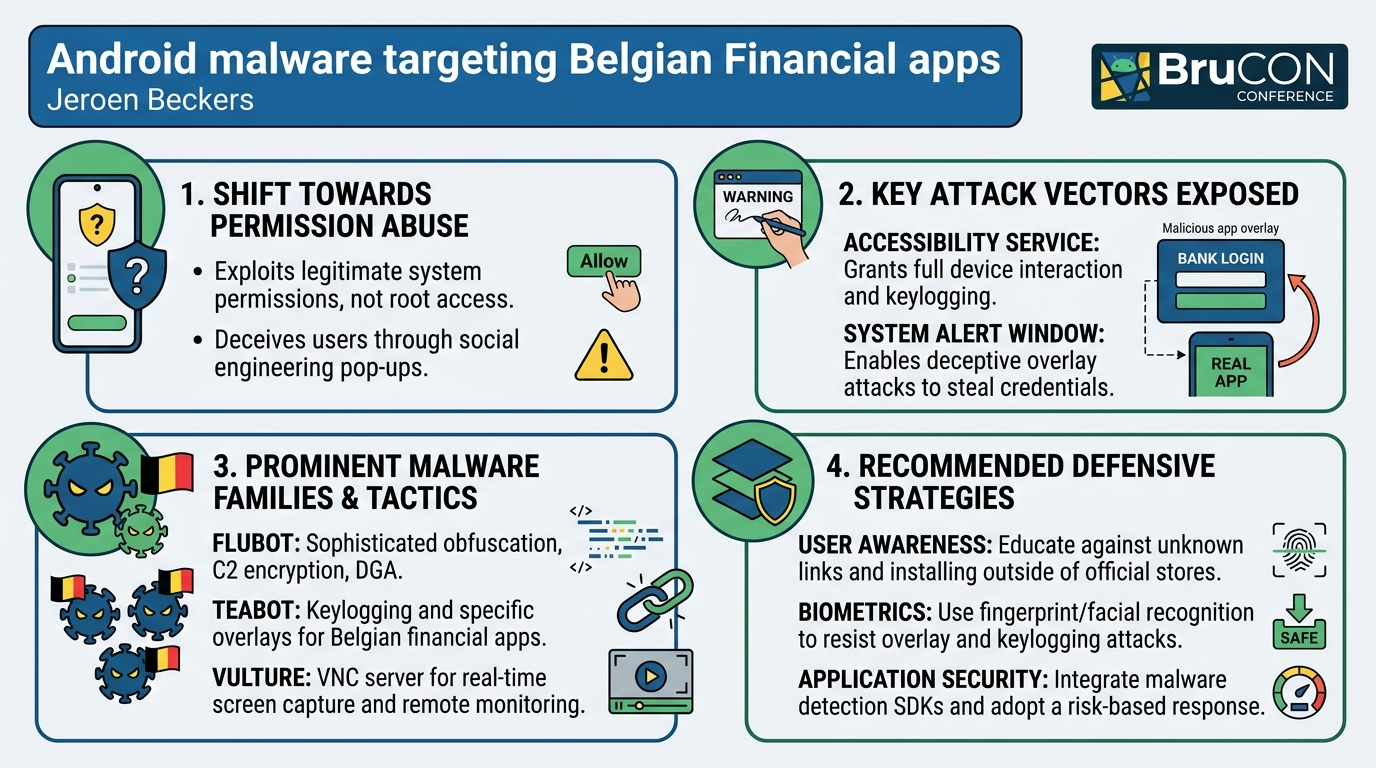
The talk's core findings revolve around the sophisticated abuse of Android's Accessibility Service and System Alert Window permissions, which enable advanced Android malware to perform highly deceptive overlay attacks and keylogging. Jeroen Beckers highlights how these legitimate features, designed for user assistance and convenience, are weaponized to steal credentials and financial data without requiring root access. This paradigm shift makes detection challenging, as the malware operates within the bounds of granted permissions, albeit under false pretenses.
Beckers introduces three prominent malware families — FluBot, TeaBot, and Vulture — that exemplify these advanced tactics, with a specific focus on their impact and targeting within Belgium.
- FluBot emerged as a technically advanced threat, utilizing complex obfuscation, dynamic payload loading, a sophisticated Domain Generation Algorithm (DGA), and C2 server encryption. While it spread extensively through fake Bpost SMS messages in Belgium, surprisingly, the samples analyzed by Beckers did not yet contain overlays for Belgian financial applications, despite showing clear intent to target the region. Its primary goal was to harvest contacts, send further phishing SMS, and disable Google Play Protect.
- TeaBot (also known as Arza), in contrast to FluBot's technical sophistication, featured a simpler infrastructure with hard-coded C2 domains and less encryption. However, its impact on Belgian users was more direct. TeaBot leveraged full keylogging capabilities through the Accessibility Service and executed specific overlay attacks against Belgian financial applications, notably targeting the Belfius mobile application to steal debit card numbers. It also monitored 13 other Belgian financial apps for keylogging.
- Vulture represented a concerning future trend. This malware uses a VNC server to perform full screen capture of the victim's device in real-time. While currently lacking direct interactive capabilities, its ability to broadcast screen interactions to a C2 server sets the stage for highly interactive, real-time attacks where operators could remotely take control of a device, effectively turning the user's phone into a puppet for financial fraud.
A critical finding was the effectiveness of social engineering in tricking users into granting dangerous permissions. Malware authors craft convincing pop-ups mimicking "Google Services" to guide users through the process of enabling the Accessibility Service, complete with legal-sounding disclaimers that lend credibility. The Cloak and Dagger attack concept illustrates how the System Alert Window can render a transparent overlay on top of legitimate apps, capturing credentials typed by the user while they believe they are interacting with the genuine application.
Beckers demonstrates that while some malware families exhibit high technical prowess in their evasion and communication, others focus on immediate, impactful attacks through direct abuse of permissions. The talk ultimately underscores that user education and robust application-level defenses are paramount, as traditional antivirus solutions and even Google Play's scanning mechanisms often struggle to keep pace with these evolving, permission-abusing threats.
Technical Deep Dive
▶ Watch: TeaBot malware: Keylogging Belgian financial applications (43:00)
The technical core of the talk centers on the abuse of two critical Android permissions: Accessibility Service and System Alert Window. Beckers explains that these are "above dangerous level permissions," meaning they require the user to be directed to a specific settings window for activation, rather than a simple pop-up.
The Accessibility Service is designed to help users with disabilities by allowing an application to read out loud everything on the screen and even touch buttons on behalf of the user. Malware exploits this by gaining complete programmatic interaction with the device's UI. It can read sensitive information displayed by other apps, including one-time passcodes, and simulate user taps to perform actions like initiating transactions or disabling security features. The social engineering involved is highly effective: a fake "Google Service" pop-up guides the user through enabling the service, often including lengthy, unread legal text to enhance legitimacy.
The System Alert Window (or "drawing on top") permission allows an app to create a window that appears on top of all other applications. While legitimately used for features like Facebook chat heads or blue light filters (e.g., Twilight), malware uses it for overlay attacks. If an application is approved by Google Play, it automatically receives this permission upon request, highlighting a potential vulnerability in the store's vetting process if malicious apps circumvent initial scanners.
The combination of these two permissions facilitates the Cloak and Dagger attack. Malware uses the System Alert Window to place a transparent overlay on top of a legitimate application (e.g., a banking app's login screen). The overlay contains an identical-looking login form. When the user types their credentials into this fake form, the Accessibility Service reads the input, which is then sent to the attacker. Simultaneously, the malware can use the Accessibility Service to input the stolen credentials into the actual underlying application, making the user believe they successfully logged in. This attack is incredibly difficult to detect, as the transparent overlay disappears if the user switches apps, leaving no trace.
Beckers then provides a detailed analysis of FluBot, a sophisticated Android malware family.
- Obfuscation and Evasion: Early FluBot samples utilized Unicode obfuscation (e.g., right-to-left converters, unreadable characters) and later versions combined at least two different obfuscation types, string encryption, and extensive Java reflection. This makes static analysis incredibly tedious, often requiring a combination of static and dynamic analysis. Some samples even included the entire WhatsApp codebase, not for functionality, but to inflate the APK size and further complicate reverse engineering efforts.
- Dynamic Payload Loading: The initial FluBot dropper only loads a decrypted text file containing the actual payload. This external code loading technique is typically blocked by Google Play but is common for apps installed outside the store (e.g., via phishing links). Crucially, FluBot initially failed to remove this decrypted payload, allowing researchers to easily extract it using
adb shell. - C2 Communication: FluBot employs a Domain Generation Algorithm (DGA), generating 5,000 randomized domain names per country seed each month, making sinkholing extremely difficult. More recent versions use DNS over HTTPS (DoH) via Google, Cloudflare, and Alibaba, further obscuring C2 traffic from network-level monitoring. All data sent to the C2 is encrypted with the C2 server's public key, preventing analysts from reading content even if a domain is sinkholed. The C2 response itself uses XOR-based encryption with a hard-coded key.
- Frida for Dynamic Analysis: Beckers describes his use of Frida, a dynamic instrumentation toolkit, to bypass FluBot's encryption. By injecting a JavaScript runtime into the running process and hooking the specific class responsible for encrypting C2 commands, he could print the unencrypted payload and modify outgoing requests. This allowed him to observe commands like "preping" (device active), "sms" (configuration for sending SMS), "ping" (device info, Google Play Protect status), "get inject list" (installed apps), and "get inject" (overlay HTML for specific apps). FluBot uses the Accessibility Service to automatically disable Google Play Protect and spread by sending phishing SMS to contacts from compromised devices.
TeaBot (Arza) is contrasted with FluBot:
- Simpler Infrastructure: TeaBot uses hard-coded C2 domains and significantly less encryption, making network interception and analysis much easier.
- Keylogger and Overlays: TeaBot's Accessibility Service abuse is more extensive, functioning as a full keylogger. It intercepts every accessibility event related to targeted applications, capturing all typed input, including passwords (even though they appear as asterisks, the last typed character is briefly visible to the service). It performs specific overlay attacks against Belgian financial apps, notably Belfius, asking only for a debit card number. While impactful, the keylogger data often lacks context, requiring significant effort to piece together meaningful information, and it doesn't grant access to application storage for cryptographic secrets used in onboarding.
Finally, Vulture malware, while simpler in its reversing aspects, presents a potent new threat:
- VNC Server for Screen Capture: Vulture sets up a local VNC server and, when a targeted financial application is opened (e.g., Spanish Bankia), it initiates a full screen capture, broadcasting the device's screen and user interactions to the C2 server. This provides real-time visual monitoring of the victim's activities.
- Future Interactive Attacks: Although Vulture samples analyzed did not yet have direct interactive capabilities, Beckers warns that combining this real-time screen capture with the button-clicking capabilities of the Accessibility Service could lead to future interactive attacks where attackers remotely control the device, making it a "full interactive man-in-the-middle."
The technical deep dive reveals a sophisticated and evolving threat landscape where malware authors are adept at abusing system design and user psychology to achieve their malicious goals, often without resorting to complex exploits.
Demo / Proof of Concept
▶ Watch: Vulture malware uses VNC for full screen capture (50:00)
While Jeroen Beckers' talk didn't feature live coding or a traditional "demo" of the malware in action, he provided compelling "proof of concept" demonstrations of his analysis techniques and the malware's capabilities through captured data, tool outputs, and simulated scenarios. These examples illustrate exactly how the malware operates and how security researchers can dissect such threats.
- FluBot C2 Communication Analysis with Frida:
- Beckers demonstrated the power of Frida, a dynamic instrumentation toolkit, to bypass FluBot's sophisticated encryption. He showed a JavaScript script designed to hook a specific Java class method (e.g.,
JClass.cin an obfuscated sample) responsible for encrypting data before it's sent to the C2 server. - The script logs the unencrypted
command(payload) andhostbeing sent, then calls the original method, and finally prints the encrypted return value. - The output clearly showed various FluBot commands: "preping" (initial check-in), "sms" (request for SMS sending configuration), "ping" (device information, including whether Google Play Protect is enabled), "get inject list" (list of installed apps), and "get inject" (request for a specific overlay HTML page). This "demo" effectively revealed FluBot's communication protocol and its ability to disable Google Play Protect and spread via SMS.
- To identify which applications FluBot was targeting, Beckers used Frida to intercept the "get inject list" command. He modified the outgoing request to append a list of over 700 potential financial applications (compiled from older banking malware write-ups and Belgian financial apps). The C2 server then responded with a list of the 14 applications it was actively attacking.
- Finally, by intercepting the "get inject" command and saving the server's HTML response to a file, Beckers could load this HTML in a browser, revealing the deceptive login prompts designed to mimic targeted financial applications.
- TeaBot Keylogger Functionality:
- To illustrate TeaBot's keylogger capabilities via the Accessibility Service, Beckers presented screenshots from a legitimate "Screen Logger" application (chosen because it didn't request internet permission, ensuring data privacy).
- The screenshots showed the app registering accessibility events, printing every character typed by the user, even in password fields where characters typically appear as asterisks. This visually confirmed that the Accessibility Service can capture sensitive input in real-time, demonstrating the core mechanism used by TeaBot.
- Vulture VNC Screen Capture Visualization:
- Although a live VNC stream wasn't shown, Beckers explained and showed a screenshot of Vulture malware's behavior. When a targeted application (e.g., the Spanish Bankia app) was opened, the device displayed a "casting" icon at the top.
- This icon, typically seen when casting to a Chromecast, indicates that Vulture has created a local service to which it is "casting" the device's screen. This effectively performs a full screen recording and interaction capture, which is then sent to the C2 server after a few minutes. This visual cue acts as a "proof of concept" for Vulture's ability to covertly monitor user activity.
These "demos" highlight Beckers' deep analytical skills and the practical application of reverse engineering tools like Frida to understand and expose the inner workings of sophisticated mobile malware.
Defensive Implications
▶ Watch: Q&A: Can malware bypass biometric authentication? (57:45)
Protecting against advanced Android malware like FluBot, TeaBot, and Vulture requires a multi-layered approach, encompassing user awareness, organizational policies, and robust application-level security. Jeroen Beckers outlines key defensive implications for both end-users and application developers/organizations.
For Users and Organizations (Protecting Users):
- User Awareness is Paramount: Most of the malware discussed is installed outside of the Google Play Store, often through phishing SMS messages or malicious links. Users must be educated:
- Do not click on suspicious links in text messages or emails.
- Do not install applications from unknown sources. While Google Play is not infallible, it offers a significant layer of protection.
- Never grant Accessibility Service permissions to unknown or untrusted applications. Legitimate applications rarely require this permission unless specifically designed for users with disabilities. If prompted by an unfamiliar app, it's a major red flag.
- Corporate Mobile Device Management (MDM): For organizations, MDM solutions can enforce policies that:
- Disable installations from unknown sources on corporate-managed devices, restricting app installations to the Google Play Store.
- Monitor for the presence of known malicious applications or suspicious permission grants.
- Encourage Biometrics for Authentication: Biometrics (fingerprint, facial recognition) offer a stronger defense against overlay attacks and keyloggers compared to PINs or passwords. The system-level biometric prompt is typically outside the scope of Accessibility Service interaction, making it much harder for malware to bypass. It also protects against shoulder surfing.
For Application Developers (Protecting the Application):
- Challenge of Overlay Detection: Accurately detecting overlay attacks is extremely difficult. An application can detect that something is drawing on top of it, but distinguishing a malicious overlay from legitimate features like Facebook chat heads or a blue light filter is prone to false positives. Blocking a user's banking access because they use a legitimate overlay is unacceptable.
- On-Device Malware Detection SDKs: Developers cannot solely rely on Google Play Protect for malware detection, as many advanced threats evade it for some time. Commercial SDKs are available that can be integrated into an application to perform on-device malware detection. These SDKs typically scan other installed applications, specifically looking for suspicious combinations of System Alert Window and Accessibility Service permissions, alongside other indicators. They aim for a very low false positive rate.
- Risk-Based Response to Detection: If malware is detected on a user's device, the response should be risk-assessed and nuanced:
- Avoid immediate blocking: Due to the potential for false positives, an immediate block might alienate legitimate users.
- Incorporate into risk analysis: The presence of malware should elevate the risk score associated with the user's session.
- Temporary blocking or re-onboarding: For high-risk transactions or sensitive operations, temporarily blocking access or forcing the user to re-onboard the application might be considered.
- Prevent new onboarding: If there's a risk of the malware using stolen credentials to onboard a secondary device as the victim, blocking new onboarding attempts from compromised devices is a critical control.
- Require strong authentication: Mandating strong multi-factor authentication (MFA) or biometrics for certain actions can mitigate the impact of credential theft.
Ultimately, the talk reinforces that while sophisticated malware will continue to evolve, a combination of informed users, robust organizational security policies, and proactive application-level defenses is the most effective strategy to protect against these persistent and increasingly complex threats.
Key Takeaways
- Android Malware Evolves Beyond Rooting: Modern Android malware predominantly abuses legitimate permissions like Accessibility Service and System Alert Window through social engineering, rather than relying on complex exploits to gain root access.
- Accessibility and Overlay are Key Attack Vectors: The Accessibility Service enables full device interaction and data capture (e.g., keylogging), while the System Alert Window facilitates deceptive overlay attacks that steal credentials by mimicking legitimate app interfaces.
- FluBot, TeaBot, and Vulture are Leading Threats:
- FluBot is technically sophisticated with complex obfuscation, dynamic payloads, a DGA, and C2 encryption, primarily spreading via phishing SMS and disabling Google Play Protect.
- TeaBot is less technically complex but directly impacts Belgian users with keylogging and overlay attacks against financial apps (e.g., Belfius).
- Vulture introduces VNC server-based real-time screen capture, signaling a future threat of interactive remote control.
- Social Engineering is Highly Effective: Attackers use convincing fake "Google Service" prompts and legal disclaimers to trick users into granting dangerous permissions, bypassing security consciousness.
- Defenses Require Multi-Layered Approach: User awareness (avoiding unofficial app installs, suspicious links, and never granting Accessibility permissions), corporate MDM policies, and application-level detection SDKs are crucial.
- Biometrics Offer Strong Protection: Biometrics provide a robust defense against overlay attacks and keyloggers as they are typically handled at the system level, outside the malware's interaction capabilities.
About the Speaker(s)
Jeroen Beckers is the Mobile Solution Lead at NVISO, a cybersecurity consulting firm. He is a highly respected figure in the mobile security community, serving as an author and instructor for the SANS 575 course on mobile application security. Additionally, Beckers is a co-author of the Mobile Security Testing Guide (MSTG) and the Mobile Application Security Verification Standard (MASVS), which are industry best practices for analyzing and securing mobile applications. Beyond his professional work, he is also a co-organizer of the Belgian Cyber Security Challenge, an annual competition for Belgian students aimed at fostering cybersecurity talent.