This Message Was Sent by Microsoft
Keanu Nys (Offensive Security Team Lead · Spottit)
BruCON 0x12 · Main Track
Overview
In "This Message Was Sent by Microsoft," Keanu Nys, also known as Redb Online, unveils a series of sophisticated phishing techniques that weaponize legitimate Microsoft services to deliver highly convincing malicious emails. Nys, an Offensive Security Team Lead at Spottit, demonstrates how various Microsoft platforms – including Azure DevOps, Viva Engage, PowerBI, and SharePoint – can be manipulated to send phishing messages from official microsoft.com subdomains. This research moves beyond traditional phishing by exploiting the inherent trust in Microsoft's infrastructure, making detection significantly harder for both users and security systems.
This Message Was Sent by Microsoft
Speakers: Keanu Nys (Offensive Security Team Lead, Spottit)
Conference: BruCON
YouTube: https://www.youtube.com/watch?v=fYkEtpa6QPY
Overview
In "This Message Was Sent by Microsoft," Keanu Nys, also known as Redb Online, unveils a series of sophisticated phishing techniques that weaponize legitimate Microsoft services to deliver highly convincing malicious emails. Nys, an Offensive Security Team Lead at Spottit, demonstrates how various Microsoft platforms – including Azure DevOps, Viva Engage, PowerBI, and SharePoint – can be manipulated to send phishing messages from official microsoft.com subdomains. This research moves beyond traditional phishing by exploiting the inherent trust in Microsoft's infrastructure, making detection significantly harder for both users and security systems.
The talk builds upon Nys's previous research, where he demonstrated how to inject custom CSS into Microsoft's login pages to hijack user credentials and bypass multi-factor authentication (MFA). This new work extends that concept by focusing on the initial delivery vector, showing how attackers can leverage Microsoft's own email sending capabilities to bypass email security controls like SPF, DKIM, and DMARC, ensuring high deliverability and credibility. The findings highlight critical vulnerabilities in Microsoft's platform design and validation processes, posing a substantial threat to organizations heavily reliant on Microsoft 365 services.
The implications of Nys's research are profound for cybersecurity defenders. The demonstrated techniques allow attackers to craft phishing campaigns that appear to originate from trusted Microsoft sources, complete with official branding and interactive elements. This level of deception makes it exceedingly difficult for users to distinguish legitimate communications from malicious ones, significantly increasing the success rate of credential harvesting and account compromise. The talk serves as a stark reminder that even the most trusted platforms can be turned against their users if underlying validation mechanisms are insufficient.
Background
Keanu Nys's presentation is rooted in a history of uncovering clever exploits against Microsoft's ecosystem, specifically focusing on the login experience. His prior work, publicly disclosed at Defcon, involved custom CSS injection into the Microsoft login page. The initial attack allowed an attacker to display the victim's legitimate email address on a malicious login page hosted on a seemingly innocuous domain (e.g., micro-off.com). By injecting a custom font, Nys could change the hyphen in micro-off.com to visually resemble an 's', making it appear as microsoft.com. When combined with a password authentication feature on the attacker's tenant, this trick enabled the capture of cleartext passwords.
Recognizing that multi-factor authentication (MFA) is prevalent, Nys extended this attack to bypass it. After capturing the password, the victim would be redirected to a second Microsoft login page instance, where a different custom CSS payload would completely hijack the login box, replacing it with a convincing image of an MFA prompt. Crucially, because all elements were hosted on legitimate Microsoft domains, discerning the malicious nature of the page was exceptionally difficult. Microsoft initially responded by sanitizing CSS to prevent custom font injection within approximately a week of Nys's Defcon disclosure. However, the broader CSS injection capabilities remained.
A few months later, Nys discovered a new method: leveraging the company logo feature on the Microsoft login page. By crafting a logo that included the victim's email address and using CSS to position it over the actual login field, he could again trick users into entering credentials on an attacker-controlled tenant. This time, Microsoft acknowledged the vulnerability, offering a $10,000 bounty and patching it in July. Following this, Microsoft announced the complete retirement of custom CSS on the login page, implicitly acknowledging the persistent security risks. This history of exploiting Microsoft's login interface laid the groundwork for Nys's current research: weaponizing Microsoft's email delivery mechanisms.
Nys observed existing, but often unsophisticated, phishing attempts that leveraged Microsoft services, such as creating malicious Microsoft Teams groups with phishing instructions or callback numbers. These attempts were typically basic, easily identifiable as phishing, and lacked control over critical elements like sender address, email body, or subject. Nys's goal was to achieve "better" phishing by creating a wishlist: sending emails from interesting microsoft.com addresses, delivering to external users, full control over email body (HTML, links, custom formatting), customizable subject, and the absence of warning messages. This ambition led him to investigate various Microsoft services for their email notification functionalities.
Key Findings
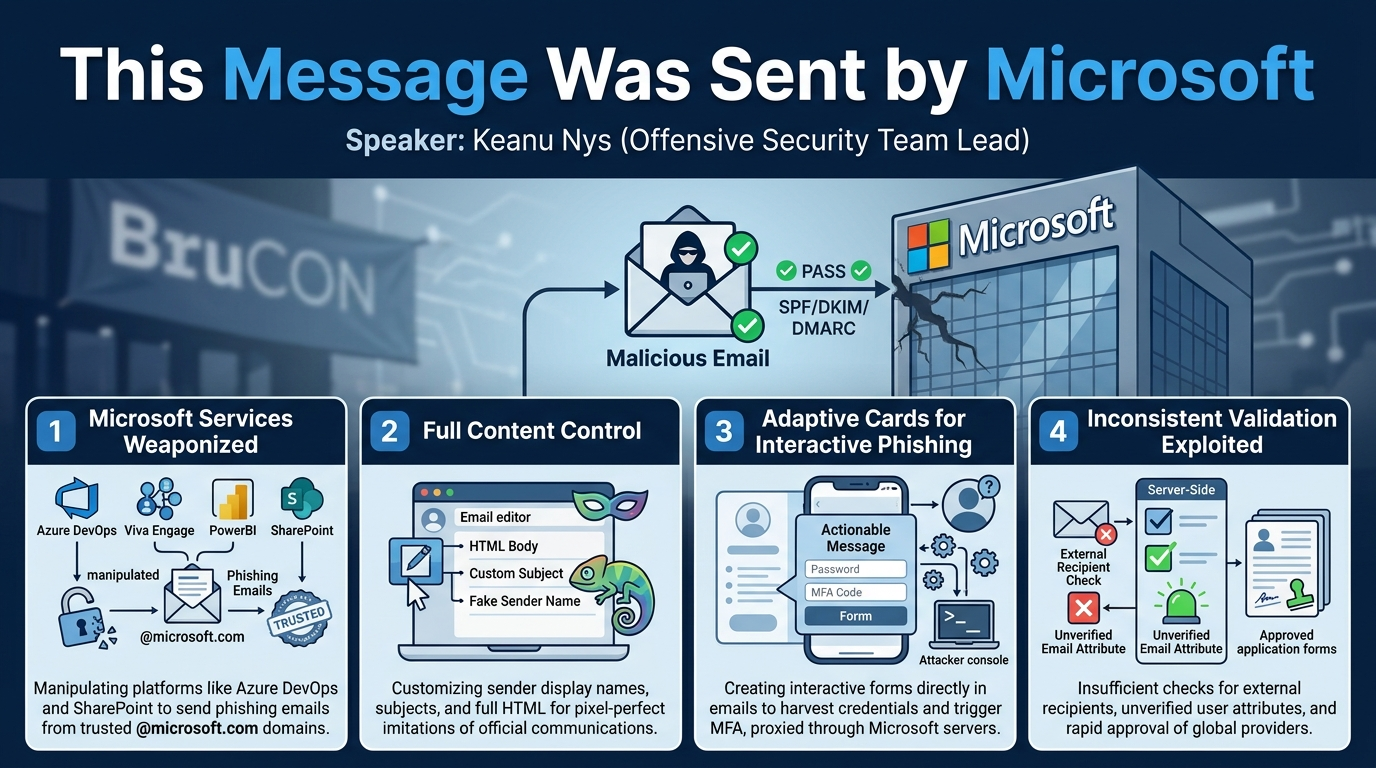
The central discovery of Keanu Nys's research is the pervasive ability to transform legitimate Microsoft services into platforms for delivering highly convincing phishing emails. He identified multiple services—Azure DevOps, Viva Engage, PowerBI, and SharePoint—each offering unique avenues for abuse. The core finding across these platforms is the capability to send emails from official microsoft.com subdomains, bypassing standard email security checks (SPF, DKIM, DMARC) that would typically flag spoofed messages. This lends an unparalleled level of credibility to the phishing attempts.
A significant aspect of the findings is the attackers' extensive control over the email content. Nys demonstrated how to customize sender display names, craft entirely custom email subjects, and inject full HTML into the email body, allowing for sophisticated formatting, embedded links, and the removal of unwanted Microsoft-generated banners or links. This level of control enables the creation of pixel-perfect imitations of legitimate communications.
A particularly potent finding, initially a bonus discovery, is the exploitation of Adaptive Cards. This Microsoft feature allows for interactive forms and dynamic content directly within emails. Nys showed how to embed custom Adaptive Cards, including password input fields, within emails sent from trusted Microsoft domains. These interactive forms can validate user input, provide immediate feedback (e.g., "incorrect password"), and even trigger multi-factor authentication (MFA) pushes, capturing credentials and session tokens without ever directing the user to an external website. The communication between the Adaptive Card and the attacker's server is proxied through Outlook servers, effectively hiding the attacker's infrastructure from network monitoring tools.
Furthermore, Nys highlighted Microsoft's inconsistent and often insufficient validation processes. This was evident in the ability to set unverified email attributes for user accounts in PowerBI to send to external recipients, to bypass server-side validation for external recipients in SharePoint, and most notably, the approval of a "global scope" Adaptive Card provider with minimal scrutiny, despite explicit documentation outlining strict validation procedures. This lack of rigorous validation at various points in the system is a recurring theme enabling these phishing attacks.
Finally, the talk implicitly reveals Microsoft's challenging stance on vulnerability disclosure, with Nys recounting instances where his reports were initially dismissed as "out of scope" but subsequently patched, or where he received bounties only after public disclosure. This dynamic underscores the difficulties researchers face in ensuring timely and effective remediation of critical vulnerabilities when engaging with large vendors.
Technical Deep Dive
Keanu Nys systematically explored several Microsoft services, detailing the specific technical mechanisms abused to achieve highly credible phishing campaigns.
Azure DevOps: The "Out of Scope" Fix
Nys began his deep dive with Azure DevOps, Microsoft's development collaboration platform. He focused on the subscriptions feature, which allows users to configure email notifications for various actions, such as committing code, creating pull requests, or commenting on work items. Crucially, these notifications can be sent to any email address, internal or external, without validation.
While commit messages and pull requests offered some content control, they were surrounded by excessive boilerplate. The breakthrough came with work items (e.g., issues). Comments on work items support full HTML email content, providing extensive control over the email body. To refine the phishing email, Nys employed several tricks:
- Custom Display Name: Setting the user's display name to "Microsoft" or a similar trusted entity.
- Custom Work Item Type: Changing the default "Issue" type to something more fitting for a pretext, like "Urgent Notice," which would then appear in the email (e.g., "Microsoft has added a comment to Urgent Notice").
- CSS Injection for Hiding Elements: Leveraging the HTML support, Nys injected
display: noneCSS rules to hide unwanted elements like the "View in Azure DevOps" link and generic warning messages at the bottom of the email. This was tricky for the footer as there were no unique classes or IDs, requiring careful CSS selection of table rows that appeared after the custom style tag, due to how some email clients apply CSS. - Automation: Nys demonstrated a simple PowerShell script utilizing Azure DevOps APIs to automate the creation of work items and trigger these customized email notifications.
The resulting emails were sent from [email protected], appearing legitimate and containing a fully controlled HTML body. Nys successfully used a pretext of an "acceptable use policy" violation to scare developers into clicking a phishing link, which, at the time, still leveraged his previous CSS injection vulnerability on the Microsoft login page for credential capture and MFA bypass. Interestingly, when Nys reported this to Microsoft, they initially deemed it "out of scope" because it required "social engineering," yet simultaneously stated their engineering team was already fixing it—a contradiction Nys highlighted.
Viva Engage: The Unregistered Whitelist Domain
Viva Engage (formerly Yammer) is Microsoft's enterprise social network. Nys explored its notification capabilities, specifically how it sends emails when users are added to communities or receive messages. For internal users, Viva Engage emails have a peculiar interactive view in Outlook, where the sender address is initially hidden, and content is fetched live from Viva Engage servers. This dynamic view, while intriguing, was less useful for external phishing.
Nys discovered that this special view was triggered by a specific email header: X-MS-Outlook-Yammer-Extensible-Content-Data, which contained a Thread-ID. Further investigation into the Outlook client's source code revealed a hardcoded whitelist of domains from which this special view would be rendered. One of these domains, engage.mmail.microsoft.com, was unregistered. Nys promptly registered this domain for €10.
While this allowed him to send emails from a domain that would trigger the special view (albeit with an error for external users due to access token limitations), it was ultimately deemed less effective for external phishing compared to other methods. However, it showcased a fascinating vulnerability: Microsoft's client-side trust in an unregistered domain within its own application.
PowerBI: The Unverified Email Attribute
PowerBI, Microsoft's business intelligence platform, offers a feature to create subscriptions that send reports and dashboards via email. Nys found that under "advanced options," users could specify the complete email subject and a custom message. Emails originated from [email protected].
The primary challenge was sending these reports to external users, which typically required a paid license. Nys discovered a bypass:
- Unverified Email Attribute: When creating a user in Azure Active Directory (now Microsoft Entra ID), there are two relevant attributes: the User Principal Name (UPN), which requires a verified domain, and the
emailattribute. If a user doesn't have an Outlook license, theemailattribute is not validated and can be set to anything, including an external email address or a spoofed internal address like[email protected]. - External Delivery: By creating a user with the
emailattribute set to the target external address, Nys could add this user to the PowerBI subscription and have the email delivered externally without needing a paid license. - Spoofed Display Name: By setting the user's name to
[email protected], the email would appear to be "sent by [email protected]" while still originating from[email protected], adding significant legitimacy. - Client-Side Validation Bypass: The message field for PowerBI subscriptions had a client-side character limit (e.g., 250 characters). Nys demonstrated bypassing this using the browser's "inspect element" feature to modify the input field's
maxlengthattribute, allowing for much longer phishing messages.
PowerBI also allows attaching custom PDF reports, or publishing reports to app.powerbi.com, which could host a convincing fake invoice or other phishing content on a legitimate Microsoft subdomain.
SharePoint: The Disabled Exchange License Trick
Nys noted that a previous SharePoint API for sending emails was being retired due to abuse. He discovered a new method leveraging SharePoint news posts. When a news post is created, there's an option to "Email news post" to specific users. Intercepting this request revealed the sharePageByEmailStream API, which accepted HTML content for the email body.
The key to controlling the sender address was the Exchange Online license. If the attacker's user account did not have an Exchange Online license, Microsoft could not send the email from that user's email address (as it would be spoofing). Instead, it would default to sending from [email protected].
- External Recipient Bypass: Initially, sending to external users was restricted. However, Nys found that the
recipientsEmailAddressesarray in the API call lacked server-side validation, allowing him to simply insert any external email address and send the email globally. - CC/BCC: The API also supported
CCandBCCattributes, allowing the inclusion of other victims or generic email addresses like[email protected]to enhance credibility. - CSS for Hiding Elements: Similar to Azure DevOps, CSS was injected to remove unwanted elements like the "View in SharePoint" link and the "how was this email formatted" feedback banner. This was more complex, requiring careful CSS selectors (e.g.,
table:has(table):has(td):has(p):not(:has(table:has(table)))) to target specific nested table structures and avoid removing the entire email content.
The result was a fully controlled HTML email, sent from [email protected], with no extraneous Microsoft branding or warning messages, making it an exceptionally clean phishing vector.
Adaptive Cards: Interactive Phishing Inside the Email
The most advanced and impactful finding was the abuse of Adaptive Cards. Nys stumbled upon this when a colleague requested access to a SharePoint document and received an email containing an interactive form with radio buttons, text boxes, and functional buttons ("Give Access," "Decline Request") that updated the email content dynamically without opening a browser.
Investigation revealed a script tag containing actionableMessagesCardScript and a JWT token (a signed Adaptive Card). Decoding the JWT unveiled a large JSON blob defining the complete interactive form. Nys discovered this was a documented Microsoft feature designed for developers to create actionable messages directly within emails.
- Password Field: The Adaptive Card designer even included a specific field type for passwords, which would hide input with bullets—effectively "developed for phishing," as Nys quipped.
- Originator Registration: To send Adaptive Cards, an attacker needs to register an "originator" or "provider ID." This ID must be included in the Adaptive Card JSON.
- Scopes and Validation:
- Test scope: Allows sending to internal test users without validation. Crucially, the "target domain" (where POST requests go) and "sender email address" (from which emails are sent) are not validated.
- Organization scope: Requires admin validation.
- Global scope: Allows sending to anyone globally but requires strict Microsoft validation, including providing detailed explanations, payloads, contact details, and SPF/DKIM checks for sender domains.
- Combining with SharePoint: Nys successfully combined Adaptive Cards with the SharePoint technique. He registered a custom originator with
[email protected]as the sender (again, unvalidated for test scope) and then used the SharePoint API to send an email containing the Adaptive Card JSON. This allowed SharePoint Online to deliver interactive password forms internally. - External Adaptive Cards: The challenge was external delivery with POST requests to an attacker-controlled domain. Using SharePoint's own
Originator IDallowed external delivery of Adaptive Cards, but SharePoint's provider configuration didn't permit POSTing data to arbitrary attacker domains. - Global Provider Approval: Nys applied for a "global scope" provider, fully expecting rejection due to the strict documentation. To his surprise, it was approved within two days, without any of the documented validation steps. This critical oversight meant an attacker could now send Adaptive Cards globally, configured to POST data to their own domain, from a custom-defined sender.
The ultimate Adaptive Card attack, demonstrated in the final proof-of-concept, leveraged the approved global provider. When a user clicks an interactive button in the email (e.g., "Preview File"), a dynamic password prompt appears. If the user enters an incorrect password, the card updates to say "password incorrect." Upon correct entry, it triggers an MFA push notification. All network requests from the Adaptive Card (password submission, MFA status checks) are proxied through Outlook servers, meaning no direct traffic goes to the attacker's web server, making network detection extremely difficult. Once credentials and MFA tokens are captured, the Adaptive Card dynamically updates again, removing the phishing prompt and displaying the legitimate content (e.g., the shared document), further aiding stealth and evading analysis.
Demo / Proof of Concept
Keanu Nys presented several mini-demos throughout the talk to illustrate each service's abuse. The most compelling and comprehensive demonstration involved the advanced Adaptive Cards technique, combining multiple findings for maximum impact.
The final demo showed an email arriving in a victim's inbox, ostensibly from sharepointonline.com, with a subject indicating a shared Word document. The email itself initially appeared benign, containing no obvious phishing links or malicious content. The key element was an embedded Adaptive Card with a "Preview File" button.
When the victim clicked "Preview File," the Adaptive Card within the email dynamically changed. Instead of immediately showing the document, it displayed a new interactive form stating that "the file is protected by Azure Information Protection" and requiring the user's password. This form was a custom-designed Adaptive Card, complete with a password input field. Nys demonstrated its intelligence: if a user tried to enter a random or incorrect password, the card would update in real-time to display "The password is incorrect," forcing the user to re-enter.
Upon entering the correct password, the Adaptive Card triggered a multi-factor authentication (MFA) push notification to the user's phone. Simultaneously, the card updated to display an image with the correct MFA code, guiding the user through the process. In the background, Nys's Evo Gen X tool (a reverse proxy for credential theft and session hijacking) was actively polling Microsoft's identity platform (Entra ID) to validate the password and capture the MFA session.
A crucial technical detail highlighted was that all communications from the Adaptive Card (password submission, MFA status checks) were proxied through Outlook servers. This means no direct network traffic ever went from the victim's client to the attacker's web server, significantly hindering detection by network security tools or firewalls.
Once the MFA was successfully completed and the session cookies/access tokens were captured by the attacker, the Adaptive Card performed its final act of deception: it dynamically updated again, removing all phishing prompts and displaying the actual shared Word document. This post-compromise cleanup ensured that if the user revisited the email or forwarded it to an IT security team, the phishing elements would be gone, making investigation incredibly difficult. The attacker, at this point, had full access to the user's account.
This demonstration perfectly encapsulated the sophistication of the attack chain: leveraging trusted Microsoft domains for delivery, interactive forms within the email, real-time validation, MFA bypass, and stealthy exfiltration via Microsoft's own infrastructure.
Defensive Implications
Keanu Nys's research presents a significant challenge for defenders, as it weaponizes the very trust users place in Microsoft services. Addressing these threats requires a multi-layered approach:
- Enhanced User Education: Traditional phishing awareness often focuses on suspicious links, mismatched domains, or generic warning signs. This research necessitates a new level of education:
- "Microsoft.com" is Not Enough: Users must be taught that even emails originating from
microsoft.comsubdomains (e.g.,[email protected],[email protected]) can be malicious. - Beware of Interactive Forms in Email: Emphasize that legitimate Microsoft services typically direct users to a web portal for sensitive actions (like password changes or document access), rather than performing them directly within an email. Any interactive form in an email requesting credentials should be viewed with extreme suspicion.
- Verify Out-of-Band: Encourage users to verify any unusual requests (e.g., content violations, overdue invoices) through official channels (e.g., directly logging into the service, contacting IT via a known number) rather than clicking links or responding within the suspicious email.
- Strong, Phish-Resistant MFA: While Nys demonstrated MFA bypass through credential theft, the ultimate defense against such attacks lies in adopting phish-resistant MFA methods like FIDO2 security keys or Passkeys. These methods bind authentication to the device and the specific origin, making it impossible for attackers to intercept and replay session tokens. Organizations should aim to enforce these methods via Conditional Access Policies, blocking weaker forms of MFA or legacy authentication where possible, even if downgrade attacks exist.
- Advanced Email Security Configuration:
- Adaptive Card Originator Blocking: Organizations should investigate if their email security solutions can block Adaptive Cards from unregistered or untrusted originators/provider IDs. While Nys's global provider was approved, monitoring and potentially blocking custom originators could provide a layer of defense.
- Monitor for Unusual Microsoft Service Activity: Security teams should monitor logs for unusual email sending patterns from their own Microsoft services (e.g., Azure DevOps sending emails to many external recipients, PowerBI subscriptions created for unknown users, SharePoint news posts emailed to suspicious addresses).
- Scrutinize Email Headers: While SPF/DKIM/DMARC will pass, look for unusual headers like
X-MS-Outlook-Yammer-Extensible-Content-Dataor other non-standard Microsoft headers that might indicate abuse.
- Conditional Access Policies (CAPs): Implement granular CAPs to restrict access based on device state, location, application, and risk. For example, block sign-ins from unmanaged devices or enforce specific MFA types for high-risk applications.
- Microsoft's Role: Microsoft needs to significantly improve its server-side validation for email attributes, sender domains, and Adaptive Card provider registrations. The ease with which Nys bypassed validation for external recipients in SharePoint, used unverified email attributes in PowerBI, and had a global Adaptive Card provider approved without proper checks represents fundamental security design flaws that need urgent attention.
- Incident Response Planning: Given the stealth and credibility of these attacks, organizations must have robust incident response plans to quickly identify, contain, and remediate account compromises originating from these advanced phishing techniques. This includes rapid password resets, session revocation, and forensic analysis.
Key Takeaways
- Microsoft's Own Services are Weaponized: Attackers can leverage legitimate Microsoft platforms like Azure DevOps, PowerBI, SharePoint, and Viva Engage to send highly convincing phishing emails from trusted
microsoft.comsubdomains. - Full Control Over Email Content: Attackers can customize sender display names, subjects, and inject full HTML, allowing for pixel-perfect imitations of official communications and the removal of unwanted Microsoft-generated warnings.
- Adaptive Cards Revolutionize Phishing: This feature enables interactive forms directly within emails, allowing for credential harvesting, real-time validation, and MFA push triggering without directing users to external websites.
- Stealthy Exfiltration: For Adaptive Card attacks, all network traffic (e.g., password submission) is proxied through Outlook servers, making it extremely difficult for network-based security tools to detect the malicious activity.
- Inconsistent Validation: Microsoft's validation processes for email attributes, external recipients, and Adaptive Card provider registrations are often insufficient, with client-side checks easily bypassed and global providers approved without rigorous scrutiny.
- Trust in
microsoft.comis Broken: Users and security systems can no longer solely rely on themicrosoft.comdomain as a definitive indicator of legitimacy, requiring a fundamental shift in phishing awareness and detection strategies.
About the Speaker(s)
Keanu Nys, who also goes by the online handle Redb Online, is an Offensive Security Team Lead at Spottit, a network cybersecurity company based in Belgium. He is a respected figure in the offensive security community, known for authoring several offensive security tools, including Raspy and Caspy, which are familiar to many penetration testers. Nys also regularly provides security trainings at Alter Security. His research often focuses on uncovering novel attack vectors against widely used platforms, as demonstrated by his prior work on Microsoft login page CSS injection and his latest findings on weaponizing Microsoft's own services for advanced phishing campaigns.
Reviews
Dr. Zero (Offensive Security Researcher) — MUST SEE
This is the real deal — original offensive research that systematically dismantles trust in Microsoft's email infrastructure. Nys didn't find one bug; he found a pattern of validation failures across Azure DevOps, PowerBI, SharePoint, and Adaptive Cards that lets attackers send pixel-perfect phishing from microsoft.com domains with full HTML control and MFA bypass. The Adaptive Cards attack chain is genuinely novel and terrifying.
Heather Calloway (CISO) — STRONG ACCEPT
This is the kind of research that changes how I think about email security controls and user trust assumptions. Nys demonstrates that our reliance on domain-based trust indicators is fundamentally broken when Microsoft's own infrastructure becomes the attack platform. Every CISO running M365 needs to understand what this means for their phishing defenses and user training programs.