The Silent Breach: Security Threats in Google Workspace
Rex Guo, Khang Nguyen
BSidesSF 2025 — Here Be Dragons · Day 2 · Main
Overview
Khang Nguyen of Cominate, in collaboration with Shu Jang Wang at Obsidian Security, walked through three real-world Google Workspace attack scenarios — Chrome extension backdooring via OAuth, domain-wide delegation enumeration, and business email compromise — and documented in each case how Google's audit logs leave defenders with critically incomplete forensic pictures. The talk concluded with a frank assessment: Google Workspace logging has "a lot to be desired," and security teams need to supplement it with custom-built monitoring using Google's own APIs. ---
Key moments
- 2:00 Cyberhaven Chrome extension attack: 2.6M users affected, malicious version bypassed review
- 5:59 OAuth MFA bypass: OAuth authorization flow grants extension access without triggering MFA prompts
- 8:00 Demo: reproducing Chrome extension backdoor using OAuth phishing and Web Store API
- 10:00 Critical logging gap: Chrome Web Store OAuth authorization barely logged; no publish events
- 14:00 Domain-wide delegation enumeration: compromised service account enables Workspace lateral movement
- 18:00 Google reports this as feature not bug: DWD attack technique still usable in production today
- 20:00 Business email compromise via Google Workspace: log gaps prevent detection of full attack chain
The Silent Breach: Security Threats in Google Workspace
Speakers: Rex Guo, Khang Nguyen
Conference: BSidesSF 2025 — April 26-27, 2025, San Francisco
YouTube: Watch the full talk
Reading time: ~7 minutes
TL;DR
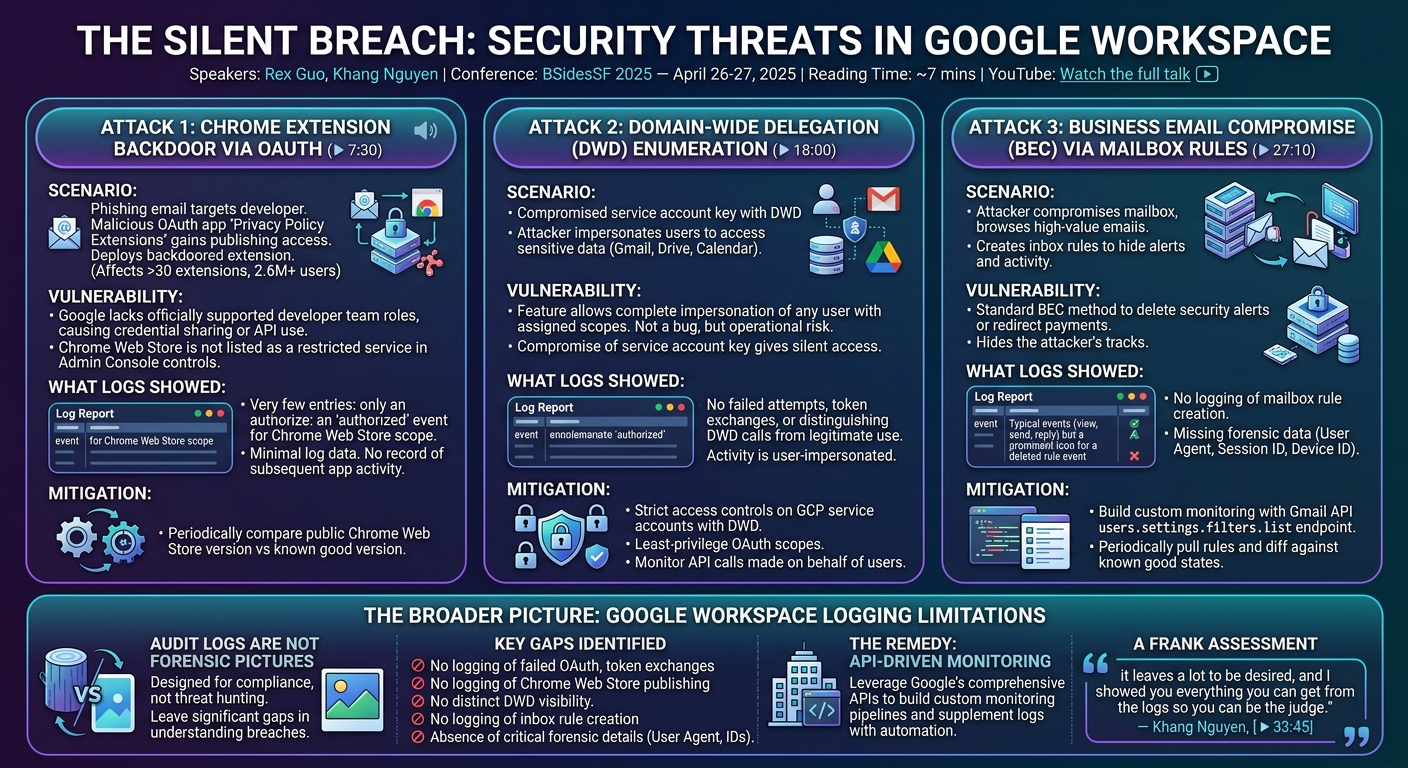
Khang Nguyen of Cominate, in collaboration with Shu Jang Wang at Obsidian Security, walked through three real-world Google Workspace attack scenarios — Chrome extension backdooring via OAuth, domain-wide delegation enumeration, and business email compromise — and documented in each case how Google's audit logs leave defenders with critically incomplete forensic pictures. The talk concluded with a frank assessment: Google Workspace logging has "a lot to be desired," and security teams need to supplement it with custom-built monitoring using Google's own APIs.
Introduction
Audit logs are the foundation of incident response. Without them, tracing an attacker's steps through a network becomes guesswork. For defenders working within Google Workspace environments — which span Gmail, Drive, Calendar, and the administrative infrastructure that connects thousands of organizations — the quality of available log data determines how quickly a breach can be detected, investigated, and remediated.
Khang Nguyen, a founding security researcher at Cominate (previously a red teamer and exploit developer), brought a dual-perspective approach to the problem at BSidesSF 2025: having spent years on the offensive side, he understands exactly what log gaps attackers can exploit. The session, co-researched with Shu Jang Wang (head of security research at Obsidian Security) and Rex Guo (co-founder of Cominate), walked through three attack scenarios in sequence, examining in each case what the logs capture — and more importantly, what they don't.
Attack 1: Chrome Extension Backdoor via OAuth
▶ Watch: Chrome extension backdoor attack walkthrough (7:30)
The reference case was the Cyber Haven incident from late 2024, in which attackers compromised a privileged Chrome extension developer's credentials through a phishing email disguised as official Chrome Web Store developer support. The email claimed the extension violated store policies, directed the developer to a malicious OAuth application named "Privacy Policy Extensions," and used the OAuth authorization flow to gain the ability to publish a backdoored version of the extension. The attack was part of a broader campaign affecting more than 30 Chrome extensions and approximately 2.6 million users.
The structural vulnerability the attack exploited: Google does not officially support team roles or access delegation for the Chrome Web Store developer account. Organizations either share credentials internally (not recommended) or use a GCP project with the Chrome Web Store API scope granted to the developer account to automate publishing. Critically, the Web Store is not listed as a Google service in the Admin Console's security controls for third-party app access, so it cannot be restricted through the standard API controls interface.
When Nguyen's team reproduced the attack — creating a Google Cloud project, enabling the Chrome Web Store API, configuring an OAuth consent screen, and crafting a phishing URL — the logs generated were minimal. After the extension developer approved the OAuth application, the audit trail showed only an "authorized" event. The log details revealed only that a privileged developer authorized the Chrome Web Store scope to a particular application. No record of what the application subsequently did with that authorization appeared in the logs.
The practical mitigation: security teams must script periodic comparisons of the public Chrome Web Store page version against an internally known version to detect unauthorized updates — there is no native API for this.
Attack 2: Domain-Wide Delegation Enumeration
▶ Watch: Domain-wide delegation attack explained (18:00)
Domain-wide delegation (DWD) is a Google Workspace feature that allows a GCP service account to impersonate any user in a workspace with predefined OAuth scopes. Originally disclosed by the Axon team roughly 18 months before the conference and reported to Google as a vulnerability, the technique was deemed "not a bug" — it remains fully functional and can be used operationally today.
The relationship between GCP and Google Workspace creates the risk: even organizations using third-party identity providers like Okta or Azure AD must sync with Google Workspace or Cloud Identity, meaning the Google identity layer remains present. A super admin enabling DWD in the Admin Console can grant a service account access to sensitive scopes — Gmail, Drive, Calendar — with the ability to call those APIs on behalf of any user in the organization.
Compromising a service account key with DWD privileges — through endpoint compromise, GitHub credential leakage, or GCP VM metadata server access via an RCE — gives an attacker the ability to enumerate and access any user's data across the workspace. Nguyen's team reproduced the attack using a small code snippet to impersonate a user and enumerate email content.
Post-attack log inspection revealed the same pattern: only two useful events appeared. The "authorized" event was logged, but no failed attempts appeared (useful for detecting enumeration), no token exchange attempts were logged, and the activity details showed only that an application called message.get on behalf of a legitimate user — indistinguishable in the logs from a legitimate DWD use case.
Recommended mitigations: strict access control on GCP service accounts with DWD configured, least-privilege scoping of OAuth permissions, and monitoring for API calls made by Google Workspace apps on behalf of users.
Attack 3: Business Email Compromise via Mailbox Rule Manipulation
▶ Watch: Business email compromise and logging gaps (27:10)
Business email compromise (BEC) typically follows a pattern: an attacker gains access to a mailbox (often through adversary-in-the-middle phishing), browses for high-value conversations, and then creates mailbox rules to hide security alert emails, conceal their activity, and enable payment redirection or other fraud.
Nguyen reproduced a BEC scenario: logged into a compromised account, created an inbox rule to delete any incoming email with "security alert" in the subject line. Post-attack log review showed standard activity events — view, open, send, reply, link click — but the rule creation was not logged. Separately, the detailed log entries lacked user agent information, session IDs, or device IDs — data that is critical for forensic reconstruction of a session.
The mitigation requires building custom monitoring using the Gmail API. Nguyen demonstrated code that uses a service account with impersonation capabilities to periodically pull email filters for users via the users.settings.filters.list endpoint, returning a JSON structure that includes the filter ID, the triggering criteria (e.g., subject contains "security alert"), and the action (e.g., move to trash). Organizations can diff this output against known-good filter states to detect unauthorized rule creation.
The Broader Picture: Google Workspace Logging Limitations
▶ Watch: Final takeaways and Q&A (33:45)
When the moderator asked Nguyen to rate Google Workspace audit logging "on a scale from awful to so so bad," his diplomatic answer — "it leaves a lot to be desired, and I showed you everything you can get from the logs so you can be the judge" — framed the core thesis precisely.
Across all three scenarios, the pattern was consistent: Google Workspace generates logs that are adequate for compliance purposes but insufficient for threat hunting and forensic investigation. Key gaps include:
- No logging of failed OAuth attempts or token exchange events, making OAuth abuse difficult to detect retrospectively.
- No logging of Chrome Web Store publishing activity through the audit trail when OAuth authorization is used for publishing.
- No distinction between domain-wide delegation and user delegation in activity logs, making DWD abuse invisible against a backdrop of legitimate DWD use.
- No logging of inbox rule creation, one of the most reliable signals of BEC activity.
- Absence of user agent, session ID, and device ID in detailed activity logs, hampering forensic session reconstruction.
Google's APIs are a mitigating factor. While the native logging is limited, the APIs are relatively comprehensive, enabling organizations to build custom monitoring pipelines that compensate for what the audit trail omits. Nguyen recommended investing in intelligence automation — the volume and complexity of cloud audit data makes manual investigation insufficient for catching OAuth abuse, DWD exploitation, or BEC in real time.
Notable Quotes
"Even if you're an offensive person, knowing what the logs look like is very beneficial — so you can craft stealthier attacks."
— Khang Nguyen, ▶ 6:00
"The only details you get is that a privileged developer authorized the Chrome Web Store scope. Other than that, there's not much else being logged."
— Khang Nguyen, ▶ 14:00
"The complexity and volume of cloud audit data make it impractical for manual investigation to catch every backdoor OAuth abuse or business email compromise attempt in real time."
— Khang Nguyen, ▶ 35:20
Key Takeaways
- Google Workspace audit logs are designed for compliance, not threat hunting; each of the three attack scenarios demonstrated significant gaps in what is captured, including OAuth abuse events, DWD enumeration, and inbox rule creation.
- Chrome Web Store security has a structural gap: publishing access via OAuth does not appear in the standard activity audit trail, and the Web Store cannot be restricted through the Admin Console's third-party app controls.
- Domain-wide delegation enumeration (the Axon-disclosed technique) remains fully exploitable; compromised service account keys with DWD privileges give attackers silent access to any user's Gmail, Drive, and Calendar without triggering meaningful log events.
- Business email compromise via inbox rule manipulation does not generate a log event in Google Workspace; detection requires custom monitoring using the Gmail API filters endpoint.
- Organizations should complement Google's native logging with API-driven custom monitoring and automation; Google's APIs are more complete than its audit logs, making programmatic monitoring a practical compensating control.
Reviews
Dr. Zero (Offensive Security Researcher) — STRONG ACCEPT
A red teamer turned researcher cataloguing exactly what Google Workspace does and does not log across three real attack scenarios — OAuth extension backdooring, domain-wide delegation enumeration, and BEC via inbox rule manipulation. The answer is consistently 'not enough,' and the proposed mitigations are concrete API-level code rather than policy hand-waving. This is forensics homework the Google Workspace defender population genuinely needs.
Heather Calloway (CISO) — MUST SEE
Google Workspace audit logs are designed for compliance, not for incident response — and across three demonstrated attack scenarios, each involving documented real-world techniques, the logs are either absent or insufficient to support meaningful forensic investigation. Organizations running GW at scale need to build supplementary monitoring pipelines using the API layer, and this talk explains why and how.