NoPrompt: Exposing Conditional Access Failures in Azure
Saksham Agrawal (Senior Security Consultant · Nosecure)
Cloud Village @ DEF CON 33 · Day 1 · Cloud Village
Overview
Conditional Access (CA) policies are a cornerstone of modern identity and access management within Microsoft Azure and Microsoft 365 environments. Designed to enforce security requirements like multi-factor authentication (MFA) based on contextual signals, CA policies are crucial for protecting sensitive resources. However, as demonstrated by Saksham Agrawal in his Cloud Village talk, "NoPrompt: Exposing Conditional Access Failures in Azure," these critical security controls are frequently misconfigured, creating significant vulnerabilities that can be exploited by attackers to bypass MFA and gain unauthorized access.
Key moments
- 0:00 Introduction to NoPrompt tool and talk agenda
- 2:00 What are Conditional Access policies?
- 4:15 Breakdown of Conditional Access policy conditions
- 6:20 Identifying common Conditional Access policy misconfigurations
- 6:50 Most common misconfiguration: selective app targeting
- 8:00 Real-world example: bypassing CA via location misuse
NoPrompt: Exposing Conditional Access Failures in Azure
Speakers: Saksham Agrawal, Senior Security Consultant, Nosecure
Conference: Cloud Village
YouTube: https://www.youtube.com/watch?v=7Q4PQwBi-4k
Overview
Conditional Access (CA) policies are a cornerstone of modern identity and access management within Microsoft Azure and Microsoft 365 environments. Designed to enforce security requirements like multi-factor authentication (MFA) based on contextual signals, CA policies are crucial for protecting sensitive resources. However, as demonstrated by Saksham Agrawal in his Cloud Village talk, "NoPrompt: Exposing Conditional Access Failures in Azure," these critical security controls are frequently misconfigured, creating significant vulnerabilities that can be exploited by attackers to bypass MFA and gain unauthorized access.
Agrawal introduces NoPrompt, a specialized tool developed to audit Azure environments for these very misconfigurations. The tool systematically tests various user agents and geographical locations against key Azure APIs to identify instances where single-factor authentication is unexpectedly permitted. This presentation highlights not only the technical capabilities of NoPrompt but also underscores the pervasive nature of CA policy gaps through real-world case studies and practical demonstrations, offering invaluable insights for both red teamers seeking to exploit these weaknesses and blue teamers striving to fortify their defenses.
The talk emphasizes that while CA policies are intended to enhance security, their complexity and the nuances of their configuration often lead to unintentional security holes. By providing a clear methodology and a practical tool, Agrawal empowers security professionals to proactively identify and remediate these critical vulnerabilities before they can be leveraged in sophisticated attacks that could compromise an entire Azure infrastructure.
Background
▶ Watch: Introduction to NoPrompt tool and talk agenda (0:00)
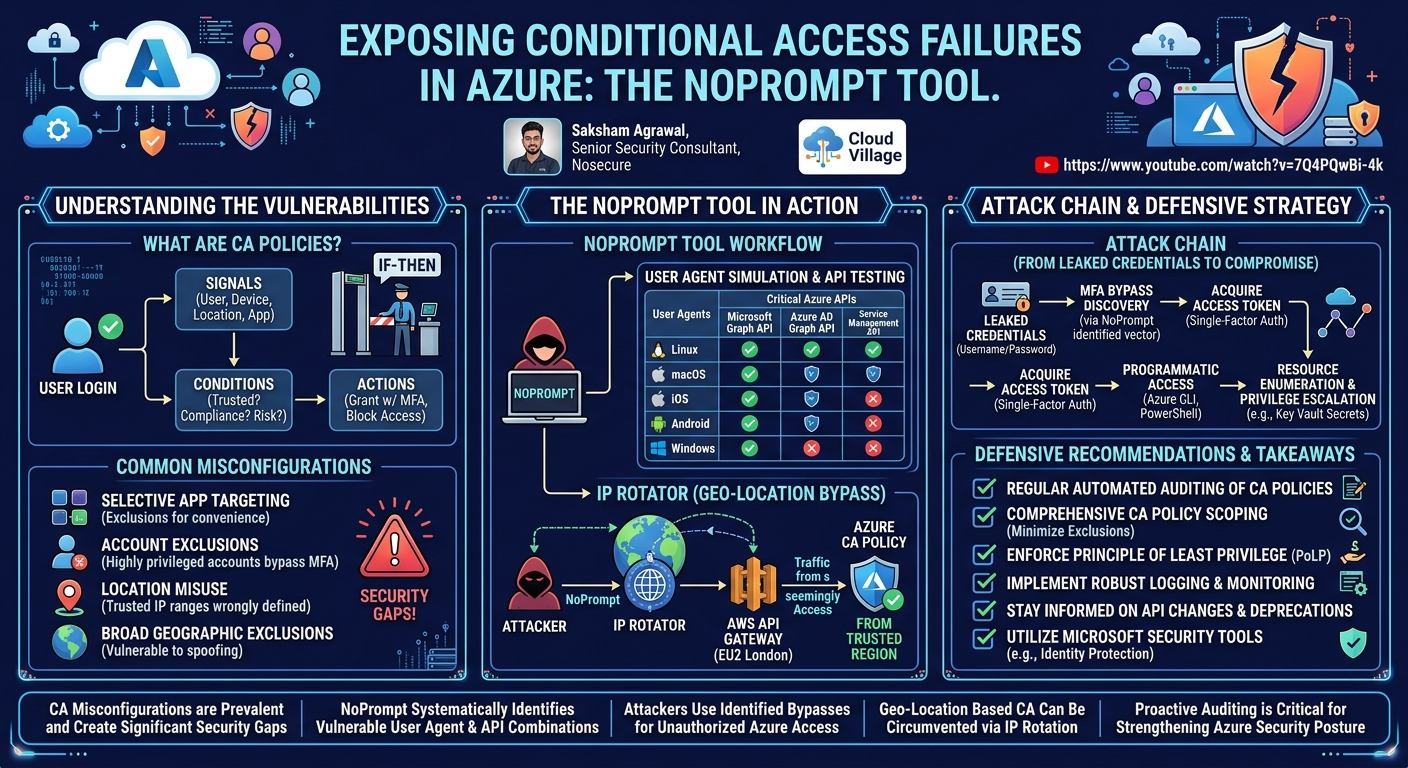
Conditional Access policies are a pivotal security feature within Microsoft Entra ID (formerly Azure AD), designed to enforce specific access requirements based on various signals during a user's login attempt. At its core, CA operates on an "if-then" logic: if certain conditions are met, then specific access controls (actions) are enforced. For instance, "if a user is logging into the Microsoft 365 portal, then they must complete multi-factor authentication."
When a user attempts to log in, the CA system first gathers signals such as the user's identity, the device they are using, their geographical location, and any associated risk factors (e.g., an unusual login location or an unfamiliar device). Based on these signals, the CA policy evaluates predefined conditions. These conditions can include:
- Users/Groups: Targeting specific users, groups, or roles.
- Cloud Apps or Actions: Scoping policies to particular applications (e.g., SharePoint Online, Azure management portal) or user actions.
- Conditions:
- Device Platforms: Operating systems (Windows, iOS, Android).
- Locations: Trusted IP ranges, specific countries/regions, or blocking access from unknown locations.
- Client Apps: Browser, mobile apps, desktop apps, legacy authentication clients.
- Device State: Whether a device is compliant or hybrid Azure AD joined.
- Sign-in Risk/User Risk: Microsoft's identity protection signals indicating potential compromise.
Once conditions are evaluated, the policy dictates an action, which can be to grant access (potentially with additional requirements like MFA, compliant device, or password change) or to block access. A critical aspect of CA configuration is the ability to Include or Exclude specific entities from a policy's scope. Excluding an application, user, or location means the CA policy will be completely bypassed for that entity, often leading to significant security gaps.
Despite their importance, misconfigurations in CA policies are alarmingly common. Agrawal highlights several prevalent gaps:
- Selective App Targeting: Often, applications are explicitly excluded from CA policies for "developer convenience." This creates an open door for attackers, as these excluded applications can be leveraged to bypass MFA requirements and gain initial access.
- Account Exclusions: In less mature security environments, highly privileged accounts (e.g., Global Administrators) might be completely excluded from CA policies, leaving them vulnerable to credential stuffing or brute-force attacks without the protection of MFA.
- Location Misuse: Incorrectly defining trusted IP ranges or geolocations can lead to bypasses. Agrawal recounted a pentest where an unauthenticated Jenkins server, accessible via a company VPN, allowed remote code execution. If the VPN's IP range was whitelisted in CA, an attacker gaining VPN access could bypass MFA for other services. Similarly, broad geographic exclusions can be exploited.
These findings are corroborated by Microsoft itself. The Microsoft Incident Response Team (MIRT), responsible for responding to Azure cloud breaches, released a blog in December 2023 acknowledging that misconfigured Conditional Access policies frequently contribute to security vulnerabilities and account compromises.
To fully understand the scope of these misconfigurations, it's essential to recognize the underlying APIs that power Azure and Microsoft 365:
- Microsoft Graph API: This is the primary API for interacting with Microsoft 365 services and Azure AD. Whether logging in via a portal, a mobile app, or the Azure CLI, requests often leverage the Microsoft Graph API in the backend.
- Azure AD Graph API: An older API for Azure AD, primarily used by tools for enumeration. Microsoft has been deprecating this API, with full deprecation expected by September, urging migration to Microsoft Graph.
- Service Management API: This is the foundational API for managing all Azure resources. Any operation involving the creation, modification, or deletion of Azure resources (VMs, storage accounts, databases, etc.) utilizes the Service Management API. Gaining access to this API with single-factor authentication is a critical security breach.
Understanding these APIs and the common misconfiguration patterns provides the necessary context for appreciating the utility and impact of the NoPrompt tool.
Key Findings
▶ Watch: Breakdown of Conditional Access policy conditions (4:15)
The central finding of this talk is the pervasive and critical vulnerability posed by misconfigured Conditional Access policies in Azure environments. Despite their intended role as a robust security control, CA policies are frequently deployed in ways that inadvertently create significant gaps, allowing attackers to bypass essential security measures like Multi-Factor Authentication (MFA). The NoPrompt tool effectively demonstrates and identifies these specific failures.
Saksham Agrawal's research, embodied in the NoPrompt tool, reveals that it is entirely possible for attackers to gain single-factor authentication (SFA) access to critical Azure APIs and resources, even when MFA is ostensibly enabled across the organization. NoPrompt's primary contribution is its ability to systematically pinpoint these vulnerabilities by simulating various attack vectors. It does this by testing different user agents (e.g., Linux, macOS, iOS, Android, Windows) and geographical locations against the three core Azure APIs: the Microsoft Graph API, the Azure AD Graph API, and the Service Management API. The tool's output clearly indicates which combinations of user agent and API allow SFA, effectively highlighting where CA policies are failing to enforce MFA.
A compelling real-world case study presented during the talk underscored the practical implications of these findings. During an external penetration test, Agrawal's team discovered leaked credentials for a target domain. By employing the NoPrompt tool, they found that out of 14 working leaked credentials, three user accounts, including a service account, had direct SFA access to Azure subscriptions and the Service Management API. This was attributed to a CA misconfiguration that allowed complete MFA bypass for these specific accounts or access paths. Leveraging this bypass, the team gained access to Service Management API tokens, enabling them to log into the Azure environment, enumerate resources, and escalate privileges. This scenario perfectly illustrates how NoPrompt can transform simple leaked credentials into a full compromise of Azure infrastructure.
Furthermore, the talk highlights a sophisticated bypass technique for location-based Conditional Access policies. NoPrompt incorporates an IP rotator functionality that routes traffic through various AWS regions. This is particularly effective because Azure's CA policies often whitelist or exclude specific geographic regions or IP ranges. If an attacker's originating IP is blocked, the IP rotator can spoof requests from random, legitimate AWS IP addresses within a region that might be trusted or simply not explicitly blocked by the target organization's CA policies (e.g., London). The demo showed that even when direct access was blocked, routing through a specific AWS region (EU2) successfully yielded access tokens, effectively bypassing the geo-fencing or IP-based restrictions. This demonstrates a critical flaw where CA policies, intended to restrict access by location, can be circumvented by leveraging cloud infrastructure to appear as a 'trusted' or 'unfiltered' source.
In summary, the key findings are:
- Widespread CA Misconfigurations: Conditional Access policies frequently contain gaps that permit single-factor authentication to critical Azure APIs.
- NoPrompt's Efficacy: The tool precisely identifies these MFA bypasses by testing various user agents and API endpoints.
- Real-world Impact: Such misconfigurations can lead to full Azure environment compromises, starting from leaked credentials and bypassing MFA.
- Geo-Location Bypass: Location-based CA policies can be bypassed by routing traffic through specific, often trusted, cloud regions using tools like NoPrompt's IP rotator.
Technical Deep Dive
▶ Watch: Identifying common Conditional Access policy misconfigurations (6:20)
The NoPrompt tool is engineered to systematically identify weaknesses in Azure Conditional Access (CA) policies by simulating various login scenarios and observing the authentication requirements. Its core functionality revolves around two primary mechanisms: user agent simulation and IP rotation, complemented by advanced capabilities for comprehensive auditing.
User Agent Simulation and API Targeting
NoPrompt's primary method for detecting MFA bypasses involves simulating requests from different user agents that Azure recognizes. The tool specifically targets the six user agents defined by Azure for CA policies: Linux, macOS, iOS, Android, Windows, and an unspecified "other" category. For each of these user agents, NoPrompt attempts to authenticate against the three critical Azure APIs:
- Microsoft Graph API: This API is central to Microsoft 365 and Azure AD interactions, handling a vast array of identity and data operations.
- Azure AD Graph API: While being deprecated, this API is still used in some environments and by legacy tools. NoPrompt includes it to ensure comprehensive coverage of potential bypasses.
- Service Management API: This is the most critical API from an infrastructure perspective, as it controls all Azure resource deployments and management. Unauthorized access here can lead to full control over an Azure subscription.
The tool sends authentication requests using a provided username and password, mimicking a single-factor authentication attempt. If a successful authentication token is returned for any combination of user agent and API without requiring MFA, NoPrompt flags it as a vulnerability. This indicates that the CA policy either explicitly excludes that user agent/API combination from MFA enforcement or has not properly scoped it within its rules.
In addition to API-level checks, NoPrompt also incorporates a web login simulation feature. Utilizing a Chromium driver, the tool simulates a user attempting to log into the Azure web portal from various devices. This helps identify scenarios where web-based access might bypass MFA, which could be due to browser exclusions or device compliance settings. The output is clear: a table showing which user agents provide "Access Standard" (single-factor access) to which APIs or web login, or if they are "Blocked / Require MFA."
IP Rotator Functionality
One of NoPrompt's most innovative features is its IP rotator, designed to bypass location-based Conditional Access policies. Many organizations configure CA policies to restrict access based on geographical location or specific trusted IP ranges (e.g., corporate VPN IPs). An attacker operating from a blocked region or an untrusted IP address would ordinarily be denied access.
The IP rotator circumvents this by routing the authentication traffic through AWS API Gateway. When a request is sent via AWS API Gateway, the originating IP address seen by the target Azure environment is not the attacker's actual IP, but rather a random IP address from the AWS infrastructure within a specified region. NoPrompt leverages "known 10 AWS regions" for this purpose.
The effectiveness of this technique stems from several factors:
- Legitimate IP Sources: Azure sees requests originating from legitimate AWS IP ranges. Blocking these IPs indiscriminately would likely disrupt legitimate cloud services that also rely on AWS, making it difficult for Security Operations Centers (SOCs) to implement blanket blocks.
- Randomized IPs: The API Gateway often uses a pool of IP addresses, making it challenging to block specific IPs as they are frequently rotated.
- Targeting Exclusions: If a CA policy has an exclusion for specific trusted regions (e.g., a data center location, or a region where the organization has operations), the IP rotator can be directed to route traffic through that region, effectively bypassing the geo-fencing.
The IP rotator functionality is crucial for red teamers who are often operating from untrusted locations or for auditors testing the robustness of geo-location-based CA policies.
Advanced Capabilities
NoPrompt further extends its utility with several advanced features:
- Credential File Flag (
--cred-file): For organizations with a large number of user accounts or in scenarios involving leaked credential databases, NoPrompt can process a file containing multiple usernames and passwords. This allows for bulk scanning, efficiently identifying all accounts vulnerable to MFA bypasses across an entire user base. - Show Token Flag (
--show-token): By default, NoPrompt might truncate the output of acquired access tokens. The--show-tokenflag ensures that the full access token is printed to the console. These tokens are crucial for subsequent steps in an attack chain, as they can be used directly with Azure CLI or PowerShell to authenticate and interact with Azure resources without further MFA prompts. - Targeted Region Selection (
--ip-rotator-region): Users can specify particular AWS regions for the IP rotator, allowing for focused testing against specific geo-fencing policies.
How MFA Bypass Works (Post-Discovery)
Once NoPrompt identifies an API and user agent combination that allows single-factor access, an attacker can leverage this information. The tool effectively acquires an access token using only the username and password. This token is then valid for a certain period and can be used to authenticate to Azure services.
For example, if the Service Management API is found to be accessible via a Linux user agent with SFA, the acquired token can be used with the Azure CLI or PowerShell modules. An attacker could use commands like az account get-access-token --resource https://management.azure.com/ (after an initial login that might require MFA depending on the specific az login method, but the token itself represents the bypass) or, more directly, Connect-AzAccount -AccessToken <acquired_token> in PowerShell. This provides programmatic access to the Azure environment, allowing enumeration of resources, privilege escalation, and data exfiltration, all while bypassing the intended MFA protection.
This detailed technical approach makes NoPrompt an invaluable asset for identifying and understanding complex Conditional Access misconfigurations, providing clear, actionable intelligence for both offensive and defensive security operations.
Demo / Proof of Concept
▶ Watch: Most common misconfiguration: selective app targeting (6:50)
Saksham Agrawal presented two distinct scenarios during the live demonstration of NoPrompt, illustrating how the tool identifies and exploits Conditional Access misconfigurations.
Scenario 1: User Agent-Based MFA Bypass
The first scenario focused on identifying an MFA bypass through a specific user agent.
- Tool Execution: The presenter ran NoPrompt using
python norom.py -u [email protected] -p <password>. - Discovery: The tool's output quickly revealed that for the
[email protected]account, both the Linux and macOS user agents allowed "Access Standard" (single-factor access) to the Azure AD Graph API, Microsoft Graph API, and crucially, the Service Management API. This meant that if a request originated from a Linux or macOS client, MFA would not be enforced for these critical APIs. - Simulated Exploitation (Resource Enumeration): While the
az logincommand with username and password did prompt for MFA in the demo (indicating the generalaz loginflow wasn't bypassed), the significance of NoPrompt's finding is that an attacker could specifically craft requests using the identified vulnerable user agent to obtain a token via single-factor authentication for the specified APIs. The demo then proceeded to show what an attacker could do once such a token was acquired and used to establish an authenticated session.
- The presenter used the
az logincommand, which, after a (skipped for brevity) MFA prompt, successfully logged into "Azure subscription one." - Next, they enumerated the user's permissions using
az role assignment list --assignee [email protected] --query "[].{Role:roleDefinitionName, Scope:scope}". - The output showed that
[email protected]had two significant roles: Key Vault Secret Userrole on a Key Vault namednorom-KV.Readerrole onresourceGroupOne.- Leveraging the
Key Vault Secret Userrole, the presenter listed secrets withinnorom-KV(az keyvault secret list --vault-name norom-KV). A secret named "flag" was discovered. - Finally, the secret's value was retrieved in clear text (
az keyvault secret show --vault-name norom-KV --name flag --query value). This demonstrated how a successful MFA bypass (as identified by NoPrompt for specific APIs) could lead to access to sensitive data within the Azure environment.
Scenario 2: IP Rotator (Geo-location) Bypass
The second scenario showcased NoPrompt's IP rotator functionality to bypass location-based CA policies.
- Tool Execution: The command used was
norom -u [email protected] -p <password> --ip-rotator --ip-rotator-region EU2 --show-token.
--ip-rotator: Activates the IP rotation feature.--ip-rotator-region EU2: Specifically directs the tool to route traffic through theEU2(London) AWS region.--show-token: Ensures that the full access token is printed, not truncated.
- Discovery: Initially, without IP rotation or when routing through a blocked region, the tool would show "Blocked / Require MFA" for all requests. However, when the traffic was routed through the EU2 (London) region, NoPrompt successfully obtained Microsoft Graph API, Azure AD Graph API, and Service Management API tokens for the
[email protected]user, specifically when using a Linux user agent. This indicated that the CA policy had either an exclusion or a less restrictive rule for traffic originating from the London region. - Exploitation (Connecting with Token):
- The presenter captured the obtained Service Management API token into a PowerShell variable (e.g.,
$token). - They then used the
Connect-AzAccount -AccessToken $tokencommand in PowerShell. This command allows direct authentication to Azure using an existing access token, completely bypassing any interactive login prompts or MFA challenges. - The command successfully connected to "Azure subscription one," demonstrating that the location-based CA policy was effectively bypassed by routing traffic through the permitted region.
- Resource Enumeration: To further prove access, the presenter listed resources within the subscription using
Get-AzResource. This revealed a storage account namedfinalflagvalue, again illustrating that an attacker could enumerate and potentially interact with Azure resources after bypassing network-based CA policies. The speaker explicitly stated that the goal of this lab was to showcase how an external pentester could log into the Azure environment by bypassing network-based Conditional Access policies, rather than internal exploitation.
Both demos clearly illustrated the practical utility of NoPrompt in uncovering critical CA policy weaknesses, enabling attackers to gain unauthorized access and enumerate sensitive Azure resources.
Defensive Implications
▶ Watch: Real-world example: bypassing CA via location misuse (8:00)
The insights provided by the NoPrompt tool and Saksham Agrawal's talk offer crucial guidance for organizations seeking to strengthen their Azure security posture. Conditional Access policies, while powerful, are only as secure as their weakest link, often introduced through misconfigurations.
Here are the key defensive implications and recommended actions:
- Regular and Automated Auditing of CA Policies: Organizations must move beyond static reviews of CA policies. Tools like NoPrompt (or similar internal auditing scripts and services) should be regularly employed to proactively identify gaps, especially those related to user agent exclusions, API access, and geographical restrictions. This should be an ongoing process, not a one-time check, as environments and policies evolve.
- Comprehensive Scope for CA Policies: Ensure that CA policies are applied as broadly as possible. By default, policies should target all users and all cloud applications unless there is a very strong, documented, and regularly reviewed justification for an exclusion. Over-scoping policies is generally safer than under-scoping.
- Minimize and Scrutinize Exclusions:
- Privileged Accounts: Never exclude highly privileged accounts (e.g., Global Administrators, Application Administrators) from MFA requirements or other stringent CA policies. These accounts are prime targets for attackers.
- Applications: Be extremely cautious when excluding specific applications for "developer convenience." Each exclusion creates a potential bypass vector. If an exclusion is absolutely necessary, ensure it is time-bound, has compensating controls, and is as narrowly defined as possible.
- Locations/IP Ranges: Regularly review trusted IP ranges and geographical exclusions. Ensure that whitelisted IPs (e.g., VPN gateways) are secure and do not provide an unauthenticated backdoor to critical services. Implement MFA for all access, even from trusted locations, if feasible.
- Implement Principle of Least Privilege (PoLP): Even if an attacker bypasses MFA, their ability to cause damage is limited by the permissions of the compromised account. Enforce PoLP rigorously across all Azure AD users and service principals. Grant only the minimum necessary permissions for users and applications to perform their functions. This acts as a crucial secondary defense layer.
- Robust Logging and Monitoring: Enhance logging for all Azure AD sign-in activities and API calls. Focus on:
- Single-factor authentication attempts for users expected to use MFA.
- Unusual user agent strings or combinations.
- Login attempts from suspicious or unexpected geographical locations.
- Access to critical APIs (Microsoft Graph, Service Management API) by non-standard clients or from unusual sources.
- Integrate these logs into a Security Information and Event Management (SIEM) system with alerts configured for anomalous behavior.
- Awareness of API Deprecations and Changes: Stay informed about changes in Microsoft's API landscape, such as the deprecation of the Azure AD Graph API. Ensure that security controls and auditing practices align with current and supported APIs to avoid leaving gaps due to outdated configurations.
- Educate Administrators and Developers: Misconfigurations often arise from a lack of understanding or pressure for convenience. Provide regular training to administrators responsible for CA policy configuration and developers who might request application exclusions. Emphasize the security implications of each configuration choice.
- Leverage Microsoft Defender for Cloud and Identity Protection: Utilize Microsoft's native security tools, such as Identity Protection, which can detect and respond to risky sign-ins and compromised identities, providing another layer of defense that can feed into CA policies.
By diligently implementing these defensive measures, organizations can significantly reduce their exposure to the types of Conditional Access failures highlighted by NoPrompt, thereby fortifying their Azure environments against sophisticated attacks.
Key Takeaways
- Conditional Access (CA) Misconfigurations are Prevalent: Despite being a critical security feature, CA policies in Azure are frequently misconfigured, creating significant security gaps that can lead to MFA bypasses.
- NoPrompt Identifies MFA Bypass Vectors: The NoPrompt tool effectively uncovers these vulnerabilities by systematically testing various user agents (e.g., Linux, macOS) and geographical locations against key Azure APIs (Microsoft Graph, Azure AD Graph, Service Management API) to identify single-factor authentication access points.
- Common Misconfigurations Lead to Critical Flaws: Key weaknesses include selectively excluding applications, completely bypassing privileged accounts from CA policies, and incorrectly defining trusted locations or IP ranges.
- Attackers Can Leverage Bypasses for Full Access: Once an MFA bypass is identified for a specific API and user agent, attackers can acquire access tokens using only leaked credentials, enabling them to log into Azure, enumerate resources, and potentially escalate privileges.
- IP Rotator Circumvents Location-Based CA: NoPrompt's IP rotator functionality demonstrates how geo-location or IP-based CA policies can be bypassed by routing traffic through legitimate AWS regions that might be implicitly trusted or not explicitly blocked by the target organization.
- Proactive Auditing is Essential for Defense: Organizations must regularly audit their CA policies using tools like NoPrompt, minimize exclusions, enforce the principle of least privilege, and implement robust logging and monitoring to detect and mitigate these critical vulnerabilities.
About the Speaker(s)
Saksham Agrawal is a Senior Security Consultant at Nosecure. His professional expertise is primarily focused on cloud security research, where he actively explores vulnerabilities and develops innovative solutions. In addition to his research, Saksham is dedicated to building security labs and creating comprehensive training programs, sharing his knowledge to enhance the skills of other security professionals in the cloud domain.
Reviews
Dr. Zero (Offensive Security Researcher) — SOLID
Competent cloud security research on a real problem — CA policy misconfigurations are genuinely pervasive and the NoPrompt tool is a practical contribution. But the technique is incremental: user-agent spoofing to probe CA gaps and AWS API Gateway for IP rotation are known primitives, and the tool is essentially a structured wrapper around well-understood attack patterns. Nothing here would surprise a seasoned Azure red teamer.
Heather Calloway (CISO) — WEAK
Solid red team research on a real and underappreciated attack surface — CA policy misconfiguration is genuinely pervasive, and the tool demonstrates the gap cleanly. But this talk is aimed at pentesters, not the people who own the problem. The defensive section is a checklist, not a governance argument, and nothing here reaches the organizational or accountability level where these misconfigurations actually get fixed.