Help! Linux in my Webcam!
Mickey Shkatov, Jesse Michael
DEF CON 33 · Day 1 · Main Stage
Overview
Most people think of a webcam as a simple optical sensor with a USB cable. Plug it in, the operating system loads a driver, and a video stream appears. The security model, implicitly, is that the webc
Key moments
- 2:13 Discovery: consumer USB webcam runs full embedded Linux OS
- 3:31 Persistence mechanism: U-Boot configuration and clean-up procedure
- 6:49 Firmware analysis: HD SDK and update mechanism reverse engineering
- 11:16 USB update mode: camera enters ROM/mass storage mode for flashing
- 15:45 First attempt at firmware modification: 'Spoiler alert, it breaks the camera'
- 24:48 Implant injection: adding malicious code to camera firmware
- 29:20 Stealth demo: camera appears normal to Windows while implant runs
- 37:58 Conclusion: implications for supply chain and insider threat scenarios
Help! Linux in my Webcam!
Speakers: Mickey Shkatov, Jesse Michael
Conference: DEF CON 33
YouTube: https://www.youtube.com/watch?v=rO785smLLrU
Slides: https://media.defcon.org/DEF%20CON%2033/DEF%20CON%2033%20presentations/Mickey%20Shkatov%20Jesse%20Michael%20-%20Help%21%20Linux%20in%20my%20Webcam%21.pdf
Overview
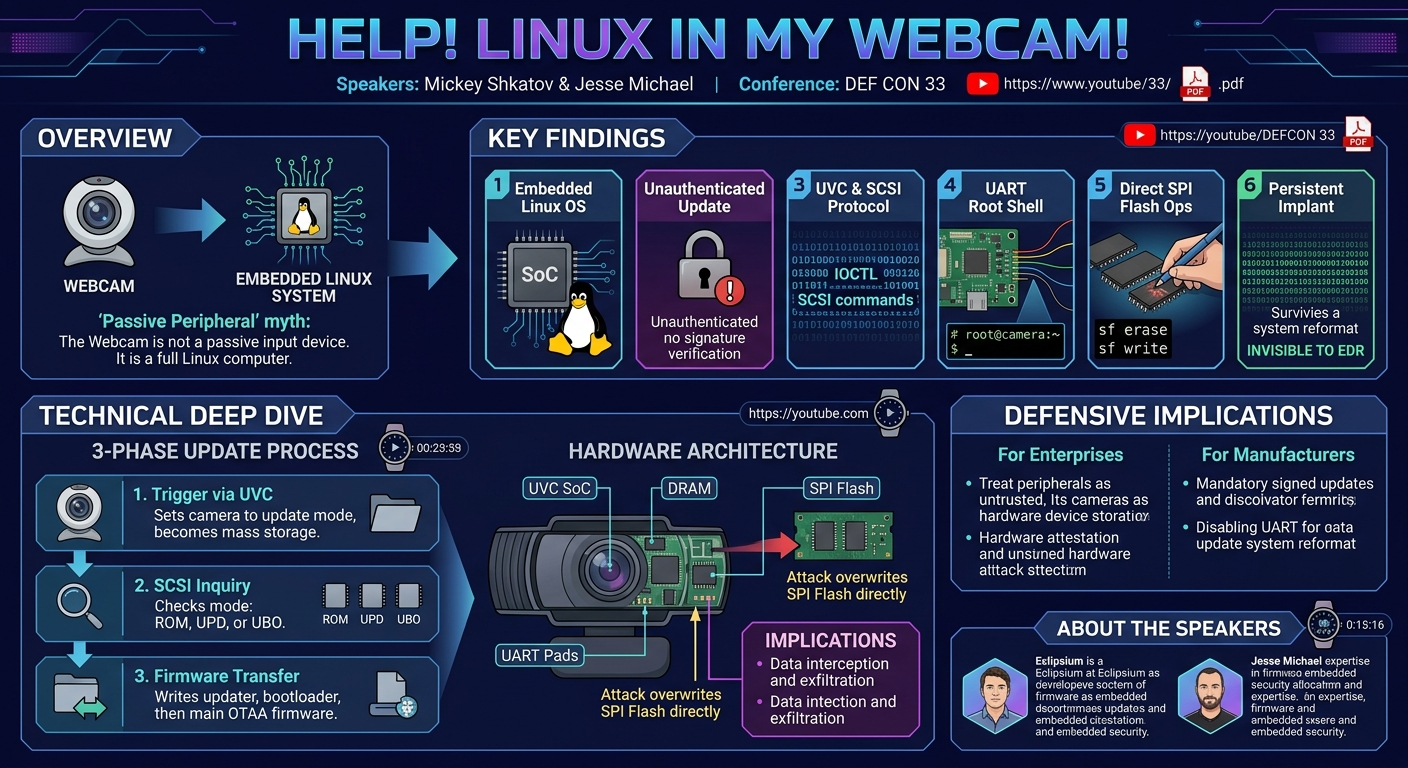
Most people think of a webcam as a simple optical sensor with a USB cable. Plug it in, the operating system loads a driver, and a video stream appears. The security model, implicitly, is that the webcam is a peripheral — a passive input device with no meaningful firmware to worry about and certainly no attack surface beyond whatever driver vulnerabilities the OS vendor might eventually patch. This model is wrong, and Mickey Shkatov and Jesse Michael's DEF CON 33 talk proves it with methodical, hands-on firmware security research conducted on a commercially available 60fps USB webcam.
What they found was a full Linux operating system embedded in the camera, a custom firmware update mechanism built on SCSI pass-through commands, an unauthenticated and unsigned firmware update process, and a chain of vulnerabilities that ultimately allowed them to achieve persistent code execution on the camera's embedded CPU — code that would survive even a full host system reinstall, because the host OS never touches the firmware on the peripheral. This research is a direct demonstration that USB peripherals are a viable implant vector for persistent, stealthy compromise of enterprise and consumer endpoints.
Background
▶ Watch: Discovery: consumer USB webcam runs full embedded Linux OS (2:13)
The research began with a mundane trigger: Mickey Shkatov purchased a 60fps webcam for video calls during the remote work era, and a year later noticed it was becoming unreliable in meetings. Searching for a firmware update, he found an update tool on the manufacturer's website, downloaded it, and ran it. His habit of examining software he runs revealed something unexpected.
The installer extracted its working files to a visible folder. Among the extracted files were items that had no business appearing in a webcam firmware updater for a Windows PC:
- A shell script (
.sh) — Linux scripting, in a Windows installer uboot.bin— Das U-Boot, the widely used embedded Linux bootloader- A USB update binary
- An OTAA (Over-The-Air-App) file with modem-style scripting commands
- An
autoupdate.txtwith update instructions
Running binwalk on the firmware package confirmed the situation: the firmware contained a complete embedded Linux environment. The camera was not a simple USB video device. It was a Linux SoC running a full OS, connected to the host via USB, and presenting itself as a USB Video Class (UVC) device for the video stream.
Physical teardown of the camera confirmed this architecture. The PCB contained a System-on-Chip (SoC), and on the back, three pads consistent with a UART debug interface were exposed. Connecting to those UART pads provided a serial console login prompt — full Linux shell access on the camera's processor — and confirmed the kernel version and firmware details.
This realization changed the security calculus entirely. The camera was not a peripheral. It was an internet-connected (via the host's USB bus) Linux computer with writable persistent storage, running as a trusted device from the host OS's perspective.
Key Findings
▶ Watch: Firmware analysis: HD SDK and update mechanism reverse engineering (6:49)
- The webcam contains a full Linux OS on an embedded SoC, not a simple microcontroller firmware. Binwalk analysis of the firmware update package revealed the complete embedded Linux environment.
- The firmware update mechanism is unauthenticated. The update process does not verify the signature or authenticity of the firmware being written to the device. Any process with access to the update tool's DLLs can flash arbitrary firmware to the camera.
- The update protocol uses UVC extension units and SCSI pass-through commands. Triggering the update puts the camera into a mass storage mode, after which SCSI vendor-specific commands are used to probe, erase, and write flash memory regions and to transfer firmware files over USB.
- UART debug pads on the PCB provide unauthenticated serial shell access. Physical access to the camera allows dropping directly into a root Linux shell with no password prompt, giving full access to the firmware, running processes, and persistent storage.
- The update scripts directly reference SPI flash operations (
sf probe,sf erase,sf write) — low-level SPI flash commands executed in U-Boot, reflecting that the firmware update modifies the bootloader environment and flash partitions directly.
- The firmware update tool software exposes code paths through the
HD510SDK.dlllibrary that can be invoked independently, allowing any program with access to the DLL to trigger firmware update operations without user interaction.
- Persistent implant capability: Arbitrary code written to the camera's flash would survive host OS reinstallation, BitLocker encryption, EDR agent deployment, or any other host-side remediation, because the host never accesses camera firmware storage.
Technical Deep Dive
▶ Watch: USB update mode: camera enters ROM/mass storage mode for flashing (11:16)
Embedded Architecture: SoC, U-Boot, and Linux
The camera's hardware consists of:
- A UVC-compatible SoC (USB Video Class controller) handling image capture and USB video streaming
- Onboard flash (SPI NOR or NAND) storing the Linux filesystem, kernel, and bootloader
- DRAM for runtime execution
- Three UART pads on the back of the PCB for serial debug access
Das U-Boot is the bootloader, responsible for initializing hardware and loading the Linux kernel from flash. The uboot.bin included in the firmware update package is a complete U-Boot binary for the camera's SoC. The OTAA file contains U-Boot console commands (sf probe 0, sf erase <offset> <size>, tftpboot or equivalent, sf write) that directly manipulate SPI flash.
Firmware Update Protocol: UVC Extension Units and SCSI Pass-Through
The firmware update process operates in three sequential phases, implemented in the HD510SDK.dll library:
Phase 1 — Triggering update mode via UVC extension unit:
USB Video Class (UVC) extension units are a standardized mechanism for vendor-specific camera configuration. Each extension unit has a GUID and a set of control selectors. The update tool calls the AIT_UVC_Extension_API.dll helper to send a specific UVC_SET_PROPERTY request with the camera's vendor GUID and a control selector that commands a reboot into firmware update mode. After this call, the tool waits for a new mass storage device to appear on the USB bus — the camera re-enumerates as a mass storage device rather than a UVC device.
Phase 2 — SCSI inquiry to determine mode:
Once mass storage mode is established, the tool uses SCSI pass-through (Windows DeviceIoControl with IOCTL code 0x4D004 — IOCTL_SCSI_PASS_THROUGH) to send a SCSI INQUIRY command. The response buffer contains a vendor-specific string at a specific offset indicating the camera's current mode:
ROMmode: Camera is in ROM bootloader, ready to receive the update binaryUPDmode: Camera is in update mode, ready for firmware transferUBOmode: Camera is in U-Boot mode
The tool uses this mode string to determine which stage of the update sequence to execute next.
Phase 3 — Firmware transfer via SCSI vendor-specific commands:
The actual firmware transfer uses SCSI vendor-specific operation codes (opcode values outside the standard SCSI command set, reserved for vendor use). The tool sends:
usb_updater.binto the device while in ROM mode — this is a small program that handles the actual flash programminguboot.binto the device onceusb_updater.binis running- The main firmware payload (
OTAA) processed according toautoupdate.txtinstructions
The OTAA file's commands map directly to U-Boot sf (SPI Flash) commands, erasing specific flash regions and writing new firmware to them.
No Signature Verification
At no point in this chain does the firmware update process verify a cryptographic signature on any of the transferred files. The HD510SDK.dll library checks whether the device responds correctly to inquiry commands (to confirm it is in the expected mode) but does not validate that the firmware being transferred is authentic, from the manufacturer, or unmodified. An attacker with access to the update DLLs can supply arbitrary firmware — including a modified Linux image with backdoor code — and the camera will accept and flash it without complaint.
UART Access: Physical Shell Access
The three solder pads on the back of the PCB are a standard UART interface (TX, RX, GND). Connecting with a USB-UART adapter at the camera's baud rate provides a serial console showing U-Boot boot output, Linux kernel messages, and ultimately a root login shell. The UART console requires no authentication. From this shell, the full Linux environment is accessible: filesystem, running processes, network configuration (the camera has no network interface beyond USB, but other devices might), and the ability to modify firmware directly.
Implications for Persistent Implant
An attacker who can deliver a modified firmware image (either via the unauthenticated USB update path from a compromised host, or physically via UART) can write arbitrary code to the camera's flash that executes on every boot. From the camera's Linux environment, the adversary could:
- Intercept the raw video stream before it is passed to the UVC driver
- Exfiltrate audio (if the camera has a microphone, which many do)
- Attempt to send data to the host via USB using vendor-specific UVC commands
- Use the camera as a persistent staging point that survives host reimaging
The host OS has no visibility into what runs on the camera's SoC. Windows or Linux on the host loads a generic UVC driver and treats the camera as a black box input device. Even an endpoint security agent performing comprehensive process listing, filesystem scanning, and network monitoring would see nothing of the camera's internal execution environment.
Demo / Proof of Concept
▶ Watch: First attempt at firmware modification: 'Spoiler alert, it breaks the camera' (15:45)
The demonstration included:
- Live binwalk output on the firmware update package, showing the complete embedded Linux filesystem structure.
- PCB teardown photos showing the SoC, the UART pads on the back of the board, and the UART connection setup.
- UART serial console session: Boot output from U-Boot followed by Linux kernel messages and a root shell prompt — directly on the camera hardware.
- Firmware update protocol walkthrough: Annotated source code from
HD510SDK.dllshowing the UVC extension unit call, the SCSI inquiry loop, and the firmware transfer SCSI commands. - OTAA file contents: The SPI flash probe, erase, and write commands confirming that the update process directly manipulates flash at a hardware level.
- No signature check: Code walkthrough confirming that no cryptographic verification step exists anywhere in the update chain.
The firmware update tool was no longer available on the manufacturer's website at the time of the talk; Shkatov noted the web archive URL for the original tool and recommended saving it.
Defensive Implications
▶ Watch: Stealth demo: camera appears normal to Windows while implant runs (29:20)
For enterprise security teams:
- USB peripherals should be treated as potential persistent implant vectors. Hardware attestation of USB devices (USB device authentication, still limited in practical deployment) would help but is not widely available.
- Firmware integrity monitoring for USB peripherals does not exist in standard EDR tooling. This is a gap that requires vendor-side solutions (e.g., manufacturers shipping signed firmware and cameras verifying signatures before accepting updates).
- Supply chain attacks targeting camera firmware could silently compromise endpoints at scale, as cameras are frequently deployed in bulk across enterprise environments.
For manufacturers:
- Firmware updates must be cryptographically signed with a manufacturer-controlled key, and the device must verify the signature before flashing. This is table-stakes security for any device accepting firmware over an uncontrolled interface.
- UART debug interfaces must be disabled or fused off in production hardware. Exposed UART pads provide a trivial physical root access path.
- The update tool should use OS-level code signing and require administrator privileges to run.
- Firmware update clients should not expose their internal DLLs in a way that allows third-party invocation.
For the USB security ecosystem:
- The USB Implementers Forum's USB Device Firmware Upgrade (DFU) specification includes provisions for signed updates, but adoption varies widely. Hardware vendors shipping cameras, keyboards, headsets, and other peripherals that run embedded Linux should be required to implement signed update verification.
- Security researchers should treat consumer USB peripherals as potential targets for firmware security review — especially those containing Linux, as the attack surface of a full OS is considerably larger than a microcontroller.
Key Takeaways
- A commercially available consumer USB webcam was found to run a full embedded Linux OS, with U-Boot as its bootloader and a Linux filesystem stored in onboard SPI flash.
- The firmware update mechanism uses UVC extension units to trigger update mode, then SCSI pass-through commands to write directly to SPI flash — with no cryptographic signature verification at any step.
- UART debug pads on the production PCB provide unauthenticated root shell access to the camera's Linux environment.
- An attacker with host-level access (or physical device access) can flash arbitrary persistent malware to the camera that survives host OS reinstallation, EDR deployment, and all other host-side remediation.
- This class of attack is invisible to standard endpoint security tooling, which has no visibility into what runs on peripheral device processors.
- The broader implication is that any USB peripheral containing an embedded OS — and many do, including keyboards, headsets, docking stations, and storage devices — represents a potential persistent implant vector that the security industry has largely ignored.
About the Speaker(s)
▶ Watch: Conclusion: implications for supply chain and insider threat scenarios (37:58)
Mickey Shkatov is a security researcher at Eclipsium, a firmware and hardware security firm. He has a background in IoT and embedded systems security and is known for deep dives into hardware attack surfaces that are typically overlooked by enterprise security programs. He has delivered multiple DEF CON and security conference talks on firmware and hardware security topics.
Jesse Michael is also a researcher at Eclipsium, specializing in firmware security across UEFI, embedded Linux, and hardware platforms. His work has exposed numerous vulnerabilities in the firmware and hardware supply chain affecting enterprise equipment. Together, Shkatov and Michael have established Eclipsium as a leading voice in the firmware security space, with a track record of responsible disclosures affecting major hardware vendors. Their shared focus is on the gap between the security assumed for hardware and the security that hardware actually provides.
Reviews
Dr. Zero (Offensive Security Researcher) — STRONG ACCEPT
Mickey Shkatov and Jesse Michael tear apart a commercially available USB webcam and find a full embedded Linux OS, a UART debug interface with unauthenticated root access, and a firmware update path that accepts arbitrary unsigned firmware via SCSI pass-through commands. The persistent implant capability — surviving host OS reinstall, BitLocker, and EDR — is the lede.
Heather Calloway (CISO) — MUST SEE
Mickey Shkatov and Jesse Michael tear apart a commercially available USB webcam to find a full embedded Linux OS, an unauthenticated unsigned firmware update mechanism over SCSI pass-through, exposed UART debug pads with no-password root shell access, and a clean path to persistent code execution that survives host OS reinstallation, EDR deployment, and every other host-side remediation. This is a supply chain and physical implant problem that the enterprise security industry has not taken seriously.