Google Apps Script - This Talk Requires Access to Your E-mails
Nicolas Kovacs (Team Leader · Quarkslab), Sébastien Rolland (Quarkslab)
GreHack 2023: 11th International Symposium on Research in Grey-Hat Hacking · Day 1 · Main Stage
Overview
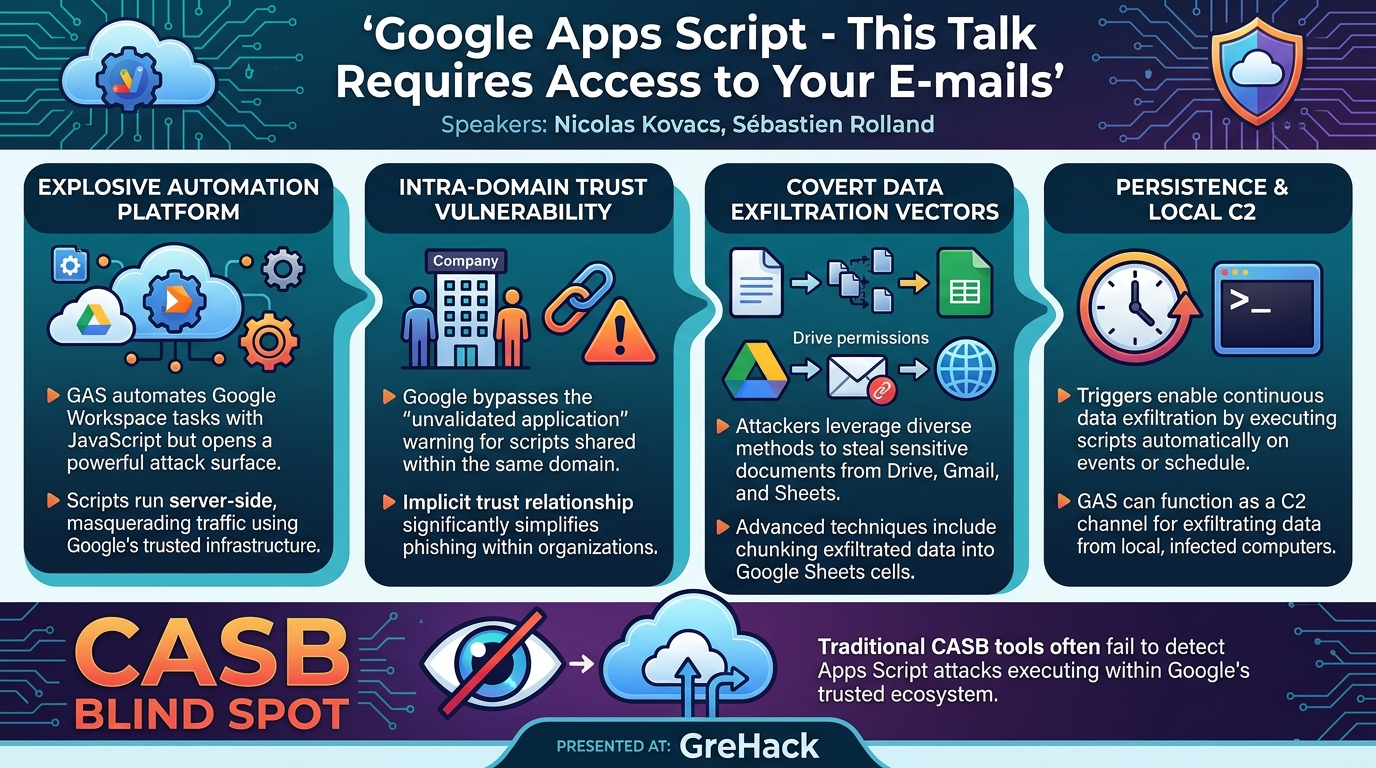
This talk, presented by Nicolas Kovacs and Sébastien Rolland of Quarkslab at GreHack, delves into the often-overlooked security implications of Google Apps Script (GAS). While designed as a powerful platform for automating tasks and extending Google Workspace applications like Gmail, Google Drive, and Google Docs, the speakers demonstrate how GAS can be weaponized for sophisticated data exfiltration, bypassing traditional security controls, including Cloud Access Security Brokers (CASBs). The presentation highlights six distinct attack scenarios, ranging from direct data theft to persistent, trigger-based exfiltration, showcasing the significant risk GAS poses, particularly within corporate Google Workspace environments where a unique trust model can be exploited.
Key moments
- 0:00 Introduction and talk agenda
- 7:00 Server-side execution using Google's IP addresses
- 13:40 Critical authorization bypass within company domains
- 18:40 Scenario 2: Exfiltrating Google Drive files via fishing
- 23:30 Scenario 5: Exfiltrating local data via Google Apps Script
- 29:30 Demo: Google Drive file exfiltration via malicious app
- 32:00 Conclusion and mitigation strategies
- 35:40 Q&A: Google Workspace logs and intra-company warnings
Google Apps Script - This Talk Requires Access to Your E-mails
Speakers: Nicolas Kovacs (Team Leader, Quarkslab); Sébastien Rolland (Quarkslab)
Conference: GreHack
YouTube: https://www.youtube.com/watch?v=mHJ1xjH-pq0
Overview
This talk, presented by Nicolas Kovacs and Sébastien Rolland of Quarkslab at GreHack, delves into the often-overlooked security implications of Google Apps Script (GAS). While designed as a powerful platform for automating tasks and extending Google Workspace applications like Gmail, Google Drive, and Google Docs, the speakers demonstrate how GAS can be weaponized for sophisticated data exfiltration, bypassing traditional security controls, including Cloud Access Security Brokers (CASBs). The presentation highlights six distinct attack scenarios, ranging from direct data theft to persistent, trigger-based exfiltration, showcasing the significant risk GAS poses, particularly within corporate Google Workspace environments where a unique trust model can be exploited.
The speakers, both from Quarkslab's cloud team, bring a wealth of experience in cloud security and penetration testing to the topic. Their detailed analysis reveals that Google Apps Script, due to its deep integration with Google services and its server-side execution model, offers a potent attack vector for malicious insiders or external attackers leveraging phishing. The talk serves as a critical warning for organizations relying on Google Workspace, urging them to re-evaluate their security posture regarding this ubiquitous, yet often underestimated, development platform.
Background
▶ Watch: Introduction and talk agenda (0:00)
Google Apps Script is an application development platform built by Google, enabling users to create scripts that interact with various Google services. It uses JavaScript, specifically leveraging the V8 JavaScript engine (previously Reno). The platform offers a rich set of built-in classes and methods, allowing developers to perform actions ranging from basic string manipulation (e.g., Base64.encode/decode) to complex interactions with Google services like reading emails from Gmail, manipulating Google Drive files, or updating Google Sheets. Extensive documentation and APIs are available to support script development.
Scripts can be deployed in several ways: as web applications, API endpoints, add-ons, or libraries. Crucially, they can also be directly embedded within Google Sheets or Google Docs, where they are intrinsically linked to the document itself. When executed, these scripts run server-side on Google's infrastructure, meaning they leverage Google's IP addresses. This has significant implications, as demonstrated by the speakers: a test performing 1,000 requests using GAS revealed 164 different Google IP addresses, which attackers could exploit to mask their origin or bypass IP-based blocking. Web applications deployed via GAS can handle both GET and POST requests, allowing for dynamic interaction and parameter passing.
A key feature of GAS is the ability to set triggers. These functions automatically execute based on predefined events, such as time intervals (e.g., daily at 8 AM), form submissions, document changes, or even the receipt of a specific email. This capability allows for the automation of complex workflows and, as the talk later illustrates, persistent malicious activities. While individual Gmail accounts face certain daily limitations (e.g., 1,000 URL fetch requests, 250 document creations), Google Workspace accounts typically have higher quotas, making them more attractive targets for large-scale operations.
The authorization model for Google Apps Script is central to its security posture. When a script requires access to Google services, Google automatically scans the source code for methods linked to specific authorization scopes. Users are then presented with a series of dialogues: first, a notification that the script needs authorization; second, an account selection prompt; third, a prominent warning if the application has not been validated by Google (requiring the user to click "Advanced parameters" to proceed); and finally, a review of the specific permissions being requested.
A critical finding highlighted by the speakers concerns the trust model within Google Workspace. If an employee within a company (Employee A) publishes an application and another employee (Employee B) from the same company accesses it, the "unvalidated application" warning is bypassed. Google assumes a "bond of trust" between users in the same domain. This significantly lowers the bar for social engineering attacks within corporate environments. Furthermore, when publishing an application, the owner can specify whether the script runs as the owner or the accessing user, and who can access it (e.g., only the owner, any Google account user, or anyone).
Quarkslab also conducted an enumeration of applications available on the Google Marketplace. In November 2023, they found over 2,000 applications. Their analysis of requested permissions revealed alarming trends:
- All applications requested access to the user's email address and personal information.
- Nearly half (over 900) requested permission to connect to external services.
- A quarter (over 500) asked to "show, modify, create, and delete all your Google spreadsheets."
- Over 300 requested to "run in your absence" or "view and download all your files in Google Drive."
- More than 100 requested access to domain groups.
- 22 applications sought to "view and manage your domains' organization units."
- Two applications requested permissions to "create and update Google Cloud Platform projects," a highly privileged scope that could lead to significant compromise.
These findings underscore that the widespread adoption of Google Apps Script, coupled with its powerful capabilities and sometimes overly broad permission requests, creates a fertile ground for security vulnerabilities and malicious exploitation.
Key Findings
▶ Watch: Critical authorization bypass within company domains (13:40)
The talk uncovers several critical insights into the security landscape of Google Apps Script:
- Ubiquitous Attack Surface: Google Apps Script, while a powerful automation tool, presents a significant and often underestimated attack surface within Google Workspace environments due to its deep integration with core services and flexible deployment options.
- Exploitable Trust Model: The most critical finding is the bypassing of the "unvalidated application" warning for Apps Scripts published and accessed by users within the same Google Workspace domain. This implicit trust relationship drastically simplifies social engineering attacks against internal employees, making phishing campaigns highly effective.
- CASB Blind Spots: Traditional security tools, including Cloud Access Security Brokers (CASBs), are frequently blind to these types of attacks. Since malicious Apps Scripts operate within Google's trusted ecosystem and execute server-side, they can often evade detection by security monitoring tools designed for network traffic or endpoint anomalies.
- Diverse Exfiltration Vectors: The speakers demonstrated six distinct and highly effective scenarios for data exfiltration, illustrating that attackers have multiple sophisticated ways to extract sensitive information. These range from direct file uploads and manipulation of Drive permissions to covert chunking of data into Google Sheets and using GAS as a Command and Control (C2) endpoint for local machine exfiltration.
- Persistent Threat with Triggers: The use of triggers allows for the establishment of persistent malicious actions. Attackers can configure scripts to execute automatically at specific times or in response to events (e.g., a new file being created), ensuring continuous data exfiltration or re-application of malicious settings.
- Broad Permission Abuse: The analysis of the Google Marketplace revealed that many third-party Apps Script applications request extensive and potentially dangerous permissions, which users might inadvertently grant, opening doors for data compromise.
Technical Deep Dive
▶ Watch: Scenario 5: Exfiltrating local data via Google Apps Script (23:30)
The core of Google Apps Script's power, and its vulnerability, lies in its JavaScript execution environment and its extensive APIs that interface directly with Google services. Scripts are deployed and executed on Google's servers, granting them a privileged position within the Google ecosystem.
The speakers detailed six specific attack scenarios, each demonstrating a different method of exploiting GAS:
- Scenario 1: Intentional Exfiltration via External Account
- Mechanism: A malicious employee or an attacker leveraging a compromised internal account creates a GAS web application. This application includes a form for users to upload documents.
- Technical Flow: When a user uploads a file through the form, the GAS script processes the request (via a
doPost()ordoGet()handler). It then uses DriveApp methods (e.g.,DriveApp.getFolderByName(),DriveApp.createFile()) to save the uploaded binary content into a specific folder in the attacker's Google Drive. Simultaneously, GmailApp.sendEmail() can be used to send a copy of the document or a notification to an attacker-controlled email address. - Impact: Direct and covert exfiltration of documents to an external, attacker-controlled location.
- Scenario 2: Fishing for Data Exfiltration via Google Sheets
- Mechanism: This is a sophisticated phishing attack. The victim is tricked into accessing a malicious GAS application and granting it broad permissions to their Google Drive.
- Technical Flow:
- Upon permission acceptance, the GAS script enumerates all files in the victim's Google Drive using DriveApp.getFiles().
- Each file is then processed: Google attempts to convert it to a PDF if it's not an image or video. Files that cannot be converted (e.g., unsupported formats) are not exfiltrated.
- The file's binary content is compressed and then Base64 encoded.
- Due to Google Sheet cell limitations (approximately 50,000 characters per cell), the Base64 string is divided into chunks.
- These chunks are then written into dedicated columns within a Google Sheet controlled by the attacker using SpreadsheetApp methods (e.g.,
SpreadsheetApp.openById(),sheet.appendRow()). - A second GAS application, running as the attacker, performs the reverse process: it reads the chunks from the Google Sheet, decodes the Base64, decompresses, and reconstructs the original files in the attacker's Drive.
- Limitations: This method is limited to approximately 80 megabytes per file due to Google Sheet size constraints and relies on Google's ability to convert files to PDF.
- Traceability: Leaves minimal traces on the victim's immediate activity log, making detection difficult.
- Scenario 3: Publicly Available Files via Google Drive Permissions
- Mechanism: Similar to Scenario 2, the victim is phished into granting permissions to a malicious GAS application. However, instead of exfiltrating file content, this scenario focuses on making the victim's files publicly accessible.
- Technical Flow:
- The GAS script lists all files in the victim's Google Drive.
- For each file, it modifies the permissions to make them publicly available using DriveApp.File.setSharing() and DriveApp.Access.ANYONE_WITH_LINK.
- The script then populates a Google Sheet owned by the attacker with the file names, dates, sizes, and direct public download links.
- Advantages: No size limitations on the files themselves.
- Drawbacks: This method is "noisy" in terms of permission changes. While the user's timeline doesn't explicitly notify them of who changed the permissions, the fact that permissions were changed is logged.
- Scenario 4: Mailbox Exfiltration (Google Drive to Email)
- Mechanism: The victim grants permissions to a malicious GAS app, which then exfiltrates files from their Google Drive by emailing them to the attacker.
- Technical Flow: The script iterates through the victim's Google Drive files and uses GmailApp.sendEmail() to attach and send these files to an attacker-controlled email address.
- Limitations: Subject to email size limitations imposed by Google (e.g., 50MB per email). Larger files may need to be split into multiple parts or converted into smaller blobs.
- Scenario 5: Local Computer Exfiltration (GAS as a C2 Endpoint)
- Mechanism: This scenario is distinct as the initial malicious code executes on the victim's local computer (e.g., a Python script, a PowerShell script, or malware). Google Apps Script is used as a highly effective Command and Control (C2) channel and data exfiltration endpoint.
- Technical Flow:
- A local script on the victim's machine (e.g., Python) enumerates local files, reads their content, Base64 encodes it, and applies an XOR cipher for obfuscation.
- The encoded and XORed data is then divided into chunks (e.g., 50,000 characters).
- These chunks are sent via HTTP POST requests to a publicly deployed Google Apps Script web application (the attacker's GAS app).
- The attacker's GAS web app, upon receiving the POST request (via its
doPost()handler), simply forwards these chunks directly to a Google Sheet controlled by the attacker. - The attacker then accesses this Google Sheet, retrieves the chunks, applies the XOR cipher again, decodes the Base64, and reconstructs the original local files.
- Impact: Allows for exfiltration of any local file, bypassing network egress filtering that might block direct connections to unknown external IPs, as the data is flowing to Google's trusted infrastructure.
- Scenario 6: Persistent Exfiltration via Triggers
- Mechanism: This scenario leverages GAS triggers to ensure continuous and automated execution of malicious actions.
- Technical Flow: An attacker's script, once granted initial permissions, sets up a time-based trigger (e.g.,
ScriptApp.newTrigger().timeBased().everyDays(1).atHour(8).create()) or an event-based trigger (e.g.,onEdit,onOpen,onFormSubmit). - Example: If Scenario 3 (making files public) was initially executed, newly created files in the victim's Drive would not be public. A daily trigger could re-run the permission modification script at 8 AM every morning, ensuring that all files, including newly added ones, have their permissions changed to public.
- Impact: Establishes persistence, allowing for long-term compromise and continuous data exfiltration or manipulation without requiring repeated user interaction.
The talk also briefly touched upon Google AppSheet, a platform for creating no-code mobile applications, which can integrate with and utilize Google Apps Script. This means that AppSheet applications could also be used as a front-end for GAS-based exfiltration. Additionally, the Admin SDK Directory Service API was mentioned as a potential target; if an admin accepts a malicious GAS app, it could perform actions like listing users, groups, or even adding domain administrators.
Demo / Proof of Concept
▶ Watch: Demo: Google Drive file exfiltration via malicious app (29:30)
The speakers presented two recorded demonstrations to illustrate the practical execution of their findings, specifically for Scenario 5 and Scenario 2.
Demo 1: Local Computer Exfiltration (Scenario 5)
This demonstration showcased the exfiltration of a file from a victim's local computer using a Google Apps Script web application as an intermediary.
- Victim's Environment: The demo started by showing a sensitive file,
mdp.docx, on the victim's local machine, presumably containing passwords. - Local Malicious Script: A Python script (or similar, the language wasn't explicitly stated but implied) was executed on the victim's computer. This script was designed to:
- Read the content of
mdp.docx. - Apply an XOR cipher to obfuscate the content.
- Base64 encode the obfuscated data.
- Send the encoded, XORed data in chunks (implied 50,000 character chunks as discussed in Scenario 2) via an HTTP POST request to a specific URL – the endpoint of the attacker's deployed Google Apps Script web application.
- Google Apps Script Web App (Attacker's Side): The GAS web app, deployed as a public endpoint, received these POST requests. Its
doPost()function processed the incoming chunks of data. - Google Sheet (Attacker's Side): The GAS web app then wrote these received chunks directly into a Google Sheet controlled by the attacker. The demo showed the Google Sheet populating with the exfiltrated content, still in its Base64-encoded and XORed form.
- Attacker's Reconstruction Script: Finally, the attacker would have another script (again, likely Python or GAS itself) that connects to this Google Sheet, retrieves the chunks, reverses the XOR operation, decodes the Base64, and reconstructs the original
mdp.docxfile. The demo showed the successful reconstruction and retrieval of the document content on the attacker's side.
This demo effectively illustrated how Google Apps Script can act as a covert C2 channel and exfiltration endpoint, allowing attackers to extract data from local machines by routing it through Google's trusted infrastructure, thus potentially bypassing traditional network-based security controls.
Demo 2: Fishing and Google Drive Exfiltration (Scenario 2)
This demonstration illustrated a phishing attack leading to the exfiltration of a victim's Google Drive files into the attacker's Drive.
- Setup: The demo showed two distinct Google accounts: an attacker's account (left side of the screen) and a victim's account (right side). The victim's Google Drive contained various files, including pictures and sensitive "password" documents.
- Phishing Lure: The victim was shown accessing a malicious Google Apps Script application. This mimics a common phishing scenario where a user clicks a malicious link.
- Authorization Flow (Victim's Perspective):
- "Authorization required": The victim first saw a dialogue indicating that the script needed authorization.
- Account Selection: The victim was prompted to select their Google account to continue.
- "Unvalidated App" Warning: A crucial step in the demo, the victim encountered a large warning stating that Google had not validated the application and it might be dangerous. As explained in the "Background" section, this warning would be bypassed if the application were published by another user within the same Google Workspace domain. In this external phishing scenario, the warning was present. The victim had to click "Advanced parameters" and then "Go to [application name] (unsafe)" to proceed.
- Permission Review: Finally, the victim was presented with the specific permissions the application was requesting: primarily, "See, edit, create, and delete all of your Google Drive files" and "Connect to an external service." The victim, likely unsuspecting or pressured, accepted these permissions.
- Exfiltration in Progress: Once the victim accepted the permissions, the malicious script began executing in the background. From the victim's perspective, nothing immediately changed in their Google Drive.
- Attacker's Gains: On the attacker's side, a new folder automatically appeared in their Google Drive. This folder was named after the victim and contained copies of the victim's files, including the pictures and password documents, successfully exfiltrated from the victim's Drive. As noted in Scenario 2, files were converted to PDF where applicable.
This demo powerfully illustrated the efficacy of phishing attacks leveraging Google Apps Script, demonstrating how a user's single click on a malicious link and subsequent permission grant can lead to a complete compromise of their Google Drive data.
Defensive Implications
▶ Watch: Q&A: Google Workspace logs and intra-company warnings (35:40)
The sophisticated attack vectors demonstrated through Google Apps Script necessitate a multi-layered defensive strategy for organizations leveraging Google Workspace:
- Employee Education and Awareness: Given that many scenarios rely on social engineering and phishing, continuous and robust employee education is paramount. Users must be trained to:
- Be suspicious of unexpected links, even if they appear to come from internal sources.
- Carefully review all permission requests, understanding what each permission entails before granting access.
- Recognize that the absence of Google's "unvalidated application" warning for internal apps does not imply safety.
- Restrict Google Apps Script Usage: Google Workspace administrators have powerful controls within the Admin Console to manage Apps Script. Organizations should consider:
- Limiting who can publish and execute Apps Scripts: Restrict script creation and deployment to specific, trusted users or groups.
- Restricting specific methods or functions: Configure policies to disallow the use of high-risk GAS methods, such as
UrlFetchApp.fetch()(for external connections),DriveApp.setSharing()(for public file sharing), orGmailApp.sendEmail()(for mass emailing). This can significantly reduce the attack surface. - Disabling triggers: Evaluate the necessity of triggers for most users and consider restricting their use.
- Enhanced Monitoring and Logging:
- Network Traffic Monitoring: Actively monitor network requests to
script.google.comandappsheet.com. While these are legitimate Google domains, an unusual volume of requests, requests from unexpected sources, or requests associated with suspicious user activity could indicate exfiltration. - Google Workspace Audit Logs: While the speakers did not directly analyze these in their talk, Google Workspace provides extensive audit logs (e.g., Drive audit logs, Admin audit logs). Security teams should regularly review these logs for:
- Unusual Apps Script deployments or modifications.
- Mass permission changes on Google Drive files.
- Abnormal file access patterns or transfers.
- Large volumes of emails sent by a user's account that are not typical for their role.
- API Activity Monitoring: Monitor for unusual API calls made by Apps Scripts, especially those related to
DriveApp,GmailApp, andSpreadsheetApp.
- Careful Review of Google Marketplace Applications: Users and administrators should exercise extreme caution when installing Apps Script applications from the Google Marketplace.
- Validate Developer Trust: Only install applications from highly trusted and reputable developers.
- Scrutinize Permissions: Thoroughly review the requested permissions. If an application asks for broad access (e.g., "all your Google Drive files") for a seemingly simple function, it should be treated with suspicion.
- Understanding CASB Limitations: Security teams must acknowledge that Cloud Access Security Brokers (CASBs) may not effectively detect or prevent these types of attacks. Since Apps Scripts execute within Google's trusted environment, they often operate outside the visibility of CASBs that primarily focus on network traffic or sanctioned application usage. Organizations should not solely rely on CASBs for protection against GAS-based threats.
By implementing these defensive measures, organizations can significantly reduce their exposure to the risks posed by malicious Google Apps Script usage and better protect their sensitive data within the Google Workspace ecosystem.
Key Takeaways
- Google Apps Script (GAS) is a double-edged sword: It offers powerful automation capabilities for Google Workspace but simultaneously presents a significant and often underestimated attack surface for data exfiltration and malicious activities.
- Intra-domain trust is a critical vulnerability: Within Google Workspace, the absence of an "unvalidated application" warning for Apps Scripts published by internal users drastically lowers the bar for successful phishing and social engineering attacks.
- Diverse and covert exfiltration methods exist: Attackers can leverage GAS for data theft through various means, including direct file uploads, modifying file permissions to public, emailing sensitive documents, or using Google Sheets as a covert data staging ground with sophisticated chunking techniques.
- GAS can act as a C2 channel for local compromise: A particularly potent threat is using a deployed GAS web application as an endpoint for exfiltrating data from a victim's local computer, bypassing traditional network security by routing traffic through Google's trusted infrastructure.
- Triggers enable persistence: The ability to set time-based or event-driven triggers allows attackers to establish persistent malicious actions, ensuring continuous data exfiltration or re-application of compromised settings without further user interaction.
- Traditional security tools (CASBs) often fall short: Due to GAS execution occurring within Google's trusted, server-side environment, many Cloud Access Security Brokers (CASBs) and other network-centric security solutions may be blind to these attacks, necessitating a shift in defensive strategies.
About the Speaker(s)
Nicolas Kovacs is a Team Leader for the Cloud Team at Quarkslab. With a decade of experience as a pentester, he has worked at companies such as Soti, Tandus, and Digital Security. Outside of his professional role, Nicolas is involved in BTI (Bug Bounty Initiative) when time permits and previously maintained a blog known as "Leo Niko."
Sébastien Rolland also works at Quarkslab, where he has been a member of the Cloud Team for several years.
Reviews
Dr. Zero (Offensive Security Researcher) — SOLID
Competent demonstration of a real attack surface that corporate defenders should care about. But it's a 2023 talk about techniques that have been floating around since at least 2017, presented as a taxonomy of exfil scenarios rather than novel research. Fills a slot at a regional con; doesn't advance the field.
Heather Calloway (CISO) — STRONG ACCEPT
This is a clear, operationally useful breakdown of how Google Apps Script creates a blind spot in most Workspace security programs. The intra-domain trust bypass is the headline: if your employees can publish Apps Scripts, your phishing risk just changed shape. Worth your security leadership's time.
→ Top-rated talks at GreHack 2023: 11th International Symposium on Research in Grey-Hat Hacking
All talks from GreHack 2023: 11th International Symposium on Research in Grey-Hat Hacking