SOCKS Over RDP/Citrix (Pentesting Over Jump Boxes)
Balazs Bucsay
Hacktivity 2023 - IT Security Festival · Day 1 · Dome
Overview
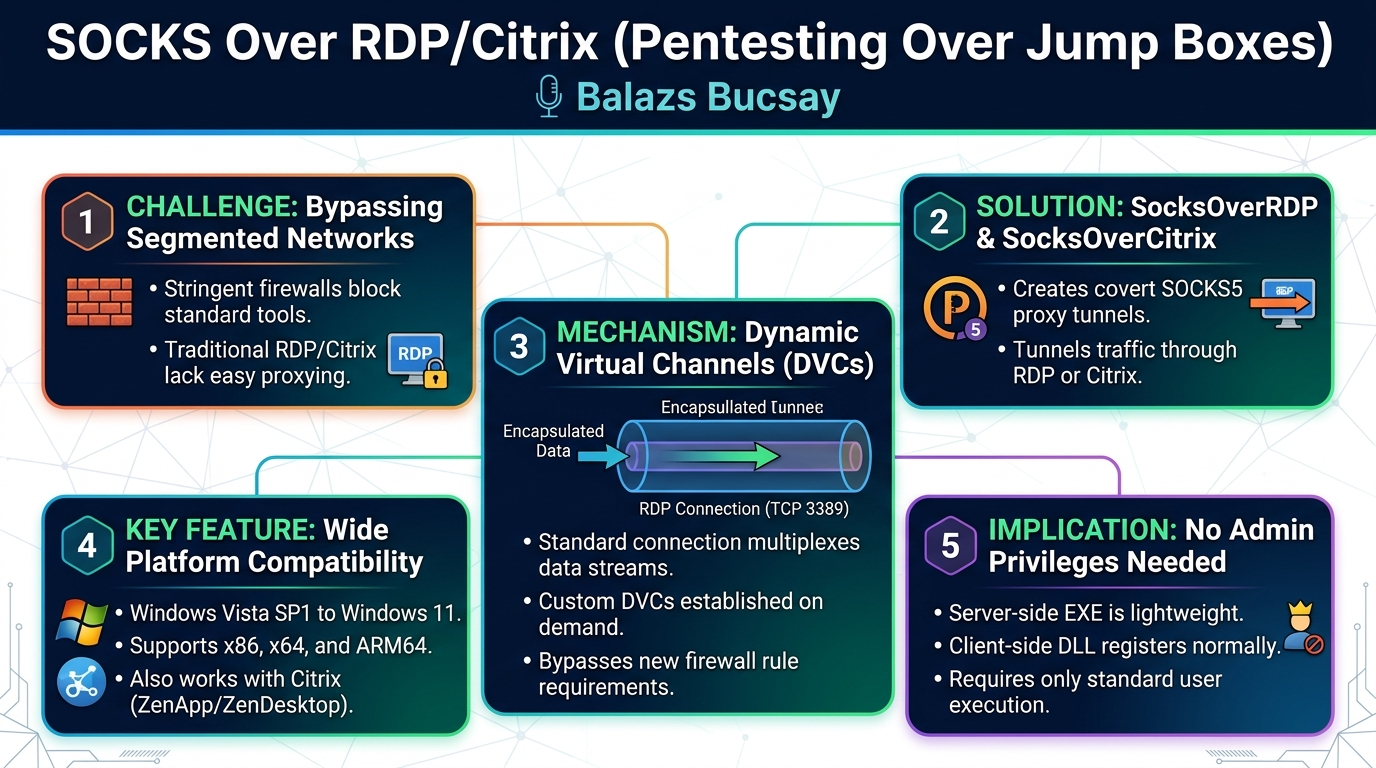
In this insightful Hacktivity presentation, Balazs Bucsay, a seasoned IT security consultant and researcher, delved into a persistent challenge faced by penetration testers operating within highly segregated network environments: the inability to easily establish SOCKS proxies over Remote Desktop Protocol (RDP) and Citrix jump boxes. Bucsay introduced his novel solution, SocksOverRDP and SocksOverCitrix, a set of tools designed to leverage the existing RDP and Citrix protocol infrastructure, specifically Dynamic Virtual Channels (DVCs), to create covert SOCKS5 proxy tunnels. This innovation dramatically enhances red team capabilities, allowing testers to seamlessly route their entire toolkit through a single RDP or Citrix connection, bypassing stringent firewall rules that would otherwise prevent direct access to internal network resources.
Key moments
- 0:00 Introduction and talk overview
- 3:18 High-level overview: what the tool does
- 7:00 Motivation: The jump box challenge for pentesters
- 11:00 Client and server tool installation guide
- 14:00 Step-by-step demonstration of SOCKS proxy
- 20:00 Practical use cases for web and infra testing
- 22:00 Defense strategies: prevention and mitigation
SOCKS Over RDP/Citrix (Pentesting Over Jump Boxes)
Speakers: Balazs Bucsay, Consultant & Researcher, Mantra Information Security
Conference: Hacktivity
YouTube: https://www.youtube.com/watch?v=YPWnkP6ryw
Overview
In this insightful Hacktivity presentation, Balazs Bucsay, a seasoned IT security consultant and researcher, delved into a persistent challenge faced by penetration testers operating within highly segregated network environments: the inability to easily establish SOCKS proxies over Remote Desktop Protocol (RDP) and Citrix jump boxes. Bucsay introduced his novel solution, SocksOverRDP and SocksOverCitrix, a set of tools designed to leverage the existing RDP and Citrix protocol infrastructure, specifically Dynamic Virtual Channels (DVCs), to create covert SOCKS5 proxy tunnels. This innovation dramatically enhances red team capabilities, allowing testers to seamlessly route their entire toolkit through a single RDP or Citrix connection, bypassing stringent firewall rules that would otherwise prevent direct access to internal network resources.
The talk addressed a critical gap in the offensive security toolkit. While SSH has long provided the convenient -D option for creating a SOCKS proxy, its RDP and Citrix counterparts lacked a native, user-friendly equivalent. This often forced penetration testers to seek complex workarounds or request special permissions to install additional tools on target jump boxes – requests frequently met with resistance from security-conscious administrators. Bucsay’s tools eliminate this friction, offering a stealthy and efficient method to extend a penetration tester's operational reach deep into segmented networks, making it a pivotal contribution for those operating in environments secured by jump boxes, such as PCI-compliant or highly confidential systems.
Background
▶ Watch: Introduction and talk overview (0:00)
The necessity for tools like SocksOverRDP and SocksOverCitrix stems from the fundamental architecture of secure, segmented networks. Organizations, particularly those handling sensitive data like Payment Card Industry (PCI) environments or highly confidential intellectual property, employ robust network segmentation strategies. A cornerstone of this strategy is the jump box (also known as a jump server or bastion host). A jump box serves as an intermediary, a dedicated machine connected to two distinct networks: the less trusted internal network (e.g., the corporate LAN) and the highly secured, segregated network. Administrators must first connect to the jump box, typically via RDP or Citrix, and only from there can they access services and resources within the protected segment. This design significantly reduces the attack surface by limiting direct ingress points into sensitive environments.
While excellent for defensive security, this architecture presents a significant hurdle for penetration testers. The firewalls guarding these segregated networks are meticulously configured to allow only the necessary RDP (TCP port 3389) or Citrix (various ports, often 1494/2598) traffic. This means that a penetration tester, once connected to a jump box, cannot simply initiate new TCP or UDP connections to other internal hosts if those connections are not explicitly permitted by the firewall. This limitation cripples the ability to use standard penetration testing tools (e.g., vulnerability scanners, web proxies like Burp Suite, or network exploration tools like Nmap), which typically require direct network access.
The speaker highlighted the stark contrast with Unix-based jump boxes. If a jump box is a Linux machine, penetration testers can easily leverage the SSH protocol's built-in SOCKS proxy functionality using the ssh -D command. This creates a local SOCKS proxy on the attacker's machine, forwarding all traffic through the encrypted SSH tunnel to the target network, effectively bypassing most firewall restrictions. However, for the vast majority of enterprise environments relying on Windows-based RDP or Citrix for remote administration, this elegant solution was historically absent. This forced pentesters into an awkward position: either requesting permission to install potentially suspicious tools on the jump box (which administrators often deny) or attempting complex, often unreliable, manual port forwarding configurations.
Bucsay acknowledged prior efforts in this domain. In 2007, Ahmad Toba developed an RDP plugin for file transport, demonstrating the extensibility of the RDP protocol. Later, around 2011, a tool called RDP2TCP was created by Nicholas, offering port forwarding capabilities, though initially only for Linux clients and later integrated into FreeRDP in 2019. Bucsay himself had developed a precursor tool called UDVC for port forwarding. However, a robust, Windows-native, and Citrix-compatible solution that provided a full SOCKS5 proxy was still missing. This historical context underscores the significance of SocksOverRDP/Citrix as a comprehensive answer to a long-standing red team challenge.
Key Findings
▶ Watch: Motivation: The jump box challenge for pentesters (7:00)
Balazs Bucsay's research and the development of SocksOverRDP/Citrix yielded several key findings that fundamentally change how penetration testers can operate within RDP and Citrix-secured environments. The most significant discovery was the practical and reliable exploitation of Dynamic Virtual Channels (DVCs) within both the RDP and Citrix protocols to establish covert SOCKS5 proxy tunnels.
Firstly, Bucsay observed the inherent architectural similarity between the RDP and Citrix protocols, noting that Microsoft essentially adopted and adapted concepts from existing remote display protocols to create RDP. This similarity extends to their use of virtual channels, which are essentially distinct data streams multiplexed within the primary TCP connection (typically TCP 3389 for RDP). These channels are designed to handle different types of data, such as clipboard transfers, keyboard input, audio, and video, ensuring an organized and efficient remote session.
The pivotal finding revolves around DVCs. While older RDP versions (prior to 6.1) primarily relied on Static Virtual Channels (which are established at the beginning of a session and persist until termination), RDP 6.1 introduced DVCs. These channels are dynamic, meaning they can be initiated and terminated on demand by developers to create custom data streams. Bucsay realized that this extensibility offered a perfect avenue for tunneling arbitrary network traffic. The mechanism involves the client proposing a new DVC to the server, and if the server accepts, a dedicated channel is established within the existing RDP connection. This channel can then be used to send and receive any form of data, effectively creating a "pipe" that bypasses the need for new firewall rules.
His core contribution, the SocksOverRDP/Citrix tool, demonstrates that a full-fledged SOCKS5 proxy can be built atop these DVCs. This allows an attacker to route all their network traffic through the RDP/Citrix connection, making it appear as legitimate RDP/Citrix traffic from the perspective of network firewalls. The tool's capabilities include:
- Platform Versatility: SocksOverRDP supports a wide range of Windows operating systems, from Windows 2000 Server 8 and Windows Vista SP1 all the way up to modern Windows 11, including ARM64 architectures. This broad compatibility ensures its utility across diverse target environments.
- Citrix Compatibility: A particularly unique aspect of Bucsay's work is the extension of this technique to Citrix environments, including Citrix ZenApp and ZenDesktop. This significantly expands the tool's applicability, as Citrix is widely deployed in enterprise settings for application and desktop virtualization.
- Stealth and Simplicity: The tool operates without requiring any additional firewall ports to be opened on the target server. The server-side component (an EXE) requires no special administrative privileges to run, making its deployment straightforward and stealthy. The client-side component (a DLL) integrates directly with the standard Microsoft Remote Desktop Connection client (
mstsc.exe). - Full Proxy Functionality: By creating a SOCKS5 proxy, the tool enables the use of virtually any network-aware application (e.g., web browsers, Burp Suite, Nmap via ProxyChains) to interact with resources on the remote network as if the client machine were directly connected.
These findings highlight a powerful method for bypassing network segmentation controls by leveraging the inherent extensibility of common remote access protocols, significantly empowering red teams in their assessments of highly secured infrastructures.
Technical Deep Dive
▶ Watch: Client and server tool installation guide (11:00)
The technical ingenuity of SocksOverRDP/Citrix lies in its sophisticated utilization of Dynamic Virtual Channels (DVCs), a feature common to both the RDP and Citrix protocols. To understand its operation, it's crucial to first grasp the underlying mechanics of these remote access protocols.
Both RDP and Citrix function by multiplexing various data streams over a single primary TCP connection. When a user connects to an RDP or Citrix server, this single TCP connection carries all aspects of the remote session. Within this connection, Virtual Channels are established. Historically, RDP primarily used Static Virtual Channels. These channels are predefined and initiated at the very beginning of the RDP session, remaining active throughout. Examples include channels for clipboard redirection (enabling copy-paste functionality), keyboard input, mouse movements, audio streaming, and video rendering. Each of these functions has its own dedicated static channel, ensuring orderly data flow.
The pivotal development for SocksOverRDP/Citrix was the introduction of Dynamic Virtual Channels (DVCs) with RDP 6.1 (and similar concepts in Citrix). Unlike static channels, DVCs are not predefined. Instead, they provide an API that allows developers to create custom, on-demand data streams within an active RDP session. The process for establishing a DVC involves:
- Client Proposal: The RDP client (e.g.,
mstsc.exe) proposes a new DVC to the RDP server. This proposal includes a unique name for the channel. - Server Acceptance: If the server-side component is present and configured to listen for this specific DVC name, it accepts the proposal.
- Channel Establishment: Once accepted, a dedicated, bidirectional data stream is established within the existing RDP TCP connection. This DVC acts as a private tunnel, completely transparent to intermediate network devices like firewalls, as it's encapsulated within the legitimate RDP traffic.
Bucsay's SocksOverRDP/Citrix leverages this DVC mechanism to create a SOCKS5 proxy. The tool comprises two main components:
- Client-Side DLL: This is a Dynamic Link Library (.dll) that resides on the penetration tester's local machine (the client). It is designed to hook into the standard Microsoft Remote Desktop Connection client (
mstsc.exe). The DLL needs to be registered usingregsvr32.exe(e.g.,regsvr32 SocksOverRDP.dll). Once registered and active, whenmstsc.exeinitiates an RDP connection, the DLL proposes a specific DVC to the target RDP server. Crucially, this client-side DLL also acts as a SOCKS5 proxy listener on the local machine, typically onlocalhost:1080by default. - Server-Side Executable: This is a standalone executable (.exe) that is copied to and run on the target RDP/Citrix jump box. This executable is lightweight and, significantly, does not require administrative privileges to run. Its role is to listen for the DVC proposal from the client. Once the DVC is established, the server-side EXE acts as the remote endpoint of the SOCKS proxy. It receives SOCKS5 requests from the client (tunneled over the DVC), processes them, makes the actual network connections to internal resources, and then sends the responses back through the DVC to the client.
The entire process unfolds as follows:
- The penetration tester registers the
SocksOverRDP.dllon their local machine. - They launch
mstsc.exeand connect to the RDP jump box. The registered DLL automatically injects into the RDP client process and proposes a DVC. An alert box appears on the client, confirming the proxy is active and listening onlocalhost:1080. - On the RDP jump box, the penetration tester copies and executes the
SocksOverRDP.exe(matching the server's architecture, e.g., x64). This executable then connects to the DVC proposed by the client. - Once the DVC is established, any application on the penetration tester's local machine configured to use the SOCKS5 proxy at
localhost:1080will have its traffic transparently routed through the RDP connection via the DVC to theSocksOverRDP.exeon the jump box. TheSocksOverRDP.exethen forwards this traffic to the internal network resources, receives responses, and sends them back to the client.
The configuration of the client-side proxy can be managed via the Windows Registry, allowing for changes to the listening IP address and port. By default, it listens on localhost:1080 for security, ensuring only local processes can connect to it. Making it accessible over the network would require explicit configuration changes.
This architecture ensures that all tunneled traffic remains encapsulated within the existing RDP/Citrix session, effectively bypassing traditional firewall rules that would otherwise block direct connections to internal hosts. This innovative approach makes SocksOverRDP/Citrix an incredibly powerful and stealthy tool for network lateral movement and data exfiltration in highly secured environments. The development of this tool was sponsored by NCC Group, acknowledging its significance in the field of offensive security research.
Demo / Proof of Concept
▶ Watch: Practical use cases for web and infra testing (20:00)
Balazs Bucsay's presentation included a clear and concise video demonstration of SocksOverRDP in action, illustrating its seamless operation across different architectures and network segments. The demo setup was particularly interesting, showcasing the tool's modern compatibility:
- Client Machine: A MacBook Pro running an ARM64 version of Windows 11 (likely via virtualization like Parallels or VMware). This highlighted the tool's support for the relatively new ARM64 architecture, which Bucsay mentioned required extra effort due to specific Windows bugs (like a
regsvr32error message that can be safely ignored on ARM64). - Server Machine: An x64 Windows server hosted in an Asia Cloud environment, intentionally chosen to have a distinct IP address range (e.g., starting with 20 and ending with 102) from the client's local network (e.g., starting with 64).
The demonstration proceeded through the following key steps:
- Client-Side DLL Registration: Bucsay opened an elevated PowerShell prompt on the Windows 11 ARM64 client. He then executed the
regsvr32command to register theSocksOverRDP.dllfor the ARM64 architecture. He specifically pointed out a known Windows bug on ARM64 whereregsvr32might display an error message even though the registration is successful, advising users to ignore it. - Initiating RDP Connection: After successful registration, Bucsay launched the standard Microsoft Remote Desktop Connection client (
mstsc.exe) and connected to the x64 Windows server in the cloud. Upon establishing the connection, a pop-up alert box appeared on the client machine, confirming that the SocksOverRDP plugin was active and the SOCKS proxy was listening onlocalhost:1080. This visual cue is how users know the client-side component is working. - Deploying Server-Side Executable: Once connected to the remote server, Bucsay copied the x64 version of
SocksOverRDP.exeto the server. He emphasized the importance of matching the executable's architecture to the server's (x64 for the server, even though the client was ARM64). He then executedSocksOverRDP.exein verbose mode (-v) on the server, which started listening for the DVC connection from the client. - Verifying Proxy Listener: Back on the client machine, Bucsay used
netstat -ano | findstr 1080to confirm that a process was listening onlocalhost:1080. The output clearly showed that the process ID (PID) associated with this listener belonged tomstsc.exe, reinforcing that the DLL was integrated directly into the RDP client. - Demonstrating IP Address Change: To visually prove the SOCKS proxy was functional and routing traffic, Bucsay opened a web browser (Edge) on his client machine. He initially showed his local IP address via
whatismyipaddress.com. Then, he navigated to the "Internet Options" (old-school settings, as he noted, since direct Edge proxy settings might not work reliably for SOCKS) and configured the browser to use the SOCKS proxy atlocalhost:1080. Upon refreshingwhatismyipaddress.com, the displayed IP address changed to that of the remote x64 server in the Asia Cloud, unequivocally demonstrating that all browser traffic was now being tunneled through the RDP connection. - Observing Proxy Activity: The verbose output of
SocksOverRDP.exerunning on the server showed real-time details of the connections being proxied from the client, including source and destination IP addresses. This illustrated the tool's active role in facilitating network traffic across the RDP tunnel. - Proxy Termination: Finally, Bucsay terminated the RDP connection. He then attempted to refresh the
whatismyipaddress.compage in the browser (still configured to use the proxy). As expected, the page failed to load, confirming that the SOCKS proxy was no longer available, as its underlying RDP tunnel had been severed.
The demo effectively showcased the ease of deployment, the transparency of the tunneling, and the immediate impact of SocksOverRDP on a penetration tester's ability to operate within a segregated network, all without requiring any changes to server-side firewall configurations.
Defensive Implications
▶ Watch: Defense strategies: prevention and mitigation (22:00)
While SocksOverRDP/Citrix is a powerful offensive tool, Balazs Bucsay also dedicated a crucial section of his talk to defensive implications, providing guidance for administrators seeking to mitigate such attacks. His recommendations, however, highlight the inherent trade-offs between security hardening and user functionality.
For Remote Desktop Protocol (RDP) environments, the primary defensive mechanism identified involves manipulating Group Policy settings on the RDP server:
- "Do not allow clipboard redirection": This policy prevents users from copying and pasting data between their local machine and the RDP session.
- "Do not allow drive redirection": This policy disables the ability for users to map local drives into their RDP session, preventing file transfers.
Bucsay explained that enabling both of these Group Policy settings effectively breaks the functionality of SocksOverRDP. The tool relies on the underlying DVC mechanisms, which are closely tied to the broader virtual channel infrastructure used for features like clipboard and drive redirection. By disabling these core functionalities, administrators can indeed prevent the SocksOverRDP DLL from successfully establishing its DVC.
However, Bucsay immediately pointed out the significant drawback: "This is a win for you, but in the same time, if you do that, the users won't be able to copy over files... neither can they do drive redirection." This creates a substantial usability impact. Many organizations rely heavily on clipboard and drive redirection for legitimate administrative tasks and user workflows. Disabling them would likely lead to user frustration and a decrease in productivity, forcing administrators to weigh the security benefit against operational efficiency.
For Citrix environments, the defensive picture is less clear. Bucsay stated that during his development and testing, he attempted to replicate similar protection mechanisms in Citrix. Although Citrix offers options akin to RDP's clipboard and drive redirection policies, he found that "somehow it doesn't work for that." Even with these features turned off in Citrix, the tool continued to function. He acknowledged that Citrix's behavior might have changed in recent years, but at the time of his research, these direct mitigations were ineffective. This suggests a potentially higher risk profile for Citrix environments regarding this specific tunneling technique.
The final defensive layer Bucsay discussed is Antivirus (AV) protection. He noted that "all bigger vendors classify this tool as malware," which he personally finds "unfortunate because it's only a tool and it doesn't do anything malicious at all." Despite his perspective, this classification means that if a target jump box has a "decent antivirus" solution, it is highly likely to detect the publicly released compiled binaries of SocksOverRDP/Citrix based on their signatures. This would prevent the attacker from copying the file to the server or executing it. However, Bucsay also offered a critical caveat: "if you want to work around the antivirus I guess you can." This implies that attackers with sufficient skill can recompile, obfuscate, or modify the tool to evade AV signatures, underscoring that AV is a significant but not foolproof defense.
In summary, defenders can apply Group Policy settings for RDP to block DVC-based tunneling, but this comes at the cost of legitimate user functionality. Citrix environments appear to be more resilient to these specific mitigations. Ultimately, a multi-layered defense strategy, including robust endpoint detection and response (EDR), application whitelisting, and continuous monitoring for unusual DVC activity, would be necessary to effectively counter tools like SocksOverRDP/Citrix, beyond relying solely on signature-based AV or broad policy restrictions.
Key Takeaways
- Covert Tunneling via DVCs: RDP and Citrix Dynamic Virtual Channels (DVCs) provide a powerful, often overlooked, mechanism for establishing covert SOCKS5 proxy tunnels within existing remote desktop sessions, bypassing traditional firewall restrictions.
- Enhanced Red Team Capabilities: SocksOverRDP/Citrix empowers penetration testers to route their entire toolkit through RDP/Citrix jump boxes, eliminating the need for additional firewall rules or privileged tool installations on the target, significantly improving operational efficiency and stealth in segregated environments.
- Broad Compatibility: The tool supports a wide array of Windows versions (from Vista SP1 to Windows 11, including ARM64) and Citrix ZenApp/ZenDesktop, making it versatile across diverse enterprise infrastructures.
- Defensive Trade-offs for RDP: While RDP environments can be hardened against this technique by disabling clipboard and drive redirection via Group Policy, this comes at a significant cost to legitimate user functionality and productivity.
- Citrix Mitigation Challenges: At the time of development, similar defensive measures in Citrix were found to be ineffective, suggesting a potential gap in protecting these environments from DVC-based tunneling.
- AV as a Partial Defense: Major antivirus vendors classify the public binaries of SocksOverRDP/Citrix as malware, offering a layer of defense. However, skilled attackers can recompile or obfuscate the tool to evade signature-based detection.
About the Speaker(s)
Balazs Bucsay (also known as Balage Bai in Hungary) is a highly experienced IT security professional with over two decades in the field. For the past 15 years, he has specialized in research and consultancy, gaining extensive hands-on experience across more than 300 engagements for over 100 different clients, including highly sensitive PCI and confidential environments. His impressive list of certifications includes OSCP, OSWE, and OSWP, and he previously held CRTP, CCT, and GPEN designations.
Bucsay is a frequent and recognized speaker at numerous international IT security conferences, having presented in locations such as Washington D.C., Atlanta, Miami, Honolulu, Singapore, the Philippines, Australia, and notably, his sixth appearance at Hacktivity. A few months prior to this talk, he founded Mantra Information Security, a boutique consultancy offering a wide range of services including cloud security reviews, source code analysis, CI/CD pipeline assessments, Kubernetes reviews, and reverse engineering. He is active on social media, reachable on Twitter via the handle @xorEIP and on LinkedIn.
Reviews
Dr. Zero (Offensive Security Researcher) — STRONG ACCEPT
Solid offensive tooling talk that solves a real, specific problem pentesters actually hit in the field. Not novel research in the academic sense—DVCs have been around since RDP 6.1—but the execution is clean, the cross-platform support (including ARM64 and Citrix) is genuinely useful, and the demo actually worked. Exactly what a tools track at Hacktivity should look like.
Heather Calloway (CISO) — SOLID
Practical red team tooling for RDP/Citrix jump box environments. Useful for understanding attacker lateral movement capabilities through remote access infrastructure, but the defensive guidance is thin and the technique is already flagged by major AV vendors.