ELECTRONizing macOS Privacy: A New Weapon in Your Red Teaming Armory
Wojciech Reguła (Principal Security Specialist · SecuRing)
Overview
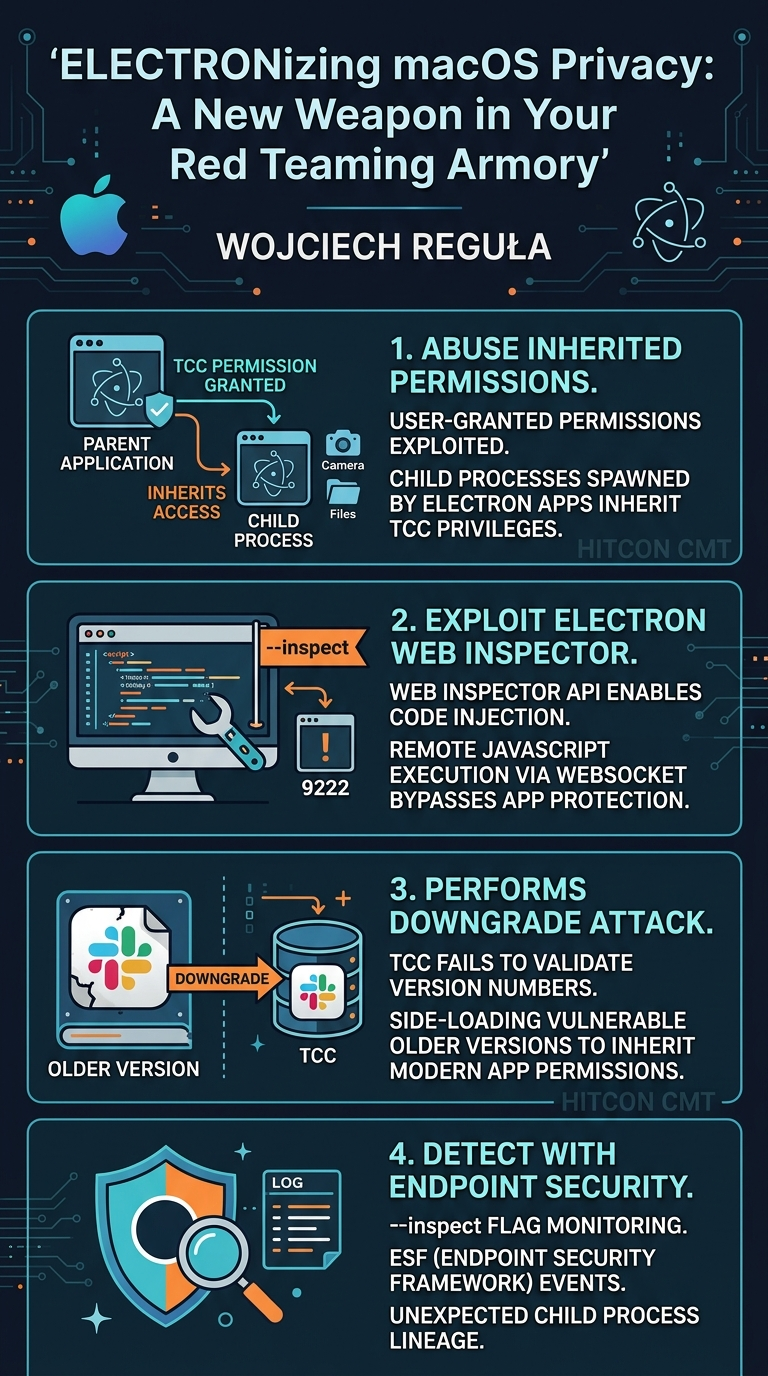
In this compelling talk at HITCON CMT, Wojciech Reguła, Principal Security Specialist at SecuRing, unveiled a novel attack vector and a new open-source tool, Electronizer, designed to exploit long-standing macOS privacy mechanisms. The presentation, titled "ELECTRONizing macOS Privacy: A New Weapon in Your Red Teaming Armory," delves into the intricacies of macOS’s Transparency, Consent, and Control (TCC) framework and the ubiquitous nature of Electron-based applications. Reguła demonstrates how a combination of TCC permission inheritance and the often-overlooked Web Inspector API in Electron apps can be weaponized to bypass critical privacy protections, allowing attackers to access sensitive user data like desktop files, documents, and even the camera, without explicit user consent or raising TCC prompts.
Key moments
- 3:00 Agenda: macOS Privacy, Electron, TCC, Electronizer
- 4:50 macOS Privacy Fundamentals: SIP and TCC
- 21:00 Crucial finding: TCC Permissions Inheritance by Children
- 22:00 Introducing Electronizer: Exploiting Electron's Web Inspector
- 24:00 Demo 1: Visual Studio Code desktop file access
- 30:00 TCC Code Signing: Bundle ID, Team ID, No Version Check
- 31:00 Demo 3: Downgrade attack on Slack for screenshot
- 33:00 Detection: Monitor Electron apps for --inspect flag
ELECTRONizing macOS Privacy: A New Weapon in Your Red Teaming Armory
Speakers: Wojciech Reguła, Principal Security Specialist, SecuRing
Conference: HITCON CMT
YouTube: https://www.youtube.com/watch?v=cOMd9VA6sZY
Overview
In this compelling talk at HITCON CMT, Wojciech Reguła, Principal Security Specialist at SecuRing, unveiled a novel attack vector and a new open-source tool, Electronizer, designed to exploit long-standing macOS privacy mechanisms. The presentation, titled "ELECTRONizing macOS Privacy: A New Weapon in Your Red Teaming Armory," delves into the intricacies of macOS’s Transparency, Consent, and Control (TCC) framework and the ubiquitous nature of Electron-based applications. Reguła demonstrates how a combination of TCC permission inheritance and the often-overlooked Web Inspector API in Electron apps can be weaponized to bypass critical privacy protections, allowing attackers to access sensitive user data like desktop files, documents, and even the camera, without explicit user consent or raising TCC prompts.
The significance of this research lies in its practical applicability and the persistent nature of the underlying issues. Electron applications, forming a substantial portion of modern desktop software (e.g., Slack, Microsoft Teams, Visual Studio Code), are routinely granted extensive TCC permissions by users. Reguła's work highlights that once these permissions are granted, they can be inherited by malicious code injected into the Electron app, effectively turning a legitimate application into an attacker's unwitting accomplice. Furthermore, the talk exposes a critical flaw in TCC's code signing validation, demonstrating how even applications with disabled Web Inspector APIs can be compromised through a downgrade attack, allowing older, vulnerable versions to inherit permissions from their updated counterparts. This research offers valuable insights for both red teamers seeking to enhance their macOS post-exploitation capabilities and blue teamers striving to fortify their defenses against sophisticated privacy bypass techniques.
Background
▶ Watch: Agenda: macOS Privacy, Electron, TCC, Electronizer (3:00)
To understand the vulnerabilities discussed in this talk, it's essential to first grasp the fundamental privacy and security mechanisms on macOS.
macOS Privacy Fundamentals: SIP and TCC
At the core of macOS security lies System Integrity Protection (SIP), often referred to as "rootless." Introduced to prevent even root users from modifying critical system files and directories, SIP ensures that core operating system components remain immutable. Beyond SIP, Transparency, Consent, and Control (TCC) is Apple's primary mechanism for safeguarding user privacy. TCC mandates explicit user consent before applications can access sensitive resources such such as the camera, microphone, contacts, location data, desktop, documents, and downloads folders. When an application requests access to one of these resources for the first time, macOS presents a prompt, requiring the user to physically click "OK" to grant permission. Programmatic or synthetic clicks are intentionally prevented to ensure genuine user intent.
TCC permissions are managed through a SQLite 3 database. There's a global database located at /Library/Application Support/com.apple.TCC/TCC.db for system-wide permissions (like Full Disk Access), and separate per-user databases at ~/Library/Application Support/com.apple.TCC/TCC.db for user-specific permissions. These databases store granular information, including the TCC permission type, the client (usually the application's bundle identifier or path), the user's decision (granted/denied), and a binary blob representing the code signing requirement of the application. The speaker demonstrates that applications cannot simply assign themselves private TCC entitlements; attempts to sign a custom executable with an Apple-specific entitlement like com.apple.private.tcc.manager will result in the application being instantly killed by the operating system, enforcing the integrity of Apple's entitlement system.
The Ubiquity and Architecture of Electron Applications
Electron is a popular framework for building cross-platform desktop applications using web technologies. Essentially, an Electron application bundles a Chromium browser and a Node.js runtime, allowing developers to create native-like experiences with HTML, CSS, and JavaScript. This architecture makes Electron apps highly prevalent on macOS, with examples including Slack, Visual Studio Code, Notion, Microsoft Teams, GitHub Desktop, WordPress Desktop, Twitch, and Discord. Due to their functionality, these applications frequently require and are granted TCC permissions—for instance, Microsoft Teams needs camera/microphone access, and Visual Studio Code needs access to desktop or document folders to open files.
Prior Research and macOS Ventura's App Protection
Reguła has a long history of researching macOS privacy mechanisms, having identified approximately 40 TCC vulnerabilities over the past four years, leading to presentations at Black Hat conferences. His earlier work in 2019 demonstrated that Electron applications were vulnerable to code injection by simply modifying their embedded HTML or JavaScript files. Even though this modification would break the application's code signature, macOS would still launch the app, verifying only the main executable's signature, not the integrity of its bundled web content. This allowed attackers to execute arbitrary JavaScript, load dynamic libraries, or spawn other applications within the context of the vulnerable Electron app.
However, macOS Ventura introduced a significant security enhancement called App Protection. This feature locks an application's directory after its initial launch, preventing any process not signed with the same team identifier from modifying its contents. This effectively mitigated the direct file modification technique Reguła presented in 2019, making it harder for malicious actors to tamper with installed Electron applications directly. This advancement meant a new approach was needed to bypass TCC protections via Electron apps, setting the stage for the core findings of this talk.
Key Findings
▶ Watch: Crucial finding: TCC Permissions Inheritance by Children (21:00)
Wojciech Reguła's presentation reveals two critical findings that, when combined, create a potent privacy bypass on macOS, even against modern protections like Ventura's App Protection.
1. TCC Permissions Inheritance
A cornerstone of this attack vector is the behavior of TCC permissions inheritance. Reguła highlights a crucial distinction:
- Apple-signed processes with private TCC entitlements (e.g., system components) generally do not inherit their TCC permissions to child processes they spawn. This design choice aims to contain the powerful privileges of system processes.
- However, applications granted TCC permissions by a user (e.g., third-party Electron apps like Microsoft Teams receiving camera access) will inherit these permissions to any child processes they spawn. This means if an application has permission to access the camera, any process launched by that application will also implicitly have camera access, without needing to prompt the user again. This inheritance model, while potentially simplifying development for legitimate applications, creates a significant security loophole if an application can be coerced into launching malicious child processes.
2. Abusing Electron's Web Inspector API
Despite macOS Ventura's App Protection preventing direct modification of Electron application bundles, Reguła found an alternative code injection vector: the Web Inspector API. Electron applications, by their nature as embedded web browsers, often support a debugging interface similar to browser developer tools. This interface can typically be activated by launching the Electron app with the --inspect command-line flag.
- When launched with
--inspect, an Electron application exposes a WebSocket server. - An attacker can connect to this WebSocket and, through the Web Inspector API, execute arbitrary JavaScript code within the context of the running Electron application.
- Because this JavaScript code runs within the Electron app, it inherits all the TCC permissions previously granted to that application by the user. This effectively bypasses the need for direct file modification and circumvents App Protection.
3. The Downgrade Attack: TCC's Incomplete Code Signing Validation
Even if an Electron application's developers attempt to disable the --inspect flag (using electron-fuses with the no-cli-inspect setting), Reguła uncovered a fundamental flaw in TCC's code signing validation that enables a downgrade attack.
- Analysis of the TCC database's binary code signing requirement blob reveals that TCC primarily verifies the application's bundle identifier, its developer Team ID (from the
certificate leaf subject organization unit), and that it's signed by an Apple-issued certificate (Anchor Apple generic). - Crucially, TCC does not verify the application's version number.
- This omission means an attacker can side-load an older version of an Electron application—one that predates the
no-cli-inspectprotection or has other vulnerabilities—onto the system. From TCC's perspective, this older version is still "Slack" (or whatever the app is) signed by the correct developer, and thus, it inherits the TCC permissions granted to the latest, installed version of the application. - This downgrade attack allows an attacker to bypass even developer-implemented protections against the
--inspectflag, leveraging the permissions of an updated, legitimate application through a vulnerable older counterpart. Reguła notes that this issue was documented a year prior to the talk and remains unaddressed by Apple, underscoring its persistence as a security concern.
These findings collectively demonstrate a robust method for red teams to achieve privacy bypass on macOS, transforming commonly installed, trusted applications into powerful tools for data exfiltration and further compromise.
Technical Deep Dive
▶ Watch: Demo 1: Visual Studio Code desktop file access (24:00)
The technical core of this talk revolves around understanding the underlying mechanisms of macOS TCC, the architecture of Electron applications, and how these two systems interact in unintended ways.
TCC Database and Code Signing Requirements:
As discussed, TCC stores its permissions in SQLite 3 databases. The code_signing_requirements column contains a binary blob. Reguła demonstrates how to decode this blob to reveal the actual criteria macOS uses for validation. Using a Base64-encoded version of this blob and a custom Objective-C snippet, he shows that the requirement string typically looks like:
anchor apple generic and certificate leaf[field.1.2.840.113635.100.6.1.9] / exists / and certificate leaf[field.1.2.840.113635.100.6.1.13] / exists / and certificate leaf[subject.OU] = "YOUR_TEAM_ID".
This string explicitly checks for:
anchor apple generic: The application must be signed by an Apple-issued certificate.certificate leaf[subject.OU] = "YOUR_TEAM_ID": The application's signing certificate must belong to a specific Apple Developer Team ID.certificate leaf[field.1.2.840.113635.100.6.1.9]andcertificate leaf[field.1.2.840.113635.100.6.1.13]: These fields typically relate to the application's bundle identifier.
Critically, this code signing requirement lacks any version information. This means TCC validates identity (who signed it, what app it is) but not integrity regarding its specific version, which is the lynchpin of the downgrade attack.
Electron's Web Inspector API Exploitation:
The core of the code injection technique relies on Electron's built-in debugging capabilities. Electron applications, being essentially Node.js processes running a Chromium instance, can be launched with various command-line flags. The --inspect flag (or --inspect-brk for pausing execution at the start) is particularly relevant.
When an Electron app is launched with --inspect, it starts a debugging server, typically on a port like 9222. This server exposes a Chrome DevTools Protocol interface over a WebSocket. The protocol allows remote tools (like a browser's developer console or a custom script) to:
- List available debugging targets (e.g., the main process, renderer processes).
- Connect to a specific target's WebSocket endpoint.
- Send commands to evaluate JavaScript expressions, inspect variables, manipulate the DOM, and interact with the Node.js environment.
Reguła's Electronizer tool (written in Swift) automates this process. When electronizer inject is used:
- It spawns the target Electron application with the
--inspectflag appended to its launch arguments. - It then connects to the WebSocket endpoint exposed by the Electron app's debugging server.
- Once connected, Electronizer sends commands via the Chrome DevTools Protocol to execute arbitrary JavaScript code. This code runs within the context of the Electron app's main process, inheriting all its TCC permissions. For example, a JavaScript snippet could leverage Node.js APIs (accessible within Electron's main process) to interact with the file system (
fsmodule) or spawn child processes (child_processmodule), inheriting the Electron app's permissions for desktop, documents, or even the camera.
Bypassing electron-fuses with Downgrade Attacks:
Developers can use electron-fuses to harden their Electron applications. One such fuse is no-cli-inspect, which prevents the application from being launched with the --inspect flag. Slack, for instance, has implemented this protection.
Reguła demonstrates that this protection can be bypassed due to TCC's version-agnostic validation:
- An attacker obtains an older version of the Electron application (e.g., an old Slack DMG). This older version does not have the
no-cli-inspectfuse enabled. - The attacker mounts this DMG and uses Electronizer to inject code into the older application.
- When this older application is launched, TCC performs its check. Because the older version has the same bundle ID and is signed by the same developer Team ID as the currently installed, updated version (which has permissions granted by the user), TCC grants it the same inherited permissions.
- The older version, lacking the
no-cli-inspectfuse, successfully launches with--inspect, allowing code injection and subsequent TCC bypass.
This highlights a fundamental architectural weakness: TCC relies on a static identifier (bundle ID, Team ID) for permission validation, rather than a robust integrity check that includes application version or a cryptographic hash of the entire bundle.
Demo / Proof of Concept
▶ Watch: TCC Code Signing: Bundle ID, Team ID, No Version Check (30:00)
The talk features several compelling demonstrations using the Electronizer tool, a Swift-based, open-source utility available on GitHub. Electronizer provides three main commands: list apps, verify, and inject.
list apps: This command enumerates all Electron applications installed on the user's machine.verify <app_path>: This command attempts to launch the specified Electron application with the--inspectflag and checks if a WebSocket server is successfully opened, indicating its vulnerability to the Web Inspector API attack.inject <app_path> [script]: This is the core command, allowing the injection of custom JavaScript (pop.js) or predefined scripts. Reguła prepared several predefined scripts for common red teaming scenarios:open calculator,take screenshot,steal address book,bind shell, andtake selfie.
Demo 1: Unauthorized Access to Desktop with Visual Studio Code
- Objective: Obtain unauthorized access to files on the desktop, a TCC-protected resource.
- Action:
electronizer inject /Applications/Visual\ Studio\ Code.app bind shell
- Electronizer launches Visual Studio Code (VS Code) with the
--inspectflag. - It then injects a JavaScript payload that causes VS Code to spawn a shell.
- Initial Check: The speaker first demonstrates that a direct attempt to
cat secret.txton the desktop from a standard terminal fails with a "permission denied" error, confirming TCC protection. - Exploitation: The speaker then connects to the shell spawned by VS Code via
netcat. - Permission Verification: Using Cedric Owens'
check_tcc.pytool, the speaker verifies that Visual Studio Code indeed has TCC permissions for "Desktop," "Documents," and "Downloads." - Result: From the
netcat-connected shell (which inherited VS Code's permissions), executingcat ~/Desktop/secret.txtsuccessfully displays the file's contents, demonstrating a bypass of TCC protection for desktop access.
Demo 2: Taking a Selfie with Microsoft Teams
- Objective: Gain unauthorized access to the camera, another TCC-protected resource.
- Action:
electronizer inject /Applications/Microsoft\ Teams.app take selfie
- Electronizer launches Microsoft Teams with the
--inspectflag. - It injects a JavaScript payload that utilizes the Node.js environment within Teams to access the camera and take a picture.
- Result: A
selfie.jpegimage (showing the speaker) is saved to the/tmpdirectory, confirming successful camera access through inherited TCC permissions.
Demo 3: Downgrade Attack on Slack to Take a Screenshot
- Objective: Bypass
electron-fusesprotection on a modern Slack version by exploiting TCC's lack of version validation. - Setup: The speaker highlights that newer Slack versions have
no-cli-inspectenabled, preventing the direct--inspectattack. To counter this, an older Slack version (pre-electron-fusesimplementation) is mounted from a DMG file. - Action:
electronizer inject /Volumes/Slack/Slack.app take screenshot
- Electronizer targets the older Slack application located on the mounted volume.
- It launches this older version with
--inspect(which works because the fuse is not present). - It injects a JavaScript payload to take a screenshot of the current desktop.
- Result: A
screenshot.jpegfile is created in/tmp, containing a screenshot of the speaker's desktop. This demonstrates that the older, vulnerable Slack version successfully inherited the TCC permissions (including screen recording/screenshot access) from the installed, updated Slack application on the system, effectively bypassing theelectron-fusesprotection.
These demonstrations vividly illustrate the power and versatility of the Electronizer tool and the underlying vulnerabilities, showcasing how an attacker can leverage trusted applications to compromise macOS privacy.
Defensive Implications
▶ Watch: Detection: Monitor Electron apps for --inspect flag (33:00)
The findings presented in this talk have clear and actionable implications for macOS defenders. While the attack relies on exploiting inherent behaviors of Electron and TCC, detection and mitigation strategies can significantly reduce risk.
Detection Strategies:
The most straightforward and effective detection mechanism leverages the macOS Endpoint Security Framework (ESF). ESF provides a powerful interface for monitoring system events, including process executions.
- Monitor for
--inspectflag: Defenders should configure their Endpoint Detection and Response (EDR) solutions to monitorES_EVENT_TYPE_NOTIFY_EXECevents. Specifically, EDRs should look for instances where Electron-based applications are launched with the--inspector--inspect-brkcommand-line arguments. The presence of this flag for any Electron application (especially those typically used for productivity like Slack, Teams, VS Code) is a strong indicator of suspicious activity. - Example: A process execution event for
/Applications/Visual Studio Code.app/Contents/MacOS/Electronwith arguments containing--inspect. - Process Lineage Analysis: Beyond the flag itself, EDRs can analyze process lineage. If an unexpected process (e.g., a shell, a Python script) is spawned as a child of an Electron application, and that Electron application was launched with
--inspect, it further strengthens the suspicion. - File Monitoring for Temporary Files: While not a primary detection, monitoring for sudden creation of sensitive files (like
selfie.jpegorscreenshot.jpeg) in unexpected locations (e.g.,/tmp) by processes related to Electron apps could be a secondary indicator.
Prevention and Mitigation:
- Developer Responsibility (
electron-fuses): Electron application developers should utilizeelectron-fusesto disable theno-cli-inspectargument. While this doesn't prevent the downgrade attack, it raises the bar for attackers by forcing them to acquire and side-load an older, vulnerable version. This is a crucial first step for hardening Electron apps. - Application Whitelisting/Integrity Checks: Organizations should implement strict application whitelisting policies. Allowing only approved, signed, and regularly updated applications reduces the risk of malicious or outdated Electron versions being introduced. Technologies that enforce strict code integrity checks on application bundles could also help detect tampered or downgraded versions, though TCC's current design limits their effectiveness against the downgrade attack.
- User Awareness and Least Privilege: Educating users about the dangers of installing applications from untrusted sources or accepting TCC prompts indiscriminately is vital. Adhering to the principle of least privilege—only granting applications the minimum necessary TCC permissions—can limit the scope of potential damage.
- Apple's Role: The most fundamental fix requires Apple to enhance TCC's code signing requirement validation. Integrating application version checks or more robust cryptographic integrity validation (e.g., a hash of the entire application bundle) into the TCC database would prevent the downgrade attack. As Reguła notes, this is a known issue that Apple has not yet addressed. Until then, the downgrade attack remains a viable bypass.
- Regular Updates: While the downgrade attack exploits the lack of version checking, keeping all legitimate applications updated is still crucial. Newer versions often include other security fixes and might introduce additional protections beyond what TCC currently offers.
By combining robust EDR monitoring, developer best practices, and pushing for fundamental improvements in macOS security mechanisms, defenders can better protect against the sophisticated privacy bypasses demonstrated by Electronizer.
Key Takeaways
- TCC Permission Inheritance is a Critical Flaw: macOS TCC permissions granted by users to applications (e.g., Electron apps) are inherited by all child processes spawned by that application, enabling a powerful avenue for privilege escalation and privacy bypass.
- Electron's Web Inspector API is a Direct Code Injection Vector: Electron applications, when launched with the
--inspectflag, expose a WebSocket API that allows for remote execution of arbitrary JavaScript code within the app's context, bypassing macOS Ventura's App Protection. - Electronizer Automates the Attack: The open-source Electronizer tool simplifies the exploitation of these vulnerabilities, enabling red teamers to list vulnerable apps, verify their susceptibility, and inject predefined or custom JavaScript payloads to steal data or bind shells.
- TCC Lacks Version Validation, Enabling Downgrade Attacks: The TCC database's code signing requirements verify bundle ID and developer Team ID but critically lack version information. This allows attackers to side-load older, vulnerable Electron app versions (even if newer versions are patched with
electron-fuses) to inherit TCC permissions from the legitimate, updated application. - Detection is Possible via ESF: Defenders can detect attempts to exploit this vulnerability by monitoring macOS Endpoint Security Framework (ESF) events for Electron applications being launched with the
--inspectcommand-line argument. - Persistent Issue Requiring Apple's Attention: The core issue of TCC's version-agnostic validation has been known for at least a year and remains unaddressed by Apple, making this a long-standing and potent red teaming technique.
About the Speaker(s)
Wojciech Reguła is a Principal Security Specialist at SecuRing, where he leads the mobile security division. His primary focus is on the security of iOS and macOS applications, an area where he has extensive expertise. Reguła is a prolific researcher, known for identifying approximately 40 vulnerabilities in macOS's Transparency, Consent, and Control (TCC) framework, which he has presented at prestigious conferences like Black Hat USA and Black Hat Europe.
Beyond his professional role, Wojciech maintains a blog at wojciechregula.blog, where he regularly documents his findings on Apple security vulnerabilities. He is also the creator of the iOS Security Suite, a free and open-source Swift library designed to help developers secure their iOS applications. Most recently, he launched a pre-order for his significant educational project, the "iOS Application Security Engineer" course, aimed at providing in-depth training for iOS developers and penetration testers. His work consistently contributes to advancing the understanding and defense of Apple's ecosystem.
Reviews
Dr. Zero (Offensive Security Researcher) — STRONG ACCEPT
Solid offensive research with a clean attack chain: TCC permission inheritance + Electron Web Inspector + downgrade attack. Reguła knows this space cold and delivers a working tool. Not paradigm-shifting, but genuinely useful for red teams and embarrassing enough for Apple that it matters.
Heather Calloway (CISO) — STRONG ACCEPT
This is material every CISO with a Mac fleet needs to understand. The TCC inheritance model combined with Electron's debugging interface creates a reliable post-exploitation path that turns your users' trusted productivity apps into collection platforms. The downgrade attack—exploiting TCC's failure to validate app versions—is the real finding here, and Apple hasn't fixed it.
→ Top-rated talks at HITCON Community 2023 (Hacks in Taiwan Conference)
All talks from HITCON Community 2023 (Hacks in Taiwan Conference)