Salesforce Snafus: Unveiling and Exploiting Security Misconfigurations Using Commonly Used Widgets
Jessa Riley Gegax (Information Security Testing Analyst · Surescripts LLC)
NorthSec 2025 · Day 1 · Ville-Marie · Conference
Overview
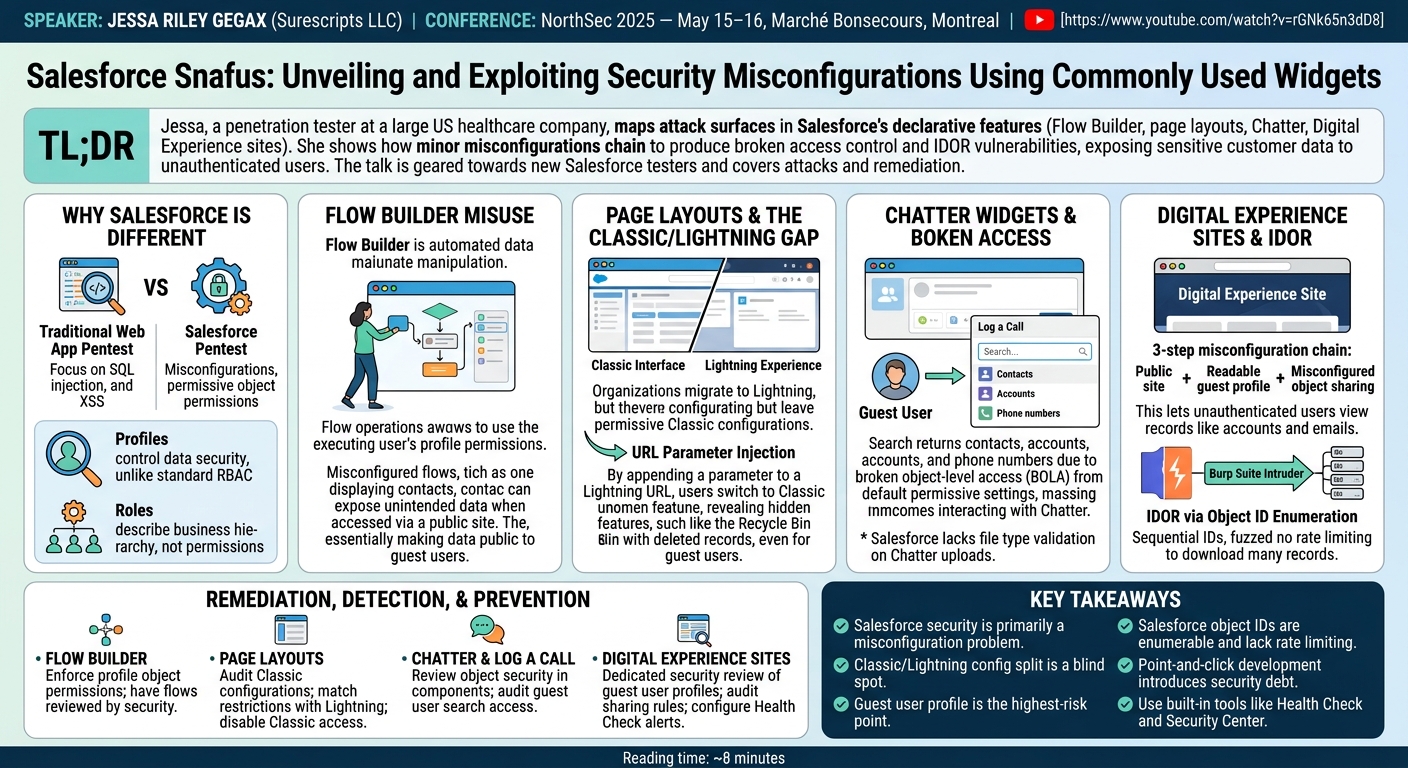
Jessa Riley Gegax, a penetration tester at a large US healthcare company, walks through a practical attack surface map of Salesforce's declarative development features — Flow Builder, page layouts, Chatter widgets, and Digital Experience sites — showing how individually minor misconfigurations chain together to produce broken access control and IDOR vulnerabilities that expose sensitive customer data to unauthenticated internet users. The talk is oriented toward practitioners encountering Salesforce for the first time in a pentest engagement and covers both attack paths and remediation. ---
Key moments
- 3:19 Salesforce objects lax by default; point-and-click enables leaks
- 8:19 Salesforce Classic silently enables more features than Lightning
- 9:40 Chatter enabled by default exposes all user PII via search
- 14:35 Salesforce object IDs enumerable with no rate limiting
- 11:55 Digital Experience sites can expose all objects to internet
- 12:55 Guest user roles misconfiguration grants public record access
- 14:53 20K+ Burp requests enumerate objects; Salesforce doesn't block
Salesforce Snafus: Unveiling and Exploiting Security Misconfigurations Using Commonly Used Widgets
Speaker: Jessa Riley Gegax (Surescripts LLC)
Conference: NorthSec 2025 — May 15–16, 2025, Marché Bonsecours, Montreal
Watch on YouTube: https://www.youtube.com/watch?v=rGNk65n3dD8
Reading time: ~8 minutes
TL;DR
Jessa Riley Gegax, a penetration tester at a large US healthcare company, walks through a practical attack surface map of Salesforce's declarative development features — Flow Builder, page layouts, Chatter widgets, and Digital Experience sites — showing how individually minor misconfigurations chain together to produce broken access control and IDOR vulnerabilities that expose sensitive customer data to unauthenticated internet users. The talk is oriented toward practitioners encountering Salesforce for the first time in a pentest engagement and covers both attack paths and remediation.
Introduction
Salesforce is the dominant CRM platform in enterprise environments, and its "point-and-click" declarative development model — which allows non-technical customer support teams to build automated workflows, configure data visibility, and deploy externally accessible portals without writing code — has dramatically lowered the barrier to creating data-rich applications. It has also lowered the barrier to misconfiguring them in ways that are not immediately obvious to the people doing the configuring.
Jessa Riley Gegax's talk at NorthSec 2025 approaches Salesforce from the perspective of a practitioner who has conducted repeated penetration tests against Salesforce-based applications in a healthcare context — an environment where the sensitivity of the exposed data makes misconfiguration particularly consequential. The talk does not attempt to be a comprehensive treatment of Salesforce security; Gegax is explicit that 30 minutes is time for a high-level orientation, not a deep dive. What she delivers is a structured taxonomy of the features most likely to introduce vulnerabilities, the access control model that makes Salesforce confusing for testers accustomed to traditional web applications, and a set of concrete attack demonstrations against a test environment.
Why Salesforce Is Different from a Standard Web Application Pentest
The starting point for understanding Salesforce security is that the dominant vulnerability class is not what most testers expect. Traditional web application testing focuses on OWASP Top 10 categories: SQL injection, cross-site scripting, CSRF, deserialization. In Salesforce environments, Gegax argues, the primary finding class is misconfiguration — specifically, default-permissive object permissions combined with feature configurations that expose those objects to broader audiences than intended.
▶ Watch: Salesforce vs. traditional web app security model (4:00)
Salesforce's data model centers on "objects" — typed entities representing business concepts (contacts, accounts, cases, users, groups). Objects carry records, which contain the actual data. Permissions on objects and records are controlled through "profiles" — a term Gegax flags as a source of confusion, because Salesforce uses "roles" to describe business hierarchy (who reports to whom) rather than security permissions. This is the inverse of standard enterprise RBAC intuition, where roles typically govern access. A tester accustomed to evaluating role-based access control needs to reorient: in Salesforce, the security-relevant construct is the profile, and the role is organizational metadata.
The second structural difference is the point-and-click development model. Salesforce increasingly positions Flow Builder, page layout configuration, and Digital Experience site construction as activities for non-technical users. A customer support manager can build an automated workflow that queries contact records, configure a portal page that surfaces those records to logged-in users, and publish the portal to external audiences — all without writing a line of code and without necessarily understanding the access control implications of each step.
Flow Builder: Automated Data Manipulation Without Access Guardrails
Flow Builder is Salesforce's visual workflow automation tool. It presents a drag-and-drop canvas for constructing sequences of data operations: querying records, creating records, updating fields, routing to different screens based on conditions. Common use cases include customer self-service forms (address updates, case submissions) and internal process automation.
▶ Watch: Flow Builder mechanics and privilege misuse (6:00)
The security concern Gegax identifies is that Flow Builder operations run in the context of the executing user's permissions, but the flows themselves are often built by users without a security background who may not consider what profile permissions are required to execute each step. A flow that queries contact records and displays them on a screen will surface whatever contact data the running user's profile can access — including data the flow designer never intended to make visible, if the profile is broader than expected. When that flow is embedded in a publicly accessible Digital Experience site, the effective audience for that data becomes every unauthenticated internet user whose guest user profile has been granted object-level read access.
Page Layouts and the Classic/Lightning Version Gap
Page layouts in Salesforce determine which fields are visible on record pages, which actions are available to users, and how information is organized in the user interface. Both the legacy Salesforce Classic interface and the modern Lightning Experience interface can be configured in the same environment, and they maintain separate page layout configurations.
▶ Watch: Salesforce Classic vs. Lightning Experience and the URL injection technique (8:00)
The vulnerability Gegax demonstrates follows from a common administrative pattern: an organization migrates to Lightning, configures Lightning page layouts with appropriate visibility restrictions, and ignores the Classic configuration on the assumption that no one uses Classic anymore. The Classic configuration, however, frequently retains permissive defaults from before the migration — including features such as the Recycle Bin that expose soft-deleted record data.
The attack is a URL parameter injection: by appending a specific parameter to a Lightning URL, the interface switches to Classic rendering, presenting the user with the broader Classic page layout and its additional features. Gegax demonstrates this on a test environment, showing that a Recycle Bin link appears in Classic that was absent in Lightning, and that navigating to it surfaces records that are not visible through the Lightning interface. The technique requires no elevated privileges — it is accessible to any user (including guest users in a Digital Experience site context) whose profile grants access to the underlying records.
Chatter Widgets, the Log a Call Feature, and Broken Object-Level Access
Chatter is Salesforce's internal collaboration layer — a real-time feed for status updates, file sharing, and activity logging. It is enabled by default for all Salesforce customers. The "Log a Call" widget is a standard Chatter component that creates completed task records associated with an object, allowing users to document communications with contacts and other entities.
▶ Watch: Chatter, Log a Call, and object-level access exposure (10:00)
When Chatter is enabled and the contact object has overly permissive object-level security settings, the Log a Call widget's search functionality can expose contact records to users who should not have access to them. Gegax demonstrates logging in as an unauthenticated guest user and using the widget's search field to query contacts by first name. The result returns all matching contacts in the environment, including their account names, phone numbers, and addresses — a full broken object-level access (BOLA) vulnerability derived entirely from default Chatter functionality interacting with permissive contact object settings.
A related finding she mentions: Salesforce does not perform file type validation on Chatter file uploads. An attacker with Chatter access can upload and send an executable — a medium-severity finding that would be a blocker in most non-CRM application contexts but which Salesforce permits by design.
Digital Experience Sites, Guest Users, and IDOR via Object ID Enumeration
Digital Experience sites are the external-facing layer of the Salesforce platform: customer portals, community forums, and self-service applications that surface Salesforce data to authenticated and unauthenticated external users. When a Digital Experience site is published as publicly accessible, its "guest user" profile determines what data is visible to unauthenticated visitors.
▶ Watch: Digital Experience sites and IDOR exploitation with Burp Suite (12:00)
The misconfiguration chain Gegax demonstrates involves three steps: the Digital Experience site is configured as publicly accessible; the account object is configured with readable permissions for the guest user profile; and a custom role grants guest users visibility to account records (a step she acknowledges required deliberate misconfiguration in her test environment, but one that she encounters in real engagements where object sharing rules are misconfigured by non-technical administrators). The result: unauthenticated users can browse account records, including names, ownership, and contact email addresses.
The IDOR component follows from Salesforce's object ID format. Every Salesforce record is assigned an ID that appears to be random but is not. Gegax declines to explain the complete ID generation mechanism (noting she has not fully reverse-engineered it), but she demonstrates that the IDs are sequential or otherwise enumerable in practice. Using Burp Suite's Intruder module to fuzz object IDs in GET requests to the Salesforce record endpoint — with no rate limiting applied by the platform — she enumerates accessible records at scale. The absence of rate limiting is consistent across the engagements she has assessed; organizations cannot rely on lockout or throttling as a control against IDOR exploitation in Salesforce.
Remediation, Detection, and Prevention
Gegax closes with a remediation framework organized around the four features covered in the talk.
▶ Watch: Remediation strategies for Salesforce misconfigurations (14:00)
For Flow Builder, the primary control is enforcing profile-level object permissions so that flow execution does not grant access to records beyond what the user's profile permits. Flows should be reviewed by someone with security context, not only by the support team member who built them.
For page layouts, organizations should audit Classic configurations even if Classic is no longer in active use. The Classic layout should reflect the same visibility restrictions as Lightning, or Classic access should be disabled at the profile level.
For Chatter and the Log a Call widget, object-level security for all objects displayed in Chatter components should be explicitly reviewed, with particular attention to whether guest users can trigger widget search functionality. Chatter file upload should be reviewed if the environment is accessible to external users.
For Digital Experience sites, the guest user profile deserves dedicated security review before any site is published publicly. Object sharing rules should be audited against the principle of least privilege, and Salesforce's Health Check tool and Security Center should be configured to alert on guest user permission changes.
Notable Quotes
"I'm not a Salesforce engineer, but I do know how to hack these applications."
"In Salesforce, roles are not security-related at all — they just show the business purpose. Security permissions are called profiles. When I learned that, it was just confusing."
"Salesforce doesn't implement rate limiting, so you can basically fuzz this request as many times as you want and it's not going to lock you out. Brute force is pretty easy."
"Default configurations are very common within Salesforce applications. It's really all about misconfigurations."
"Once Digital Experience is enabled, it allows external users to access some of your company's data. Big red flag if you don't know what you're doing."
Key Takeaways
- Salesforce security is primarily a misconfiguration problem. Unlike traditional web applications where injection and authentication bypass dominate, Salesforce vulnerabilities typically arise from default-permissive object settings interacting with features that expose those objects to broader audiences than intended.
- The Classic/Lightning configuration split is a persistent blind spot. Organizations that have migrated to Lightning often leave Classic page layouts with permissive defaults. A URL parameter injection can switch an authenticated or guest user into Classic rendering, exposing features and data not visible in Lightning.
- Guest user profile is the highest-risk configuration point. The guest user profile governs what unauthenticated internet users can access through a public Digital Experience site. Any object readable by the guest user profile is effectively public.
- Salesforce object IDs are enumerable. Despite their apparent randomness, object IDs can be enumerated via Burp Suite's Intruder or equivalent tooling. Without rate limiting, IDOR exploitation against Salesforce record endpoints is straightforward once object-level read permissions are misconfigured.
- Point-and-click development introduces security debt. Non-technical users building Salesforce applications via Flow Builder and Digital Experience configuration tools routinely create access control issues they are not equipped to recognize. Security review of declarative configurations requires explicit inclusion in the development process.
- Use Salesforce's built-in tooling. Health Check and Security Center provide visibility into misconfigured profiles, guest user permissions, and object sharing rules. These should be treated as baseline controls, not optional auditing tools.
Reviews
Dr. Zero (Offensive Security Researcher) — SOLID
Jessa Riley Gegax (Surescripts) maps the Salesforce attack surface for penetration testers: Flow Builder privilege misuse, Classic/Lightning configuration split (URL parameter switch to Classic rendering), Chatter widget BOLA via guest user profile misconfiguration, and IDOR through enumerable Salesforce object IDs against Digital Experience sites. Includes remediation per feature and notes absence of platform rate limiting.
Heather Calloway (CISO) — SOLID
Salesforce's declarative development model lets non-technical administrators build data-rich external portals without writing code — and without necessarily understanding that customer data they never intended to expose is now accessible to anyone with a browser. Jessa Riley Gegax documents the misconfiguration patterns clearly for practitioners doing pentest engagements. The governance and organizational exposure story for the CISOs running these environments is largely absent.