OpSec for Grandma
Rich Mogull
ShmooCon XX (Final) · Day 2 · Belay It
Overview
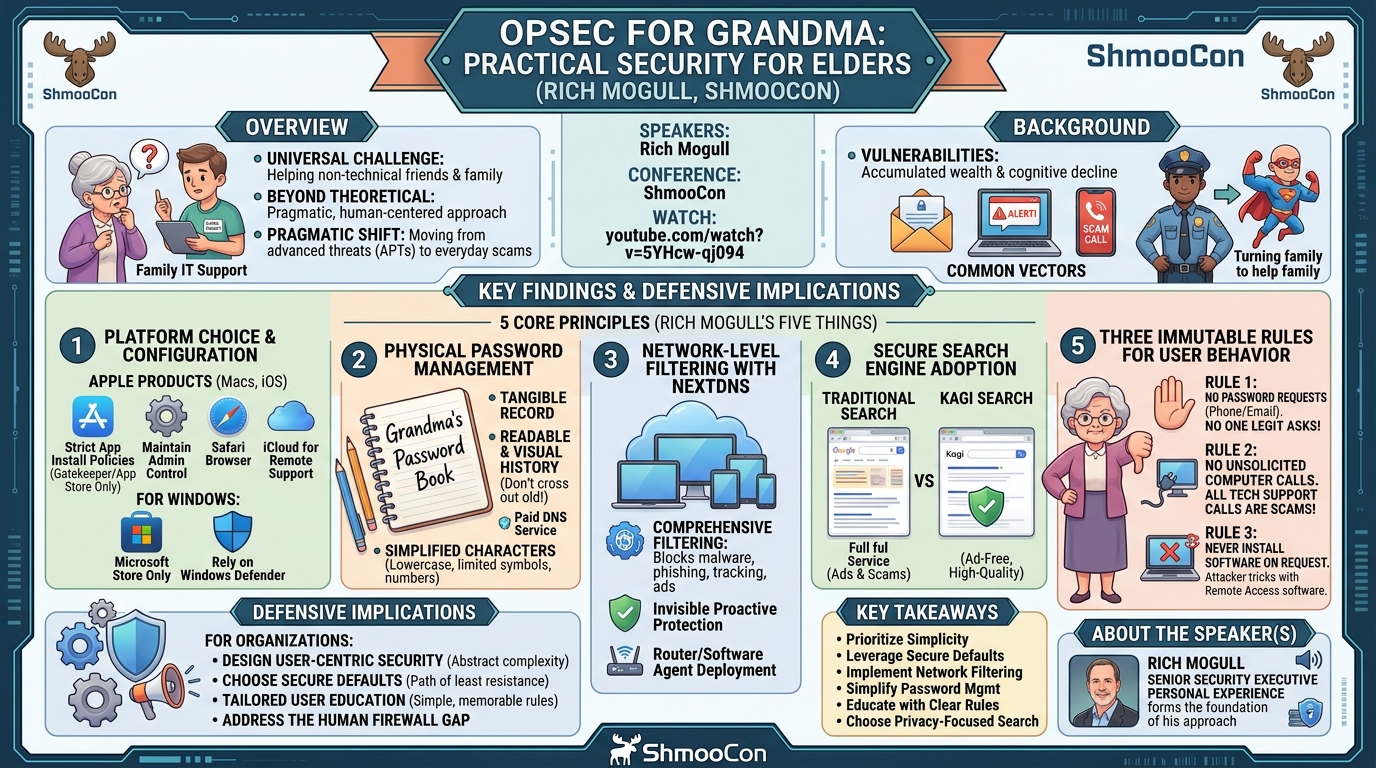
In his ShmooCon talk, "OpSec for Grandma," Rich Mogull, a seasoned security executive, tackles a universal challenge faced by many in the cybersecurity community: providing effective technical support and security guidance to non-technical friends and family, particularly elders. Mogull highlights the often-overlooked reality that despite their professional prowess in defending complex organizations, security experts frequently struggle to translate sophisticated security concepts into actionable, user-friendly advice for their loved ones. This talk is a candid exploration of practical strategies and tools that have proven highly effective in drastically reducing security incidents for his own family members.
Key moments
- 6:30 Why elders are uniquely vulnerable to scams
- 7:10 Common types of scams targeting friends and family
- 8:20 Why Macs are recommended for family IT support
- 10:15 The 'Password Book' method for elders
- 11:15 NextDNS: Crucial filtering for all devices
OpSec for Grandma
Speakers: Rich Mogull
Conference: ShmooCon
YouTube: https://www.youtube.com/watch?v=5YHcw-qj094
Overview
In his ShmooCon talk, "OpSec for Grandma," Rich Mogull, a seasoned security executive, tackles a universal challenge faced by many in the cybersecurity community: providing effective technical support and security guidance to non-technical friends and family, particularly elders. Mogull highlights the often-overlooked reality that despite their professional prowess in defending complex organizations, security experts frequently struggle to translate sophisticated security concepts into actionable, user-friendly advice for their loved ones. This talk is a candid exploration of practical strategies and tools that have proven highly effective in drastically reducing security incidents for his own family members.
Mogull's presentation goes beyond theoretical security principles, offering a pragmatic, human-centered approach to personal operational security (OpSec). He emphasizes that while professionals are adept at combating advanced persistent threats (APTs), the battle against everyday scams targeting the elderly—such as phishing, tech support fraud, and malicious advertising—requires a different toolkit and a simpler communication strategy. The talk resonates deeply with anyone who has served as the de facto "family IT support," providing a refreshing perspective on how to achieve significant security gains for vulnerable populations without overwhelming them with technical jargon or complex procedures.
The core message is one of responsibility and empowerment: as security professionals, we are uniquely positioned to protect our elders, who are disproportionately targeted due to accumulated wealth and potential cognitive decline. Mogull shares a set of five core principles and associated tools that have transformed his family's security posture, moving from a dozen incidents and close calls annually to virtually none. This talk is not just about technical controls, but about understanding user behavior, simplifying interfaces, and establishing clear, memorable rules that even the most non-technical user can follow.
Background
▶ Watch: Why elders are uniquely vulnerable to scams (6:30)
The problem addressed by Mogull is a pervasive and often distressing one: the vulnerability of elderly individuals to various forms of cybercrime and online scams. As Mogull points out, this isn't a new phenomenon; elders have been targets for exploitation long before the internet, primarily because they often possess accumulated wealth and may experience a natural degradation of cognitive faculties with age. This combination makes them particularly susceptible to manipulation, falling for scams that more technically savvy individuals might easily identify.
The landscape of attacks targeting elders is diverse, but Mogull identifies several prevalent vectors based on his personal experience supporting friends and family. These include phishing attacks delivered via email, often designed to mimic legitimate communications from banks, government agencies, or well-known services. Another significant vector involves browser-based phishing, frequently manifested as pop-up scams or deceptive advertisements delivered through compromised ad networks, which can trick users into revealing sensitive information or installing malicious software. Finally, cold calls and cold text messages from imposters pretending to be tech support, government officials, or family members in distress, represent a persistent and highly effective threat, often leading to significant financial losses or system compromise.
Mogull’s personal journey reflects a common narrative among cybersecurity professionals: becoming the default, unpaid IT support for family and friends. Recognizing the limitations of traditional enterprise security strategies when applied to this demographic, he dedicated years to developing and refining a practical, effective set of countermeasures. His approach acknowledges that the target users are not "hackers" or even "power users"; they are individuals who need simple, robust, and often invisible protection, minimizing their need to make complex security decisions. This background sets the stage for his "five things" – a curated set of strategies designed to address these specific vulnerabilities with a focus on ease of use and maximum impact.
Key Findings
▶ Watch: Common types of scams targeting friends and family (7:10)
Rich Mogull's presentation distills years of practical experience into five key strategies that have dramatically reduced security incidents for his non-technical family members. These findings represent a pragmatic shift from enterprise-grade security to a user-centric, simplified approach tailored for vulnerable populations.
- Platform Choice and Configuration for Simplicity: Mogull strongly advocates for Apple products, specifically Macs and iOS devices, due to their superior out-of-the-box security defaults and integrated hardware-software defenses. For these users, he implements strict application installation policies, maintains administrative control, and leverages built-in remote assistance features. For those stuck with Windows, he advises utilizing the Microsoft Store for app installations and relying on Windows Defender.
- Physical Password Management: Contrary to conventional cybersecurity wisdom, Mogull recommends a physical password book for older, less technically inclined individuals. This method addresses challenges associated with digital password managers, such as remembering master passwords or navigating complex interfaces, by providing a tangible, easy-to-update record.
- Network-Level Filtering with NextDNS: The most impactful finding is the deployment of NextDNS, a paid DNS service offering robust, configurable filtering against malware, phishing, and advertising networks. This proactive measure intercepts threats at the network layer, preventing users from even reaching malicious sites, regardless of the browser or application they are using.
- Secure Search Engine Adoption: Mogull identifies Kagi as a critical component for preventing users from inadvertently landing on scam sites through search results. By providing ad-free, high-quality search results, Kagi helps steer users away from malicious advertising and deceptive links often found in conventional search engines.
- Three Immutable Rules for User Behavior: Beyond technical controls, Mogull emphasizes the importance of simple, memorable behavioral rules:
- No one legitimate will ever ask for a password or bank account over the phone or email. Users should hang up/delete and use known, official contact methods.
- No one will ever call about a problem with their computer. All unsolicited calls about computer issues are scams; only the designated family IT support (Mogull himself) should be trusted.
- Never install anything someone asks you to download. This targets remote access scams where attackers trick users into installing legitimate screen-sharing software to gain control.
These findings collectively form a layered defense strategy that minimizes user interaction with threats, simplifies security decision-making, and provides robust protection against the most common attack vectors targeting elders.
Technical Deep Dive
▶ Watch: Why Macs are recommended for family IT support (8:20)
Mogull's "five things" constitute a layered defense strategy, each component addressing specific vulnerabilities and user behaviors.
1. Platform Choice and Configuration
Mogull's primary recommendation for non-technical users, particularly elders, is the Mac platform. He argues that Apple's integrated hardware and software defenses, coupled with its secure-by-default philosophy, significantly reduce the attack surface and simplify security management.
- Gatekeeper: A key feature on macOS, Gatekeeper, is configured to allow application installations only from the Mac App Store and identified developers. For particularly vulnerable family members, Mogull restricts installations exclusively to the App Store, manually installing any necessary third-party applications himself. This significantly curtails the risk of users inadvertently downloading and running malware.
- Admin Privileges: Mogull ensures he maintains an admin user account on all family Macs, allowing him to manage settings and install software remotely or during visits, while limiting the daily user account to standard privileges.
- Safari Browser: He encourages the use of Safari over Chrome, noting Chrome's roots as an advertising product. Safari, being more tightly integrated with macOS and privacy-focused, offers a more secure browsing experience out of the box.
- iCloud for Remote Support: Leveraging iCloud accounts and built-in features like Messages and FaceTime, Mogull can remotely connect to family members' systems for support without requiring them to install any additional software. This seamless integration is crucial for users who would struggle with installing and configuring remote access tools.
While Macs are his preferred platform, Mogull acknowledges that some users may be "stuck" with Windows. For these systems, he advises:
- Microsoft Store Only: Configuring Windows to only install applications from the Microsoft Store, mirroring the Mac App Store strategy.
- Windows Defender: Relying on Windows Defender, which he notes has evolved into a highly effective built-in antivirus solution.
- General Hardening: Beyond these, he urges users to "do their best" to lock down the system, recognizing the inherent complexities of securing Windows for non-technical users.
2. Physical Password Management
This recommendation challenges conventional security wisdom, which typically promotes digital password managers. However, Mogull argues that for older individuals, the cognitive load and complexity of remembering a master password, navigating a new application, or understanding password generation principles can be insurmountable barriers.
- Password Book: His solution is a simple, physical notebook where each page is dedicated to a single account.
- Readability and History: The use of larger letters and the practice of not crossing out old passwords (just adding new ones below) ensures readability and provides a historical record, helping users recall previous passwords if a new one is forgotten or rejected.
- Simplified Characters: He advises teaching users to create passwords with lowercase letters, limited special characters, and numbers. While less complex than strong, randomly generated passwords, this approach prioritizes handwriting recognition and memorability for humans over cryptographic strength that might be undermined by users writing it on a sticky note anyway. The goal is to make it easy enough to use consistently.
3. Network-Level Filtering with NextDNS
Mogull identifies NextDNS as the single most effective tool he has deployed. NextDNS is a paid, cloud-based DNS resolver that offers highly configurable filtering capabilities.
- Comprehensive Filtering: It blocks various categories of threats, including malware, phishing sites, tracking networks, and advertising. This proactive filtering prevents users from ever reaching malicious domains, regardless of the application they are using.
- Cost-Effectiveness: Mogull highlights its affordability, costing "20 bucks for you and your immediate family members," which he considers an incredible value given its robust features.
- Deployment Methods:
- Router Integration: For home networks, NextDNS can be integrated directly with the router (e.g., Ubiquiti devices), providing network-wide protection for all connected devices.
- Software Agent: More practically for remote family members, Mogull uses the software agent available for all major operating systems (macOS, Windows, iOS, Android). This agent installs a small icon in the menu bar/system tray.
- User Empowerment (Controlled): The software agent allows users to temporarily toggle off the filtering, for instance, if a legitimate link from a church group is being blocked. Mogull trains his family members on how to do this, emphasizing the importance of turning it back on immediately. This provides a release valve for false positives without requiring complex intervention.
- Real-time Logging: For support purposes, Mogull enables logging for family members' NextDNS configurations. This allows him to see in real-time what domains are being accessed and blocked, providing critical insights when diagnosing issues or understanding potential threats. The logs confirm the service's effectiveness, showing few malicious attempts getting through.
- Impact: NextDNS has been instrumental in blocking browser-based scams, particularly those delivered via ad networks. Mogull recounts only one instance where a scam got through NextDNS in a year, which was a full-page video ad directly on Facebook trying to trick the user into calling a number – a social engineering attack that bypassed DNS filtering.
4. Secure Search Engine Adoption
Mogull points out that traditional search engines like Google and Bing are fundamentally "advertising delivery platforms," where the user is not the customer. This model often leads to search results polluted with advertisements and links to scam sites, especially when users search for common things like recipes.
- Kagi Search: He promotes Kagi, a paid search engine that prioritizes user experience and privacy over advertising. Kagi provides high-quality, ad-free search results, significantly reducing the likelihood of users encountering malicious links or deceptive sites directly from search queries.
- Proactive Protection: While still in the process of rolling out Kagi to all family members, Mogull sees it as a crucial complement to NextDNS, further hardening the browsing experience by cleaning up the initial entry point to the web.
5. Three Immutable Rules for User Behavior
Beyond technical tools, Mogull emphasizes direct user education through three simple, easy-to-remember rules designed to counter common social engineering tactics. These rules address the human element, which is often the weakest link in any security chain.
- "No one will ever ask you for a password or a bank account ever over the phone or over email." This rule directly targets phishing and vishing (voice phishing) attempts. Users are instructed to hang up or delete such communications and, if concerned, to independently navigate to the official website or call a known, official phone number for the organization in question.
- "No one's ever going to call you about your computer. Nobody gives a crap about your computer except me, and I'm the only one that'll ever call you." This rule is a direct countermeasure to the pervasive IT support scam epidemic. Mogull highlights how devastating these scams can be, often leading to complete system compromise and significant financial loss. By establishing himself as the sole trusted authority for computer issues, he inoculates his family against unsolicited tech support calls. In case of a problem, they are instructed to call him and wait, even to the point of unplugging the computer until he can assist.
- "Never install anything somebody asks you to download." This rule addresses scams where attackers trick users into installing legitimate remote access software, such as AnyDesk or TeamViewer. While Apple and Microsoft have built-in protections against malware, these protections don't stop users from installing legitimate software that can then be abused. Mogull makes it clear that he is the only one who installs software on their computers.
These three rules, hammered in repeatedly, leverage the cognitive decline aspect by simplifying complex security decisions into clear, binary choices, making them highly effective even for highly intelligent individuals who might otherwise fall victim to sophisticated social engineering.
Demo / Proof of Concept
▶ Watch: The 'Password Book' method for elders (10:15)
The talk "OpSec for Grandma" did not include a live technical demonstration or a traditional proof of concept. Instead, Rich Mogull presented his findings and strategies based on extensive personal experience and anecdotal evidence from his own family's security journey. He shared real-world examples of phishing emails his father-in-law received and discussed how the implemented solutions effectively blocked numerous scam attempts. The "proof" of concept lies in the demonstrated reduction of security incidents and close calls from "a dozen incidents and a half a dozen close calls every year to pretty much basically nothing" since deploying these five strategies. The effectiveness is measured by the tangible improvement in his family's security posture over time.
Defensive Implications
▶ Watch: NextDNS: Crucial filtering for all devices (11:15)
Rich Mogull's practical advice, while aimed at securing non-technical family members, carries significant implications for professional security defenders and organizations. The core takeaway is the critical importance of designing and implementing user-centric security solutions that account for human factors, cognitive limitations, and varying technical proficiencies.
- Simplify and Abstract: Enterprise security often relies on complex tools and policies. Mogull's success with NextDNS demonstrates the power of network-level filtering that abstracts away complexity from the end-user. Organizations should consider how to implement similar "invisible" protections (e.g., DNS filtering, secure web gateways, email filtering) that block threats before they reach the user, minimizing the need for user intervention or decision-making.
- Choose Secure Defaults: The emphasis on Apple products highlights the value of platforms with strong, secure-by-default configurations. When choosing systems or designing internal applications, organizations should prioritize security and ease of use, ensuring that the path of least resistance is also the most secure path. This includes restricting application installations to trusted sources (e.g., enterprise app stores) and utilizing built-in security features.
- Tailored User Education: Generic security awareness training often falls flat. Mogull's "three rules" exemplify targeted, memorable user education that focuses on specific, high-impact behaviors. Security teams should move beyond fear-mongering and instead create concise, actionable rules that are easy for all employees, regardless of technical background, to understand and recall, especially for common threats like phishing and tech support scams.
- Leverage Remote Management Tools: Mogull's use of iCloud for remote support underscores the importance of integrated and user-friendly remote management capabilities. Organizations should invest in tools that allow IT and security teams to efficiently manage and troubleshoot endpoints without requiring complex actions from end-users, thereby reducing help desk load and improving incident response.
- Address the "Human Firewall" Gap: The talk implicitly acknowledges that the human element remains the weakest link. By focusing on simple behavioral changes (e.g., "never install anything someone asks you to download") and providing clear incident response instructions ("call me, leave a message, it's okay to unplug"), organizations can empower their employees to act as effective "human firewalls" against social engineering attacks.
- Reconsider Traditional Advice for Specific Demographics: The recommendation for physical password books challenges the one-size-fits-all approach to security. This suggests that for certain demographics or user groups within an organization (e.g., less tech-savvy employees, front-line workers with limited digital interaction), traditional security advice may need to be adapted or even inverted to be truly effective.
In essence, Mogull's talk serves as a powerful reminder that effective security isn't just about advanced technical controls; it's equally about empathy, simplicity, and understanding the real-world behaviors and capabilities of the people we are trying to protect.
Key Takeaways
- Prioritize User-Centric Security: Effective security for non-technical users, especially elders, must prioritize simplicity, ease of use, and minimal cognitive load over complex technical solutions.
- Leverage Secure-by-Default Platforms: Apple's macOS and iOS offer superior out-of-the-box security features like Gatekeeper and integrated remote support via iCloud, significantly reducing vulnerabilities. For Windows, utilize the Microsoft Store and Windows Defender.
- Implement Network-Level Filtering: Services like NextDNS provide robust, affordable, and "invisible" protection against malware, phishing, and ads by blocking threats at the DNS layer, drastically reducing user exposure to malicious content.
- Simplify Password Management for Specific Demographics: For older, less tech-savvy individuals, a physical password book with clear, large writing and historical records can be more effective and user-friendly than digital password managers.
- Educate with Clear, Unambiguous Rules: Three key behavioral rules—never share passwords/bank accounts, no one will call about your computer, and never install requested software—are crucial for countering common social engineering scams.
- Choose Privacy-Focused Search: Using paid, ad-free search engines like Kagi helps prevent users from landing on scam sites or encountering malicious advertising through search results.
About the Speaker(s)
Rich Mogull is presented as a highly experienced and respected figure in the cybersecurity industry, described as a "senior Security executive" who has spent "decades building up [his] career" defending "most important organizations out there in the world." Beyond his professional accolades, the talk reveals a relatable aspect of his life: his role as the primary, unpaid IT support for his friends and family. This personal experience forms the foundation of his practical and empathetic approach to securing non-technical users, particularly elders, against prevalent online scams. His insights stem from a unique blend of high-level security expertise and hands-on problem-solving for those closest to him.
Reviews
Dr. Zero (Offensive Security Researcher) — STRONG ACCEPT
The talk "OpSec for Grandma" by Rich Mogull provides a brutally honest and practical framework for security professionals tasked with protecting non-technical family members, particularly elders, from common online scams. Mogull outlines five actionable strategies, from device choice and password management to DNS filtering and fundamental security rules, emphasizing ease of implementation and effectiveness over traditional, often impractical, cybersecurity best practices for this demographic. He asserts these methods have dramatically reduced incidents within his own family, offering a compelling case for a pragmatic, low-overhead approach to a pervasive problem.
Heather Calloway (CISO) — STRONG ACCEPT
Rich Mogull's "OpSec for Grandma" offers a refreshingly direct and unsentimental approach to securing the most vulnerable users. While framed through the lens of personal family security, the core principles—simplification, network-level abstraction, and precise behavioral rules—are profoundly relevant for enterprise security leaders struggling with the human element. This isn't just a talk about personal tech support; it's a practical masterclass in designing effective security programs for the least technically proficient users, a challenge every organization faces.