Security Guidance as a Service: Building an AI-Native Blueprint for Defensive Security
Shruti Datta Gupta (Product Security Engineer · Adobe), Chandrani Mukherjee (Product Security Engineer · Adobe)
[un]prompted 2026 — AI Security Practitioner Conference · Day 1 · 1
Overview
Adobe's security engineering team built a centralized, AI-powered Security Guidance as a Service platform that delivers consistent, Adobe-specific security recommendations across every developer touchpoint — Jira tickets, Slack, threat modeling tools, and now directly inside IDEs via an MCP server. The system, built on a RAG architecture with a rigorous automated ingestion pipeline, demonstrates how a small security team can democratize expert-level guidance across a large engineering organization. ---
Key moments
- 1:00 Problem: security-to-developer ratio too low for one-on-one guidance
- 2:30 Generic AI gives generic answers; company-specific RAG needed
- 3:59 Architecture: single vector store serves Jira, Slack, threat modeling, IDE
- 5:59 Automated ingestion pipeline: Git repo as source of truth, pub-sub model
- 7:59 Per-document eval: reference Q&A pairs test correctness and relevancy on ingest
- 10:00 AI orchestrator tweaks system prompt per input type for tailored guidance
- 11:59 Demo: Slack bot and Jira ticket delivering org-specific security guidance live
- 15:00 MCP server integration extends guidance to IDE developer workflows
Security Guidance as a Service: Building an AI-Native Blueprint for Defensive Security
Speakers: Shruti Datta Gupta, Product Security Engineer, Adobe; Chandrani Mukherjee, Product Security Engineer, Adobe
Conference: [un]prompted 2026 — The AI Security Practitioner Conference
Date: March 3–4, 2026, San Francisco
Watch on YouTube: https://www.youtube.com/watch?v=SMEZowlcyyo
Reading time: ~8 minutes
TL;DR
Adobe's security engineering team built a centralized, AI-powered Security Guidance as a Service platform that delivers consistent, Adobe-specific security recommendations across every developer touchpoint — Jira tickets, Slack, threat modeling tools, and now directly inside IDEs via an MCP server. The system, built on a RAG architecture with a rigorous automated ingestion pipeline, demonstrates how a small security team can democratize expert-level guidance across a large engineering organization.
Introduction
The ratio of security engineers to developers at most large organizations is deeply unfavorable. One-on-one guidance doesn't scale. Security documentation becomes fragmented and stale. Developers ask the same questions in Slack, in Jira, during threat modeling sessions, and at code review time — and the answers they get are inconsistent, generic, or arrive too late in the development cycle to be easily acted upon.
Chandrani Mukherjee (ten years in security) and Shruti Datta Gupta (five years in product security) spent the last year and a half at Adobe building a practical answer to this problem: Security Guidance as a Service, a platform-agnostic system that delivers consistent, organization-specific security guidance wherever developers already work.
Their talk at [un]prompted 2026 traced the system's evolution from a basic RAG prototype integrated with Jira to a production system with four distinct use cases, an automated document ingestion pipeline, an LLM orchestrator, and most recently an MCP server that surfaces guidance directly inside AI coding tools like Cursor.
▶ Watch: Introduction and Problem Statement (00:00)
The Problem: Generic AI Gives Generic Answers
The failure mode of using a general-purpose LLM for security guidance is predictable. Ask ChatGPT or Claude "what authentication should I use?" and you get a general answer. You don't get Adobe's specific authentication standards, the approved methods your platform team has chosen, or the internal libraries and functions your organization uses. You might also get hallucinations — confidently stated but incorrect guidance that points developers in the wrong direction.
Mukherjee described three intersecting problems that drove the project:
Scalability. The security-to-developer ratio is simply too low for human security engineers to provide one-on-one guidance at scale. It becomes a bandwidth problem.
Fragmented documentation. Security guidance lives across multiple systems — design review documentation, threat modeling templates, scanner configuration, Confluence pages — and is not reliably reaching developers when and where they need it. Information becomes stale, and the people who most need it often can't find it.
Consistency gaps. Security researchers and partners provide essentially the same underlying guidance across different processes — threat modeling, vulnerability triage, code review — but on separate platforms, with no shared knowledge base ensuring the answers are consistent.
▶ Watch: The Problem We Were Solving (00:00)
The Architecture: One Vector Store, Many Surfaces
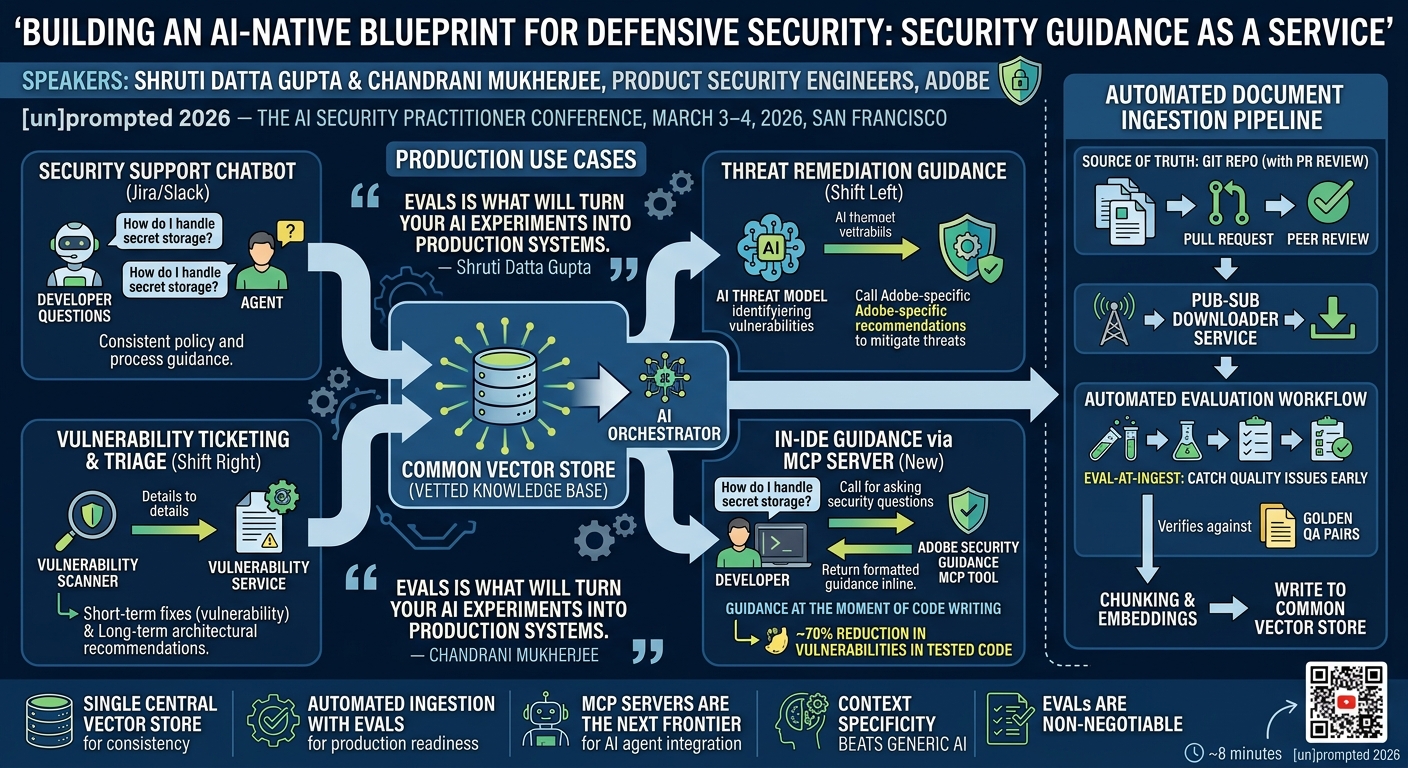
The core design principle of Security Guidance as a Service is a single central vector store — a vetted, curated knowledge base — that backs every response, regardless of which platform or workflow triggered the question. All guidance comes from the same source, which means it is consistent and organization-specific.
The team started about a year and a half ago with a straightforward RAG (Retrieval-Augmented Generation) implementation: curated documents, a vector store, and an integration with Jira's vulnerability ticketing workflow. The first expansion was to Slack, where developers were asking the same questions in channels they did have access to, even when they couldn't access the relevant Jira ticket.
▶ Watch: The Journey and Architecture (04:00)
They quickly realized the system needed to be platform-agnostic and extensible. Building separate RAG pipelines for Jira, Slack, threat modeling, and the IDE would mean maintaining multiple vector stores and getting diverging answers across tools. The right architecture was a single common vector store with a flexible orchestration layer on top.
The request flow looks like this:
- A query arrives from any surface — Jira ticket, Slack message, threat modeling platform, or IDE.
- An AI orchestrator adjusts the system prompt based on the request type; each integration has its own configured prompt template.
- The orchestrator queries the vector store and retrieves relevant guidance.
- The LLM formats the response as structured JSON appropriate for the requesting platform.
- Everything is logged in LangSmith for traceability, and online evaluation workflows run continuously in production.
The Automated Document Ingestion Pipeline
As the system scaled, document ingestion became a first-class engineering problem. In the early days, document preparation was manual — taking PDFs or Word documents, processing them for the vector store, running one-off scripts to generate embeddings. That was not sustainable.
The solution was an automated ingestion pipeline with a Git repository as the source of truth.
▶ Watch: Document Curation Workflow (08:00)
Here is how it works:
- A security champion or subject matter expert who wants to add content to the guidance store submits a metadata file — containing, at minimum, the URL of the content — via a pull request.
- The PR goes through a peer review and merge process.
- A downloader service running on a pub-sub model listens for Git diffs. When it detects a new or changed metadata file, it pulls the content from the specified URL.
- A separate cron job handles ongoing freshness: it periodically scans already-ingested URLs to check for content updates, and re-ingests when changes are detected.
- The content flows to an ingestor service that generates embeddings and writes to the vector store. A Slack notification confirms completion.
- An evaluation workflow fires automatically at ingestion time. The document submitter provides three to four question-and-answer pairs as a reference dataset — ideal responses for that document's content. The system immediately runs evals against those pairs, checking for correctness and relevance. Quality problems are caught at ingestion, not discovered later in production.
Four Use Cases in Production
By the time of the conference, Security Guidance as a Service was powering four distinct use cases:
Security support chatbot. Developers ask policy and process questions: "How do I handle secret storage at Adobe?" "Who is the security champion for product Y?" The chatbot pulls from the same vector store backing every other integration, ensuring consistent answers.
Threat remediation guidance (shift left). Adobe has a separate automated AI threat modeling engine. Once it identifies threats in a design or architecture, it calls Security Guidance as a Service to get Adobe-specific recommendations for mitigating those threats. Generic threat modeling output becomes actionable, company-specific guidance.
Vulnerability ticketing and triage (shift right). When a security finding comes in, the vulnerability workflow passes the full vulnerability and exploit details to the service. The response includes both short-term fixes for the specific vulnerability and long-term fixes: if a team is seeing multiple vulnerabilities from the same class, the service recommends more secure-by-default changes that address the root cause rather than just the individual finding.
In-IDE guidance via MCP server. This was the newest and most forward-looking use case. With developers spending significant time in AI coding assistants, the team built a Model Context Protocol (MCP) server so that agents like Cursor can call the Adobe Security Guidance tool directly. When a developer asks a security question while writing code, the coding agent recognizes the MCP server is available, calls the tool, retrieves relevant guidance, and surfaces it formatted inline in the chat. Security guidance arrives in the IDE at the moment of writing code — further left than threat modeling, further left than code review.
▶ Watch: Use Cases in Production Including MCP Server Demo (12:01)
The live demo during the talk ran into network issues, but the flow Datta Gupta walked through verbally: a developer asks "How do I fix SQL injection?" in Cursor, the Cursor agent identifies the Adobe Security Guidance MCP tool as relevant, calls it, and returns Adobe-specific guidance formatted and displayed inline. The same guidance available in Slack or Jira, now available at the point of development.
Challenges and Lessons Learned
The speakers were candid about the difficulties they encountered:
Evals are non-negotiable, and they are expensive. Building a golden dataset is manual, time-consuming, and laborious. But it is the mechanism that makes a production AI system trustworthy rather than approximate. "Without evals, you have no reliable way to know when the system is working and when it is not."
Document freshness requires shared responsibility. The automated ingestion pipeline handles re-ingestion when content changes. But identifying that a document has become stale still involves human judgment — either the eval workflows surface a response that suggests staleness, or document owners proactively flag updates. Neither is fully automated yet.
▶ Watch: Challenges and Lessons Learned (16:01)
The PR review step is a deliberate bottleneck. It slows ingestion, but it is the mechanism that ensures only vetted, accurate information reaches the vector store. The team chose quality over speed.
The technology stack evolved significantly over 18 months. When the team built the first version of the vector store, LLMs couldn't handle multimodal input, and document chunking and vectorization had to be handled manually. By the time of the conference, multiple vector store vendors handle the entire process automatically when given a file upload. Teams building similar systems now have significantly better tooling than was available 18 months ago.
A particularly notable result from a Q&A question: in preliminary testing, foundational security rules and skills added to developer environments reduced vulnerabilities in generated code by roughly 70 percent.
Notable Quotes
"AI is useful, AI boosts productivity, but context is king. The more organization-specific context you're able to provide to these models, the more useful you can make these systems." — Shruti Datta Gupta (18:01)
"Evals is what will turn your AI experiments into production systems." — Shruti Datta Gupta (18:01)
"We needed something that is platform-agnostic — a common vector store that provides information to all these systems regardless of where the developer is in the SDLC." — Chandrani Mukherjee (06:00)
"Even foundational rules did really well. In our testing, we found that they were helpful in reducing vulnerabilities in code by a good seventy percent or so." — Shruti Datta Gupta (22:02)
Key Takeaways
- A single central vector store backing all surfaces — Jira, Slack, threat modeling, IDE — is the right architecture for consistent security guidance. Separate RAG pipelines per platform create divergence and maintenance overhead.
- Automated document ingestion with eval-at-ingest is essential for production quality. Git-as-source-of-truth with PR review, pub-sub ingestion, cron-based freshness checking, and automated Q&A eval ensures guidance stays vetted and current.
- MCP servers are the next frontier for security guidance delivery. Connecting guidance systems directly to AI coding agents like Cursor enables security guidance at the moment of code generation — further left than any previous integration point.
- Context specificity beats generic AI. Adobe-specific recommendations about Adobe's approved libraries, internal policies, and platform standards are far more actionable than generic security advice from an unconfigured LLM.
- Evals are the bridge between prototype and production — time-consuming to build but the only mechanism that provides confidence in system behavior at scale.
Slides Reference
Slides from this session are available as 2026-04-04-D1-S1-10-05-Security-Guidance-as-a-Service-Buildin.pdf. Key topics in the slides include: the problem diagram (scalability, process fragmentation, documentation staleness), the automated ingestion pipeline architecture, the core service architecture with the AI orchestrator, and the four use case flows including the MCP server integration.
Reviews
Dr. Zero (Offensive Security Researcher) — SOLID
Adobe built a sensible RAG system for security guidance and actually shipped it to four surfaces including an MCP server. Solid practitioner work with a 70% vulnerability reduction claim that deserves more scrutiny. Not novel architecture, but the execution discipline and the ingestion pipeline details are genuinely useful.
Heather Calloway (CISO) — SOLID
Adobe built the right thing: a single vetted knowledge base backing all developer touchpoints, with evaluation baked into ingestion. The 70% reduction in AI-generated vulnerabilities from foundational security rules is the number that belongs in every AppSec budget conversation. This is a practitioner talk for practitioners — it doesn't reach beyond its audience.
→ Top-rated talks at [un]prompted 2026 — AI Security Practitioner Conference
All talks from [un]prompted 2026 — AI Security Practitioner Conference