Rise of Inspectron: Automated Black-box Auditing of Cross-platform Electron Apps
Mir Masood Ali (PhD student · University of Illinois Chicago)
33rd USENIX Security Symposium · Day 1 · USENIX Security '24 · USENIX Security '24
Overview
This talk, presented by Mir Masood Ali, a PhD student at the University of Illinois Chicago, delves into the often-overlooked security vulnerabilities prevalent in Electron applications. Electron, a framework that enables developers to build desktop applications using web technologies (HTML, CSS, JavaScript), offers unparalleled convenience for cross-platform development. However, this convenience comes at a significant security cost, as developers frequently misconfigure critical security settings, inadvertently exposing users to severe risks. The presentation introduces Inspectron, an automated dynamic analysis framework designed to identify these security and privacy misconfigurations in black-box Electron apps.
Key moments
- 0:00 Introduction and Electron's inherent security complexity
- 1:50 Introducing Inspectron: Automated Dynamic Analysis Framework
- 2:35 Fundamental Security Differences: Web Browsers vs. Electron
- 4:00 Electron: Increased Developer Responsibility for Security
- 5:05 Inspectron's High-Level Methodology for App Evaluation
- 6:05 Technical Challenges of Electron Instrumentation and Complexity
Rise of Inspectron: Automated Black-box Auditing of Cross-platform Electron Apps
Speakers: Mir Masood Ali
Conference: USENIX Security '24
YouTube: https://www.youtube.com/watch?v=UFJh9AI1BjM
Overview
This talk, presented by Mir Masood Ali, a PhD student at the University of Illinois Chicago, delves into the often-overlooked security vulnerabilities prevalent in Electron applications. Electron, a framework that enables developers to build desktop applications using web technologies (HTML, CSS, JavaScript), offers unparalleled convenience for cross-platform development. However, this convenience comes at a significant security cost, as developers frequently misconfigure critical security settings, inadvertently exposing users to severe risks. The presentation introduces Inspectron, an automated dynamic analysis framework designed to identify these security and privacy misconfigurations in black-box Electron apps.
The research behind Inspectron highlights a fundamental shift in security responsibility: while web browsers inherently provide robust security mechanisms, Electron delegates many of these critical decisions to app developers. This delegation, often coupled with a lack of deep security understanding among developers, leads to a landscape riddled with vulnerabilities. Inspectron's efficacy was demonstrated through the discovery and reporting of 106 unique bug reports, including a high-severity CVE, to popular applications like Postman and WordPress.
The significance of this work extends beyond merely identifying bugs. It underscores a systemic problem within the Electron ecosystem, where the ease of development often overshadows the complexity of securing a platform that bridges the web and native operating system environments. By providing a tool and methodology for automated auditing, Inspectron offers a crucial step towards improving the security posture of the vast and growing number of Electron applications that millions of users rely on daily.
Background
▶ Watch: Introduction and Electron's inherent security complexity (0:00)
The proliferation of Electron applications stems from the desire of developers to leverage existing web codebases for desktop environments, offering a "native feeling" experience without the overhead of maintaining separate codebases for different operating systems. Electron achieves this by bundling a Chromium browser engine and the Node.js runtime into a single executable, allowing web technologies (HTML, CSS, JavaScript) to function as a desktop application. While this approach significantly streamlines development and reduces time-to-market, it fundamentally alters the security landscape compared to traditional web browsing.
In a standard web browser, a robust security model, primarily enforced by the Same-Origin Policy (SOP) and a highly sandboxed environment, rigorously isolates different origins and restricts access to the user's local system. These safeguards are continuously developed and maintained by large, dedicated security teams. However, Electron applications operate differently. The framework provides developers with extensive control over crucial security configurations, such as enabling Node.js APIs directly within the renderer process (nodeIntegration) or relaxing the SOP (webSecurity). This means that security, which is largely implicit in a web browser, becomes an explicit, configurable choice for every Electron app developer.
The problem arises because many developers, accustomed to the browser's inherent protections, may not fully grasp the implications of these configurations. They might enable powerful features like nodeIntegration for convenience, inadvertently granting the web content within their app direct access to the user's file system, network interfaces, and the ability to execute arbitrary commands. Similarly, disabling webSecurity can allow third-party content (e.g., ads, embedded widgets) to bypass critical isolation, leading to cross-site scripting (XSS) or other attacks that could exfiltrate sensitive data or escalate privileges. This shift in responsibility from the browser vendor to the individual app developer creates a complex, error-prone environment, paving the way for the types of vulnerabilities Inspectron was designed to uncover. Prior work in this area has often involved manual audits or static analysis, which struggle with the dynamic nature and obfuscation common in packaged Electron apps.
Key Findings
▶ Watch: Fundamental Security Differences: Web Browsers vs. Electron (2:35)
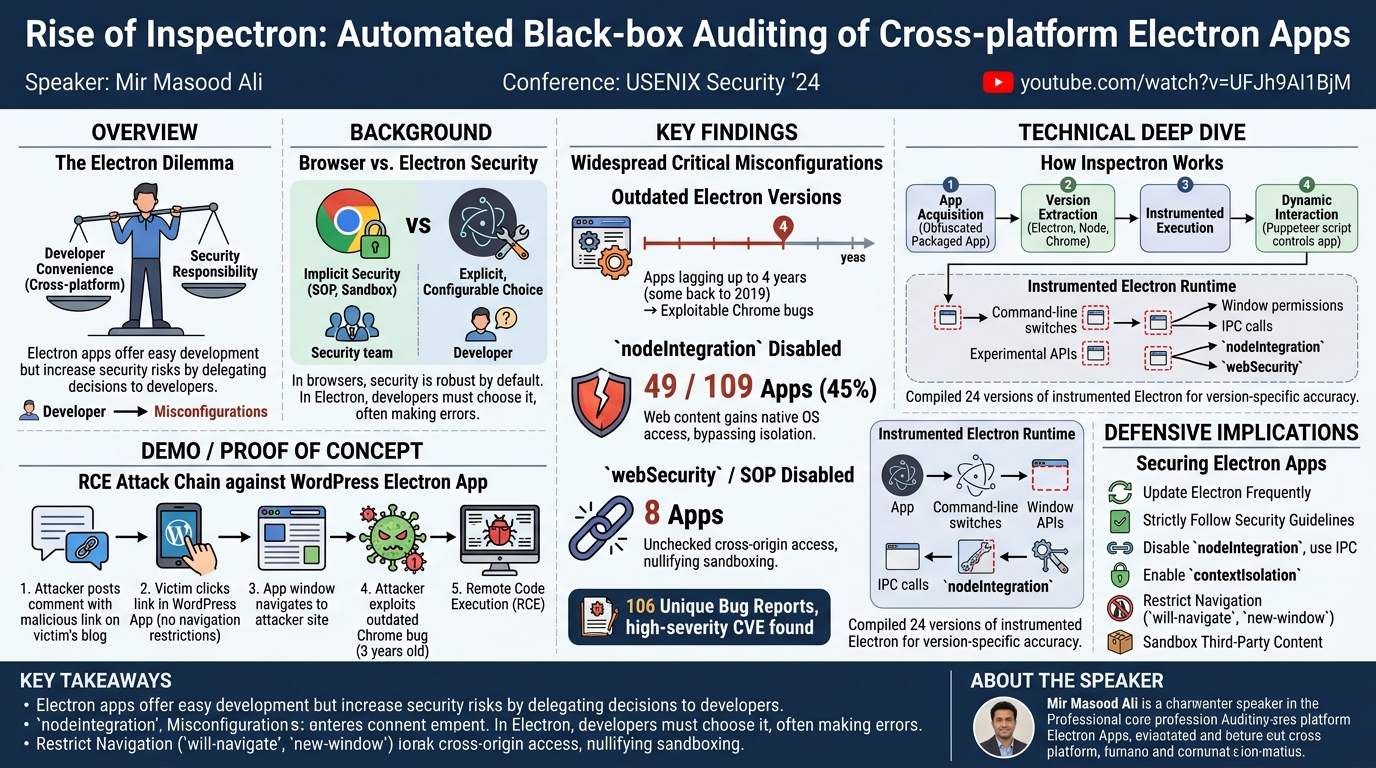
The Inspectron project embarked on a comprehensive evaluation of 109 popular Electron applications, with data collected in May 2023. A significant initial finding was the widespread use of outdated Electron versions. The research revealed that many applications were not running the latest Electron framework; some were dependent on versions as old as May 2019, making them four years behind the current releases at the time of the study. This is critical because Electron bundles specific versions of Chrome, V8, and Node.js, meaning an outdated Electron version directly translates to an outdated browser engine with known, publicly exploitable vulnerabilities.
Beyond outdated dependencies, Inspectron identified two major categories of misconfigurations that severely impact security:
nodeIntegrationMisconfigurations: Electron allows app developers to expose Node.js APIs directly to the renderer process (where web content runs). While Electron strongly recommends performing privileged operations solely within the isolated main process and exposing only specific, limited functionalities to the renderer via Inter-Process Communication (IPC), a staggering 49 out of the 109 evaluated apps (45%) completely disabled these safeguards. This means that any web content loaded within these apps, including potentially malicious third-party scripts, could directly access the user's device, read/write files, execute system commands, and modify system settings. This effectively bypasses the fundamental security model that web browsers enforce, giving untrusted web content native system access.
webSecurity/ Same-Origin Policy (SOP) Disabling: The Same-Origin Policy is a cornerstone of web security, preventing scripts from one origin from interacting with resources from another. Electron, however, permits developers to relax or completely disable this isolation. Inspectron found that at least 8 apps completely disabled this standard security feature. DisablingwebSecurityallows different origins within the app to communicate freely, even if they are untrusted or malicious. This can nullify any attempts at sandboxing third-party content, enabling an embedded malicious iframe to directly interact with the parent application's content, potentially stealing credentials, session tokens, or escalating attacks to the user's system.
In total, Inspectron identified and reported 106 unique bug reports to the affected framework and application developers. These reports encompassed a range of issues, from minor misconfigurations to severe vulnerabilities. Notably, the research led to the discovery of a high-severity CVE, which has since been patched. These findings underscore a pervasive lack of security awareness and best practice adherence among Electron app developers, highlighting the critical need for automated tools like Inspectron to continuously audit and improve the security posture of these widely used applications. The identified misconfigurations were part of a broader set, as Inspectron checks 12 specific web preferences that fall under 16 distinct classes of misconfigurations implemented within the framework.
Technical Deep Dive
▶ Watch: Electron: Increased Developer Responsibility for Security (4:00)
Inspectron operates as an automated dynamic analysis framework specifically designed for black-box auditing of cross-platform Electron applications. Its core methodology involves executing target applications within a heavily instrumented version of the Electron framework, observing their runtime behavior, and identifying security-critical misconfigurations.
The high-level process for analyzing an app with Inspectron involves several stages:
- App Acquisition: Packaged Electron applications are downloaded, often in their obfuscated and minified forms.
- Version Extraction: Inspectron extracts the underlying Electron, Node.js, and Chrome versions used by the target app. This step is crucial because Electron's security model and API surface can vary significantly between releases.
- Instrumented Execution: The extracted source code of the app is then loaded and run within a specially prepared, instrumented version of Electron. This instrumentation is key to Inspectron's capabilities.
- Dynamic Interaction: Once the app is running, Inspectron connects to it via a Puppeteer script. Puppeteer, a Node.js library, provides a high-level API to control headless Chrome (or Chromium, which Electron uses). This allows Inspectron to programmatically interact with the application, simulate user actions, navigate through different views, and trigger various functionalities, thereby exercising different code paths and revealing dynamic behaviors.
- Report Generation: Data collected from the instrumented Electron runtime and Puppeteer interactions is combined to generate an extensive report detailing potential misconfigurations, vulnerabilities, and how they could be chained into exploitable attack scenarios.
The instrumented version of Electron is the backbone of Inspectron's analysis. Electron's codebase itself is highly complex, involving a mix of TypeScript, C++, and shell scripts, all intermingling and interacting across different directories, libraries, and scripts. Instrumenting this environment is a significant undertaking. As the speaker illustrated, even the simple act of opening a new window in Electron involves a cascade of scripts and processes determining session isolation, JavaScript execution privileges, and communication channels with the main process. Inspectron strategically places instrumentation points (represented by "red dashed boxes" in the talk's diagrams) across this intricate architecture. These points allow Inspectron to monitor and log critical security-related events and configurations, such as:
- Command-line switches passed to V8, Node.js, or Chrome.
- Enabling or disabling experimental APIs.
- Permissions granted to new windows or web views.
- Inter-process communication (IPC) patterns.
- The status of security features like
nodeIntegration,webSecurity, andcontextIsolation.
A critical challenge highlighted by the researchers was the need for version-specific instrumentation. Because Electron bundles specific versions of Chrome, V8, and Node.js, and applies its own patches, the internal structure and API behavior can differ substantially between major Electron releases. To ensure accurate analysis, Inspectron had to create a dedicated instrumented version of Electron for each major framework release found among the target applications. This involved compiling and maintaining 24 different instrumented versions to support both macOS and Linux targets, a testament to the effort required to achieve reliable and comprehensive coverage.
Inspectron's dynamic analysis specifically targets crucial security settings. For instance, the nodeIntegration option, when enabled, allows the renderer process to access Node.js modules and APIs directly. While this provides powerful native capabilities, Electron's security guidelines strongly advise against enabling it by default and to use contextIsolation to prevent untrusted web content from directly accessing Node.js globals. Inspectron identifies instances where nodeIntegration is enabled without proper isolation, leading to the 49 apps found with this critical misconfiguration.
Similarly, the webSecurity option controls the enforcement of the Same-Origin Policy. Disabling it, as seen in 8 apps, allows cross-origin communication that would normally be blocked by web browsers. This can be particularly dangerous when an application embeds third-party content, as it allows malicious scripts from one origin to interact with sensitive data or functionality from another. Inspectron's instrumentation monitors these configurations at runtime, flagging any deviations from secure defaults. Overall, Inspectron is capable of checking 12 specific web preferences that fall under 16 distinct classes of misconfigurations, making it a highly comprehensive auditing tool for the Electron ecosystem.
Demo / Proof of Concept
▶ Watch: Inspectron's High-Level Methodology for App Evaluation (5:05)
The talk vividly demonstrated the real-world impact of these misconfigurations through a detailed proof-of-concept attack chain against the popular WordPress Electron application. This demonstration highlighted how a combination of outdated software and lax security settings could lead to a severe remote code execution (RCE) vulnerability.
The WordPress Electron app, designed to allow users to manage their websites, blog posts, and comments, was found to have two critical misconfigurations as of May 2023:
- Outdated Electron/Chrome Version: The application was running on an Electron version that depended on a Chrome browser engine at least three years old. At that time, this specific Chrome version was known to have a multitude of publicly available exploits, including those that could lead to remote code execution.
- Lack of Navigation Restriction Listeners: The WordPress app did not implement proper listeners to restrict navigation. In a secure Electron application, developers should explicitly prevent the app's web content from navigating to arbitrary external URLs, especially if those URLs are untrusted. Without such restrictions, the application's window can be hijacked.
The attack scenario unfolded as follows:
- Initial Compromise Vector: An attacker targets a victim's publicly available blog. The attacker posts a comment on the victim's blog, embedding a specially crafted malicious link within the comment.
- Victim Interaction: The victim, using the vulnerable WordPress Electron app, views the comments on their blog post. They see the attacker's link and, perhaps out of curiosity or habit, click on it.
- Application Hijack: Because the WordPress app lacked navigation restriction listeners, clicking the malicious link causes the entire Electron application window to navigate away from the legitimate WordPress content and load the attacker's controlled website.
- Exploitation: At this point, the attacker's website is being rendered within the victim's WordPress Electron application, which is still running on the outdated and vulnerable Chrome engine (3 years old). The attacker can then serve an exploit targeting one of the publicly known vulnerabilities in that specific Chrome version.
- Remote Code Execution (RCE): Successful exploitation of the outdated Chrome vulnerability grants the attacker remote code execution capabilities on the victim's underlying operating system. This means the attacker could then install malware, steal sensitive files, or take complete control of the user's machine, all initiated through a seemingly innocuous link within a trusted application.
This demonstration effectively showcased how the combination of an outdated framework, which introduces known vulnerabilities, and a fundamental security misconfiguration (lack of navigation restriction) can create a critical attack surface, turning a benign desktop application into a powerful tool for system compromise.
Defensive Implications
▶ Watch: Technical Challenges of Electron Instrumentation and Complexity (6:05)
The findings from Inspectron's research provide critical insights for both Electron app developers and security defenders. Adhering to these defensive implications is paramount to mitigating the widespread vulnerabilities identified in the Electron ecosystem:
- Prioritize Electron and Dependency Updates: The most straightforward and impactful defense is to keep Electron up-to-date. Developers must regularly update their Electron framework to the latest stable version. This ensures that the bundled Chromium, V8, and Node.js components benefit from the most recent security patches, closing known exploits. Relying on versions that are years old, as seen in many audited apps, is an open invitation for attackers. Implement automated processes for dependency updates to minimize manual oversight.
- Strictly Adhere to Electron's Security Recommendations: Electron provides comprehensive security guidelines, which are often overlooked. Developers should:
- Disable
nodeIntegrationby default: Unless absolutely necessary, Node.js APIs should not be exposed to the renderer process. If native features are required, use secure Inter-Process Communication (IPC) channels to pass specific, validated requests from the renderer to the main process, where privileged operations are executed. - Enable
contextIsolation: This feature, enabled by default in newer Electron versions, prevents the renderer process's JavaScript from accessing Node.js globals directly, even ifnodeIntegrationis enabled. It creates a separate JavaScript context for Electron's internal scripts and the web content. - Enable
webSecurity: Never disable the Same-Origin Policy unless there is an extremely compelling and thoroughly audited reason. If cross-origin communication is essential, implement it securely with strict message validation and origin checks. - Implement Navigation Restrictions: Developers must add listeners to restrict navigation (
will-navigate,new-window) within the app's web content. Prevent the app from navigating to arbitrary external URLs, especially if they are untrusted. Only allow navigation to known, safe domains. - Sanitize User Input: Any content loaded from external sources or user input must be rigorously sanitized and validated to prevent injection attacks (e.g., XSS) that could lead to unexpected navigation or arbitrary code execution within the renderer process.
- Careful Privilege Management: Developers must meticulously consider the principle of least privilege. Any functionality that requires access to the native system (e.g., file system, network, executing other applications) should be confined to the main process. Expose only the minimum necessary functionality to the renderer process, and ensure all IPC calls are validated and strictly defined.
- Regular Security Audits and Static/Dynamic Analysis: Beyond manual code reviews, integrate automated security tools like Inspectron (or similar methodologies) into the CI/CD pipeline. This includes both static analysis for identifying insecure configurations in code and dynamic analysis to detect runtime misbehaviors. For black-box applications, tools like Inspectron are invaluable for uncovering issues missed during development.
- Sandbox Third-Party Content: If an Electron application must embed third-party content (e.g., ads, analytics, external widgets), it should be done within the most restrictive sandbox possible. Use
<webview>tags with strictpartitionandpreloadscripts, and ensurenodeIntegrationandwebSecurityare disabled for these specific webviews.
By proactively addressing these areas, developers can significantly enhance the security posture of their Electron applications, protecting users from the severe risks highlighted by the Inspectron research.
Key Takeaways
- Electron's Convenience Comes with Security Trade-offs: While Electron simplifies cross-platform development, it shifts critical security responsibilities from browser vendors to app developers, leading to frequent misconfigurations.
- Outdated Electron Versions are Rampant and Dangerous: A significant portion of Electron apps run on severely outdated frameworks, bundling old Chrome versions with known, publicly exploitable vulnerabilities, creating an easy target for attackers.
nodeIntegrationandwebSecurityMisconfigurations are Widespread: Many apps carelessly enablenodeIntegrationwithout proper isolation (45% of audited apps) or disablewebSecurity(8% of audited apps), granting untrusted web content direct access to the user's system or bypassing fundamental web security mechanisms.- Inspectron Automates Black-Box Auditing: The Inspectron framework provides an automated dynamic analysis solution for identifying security and privacy misconfigurations in packaged Electron apps, proving effective by reporting 106 bugs, including a high-severity CVE.
- Strict Adherence to Electron Security Guidelines is Crucial: Developers must prioritize keeping Electron updated, disable
nodeIntegrationand enablecontextIsolationby default, ensurewebSecurityis active, and implement robust navigation restrictions to prevent application hijacking and RCE. - Automated Security Testing is Essential: Given the complexity and prevalence of misconfigurations, integrating automated dynamic analysis tools into the development lifecycle is vital for continuously auditing and improving the security of Electron applications.
About the Speaker(s)
Mir Masood Ali is a PhD student at the University of Illinois Chicago. His research interests evidently lie in the realm of application security, particularly focusing on the challenges presented by cross-platform frameworks like Electron. This work on Inspectron is a significant contribution to understanding and mitigating security vulnerabilities in such applications. He collaborated on this project with Mo, who has since graduated and is working at Postal, his advisor Chris, and Jon. Masood Ali presented this extensive work, which took approximately 18 months to complete, at USENIX Security '24.
Reviews
Dr. Zero (Offensive Security Researcher) — MUST SEE
Mir Masood Ali's work on Inspectron is a critical deep dive into the systemic security failures of the Electron ecosystem. The research provides a novel, automated dynamic analysis framework that uncovers widespread misconfigurations and outdated dependencies, culminating in a high-severity CVE and a chilling RCE demo. This is essential viewing for anyone building or defending Electron applications.
Heather Calloway (CISO) — STRONG ACCEPT
This research uncovers a systemic failure in application security governance within the Electron ecosystem, where widespread developer misconfigurations and outdated dependencies create critical business exposure. Inspectron offers a valuable automated methodology to identify these pervasive risks, providing clear, actionable steps for security leaders and development teams to mitigate remote code execution vulnerabilities.