Vulnerability Data Analysis with Google Spreadsheets and Apps Script for Fun and Profit
CVE/FIRST VulnCon 2025 · Main Stage
Overview
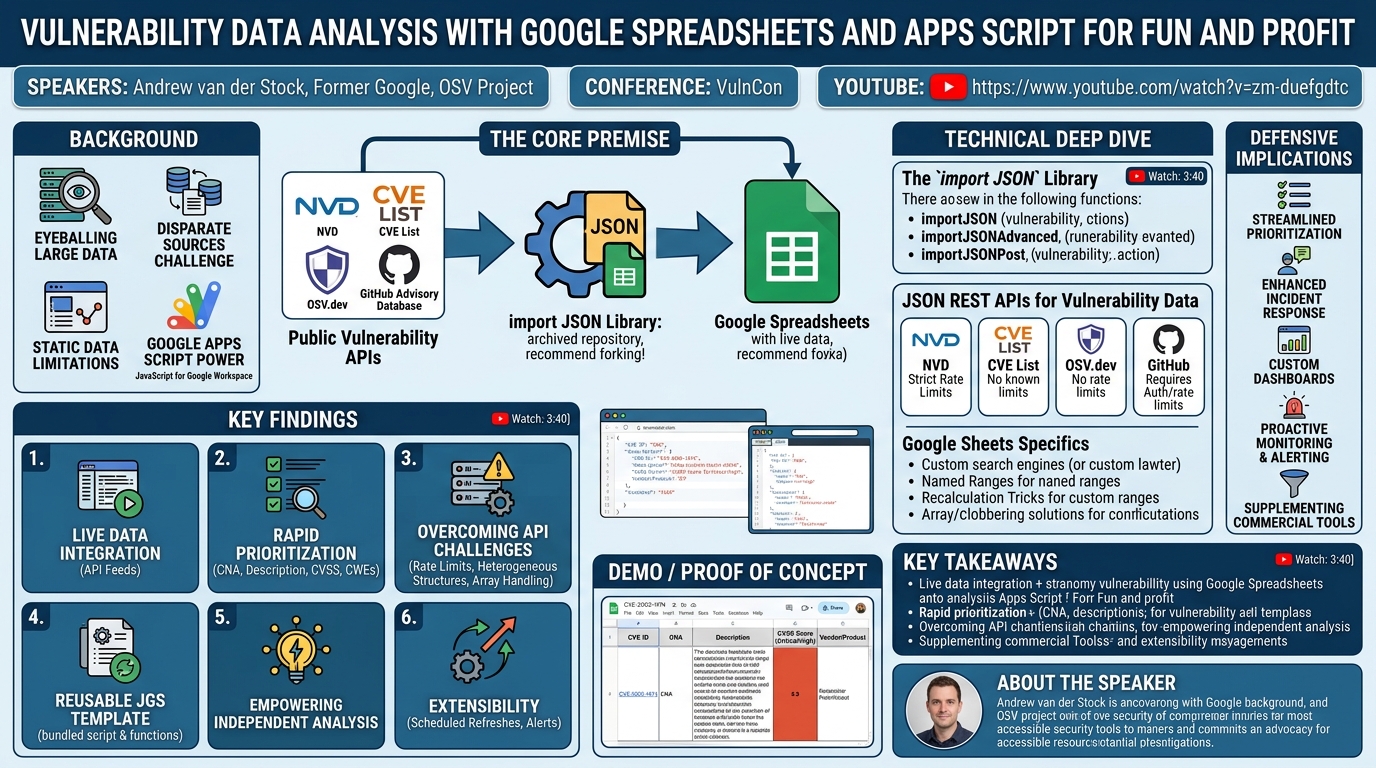
In this insightful VulnCon presentation, Andrew van der Stock, a key figure in the OSV (Open Source Vulnerability) project and formerly of Google, unveiled a practical and accessible methodology for performing vulnerability data analysis using nothing more than Google Spreadsheets and Google Apps Script. The talk focused on empowering security professionals—from vulnerability managers to researchers and CNAs—to overcome common challenges in wrangling disparate vulnerability data sources. By leveraging free tools and public APIs, van der Stock demonstrated how to create dynamic, real-time dashboards and analysis environments for quick and dirty, yet highly effective, vulnerability management.
Key moments
- 0:00 Introduction: CVE analysis, OSV, and spreadsheet utility
- 2:16 Workshop goals: zero dependencies, making sausage from scratch
- 3:40 Why use spreadsheets for quick, dirty vulnerability management
- 4:20 Workshop prerequisites: Google account and JSON browser extension
- 6:40 Introducing importJSON App Script for Google Sheets
- 8:00 importJSON's archived status, bugs, and future considerations
Vulnerability Data Analysis with Google Spreadsheets and Apps Script for Fun and Profit
Speakers: Andrew van der Stock, Former Google, OSV Project
Conference: VulnCon
YouTube: https://www.youtube.com/watch?v=zm-duefgdtc
Overview
In this insightful VulnCon presentation, Andrew van der Stock, a key figure in the OSV (Open Source Vulnerability) project and formerly of Google, unveiled a practical and accessible methodology for performing vulnerability data analysis using nothing more than Google Spreadsheets and Google Apps Script. The talk focused on empowering security professionals—from vulnerability managers to researchers and CNAs—to overcome common challenges in wrangling disparate vulnerability data sources. By leveraging free tools and public APIs, van der Stock demonstrated how to create dynamic, real-time dashboards and analysis environments for quick and dirty, yet highly effective, vulnerability management.
The core premise of the talk revolves around the import JSON Apps Script library, which allows Google Sheets to fetch and parse JSON data directly from various REST APIs. This capability transforms a standard spreadsheet into a powerful, interactive data analysis platform, enabling users to pull live metadata about CVEs, OSV records, and GitHub advisories. The speaker emphasized independence and the ability for attendees to "make the sausage from scratch," providing a template and detailed walkthrough for building a robust vulnerability data analysis system without relying on proprietary or complex solutions.
This approach is particularly relevant in an era where vulnerability data is fragmented across numerous databases, and the need for rapid, informed decision-making is paramount. The techniques presented offer a low-cost, high-flexibility alternative for organizations to gain deeper insights into their vulnerability landscape, prioritize remediation efforts, and enhance incident response capabilities. Van der Stock’s experience in large-scale CVE conversion for OSV underscores the utility of such methods for visually inspecting and identifying patterns in vast datasets, making this talk a valuable resource for anyone seeking to improve their vulnerability intelligence workflows.
Background
▶ Watch: Introduction: CVE analysis, OSV, and spreadsheet utility (0:00)
Andrew van der Stock's journey into vulnerability data analysis with spreadsheets originated from his extensive work on the OSV project, specifically converting NVD CVE data into the OSV format. This role necessitated the ability to "eyeball large swaths of data" to identify anomalies, trends, and patterns that might not be immediately obvious through automated processing alone. Spreadsheets, with their inherent tabular structure and visual filtering capabilities, emerged as a surprisingly convenient and powerful tool for this task.
The problem van der Stock addresses is a common one in the security industry: how to efficiently gather, consolidate, and analyze vulnerability metadata from multiple, often disparate, sources. Many organizations, despite having sophisticated vulnerability management platforms, still resort to spreadsheets for ad-hoc analysis, quick checks, or when dealing with specific lists of CVE IDs. However, these manual spreadsheet-based approaches often involve static data, requiring repetitive updates and lacking real-time insights.
Recognizing the limitations of static data and the power of Google's ecosystem, van der Stock turned to Google Apps Script, which is essentially JavaScript tailored for Google Workspace applications like Google Sheets. Apps Script provides a robust framework for extending the functionality of Sheets, enabling custom functions and automation. The key enabler for his methodology is an existing, open-source Apps Script library called import JSON. This library, initially developed by Trevor and later maintained by Brad, provides custom functions that allow Google Sheets to make HTTP requests and parse JSON responses directly into spreadsheet cells. While import JSON is powerful, van der Stock notes its current status: the repository is archived, implying no active maintenance and a backlog of reported bugs. He strongly recommends forking the repository for anyone intending to use it, ensuring a local copy and the potential for community-driven maintenance.
The talk directly caters to professionals involved in vulnerability management, vulnerability research, and CVE Numbering Authorities (CNAs), who frequently need to query live information about CVEs—such as their assigned CNA, current status in NVD, CVSS scores, descriptions, and affected products. By providing a "make the sausage from scratch" guide, van der Stock aims to equip these professionals with the skills to build their own independent, dynamic analysis tools, bypassing commercial dependencies and leveraging the ubiquitous and free Google account.
Key Findings
▶ Watch: Why use spreadsheets for quick, dirty vulnerability management (3:40)
The central discovery and contribution of this talk lie in demonstrating how a combination of readily available, free tools—Google Spreadsheets, Google Apps Script, and the import JSON library—can be harnessed to create a highly effective and dynamic vulnerability data analysis platform. The key findings and capabilities include:
- Live Data Integration with Public APIs: The talk conclusively proves that Google Sheets can pull live, real-time vulnerability metadata directly from various JSON REST APIs, including the CVE List API, NVD API, OSV.dev API, and GitHub Advisory Database API. This eliminates the need for manual data exports and imports, ensuring that analysis is always based on the most current information.
- Rapid Prioritization and Contextualization: Users can quickly enrich lists of CVE IDs with critical information such as CNA assignments, CVE descriptions, CVSS scores, and CWEs. This capability is vital for rapid vulnerability prioritization, incident response, and understanding the scope of a vulnerability. For instance, a simple spreadsheet formula can fetch the base severity score for a given CVE-ID in real-time.
- Overcoming API and Data Heterogeneity Challenges: Van der Stock presented practical techniques for dealing with common challenges when consuming external APIs. These include strategies for handling API rate limits (e.g., for the NVD API by selectively recalculating error rows), managing heterogeneous JSON structures (e.g., differing field names for CVSS v3.0 vs. v3.1), and gracefully managing array outputs that might otherwise "clobber" subsequent rows in a spreadsheet.
- Reusable Template for Efficiency: The talk introduced a pre-configured Google Sheet template, dubbed the "import JSON Google Sheet template" (JGS template), which bundles the necessary Apps Script code and pre-defined functions. This template acts as a foundational "grunge work" layer, allowing users to quickly set up their own analysis environments without repeatedly copying scripts or configuring API endpoints.
- Empowering Independent Analysis: A core tenet of the talk is fostering independence. By showing how to build the solution from scratch, users gain full control and understanding of their data pipelines. This approach minimizes reliance on specific vendors or commercial tools, promoting a "bail-in-wire and duct tape" philosophy for cost-effective vulnerability management.
- Extensibility for Advanced Workflows: Beyond simple data retrieval, the methodology can be extended to support more complex scenarios. Discussions with the audience highlighted the potential for scheduled refreshes, automated notifications (e.g., for actively exploited CVEs), and even building "poor man's feeds" or basic vulnerability scanners within the spreadsheet environment.
These findings collectively demonstrate that powerful, custom vulnerability intelligence capabilities are within reach for anyone with a Google account and a willingness to engage with basic scripting and API documentation, significantly democratizing access to real-time vulnerability data analysis.
Technical Deep Dive
▶ Watch: Workshop prerequisites: Google account and JSON browser extension (4:20)
The technical foundation of this approach rests on the import JSON Apps Script library and its interaction with various JSON REST APIs.
The import JSON Library
The import JSON library is a custom Apps Script solution that extends Google Sheets' native capabilities. Once installed into a spreadsheet's Apps Script project, it provides several custom functions callable directly from sheet cells, similar to VLOOKUP or SUM. The primary functions include:
importJSON(url, path, options): The most commonly used function, it fetches JSON data from a specifiedurl, extracts data based on apath(using dot notation for nested fields), and processes it with optionaloptions. Van der Stock prefers thenoHeadersoption to avoid extra header rows that can complicate tabular data.importJSONAdvanced(url, path, options): This variant allows for more complex HTTP requests, including custom headers. This is crucial for APIs that require authentication via headers, such as the NVD API if an API key is used for higher rate limits.importJSONPost(url, payload, path, options): For APIs requiring POST requests, allowing a JSONpayloadto be sent.
A critical aspect highlighted by van der Stock is the library's maintenance status: it's archived, meaning no new features or bug fixes are being actively developed. He strongly advises users to fork the GitHub repository to ensure long-term availability and the potential for community contributions. Despite its archived status, import JSON remains functional for many common use cases.
JSON REST APIs for Vulnerability Data
The talk explored four primary public APIs that provide vulnerability metadata:
- CVE List API:
- Source: Directly from the CVE Program, considered "the horse's mouth."
- Rate Limits: No known rate limits, making it a reliable choice for bulk queries.
- Data: Provides core CVE metadata, including CNA information, descriptions, and sometimes CVSS scores.
- Usage: Ideal for fetching fundamental CVE details without worrying about hitting API quotas.
- NVD API:
- Source: National Vulnerability Database, managed by NIST.
- Rate Limits: Strictly rate-limited. Exceeding limits results in errors. Users can apply for an API key to increase their quota, which would then be passed via an HTTP header using
importJSONAdvanced. Van der Stock, however, has not personally implemented API key usage withimport JSON, relying instead on manual error handling. - Data: Comprehensive vulnerability data, including CPE (Common Platform Enumeration) information, detailed descriptions, CVSS scores, and NVD analysis status (e.g., "Analyzed," "Awaiting Analysis").
- Challenges: The NVD API's data can vary in completeness and timeliness, especially after periods of operational changes (e.g., the "flubble" in early 2024). Dealing with rate limits typically involves filtering for error rows (
#N/Aor#ERROR), deleting their values, and then usingCtrl+Zto trigger a re-calculation for only those specific rows.
- OSV.dev API:
- Source: Open Source Vulnerability database, maintained by Google and the community.
- Rate Limits: No rate limits.
- Data: Focuses on vulnerabilities in open-source packages across various ecosystems. It provides a subset of CVEs, specifically those relevant to open-source software.
- Usage: Excellent for querying vulnerabilities related to specific open-source components, often providing more granular package and version information.
- GitHub Advisory Database API:
- Source: GitHub's public database of security advisories.
- Rate Limits: Has various rate limits.
- Authentication: Requires authentication (likely a personal access token or OAuth), which would necessitate
importJSONAdvancedfor passing headers. Van der Stock noted that he hasn't integrated it personally and suggested exploring Eric Koleda's Apps Script OAuth library for complex authentication flows. - Data: Provides advisories for open-source projects hosted on GitHub, often including detailed remediation advice.
Google Sheets Specifics and Advanced Techniques
- Custom Search Engines: Van der Stock recommends configuring custom search engines in browsers (e.g., Chrome) to quickly view the raw JSON output from these APIs. This helps in understanding the data structure and identifying the correct
pathforimport JSONqueries. - Named Ranges: For formula readability and maintainability, named ranges can be used to store base URLs for APIs or other constants. Instead of hardcoding a long URL in an
import JSONcall, a named range likeCVE_API_BASEmakes the formula concise and self-explanatory. - Recalculation Behavior: Google Sheets automatically recalculates formulas when inputs change. However, for static data or to manage API quotas, users can copy and paste values only to "freeze" the data, converting formulas into their results. To force a recalculation for specific rows, deleting the values and immediately undoing (
Ctrl+Z) is a common workaround. - Handling Arrays and "Clobbering": A significant challenge arises when an
import JSONcall returns an array (e.g., multiple affected products or references). Google Sheets prevents a formula from "clobbering" data in adjacent cells below it. To overcome this: - Use the
TRANSPOSEfunction to reorient array outputs into columns instead of rows, assuming sufficient columns are available. - Use the
INDEXfunction to extract specific elements from an array if only a single value is needed. - For more complex scenarios, multiple
import JSONcalls might be necessary, each fetching a different part of the record, potentially increasing API call volume. - Heterogeneous Data Structures: The speaker provided an example of handling varying CVSS versions (v3.0 vs. v3.1) where the score field might differ. A complex
import JSONpath can be constructed to try one field and fall back to another if the first is not present, ensuring graceful handling of diverse data. - Error Checking: The entire
import JSONfunction call must succeed for any data to be returned. If one part of a multi-path query fails, the entire cell will show an error. This often necessitates breaking complex queries into multipleimport JSONcalls, each focusing on a specific data point, at the cost of more API requests.
By mastering these technical nuances, users can craft powerful and flexible vulnerability data analysis tools within Google Sheets, tailored to their specific needs.
Demo / Proof of Concept
▶ Watch: Introducing importJSON App Script for Google Sheets (6:40)
Andrew van der Stock provided a live demonstration using a pre-configured "playground" Google Sheet, showcasing the practical application of import JSON and Apps Script for vulnerability data analysis. While not on his personal laptop, he successfully navigated the demonstration, illustrating key functionalities.
The demo started by populating a column with CVE IDs. For instance, when prompted by an audience member, he used CVE-2005-1974 as an example.
- CNA and Description Retrieval (CVE List API): The first demonstration involved pulling the CNA (CVE Numbering Authority) responsible for the CVE and its associated description directly from the CVE List API. A simple formula in a cell, referencing the CVE ID in an adjacent cell, instantly fetched and displayed this live information, demonstrating the real-time data integration.
- NVD Status Check (NVD API): Next, he showed how to query the NVD API for the status of a CVE. For the chosen CVE, the NVD status might indicate "Awaiting Analysis," highlighting the difference in information availability across various APIs. This also implicitly demonstrated how the sheet could handle NVD's rate limits, though a full-scale rate limit challenge was not encountered during the brief demo.
- CVSS Severity Score (CVE List API): A more advanced example involved retrieving the CVSS base severity score. This formula was notably complex, as it had to account for the heterogeneous nature of CVSS data in the CVE List, where scores might be recorded under different fields for CVSS v3.0 versus CVSS v3.1. The formula intelligently attempted to fetch the score from v3.1 first, falling back to v3.0 if the former was absent, ultimately displaying "Critical" for the example CVE. This illustrated the need for robust error handling and conditional logic within the spreadsheet formulas.
- Vendor and Product Information (CVE List API): The most ambitious part of the demo attempted to pull vendor and product information from the CVE List API. This particular example highlighted the challenges of dealing with arrays in
import JSON. While the formula successfully extracted vendor names, it sometimes struggled with product details, especially when multiple products or complex structures were involved. This reinforced the point aboutimport JSONnot being able to "clobber" rows below a formula, requiring advanced techniques likeTRANSPOSEorINDEXfor array handling, or breaking down the query into multiple calls.
Throughout the demo, van der Stock emphasized the utility of a JSON Viewer browser extension. He quickly installed one in Chrome during the talk, showing how it transforms raw JSON output from API endpoints into a human-readable, formatted structure. This visual aid is invaluable for understanding API responses and crafting the correct path arguments for import JSON functions.
The demo successfully showcased the power and flexibility of using Google Sheets for live vulnerability data, despite encountering minor expected complexities with array handling and varied data structures, underscoring the "fun and profit" aspect of this DIY approach.
Defensive Implications
▶ Watch: importJSON's archived status, bugs, and future considerations (8:00)
The methodology presented by Andrew van der Stock has significant defensive implications for security teams, offering practical, cost-effective ways to enhance vulnerability management and incident response.
- Streamlined Vulnerability Prioritization: Defenders can leverage these techniques to rapidly enrich their vulnerability lists with crucial context. By pulling CVSS scores, CWEs, detailed descriptions, and CNA information in real-time, security teams can move beyond simple CVE ID lists. This enables more informed prioritization, allowing them to focus resources on vulnerabilities that pose the highest risk to their specific environment, rather than relying on generic scores or static data.
- Enhanced Incident Response: During an active incident or when triaging newly disclosed vulnerabilities, the ability to fetch live data is invaluable. Security analysts can quickly query the status of a CVE in NVD, check for known exploitability in databases like the KEV (if an API is available and integrated), or pull the latest advisories. This agility helps in making rapid decisions about containment, mitigation, and communication.
- Custom Vulnerability Dashboards and "Poor Man's Feeds": Organizations can build bespoke dashboards tailored to their unique needs. Instead of relying on off-the-shelf dashboards that might not align with internal risk models, defenders can create sheets that track specific sets of CVEs, monitor their status changes, or highlight those affecting critical assets. This acts as a highly customizable "poor man's feed" for vulnerability intelligence.
- Proactive Monitoring and Alerting: As discussed during the Q&A, the combination of Apps Script's scheduling capabilities and its ability to send notifications (e.g., email, chat messages) opens the door for proactive monitoring. A sheet could be configured to periodically check if a CVE of interest (e.g., one affecting a critical system) has been added to the CISA KEV database or if its NVD status has changed to "Actively Exploited." Upon detection, an automated alert could be triggered, significantly reducing manual oversight.
- Supplementing Commercial Tools: While not a replacement for comprehensive vulnerability management platforms, this approach can effectively supplement existing tools. It provides a flexible sandbox for ad-hoc analysis, exploring new data sources, or validating information. For smaller teams or those with limited budgets, it offers a powerful, free alternative to gain deep insights without significant investment.
- Understanding Data Gaps and Heterogeneity: By directly interacting with various APIs, defenders gain a deeper understanding of the nuances and inconsistencies in vulnerability data across different sources (e.g., NVD's rate limits, OSV's focus on open-source, the varying CVSS versions). This awareness is crucial for interpreting data correctly and making robust security decisions.
- Empowering Researchers and Analysts: For vulnerability researchers, this provides an easy way to explore large datasets, identify trends, or rapidly prototype new analysis techniques without setting up complex programming environments. It democratizes access to powerful data analysis capabilities, fostering a more data-driven approach to security.
In essence, van der Stock's methodology equips defenders with a highly adaptable, zero-cost framework to move beyond static spreadsheets, enabling more dynamic, informed, and proactive vulnerability management practices.
Key Takeaways
- Google Sheets as a Powerful VM Tool: Google Spreadsheets, when augmented with Google Apps Script and the
import JSONlibrary, transforms into a dynamic, free, and highly customizable platform for vulnerability data analysis. - Leverage Public JSON REST APIs: Directly access live vulnerability metadata from authoritative sources like the CVE List API, NVD API, OSV.dev, and GitHub Advisory Database to ensure up-to-date intelligence.
- Master
import JSONand Apps Script: Understand how to useimport JSONfor fetching data, craft appropriate JSON paths, and utilize Google Sheets functions likeTRANSPOSEandINDEXto effectively handle complex data structures, especially arrays. - Manage API Limitations and Data Nuances: Be aware of and implement strategies for dealing with API rate limits (e.g., NVD), varying JSON schemas (e.g., CVSS versions), and the recalculation behavior of Google Sheets to optimize performance and data accuracy.
- Enable Custom Workflows and Proactive Monitoring: The framework allows for building custom vulnerability dashboards, rapid prioritization tools, and even scheduled Apps Script functions for automated monitoring and alerting on critical vulnerability changes or exploitations.
- Fork
import JSONand Embrace Independence: Due to the archived status of theimport JSONlibrary, users are strongly encouraged to fork its repository to maintain control over their tools and foster community-driven enhancements, promoting a self-sufficient approach to vulnerability intelligence.
About the Speaker(s)
Andrew van der Stock is a seasoned professional in the security and software development space, with a significant background at Google, where he worked for nearly two decades until recently. He is deeply involved in the OSV (Open Source Vulnerability) project, specifically focusing on the large-scale conversion of NVD CVE data into the OSV format. His work highlights a practical need for efficient data analysis, often requiring the visual inspection of extensive datasets. Van der Stock advocates for accessible and pragmatic solutions, finding spreadsheets to be a surprisingly effective "hammer" for complex data challenges. His expertise lies in navigating vast amounts of vulnerability information and developing tooling to make this data more understandable and actionable for the security community.
Reviews
Dr. Zero (Offensive Security Researcher) — SOLID
Van der Stock delivers a competent, pragmatic workshop-style talk on using Google Sheets and Apps Script to wrangle vulnerability data from public APIs. The content is honest, practical, and clearly comes from real operational experience on the OSV project. But the ceiling is low: this is a clever productivity tip, not security research. The technical contribution is essentially 'here is how to use an existing third-party library to call public REST APIs from a spreadsheet.' That has genuine utility for vulnerability managers and CNAs who haven't thought to do this, but it won't move any experts in the room. Fits VulnCon better than it would fit DEF CON or Black Hat.
Heather Calloway (CISO) — WEAK
Van der Stock demonstrates genuine technical fluency and the methodology is real — pulling live CVE data into Google Sheets via Apps Script is a legitimate workflow that some vulnerability analysts will find useful. But this is a practitioner trick, not a security program contribution. It has no governance dimension, no accountability framing, no threat model, and no organizational implication. The talk tells a narrow audience how to build a dashboard, not what to do with the risk on the other side of it.