BiC Village -Let's Lose the Shock: Mystery of Linux - A Pain Free Intro
DJ Davis
Blacks in Cyber Village @ DEF CON 33 · Day 1 · Blacks in Cyber Village
Overview
DJ Davis’s talk, "Let's Lose the Shock: Mystery of Linux - A Pain Free Intro," delivered at the Blacks in Cyber Village, serves as an accessible and comprehensive introduction to the Linux operating system. Aimed at demystifying Linux for newcomers and those intimidated by its reputation, the presentation systematically breaks down its core components, historical context, and fundamental operational paradigms. Davis, an experienced IT professional with a background spanning mainframes to information security, leverages decades of expertise to draw clear comparisons between Linux and Microsoft Windows, highlighting their distinct philosophies and functionalities.
Key moments
- 0:00 Introduction and talk overview by host
- 2:00 Talk objectives and game plan for the session
- 3:20 Key reasons to learn and utilize Linux
- 4:10 Understanding the special characteristics of Unix
- 5:00 Comparing Linux and Microsoft command differences
- 7:00 Further differences: CLI vs GUI, scripting, user accounts
- 8:10 The historical origins and evolution of Linux
Let's Lose the Shock: Mystery of Linux - A Pain Free Intro
Speakers: DJ Davis, Seasoned IT Professional, [Company not specified in transcript]
Conference: Blacks in Cyber Village
YouTube: https://www.youtube.com/watch?v=R_rpuLpfMZM
Overview
DJ Davis’s talk, "Let's Lose the Shock: Mystery of Linux - A Pain Free Intro," delivered at the Blacks in Cyber Village, serves as an accessible and comprehensive introduction to the Linux operating system. Aimed at demystifying Linux for newcomers and those intimidated by its reputation, the presentation systematically breaks down its core components, historical context, and fundamental operational paradigms. Davis, an experienced IT professional with a background spanning mainframes to information security, leverages decades of expertise to draw clear comparisons between Linux and Microsoft Windows, highlighting their distinct philosophies and functionalities.
The talk provides a foundational understanding crucial for anyone venturing into cybersecurity, system administration, or even general IT. By focusing on practical concepts rather than an exhaustive list of commands, Davis equips attendees with the conceptual framework necessary to navigate the Linux environment confidently. This session is particularly valuable in the security landscape, where Linux systems are ubiquitous, underpinning critical infrastructure, security tools, and development environments. Understanding its intricacies is not just an advantage but often a necessity for effective defense and offensive operations.
The significance of this presentation lies in its ability to lower the barrier to entry for a powerful and pervasive operating system. In a field where Linux proficiency is highly prized, talks like Davis's play a vital role in expanding the talent pool and fostering a deeper understanding of the systems that power much of the digital world. By making Linux less intimidating, he empowers a new generation of professionals to explore, learn, and contribute to the cybersecurity domain.
Background
▶ Watch: Introduction and talk overview by host (0:00)
The journey of Linux, as outlined by DJ Davis, is deeply rooted in the history of Unix. Unix emerged in 1969 from AT&T Bell Labs as the first truly portable operating system, a revolutionary concept allowing its code to be copied and adapted across different hardware platforms. Its modular design, featuring interprocess communication (IPC) and input/output redirection, laid the groundwork for modern operating system design. Microsoft Windows, for instance, later adopted concepts like the pipe (|) for command-line operations, a direct inheritance from Unix.
In the late 1970s, AT&T released Unix to universities and for commercial use, fostering its growth and influence. A pivotal moment came in 1987 when Andrew Tanenbaum developed Minix, a Unix-like operating system designed for educational purposes. Tanenbaum's book, "Operating Systems: Design and Implementation," which included Minix's code, became a key resource for students. Among these students was Linus Torvalds, who, while attending the University of Helsinki in 1988, began experimenting with Minix. Torvalds' work eventually led to the creation of the Linux kernel in 1991. Notably, he licensed the kernel under the GNU Project's General Public License (GPL), a decision that transformed Linux into a cornerstone of the open-source movement, enabling its free distribution, modification, and commercial use.
Linux's design philosophy fundamentally differs from Microsoft Windows. While Windows traditionally emphasizes a Graphical User Interface (GUI), Linux often prioritizes the Command Line Interface (CLI), offering granular control and scripting capabilities. This distinction is evident in basic operations: Linux uses a forward slash (/) for directory separation, contrasting with Windows' backslash (\). Similarly, Linux represents the null device as /dev/null, while Windows uses NUL. Linux boasts a vast ecosystem of free and open-source software and supports a wide array of programming languages, making it a flexible platform for development and security tasks. Its inherent stability and reliability, coupled with its Unix heritage, position it as a powerful, free alternative to proprietary operating systems.
Key Findings
▶ Watch: Key reasons to learn and utilize Linux (3:20)
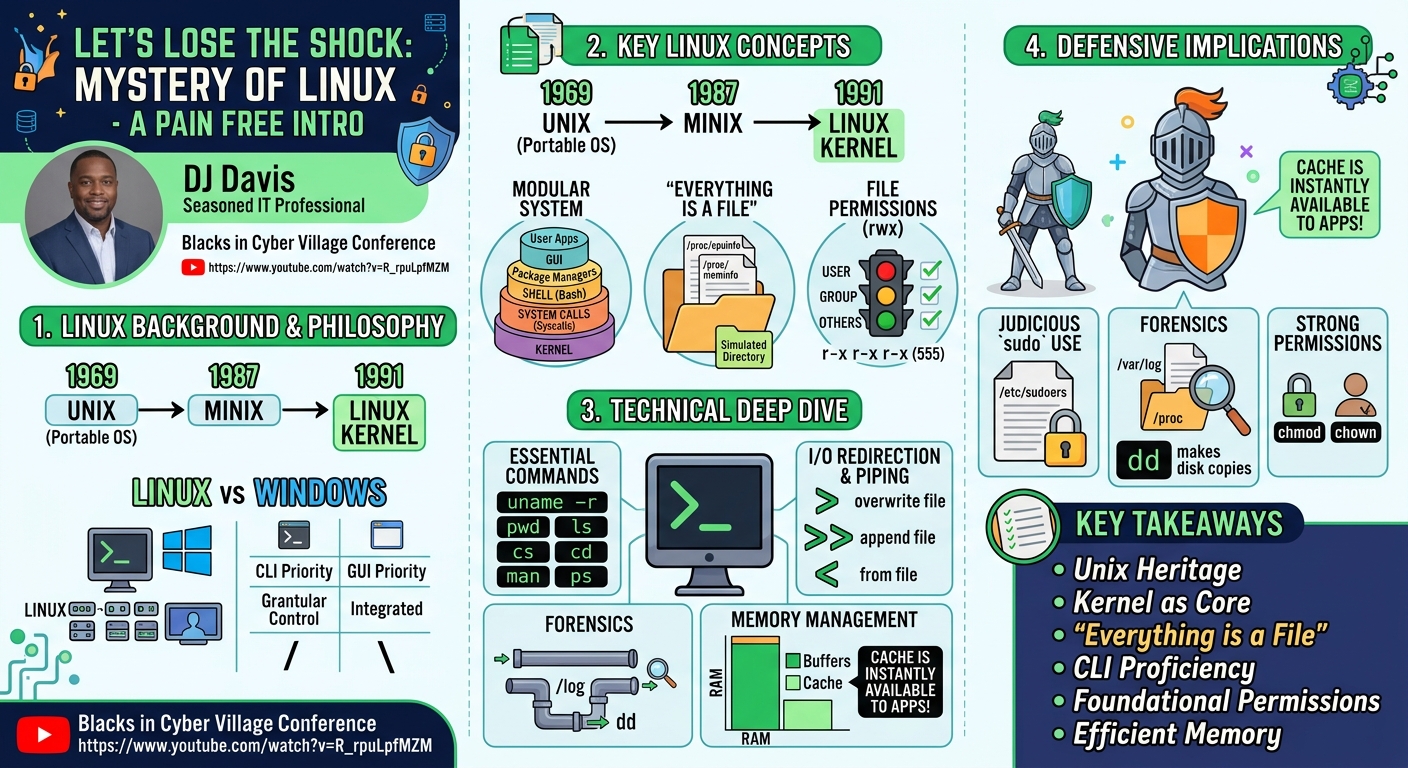
The presentation elucidates several core principles and components that define the Linux operating system, making it a stable, powerful, and versatile platform. A primary "finding" for newcomers is the understanding that Linux is not monolithic but a modular system comprising several key elements. At its heart is the kernel, the central core developed by Linus Torvalds, responsible for fundamental operations like memory allocation, CPU scheduling, and I/O management. Crucially, DJ Davis clarifies that the kernel does not include the command-line interpreter (e.g., Bash), the graphical user interface, or user-level commands and programs; these are separate components that interact with the kernel through system calls (syscalls).
Another key concept is the "everything is a file" paradigm in Linux. This philosophical approach means that devices, processes, and even system parameters are represented as files, allowing for consistent interaction through standard file operations (open, read, write, close). This is powerfully demonstrated by the /proc filesystem, a simulated directory structure that provides real-time access to kernel and process information as if they were ordinary files. For instance, /proc/cpuinfo offers detailed CPU specifications, while /proc/meminfo provides memory statistics.
The talk also highlights the critical role of file permissions in Linux security and operation. Unlike the often more complex access control lists (ACLs) in Windows, Linux employs a straightforward read (r), write (w), execute (x) model for three categories: the user (owner), the group, and others. These permissions can be represented numerically (e.g., r=4, w=2, x=1), allowing for precise control over who can interact with files and directories. Understanding and correctly configuring these permissions is fundamental to securing a Linux system and managing user access effectively.
Finally, Davis underscores Linux's efficient memory management. Linux is designed to utilize all available memory by allocating idle RAM to buffers and cache. This strategy improves performance by storing frequently accessed files and data in memory, reducing the need for slower disk I/O. While this can sometimes lead to reports of high memory utilization, Davis clarifies that this cached memory is instantly available to applications, meaning a high memory usage percentage does not necessarily indicate a problem or a system running out of resources. This understanding is vital for administrators to correctly interpret system performance metrics.
Technical Deep Dive
▶ Watch: Understanding the special characteristics of Unix (4:10)
Linux's architecture is a testament to its Unix heritage, built upon a modular design that separates the core kernel from other system components. The Linux kernel itself, primarily written in C code (approximately 98% C, with other variants on GitHub), acts as the central orchestrator, managing memory, scheduling CPU time for multiple processes, and handling all input/output operations. Kernel versions are frequently updated; for example, a version released on July 27 was mentioned. Users can ascertain their kernel version using the uname command with the -r (release) or -a (all information) switches, and the kernel image is typically stored in the /boot directory.
Beyond the kernel, a Linux system includes a system bootloader (commonly GRUB), which can also boot other operating systems like Windows, facilitating dual-boot configurations. Users interact with the system primarily through a Command Line Interpreter (CLI), with Bash (Born Again SHell) being the most prevalent, though alternatives like SH (Bourne Shell) and KSH (Korn Shell) exist. For graphical interaction, various GUIs are available. Package managers are crucial for software installation and updates, broadly categorized into RPM/YUM (Red Hat-based distributions) and APT/Debian (Debian-based distributions). System startup is managed by startup scripts, transitioning from older System V init to the more modern SystemD. The file system typically uses ext3 or newer ext4 (though FAT32 and exFAT are common for removable media).
A key mechanism for user programs to interact with the kernel is system calls (syscalls). Davis illustrates this using the strace utility, which prints out the system calls made by a program. A simple "Hello World" assembly program (hello_asm) demonstrates minimal syscalls: typically one to start, one write (syscall number 4) to output the string, and one exit (syscall number 1). In contrast, a C program performing the same task exhibits a multitude of syscalls due to the overhead of its standard library, which handles buffered I/O, making it more efficient by reducing the number of costly context switches between user and kernel space. This also highlights the default file descriptors: 0 for standard input (stdin), 1 for standard output (stdout), and 2 for standard error (stderr), which are automatically opened for every process.
The Linux file system hierarchy is well-defined, starting from the root directory (/). Key directories include /boot (kernel and boot files), /etc (system configuration files), /home (user home directories), /root (root user's home directory), /usr (non-changeable files, programs, libraries, e.g., /usr/bin, /usr/sbin, /usr/lib), and /var (variable data like logs). Two particularly interesting simulated filesystems are /proc and /sys. /proc is not on disk but provides a dynamic view of memory and running processes, with each process having its own numbered directory containing parameters. /sys allows reading and setting kernel parameters, enabling runtime configuration changes.
File permissions are managed via chmod (change mode) and chown (change owner). Permissions are assigned to the user, group, and others, with r (read), w (write), and x (execute) attributes. These can be set using octal numbers (e.g., 7 for rwx, 5 for r-x, 0 for no permissions), such as chmod 755 filename. The meaning of x differs for files (executable program/script) versus directories (ability to enter the directory).
Command-line operations are central to Linux. Commands like pwd (print working directory), ls (list files), cd (change directory), df -h (disk free, human-readable), uptime, who, and ps (processes) are fundamental. The man pages provide an extensive built-in help system. I/O redirection and piping are powerful features: > redirects stdout to a file (overwriting), >> appends to a file, < redirects stdin from a file, and | pipes the output of one command as input to another (e.g., ls -l | wc -l to count files). The & symbol runs a command in the background (e.g., gedit file.txt &). Essential CLI shortcuts include Ctrl+C (end program), Ctrl+D (end of input), Ctrl+Z (suspend program), and Shift+Ctrl+C/V for copy/paste in the terminal.
Linux's approach to memory management involves actively using all physical RAM. Spare memory is dynamically allocated to buffers (for virtual memory paging) and cache (for storing file contents). This means that a system reporting high memory usage (e.g., 99%) is often efficiently utilizing its resources, and this "used" memory is immediately relinquished if an application demands it.
For file system compatibility, Davis notes that FAT32 has a 4GB file size limit, recommending exFAT for large USB drives, which Linux can typically read (sometimes requiring package installation). While Windows uses NTFS, Mac and Linux systems generally cannot read NTFS without additional drivers.
Finally, the talk touches on security. Linux's design inherently limits the write access of non-privileged users to system areas, which can reduce the impact of malware compared to less restricted Windows environments. Privilege management is handled by su (switch user) and sudo (super user do), with authorized users listed in /etc/sudoers. A powerful utility, dd (Disk Duplicator), is highlighted for its ability to copy anything as a file, including entire disks, and to compress disk images (e.g., dd if=/dev/sda | gzip > image.gz), reducing backup sizes significantly (e.g., 15% of original size for an SSD).
Demo / Proof of Concept
▶ Watch: Further differences: CLI vs GUI, scripting, user accounts (7:00)
While the talk is primarily an introductory lecture rather than a live demonstration of a specific exploit or tool, DJ Davis effectively uses command-line examples and conceptual illustrations to demonstrate core Linux functionalities. The most prominent "proof of concept" is the comparison of system calls (syscalls) using the strace utility.
Davis presents strace output for a simple "Hello World" program written in assembly language (hello_asm). This output clearly shows a minimal set of syscalls: one to initiate execution, a write syscall (number 4) to output "Hello World" to standard output, and an exit syscall (number 1) to terminate the program. This directly illustrates how low-level programs interact with the kernel.
In contrast, he then shows the strace output for a C language "Hello World" program. This output is significantly longer and more complex, revealing a multitude of syscalls. This demonstrates the role of the C standard library, which performs various behind-the-scenes operations (like buffered I/O, opening implicit file descriptors for standard in/out/error) that abstract away direct syscalls from the programmer but result in many more interactions with the kernel. This comparison effectively highlights the efficiency benefits of buffered I/O provided by standard libraries, even as it reveals the underlying complexity.
Throughout the presentation, Davis also provides numerous command-line examples for navigating the file system (pwd, ls, cd), managing processes (ps), checking system status (uptime, df -h), and manipulating file permissions (chmod). He demonstrates I/O redirection (>, >>, <), piping (|), and running commands in the background (&) with practical scenarios, such as ls -l | wc -l to count files in a directory or gedit file.txt & to launch a text editor without tying up the terminal. These examples, though not live, serve as clear, actionable demonstrations of Linux's capabilities.
Defensive Implications
▶ Watch: The historical origins and evolution of Linux (8:10)
Understanding the fundamental principles of Linux, as outlined by DJ Davis, provides a robust foundation for implementing strong defensive security postures. The "everything is a file" paradigm, while powerful, necessitates careful attention to file permissions. Defenders must master chmod and chown to ensure that critical system files, configuration files in /etc, and executable programs in /usr/bin or /usr/sbin have appropriate read, write, and execute permissions for the user, group, and others. Misconfigured permissions (e.g., world-writable files) are a common vector for privilege escalation or data tampering. Restricting write access for non-privileged users to system directories, as Linux inherently often does, is a key security advantage.
Effective privilege management is another critical defensive concern. The sudo mechanism, controlled by the /etc/sudoers file, must be configured judiciously. Granting sudo access only to necessary users and for specific commands minimizes the attack surface if a user account is compromised. Regular auditing of /etc/sudoers entries is essential to prevent unauthorized privilege escalation. The root user's separate home directory (/root) further reinforces security, ensuring that even if user partitions are compromised or filled, the superuser can still operate.
Familiarity with the file system hierarchy is crucial for incident response and forensic analysis. Knowing where logs reside (/var/log), where configuration files are (/etc), and how to inspect running processes and kernel parameters via /proc and /sys allows defenders to quickly gather intelligence, identify anomalies, and respond to threats. For example, monitoring /proc for unusual process parameters or open file descriptors can reveal suspicious activity.
Finally, understanding Linux's memory management prevents unnecessary alerts or misinterpretations of system health. High memory utilization due to caching and buffers is a normal and efficient behavior, not an indicator of an imminent system crash. Defenders should use appropriate tools and metrics that account for this cached memory when assessing system performance and potential resource exhaustion. Furthermore, the dd command, highlighted for disk imaging, is an invaluable tool for creating forensic copies of compromised systems, enabling offline analysis without altering the live system. This capability is fundamental for preserving evidence and conducting thorough investigations.
Key Takeaways
- Linux's Unix Heritage and Modularity: Linux evolved from Unix, inheriting its powerful modular design, portability, and key features like interprocess communication and I/O redirection. It's composed of a kernel, bootloader, shell, GUI, and package managers, allowing for high customization.
- The Kernel as the Core: The Linux kernel is the central component, managing memory, CPU scheduling, and I/O. Crucially, user-level programs, the GUI, and the command-line interpreter are separate from the kernel, interacting through system calls.
- "Everything is a File": Linux treats devices, processes, and system parameters as files. This is exemplified by the
/procfilesystem, which provides real-time, file-based access to dynamic system and process information likecpuinfoandmeminfo. - Command-Line Proficiency is Essential: Mastering the CLI, including commands like
ls,cd,pwd,man,df -h, and understanding I/O redirection (>,>>,<), piping (|), and background execution (&), is fundamental for efficient Linux administration and security tasks. - File Permissions are Foundational Security: Linux uses a clear read/write/execute (rwx) permission model for user, group, and others, often expressed numerically (e.g.,
chmod 755). Correctly configuring these permissions is vital for securing files, directories, and managing user access. - Efficient Memory Management: Linux utilizes all available memory for buffers and cache to optimize performance. High reported memory usage does not necessarily indicate a problem, as this memory is instantly freed when applications require it.
About the Speaker(s)
DJ Davis is a seasoned IT professional with a distinguished career spanning decades across various computing domains. His expertise originates from working on IBM micro mainframes and mid-range systems, later expanding into systems engineering, network design, and information security. He holds both a bachelor's and a master's degree in business information systems. Currently based in the Washington D.C. area, DJ Davis dedicates his work to assisting others in navigating complex IT ecosystems. Driven by a passion for mentoring, he has made it his mission to reduce the intimidation factor often associated with Linux, making it more accessible to a broader audience.
Reviews
Dr. Zero (Offensive Security Researcher) — SOLID
Competent introductory Linux content delivered in the right venue for the right audience. Davis knows his material and the Blacks in Cyber Village context makes this a legitimate community-education slot, not a research talk — grading it on CVE count would be absurd. Solid, accessible instruction that fills a real gap for newcomers entering the field.
Heather Calloway (CISO) — SOLID
A competent, well-structured introductory session aimed squarely at newcomers to Linux — delivered by someone with real experience and genuine mentorship intent. It does what it sets out to do, but that goal is narrow: this is workforce development content, not security leadership content.