Mind the Gaps: Detecting What You Miss in Windows Event Logs (and Fixing It!)
Fukusuke Takahashi (NTTDATA-CERT), Zach Mathis (Founder · Yamato Security)
CODE BLUE 2025 · Day 2 · Bluebox
Overview
In the realm of cybersecurity, Windows Event Logs are foundational for incident response and forensic analysis. However, as Fukusuke Takahashi from NTTDATA-CERT and Zach Mathis from Yamato Security reveal in their CODE BLUE talk, "Mind the Gaps: Detecting What You Miss in Windows Event Logs (and Fixing It!)," the default configurations of these logs are severely inadequate for effective DFIR (Digital Forensics and Incident Response). This presentation critically examines the inherent limitations of default Windows event log settings, demonstrating how they create significant blind spots that hinder the detection of sophisticated attacks and compromise forensic investigations.
Key moments
- 0:00 Introduction: Windows Event Log Challenges and Solutions
- 18:00 Default Windows Event Log Settings are Insufficient for DFIR
- 20:00 Quantifying Detection Gaps with Sigma Rules
- 23:00 Good News: Native Sysmon-like Features Coming to Windows
- 28:00 Recommended Event Log Configuration Guides and Baselines
- 32:00 Introducing Weller: Automated Event Log Configuration Tool
- 38:00 Weller Demo: Visualizing Gaps and Applying Recommended Settings
- 43:00 Q&A: Precautions Before Increasing Log Volume
Mind the Gaps: Detecting What You Miss in Windows Event Logs (and Fixing It!)
Speakers: Fukusuke Takahashi (NTTDATA-CERT); Zach Mathis (Founder, Yamato Security)
Conference: CODE BLUE
YouTube: https://www.youtube.com/watch?v=8aw84yfSiZ4
Overview
In the realm of cybersecurity, Windows Event Logs are foundational for incident response and forensic analysis. However, as Fukusuke Takahashi from NTTDATA-CERT and Zach Mathis from Yamato Security reveal in their CODE BLUE talk, "Mind the Gaps: Detecting What You Miss in Windows Event Logs (and Fixing It!)," the default configurations of these logs are severely inadequate for effective DFIR (Digital Forensics and Incident Response). This presentation critically examines the inherent limitations of default Windows event log settings, demonstrating how they create significant blind spots that hinder the detection of sophisticated attacks and compromise forensic investigations.
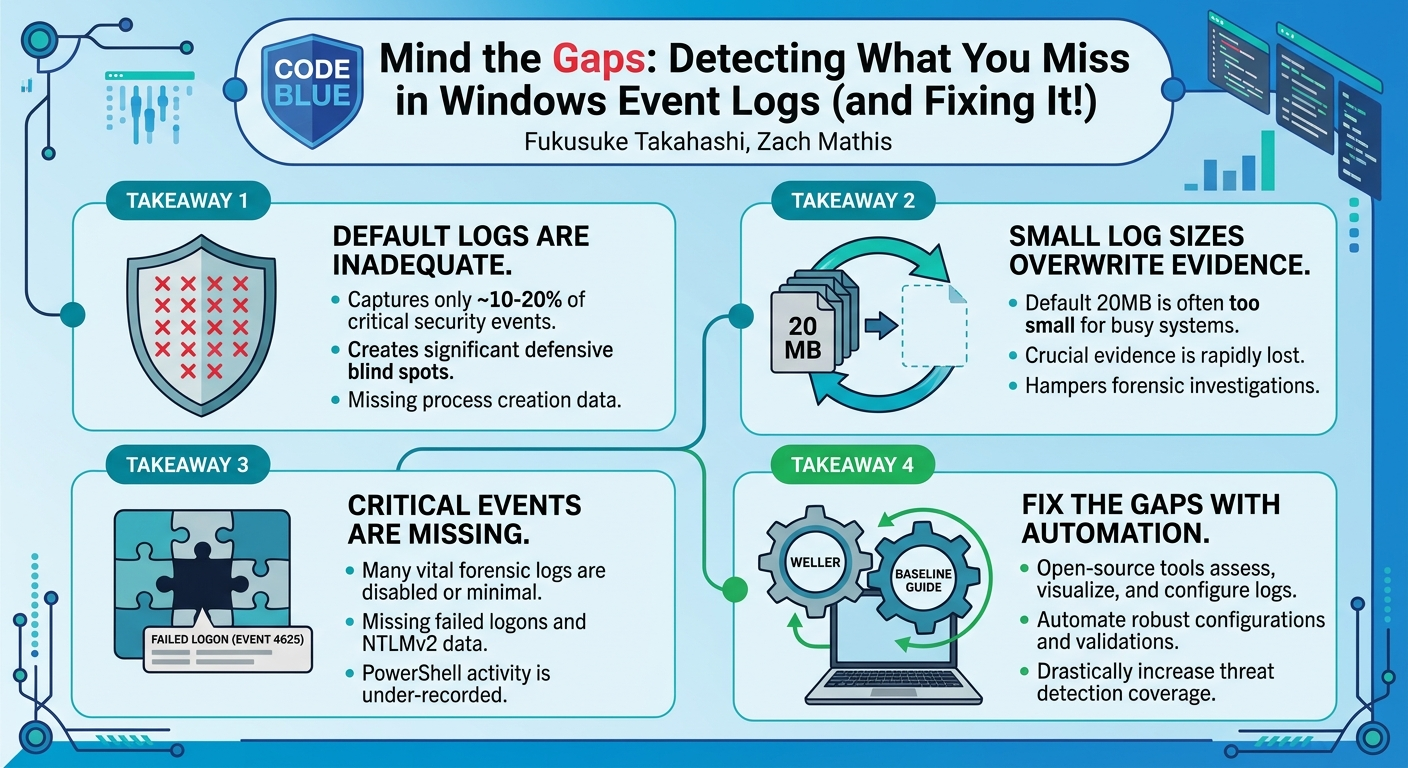
The speakers highlight that default settings capture only a fraction (estimated 10-20%) of the crucial security events required for comprehensive threat detection, leaving organizations vulnerable. They introduce a suite of open-source tools developed by Yamato Security—Weller and the EventLog Baseline Guide—designed to empower defenders to identify these critical logging gaps and automatically implement robust, recommended configurations. This talk is essential for any security professional grappling with Windows endpoint security, offering practical guidance and powerful tools to transform a weak default logging posture into a strong defensive asset.
Background
▶ Watch: Introduction: Windows Event Log Challenges and Solutions (0:00)
Windows Event Logs have a long history, dating back to Windows XP and 2003 with the .evt file format. While these early logs suffered from performance issues and limited functionality, the introduction of the .evtx format in Windows Vista marked a significant improvement, becoming the standard still in use today. Unlike simple text-based logs, EVTX files employ a proprietary Microsoft binary format based on XML, necessitating specialized tools like Event Viewer or custom parsers for analysis. These logs are typically stored in C:\Windows\System32\winevt\Logs and can even be extracted from memory or VSS (Volume Shadow Copy Service) snapshots.
The fundamental structure of an EVTX event consists of two main parts: the System tag and the EventData/UserData tag. The System tag contains common metadata across all events, such as timestamp, Event ID, and channel. In contrast, the EventData/UserData tag is highly variable, with fields that differ significantly based on the Event ID and channel. This variability, coupled with internal proprietary encoding, makes direct human interpretation challenging and often requires message DLLs for rendering human-readable text in tools like Event Viewer. From a DFIR perspective, crucial fields in the System tag include ProviderName, EventID, and TimeCreated. However, the Level field (e.g., Critical, Warning, Information) is primarily for system administration, not DFIR, and can be misleading.
Despite their ubiquity on every Windows endpoint and their role as a fundamental artifact in DFIR, the default settings for Windows Event Logs are profoundly insufficient. The speakers emphasize that these defaults were not designed with DFIR in mind, resulting in a "very insufficient record." Key issues include:
- Limited Coverage: An estimated 70-90% of desirable log categories are not recorded by default. For example, critical process creation logs, which include command-line arguments, are entirely absent.
- Insufficient Log Sizes: Default log file sizes are extremely small, often around 20MB (or even 1MB for some logs), leading to rapid overwriting of crucial evidence. On busy servers like Active Directory domain controllers, logs can rotate within hours, destroying forensic artifacts needed for investigations.
- Missing Critical Events: Many events vital for forensic analysis, such as failed logon attempts (Event ID 4625), NTLMv2 failures, and detailed PowerShell execution logs, are not captured by default.
These gaps severely hamper the ability of security teams to detect attacks and investigate incidents. For Red Teams and penetration testers, understanding these logging deficiencies is equally crucial, as it allows them to identify blind spots in an organization's detection capabilities. The talk underscores that while other artifacts like the Registry and MFT are important, maximizing the potential of event logs through proper configuration is paramount for a robust security posture.
Key Findings
▶ Watch: Quantifying Detection Gaps with Sigma Rules (20:00)
The central revelation of this talk is the profound disparity between the default Windows Event Log settings and the requirements for effective cybersecurity detection and incident response. The speakers meticulously detail several critical findings:
- Massive Detection Gaps: By default, Windows Event Logs capture only a small fraction of the data needed for comprehensive threat detection. The speakers estimate that 70-90% of the logs crucial for DFIR are not recorded with default settings. This includes fundamental events like process creation with command-line arguments, which are essential for understanding attacker activity.
- Crippled Sigma Rule Effectiveness: The widespread adoption of Sigma rules for detecting attacks across various SIEMs and log management solutions is severely undermined by default Windows logging. The presentation shows that with default settings, only about 10-20% of the available Sigma rules can be effectively utilized. This means a significant portion of community-driven threat intelligence and detection capabilities are rendered useless without proper log configuration.
- Inadequate Log Retention: Default log file sizes are alarmingly small, typically around 20MB, and in some cases as low as 1MB. This minuscule capacity leads to rapid log rotation and overwriting, especially on busy systems like Active Directory servers, where critical evidence can be lost within hours. This significantly shortens the forensic timeline available for investigation.
- Specific Critical Events Are Missing: The talk highlights specific examples of crucial logs that are not recorded by default, including:
- Failed logon attempts (Event ID 4625) on client machines.
- NTLMv2 authentication failures.
- Process creation events with command-line details, which are critical for identifying malicious execution.
- Detailed PowerShell activity, including script block logging and module logging.
- Complexity of Manual Configuration: While it's technically possible to modify event log settings manually via Group Policy Editor,
auditpolcommands,wevtutil, or the Registry Editor, this process is fraught with challenges. The Group Policy Editor has complexities, such as conflicts between "Basic" and "Advanced Audit Policy Configuration" settings, and requires meticulous validation to ensure logs are actually being recorded as intended. This makes manual, large-scale deployment error-prone and inefficient. - Emerging Positive Developments: A positive finding shared is Microsoft's announcement regarding the future integration of Sysmon-like capabilities natively into Windows 11 and Windows Server 2025. This development promises to address some of the current logging deficiencies, particularly for process creation, network connections, and file system activity, without requiring external tools. While it won't be default, it offers a path to significantly enhanced native logging.
- Existence of Effective Baselines and Tools: Despite the grim picture of default settings, the talk emphasizes that comprehensive guidelines for improving Windows event logging already exist from organizations like Microsoft, the Australian Cyber Security Centre (ACSC), and Yamato Security. Furthermore, Yamato Security has developed open-source tools, Weller and the EventLog Baseline Guide, to automate the assessment, comparison, and implementation of these recommended configurations, making it feasible for organizations to close these detection gaps.
These findings collectively underscore the urgent need for organizations to proactively address their Windows Event Log configurations to achieve a defensible security posture.
Technical Deep Dive
▶ Watch: Recommended Event Log Configuration Guides and Baselines (28:00)
Windows Event Logs, specifically in the EVTX format, are complex binary files that store system activities. Each event is structured with an underlying XML schema, broadly divided into a System tag and an EventData/UserData tag. The System tag provides consistent metadata such as ProviderName, EventID, TimeCreated, and the Channel (e.g., "Security," "System"). The EventData/UserData tag, however, is highly dynamic, containing event-specific details that vary significantly by Event ID and channel. This variability, combined with internal encoding (e.g., %16 or %Encoded values), means that raw EVTX data is not human-readable and requires parsing tools or message DLLs for interpretation.
The default Windows Event Viewer (eventvwr.msc) can display these logs, but its filtering capabilities are limited, making it unsuitable for in-depth DFIR investigations, especially with large volumes of logs. Beyond the three primary logs (Application, Security, System), Windows records events across hundreds of channels (approximately 400 per endpoint). Crucially, many vital logs are disabled or minimally configured by default, including:
- Windows Defender/AMSI (Antimalware Scan Interface) logs: Critical for detecting malicious script execution and payload delivery.
- PowerShell logs: Essential for tracking PowerShell activity, including script block logging, module logging, and transcription.
- RDP (Remote Desktop Protocol) logs: Important for monitoring remote access and authentication.
A major technical gap highlighted is the absence of Process Creation logs with command-line arguments in default settings. These logs are fundamental for understanding what executables are run, with what parameters, and by whom – a cornerstone of forensic analysis. Similarly, Event ID 4625 (Account Logon Failed), while present on domain controllers, is often not adequately recorded on client machines by default, limiting visibility into brute-force attempts or lateral movement failures.
Traditionally, improving event log configurations involves modifying Audit Policies. These can be adjusted via:
- Local Group Policy Editor (
gpedit.msc): For individual machines. - Domain Group Policy Objects (GPOs): For enterprise-wide deployment.
auditpolcommand: For command-line management of audit policies.wevtutilcommand: For managing event log properties like maximum file size.- Registry Editor: For specific settings, such as enabling command-line logging for process creation (e.g.,
HKLM:\SOFTWARE\Microsoft\Windows\CurrentVersion\Policies\System\Audit\ProcessCreationIncludeCommandLine).
However, these manual methods present significant challenges. The Group Policy Editor has a tricky interaction between "Basic Audit Policy Settings" and "Advanced Audit Policy Configuration." Enabling basic settings can inadvertently disable advanced ones, leading to unexpected logging behavior. Furthermore, simply applying settings is not enough; rigorous validation is required to ensure that the desired logs are indeed being generated. For instance, a checkbox might be selected, but the corresponding logs might not appear, or vice versa, due to underlying system complexities.
The talk extensively discusses Sigma rules, a generic and open signature format for detecting threats in log data. Sigma's strength lies in its vendor-agnostic nature, allowing rules to be converted into queries for various SIEMs (e.g., Splunk, Elastic, QRadar). The Sigma repository contains thousands of rules, with many targeting Windows Event Logs. However, the speakers demonstrate that the default Windows event log configuration renders approximately 75-80% of these Sigma rules ineffective. For example, rules targeting process creation events, which constitute about 50% of the Sigma rule base for Windows, cannot function if process creation logging is disabled. This means organizations relying solely on default Windows logs are missing vast categories of detections provided by the security community.
A glimmer of hope comes with Microsoft's announcement of upcoming native Sysmon-like functionality in Windows 11 and Windows Server 2025. This future capability aims to provide richer telemetry, including detailed process creation, network connections, and file activity, directly from the operating system. While it's not expected to be enabled by default, it will offer a more robust native logging solution, potentially reducing the reliance on third-party endpoint telemetry tools for certain critical event categories.
To guide organizations in improving their logging, several reputable baselines exist:
- Microsoft's recommended audit policies: Detailed documentation on which categories to enable.
- Australian Cyber Security Centre (ACSC) guidelines: Highly detailed recommendations, including specific log sizes and retention periods (e.g., 18 months for some logs).
- Yamato Security's DFIR/Hunting Windows Event Log Configuration Guide: A comprehensive guide with specific recommended log sizes (e.g., Security logs from 20MB to 1GB+, PowerShell logs from 15MB to larger sizes, even 4GB for Security logs on domain controllers).
These baselines, while invaluable, still require careful implementation. The sheer number of granular settings (e.g., many specific settings for PowerShell logging alone) makes manual configuration and validation a daunting task, emphasizing the need for automated solutions.
Demo / Proof of Concept
▶ Watch: Introducing Weller: Automated Event Log Configuration Tool (32:00)
The core of the solution presented lies in two open-source tools developed by Yamato Security: Weller and the EventLog Baseline Guide. These tools aim to automate the assessment, comparison, and configuration of Windows Event Logs, addressing the gaps discussed in the talk.
Weller (Windows Event Log Auditor)
Weller is a PowerShell-based tool designed to audit and configure Windows Event Log settings efficiently. Its name is an acronym for Windows Event Log Auditor. It streamlines the process of evaluating current logging capabilities against recommended baselines and automatically applying necessary changes. Weller features four main commands:
Update-Rules: This command fetches the latest Sigma detection rules from the public repository. This ensures that Weller's assessment of detection coverage is based on the most current threat intelligence.Audit-Settings: This command analyzes the current Windows Event Log audit policies and compares them against known security baselines (Microsoft, ACSC, Yamato Security). It then visualizes which audit categories are enabled or disabled and, crucially, how many Sigma rules can be effectively utilized with the current configuration. The demo shows a graphical PowerShell GUI displaying categories like "Process Creation" with over 1300 Sigma rules, but indicating "No Auditing" by default. It provides a summary, often showing that default settings only enable about 25% of potential Sigma rule coverage. A unique feature is its ability to export a JSON file compatible with the MITRE ATT&CK Navigator, allowing users to visually see detection gaps (red areas) on the ATT&CK matrix before configuration changes, and then the improved coverage (green areas) after applying recommended settings.Audit-FileSizes: This command checks the maximum file sizes configured for various event logs. It compares these against recommended sizes from the baselines (e.g., increasing Security logs from 20MB to 1GB or more, PowerShell logs from 15MB to larger capacities) and suggests optimal values to ensure sufficient log retention.Configure: This is the most impactful command. It automatically applies the recommended event log settings and maximum file sizes based on Yamato Security's guidelines. This single command handles numerous granular configurations, including enabling process creation logging with command-line arguments and adjusting log sizes. The demo illustrates that this command can significantly improve log configurations in less than a minute, transforming the default, insufficient setup into one that can support a much higher percentage (around 75%) of Sigma rule detections.
Weller requires no installation beyond unzipping and can be run by executing PowerShell commands. It handles the complexities of Group Policy and Registry settings behind the scenes.
EventLog Baseline Guide
The EventLog Baseline Guide is a Streamlit-based Python tool designed for visualization and comparison. Its primary purpose is to help users understand the impact of different security baselines on Windows Event Log configurations and their corresponding Sigma detection coverage.
The tool visually compares:
- Default Windows Event Log settings: Showing the inherent weaknesses, such as disabled process creation logs and small file sizes. It uses charts to clearly illustrate the low percentage of detectable Sigma rules (e.g., a majority of rules appearing in the "cannot detect" category).
- Recommended baselines: Specifically, it compares configurations against Microsoft's, ACSC's, and Yamato Security's guidelines.
- Impact on Sigma Coverage: Users can see side-by-side comparisons of how applying a specific baseline drastically increases the number of detectable Sigma rules and improves log retention. For instance, it clearly shows the shift from a predominantly "red" (undetectable) ATT&CK matrix view to a "green" (detectable) one after applying Yamato Security's recommendations.
This tool acts as a powerful educational and planning resource, allowing organizations to visualize the benefits of improved logging before full deployment.
Hayabusa's logmetrics Command (Supporting Tool)
While not the main focus, the speakers briefly mention Hayabusa's logmetrics command. Hayabusa is another open-source event log analysis tool from Yamato Security. The logmetrics command helps assess log retention by displaying the FirstTimestamp, LastTimestamp, and current size of event logs. This information is crucial for estimating how much data is retained over time and for planning storage capacity when increasing log sizes, as highlighted in the Q&A.
Together, Weller and the EventLog Baseline Guide provide a comprehensive solution for auditing, visualizing, configuring, and validating Windows Event Log settings, enabling organizations to "mind the gaps" and significantly enhance their detection capabilities.
Defensive Implications
▶ Watch: Q&A: Precautions Before Increasing Log Volume (43:00)
The findings and tools presented in this talk carry significant defensive implications for any organization operating Windows environments:
- Proactive Configuration is Non-Negotiable: The most critical implication is that relying on default Windows Event Log settings is a severe security risk. Defenders must proactively configure their event logs to capture essential telemetry. This is not merely a "nice to have" but a fundamental requirement for effective security operations.
- Adopt and Implement Security Baselines: Organizations should move beyond ad-hoc logging configurations and adopt well-vetted security baselines. The recommendations from Microsoft, the Australian Cyber Security Centre (ACSC), and Yamato Security provide a solid foundation. These baselines offer specific guidance on which audit policies to enable and what log file sizes to set, ensuring comprehensive coverage.
- Leverage Automation for Configuration and Validation: Manual configuration of event logs across an enterprise is complex, time-consuming, and prone to errors. Tools like Weller are indispensable for automating the process of applying recommended settings and for validating that logs are indeed being generated as expected. The
Configurecommand in Weller can drastically reduce the effort required to implement a robust logging posture. - Enhance Threat Detection Capabilities: By implementing improved logging configurations, organizations can unlock the full potential of Sigma rules. This directly translates to a significant increase in detection coverage for various attack techniques, moving from an estimated 10-20% effectiveness to around 75%. This enhanced visibility allows security teams to detect sophisticated threats that would otherwise go unnoticed.
- Improve Incident Response and Forensic Analysis: With richer and longer-retained event logs, DFIR teams will have access to more complete evidence. Detailed process creation logs with command-line arguments, comprehensive PowerShell activity, and extended log retention periods are invaluable for reconstructing attack timelines, identifying compromised systems, and understanding attacker methodologies.
- Plan for Increased Storage Requirements: Implementing recommended log sizes (e.g., Security logs from 20MB to 1GB+, or even 4GB for domain controllers) will significantly increase storage consumption on endpoints and in centralized log management systems (SIEMs). Defenders must plan for this increased storage capacity and ensure their infrastructure can handle the higher volume of data. The
logmetricscommand in Hayabusa can assist in estimating storage needs. - Monitor and Validate Continuously: Event log configurations are not a one-time setup. Systems can drift, and new threats may require adjustments. Defenders should incorporate regular audits using tools like Weller's
Audit-Settingsto ensure that logging policies remain effective and aligned with current detection needs. - Prepare for Future Native Capabilities: While current tools address immediate needs, defenders should keep an eye on Microsoft's announced native Sysmon-like features in Windows 11 and Windows Server 2025. Understanding these upcoming capabilities will be crucial for integrating them into future logging strategies, potentially simplifying deployment and maintenance.
In essence, the message for defenders is clear: neglecting Windows Event Log configuration is akin to operating without security cameras. By actively managing and enhancing these logs, organizations can transform a critical blind spot into a powerful defensive asset, significantly improving their ability to detect, respond to, and recover from cyberattacks.
Key Takeaways
- Default Windows Event Log settings are severely inadequate for DFIR and threat detection, capturing only 10-20% of critical security events.
- Crucial logs like process creation with command-line arguments and detailed failed logon attempts are often missing by default, creating significant blind spots for defenders.
- Small default log file sizes (e.g., 20MB) lead to rapid overwriting of evidence, severely limiting the window for forensic analysis.
- Yamato Security's open-source tools, Weller and EventLog Baseline Guide, empower organizations to automate the identification and remediation of these logging gaps.
- Implementing recommended log configurations (e.g., using Weller's
Configurecommand) can increase Sigma rule detection coverage from 10-20% to approximately 75%, dramatically enhancing threat visibility. - Defenders must proactively adopt and implement established security baselines (e.g., Microsoft, ACSC, Yamato Security) and plan for increased storage to ensure comprehensive and durable logging.
About the Speaker(s)
Fukusuke Takahashi is affiliated with NTTDATA-CERT and is an open-source developer for Yamato Security. His work focuses on improving security operations through practical solutions, as demonstrated by his contributions to tools like Weller and the EventLog Baseline Guide.
Zach Mathis is the Founder of Yamato Security, where he leads various open-source projects. He is a prominent figure in the cybersecurity community, particularly known for his expertise in DFIR and threat hunting, and for developing tools that empower security practitioners.
Reviews
Dr. Zero (Offensive Security Researcher) — STRONG ACCEPT
Solid, practical talk that quantifies a problem everyone vaguely knows but few have measured: default Windows logging is garbage for detection. The Weller tooling and baseline comparisons are genuinely useful. Not groundbreaking research, but excellent practitioner content that will actually change configs in the field.
Heather Calloway (CISO) — STRONG ACCEPT
This is operationally useful work that belongs in front of every Windows security team. The gap analysis is quantified, the tooling is free and immediately deployable, and the problem it solves—default Windows logging being nearly useless for detection—is something most organizations have not fixed.