Netscape, Dial-Up, and Data Breaches: Browser Risk Then vs Now
Jesse Durkee
Overview
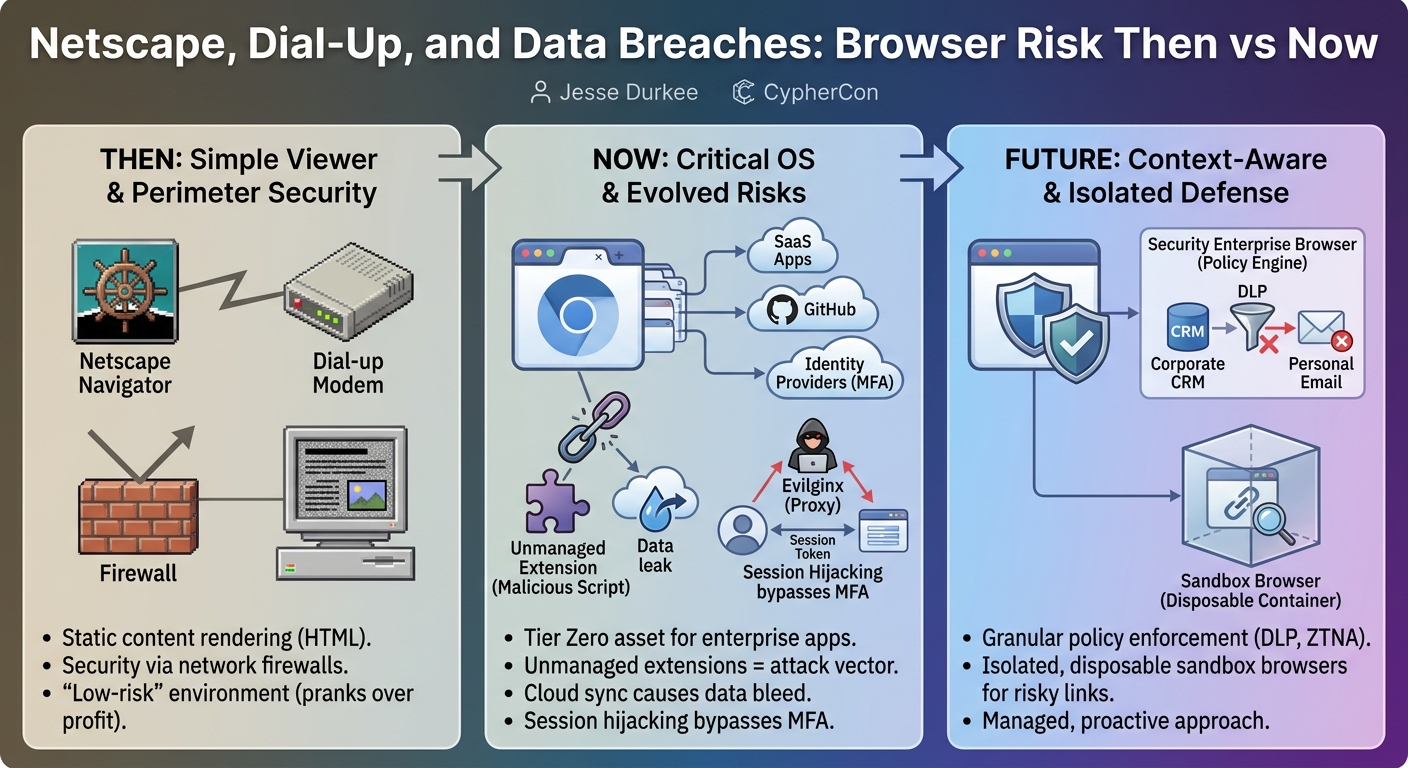
Jesse Durkee's talk, "Netscape, Dial-Up, and Data Breaches: Browser Risk Then vs Now," delivers a compelling historical and technical analysis of how the web browser has evolved from a simple content viewer into a critical, often unmanaged, operating system for modern enterprises. Durkee, a generalist at a managed service provider, argues that despite its central role in accessing sensitive corporate data, the browser is frequently overlooked in security strategies, often treated as a mere "personal choice" rather than a tier zero asset. The presentation vividly contrasts the nascent, relatively low-risk internet of the 1990s with today's complex, cloud-native landscape, where the browser acts as a gateway to virtually all critical business functions, from GitHub repositories to hypervisor management and identity systems.
Key moments
- 4:00 Browser: The New Operating System & Tier Zero Asset
- 5:45 Early Browser Wars: Netscape vs. IE, Low Cybercrime
- 8:00 Chrome's Sandbox, Risky Extensions & Cloud Syncing
- 10:00 Modern Threats: Session Hijacking & Business Email Compromise
- 18:00 Context-Aware Security Enterprise Browsers & Policy Enforcement
- 24:30 Browser is Critical Infrastructure: Manage it Now
- 26:00 Q&A: Ingesting Browser Telemetry into Security Platforms
Netscape, Dial-Up, and Data Breaches: Browser Risk Then vs Now
Speakers: Jesse Durkee, Generalist
Conference: CypherCon
YouTube: https://www.youtube.com/watch?v=5-8t_TmrYMw
Overview
Jesse Durkee's talk, "Netscape, Dial-Up, and Data Breaches: Browser Risk Then vs Now," delivers a compelling historical and technical analysis of how the web browser has evolved from a simple content viewer into a critical, often unmanaged, operating system for modern enterprises. Durkee, a generalist at a managed service provider, argues that despite its central role in accessing sensitive corporate data, the browser is frequently overlooked in security strategies, often treated as a mere "personal choice" rather than a tier zero asset. The presentation vividly contrasts the nascent, relatively low-risk internet of the 1990s with today's complex, cloud-native landscape, where the browser acts as a gateway to virtually all critical business functions, from GitHub repositories to hypervisor management and identity systems.
The core message underscores a fundamental shift in cybersecurity priorities: traditional perimeter-based defenses are no longer sufficient when the primary interface to critical applications resides within a browser tab. Durkee highlights the escalating risks associated with browser extensions, cloud synchronization of credentials, sophisticated session hijacking techniques, and the blurring lines between personal and corporate data. He advocates for a proactive, enterprise-level approach to browser management, introducing concepts like security enterprise browsers and sandbox browsers as essential tools for implementing granular policy enforcement, data loss prevention (DLP), and robust zero-trust principles at the application layer.
Background
▶ Watch: Browser: The New Operating System & Tier Zero Asset (4:00)
The journey of the web browser, as recounted by Durkee, began with humble origins in the 1990s. Early browsers like Netscape offered a sparse feature set: basic text rendering, image display, links, and unsecure forms. The internet itself was a slower, less hostile environment, where "cybercrime" typically amounted to pranks like "toilet papering a house" – defacing a website for bragging rights rather than financial gain. This era was marked by the "browser wars," a fierce competition between Netscape and Microsoft's Internet Explorer (IE), symbolized by memorable stunts like dumping giant logos on rivals' lawns.
A pivotal moment arrived with the normalization of code execution in the browser, primarily through JavaScript. Initially used for simple animations and form validations, this capability gradually transformed static web pages into dynamic, interactive applications. However, this power also introduced new vulnerabilities, such as endless pop-up storms capable of crashing entire systems. The landscape shifted dramatically in 2008 with Google's introduction of Chrome, which pioneered a sandbox architecture. This innovation allowed individual tabs to crash without bringing down the entire browser, significantly improving stability and security. Microsoft eventually conceded, adopting Chromium (the open-source engine behind Chrome) for its own Edge browser, solidifying Chromium's dominance.
As browsers matured, they accumulated more features, notably extensions. While initially lauded for utility (e.g., ad blockers, password managers like Bitwarden), extensions quickly became a significant attack vector. Durkee cites a Hacker News report revealing that 20 million users unknowingly installed fake ad blockers that injected malicious scripts and manipulated browsing behavior. Concurrently, the introduction of cloud synchronization for bookmarks, saved passwords, and settings, while convenient, inadvertently led to the dangerous bleed of personal and corporate data, especially when users signed in with work emails on personal devices or vice-versa. This confluence of advanced features, convenience, and lax management laid the groundwork for the modern browser's elevated risk profile.
Key Findings
▶ Watch: Chrome's Sandbox, Risky Extensions & Cloud Syncing (8:00)
Durkee's talk reveals several critical insights into the contemporary browser threat landscape and the necessary evolution of security strategies:
- The Browser as a Tier Zero Asset and De Facto OS: The most significant finding is the browser's transformation from a utility into the primary interface for almost all business operations, including sensitive systems like GitHub, hypervisors, and identity management. This makes it a tier zero asset, on par with domain controllers or critical infrastructure, yet it's often managed with the same casualness as a personal app.
- Inadequacy of Traditional Security Models: Existing security paradigms, heavily focused on perimeter defenses (firewalls, antivirus, EDR) and even man-in-the-middle decryption, are struggling to keep pace. Web applications increasingly use certificate pinning to resist inspection, while the shift to cloud-native, browser-centric workflows renders network-edge controls less effective.
- The Rise of Sophisticated Browser-Based Attacks: Attackers no longer solely rely on brute-forcing passwords. Instead, they employ advanced techniques like session hijacking using tools like Evilginx to steal authenticated session tokens, effectively bypassing multi-factor authentication (MFA). Business Email Compromise (BEC) schemes are also highly automated, leveraging AI to parse stolen mailboxes and craft convincing, typo-squatted phishing attempts.
- The Heavy Burden of Legacy Isolation: Traditional methods for securing sensitive browser access, such as Virtual Desktop Infrastructure (VDI), are costly, complex, and user-unfriendly. Durkee highlights the irony of spinning up entire secondary infrastructures just to securely open a single link in a managed browser.
- Emergence of Context-Aware Security Enterprise Browsers: A new class of browsers or browser extensions is innovating by embedding security directly into the browsing experience. These security enterprise browsers can enforce policies at a highly granular level – per session, per tab, based on identity, application, and user behavior. This enables capabilities like Data Loss Prevention (DLP) directly within the browser, monitoring and blocking data movement between sensitive applications and personal channels (e.g., CRM to personal email or AI prompts).
- ZTNA's Evolution and Pitfalls: While Zero Trust Network Access (ZTNA) aims to assume devices are compromised, Durkee suggests moving the ZTNA agent into the browser itself. However, he cautions against repeating past mistakes of proprietary, siloed solutions, advocating for more open, integrated approaches.
- Sandbox Browsers for Risk Mitigation: Lightweight, containerized, and on-demand sandbox browsers (e.g., Browser.l, AWS Workspaces) offer a superior alternative to basic private browsing modes for handling risky content, conducting investigations, or testing unknown links, providing true isolation from the primary environment.
- The "Hot Crazy Browser Matrix": Durkee introduces his own categorization framework, the "hot crazy browser matrix," to evaluate browsers based on their enterprise capability/policy enforcement ("hot") versus their unmanageability or malicious potential ("crazy"). This conceptual model helps organizations assess their current browser posture.
Technical Deep Dive
▶ Watch: Modern Threats: Session Hijacking & Business Email Compromise (10:00)
The technical evolution of the browser forms the backbone of Durkee's argument. Initially, browsers were simple HTML renderers, displaying static content. The introduction of JavaScript transformed them into dynamic application platforms, enabling client-side logic. However, early JavaScript implementations were prone to abuse, leading to infamous "pop-up storms" that could crash an entire system due to resource exhaustion.
Google Chrome's innovation in 2008 introduced a fundamental architectural shift: the sandbox architecture. Each browser tab, and often each extension, runs in its own isolated process. This means a crash in one tab or a malicious script in an extension is confined to its sandbox, preventing it from compromising the entire browser or the underlying operating system. This significantly enhanced stability and security, a model subsequently adopted by other browsers, including Microsoft Edge, which now leverages the Chromium engine.
Browser extensions, while powerful, present a substantial attack surface. Durkee highlights how seemingly innocuous extensions, such as coupon or grammar checkers, often request broad permissions, gaining access to all content on a page or even the clipboard. This enables malicious extensions (like the fake ad blockers reported to have affected 20 million users) to inject scripts, manipulate browsing behavior, and exfiltrate sensitive data without direct user interaction beyond the initial install.
The convenience of cloud synchronization for browser data (bookmarks, saved passwords, browsing history) also introduces significant risks. When users sign into their browsers with work or personal emails, their data is synced to the cloud, often blurring the lines between corporate and personal information. While cookies are typically device-specific and not synced, the resulting saved credentials become a target.
Attackers have adapted to modern defenses like MFA. Instead of brute-forcing passwords, they increasingly focus on session hijacking. Tools like Evilginx facilitate this by acting as sophisticated reverse proxies. They sit in the middle of a login flow, mimicking legitimate branding (e.g., Entra login pages), capturing user credentials and the subsequent MFA token. Crucially, they then use this information to authenticate to the legitimate service and steal the resulting session cookie or token. With this stolen token, attackers can bypass future MFA prompts for the duration of the session, gaining full access to the user's accounts. Durkee notes the importance of setting short-lived session tokens to mitigate this risk, though he acknowledges that tying access to specific browser versions for conditional access policies is unreliable due to user-agent spoofing.
Business Email Compromise (BEC) has also evolved, leveraging automation and AI. Durkee recounts an incident where a compromised email account silently collected intelligence for months, dumping the entire mailbox, and parsing it with AI to understand payment patterns and vendor relationships. This allowed attackers to craft highly convincing, precisely timed phishing emails, often using typo-squatted domains to request changes to payment details, leading to significant financial losses.
The talk then pivots to the emerging security enterprise browsers. These are not just browsers with added security features; they are designed from the ground up or heavily augmented to be context-aware. This means they understand the context of the web page, the user's identity, the application being accessed, and the user's behavior. This allows for unprecedented granular policy enforcement:
- Application-level DLP: Monitoring and blocking attempts to copy sensitive data from a CRM and paste it into a personal email or an AI prompt.
- Behavioral policy enforcement: Blocking a user from rebooting an AWS instance if their role does not permit it, even if they have some form of access to the page.
- ZTNA integration: Moving the ZTNA agent directly into the browser, reducing the number of endpoint agents and enabling access policies at the application layer rather than just the device layer.
- Managed Access: Providing connectors for traditional RDP or SSH hosts with managed keys, centralizing access to diverse resources.
Durkee also discusses sandbox browsers (e.g., Browser.l, AWS Workspaces). These provide on-demand, containerized, and disposable browser sessions. Unlike a simple "private browsing" mode, which merely avoids saving history but operates on the same device and network, sandbox browsers offer true isolation. They are ideal for investigating suspicious links, handling risky content, or performing forensic analysis without exposing the primary operating environment.
Finally, Durkee touches upon AI-driven browsers like ChatGPT Atlas or Perplexity's Comet browser. These represent a nascent stage of browser evolution where an AI attempts to navigate and interact with the web on the user's behalf. While innovative, they are currently described as "gimmicky" and struggle with vague instructions, requiring highly detailed, step-by-step commands to perform tasks effectively.
Demo / Proof of Concept
▶ Watch: Browser is Critical Infrastructure: Manage it Now (24:30)
While the talk did not feature a live, interactive demonstration, Jesse Durkee alluded to a specific scenario he has "demoed" to illustrate the capabilities of context-aware security enterprise browsers. He described a situation where a user attempted to reboot an AWS instance. Due to the granular, context-aware policy enforced by such a browser, the action was blocked with a pop-up notification because the user's identity and the browser's understanding of the page's context determined that the user was not authorized to perform that specific operation. This example effectively highlights the browser's ability to enforce security policies not just at the login stage, but dynamically within an authenticated session, based on user behavior and application context.
Defensive Implications
▶ Watch: Q&A: Ingesting Browser Telemetry into Security Platforms (26:00)
The central defensive implication is clear: treat the browser as critical infrastructure and a tier zero asset. Organizations must move beyond the antiquated view of the browser as a personal choice and integrate it fully into their security architecture.
- Implement Strict Browser Management: Just as firewalls or EDR solutions are managed, browsers must be centrally configured and controlled. This includes pushing managed favorites, company branding, and enforcing specific browser choices (e.g., Chromium-based browsers like Edge or Chrome for consistency and easier management via signed users or computer configurations).
- Enforce Extension Allow Lists: The wild west of browser extensions is a significant risk. Organizations should implement a strict extension allow list, prohibiting all extensions not explicitly approved and vetted. This requires collecting intelligence on currently used extensions and defining clear policies.
- Deploy Browser-Level Data Loss Prevention (DLP): Leverage the context-aware capabilities of security enterprise browsers to implement granular DLP. This means monitoring and blocking sensitive data transfers from corporate applications (e.g., CRM) to unauthorized destinations like personal emails, cloud storage, or AI prompts.
- Mandate Work-Personal Profile Separation: To combat the "data bleed" caused by cloud sync, organizations must enforce a clear separation between work and personal browser profiles. Users should be required to use distinct profiles, preferably managed, for corporate access.
- Utilize Sandbox Browsers for Risky Activities: For investigations, testing unknown links, or interacting with potentially malicious content, deploy sandbox browsers (e.g., Browser.l, AWS Workspaces). These containerized, disposable environments provide true isolation, preventing compromise of the primary system.
- Integrate Browser Telemetry and Logging: Ensure that enterprise browsers are configured to push logs and telemetry data to existing security platforms (e.g., Microsoft 365 portal, CrowdStrike, Falcon). This provides crucial visibility into user behavior and potential security incidents within the browser.
- Re-evaluate ZTNA Deployment: Consider moving ZTNA enforcement to the browser layer. While this reduces the number of agents, it's crucial to avoid creating new proprietary silos and instead strive for open, integrated solutions.
- Proactive Key Management: As illustrated by the Reddit incident, organizations deploying secure enterprise browser solutions must diligently manage and rotate their encryption keys to avoid locking themselves out of critical systems during renewal processes.
- Education and Vigilance: While technical controls are paramount, user education remains vital. Training employees to recognize sophisticated phishing attempts, especially those leveraging typo-squatted domains and AI-parsed intelligence, is a crucial human firewall. The anecdote of the vigilant AP clerk highlights the importance of user awareness.
Key Takeaways
- The Browser is Now Critical Infrastructure: Modern browsers have evolved into the primary operating system for enterprise access, making them a "tier zero asset" that demands enterprise-level security management, not personal choice.
- Traditional Perimeter Defenses Are Insufficient: Legacy security focused on network perimeters and device agents struggles to protect against browser-centric threats like session hijacking and data exfiltration within cloud applications.
- Browser Extensions and Cloud Sync Pose Major Risks: Unmanaged browser extensions are a significant attack vector, while cloud synchronization of user data routinely blurs the lines between personal and corporate information, leading to data bleed.
- Context-Aware Enterprise Browsers are the Future: A new generation of security enterprise browsers offers granular, context-aware policy enforcement, enabling advanced Data Loss Prevention (DLP), identity-based controls, and application-layer Zero Trust Network Access (ZTNA).
- Isolation is Key for Risky Content: Sandbox browsers provide lightweight, disposable, and truly isolated environments for handling suspicious links and content, offering a superior alternative to basic private browsing modes.
- Active Management is Non-Negotiable: Organizations must implement strict controls, including extension allow lists, work/personal profile separation, robust logging, and proactive key management, to secure the browser as a critical component of their security posture.
About the Speaker(s)
Jesse Durkee is a generalist working for a managed service provider based in West Bend, just north of CypherCon's location. His professional background is diverse, spanning Layer 1 cabling work to cloud security and breach remediation. He identifies as a generalist, having experience playing both red team (onboarding companies/devices) and blue team (most days). Outside of his professional life, Jesse is a husband, father, and veteran who actively volunteers, including running Cub Scout derby events and leading a Cub Scout den. He's also involved with a youth go-kart racing organization and is a self-professed ham radio enthusiast, indicating a deep passion for technology. Durkee admits to having been a "script kiddie" in his youth, experimenting, probing, and prodding with software like Back Orifice and NetBus, and even building "cringe" Flash screens and editing GeoCities sites in Notepad, giving him a unique perspective on both building and breaking things in the digital realm.
Reviews
Dr. Zero (Offensive Security Researcher) — WEAK
This is an IT helpdesk awareness session wearing a hacker con badge. If you still need a presentation to tell you the browser is a target, you are in the wrong fucking industry.
Heather Calloway (CISO) — SOLID
This is a clean, accurate argument for reframing the web browser from a user preference to a Tier 0 corporate asset. It is worth your infrastructure leadership's time if you are trying to justify budget for enterprise browsers or strict endpoint profile management.