Auths Gone Wild: When ‘Authenticated’ Means Anyone
Danielle Aminov (Threat researcher · Wiz)
DistrictCon 2026 (Year 1) · Day 1 · Disco In The Dark
Overview
In "Auths Gone Wild: When ‘Authenticated’ Means Anyone," Danielle Aminov, a threat researcher at Wiz, unveils a pervasive and often overlooked security blind spot in cloud environments. Collaborating with Yara Shreiki, Aminov's research exposes how critical cloud resources, despite appearing private to standard anonymous scans, are in fact publicly accessible to anyone authenticated to the respective cloud service provider (CSP). This presentation challenges the conventional understanding of "access denied" responses, demonstrating that a 403 Forbidden message from an unauthenticated scan can be dangerously misleading when the resource is configured to allow "all authenticated users."
Key moments
- 0:00 Introduction: The Blind Spot in Cloud Security
- 2:00 The 'Auths Gone Wild' Discovery in S3
- 5:45 Configuring Public Access: CLI vs. Portal Warnings
- 8:00 Attacker Methodology: Authenticated vs. Anonymous Scanning
- 8:50 Shocking Findings: 1% of S3 Buckets Unintentionally Public
- 12:00 Azure SQL Server: A New Service, Same Misconfiguration
- 16:30 Practical Takeaways: Discovery, Detection, and Prevention
Auths Gone Wild: When ‘Authenticated’ Means Anyone
Speakers: Danielle Aminov, Threat researcher, Wiz
Conference: DistrictCon
YouTube: https://www.youtube.com/watch?v=K5-9yZjHm4c
Overview
In "Auths Gone Wild: When ‘Authenticated’ Means Anyone," Danielle Aminov, a threat researcher at Wiz, unveils a pervasive and often overlooked security blind spot in cloud environments. Collaborating with Yara Shreiki, Aminov's research exposes how critical cloud resources, despite appearing private to standard anonymous scans, are in fact publicly accessible to anyone authenticated to the respective cloud service provider (CSP). This presentation challenges the conventional understanding of "access denied" responses, demonstrating that a 403 Forbidden message from an unauthenticated scan can be dangerously misleading when the resource is configured to allow "all authenticated users."
The talk delves into real-world scenarios across AWS, Google Cloud Platform (GCP), and Microsoft Azure, illustrating how this subtle misconfiguration leads to significant data exposure. Aminov highlights that many organizations are unknowingly vulnerable, with sensitive data like PII, bank account numbers, JWT tokens, and SSH keys exposed in seemingly private S3 buckets, GCP storage, and Azure SQL Servers. The research reveals that a significant percentage of these resources, initially deemed secure, become fully accessible when tested by an attacker authenticated to their own, potentially malicious, CSP account.
This critical finding necessitates a fundamental shift in how organizations assess their external attack surface. Aminov emphasizes the need for authenticated scanning methodologies and rigorous policy inspection to uncover these hidden exposures. The talk provides actionable insights for defenders, urging them to move beyond anonymous checks and implement "shift left" security practices to prevent these misconfigurations from reaching production environments, thereby mitigating the risk of massive, untraceable data leaks.
Background
▶ Watch: Introduction: The Blind Spot in Cloud Security (0:00)
The landscape of cloud security is frequently marred by reports of massive data leaks, often attributed to compromised keys, account takeovers, or "unclear" origins. This recurring theme underscores a persistent challenge for organizations: accurately mapping their external attack surface and understanding the true scope of their data exposure. A prevalent assumption in security assessments is that if an external scanner receives a "403 Forbidden" response when attempting to access a resource anonymously, that resource is secure and private. However, Aminov's research exposes a critical flaw in this assumption, revealing a widespread misconfiguration that bypasses this traditional defense mechanism.
The problem stems from a specific interpretation of "public" access within cloud environments. While many understand "public" to mean accessible to "all users" (i.e., anonymous access), CSPs also offer a configuration option for "all authenticated users." This distinction is often misunderstood or overlooked, leading to resources being inadvertently exposed. From a developer's perspective, testing a newly launched bucket by first accessing it anonymously (resulting in a 403) and then accessing it while authenticated to their own AWS account (resulting in success) might lead them to believe authentication is working as expected, completely missing the broader implication that any authenticated user, including a malicious one, could gain access.
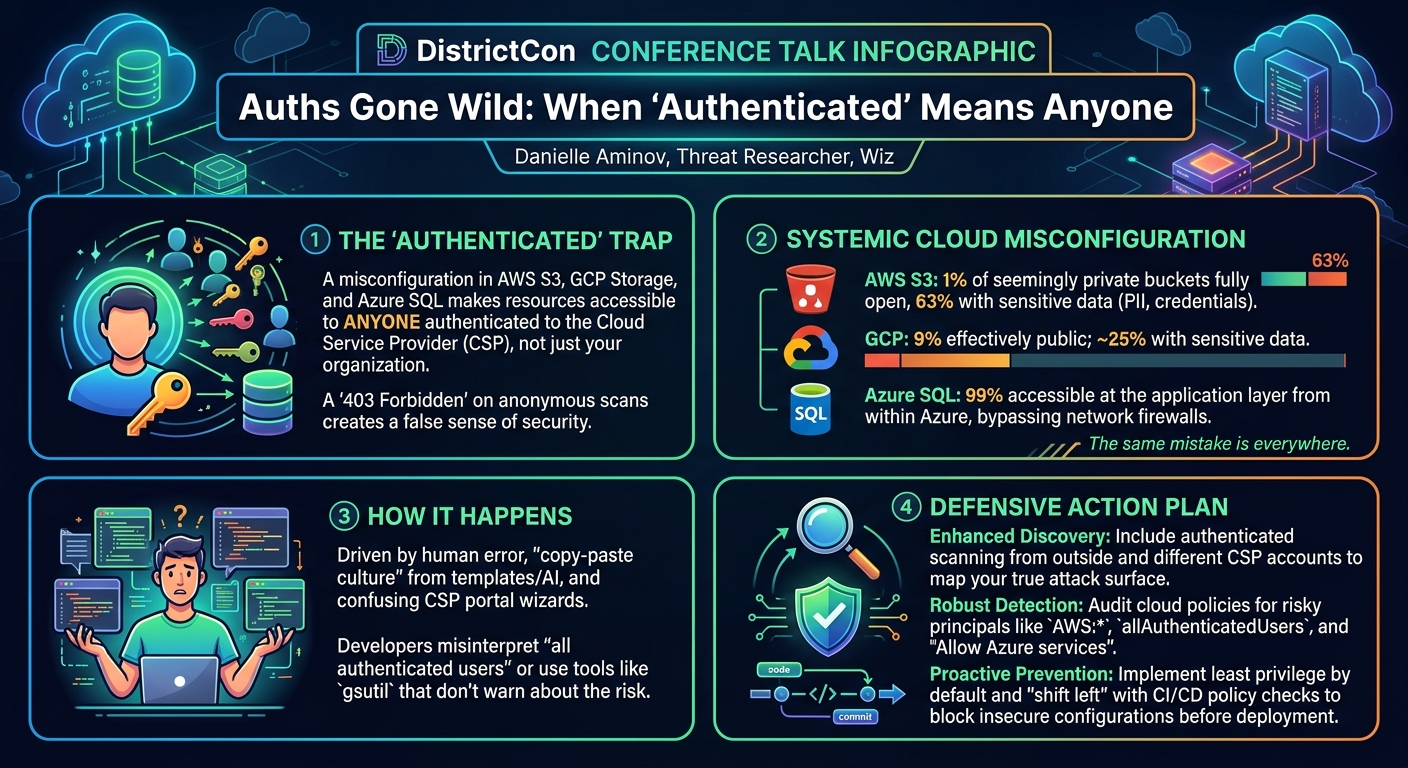
Several factors contribute to the proliferation of this misconfiguration. Human error is a significant culprit, as developers may not fully grasp the implications of "all authenticated users" or may inadvertently select this option during rapid deployment. The pervasive copy-paste culture in development, where old templates, misconfigured commands from AI assistants, or Terraform defaults are reused, perpetuates these errors across environments. Additionally, overwhelming wizards in CSP portals, designed for ease of use, can sometimes obscure the security implications of certain selections, leading users to click through without fully understanding the impact of making a resource "public" to all authenticated identities. This confluence of factors creates a fertile ground for the "Auths Gone Wild" scenario, where seemingly private assets are, in fact, open targets.
Key Findings
▶ Watch: Configuring Public Access: CLI vs. Portal Warnings (5:45)
The central discovery of this research is a subtle yet profound misconfiguration pattern across major cloud providers: the ability to grant access to "all authenticated users" of a CSP, effectively making a resource public to anyone with an account, regardless of the account owner or organization. This differs critically from "all users" (anonymous access) and is a significant blind spot in traditional security scanning.
Aminov and Shreiki's investigation revealed alarming statistics across AWS, GCP, and Azure:
- AWS S3 Buckets: Out of hundreds of thousands of scanned S3 buckets, 96% initially appeared private, returning a 403 Forbidden message when accessed anonymously. However, upon rescanning while authenticated to an AWS account (even a malicious one), 1% of these buckets were found to be effectively public, returning a 200 OK response. A staggering 63% of these newly discovered public buckets contained sensitive data, including Personally Identifiable Information (PII), bank account numbers, JSON Web Tokens (JWTs), and SSH keys. This 1% figure, while seemingly small, translates to a vast number of exposed resources given the sheer scale of S3 usage.
- GCP Storage Buckets: The situation in GCP mirrored AWS. While 98% of scanned GCP buckets appeared private initially, almost 9% were found to be public when accessed by an authenticated Google account. Approximately a quarter (25%) of these exposed GCP buckets also contained sensitive data, consistent with the types found in AWS.
- Azure SQL Server: While Azure Blob Storage was found to be immune to this specific misconfiguration pattern, the research uncovered the same vulnerability in Azure SQL Server. An astonishing 82% of scanned SQL servers appeared private when accessed from an external IP (e.g., an AWS-hosted Kali VM), blocking network communication. However, when accessed from within Azure (i.e., from any authenticated Azure account), 99% of these servers proved to be publicly accessible at the application layer, allowing an attacker to attempt login or brute-force credentials. This represents a massive, hidden attack surface for databases.
The consistent presence of this misconfiguration pattern across different CSPs and services (S3, GCP Storage, Azure SQL) led Aminov to conclude that "the same mistake is everywhere." This suggests that many other cloud services, including AWS Lambda, Amazon Elastic Container Registry (ECR), and Azure Functions, could potentially harbor similar, as-yet-undiscovered misconfigurations, where "authenticated" access translates to unintended public exposure. The core finding is that relying solely on anonymous scans provides a false sense of security, and a deeper, authenticated inspection is essential to truly understand an organization's cloud exposure.
Technical Deep Dive
▶ Watch: Attacker Methodology: Authenticated vs. Anonymous Scanning (8:00)
The "Auths Gone Wild" phenomenon hinges on a specific misinterpretation and misconfiguration of access policies within cloud service providers. Understanding the technical nuances of how "all authenticated users" is defined and implemented across AWS, GCP, and Azure is crucial.
AWS S3 Buckets
In AWS, the misconfiguration primarily involves S3 bucket policies or Access Control Lists (ACLs).
- Bucket Policies: A misconfigured bucket policy will specify
Principal: "AWS": ""(often seen asPrincipal: { "AWS": "" }). This statement grants permissions (e.g.,s3:GetObject,s3:ListBucket) to any identity that is authenticated to any AWS account. This is distinct fromPrincipal: "", which grants access to all users*, including anonymous ones. The subtle difference is critical:AWS:means "any AWS user, no matter which account they belong to," whereasmeans "anyone, period." The AWS console typically provides warnings when configuring a bucket this way, but these can be overlooked. - ACLs: S3 also supports an older access model via ACLs. A misconfiguration here would involve granting permissions to the predefined
AuthenticatedUsersgroup. In the JSON format for ACLs, this is represented by a specific URI, such ashttp://acs.amazonaws.com/groups/global/AuthenticatedUsers. This group effectively mirrors theAWS:*principal in bucket policies, granting access to any authenticated AWS user.
To inspect S3 policies, the aws s3api get-bucket-policy --bucket <bucket-name> and aws s3api get-bucket-acl --bucket <bucket-name> commands can be used via the AWS CLI. Defenders should specifically look for AWS:* in policies and the AuthenticatedUsers URI in ACLs.
Google Cloud Platform (GCP) Buckets
GCP experiences a similar vulnerability with its Cloud Storage buckets.
- IAM Policies: The misconfiguration in GCP involves granting the "allAuthenticatedUsers" group specific roles (e.g.,
roles/storage.objectViewer,roles/storage.legacyBucketReader). This group, akin to AWS'sAWS:*, encompasses any user who is signed into a Google account. The GCP console does provide clear warnings and requires reconfirmation when selecting "all authenticated users," explicitly stating the resource will be "accessible to anyone who is signed into a Google account." - Command Line Configuration: A critical discovery was that configuring this via the
gsutilcommand-line utility (e.g.,gsutil iam ch allAuthenticatedUsers:objectViewer gs://<bucket-name>) offers no warnings at all. This stark difference from the portal experience increases the likelihood of accidental misconfiguration, as developers using automation scripts or quick terminal commands might inadvertently expose buckets without realizing the implications.
To check GCP bucket policies, the gsutil iam get gs://<bucket-name> command can be used. Defenders should look for allAuthenticatedUsers in the IAM policy output.
Azure SQL Server
Azure Blob Storage was found to be immune to this specific "all authenticated users" pattern. However, the same logical misconfiguration manifests in Azure SQL Server.
- Firewall Rules and "Allow Azure Services": When deploying an Azure SQL Server, users can configure firewall rules to restrict access by IP address. However, there's an option labeled "Allow Azure services and resources to access this server." While this might sound like it applies only to services within the user's subscription or VNet, hovering over an information icon reveals its true meaning: "any Azure service or asset." This effectively means that any user who creates an Azure account and launches a service within Azure can potentially bypass the network-level firewall and attempt to connect to the SQL server at the application layer.
- Attack Flow: An attacker outside Azure (e.g., on a Kali VM in AWS) would be blocked by the firewall, receiving a message like "The client with IP address [...] is not allowed to access the server." However, if the attacker creates their own Azure account and attempts to connect from a resource within Azure, the network firewall is bypassed. The response then changes to an application-level error, such as "Login failed for user SA," indicating that the server is now reachable and susceptible to password attacks, brute-forcing, or other application-layer exploits.
This is a significant security flaw because it hides the true attack surface. What appears to be a firewall-protected database is, in reality, exposed to the vast ecosystem of Azure users, including potential adversaries.
Scanning Methodology
The research team developed a specific methodology to uncover these misconfigurations:
- Enumerate Bucket/Service Names: Utilize open-source tools like
cloud enum(for general cloud resources) andAWS i(for AWS account-specific enumeration) to gather a list of potential target names. Company names can also be used for targeted searches. - Anonymous Scan: Attempt to access the enumerated resources without any authentication. Collect all resources that return a "403 Forbidden" or similar access denied message. These are the "seemingly private" targets.
- Authenticated Scan: For the resources identified in step 2, perform a second scan while authenticated to your own CSP account (e.g., an AWS account for S3, a Google account for GCP, an Azure account for Azure SQL).
- Identify Misconfigurations: Any resource that changes its response from "403 Forbidden" (or network block) to "200 OK" (or an application-layer response like "Login failed") during the authenticated scan is deemed misconfigured. These are the "effectively public" resources.
This two-step, authenticated-vs-unauthenticated scanning approach is the core innovation of the research, allowing defenders to identify exposures that traditional anonymous scans would completely miss.
Demo / Proof of Concept
▶ Watch: Azure SQL Server: A New Service, Same Misconfiguration (12:00)
The core demonstration of this vulnerability originated from a real-world scenario that "kicked it all off." The researchers initially encountered a leaked secret tied to an S3 bucket. Their first attempt to access this bucket anonymously resulted in a 403 Forbidden message, which would typically indicate that the bucket was secure. However, driven by curiosity and the context of the leaked secret, they made a crucial second attempt: accessing the same S3 bucket while authenticated to their own AWS account. This time, the response was a 200 OK, allowing them to list and retrieve objects from the bucket, including the very leaked secret they were investigating. This pivotal moment served as the initial proof of concept, demonstrating that "access denied" doesn't always mean safe when an attacker is authenticated.
A more detailed proof of concept was provided for Azure SQL Server. Aminov illustrated how a typical external attacker attempting to compromise an Azure SQL Server would likely be blocked at the network level. She demonstrated launching a Kali Linux VM hosted in AWS and attempting a password attack against an Azure SQL Server. As expected, the attempt failed with a message: "The client with IP address [attacker's IP] is not allowed to access the server." This confirms the network firewall is working, blocking external, unauthenticated (by Azure standards) access.
However, the demonstration then shifted. Aminov showed that by creating a new, separate account within Azure and attempting the same password attack from a resource deployed within that Azure account, the situation completely changed. This time, the network-level block was bypassed, and the attacker received an application-layer response: "Login failed for user SA." While still a failed login attempt, this response signifies a successful penetration to the application layer. The crucial point is that the attack surface opened up. From an attacker's perspective, this transforms an unreachable target into one that is now ripe for brute-force attacks, password spraying, or other credential-based exploits. This clearly demonstrated how the "allow Azure services and resources to access this server" misconfiguration, combined with the "all authenticated users" principle, creates a hidden pathway for compromise that traditional, external scans would never detect.
Defensive Implications
▶ Watch: Practical Takeaways: Discovery, Detection, and Prevention (16:30)
The findings from "Auths Gone Wild" necessitate a significant re-evaluation of current cloud security practices. Organizations must move beyond superficial checks and adopt a multi-faceted approach to truly secure their cloud environments.
1. Enhanced Discovery: Map Your Authenticated External Attack Surface
- Scan from Multiple Perspectives: It is no longer sufficient to scan your external attack surface solely from an unauthenticated (anonymous) perspective. Implement scanning methodologies that also include authenticated scans, using accounts within each respective CSP (AWS, GCP, Azure). This will reveal resources that appear private but are exposed to "all authenticated users."
- Cross-CSP Scanning: Consider scanning resources from accounts hosted in different CSPs. For example, attempt to access an Azure SQL Server from an AWS-hosted VM, and then from an Azure-hosted VM, to understand the nuanced firewall and authentication bypasses.
- Utilize Specialized Tools: Leverage tools like
cloud enumandAWS ifor initial enumeration, but then integrate custom scripts or security platforms that can perform authenticated checks and compare responses (e.g., 403 vs. 200 OK, network block vs. application-layer response).
2. Robust Detection: Inspect and Monitor Cloud Policies
- Deep Policy Inspection: Regularly audit and inspect all access policies for cloud services, not just at deployment but continuously. Pay close attention to S3 bucket policies and ACLs, GCP IAM policies, and Azure service configurations.
- Identify Risky Principals/Groups: Specifically look for configurations that grant permissions to:
- AWS:
Principal: "AWS": "*"(in bucket policies) or theAuthenticatedUsersURI (in ACLs). - GCP:
allAuthenticatedUsersgroup in IAM policies. - Azure: The "Allow Azure services and resources to access this server" option for Azure SQL Servers.
- Automated Policy Scanners: Integrate automated tools that can parse and analyze cloud resource policies for these specific misconfigurations. This helps identify risks at scale across large cloud footprints.
3. Proactive Prevention: Shift Left with Least Privilege
- Implement Least Privilege by Default: Enforce the principle of least privilege across all cloud resource configurations. Resources should only be accessible to explicitly defined identities or groups, and never to broad categories like "all authenticated users" unless absolutely necessary and thoroughly vetted.
- CI/CD Pipeline Integration: Integrate policy checks and security validations directly into your Continuous Integration/Continuous Deployment (CI/CD) pipelines. Block deployments that attempt to configure resources with these risky "all authenticated users" settings. This "shift left" approach prevents misconfigurations from ever reaching production environments.
- Custom Policy Guards: Develop and deploy custom policy guards (e.g., AWS Service Control Policies, Azure Policies, GCP Organization Policies) to prevent the creation or modification of resources with these specific insecure configurations across your entire cloud organization.
- Developer Education: Educate development and operations teams on the critical distinction between "all users" and "all authenticated users" and the severe implications of inadvertently exposing resources. Emphasize testing from foreign authenticated accounts, not just their own.
By adopting these defensive strategies, organizations can significantly reduce their exposure to this prevalent and stealthy cloud security blind spot, safeguarding sensitive data from unintended public access.
Key Takeaways
- "All authenticated users" is a critical blind spot: This seemingly innocuous setting in cloud services like AWS S3, GCP Storage, and Azure SQL Server can make resources publicly accessible to anyone with an account in that CSP, even if they appear private to anonymous scans.
- Anonymous scans are insufficient: Relying solely on unauthenticated scans provides a false sense of security. Defenders must incorporate authenticated scanning from their own CSP accounts to accurately assess their external attack surface.
- Misconfiguration is widespread across CSPs: The same pattern of vulnerability was found in AWS, GCP, and Azure, indicating a systemic issue that likely extends to other cloud services.
- Human error and automation contribute: Developer testing methodologies, copy-paste culture, outdated templates, and overwhelming UI wizards often lead to these subtle but dangerous misconfigurations.
- Defenders must act on three fronts: Implement enhanced discovery (authenticated scanning), robust detection (deep policy inspection for specific groups like
AWS:*orallAuthenticatedUsers), and proactive prevention (shift-left security, least privilege in CI/CD). - Azure SQL Servers are highly vulnerable: 99% of Azure SQL Servers appearing private to external IPs were found to be accessible at the application layer from within Azure, creating a massive, hidden attack surface for databases.
About the Speaker(s)
Danielle Aminov is a threat researcher at Wiz, where she specializes in helping organizations map their external attack surface and defend against emerging threats in the cloud. Her work focuses on identifying novel attack vectors and misconfigurations that can lead to significant data exposure. Danielle, along with her colleague Yara Shreiki, conducted the investigative research presented in this talk, uncovering a major blind spot in how cloud security is often perceived and managed.
Reviews
Dr. Zero (Offensive Security Researcher) — SOLID
Solid, practical cloud security research that nails a real blind spot most orgs are missing. The 'all authenticated users' misconfiguration pattern is embarrassingly simple but the data showing 1% of 'private' S3 buckets and 99% of 'firewalled' Azure SQL servers actually being exposed is the kind of concrete finding that changes behavior. Not groundbreaking exploitation research, but exactly the kind of talk that makes defenders smarter.
Heather Calloway (CISO) — STRONG ACCEPT
This is operationally consequential research that every security team with cloud assets needs to internalize. The finding that 99% of Azure SQL Servers thought to be firewalled are actually reachable from any Azure account is a board-level exposure for most enterprises. Worth your time.