That’s Just a Tool – Not Good Nor Bad. That Part is Up to YOU
Yossi Sassi (Co-founder · 10Root Cyber Security)
Hacktivity 2023 - IT Security Festival · Day 1 · Theater
Overview
In his compelling Hacktivity talk, "That’s Just a Tool – Not Good Nor Bad. That Part is Up to YOU," Yossi Sassi, co-founder of 10Root Cyber Security, delves into the inherent duality of common Windows administration tools. The presentation meticulously dissects how legitimate Remote Management tools and core operating system functionalities, often used by IT professionals for essential tasks, can be repurposed by adversaries for malicious Living Off The Land (LotL) attacks. Sassi emphasizes that the crucial differentiator between an administrator and an attacker lies solely in the context and intention behind their actions, not the tools themselves.
Key moments
- 2:20 Admin or attacker? Context is key for tools.
- 5:20 Named pipe C2 demo: no admin, rides SMB.
- 10:00 RDP man-in-the-middle gets cleartext password.
- 14:40 Hijacking disconnected RDP admin session.
- 20:00 PowerShell Remoting with Just Enough Administration (JEA).
- 24:50 Bypassing WinRM credential protection via token duplication.
- 27:40 Virtual accounts mitigation bypassed by config file edit.
- 30:00 Logon restrictions prevent lateral movement (and its bypass).
That’s Just a Tool – Not Good Nor Bad. That Part is Up to YOU
Speakers: Yossi Sassi, Co-founder, 10Root Cyber Security
Conference: Hacktivity
YouTube: https://www.youtube.com/watch?v=OQ_vWws0FK0
Overview
In his compelling Hacktivity talk, "That’s Just a Tool – Not Good Nor Bad. That Part is Up to YOU," Yossi Sassi, co-founder of 10Root Cyber Security, delves into the inherent duality of common Windows administration tools. The presentation meticulously dissects how legitimate Remote Management tools and core operating system functionalities, often used by IT professionals for essential tasks, can be repurposed by adversaries for malicious Living Off The Land (LotL) attacks. Sassi emphasizes that the crucial differentiator between an administrator and an attacker lies solely in the context and intention behind their actions, not the tools themselves.
The talk provides a comprehensive exploration of several key Windows mechanisms, including Remote Procedure Call (RPC), Interprocess Communications (IPC) via Named Pipes, Remote Desktop Protocol (RDP), and Windows Remote Management (WinRM) with PowerShell Remoting. Through a series of live and recorded demonstrations, Sassi illustrates potent attack vectors and corresponding, often overlooked, defensive strategies. The session caters equally to red teamers seeking novel bypasses and blue teamers aiming to bolster their defenses against sophisticated LotL techniques, underscoring the universal applicability of understanding these fundamental Windows components.
Sassi's presentation is particularly significant in today's threat landscape, where adversaries increasingly blend into normal network traffic by using built-in tools. By highlighting the malicious potential of everyday administrative utilities, the talk challenges defenders to look beyond signature-based detection and focus on behavioral analysis and robust configuration management. It serves as a stark reminder that even seemingly secure features or official documentation can harbor exploitable nuances, demanding a deeper, more critical understanding of the underlying technology from both offensive and defensive security practitioners.
Background
▶ Watch: Admin or attacker? Context is key for tools. (2:20)
The concept of Living Off The Land (LotL) has become a cornerstone of modern cybersecurity, describing tactics where attackers leverage pre-installed software and legitimate operating system features to carry out their objectives. This approach allows adversaries to evade detection by blending in with normal system activity, reducing their reliance on custom malware that might trigger endpoint security solutions. Windows environments, with their rich array of built-in management tools and communication protocols, offer a fertile ground for LotL techniques.
At the heart of Windows operations lies Remote Procedure Call (RPC), a foundational mechanism that enables data exchange and functionality invocation between processes, whether local or remote. As Sassi points out, the Windows operating system cannot function without RPC; a recent Windows 10 build shows over 200 services directly depending on the RPC subsystem. While often associated with remote administration, RPC's core definition inherently supports malicious activities like data exfiltration and command and control (C2).
Building upon RPC, other critical protocols like Server Message Block (SMB) facilitate file sharing and Named Pipes for interprocess communication. Remote Desktop Protocol (RDP) is ubiquitous for remote access, and Windows Remote Management (WinRM), powered by PowerShell Remoting, has become the preferred method for modern, scriptable administration since Windows Vista. Each of these tools, designed for efficiency and management, presents a dual-use dilemma: essential for IT operations, yet ripe for exploitation by an attacker who understands their intricacies and the context in which they operate. The challenge for defenders is not to eliminate these vital tools, but to understand their attack surface and implement controls that differentiate legitimate use from malicious abuse.
Key Findings
▶ Watch: RDP man-in-the-middle gets cleartext password. (10:00)
The talk uncovers several critical insights into Windows security, challenging conventional wisdom and highlighting often-overlooked vulnerabilities and defensive opportunities:
- RPC's Malicious Potential: Sassi demonstrates that RPC, while fundamental to Windows, is not merely for remote management. Its core definition allows for "data exchange" (exfiltration) and "invocation of functionality" (command and control) across processes, making it a prime target for adversaries.
- Named Pipes for Covert C2: Named Pipes, riding on SMB (port 445), offer a stealthy mechanism for C2 and data exfiltration without requiring elevated privileges or opening new firewall ports. Their ubiquitous presence in Windows makes their detection exceptionally difficult without specialized monitoring.
- RDP's Enduring Vulnerabilities: Despite its widespread use, RDP remains highly susceptible to various attacks. Sassi showcases how Man-in-the-Middle (MiTM) attacks can easily yield Net-NTLM hashes and even cleartext passwords by downgrading connection security and faking certificates. Furthermore, RDP session hijacking of disconnected sessions allows attackers to take over active user contexts, including those of domain administrators, without needing their passwords, even if Multi-Factor Authentication (MFA) is enabled.
- PowerShell Remoting's Power and Pitfalls: WinRM and PowerShell Remoting are presented as powerful, encrypted, single-port remote administration solutions. However, their security relies heavily on proper configuration. While Just Enough Administration (JEA) can significantly constrain capabilities, the underlying PowerShell security features are often not enabled by default and are easily bypassed, for instance, by downgrading to PowerShell v2 or using tools like InvisiShell.
- Misleading Credential Exposure Documentation: Microsoft's documentation states that WinRM connections (logon type 3) do not expose reusable credentials in LSASS. Sassi critically refutes this, demonstrating that while LSASS might not contain the hash, an attacker with local admin rights can perform process token duplication from the
WSMProvHost.exeprocess to gain the full privileges of the remote user, including network access. - Virtual Accounts Bypass: Even Microsoft's mitigation for token duplication—Virtual Accounts in PowerShell Session Configuration (.pssc) files—can be bypassed. An attacker with local access can simply edit the
.psscfile to disable the virtual account setting, rendering the protection ineffective. - Simple, Effective Lateral Movement Prevention: A seemingly minor Active Directory setting, "Log On To" restrictions (limiting user logon to specific workstations), proves to be a highly effective, zero-cost mechanism to prevent lateral movement for privileged accounts. However, this too can be bypassed by sophisticated attackers capable of crafting Kerberos Ticket Granting Tickets (TGTs) that ignore these restrictions.
Technical Deep Dive
▶ Watch: PowerShell Remoting with Just Enough Administration (JEA). (20:00)
Sassi's presentation meticulously dissects several Windows mechanisms, illustrating their attack vectors and defensive countermeasures.
RPC and Named Pipes for Covert Operations
Remote Procedure Call (RPC) is foundational to Windows, described as a mechanism for "data exchange and invocation of functionality that is located in a different process." This definition, Sassi notes, inherently allows for malicious use, enabling data exfiltration and command and control (C2) even without direct remote access. The Windows operating system's reliance on RPC is profound, with over two-thirds of its approximately 300 services depending on the RPC subsystem.
One key IPC mechanism riding on RPC and SMB (port 445) is Named Pipes. Unlike traditional socket binding, Named Pipes allow communication between local and remote processes without requiring administrative privileges or opening new firewall ports. Sassi demonstrates a simple PowerShell one-liner to establish a Named Pipe-based reverse shell: on the victim, Invoke-Expression (New-Object IO.StreamReader((New-Object IO.Pipes.NamedPipeClientStream('.', 'mypipe'))).ReadToEnd()) acts as the client, while on the attacker's side, (New-Object IO.Pipes.NamedPipeServerStream('mypipe')).Write('command') writes commands. This makes detection challenging as hundreds of Named Pipes are active on a typical Windows system.
Detection strategies for Named Pipes are limited. Native Windows event logging for Named Pipes is absent, necessitating custom solutions like a file system mini-filter driver. Alternatively, monitoring the kernel object handle provider can log events (Event ID 4656), but this is extremely noisy. Sysmon with a specific XML configuration can capture pipe events. Sassi personally recommends monitoring SMB open files with the prefix \ and \, indicating remote Named Pipe access.
RDP Attacks and Mitigations
RDP is a pervasive remote administration tool, yet it harbors numerous vulnerabilities. Sassi first demonstrates an RDP Man-in-the-Middle (MiTM) attack. By placing themselves between the victim and the RDP server, an attacker can downgrade the session to weak ciphers like RC4, fake the self-signed RDP certificate (common in environments without proper Certificate Authorities), and attempt CredSSP negotiation. This attack successfully extracts Net-NTLM hashes and, crucially, cleartext passwords from the victim's session, all while the victim experiences no visible disruption. An attacker can also disable Network Level Authentication (NLA) via registry keys or WMI (Set-WmiInstance -Namespace root\cimv2\TerminalService -Class Win32_TerminalServiceSetting -Argument @{AllowNLA=0}) for more silent attacks, bypassing the initial authentication layer.
Mitigations for RDP MiTM include enforcing NLA, which blocks non-authenticated, non-domain-joined machines but does not prevent credential theft during an authenticated session. A more robust defense is enforcing server authentication for the client via Group Policy, requiring valid CA-issued certificates on RDP servers. This blocks connections if the certificate is faked, though Sassi notes it still might not prevent password exposure in some scenarios.
The talk then moves to RDP session hijacking, demonstrating how an attacker can take over a disconnected RDP session without knowing the user's password. In a live demo, Sassi uses a USB rubber ducky (simulating local access) to run a script that leverages kernel32.dll WINAPIs. This script elevates the local admin's privileges to SYSTEM and then uses the tscon command (e.g., tscon 3) to connect to a disconnected administrator's session. This bypasses MFA and password requirements entirely as the session is already authenticated.
Defensive measures against RDP session hijacking primarily involve policy. While GPOs for idle sessions exist, they often don't effectively log off disconnected sessions. Sassi recommends a local scheduled task or custom script (available on his GitHub) to actively log off idle, disconnected RDP sessions. Changing the default RDP listening port from 3389 can deter casual scanners but won't stop determined attackers.
PowerShell Remoting, JEA, and Credential Nuances
Windows Remote Management (WinRM), available since Windows Vista, provides a robust, encrypted remote management framework built on Web Services Management (WS-Man) (XML/SOAP) over ports 5985 (HTTP) or 5986 (HTTPS). When a connection is made, WinRM spawns a new WSMProvHost.exe process on the remote machine. Sassi showcases its power for administrators, demonstrating how Invoke-Command -ComputerName (Get-ADComputer -Filter *).Name -ScriptBlock {ipconfig /all} -AsJob can collect data from multiple domain computers in parallel, with results stored in memory for later retrieval. Crucially, WinRM can copy files without SMB open, using its single encrypted port.
A key security feature is Just Enough Administration (JEA), which uses PowerShell session configurations to create constrained remote access. Sassi demonstrates connecting to a JEA endpoint where commands like ipconfig or shutdown -x are explicitly blocked, and Get-Command reveals a severely limited set of available cmdlets, with parameters potentially restricted (e.g., Start-Service only for AudioSrv). This provides granular control over what a remote user or process can execute.
However, Sassi challenges Microsoft's documentation, which states that PowerShell Remoting with a Network logon type (Type 3) does not expose reusable credentials in LSASS (Local Security Authority Subsystem Service). While mimikatz might indeed fail to dump an administrator's hash from such a session, Sassi demonstrates that an attacker with local admin rights can perform process token duplication. By taking the process ID of the WSMProvHost.exe process spawned by the remote admin's session, tools (like a custom PowerShell script or a kernel-mode tool developed by his team) can duplicate the primary token. This grants the attacker the full context and network access of the remote administrator, effectively bypassing the supposed credential protection.
Microsoft's proposed mitigation for this is Virtual Accounts. By setting RunAsVirtualAccount = True in the PowerShell Session Configuration (.pssc) file, the remote session runs under a unique, non-domain-joined virtual account (e.g., WinRM-VA3) that has no domain SID and thus no network access. Sassi demonstrates that attempting token duplication on such a virtual account yields a useless token. The catch: these .pssc files are local text files. An attacker with local admin rights can simply edit the file, changing RunAsVirtualAccount = True to False, and restart the WinRM service, effectively disabling the protection. Defenders can monitor these .pssc files for hash changes to detect tampering.
Finally, Sassi briefly mentions advanced PowerShell bypasses, such as InvisiShell (a CLR profiler and user mode hooks tool on GitHub) which bypasses all PowerShell defenses without admin privileges. He also stresses the importance of removing PowerShell version 2 from all clients, as it lacks any monitoring capabilities.
Lateral Movement Prevention and Bypasses
Sassi highlights a simple, often underutilized, yet highly effective lateral movement prevention technique: Active Directory's "Log On To" restrictions. By configuring a privileged user account (e.g., ADP admin) to only log on to specific machines (e.g., Domain Controller and SRV2), any attempt to Pass-the-Hash (PtH) or psexec from an unauthorized workstation (e.g., LAN-CL1) will fail with an "user isn't allowed to sign in" error, despite the hash being correct. This provides a robust, no-cost segmentation strategy.
However, even this strong defense has a bypass. Sophisticated attackers, using tools like Impacket, can craft a Kerberos Ticket Granting Ticket (TGT) that intentionally omits or modifies the logon restrictions, allowing them to bypass this control and move laterally.
Demo / Proof of Concept
▶ Watch: Bypassing WinRM credential protection via token duplication. (24:50)
The talk was heavily driven by practical demonstrations, showcasing both the attack vectors and their potential mitigations. Yossi Sassi provided compelling proof-of-concept scenarios for each major technical point discussed:
- Named Pipe Command and Control: Sassi demonstrated a PowerShell one-liner establishing a client-server connection over a Named Pipe. He showed how commands written to the server pipe were executed instantly on the client, illustrating a simple, stealthy C2 channel that leverages SMB (port 445) without requiring new firewall rules or elevated privileges.
- RDP Man-in-the-Middle (MiTM) Attack: This demo showcased an attacker intercepting an RDP connection. By downgrading the session to RC4 and presenting a fake self-signed certificate, the attacker successfully captured the victim's Net-NTLM hash and, subsequently, their cleartext password. The victim experienced a normal RDP session, completely unaware of the compromise.
- RDP Session Hijacking: In a live demonstration, Sassi used a USB stick (simulating local access via a "rubber ducky") to inject a script. This script leveraged
kernel32.dllWINAPIs to elevate privileges toSYSTEMand then used thetsconcommand (e.g.,tscon 3) to seamlessly take over a disconnected RDP session belonging to a domain administrator, bypassing any password or MFA requirements. - PowerShell Remoting for Administration: Sassi illustrated the power of WinRM for legitimate administrative tasks. He demonstrated using
Invoke-Commandwith the-AsJobparameter to executeipconfig /allacross multiple domain computers in parallel, efficiently collecting system information. He also highlighted WinRM's ability to copy files securely over a single, encrypted port, even with SMB disabled. - Just Enough Administration (JEA) in Action: This demo highlighted the security benefits of JEA. Sassi connected to a JEA-configured PowerShell Remoting session and showed how commands like
ipconfigorshutdown -xwere blocked. UsingGet-Command, he revealed a severely restricted set of available cmdlets, demonstrating the granular control JEA offers by limiting a user to only specific, predefined functions and parameters. - WinRM Credential Exposure via Token Duplication: Sassi challenged Microsoft's documentation. After a domain administrator connected via WinRM, a
mimikatzrun on the client machine failed to dump the admin's credentials from LSASS. However, Sassi then used a custom PowerShell script to perform process token duplication on theWSMProvHost.exeprocess, successfully gaining the full privileges and network access of the domain administrator, proving that credentials are exposed in a usable form. - Virtual Accounts and Their Bypass: To counter token duplication, Sassi demonstrated Microsoft's Virtual Accounts feature within PowerShell Session Configuration (.pssc) files. He showed that attempting token duplication on a session configured with a virtual account (e.g.,
winrm-va3) yielded a useless token. He then illustrated the bypass: an attacker with local access could simply edit the.psscfile to disable the virtual account, rendering the protection ineffective. - Active Directory Logon Restrictions for Lateral Movement Prevention: Sassi set up an
ADPadmin account with "Log On To" restrictions, allowing logon only to the Domain Controller andSRV2. He then attempted Pass-the-Hash (PtH) andpsexecfrom an unauthorized machine (LAN-CL1), which consistently failed with "user isn't allowed to sign in" messages, showcasing the effectiveness of this simple configuration. He then demonstrated how whitelistingLAN-CL1immediately allowed the connection.
Defensive Implications
▶ Watch: Logon restrictions prevent lateral movement (and its bypass). (30:00)
Understanding the duality of Windows tools is paramount for effective defense. Yossi Sassi's talk provides critical insights that defenders can leverage to harden their environments:
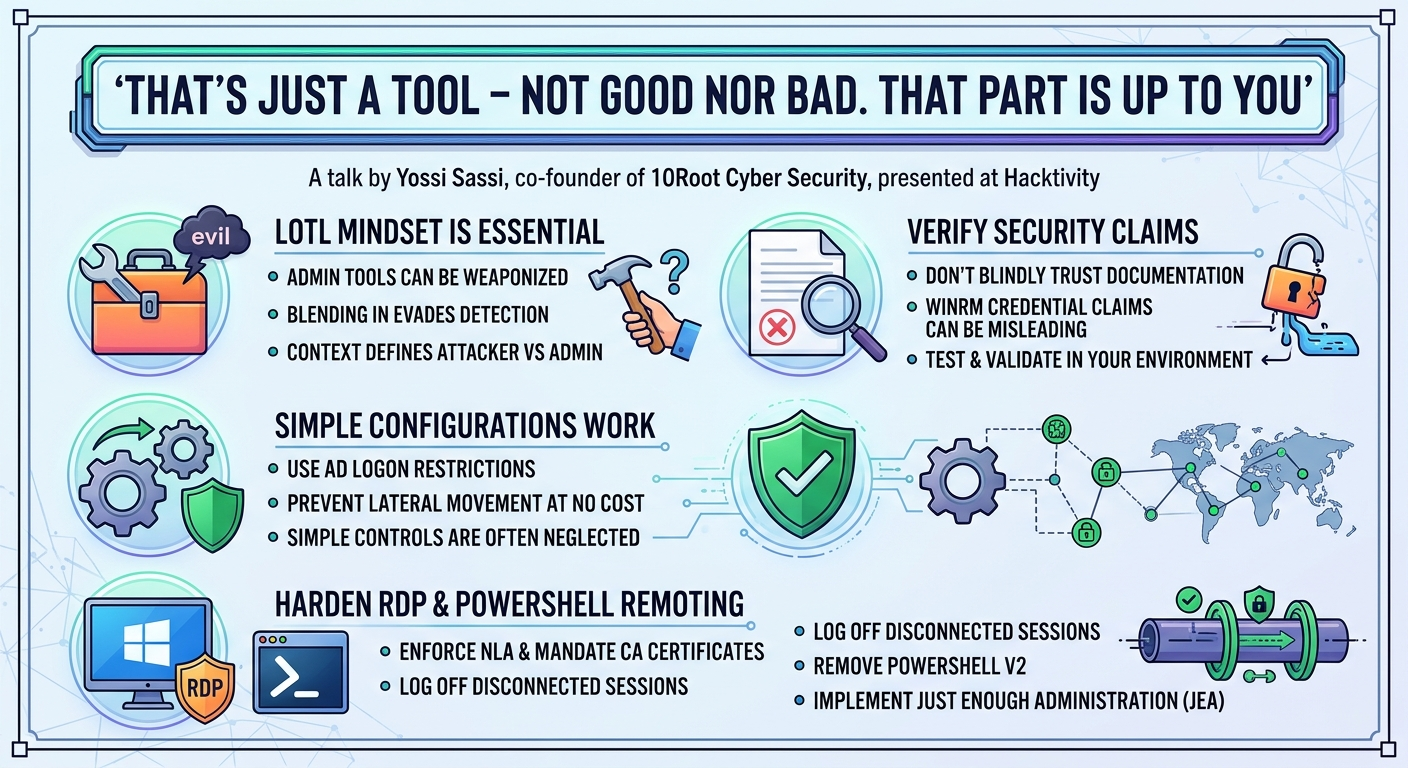
- Embrace the LotL Mindset: Defenders must adopt the Living Off The Land (LotL) mentality. This means moving beyond signature-based detection and focusing on the behavior of legitimate tools. Understand how adversaries repurpose native Windows functionalities to blend in and develop detection rules based on anomalous usage patterns rather than just known malicious binaries.
- Monitor Named Pipes Rigorously: Given the stealth of Named Pipes for C2, defenders should implement advanced monitoring. Since native event logs are insufficient, consider deploying Sysmon with an XML configuration specifically tailored to capture pipe events. Alternatively, monitor SMB open files for unusual prefixes (
\and\) that indicate remote Named Pipe activity. Developing or deploying a file system mini-filter driver for comprehensive Named Pipe auditing is an advanced but highly effective option. - Harden RDP Connections:
- Enforce NLA (Network Level Authentication): While not a silver bullet against all RDP attacks, NLA helps prevent unauthenticated access attempts from non-domain-joined machines.
- Mandate Server Authentication with CA Certificates: Crucially, configure Group Policies to require RDP servers to present valid, CA-issued certificates, not self-signed ones. This prevents Man-in-the-Middle (MiTM) attacks that rely on faking certificates.
- Implement Strict Session Logoff Policies: GPOs for idle sessions often don't log off disconnected RDP sessions. Implement custom scheduled tasks or scripts (like those provided on Sassi's GitHub) that proactively log off disconnected sessions after a short idle period to prevent RDP session hijacking.
- Change Default Port: While not a strong security control, changing the default RDP port (3389) can deter opportunistic attackers and reduce noise from scans.
- Secure PowerShell Remoting and JEA:
- Leverage JEA (Just Enough Administration): For all remote administration, implement JEA with PowerShell Session Configurations that strictly define allowed commands, functions, and parameters. This significantly reduces the attack surface for privileged users.
- Enable PowerShell Security Features: Crucially, enable comprehensive PowerShell logging, including script block logging, module logging, and transcription. Configure Constrained Language Mode where appropriate. These features provide vital telemetry for detecting malicious PowerShell activity.
- Remove PowerShell v2: Ensure PowerShell version 2 is removed from all systems, as it lacks critical security features and monitoring capabilities.
- Monitor
WSMProvHost.exeand WinRM Logs: Monitor theWSMProvHost.exeprocess for anomalous behavior and review WinRM operational logs (Event ID 6 on client, Event ID 9191 on destination) for suspicious connections. - Protect .pssc Files: Monitor the integrity of PowerShell Session Configuration (.pssc) files by tracking their hash changes. Any unauthorized modification (e.g., to disable Virtual Accounts) should trigger an alert.
- Implement Active Directory Logon Restrictions: For highly privileged accounts (e.g., Domain Admins), configure "Log On To" restrictions in Active Directory. Limit these accounts to Privileged Access Workstations (PAWs) or designated jump servers only. This provides a powerful, zero-cost lateral movement prevention mechanism. Be aware of advanced Kerberos Ticket Granting Ticket (TGT) crafting bypasses, which necessitate multi-layered defenses.
- Verify Vendor Documentation: As Sassi demonstrates with WinRM credential exposure, official documentation can sometimes be misleading or incomplete. Defenders should independently verify security claims and test scenarios in their own environments.
- Continuous Monitoring is Key: The dynamic nature of LotL attacks demands continuous monitoring of system processes, network activity, file integrity, and configuration changes. No single control is foolproof; a layered defense with robust detection capabilities is essential.
Key Takeaways
- Embrace the LotL Mindset: Both offensive and defensive security practitioners must understand how legitimate Windows tools can be repurposed for malicious activities. The context and intent define whether a tool is benign or harmful.
- Validate Vendor Documentation: Do not blindly trust official vendor documentation regarding security claims, especially concerning credential exposure. Always verify in your own environment, as demonstrated with WinRM's LSASS protection and subsequent process token duplication bypass.
- Simple Configurations Can Be Potent: Often, fundamental, no-cost configurations, such as Active Directory's "Log On To" restrictions, can provide significantly more effective lateral movement prevention than expensive, complex security products.
- PowerShell Remoting is a Double-Edged Sword: PowerShell Remoting with Just Enough Administration (JEA) is a powerful and secure administrative tool when configured correctly. However, PowerShell security features are usually disabled by default and are easily bypassed (e.g., PowerShell v2 downgrade, InvisiShell), necessitating robust logging and continuous monitoring.
- RDP Requires Deep Hardening: RDP remains a significant attack surface. Beyond common mitigations like NLA, critical defenses include enforcing server authentication with CA-issued certificates and implementing strict, active logoff policies for disconnected sessions to prevent RDP session hijacking.
- Continuous Monitoring is Non-Negotiable: Given the sophistication of LotL techniques and potential bypasses for even strong defenses, continuous monitoring for anomalous behavior, configuration drift, and credential exposure across the environment is essential for effective detection and response.
About the Speaker(s)
Yossi Sassi is a distinguished figure in the cybersecurity landscape, bringing over four decades of experience in computing to the fore. His extensive career has spanned various operating systems, from early OpenVMS, Unix, and BSD to Novell Network, eventually focusing on Microsoft environments, even working for Microsoft for a period. Throughout this impressive journey, Sassi has dedicated his time to information security and hacking. He is the co-founder of 10Root Cyber Security, based in Tel Aviv, Israel. His expertise also extends to his involvement with HEC directory and Javelin Networks, where he contributed to deception solutions for Active Directory before its acquisition by Symantec. Beyond his professional endeavors, Yossi Sassi balances his time with passions such as playing music, inventing musical instruments, and flying planes, finding inspiration in the world viewed from above.
Reviews
Dr. Zero (Offensive Security Researcher) — SOLID
Competent Windows security primer that covers well-trodden ground — RDP hijacking, Named Pipes C2, token duplication, JEA bypass. Good demos, solid delivery, but nothing here that wasn't published years ago. Fine for practitioners who need a refresher or haven't seen these techniques assembled in one place, but experts will be checking their phones.
Heather Calloway (CISO) — SOLID
Solid practitioner talk on Windows LotL techniques. Good refresher for defenders on RDP, WinRM, and Named Pipe attack surfaces, with actionable hardening steps. Nothing new for mature programs, but useful for teams that haven't pressure-tested their remote admin controls recently.