Don't Interrupt Me - A Large-Scale Study of On-Device Permission Prompt Quieting in Chrome
Marian Harbach
Network and Distributed System Security (NDSS) Symposium 2024 · Day 3 · Network Detection
Overview
This talk details a significant evolution in how Google Chrome manages user permission prompts, particularly for notifications and geolocation. Presented by Marian Harbach, the research introduces a novel machine learning (ML)-based activation mechanism for "quiet prompts," a UI treatment designed to reduce user interruption from unwanted permission requests. The work expands upon previous interventions by dramatically increasing the reach and efficacy of prompt quieting, aiming to improve the overall browsing experience without sacrificing security or user control.
Key moments
- 0:00 Introduction: Problem of interruptive permission prompts
- 1:00 Key contributions: UI evolution and ML-based activation
- 4:00 UI evolution: Quiet chip and quietest chip designs
- 6:00 Novel ML-based activation with Web Permissions Predictions model
- 6:45 WPP model features and privacy considerations
Don't Interrupt Me - A Large-Scale Study of On-Device Permission Prompt Quieting in Chrome
Speakers: Marian Harbach
Conference: NDSS Symposium
YouTube: (no public video)
Overview
This talk details a significant evolution in how Google Chrome manages user permission prompts, particularly for notifications and geolocation. Presented by Marian Harbach, the research introduces a novel machine learning (ML)-based activation mechanism for "quiet prompts," a UI treatment designed to reduce user interruption from unwanted permission requests. The work expands upon previous interventions by dramatically increasing the reach and efficacy of prompt quieting, aiming to improve the overall browsing experience without sacrificing security or user control.
The motivation for this work stems from the pervasive issue of intrusive and often unwanted permission prompts on the web. As web platforms gain more system-level capabilities, the need for explicit user consent for sensitive actions like notifications or location access becomes critical. However, constant, irrelevant prompts lead to user fatigue, often termed "prompt blindness," where users either grant permissions indiscriminately or become frustrated. This study not only describes the technical advancements in Chrome's quiet prompt UI and its ML-driven activation but also provides the first large-scale, in-context user survey to gauge sentiment and effectiveness, making it a crucial contribution to human-computer interaction in security.
The findings presented are highly relevant for browser vendors, web developers, and security researchers alike. By demonstrating how a sophisticated, on-device ML model can intelligently mediate user interactions, the research provides a blueprint for balancing security, privacy, and user experience. It underscores the importance of data-driven design in security UIs and offers actionable insights into how users perceive and interact with browser-level security decisions, ultimately contributing to a more intuitive and less interruptive web.
Background
[▶ Watch: Introduction: Problem of interruptive permission prompts (0:00)]()
The evolution of the web into a powerful application platform has brought with it an increasing array of APIs that grant websites access to system-level capabilities, such as push notifications, precise geolocation, and clipboard access. While these features enable rich web experiences, they also present significant opportunities for abuse. Unscrupulous content providers can leverage push notifications to drive traffic with irrelevant or even malicious messages, creating a highly disruptive user experience. This problem has been consistently flagged by media outlets, browser vendors, and users as a major concern.
In response to this challenge, browsers have implemented various mechanisms to mitigate abuse and require explicit user consent. Notably, Mozilla introduced changes in 2019 to limit notification abuses. Google Chrome, in particular, began experimenting with a "quiet prompt UI" in 2020, following initial work by Bilogrevic et al. [4]. This initial intervention aimed to reduce unnecessary user actions by up to 30% with only a marginal reduction in grant rates (less than 5%). Its success led to adoption by Microsoft Edge, which enabled a similar quiet prompt UI by default for all users starting in 2020.
However, the initial quiet prompt implementation in Chrome had two primary limitations. First, its activation mechanism was restricted, affecting only 1-3% of notification requests on a site-based level and 14% of users on a user-based level. This significantly limited its overall impact. Second, there was a noticeable lack of direct, large-scale user feedback on how these quieter prompts were perceived in real-world browsing contexts.
Understanding user sentiment for security and privacy decision UIs is a notoriously complex task. Prior research in this domain often relied on elaborate hypothetical setups or controlled field studies. For example, Bravo-Lillo et al. [7] utilized crowd-workers in online games to evaluate warnings, and Elbitar et al. [12] studied prompt timing by presenting users with unrelated goals. Instrumented Android phones have been employed to collect in-the-wild permission decision data [9, 17, 30]. More recently, Harbach et al. [15] used experience sampling with short, in-context surveys to understand phone unlocking behaviors, and Felt et al. [14] and Reeder et al. [25] applied micro-surveys and browser extensions for similar purposes in browser security contexts. The consensus from this prior work emphasizes the value of in-situ collection of user sentiment and attitudes due to its ecological validity, a methodology that forms a cornerstone of the current study.
Key Findings
[▶ Watch: Key contributions: UI evolution and ML-based activation (1:00)]()
The study presents a comprehensive evaluation of Chrome's improved permission prompt quieting, combining large-scale telemetry data with an extensive in-product user survey. The key findings illuminate both the technical efficacy and user perception of the new system:
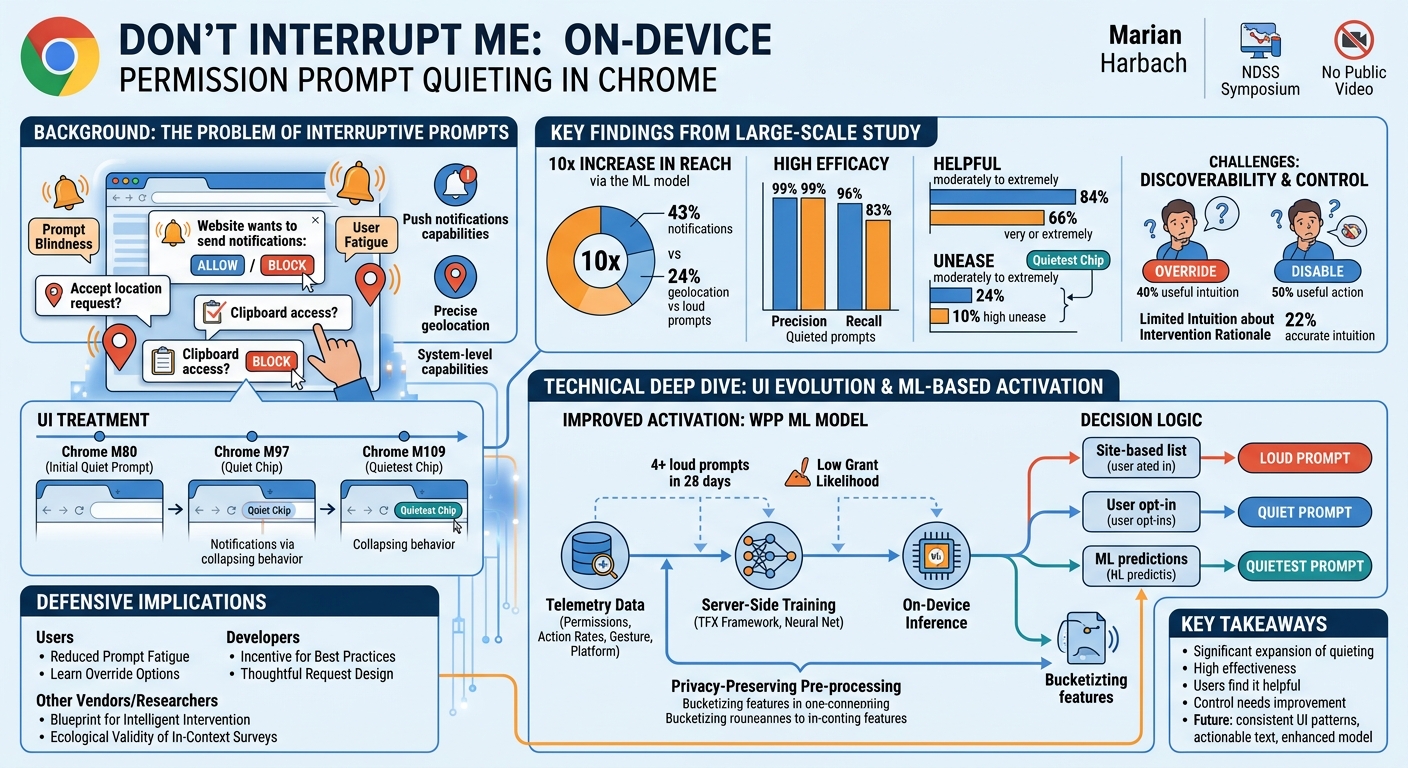
- Dramatically Increased Reach: The novel ML-based activation mechanism (WPP model) significantly expanded the scope of prompt quieting. It was the UI selector for 43% of notification permission prompts and 24% of geolocation prompts on desktop platforms. This represents a more than 10x increase in impact compared to previous, more limited activation mechanisms.
- High Efficacy in Quieting Unwanted Prompts: Of the prompts where the WPP model made the decision, 96% of notification prompts and 81% of geolocation prompts were successfully quieted. The post-hoc precision for quieted prompts was exceptionally high at 99% for both notification and geolocation, meaning less than 1% of quieted prompts were subsequently granted. This indicates a very low false positive rate, effectively reducing unwanted interruptions. The post-hoc recall was also strong at 96% for notifications and 83% for geolocation, showing the model correctly identified most prompts that users would not grant.
- Positive User Perception of Helpfulness: A large majority of users found the quieting intervention helpful. 84% of 13.1k survey respondents found quieting at least moderately helpful, with 66% rating it as very or extremely helpful. The "quietest chip" treatment was even more favorably received, with 88% finding it helpful for notifications.
- Low Levels of User Unease: Despite intervening in user-website interactions, the quieting mechanism generated relatively low levels of unease. Only 24% of respondents felt at least moderately uneasy, and a mere 10% rated this unease as very or extremely high. The quietest treatment again performed better, resulting in substantially less unease (18%) compared to regular quieting of notification requests (30%).
- Challenges with Discoverability and Control: While effective, the study identified significant room for improvement in user control and discoverability. Only 40% of respondents had a useful intuition on how to override the quieting and grant permission if desired, with 32% stating they wouldn't know what to do. Similarly, 50% indicated a useful action to permanently disable quieting, but 22% were unsure. The current "Notifications blocked" chip text was found to potentially imply a permanent decision, contributing to a perceived lack of control.
- Limited Intuition about Intervention Rationale: Without prior user education, only 22% of respondents had an accurate intuition about why Chrome had blocked a website's request. Almost half (45.5%) simply stated "I don't know." However, the quietest notification treatment, with its more assertive phrasing, led to a clearer understanding among users.
These findings collectively demonstrate the success of Chrome's advanced prompt quieting in reducing interruptions and improving user experience, while also highlighting critical areas for further refinement in user education and interaction design.
Technical Deep Dive
[▶ Watch: UI evolution: Quiet chip and quietest chip designs (4:00)]()
The evolution of Chrome's permission prompt quieting mechanism represents a sophisticated blend of UI/UX design and advanced machine learning, aimed at enhancing user experience without compromising security.
UI Treatment of Permission Prompt Quieting
The quiet prompt UI in Chrome has undergone significant iterations to improve consistency and perceptibility. Initially launched in Chrome M80, the quiet UI (referred to as Figure 1 in the original paper) was positioned on the right-hand side of the address bar, alongside other page-related actions like pop-up blocking. This initial placement, however, had two key disadvantages: it lacked consistency with the full, "loud" prompts that appear on the left, and it missed an opportunity to reinforce the entry point to permanent permission controls, which are accessed from the left-hand side site controls.
In January 2022, with Chrome M97, the quiet prompt migrated to a new UI pattern on the left-hand side of the address bar. This redesign, termed the quiet chip (Figure 3), uses a distinct chip pattern with a colored background, making it more perceptible as an interactive affordance. It also incorporates a progressive collapsing behavior, offering users an additional chance to notice and grant the permission before it fully collapses into a less intrusive indicator.
Further refinement led to the introduction of an even quieter prompt UI, the quietest chip. This treatment immediately displays the collapsed state of the regular quiet prompt, featuring an even smaller UI surface area. The quietest chip is specifically applied when Chrome has a high degree of confidence that users are highly unlikely to allow access. In December 2022, this was extended to the top 30 sites identified as using notifications in disruptive ways, based on aggregated telemetry. On these sites, notification permission requests are surfaced using the quietest prompt, and any pre-existing permissions granted without adequate warning were revoked. The study primarily focuses on Chrome for desktop platforms, as the in-product survey was conducted exclusively there.
Improved Activation: ML-Based Mechanism
The original activation mechanisms for quiet prompts were limited in their reach. These included:
- Site-based lists: Generated from aggregated Chrome telemetry, identifying websites with the bottom 5% grant rate for notifications. This mechanism affected only 1-3% of notification requests.
- User opt-in: Users could manually enable "Use quieter messaging" in Chrome settings.
- User-based: Permanent activation after three consecutive deny decisions on any site within a 28-day period. This mechanism applied to only 14% of users.
To substantially expand the reach and effectiveness of prompt quieting, a novel ML-based activation mechanism was designed and deployed, replacing the previous user-based approach. This new system relies on the Web Permissions Predictions (WPP) model.
The WPP model is trained server-side using telemetry data from a subset of opted-in Chrome users who have enabled features like "share usage reports and crash analytics" and "Make searches and browsing better / Sends URLs of pages you visit to Google" [10]. The model leverages a combination of contextual real-time signals and statistical features derived from users' past actions. Key features used for both training and on-device inference include:
- Permission type: Specifically, whether the request is for notifications or geolocation.
- Average action rates: Grant, deny, dismiss, or ignore actions across all permissions over the last 28 days on loud prompts, rounded to the first decimal.
- Average per-permission action rates: Similar to the above, but specific to the requested permission type (e.g., notification grant rate).
- Total number of loud permission prompts shown: Over the last 28 days, bucketized non-linearly and capped at 20.
- User gesture: A boolean indicating whether a click or keyboard event occurred within 5 seconds before the permission request, suggesting user engagement.
- Platform: Whether the user is on a desktop (Windows, macOS, ChromeOS, Linux) or mobile device.
For privacy and performance reasons, statistical features are pre-processed (coarsened or bucketized) before leaving the client. For instance, average action rates are rounded to the first decimal, and total prompts shown are bucketized to ensure similar request numbers per bucket. This approach has a minimal impact on prediction accuracy (99% same UI chosen) while significantly reducing the probability of unique feature sets from 2.5% to 0.2%, thereby enhancing user privacy.
The WPP ML production pipeline utilizes the TFX framework and a neural network architecture. It is optimized for a precision of >= 95%, specifically to limit error rates when a "loud" UI is shown instead of a "quiet" one, prioritizing user experience by avoiding unnecessary interruptions.
The current decision logic for determining which prompt UI (loud, quiet, or quietest) to display is as follows:
- Site-based: If the requesting site is identified as having a very low grant rate (e.g., in the lowest grant rate percentile), the quietest prompt UI is shown.
- Opt-in: If the user has explicitly enabled "Use quieter messaging" in their Chrome settings, the quiet prompt UI is shown.
- ML-based: If Chrome has shown 4 or more loud permission prompts in the last 28 days, and the WPP model predicts the user is very unlikely to grant the request, the quiet prompt UI is shown. The threshold of 4 loud prompts ensures that quieting is not applied to users who see prompts infrequently, preserving their ability to grant permissions without intervention.
- Otherwise: If none of the above conditions are met, the standard, loud prompt UI is displayed.
This multi-faceted approach ensures that prompt quieting is applied intelligently, balancing the need for reduced interruption with the necessity of providing users with clear, actionable choices when they genuinely intend to grant a permission.
Demo / Proof of Concept
[▶ Watch: Novel ML-based activation with Web Permissions Predictions model (6:00)]()
This technical article is based on a research talk detailing a large-scale study and the implementation of a new system within Chrome. As such, the presentation focused on the methodology, findings, and technical architecture of the prompt quieting mechanism and its ML-based activation, rather than a traditional security exploit demonstration or proof of concept. The "demo" aspect of this work was the actual rollout and observation of the quiet prompt UI and WPP model in Chrome for millions of users, followed by an extensive in-product survey to gather user feedback. The efficacy was demonstrated through telemetry data showing increased quieting rates and high precision, alongside survey results validating user helpfulness and unease levels.
Defensive Implications
[▶ Watch: WPP model features and privacy considerations (6:45)]()
The advancements in Chrome's permission prompt quieting have several significant implications for various stakeholders involved in web security and user experience:
- For End Users:
- Reduced Prompt Fatigue: Users benefit directly from fewer intrusive and irrelevant permission prompts, which helps combat "prompt blindness." This means they are less likely to automatically grant permissions without thinking, potentially improving their security posture against malicious or annoying sites.
- Improved Focus: The quieter UI allows users to maintain focus on their browsing tasks, leading to a smoother and more enjoyable web experience.
- Need for Awareness of Override Options: While quieting is generally helpful, users should be aware that their browser might be automatically intervening. It is crucial for users to understand how to override a quieted prompt (e.g., by clicking the lock icon or the chip itself) if they genuinely wish to grant a permission to a specific site. The study highlighted that only 40% of users had a useful intuition for this.
- Understanding Settings: Users should also know how to access Chrome's settings to permanently disable quieting if they prefer to see all prompts, though this is less common.
- For Web Developers and Site Owners:
- Incentive for Best Practices: The ML-based quieting mechanism, particularly the quietest chip, is applied more aggressively to sites that exhibit disruptive notification behavior (e.g., top 30 disruptive sites). This provides a strong incentive for web developers to adopt ethical and user-friendly notification practices. Sites that request permissions at appropriate times and only when relevant to user action are less likely to have their prompts quieted.
- Impact on Permission Grant Rates: Developers should be aware that if their site's permission request patterns align with those typically denied by users, Chrome's WPP model is likely to quiet their prompts, potentially reducing their permission grant rates. This reinforces the need for thoughtful UI/UX design around permission requests.
- Designing for User Control: Given the user feedback on perceived lack of control and difficulty in finding override options, developers should consider designing their site's experience to clearly guide users on how to enable permissions if they are quieted by the browser, especially for core functionalities.
- For Other Browser Vendors:
- Blueprint for Intelligent Intervention: This research provides a robust, data-driven model for how to implement intelligent, on-device interventions for user security and privacy prompts. The use of ML trained on large-scale telemetry, coupled with privacy-preserving feature engineering, offers a valuable blueprint.
- Importance of User Sentiment: The extensive in-context user survey highlights the critical importance of understanding user perception. Other browser vendors can learn from Chrome's findings regarding helpfulness, unease, and discoverability challenges to inform their own UI/UX designs for security features.
- Balancing Act: The study demonstrates the delicate balance between reducing interruptions and maintaining user agency. Future browser security features should aim for high efficacy (like Chrome's 99% precision) while actively addressing user concerns about control and clarity.
- For Security Researchers and Privacy Advocates:
- Ethical AI in Security: The WPP model exemplifies the application of ethical AI in security, where ML is used to protect users from unwanted interactions. The focus on privacy-preserving feature processing (coarsening, bucketizing) for on-device deployment is a key takeaway.
- Measuring Effectiveness: The combination of telemetry and in-product surveys provides a powerful methodology for evaluating the real-world impact and user perception of security interventions. This approach is more ecologically valid than hypothetical studies.
- Addressing "Privacy Paradox": The observed disconnect between users' stated intentions and actual behavior (the "privacy paradox") remains a challenge. The study provides data points for understanding how interventions can influence this, even if users struggle to articulate their preferences.
In summary, Chrome's enhanced prompt quieting acts as a proactive defense against pervasive web annoyances, leveraging ML to make the web a more user-friendly and secure environment. However, its success also places a renewed emphasis on responsible web development practices and continuous user education on browser security features.
Key Takeaways
- Significant Expansion of Prompt Quieting: Chrome's new ML-based Web Permissions Predictions (WPP) model dramatically increased the mediation of permission prompts, now handling 43% of notification and 24% of geolocation requests, a 10x increase from previous mechanisms.
- Highly Effective in Reducing Unwanted Prompts: The WPP model exhibits exceptional post-hoc precision (99%) for quieted prompts, meaning less than 1% of quieted prompts were subsequently granted, effectively reducing unwanted interruptions and "prompt blindness."
- Users Find Quieting Helpful and Not Highly Unsettling: A large majority of users (84%) found the quieting intervention at least moderately helpful, with only a small fraction (10%) reporting very or extremely high levels of unease, indicating a positive user experience overall.
- "Quietest Chip" is Preferred: The even more subtle quietest chip UI was perceived as even less noticeable and received more favorably by users, especially for notifications, suggesting that more assertive quieting is often welcome when confidence is high.
- Discoverability of Control Needs Improvement: A major challenge identified is that only 40% of users had a useful intuition on how to override a quieted prompt to grant permission, and a significant portion were unsure how to disable quieting altogether, highlighting a need for better UI/UX to enhance user control.
- Future Improvements Focus on Clarity and Control: Chrome plans to address user feedback by rolling out consistent chip-based UI patterns, changing the quiet prompt text (e.g., to "Use notifications?") to imply actionability, and enhancing the WPP model with site-related aggregated statistics to reduce false positives on well-behaved sites.
About the Speaker(s)
The talk "Don't Interrupt Me - A Large-Scale Study of On-Device Permission Prompt Quieting in Chrome" was presented by Marian Harbach. Based on the content of the presentation, Marian Harbach is a researcher and engineer involved in the development and evaluation of user interface and security features within Google Chrome. Their work focuses on enhancing user experience through intelligent interventions, particularly in the realm of web permissions and privacy. The detailed technical insights into Chrome's ML-based permission prediction model and the extensive user study methodology demonstrate a deep expertise in human-computer interaction, machine learning, and browser security.
All talks from Network and Distributed System Security (NDSS) Symposium 2024