Vault Raider: Stealthy UI-based Attacks Against Password Managers in Desktop Environments
Andrea Infantino
Network and Distributed System Security (NDSS) Symposium 2026 · Day 3 · Usable Security
Overview
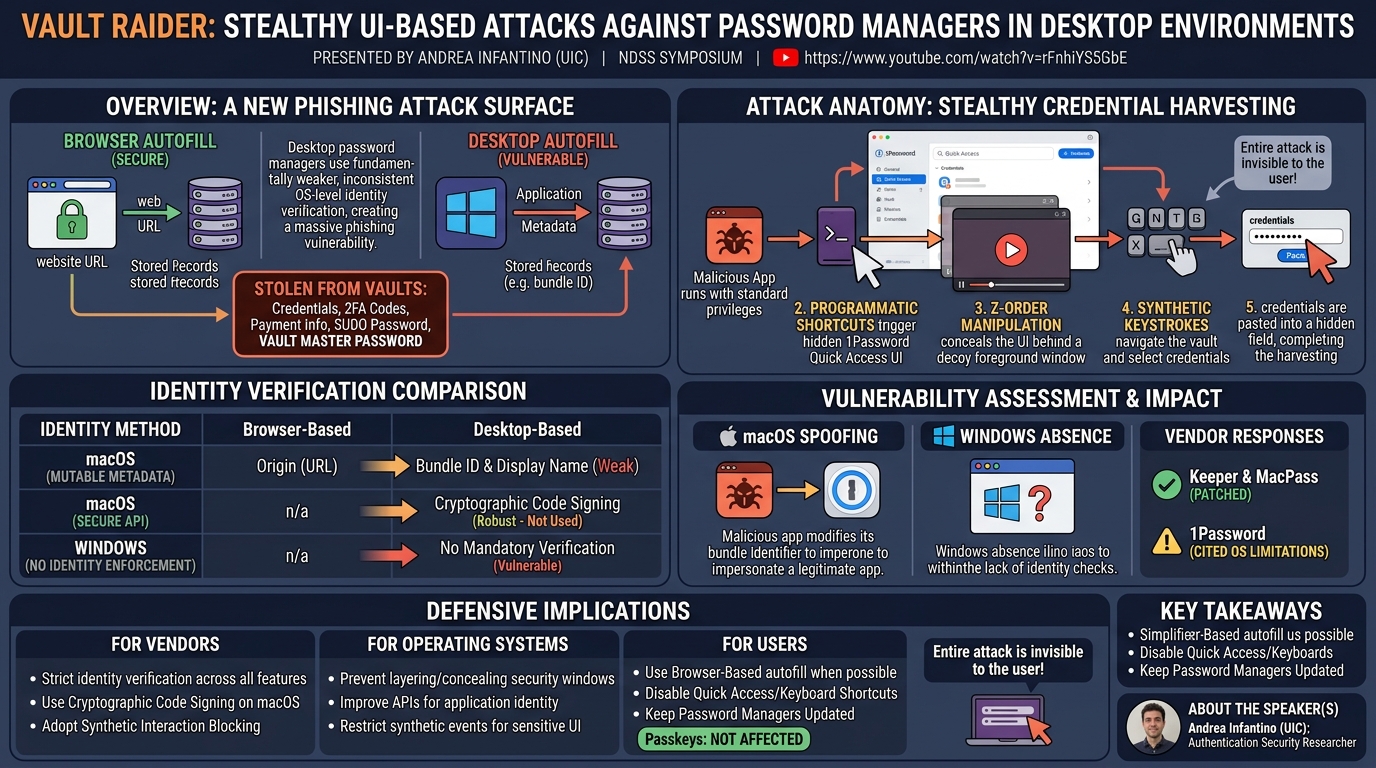
Vault Raider demonstrates that desktop password managers are vulnerable to stealthy phishing attacks through their native autofill mechanisms. While browser-based autofill uses URL-based origin verification, desktop autofill relies on operating system-level identity verification that is fundamentally weaker and inconsistently implemented. A malicious native application running with standard (unprivileged) user privileges can exploit these weaknesses to harvest credentials, 2FA codes, payment information, and even the vault master password and sudo password from password managers.
Key moments
- 0:00 Browser vs desktop autofill: fundamentally different security models
- 2:00 Threat model: malicious native app with standard privileges
- 4:00 macOS bundle identifiers and code signing for app identity
- 6:00 1Password quick access bypass: no identity verification
- 8:00 Live demo: stealthy credential harvesting while user watches video
- 10:00 Windows vulnerability: no identity checks at all
- 12:00 Evaluation across password managers and vendor disclosure results
- 16:00 Q&A: passkeys not affected, usability vs security tradeoffs
Vault Raider: Stealthy UI-based Attacks Against Password Managers in Desktop Environments
Speakers: Andrea Infantino
Conference: NDSS Symposium
YouTube: https://www.youtube.com/watch?v=rFnhiYS5GbE
Overview
Vault Raider demonstrates that desktop password managers are vulnerable to stealthy phishing attacks through their native autofill mechanisms. While browser-based autofill uses URL-based origin verification, desktop autofill relies on operating system-level identity verification that is fundamentally weaker and inconsistently implemented. A malicious native application running with standard (unprivileged) user privileges can exploit these weaknesses to harvest credentials, 2FA codes, payment information, and even the vault master password and sudo password from password managers.
The attacks were tested against multiple password managers across macOS and Windows, with all tested products found vulnerable in at least some configurations. The attack on 1Password's quick access interface is particularly severe: synthetic keyboard interactions programmatically navigate the vault, select credentials, and transfer them to attacker-controlled fields -- all while the user sees only a video or game in the foreground. All vulnerabilities were disclosed; Keeper and MacPass have patched, while 1Password cited operating system limitations as barriers to complete fixes.
Background
▶ Watch: Browser vs desktop autofill: fundamentally different security models (0:00)
Password managers have expanded beyond browser extensions to provide system-wide autofill for native desktop applications (Zoom, Slack, Discord, etc.). This shift introduces a fundamentally different security model:
Browser-based autofill uses origin-based verification: the password manager reads the website's URL and verifies it against stored records. This model is well-understood and generally robust against phishing.
Desktop-based autofill uses OS-based identity verification: the password manager must verify the requesting application's identity through operating system mechanisms. On macOS, applications have bundle identifiers, display names, and code signatures. On Windows, the security model is more relaxed with no mandatory application identity enforcement.
The research question: how robust is this desktop identity verification, and can a malicious native application conduct phishing attacks against password managers?
The threat model follows established phishing research: the attacker runs a malicious native application with standard privileges on the user's system. The application can modify its own appearance and metadata to impersonate legitimate applications, and can interact programmatically with the password manager and OS.
Key Findings
▶ Watch: macOS bundle identifiers and code signing for app identity (4:00)
1Password's quick access interface bypasses all verification. While 1Password's primary autofill mechanism verifies bundle IDs and code signatures (a secure workflow), the quick access interface -- which lets users manually select and transfer credentials -- performs no application identity verification. A malicious app can programmatically trigger this interface, navigate the vault, select credentials, and paste them into attacker-controlled fields.
sudo password and vault master password accessible. 1Password stores the system (sudo) password in a predictable record. The attacker can use the same phishing technique to retrieve it and execute privileged commands. If the CLI interface is enabled, the master password is also accessible, enabling full vault replication to an attacker-controlled device.
All tested macOS password managers rely on mutable metadata for verification. None of the tested password managers cryptographically verify the target application through OS-level code signing mechanisms, despite macOS providing fine-grained security APIs for this purpose. Attackers can modify their application's identity metadata to spoof legitimate apps.
Windows password managers perform no identity checks. On Windows, 1Password performs no application identity verification at all for autofill. The Windows security model's lack of mandatory application identity enforcement makes all tested password managers vulnerable.
Attacks more effective than keyloggers in some cases. The vault raider approach can access stored credentials that are never typed, including 2FA codes, payment information, and credentials for services the user hasn't recently accessed.
Keeper and MacPass patched; 1Password cites OS limitations. After responsible disclosure, Keeper assigned a bug bounty and patched. MacPass also patched. 1Password acknowledged the vulnerability but stated they cannot fully defend against phishing attacks due to operating system limitations.
Technical Deep Dive
▶ Watch: Live demo: stealthy credential harvesting while user watches video (8:00)
The attack exploits synthetic interactions -- programmatic keyboard and mouse events that simulate user input -- to interact with the password manager's UI without the user's knowledge.
macOS attack flow (1Password quick access):
- The malicious app triggers 1Password's quick access interface using synthetic keyboard shortcuts
- The app manipulates window position and layering to hide the quick access window behind the foreground application (the user sees only a video or game)
- Synthetic key presses navigate the vault, search for specific credentials, and select them
- The selected credentials are pasted into hidden fields in the malicious application
- From 1Password's perspective, this appears to be a legitimate user interaction
macOS identity spoofing: For password managers that do check application identity, the attacker modifies the malicious app's bundle identifier and display name to match the target application. Since password managers check these mutable properties rather than the immutable code signature, the spoofing succeeds.
Windows attack: The absence of mandatory identity verification on Windows means the attack is even simpler -- no identity spoofing is needed. The malicious app simply triggers autofill, and the password manager complies without verification.
Stealthiness techniques: The attack hides all UI interactions from the user through window layering, z-order manipulation, and transparency controls. The malicious app's visible interface (a video player, game, etc.) remains in the foreground while password manager interactions occur on hidden windows behind or beside it.
The researchers also built a defense mechanism that detects and blocks synthetic interactions, which password managers can adopt.
Demo / Proof of Concept
▶ Watch: Windows vulnerability: no identity checks at all (10:00)
A live video demonstration showed the attack in action with a split-screen view: the left panel showed what the user sees (just a video playing), while the right panel showed the background activity -- synthetic key presses navigating 1Password's quick access interface, selecting credentials, and transferring them to the attacker's application. The entire attack was invisible to the user.
Credential types harvested across all password managers: account passwords, system passwords (sudo), 2FA/OTP codes, and payment information. In the worst case (1Password with CLI enabled), the vault master password was also accessible.
Defensive Implications
▶ Watch: Q&A: passkeys not affected, usability vs security tradeoffs (16:00)
For password manager vendors:
- Enforce strict identity verification across all autofill features, including secondary interfaces like quick access
- Use cryptographic code signature verification (not mutable metadata) for application identity on macOS
- Implement the researchers' proposed mechanism to block synthetic interactions
- On Windows, develop custom identity verification since the OS provides no built-in mechanisms
For operating systems:
- Prevent layering and concealing of security-critical authorization windows
- Provide better APIs for application identity verification that password managers can leverage
- Consider restricting synthetic input events from interacting with security-sensitive UI elements
For users:
- Be aware that desktop autofill operates under a weaker security model than browser autofill
- Prefer browser-based password management where possible for web credentials
- Disable quick access/keyboard shortcut features for password managers if not needed
- Keep password managers updated; check if your vendor has patched these vulnerabilities
Passkeys are not affected -- the Q&A confirmed that passkey-based authentication cannot be phished through this mechanism because passkeys are not pasted as text credentials.
Key Takeaways
- Desktop password managers use fundamentally weaker identity verification than browser-based autofill, creating a new phishing attack surface
- 1Password's quick access interface performs no application identity verification, enabling stealthy credential harvesting
- Attackers can access sudo passwords, vault master passwords, 2FA codes, and payment information -- not just account passwords
- All tested macOS password managers rely on mutable metadata instead of cryptographic code signatures for verification
- Windows password managers perform no identity verification at all due to OS limitations
- Keeper and MacPass patched after disclosure; 1Password acknowledged but cited OS limitations
- A synthetic interaction blocking mechanism was built and proposed to vendors
About the Speaker(s)
The talk was presented on behalf of Andrea Infantino, who led the project during his masters at UIC (University of Illinois at Chicago). The presenter (likely the research supervisor) specializes in authentication security, password manager analysis, and UI-based attacks. The research team focuses on the intersection of usability and security in credential management systems.
Reviews
Dr. Zero (Offensive Security Researcher) — STRONG ACCEPT
A clean, practical attack against desktop password managers that harvests credentials, sudo passwords, and even vault master passwords through synthetic UI interactions -- all invisible to the user. The 1Password quick access bypass is elegant: no identity verification on a secondary interface that has full vault access. The finding that Windows password managers perform zero identity checks is damning. This is the kind of attack red teams should add to their toolkit.
Heather Calloway (CISO) — MUST SEE
A critical finding that desktop password managers -- used by millions of individuals and enterprises -- are vulnerable to stealthy credential harvesting by malicious native applications. The attack can extract not just passwords but sudo credentials, 2FA codes, payment info, and vault master passwords. Every CISO recommending password managers needs to understand the desktop autofill attack surface and ensure vendors have patched.
→ Top-rated talks at Network and Distributed System Security (NDSS) Symposium 2026
All talks from Network and Distributed System Security (NDSS) Symposium 2026