Hacking Customized IDE Distributions: Methodology Behind Six Figures in Bug Bounties
Nick Copi (Full Time Bug Bounty Hunter)
RVAsec 2026 · Day 1 · Grand Ballroom F/G
Overview
In this RVAsec talk, "Hacking Customized IDE Distributions: Methodology Behind Six Figures in Bug Bounties," full-time bug bounty hunter Nick Copi unveils the often-overlooked yet highly lucrative attack surface presented by Integrated Development Environments (IDEs). Copi, a former AppSec engineer at CarMax and reigning RVAsec CTF champion, meticulously details the methodologies he employed to discover high-impact vulnerabilities in various custom IDE platforms, leading to substantial bug bounty payouts. The talk serves as a guide for security researchers and developers alike, highlighting the unique threat model and common pitfalls associated with these complex, feature-rich environments.
Key moments
- 0:00 Speaker intro and talk overview
- 6:00 Local vs. SaaS Web IDE attack models
- 8:00 The IDE Kill Chain: Infiltrate, inject, escalate, exfiltrate
- 12:30 Workspace Trust: The #1 source of IDE vulnerabilities
- 23:50 Web Views & Post Message: Escalating XSS to RCE
- 43:00 AI Agents: New attack surface for RCE and data exfiltration
- 46:50 Example attack chain and defense strategies
Hacking Customized IDE Distributions: Methodology Behind Six Figures in Bug Bounties
Speakers: Nick Copi, Full Time Bug Bounty Hunter
Conference: RVAsec
YouTube: https://www.youtube.com/watch?v=o9hSxmmBlsg
Overview
In this RVAsec talk, "Hacking Customized IDE Distributions: Methodology Behind Six Figures in Bug Bounties," full-time bug bounty hunter Nick Copi unveils the often-overlooked yet highly lucrative attack surface presented by Integrated Development Environments (IDEs). Copi, a former AppSec engineer at CarMax and reigning RVAsec CTF champion, meticulously details the methodologies he employed to discover high-impact vulnerabilities in various custom IDE platforms, leading to substantial bug bounty payouts. The talk serves as a guide for security researchers and developers alike, highlighting the unique threat model and common pitfalls associated with these complex, feature-rich environments.
Copi's presentation focuses not on specific, undisclosed bugs, but on the overarching methodology and conceptual understanding of IDE security. He categorizes customized IDEs into three primary buckets: the VS Code family (extensions, forks), Jupyter Lab plugins (especially cloud provider versions), and entirely custom web-based IDEs. This classification underscores the broad applicability of his findings, suggesting that many targets may share similar vulnerabilities due as they grapple with the inherent complexities of integrating diverse tools and services.
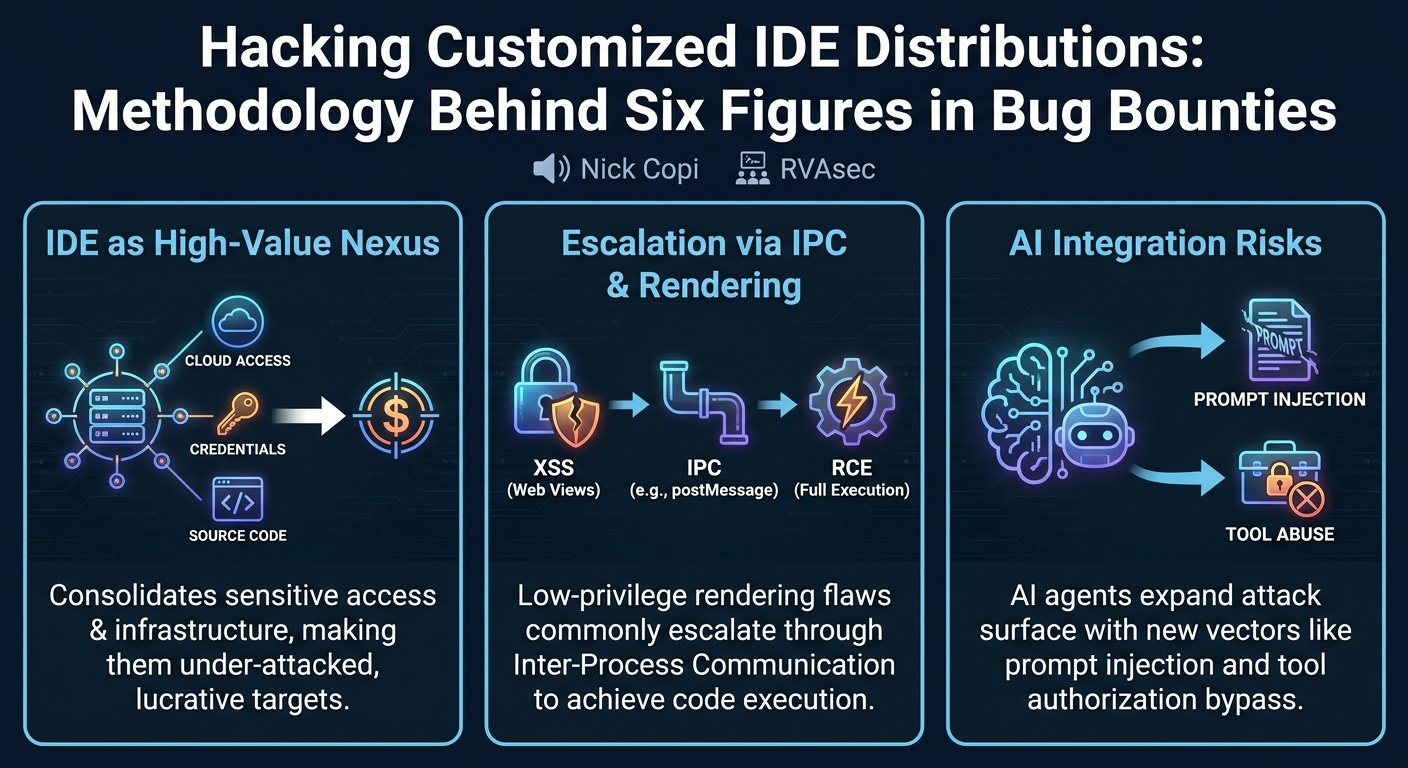
The significance of this talk is amplified by the increasing centralization of developer workflows within IDEs, which often serve as a nexus for sensitive credentials, access tokens, and critical infrastructure integrations. With the rapid adoption of AI agents directly embedded into IDEs, the attack surface is expanding at an unprecedented rate, introducing new vectors and magnifying existing risks. Copi argues that this area is currently "under focused" by the security community, presenting a ripe opportunity for those willing to delve into its intricacies.
Background
▶ Watch: Speaker intro and talk overview (0:00)
The premise of Copi's research is rooted in the understanding that modern IDEs are far more than simple text editors; they are junction points – centralized hubs where a multitude of critical components converge. This convergence includes source control tokens, package registry tokens, cloud credentials, dot files, AI backends, tools, APIs, CI/CD deployment configurations, SSH keys, and browser cookies. Consequently, any compromise within an IDE can provide an attacker with a high-privilege foothold, enabling extensive lateral movement and data exfiltration within an organization's ecosystem.
Copi identifies two primary deployment models for IDEs, each with distinct threat models: local IDEs (e.g., desktop VS Code or IntelliJ installations) and SaaS web IDEs (e.g., cloud-hosted VS Code or Jupyter Lab instances). Local IDEs present opportunities for traditional desktop application hacking, aiming for a shell on a developer's machine. SaaS web IDEs, however, often run on backing compute resources (cloud VMs) that expose powerful credentials, making Cross-Site Scripting (XSS) a direct path to Remote Code Execution (RCE) on the underlying infrastructure with significant impact.
To conceptualize the attack process, Copi introduces an "IDE Kill Chain," drawing parallels to Wonder Wozny's AI kill chain. This chain outlines a typical progression:
- Infiltration: Files or state are introduced into a victim's development environment (e.g., via a cloned Git repository, downloaded zip, or query parameter).
- Processing/Rendering: The IDE processes or renders the infiltrated content.
- Injection: A vulnerability allows for code injection (e.g., XSS, command injection).
- Low-Privilege Escalation: Initial injection gains control within a limited rendering context.
- IPC Channel Abuse: Communication over Inter-Process Communication (IPC) channels allows escalation to code execution.
- Token Exfiltration: Sensitive tokens and credentials are stolen.
- Lateral Movement: (Hypothetically, though often out of scope for bug bounties) Further compromise of connected systems.
A significant challenge in securing these environments, and a reason SAST (Static Application Security Testing) tools often miss vulnerabilities, is the prevalence of non-traditional sources and sinks. Unlike typical web applications, IDEs interact with file paths, custom APIs, and internal command dispatch mechanisms in ways that generic SAST rules are not designed to detect. For instance, file paths, often assumed safe, can be injected into raw HTML (leading to XSS on Linux/macOS with flexible file systems) or into shell commands (leading to code execution via shell meta characters). This calls for specialized security analysis, potentially through custom CodeQL rules tailored to specific IDE ecosystems like VS Code extensions or Jupyter Lab plugins.
Key Findings
▶ Watch: The IDE Kill Chain: Infiltrate, inject, escalate, exfiltrate (8:00)
Copi's methodology reveals several recurring themes and specific vulnerability classes that consistently lead to high-impact findings in customized IDE distributions:
- Workspace Trust Bypass: This is arguably the most critical finding. Most modern IDEs, particularly VS Code-based ones, implement a workspace trust model. When opening a new project, the user is prompted to declare whether they trust the workspace. Untrusted workspaces should operate in a severely restricted mode, preventing arbitrary code execution. However, custom extensions, especially those in AI-focused IDEs, often activate in untrusted mode to perform "fundamental stuff" before the trust prompt. Any arbitrary code execution or dangerous behavior (e.g., reading config files, making network requests with credentials) in an untrusted workspace constitutes a high-severity bug and is a primary source of Copi's "six figures in bug bounties."
- Non-Traditional Sources and Sinks: As highlighted in the background, traditional SAST tools often fail to identify dangerous data flows in IDEs. Key examples include:
- File Paths: Assumptions about safe file path characters (e.g., Windows restrictions) can lead to injection into HTML contexts or shell commands on more permissive file systems (Linux/macOS).
- VS Code Commands: The ability to dispatch arbitrary VS Code commands with attacker-controlled arguments via IPC channels can lead to RCE, a sink not typically recognized by SAST.
- Direct Binary Calls: Unsafe construction of command paths when calling binaries like
gitdirectly can introduce shell injection vulnerabilities.
- Content Rendering Vulnerabilities (Web Views & Notebooks): IDEs frequently render user-controlled content (e.g., custom UI, previews of Markdown/HTML, Jupyter notebooks). If this content is not rigorously sanitized, it can lead to XSS. In VS Code, web views are common for custom UI. If HTML is generated via string concatenation from untrusted workspace file content, XSS can occur. In Jupyter Lab, notebooks support rendering arbitrary MIME types, including
text/html. While Jupyter Lab sanitizes this by default in untrusted mode, custom plugins often fail to uphold this strict trust model, leading to XSS.
- IPC Channel Abuse: The communication mechanisms between different components of an IDE, particularly between low-privilege rendering contexts (like web views) and privileged backends (like the Node.js extension host), are a rich source of vulnerabilities.
postMessageVulnerabilities: In web-based IDEs,postMessageis used for inter-frame communication. Flawed origin checks (e.g., regex bypasses with unescaped dots) or the processing of arbitrary HTML from untrustedpostMessagedata can lead to XSS or RCE.Electron.openExternalAbuse: In Electron-based IDEs, theElectron.openExternalAPI, intended for opening browser windows, can be abused if passed afile://URI pointing to an executable (e.g.,.jar, Python script), leading to RCE.
- AI Agent Risks: The integration of AI agents into IDEs introduces a new layer of complexity and risk.
- Prompt Injection: Direct or indirect prompt injection (e.g., via malicious
summary.mdfiles) can trick the agent into performing unauthorized actions, such as using dangerous tools or executing scripts. - Tool Call Authorization Bypass: Agents often have access to "tools" (e.g., file I/O, network requests). If the strictness configuration for tool usage can be controlled by untrusted workspace files, or if tool authorization is too broad, attackers can leverage the agent for RCE or data exfiltration.
- Data Exfiltration: Agents can be coerced into exfiltrating sensitive data by reading files (e.g.,
.aws/credentials) and then embedding their content into network requests (via a web fetch tool) or even into imagesrcattributes in rendered Markdown.
- Symlink Tricks: Symbolic link manipulation is a powerful technique for bypassing sandbox restrictions and accessing sensitive files outside the intended workspace. Many IDE components, especially AI agents, blindly follow symlinks, enabling an attacker to read/write to arbitrary locations on disk, even if the agent is ostensibly restricted to the workspace.
Technical Deep Dive
▶ Watch: Workspace Trust: The #1 source of IDE vulnerabilities (12:30)
The technical depth of Copi's talk lies in dissecting how these vulnerabilities manifest within the specific architectures of customized IDEs.
Workspace Files as Attack Surface
In an untrusted workspace, an attacker has full control over the files. This control is leveraged by placing malicious configurations that custom extensions or plugins read at startup or during execution. For instance, many AI-focused extensions eagerly read configuration files (e.g., .claudeAI, skills directories) before the workspace trust prompt appears. If these configurations are used to construct commands or network requests, they become prime targets for injection.
A particularly insidious example involves .env files in Node.js-based VS Code extensions. If an extension uses a package like npm config which automatically sources .env files from the current working directory, an attacker can place a malicious .env file containing an LD_PRELOAD environment variable. This can force a shared object file (.so) in the workspace to be loaded and executed, achieving RCE without any user interaction beyond opening the untrusted project.
Content Rendering Vulnerabilities
Web Views in Electron-based IDEs (like VS Code) are designed to render lower-privileged custom content. They consist of an HTML/JavaScript frontend that communicates with a privileged Node.js backend via an IPC channel. Vulnerabilities arise when:
- HTML Generation from Tainted Content: If HTML for a web view is built via string concatenation incorporating untrusted data (e.g., a file path from the workspace), XSS can occur. For example, a custom
.skillfile might have its path unsanitized when rendered as a UI title, allowing an attacker to inject</title><script>alert(1)</script>. postMessagein Web Views: Web views often expose IPC methods viapostMessageto the privileged extension host. If a web view'spostMessagelistener accepts arbitrary HTML for rendering from another web view, an XSS in one web view can escalate to another, potentially one with broader privileges to talk to the extension host.- Content Security Policy (CSP) Bypasses: While CSPs aim to prevent XSS from leading to arbitrary script execution, they can often be bypassed, especially with complex configurations or older browser engines.
Inter-Process Communication (IPC) via postMessage
The communication between the low-privileged web view and the high-privileged Node.js extension host is a critical attack surface. If an XSS vulnerability is achieved in a web view, the attacker's JavaScript can send postMessage calls to the extension host. The extension host's listeners must rigorously validate these messages.
Electron.openExternalfor RCE: A common misconfiguration is exposingElectron.openExternalfunctionality to web views. While intended for opening URLs in the default browser, if an attacker can pass afile://URI toopenExternal, it behaves like double-clicking the file. This can execute.jarfiles (which are common in Java projects) or Python scripts, leading to RCE.- Arbitrary Command Dispatch: AI agent integrations often require the agent to run commands. If a web view can send
postMessagerequests to the extension host to run arbitrary commands, or if there's command injection in the IPC handler that constructs the command, RCE is trivial.
Web IDE Specifics
SaaS web IDEs introduce additional postMessage attack vectors due to their multi-frame, cross-origin architecture.
- Flawed Origin Checks:
postMessagerelies onoriginchecks to ensure messages come from trusted sources. Weak regular expressions (e.g.,company.commatchingsafecompanyasubdomain.comdue to an unescaped dot) can allow a malicious origin to spoof a trusted one, sending arbitrary data to sensitive listeners. - Web Workers & Service Workers: These background scripts often process user-controlled content (e.g., language server parsing). If XSS is achieved in a worker, and the worker communicates back to the main window via
postMessagewhere the main window blindly uses the worker's message forinnerHTML, XSS can propagate to the main context. Copi cites a CyberChef bug as an example where a worker's output was trusted forinnerHTML.
Untrusted HTML Rendering in Jupyter Lab
Jupyter Lab notebooks, being JSON-based, support embedded text/html MIME types. While Jupyter Lab's core sanitizes this in untrusted mode, custom plugins often fail to apply the same strictness. A notable vulnerability in 2022 involved a DOM clobbering attack in Jupyter Lab, where despite sanitization, properties on the DOM could be clobbered, leading to a mathjax library loading and executing an arbitrary script. This illustrates that even with sanitization, sophisticated client-side attacks are possible when rendering untrusted HTML.
Extension and Plugin Footguns
VS Code extensions, being Node.js-based, are susceptible to common Node.js security pitfalls:
- Unsafe
child_processUsage: Developers frequently usechild_process.execorchild_process.spawnwithout proper sanitization, constructing commands by concatenating user-controlled strings directly. This leads to shell injection. Copi advises auditing forchild_process.requireandexecwithout safe practices. - Extension Host is Not a Trust Boundary: A crucial point is that code running in the extension host has the same privileges as the core IDE. Compromising an extension means compromising the entire IDE.
- Activation Triggers: VS Code extensions can activate based on various events (e.g., opening specific file types,
onViewer,onURI). Custom file rendering for certain types (like the.skillfile example) can trigger vulnerable code paths when an attacker's file is opened.
Custom Jupyter Lab plugins can also introduce vulnerabilities, such as:
- Custom API Routes: Plugins can implement their own web API routes on the Jupyter Lab instance, which may suffer from classic web vulnerabilities like shell injection.
- Widget Argument Trust: Jupyter Lab serializes workspace state as JSON, including arguments for custom UI widgets. If custom widgets blindly trust these arguments from an untrusted workspace, they can be manipulated to trigger dangerous behavior.
AI Agents as a Force Multiplier
AI agents, with their broad capabilities, act as a force multiplier for existing vulnerabilities.
- Prompt Injection: An attacker can craft a malicious configuration file (e.g.,
README.md,summary.md) that, when processed by an AI agent (e.g., to summarize the project), causes the agent to follow malicious instructions, such as installing bad dependencies or executing scripts. - Tool Authorization Bypass: Agents often have authorized "tool calls" (e.g., file I/O, network requests). If the strictness of these tool calls can be configured by an untrusted workspace file, or if the agent's permissions are too broad, an attacker can trick the agent into performing actions outside its intended scope.
- Data Exfiltration: An agent can be prompted to read sensitive files (e.g.,
~/.aws/credentials, GCP creds) and then exfiltrate their content either by making a network request (using a web fetch tool) or by embedding the data into an imagesrcattribute within rendered Markdown (e.g.,!creds). - Symlink Manipulation: Agents may have read/write sandboxes. By creating a symlink within the workspace that points outside to a sensitive file or configuration, an attacker can trick the agent into reading or even modifying critical system files or its own configuration.
Demo / Proof of Concept
▶ Watch: AI Agents: New attack surface for RCE and data exfiltration (43:00)
While Nick Copi's talk did not feature a live demonstration of a specific exploit, he effectively articulated a conceptual attack chain that encapsulates the methodologies discussed. This "example chain idea" illustrates how multiple smaller vulnerabilities can be strung together to achieve significant impact.
The scenario begins with a malicious code base (e.g., a Git repository or a downloaded archive) that is opened in an IDE within an untrusted context. Despite the user explicitly denying trust, custom extension code, which is often configured to run pre-trust, executes. This custom code, due to a flaw, constructs HTML for a web view using unsanitized data from the untrusted workspace – for instance, a maliciously crafted file path.
This vulnerability leads to script execution (XSS) within the web view. From this compromised web view, the attacker's JavaScript sends a postMessage to the privileged extension host handler. The extension host, expecting legitimate requests from the web view, has an exposed openExternal IPC method that it trusts. The attacker's postMessage requests the openExternal call, pointing it to a file:// URI that references a companion malicious binary, such as a .jar file, placed within the untrusted workspace. The openExternal call then "double-clicks" and executes the .jar file, resulting in full code execution (RCE) on the underlying compute environment. This RCE provides access to valuable credentials and allows for further exploitation.
This conceptual chain highlights the common progression: an initial low-privilege injection (XSS in a web view) escalating through a trusted IPC channel to achieve RCE, leveraging misconfigurations or oversight in how custom IDE components handle untrusted input and inter-process communication.
Defensive Implications
▶ Watch: Example attack chain and defense strategies (46:50)
Securing customized IDE distributions requires a fundamental shift in mindset, treating the IDE and its environment as inherently hostile. Nick Copi's talk provides critical insights for defenders looking to harden these complex systems:
- Assume the File System is Hostile: This is paramount. Never trust file paths, file contents, or configurations sourced from an untrusted workspace. Implement rigorous sanitization for all file-related inputs, especially when they are used in commands, HTML rendering, or network requests. Be acutely aware of symlink vulnerabilities, as they are frequently exploited to bypass workspace sandboxes.
- Strict Workspace Trust Enforcement: If possible, do not allow custom code to run in untrusted mode. If custom extensions must activate pre-trust (a common requirement for AI features), ensure this code is minimal, thoroughly audited, and adheres to the strictest security principles. Any execution of arbitrary commands, network requests, or sensitive file operations should be strictly prohibited in untrusted mode.
- Robust Input Sanitization: This extends beyond traditional web contexts. All data originating from the workspace, external inputs, or untrusted sources must be sanitized before being used in:
- HTML Rendering: Prevent XSS in web views, custom UI, and notebook previews. Use safe rendering libraries and ensure strict Content Security Policies (CSPs) are in place and hardened against common bypasses.
- Command Execution: Never concatenate user-controlled strings directly into
child_process.execorspawncalls. Use argument arrays withspawnto prevent shell injection. - File Paths: Validate and sanitize file paths to prevent injection of shell meta characters or directory traversal.
- Secure IPC Design (
postMessageand Internal APIs):
- Origin Checks: For
postMessagein web IDEs, implement robust origin checks using precise string matching rather than regexes that might be vulnerable to bypasses (e.g., unescaped dots). - Least Privilege for IPC Handlers: IPC methods exposed by privileged backends to lower-privileged contexts (like web views) should follow the principle of least privilege. Functionality like
Electron.openExternalshould be extremely restricted or removed if it can be abused withfile://URIs. Audit all IPC handlers for potential command injection or arbitrary action dispatch.
- Harden AI Agent Integrations:
- Strict Tool Authorization: AI agents' ability to use tools (file I/O, network requests) must be tightly controlled. The "strictness configuration" for tool usage should not be configurable by untrusted workspace files.
- Prompt Injection Mitigation: Implement defenses against both direct and indirect prompt injection. Scrutinize any agent behavior that involves automatically processing or summarizing untrusted workspace content.
- Data Exfiltration Prevention: Prevent agents from exfiltrating sensitive data by restricting network access, monitoring outbound connections, and sanitizing any data that might be embedded in rendered output (e.g., image
srcattributes).
- Regular Security Audits and Tooling: Develop or leverage specialized security tooling (e.g., custom CodeQL rules) that understand the unique sources and sinks within IDE extension and plugin ecosystems. Regular security audits of custom extensions and plugins are crucial, focusing on the specific attack vectors detailed in this talk.
In essence, while Copi jokingly advises, "If you build an IDE, don't," the practical takeaway is to adopt a rigorous security posture, acknowledging the immense power and interconnectedness of these developer tools.
Key Takeaways
- IDEs are High-Value, Under-Attacked Targets: Customized IDE distributions are central to developer workflows, consolidating access to sensitive credentials, cloud resources, and source code, making them extremely lucrative targets for bug bounty hunters and malicious actors.
- Workspace Trust is a Critical Security Boundary: Bypassing the IDE's workspace trust model (achieving RCE or sensitive data access in an untrusted workspace) represents a high-impact vulnerability and is a primary focus for researchers.
- Non-Traditional Sources and Sinks are Key Exploit Paths: Standard SAST tools often miss vulnerabilities in IDEs because they fail to identify platform-specific dangerous inputs (e.g., file paths, custom command arguments) and outputs (e.g., VS Code commands,
child_processcalls). - AI Integration Significantly Expands Attack Surface: The embedding of AI agents introduces new vectors like prompt injection, tool call abuse, and novel data exfiltration techniques, requiring increased vigilance from defenders.
- IPC and Content Rendering are Common Escalation Points: Vulnerabilities in inter-process communication (
postMessage,Electron.openExternal) and unsafe content rendering (web views, Jupyter notebooks) are frequently exploited to escalate low-privilege injections (XSS) to full code execution. - Assume Hostility and Sanitize Everything: Defenders must adopt a "hostile file system" mindset, rigorously sanitizing all inputs from untrusted workspaces, especially file paths and configurations, and being aware of powerful techniques like symlink manipulation for sandbox escapes.
About the Speaker(s)
Nick Copi is a full-time bug bounty hunter with a proven track record of discovering high-impact vulnerabilities. Prior to his full-time bug bounty career, he honed his skills as an AppSec Engineer at CarMax for four years. Copi is also an alumnus of VCU, where he served as president of the cybersecurity club, and is recognized as the reigning RVAsec CTF champion, demonstrating his practical expertise in offensive security. His talk draws from extensive experience in targeting complex applications, particularly in the under-explored domain of customized IDEs.
Reviews
Dr. Zero (Offensive Security Researcher) — STRONG ACCEPT
Nick Copi outlines exactly how he's been farming six figures in bounties by tearing apart the garbage fire that is custom IDE security. He skips the vendor hype and goes straight for the architectural throat: Electron IPC abuses, workspace trust bypasses, and AI extensions that blindly execute whatever you feed them. Mandatory viewing for anyone deploying developer environments.
Heather Calloway (CISO) — STRONG ACCEPT
This is mandatory viewing for whoever owns your developer security and endpoint programs. Copi breaks down how custom IDEs and AI coding agents have quietly turned developer environments into the most fragile, high-privilege targets in the enterprise. It forces a hard conversation about extension governance and the limits of developer sandboxing.