Tools of the Trade: Tips & Tricks for Testers OTG
Phil Miller, David Fletcher
Overview
In "Tools of the Trade: Tips & Tricks for Testers OTG," Phil Miller and David Fletcher deliver a highly practical and experience-driven talk aimed at cybersecurity professionals conducting on-site engagements, from penetration tests to red team operations. The core objective is to equip testers with the knowledge and gear necessary to seamlessly extend their in-office capabilities to any remote location, ensuring both efficiency and security. The speakers emphasize the importance of meticulous preparation, secure connectivity, and adaptable toolkits to overcome common logistical and technical challenges encountered in the field.
Key moments
- 0:00 Introduction to secure on-site testing
- 2:30 GL.iNet travel router for secure connectivity
- 8:10 Practical NAC bypass using MAC cloning
- 10:30 Demonstrating the new Hak5 Wi-Fi Pineapple Pager
- 14:10 Pi KVM for assumed compromise test reporting
- 22:00 Pangolin: identity-aware VPN and proxy explained
- 28:00 Physical testing kit and covert travel strategies
Tools of the Trade: Tips & Tricks for Testers OTG
Speakers: Phil Miller, David Fletcher
Conference: Wild West Hackin' Fest @ Mile High
YouTube: https://www.youtube.com/watch?v=e7kix0_nF88
Overview
In "Tools of the Trade: Tips & Tricks for Testers OTG," Phil Miller and David Fletcher deliver a highly practical and experience-driven talk aimed at cybersecurity professionals conducting on-site engagements, from penetration tests to red team operations. The core objective is to equip testers with the knowledge and gear necessary to seamlessly extend their in-office capabilities to any remote location, ensuring both efficiency and security. The speakers emphasize the importance of meticulous preparation, secure connectivity, and adaptable toolkits to overcome common logistical and technical challenges encountered in the field.
The presentation delves into a wide array of tools, strategies, and personal hacks that enable testers to maintain a consistent, secure, and effective testing experience regardless of their physical environment. From selecting the right backpack and travel router to employing advanced physical bypass techniques and remote access implants, Miller and Fletcher provide actionable insights for both seasoned professionals and newcomers. Their advice is grounded in real-world scenarios, highlighting the critical need for organization, foresight, and the judicious selection of equipment to optimize on-site performance and mitigate unforeseen obstacles.
This talk is particularly relevant in an era where hybrid work models and diverse engagement types are becoming the norm. It underscores that while digital tools are paramount, the physical aspects of cybersecurity testing—including travel logistics, secure remote access, and physical penetration—remain crucial and often overlooked components of a successful operation. By sharing their "tools of the trade," Miller and Fletcher empower testers to approach on-site work with greater confidence, capability, and a robust arsenal of solutions.
Background
▶ Watch: Introduction to secure on-site testing (0:00)
The challenges faced by cybersecurity testers operating on-site are multifaceted, often extending beyond the technical scope of an engagement. The speakers highlight several recurring pain points: the "one cable you forgot" scenario, the struggle to replicate a comfortable multi-monitor office setup, the inherent insecurity of public Wi-Fi networks, and the logistical nightmare of transporting specialized equipment like badge printers or large physical bypass tools. These issues can significantly impede productivity, introduce security risks, and ultimately impact the quality and timeline of an assessment.
Historically, testers have relied on ad-hoc solutions, often leading to inconsistent experiences and last-minute scrambling for forgotten items. The talk implicitly addresses the evolution of penetration testing from purely remote or internal network assessments to complex physical and social engineering engagements that demand a different kind of preparation. The need for secure, reliable connectivity from potentially hostile environments (like hotel Wi-Fi) has become paramount, as has the ability to interact with client systems without leaving a trace or compromising data integrity.
Miller and Fletcher build upon the concept of "go-kits" popularized by figures like Deviant Ollam, advocating for a systematic approach to organizing tools into purpose-based kits (e.g., Wi-Fi testing, physical testing, everyday carry). This structured methodology aims to eliminate the mental overhead of packing for each engagement, ensuring that essential gear is always ready. The talk also provides practical applications for fundamental cybersecurity skills, such as using macchanger – a tool often learned early in Kali Linux but rarely demonstrated with a real-world impact. By sharing these experiences, the speakers provide context for why these specific tools and strategies have become indispensable in their professional practice.
Key Findings
▶ Watch: Practical NAC bypass using MAC cloning (8:10)
The talk presents several key findings and practical solutions for on-site cybersecurity engagements:
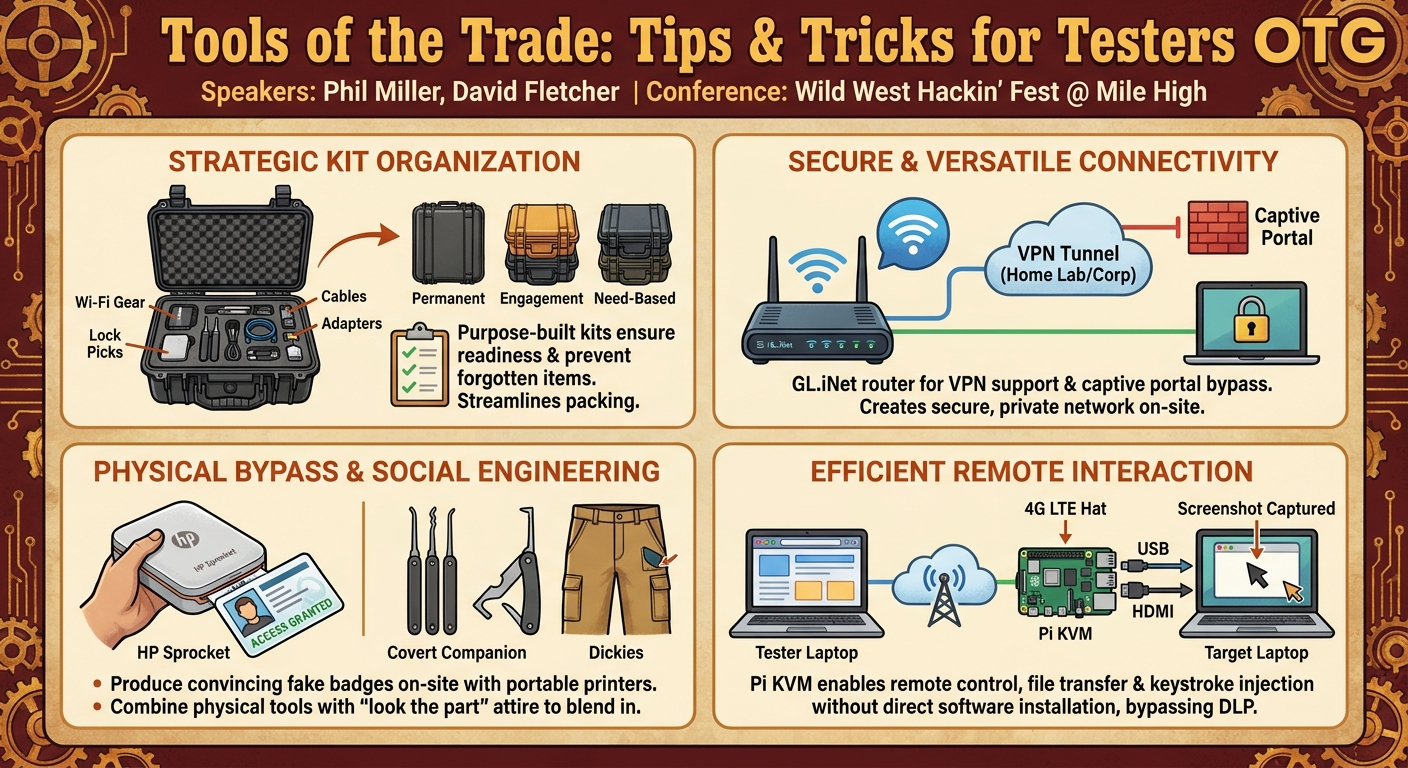
- Strategic Kit Organization: The most fundamental finding is the critical importance of organizing tools into permanent, engagement-based, and need-based kits. This structured approach, often utilizing Pelican cases with custom foam inserts, ensures readiness, prevents forgotten items, and streamlines the packing process.
- Secure and Versatile Connectivity: The GL.iNet travel router is identified as an indispensable tool for establishing secure and flexible network access on-site. Its ability to support various VPNs, bypass captive portals, and potentially act as a 4G LTE hotspot transforms insecure public Wi-Fi into a controlled testing environment, extending the tester's home lab or corporate network presence.
- Enhanced On-Site Productivity: Portable travel monitors are highlighted as crucial for replicating a multi-screen office environment, significantly boosting productivity when working from a single laptop. Paired with programmable gaming mice and external keyboards, these accessories create a more ergonomic and efficient workspace.
- Effective Network Access Control (NAC) Bypass: A practical application of MAC Changer is demonstrated for bypassing NAC by cloning the MAC address of a VOIP phone. This simple yet effective technique often exploits common misconfigurations where VOIP networks are not properly segmented or protected by 802.1X authentication.
- Advanced Wireless Exploitation: The Hak5 Wi-Fi Pineapple Pager is presented as a powerful, portable, and user-friendly tool for advanced Wi-Fi testing, including evil twin attacks and on-site payload deployment. Its integration with Glitch GPS mod for war driving and direct Wigle.net data export showcases its versatility.
- Cost-Effective Physical Access Tools: The HP Sprocket mini printer is lauded as a low-budget, highly effective alternative to expensive badge printers. Its ability to produce convincing fake badges, even without cloning RFID, significantly aids social engineering efforts and physical bypasses. The Covert Companion V2 is also praised as a comprehensive multi-tool for lock picking and shimming.
- Efficient Remote System Interaction: The Pi KVM (especially the V4 Plus) emerges as a game-changer for assumed compromise tests. It allows testers to remotely control a customer's laptop from their own, facilitating seamless screenshot capture, file transfer, and keystroke injection, bypassing typical data loss prevention (DLP) or network restrictions. Its potential integration with a 4G LTE hat turns it into a covert, remotely accessible implant.
- Simplified Secure Remote Access: Pangolin is introduced as an identity-aware VPN and proxy service, offering a simplified, bundled alternative to solutions like Tailscale for establishing secure remote access to on-site devices, particularly useful for managing implants or remote testing infrastructure.
- The "Look the Part" Strategy: Beyond technical tools, the speakers underscore the importance of social engineering tactics, including wearing appropriate attire (e.g., Dickies carpenter pants with hidden pockets) and using fake badges, to blend in and reduce suspicion during physical engagements.
Technical Deep Dive
▶ Watch: Demonstrating the new Hak5 Wi-Fi Pineapple Pager (10:30)
The talk provides a detailed look at several technical tools and methodologies, emphasizing their practical application in real-world scenarios.
GL.iNet Travel Router: This device, costing around $100-$120, runs OpenWrt, an open-source operating system for routers. Its core functionality revolves around providing secure and flexible internet access. It supports a wide array of VPN protocols and services, including NordVPN, IPVanish, and Private Internet Access (PIA), allowing testers to tunnel all their on-site traffic through a secure, trusted endpoint (e.g., their home lab or a company VPN). A key feature is its ability to bypass captive portals often found in hotels or public spaces. By connecting the router's WAN port to a hotel's LAN port (e.g., found behind a TV), the router can often obtain an IP address and allow all connected devices to bypass the portal, creating a private, secure subnet. It also features pre-built plugins like AdGuard for ad and tracker blocking, though users must remember to disable DNS override if using a custom DNS server. The router can also be configured as a 4G LTE hotspot, though the presenter noted this feature was not fully explored yet.
MAC Changer for NAC Bypass: This technique leverages the macchanger utility, a staple of Kali Linux, to bypass Network Access Control (NAC) implementations. The process involves identifying a legitimate network device, such as a VOIP phone, and noting its MAC address. The tester then uses macchanger to clone this MAC address onto their own laptop's network interface. By unplugging the VOIP phone and connecting their laptop to the same Ethernet port, the tester can often gain access to the internal network. This exploit relies on the target organization's failure to properly segment VOIP networks or implement robust 802.1X authentication, which would prevent unauthorized devices from connecting even with a cloned MAC address.
Hak5 Wi-Fi Pineapple Pager: Priced around $300, this tool is designed for advanced wireless penetration testing. It features multiple Wi-Fi cards, enabling sophisticated attacks such as evil twin attacks, where it mimics legitimate access points to trick clients into connecting. A significant enhancement is its ability to download payloads directly from GitHub while on-site, eliminating the need to connect it to another computer for updates or new tools. The talk also mentions the development of a feature to clone captive portals for evil twin attacks, though this requires running a headless Chromium instance, which can be resource-intensive. The Glitch GPS mod for the Pager allows for war driving, automatically capturing Wi-Fi network data and exporting it to Wigle.net-compatible CSV files for easy upload and analysis.
Pi KVM: This Raspberry Pi-based Kernel-based Virtual Machine provides remote out-of-band management capabilities. The talk highlights the evolution from Pi KVM V3 (requiring manual firmware flashing) to the Pi KVM V4 Plus, which offers plug-and-play functionality. Essential components include a 5.1V 3A USB-C power supply, HDMI cable, Ethernet cable, and a USB-C to USB-A cable with data lines (crucial for keyboard and mouse emulation). The Pi KVM allows testers to control a target computer (e.g., a customer's laptop in an assumed compromise test) through a web browser interface on their own laptop. This enables seamless screenshot capture, file transfer, and keystroke injection, bypassing endpoint security controls like Data Loss Prevention (DLP) or network restrictions. A particularly powerful application is its integration with a 4G LTE hat (e.g., Sixfab), transforming the Pi KVM into a covert, remotely accessible implant. The presenter demonstrated this with a Raspberry Pi 5 housed in a custom enclosure, powered by a battery pack, creating a "mini pwn box" that can be deployed on-site and managed over a cellular network. The Pi KVM V4 also supports a switch, allowing it to manage multiple target devices from a single Pi KVM unit.
Pangolin: Described as an identity-aware VPN and proxy, Pangolin offers a streamlined solution for remote access, similar to Tailscale but with a more bundled and simplified setup. It leverages WireGuard as its underlying technology. While it provides secure ingress proxy services to access remote devices, the speakers note that it does not yet support VPN egress functionality (routing all traffic through it), a highly requested feature. Pangolin simplifies the deployment of secure remote access infrastructure, potentially using Docker Compose, Terraform, or Ansible for automated spin-up in cloud environments like AWS or Digital Ocean. Its dashboard allows for managing client machines and sites, providing a web UI for configuration.
Physical Testing Tools: The talk covers specific physical tools:
- HP Sprocket Mini Printer: A cost-effective (around $80) portable printer for creating fake badges on-site. The ability to print a convincing badge, even if not RFID-cloned, is a significant social engineering asset.
- Covert Companion V2: This multi-tool is praised for its robust design and comprehensive set of lock picks, rakes, tensioners, and a hidden shim/decoder for rotating locks. It addresses shortcomings of earlier versions, offering a more practical and durable solution for physical bypasses.
- Under Door Tool: A large, foldable wire tool used to manipulate door handles or security mechanisms from underneath a door. The GoRuck backpack is noted for its ability to covertly carry this tool.
These technical tools and techniques, when combined with strategic planning and social engineering, form a powerful arsenal for modern cybersecurity testers.
Demo / Proof of Concept
▶ Watch: Pangolin: identity-aware VPN and proxy explained (22:00)
The talk included two primary demonstrations: a live technical demo of Pangolin for remote access and a physical display of the BHIS physical testing kit.
Pangolin Remote Access Demo:
Phil Miller attempted a live demonstration of Pangolin connecting a Raspberry Pi 5 (configured as a Kali Linux box with a Sixfab 4G LTE hat) to a Pangolin site hosted on milehighhackerfest.net. The objective was to show remote SSH access to the Pi 5 over the cellular network via the Pangolin service.
The demo process involved:
- Running a command on the Raspberry Pi 5 client to connect it to the Pangolin service.
- Monitoring the Pangolin dashboard to observe the client's connection status.
- Enabling the "site" within Pangolin, which then establishes the secure tunnel.
- Attempting to SSH into the connected Raspberry Pi 5 from the presenter's laptop.
Challenges Encountered:
- VPN Interference: The initial attempt failed due to the presenter's Cloudflare Warp VPN interfering with the connection. This was quickly identified and resolved by disabling the VPN.
- Connection Order: A peculiar caveat was noted: the client machine (Pi 5) needed to connect first, then the Pangolin site had to be enabled. Reversing this order reportedly caused issues.
- Windows vs. Linux: While the demo was primarily intended for the Kali Linux box on the Pi 5, the presenter also attempted to show it working on a Windows client, which experienced some difficulties, highlighting potential platform-specific quirks or configuration needs.
Outcome:
Despite the initial technical hiccups, the demo eventually worked. The Pangolin dashboard successfully showed the Raspberry Pi 5 as connected, and an SSH session was established. This demonstrated the core functionality of Pangolin for providing secure, identity-aware remote access to an on-site implant (the 4G LTE-enabled Pi 5 running Kali Linux). The visual confirmation of the SSH terminal, even if brief, validated the concept of managing a "pwn box" remotely over a cellular network.
Physical Testing Kit Demonstration:
David Fletcher, the primary maintainer of the BHIS physical kit, showcased a highly organized physical testing kit housed in a Pelican case. He emphasized the meticulous process of hot-knifing foam inserts to create custom compartments for each tool.
Key aspects of the physical kit shown/discussed:
- Multi-Layered Organization: The Pelican case contained multiple layers of foam, each dedicated to specific categories of tools.
- Comprehensive Tool Selection: The kit included a wide array of physical penetration testing tools, such as various lock picks, shims, the Covert Companion, and the under door tool (stored at the very bottom layer).
- HP Sprocket Printer: The mini printer was visible within the kit, demonstrating its compact size and practical inclusion for on-site badge printing.
- Purpose-Based Design: Fletcher stressed that the kit was designed for specific purposes, ensuring testers had everything needed for a physical engagement without having to "pilfer" tools from other kits.
This dual demonstration effectively showcased both the technical prowess required for remote implant management and the meticulous physical preparation needed for hands-on engagements, reinforcing the talk's theme of comprehensive on-site readiness.
Defensive Implications
▶ Watch: Physical testing kit and covert travel strategies (28:00)
The insights shared in this talk offer critical defensive implications for organizations looking to bolster their security posture against sophisticated attackers, both digital and physical.
- Network Access Control (NAC) Hardening: The demonstration of MAC address cloning to bypass NAC via VOIP phones highlights a common vulnerability. Organizations must implement robust 802.1X authentication on all network ports, including those used by IP phones and other IoT devices. Furthermore, network segmentation for VOIP and other sensitive devices should be strictly enforced, preventing access to the broader internal network even if a port is compromised. Regular audits of NAC configurations and device MAC address whitelists are essential.
- Wireless Security Enhancements: The capabilities of tools like the Wi-Fi Pineapple Pager for evil twin attacks and war driving underscore the need for advanced wireless security. Organizations should:
- Implement WPA3-Enterprise where possible, or strong WPA2-Enterprise with robust authentication.
- Deploy Wireless Intrusion Detection/Prevention Systems (WIDS/WIPS) to detect rogue access points and evil twin attacks.
- Educate employees about the dangers of connecting to unknown Wi-Fi networks, even those with familiar-looking SSIDs.
- Regularly conduct war driving exercises to identify unauthorized access points or misconfigured legitimate ones.
- Physical Security Reinforcement: The emphasis on social engineering, fake badges, and physical bypass tools provides direct guidance for improving physical security:
- Employee Awareness Training: Conduct frequent training on tailgating prevention, verifying unfamiliar individuals, and challenging suspicious behavior. Employees should be empowered to question badges and report unusual activities.
- Access Control Audits: Regularly audit physical access control systems, including door locks, RFID readers, and visitor policies. Test for vulnerabilities like easily bypassed Rex sensors or double-door gaps.
- Badge Verification: Implement multi-factor authentication for physical access where appropriate, or secondary verification steps for visitors. Ensure security guards are trained to scrutinize badges and not rely solely on a "beep and green light."
- Covert Tool Detection: While difficult, security personnel should be aware of common physical bypass tools and how they might be concealed (e.g., in clothing pockets, backpacks).
- Endpoint and Remote Access Security: The Pi KVM and Pangolin discussions highlight risks related to remote access and client device compromise:
- Device Whitelisting/Monitoring: Implement strict controls over USB device usage on sensitive systems. Monitor for unauthorized devices being plugged into corporate laptops or network infrastructure.
- Out-of-Band Management Security: If using remote management solutions, ensure they are securely configured, regularly patched, and employ strong authentication. The idea of a 4G LTE-enabled Pi KVM implant demonstrates the potential for persistent, covert access even if the internal network is locked down.
- Remote Access Gateway Security: For solutions like Pangolin or Tailscale, ensure the central server (or "site" in Pangolin's terminology) is hardened, regularly updated, and has robust access controls. Monitor for unusual connection patterns or unauthorized client registrations.
- Supply Chain and Assumed Compromise Scenarios: When providing laptops for assumed compromise tests, organizations should be aware that testers may use tools like Pi KVM to interact with the device without installing anything directly, bypassing traditional DLP. This reinforces the need for trust in testing partners and clear rules of engagement.
By understanding the "tools of the trade" from an attacker's perspective, defenders can proactively identify and mitigate vulnerabilities, transforming potential weaknesses into resilient security controls.
Key Takeaways
- Strategic Kit Organization is Paramount: Always organize your tools into purpose-built kits (permanent, engagement-based, need-based) using solutions like Pelican cases with custom foam inserts. This saves time, ensures readiness, and prevents critical omissions.
- Prioritize Secure On-Site Connectivity: Invest in a GL.iNet travel router to establish a secure, private network on-site, bypass captive portals, and tunnel all traffic through a trusted VPN. This is crucial for maintaining operational security in untrusted environments.
- Leverage Pi KVM for Efficient Client Interaction: The Pi KVM V4 Plus is an invaluable tool for assumed compromise tests, enabling remote control of client laptops, seamless screenshot capture, and file transfer without direct software installation, effectively bypassing endpoint security and network restrictions.
- Master Physical Bypass and Social Engineering: Effective physical penetration testing relies on more than just tools. Develop strong social engineering skills, utilize cost-effective tools like the HP Sprocket printer for fake badges, choose appropriate attire (e.g., Dickies carpenter pants), and understand how to blend in to reduce suspicion.
- Stay Updated on Evolving Tools: Continuously research and integrate new and improved tools into your arsenal, such as the Hak5 Wi-Fi Pineapple Pager for advanced wireless attacks or the Covert Companion V2 for physical access, ensuring your capabilities remain cutting-edge.
- Invest in Durable, Versatile Gear: High-quality, robust equipment like the GoRuck GR1/GR2 backpack is a worthwhile investment. Its durability and design allow for covertly carrying a wide range of tools, including larger items like the under door tool, across numerous engagements.
About the Speaker(s)
Phil Miller is a cybersecurity professional with extensive experience in penetration testing and red teaming. Throughout the talk, he demonstrates a deep practical understanding of various tools and techniques, sharing personal anecdotes and hands-on advice. He is clearly passionate about optimizing the on-site testing experience, emphasizing secure practices, efficiency, and preparedness. Miller's presentation style is engaging and informative, drawing from his own experiences with everything from selecting durable backpacks to configuring complex remote access implants. He is adept at breaking down technical concepts into actionable steps for fellow testers.
David Fletcher is also a seasoned cybersecurity expert, contributing significantly to the practical aspects of on-site engagements. He is the primary maintainer of the Black Hills Information Security (BHIS) physical testing kit, showcasing his expertise in organizing and deploying physical penetration tools. Fletcher's contributions underscore the importance of proactive planning, preventing the need to acquire tools last-minute, and the art of social engineering through appropriate attire and plausible deniability. His insights are grounded in extensive field experience, offering valuable perspectives on the logistical and human elements of successful security assessments.
Reviews
Dr. Zero (Offensive Security Researcher) — SOLID
This is a red team packing list masquerading as a conference talk. It's competent and functional, but if you've been on a physical engagement in the last decade, you already own everything in their Pelican case.
Heather Calloway (CISO) — SOLID
This is a tactical briefing for red teams on how to pack physical and digital bypass gear for on-site engagements. While not a leadership presentation, it highlights exactly how cheaply our physical perimeters and network access controls can be bypassed. It's a solid reality check for your network and physical security directors.
→ Top-rated talks at Wild West Hackin' Fest @ Mile High 2026