The OAuth Problem You Didn't Know You Have
Evier Tabora (Security Engineer)
Overview
In his Wild West Hackin' Fest @ Mile High talk, Evier Tabora, a security engineer, delves into a pervasive and often overlooked security vulnerability stemming from the widespread adoption of OAuth. Titled "The OAuth Problem You Didn't Know You Have," the presentation exposes how the very tools designed to simplify integrations and enhance user experience within enterprise ecosystems are inadvertently creating significant security holes. Tabora highlights the critical distinction between authorization and authentication, a nuance frequently misunderstood, leading to a false sense of security in environments heavily reliant on OAuth for service-to-service communication.
Key moments
- 0:00 Introduction and talk agenda
- 4:00 OAuth 2.0's problematic origins and implementation
- 8:00 Debunking common OAuth security misconceptions
- 14:00 Google Apps Script: ideal attack vector
- 18:00 Exploiting Google's 'internal app' OAuth loophole
- 22:00 Live demo: AI-powered Apps Script exploit
- 31:00 Three-pronged defense against OAuth attacks
- 35:00 Future risk: OAuth exhaustion and AI agents
The OAuth Problem You Didn't Know You Have
Speakers: Evier Tabora, Security Engineer
Conference: Wild West Hackin' Fest @ Mile High
YouTube: https://www.youtube.com/watch?v=OV0muip3wHk
Overview
In his Wild West Hackin' Fest @ Mile High talk, Evier Tabora, a security engineer, delves into a pervasive and often overlooked security vulnerability stemming from the widespread adoption of OAuth. Titled "The OAuth Problem You Didn't Know You Have," the presentation exposes how the very tools designed to simplify integrations and enhance user experience within enterprise ecosystems are inadvertently creating significant security holes. Tabora highlights the critical distinction between authorization and authentication, a nuance frequently misunderstood, leading to a false sense of security in environments heavily reliant on OAuth for service-to-service communication.
The core of Tabora's argument centers on how implicit trust within platforms like Google Workspace and Microsoft 365 can be leveraged by attackers. By exploiting the differing security treatments of "internal" versus "public" applications, particularly with tools like Google Apps Script and Microsoft Power Automate, malicious actors can craft convincing OAuth consent flows that bypass standard security warnings. This allows for the persistent granting of broad permissions, potentially leading to data exfiltration, unauthorized access, and even administrative actions. The talk culminates in a stark warning about the escalating threat posed by agentic AI, which inherently seeks broad OAuth permissions, magnifying the existing vulnerabilities and necessitating immediate defensive actions from organizations.
Background
▶ Watch: Introduction and talk agenda (0:00)
The genesis of the OAuth problem can be traced back to a fundamental need for controlled access, much like the valet key introduced in the 1970s. Just as a valet key grants limited access to a car (e.g., driving but not opening the trunk), a digital solution was required for services to access user data on other platforms without requiring the user's primary credentials (username and password). This challenge became particularly acute around 2007, when engineers sought a standardized method for authorizing API calls without impersonating the customer. The OpenID community responded by creating OAuth, which was rapidly adopted by industry giants like Google, Netflix, and Twitter.
However, the evolution of OAuth was not without its controversies. A significant security patch was released in 2009, and by 2010, work began on OAuth 2.0. This iteration, however, faced fundamental disagreements, leading to the dramatic withdrawal of primary editor Aaron Hammer from the working group. The resulting OAuth 2.0 standard, while widely adopted, suffers from a lack of prescriptive guidance. Implementers are left to synthesize information from numerous RFCs and drafts, deciding for themselves on critical aspects like token types, grant types, and even token string sizes. Crucially, the standard provides minimal guidance on security implications, cautioning, or specific consent prompt designs. This ambiguity results in highly variable consent flows, where the appearance and functionality of prompts can differ wildly between implementations, making it difficult for users to discern legitimate requests from malicious ones.
A significant misconception, heavily emphasized by Tabora, is that OAuth is often conflated with authentication. He clarifies that OAuth is purely for authorization – granting permission for one service to access resources on another – not for verifying a user's identity. This distinction is critical because common security measures like Multi-Factor Authentication (MFA), application marketplace reviews, corporate VPNs, and even robust security training often fail to address the specific vulnerabilities inherent in OAuth's authorization flows. For instance, MFA secures the initial sign-in, but once a service-to-service authorization is granted, MFA has no impact. Similarly, marketplace review doesn't guarantee an application isn't over-permissioned, and VPNs don't revoke already authorized service-to-service access. The primary attack vectors, therefore, become consent phishing and the granting of broad permissions, facilitated by persistent OAuth approvals that are notoriously difficult to revoke.
Key Findings
▶ Watch: Debunking common OAuth security misconceptions (8:00)
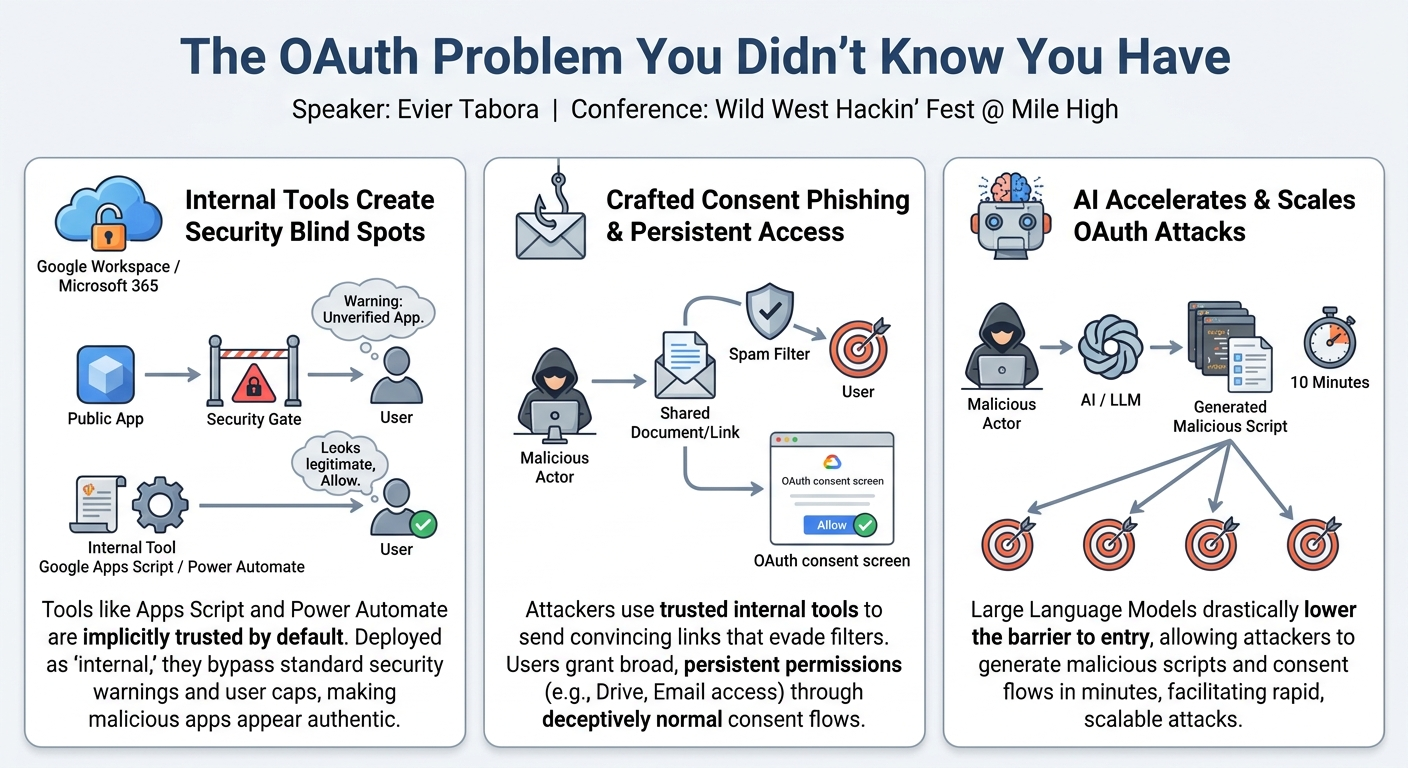
The central discovery of this talk revolves around the exploitable nuances within major technology ecosystems, particularly Google Workspace and Microsoft 365, regarding their handling of OAuth consent. Evier Tabora identifies that these ecosystems treat applications designated as "internal" differently from those deemed "public" or "external." This differential treatment creates a significant security blind spot that attackers can leverage.
Specifically, the key findings include:
- Implicit Trust in Internal Tools: Tools native to these ecosystems, such as Google Apps Script and Microsoft Power Automate, are implicitly trusted by default. They are designed for seamless integration and often bypass standard security checks, including spam filters for communications originating from them.
- Google Apps Script as an Attack Vector: Google Apps Script is a SaaS application provided and enabled by default in both commercial and enterprise Google Workspace tenants. It runs on JavaScript, a widely known language, making it accessible to many developers (and attackers). Crucially, Apps Script is designed to integrate with all of the Google Workspace ecosystem, not just specific applications like Sheets or Drive, extending its potential reach.
- Bypassing Google's Security Warnings: Google does implement security measures for Apps Script, such as requiring app review for public deployment, displaying "unverified app" warnings (the "red triangle"), and imposing a 100-user cap. However, Tabora reveals that if an Apps Script is deployed as a web app and designated as "internal" to an organization, these critical safeguards are entirely bypassed. The "unverified app" screen disappears, and the 100-user cap is removed. Google's documentation explicitly states this behavior, highlighting a significant context gap where an "internal" organization could range from two people to hundreds of thousands.
- Crafting Convincing Consent Prompts: By exploiting the "internal app" designation, attackers can generate an OAuth consent flow that appears indistinguishable from a legitimate, verified application within the Google or Microsoft ecosystem. This "normal" appearance significantly reduces user scrutiny, making them far more likely to click "allow" or "accept" without recognizing the inherent risk. The attacker controls the name of the project, which directly translates to the application name shown in the consent prompt, further enhancing credibility.
- AI as an Enabler: The advent of Large Language Models (LLMs) like Gemini, ChatGPT, and Claude has drastically lowered the barrier to entry for creating these malicious OAuth applications. An attacker can use an LLM to generate the necessary script and associated OAuth consent flows in "10 minutes or less," enabling rapid and scalable deployment of attacks. This diminishes the effectiveness of traditional user education around consent prompts, as the prompts themselves are now harder to distinguish from legitimate ones.
- Persistent and Broad Permissions: Once an attacker gains authorization through such a method, the OAuth approvals are persistent and often grant very broad permissions (e.g., full access to Google Drive, Gmail, or administrative actions). Revoking these permissions manually across various platforms is often complex and non-straightforward for users and administrators alike.
- OAuth Exhaustion Vulnerability: Tabora coins the term "OAuth exhaustion" to describe this systemic vulnerability, where the sheer volume and complexity of OAuth applications, coupled with the ease of generating malicious ones, overwhelm an organization's ability to monitor and secure them effectively.
These findings collectively paint a picture of a critical, under-addressed security challenge, exacerbated by the convenience features of modern enterprise ecosystems and the accelerating capabilities of AI.
Technical Deep Dive
▶ Watch: Exploiting Google's 'internal app' OAuth loophole (18:00)
The technical heart of Tabora's presentation lies in the exploitation of Google Apps Script within the Google Workspace ecosystem. Apps Script is a cloud-based JavaScript platform that allows users to create custom functions, automations, and integrations across Google products like Sheets, Docs, Drive, and Gmail. It requires no local installation, functioning as a Software as a Service (SaaS), and is enabled by default for all commercial and enterprise Google tenants. Its ubiquity and ease of use, combined with its deep integration capabilities across the entire Workspace, make it a potent tool for automation—and, as demonstrated, for exploitation.
The critical vulnerability arises from Google's policy concerning internal applications. When an Apps Script is deployed as a web app within a Google Workspace organization, it is automatically classified as "internal." This classification is crucial because, as per Google's own developer documentation, internal apps are exempt from several security checks and limitations applied to public apps:
- Bypassed Verification Screens: Unlike public apps, internal Apps Scripts do not trigger the prominent "This app hasn't been verified by Google" warning screens (the "red triangle" or "extra orange" notifications) during the OAuth consent flow. This means the user sees a standard, clean consent prompt, identical in appearance to those from legitimate, verified Google applications.
- Removed User Cap: Public Apps Scripts are typically capped at 100 users for authorization before requiring extensive review. For internal apps, this 100-user cap is removed, allowing an attacker to target an entire organization regardless of its size.
An attacker leverages these characteristics by crafting an Apps Script that requests broad OAuth scopes, such as https://www.googleapis.com/auth/drive (for full Google Drive access) or https://www.googleapis.com/auth/gmail.readonly (for reading Gmail). The script itself can be simple, often generated by an LLM like Gemini or ChatGPT, designed to perform actions like sharing files with the attacker or exfiltrating data.
The deployment process is deceptively simple:
- An attacker creates a Google Sheet (or any Google Workspace document).
- They access Extensions > Apps Script from within the document.
- They paste their malicious JavaScript code into the Apps Script editor.
- Crucially, they specify the required OAuth scopes in the
appsscript.jsonmanifest or via the UI, granting the script the desired permissions (e.g., Drive API scopes). - They assign a project name to the Apps Script (e.g., "ChatGPT automations"). This name is what the end-user will see as the requesting application in the OAuth consent prompt, lending an air of legitimacy.
- The script is then deployed as a web app. During deployment, the attacker configures it to execute "as user accessing the web app" and to be accessible "to anyone in the organization." This internal deployment is the key step that bypasses Google's external app verification and warnings.
Once deployed, the attacker can then share the Google Sheet (or a link to the web app) with a target within the organization. Because the share originates from a Google Workspace application, it bypasses email spam filters, increasing the likelihood of the target opening it. When the target interacts with the sheet in a way that triggers the script (e.g., clicking a custom menu item), the OAuth consent flow is initiated. Due to the "internal app" designation, the user is presented with a seemingly legitimate consent screen, requesting permissions under the attacker-chosen project name. If the user accepts, the script gains the requested permissions and can execute its malicious payload in the background, without further user interaction.
The talk also briefly touches upon Microsoft Power Automate as another example of an internal tool with similar vulnerabilities. Power Automate, with its built-in connectors, can also be configured to exfiltrate information, and its OAuth consent flows, if originating from a trusted internal source, might also bypass scrutiny, especially if the developer identity (e.g., a Gmail account) is superficially trusted. The fundamental issue is the implicit trust granted to internal ecosystem tools and the lack of robust, context-aware security validation for their OAuth permission requests.
Demo / Proof of Concept
▶ Watch: Live demo: AI-powered Apps Script exploit (22:00)
Evier Tabora illustrates the OAuth exploitation with a compelling and practical demo, showcasing how an attacker could gain unauthorized access to a victim's files within a Google Workspace environment. The scenario involves two fictional employees: Snoop Dogg (the attacker) and Dr. Dre (the victim).
The demonstration proceeds as follows:
- Script Generation with AI: Snoop Dogg initiates the attack by leveraging an LLM, specifically Gemini. He provides a prompt to Gemini, instructing it to generate a Google Apps Script that can fill out a Google Sheet and access Google Drive files. The LLM quickly generates the necessary JavaScript code.
- Crafting the Lure: Snoop Dogg creates a new Google Sheet, giving it a plausible and enticing name for Dr. Dre, such as "transactions for Dre." He adds relevant-looking columns like "deals," "artists," and "month" to make the sheet appear legitimate and useful.
- Embedding the Malicious Script:
- Snoop Dogg navigates to Extensions > App Script within the newly created Google Sheet.
- He pastes the Gemini-generated script into the Apps Script editor.
- Crucially, he configures the script's permissions by adding Drive API scopes (
https://www.googleapis.com/auth/drive). This is the permission that will allow the script to access Dr. Dre's Google Drive. - He renames the Apps Script project to something innocuous and seemingly beneficial, like "ChatGPT automations." This name will appear in the OAuth consent prompt.
- Deploying as an Internal Web App:
- Snoop Dogg deploys the script as a web app.
- He configures the deployment to execute "as the user accessing the web app" (meaning Dr. Dre's permissions will be used) and makes it accessible "to the entire organization." This "internal" deployment is the key bypass for Google's security warnings.
- Phishing the Victim:
- Snoop Dogg populates the sheet with some dummy data (e.g., Eminem, 50 Cent) to make it look active.
- He uses the native Google Sheets "Share" functionality to send the sheet to Dr. Dre. This action, originating from a trusted internal Google service, ensures the email bypasses spam filters.
- The email includes a persuasive message, encouraging Dr. Dre to "use the AI tool functionality" within the new menu of the sheet.
- Victim Interaction and Consent:
- Dr. Dre receives the email, which appears to be from a legitimate internal source and contains a direct link to the shared Google Sheet.
- Upon opening the sheet, Dr. Dre notices the "AI menu" that Snoop Dogg mentioned.
- When Dr. Dre clicks on the "AI menu," the embedded Apps Script attempts to run, triggering an OAuth consent flow.
- The critical moment: Dr. Dre is presented with a standard-looking Google OAuth consent prompt. There are no "unverified app" warnings or red triangles. The prompt simply asks for broad permissions (e.g., access to Google Drive) on behalf of "ChatGPT automations" (the attacker's chosen project name).
- Assuming this is a legitimate internal tool, Dr. Dre clicks "OK" and then "Allow" or "Accept," granting the script the requested permissions.
- Data Exfiltration:
- Once authorized, the script executes its malicious payload in the background. In this demo, it's designed to share Dr. Dre's files with Snoop Dogg.
- Tabora shows a "toast" notification appearing for Dr. Dre, indicating the script attempted a ChatGPT action (which failed because no API key was provided), while simultaneously sharing files.
- Switching back to Snoop Dogg's account, two new files appear, shared from Dr. Dre. One of the files contains a message implying illicit gains from Dr. Dre.
Tabora emphasizes that this entire exploit can be executed in "under 10 minutes." The script can be designed to run silently in the background, perform administrative actions if the victim has admin privileges, or be paused and resumed, making the attack highly versatile. He also briefly mentions Microsoft Power Automate as an analogous tool that can be used for similar exfiltration, often leveraging built-in connectors that make the process even more straightforward.
Defensive Implications
▶ Watch: Future risk: OAuth exhaustion and AI agents (35:00)
Defending against these sophisticated OAuth attacks presents several challenges due to the pervasive nature of OAuth, the constant evolution of tools and user practices, and the difficulty in distinguishing legitimate applications from malicious ones. Evier Tabora outlines a three-pronged defensive approach to mitigate the risks:
- Identify the Apps:
- Audit All OAuth Applications: Organizations must undertake a comprehensive audit of all OAuth applications currently authorized within their environment, both third-party and internal.
- Baseline Critical vs. Optional: For each identified application, determine if it is critical for business operations or merely optional. This process establishes a baseline of truly necessary applications and their associated permissions. This step is often time-consuming but foundational.
- Enable Needed Apps (Allow List Framework):
- Shift from Default to Allow List: The default setting in many enterprise environments (e.g., Google Admin, Microsoft Azure AD) is often to allow users to consent to applications or trust internal applications implicitly. This default must be changed. Organizations should switch to an allow list framework, where only explicitly approved applications are permitted to request OAuth permissions.
- Google Admin Console Configuration:
- For third-party app access, change the default from "Allow for everyone" to "Do not allow any applications" or "Limit which third-party apps users can install." This forces all external applications to go through an explicit review and approval process before they can be added to an allow list.
- For internal apps, specifically uncheck the "Trust all internal applications" box. This ensures that even Apps Scripts deployed internally are subject to the same scrutiny and require explicit addition to the allow list, preventing the demonstrated bypass of security warnings.
- Microsoft Azure AD Configuration:
- Navigate to "Enterprise applications" or "App registrations" settings.
- Configure "User consent for applications" to "Do not allow user consent" or "Allow user consent for apps from verified publishers, or your organization only, for selected permissions." The most secure approach is to disable user consent entirely, requiring administrator approval for all new application authorizations.
- Alternatively, preset specific OAuth scopes that are permitted, automatically denying applications requesting anything outside that scope.
- Prevent with Automation:
- Streamline Approval Workflows: To avoid hindering productivity, implement automated processes for users to request new applications. This could integrate with existing ticketing systems (e.g., ServiceNow), communication platforms (e.g., Slack, Microsoft Teams), or custom portals.
- Automated Scope Checking: Integrate automation that can automatically check the OAuth scopes being requested by a new application. Based on predefined policies (e.g., critical permissions requiring manual review, less sensitive ones auto-approved), the system can add the application to the allow list or deny it. This removes friction for users while maintaining security control.
Tabora emphasizes that implementing these defenses, particularly changing default settings, will immediately impact existing over-permissive applications by denying their access until they are explicitly reviewed and added to the allow list. This proactive approach stops ongoing or future exploitation attempts. The ultimate goal is to remove the implicit trust that attackers currently leverage within enterprise ecosystems, making it significantly harder for malicious Apps Scripts or Power Automate flows to gain unauthorized, persistent access.
Key Takeaways
- OAuth exhaustion is a critical, under-recognized vulnerability. The sheer volume of OAuth applications and their diverse consent flows create a systemic challenge for organizations to monitor and secure effectively.
- Internal ecosystem tools like Google Apps Script and Microsoft Power Automate are implicitly trusted by default. This implicit trust bypasses standard security warnings and spam filters, making them prime targets for attackers to create seemingly legitimate but malicious applications.
- The distinction between "internal" and "public" application deployment is a significant security blind spot. Google, for example, removes critical security warnings (like "unverified app" screens) and user caps for internally deployed Apps Scripts, allowing attackers to craft convincing consent prompts.
- Artificial Intelligence (LLMs) drastically lowers the barrier to entry for OAuth attacks. Tools like Gemini and ChatGPT can generate the necessary malicious scripts and associated OAuth consent flows in minutes, accelerating the rate and scale of potential attacks and diminishing the effectiveness of user education alone.
- OAuth was designed for authorization, not authentication or intent evaluation. This fundamental design, coupled with the broad permissions sought by many applications (especially agentic AI), makes it inherently dangerous when misused, as it grants power without verifying the true purpose or context of the request.
- Agentic AI, with its expansive connectors and broad OAuth permissions, represents an escalating threat. Platforms like Claude and future Multi-Compute Platform (MCP) servers or OpenClaw agents inherently seek wide-ranging access, magnifying the "OAuth problem" and potentially punching significant security holes in enterprise defenses if not addressed proactively.
About the Speaker(s)
Evier Tabora is a Security Engineer. His professional focus is on enhancing the security posture of small businesses and startups. Tabora is known by his clients, and now his audience, as "the dog with the pipe," a distinctive persona he uses in his work. His expertise lies in understanding the practical implications of security vulnerabilities, particularly within cloud and enterprise ecosystems, and translating complex technical issues into actionable defensive strategies for organizations.
Reviews
Dr. Zero (Offensive Security Researcher) — SOLID
A competent, practical walkthrough of OAuth consent phishing using Google's 'internal app' verification bypass. Tabora delivers actionable defensive advice for Workspace admins, even if he wraps a well-documented red team TTP in unnecessary AI hype.
Heather Calloway (CISO) — MUST SEE
This session exposes a critical blind spot in enterprise SaaS posture: the implicit trust Google and Microsoft grant to internal integrations. Tabora proves how attackers use native tools to bypass OAuth warnings and silently exfiltrate data. It is required viewing for the engineering director who owns your productivity tenant.
→ Top-rated talks at Wild West Hackin' Fest @ Mile High 2026