Trust Me, I'm a Shortcut: New LNK Abuse Methods
Wietze Beukema (Klaviyo)
Overview
In this insightful talk, "Trust Me, I'm a Shortcut," Wietze Beukema, a Security Engineer at Klaviyo, delves into the often-underestimated world of Windows LNK files. He meticulously dissects their historical context, inherent complexities, and, most critically, unveils four novel methods to weaponize them for highly deceptive attacks. Beukema demonstrates how these seemingly innocuous shortcut files, a staple of Windows usability since Windows 95, can be manipulated to display one thing to a user while secretly executing an entirely different, malicious command.
Key moments
- 2:40 Inspecting LNK file properties for target
- 8:30 Understanding LNK file format and sections
- 14:50 Analyzing previous LNK argument hiding technique
- 28:00 Advanced LNK spoofing with environment variable mismatch
- 31:30 Linked It Up testing framework for detection
- 33:00 Key takeaways and defense recommendations
- 40:00 Microsoft's perspective on LNK UI bugs and vulnerabilities
Trust Me, I'm a Shortcut: New LNK Abuse Methods
Speakers: Wietze Beukema, Security Engineer, Klaviyo
Conference: Wild West Hackin' Fest @ Mile High
YouTube: https://www.youtube.com/watch?v=xKxXnEegCIk
Overview
In this insightful talk, "Trust Me, I'm a Shortcut," Wietze Beukema, a Security Engineer at Klaviyo, delves into the often-underestimated world of Windows LNK files. He meticulously dissects their historical context, inherent complexities, and, most critically, unveils four novel methods to weaponize them for highly deceptive attacks. Beukema demonstrates how these seemingly innocuous shortcut files, a staple of Windows usability since Windows 95, can be manipulated to display one thing to a user while secretly executing an entirely different, malicious command.
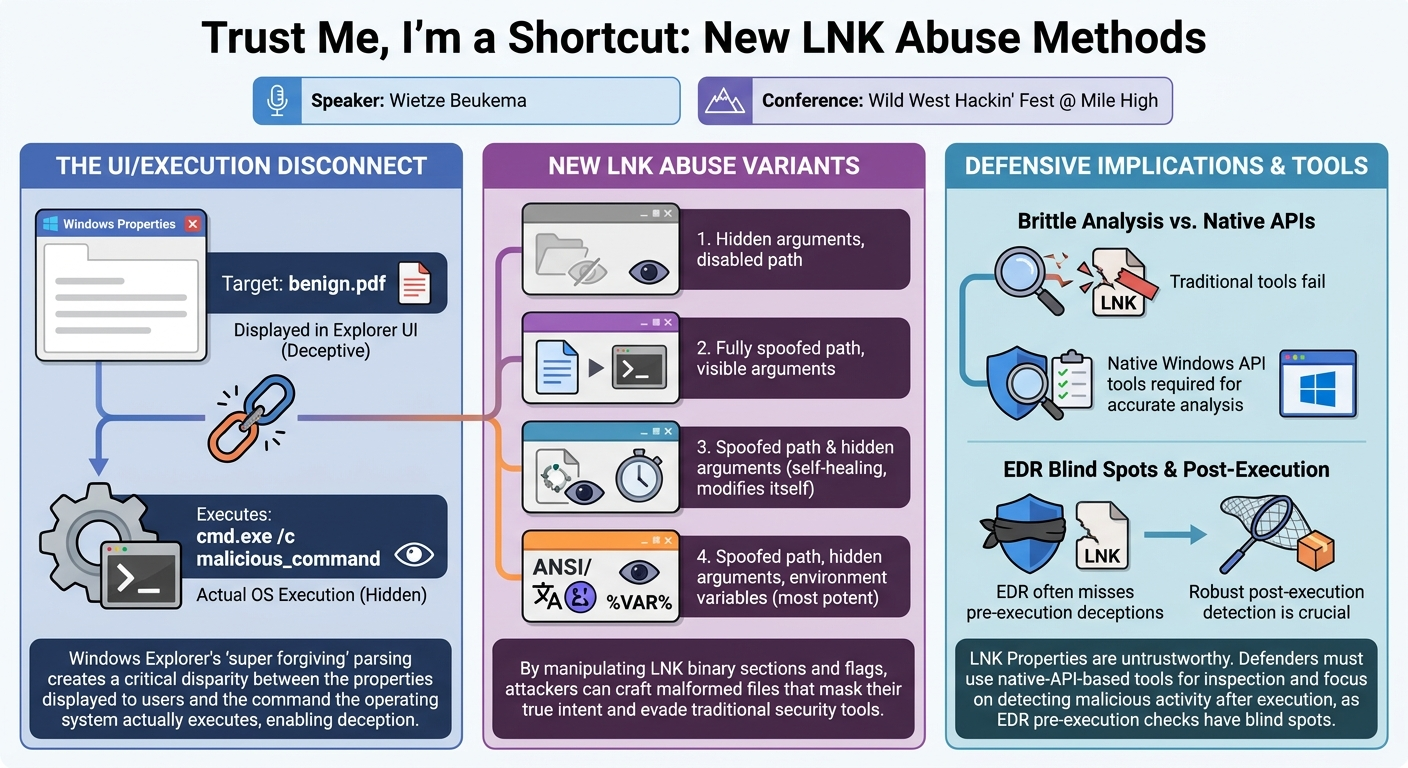
The talk highlights a critical disconnect between how Windows Explorer displays LNK file properties and how the operating system ultimately resolves and executes them. This discrepancy, rooted in the legacy design choices of a bygone era when security was secondary to user-friendliness, creates significant blind spots for both users and traditional security tools. Beukema not only exposes these vulnerabilities but also provides practical tools – a link generator and a testing framework – to help both offensive security practitioners and defenders understand and mitigate these advanced LNK abuses.
This presentation is highly relevant for anyone involved in cybersecurity, from incident responders and forensic analysts to red teamers and security engineers. It underscores the enduring threat posed by old technologies when their underlying complexities are not fully understood or properly secured. The ability to craft LNK files that completely mask their true intent represents a potent technique for initial access, persistence, and defense evasion, necessitating a re-evaluation of current detection and prevention strategies.
Background
▶ Watch: Inspecting LNK file properties for target (2:40)
The Microsoft Windows operating system relies on various types of shortcuts to enhance user experience and streamline navigation. Broadly, these fall into two categories: URL files for external resources (like http:// or https:// links) and LNK files for local resources. LNK files, the focus of this talk, point to anything accessible via Windows Explorer – local drives, removable media, network shares, WebDAV, or UNC paths. Unlike symbolic links in macOS or Linux, LNK files are not mere pointers; they are complex binary files, a proprietary format introduced with Windows 95.
This design choice in Windows 95, driven by a push for greater user-friendliness in an era of floppy disks and dial-up internet, allowed LNK files to do far more than just open a file or folder. They could execute commands, define a specific working directory, set window states (maximized, minimized), and incorporate a wealth of other metadata. The visual cue of a small arrow on the icon indicates a shortcut, but the only way for a user to ascertain its true target and behavior is by right-clicking it and inspecting the "Properties" dialogue, specifically the "Target" field. This reliance on a single UI element for security insight forms the crux of the abuse methods discussed.
LNK files have a long history of being exploited in cyberattacks. Their complexity and age mean they frequently break in unexpected ways, leading to numerous CVEs. A notable historical example is the Stuxnet campaign, which leveraged an LNK zero-day to load a malicious DLL without explicit execution. In contemporary threat landscapes, LNK files remain a popular vector for initial access, often delivered via phishing emails as zipped "invoices" or "software updates" that trick users into clicking a seemingly benign shortcut. They are also used for persistence (e.g., modifying existing desktop shortcuts or placing malicious LNKs in startup folders) and defense evasion through masquerading. Their customizability – allowing attackers to change icons, names, and arguments – makes them ideal for deceiving users and blending into legitimate system operations.
To understand the deeper abuse potential, Beukema delved into Microsoft's official documentation for the LNK file format, available since 2011. This extensive 50-page specification, though dry, explicitly states that "security was not a consideration" during the format's initial design. This foundational oversight is key to understanding why LNK files are so susceptible to the types of UI/execution discrepancies demonstrated.
Every LNK file is structured into up to five main sections:
- Shell Link Header: Always present, containing high-level metadata and, crucially, a 4-byte Link Flags field. This field, with its 25 unique flags, offers 2^25 (over 33 million) possible combinations, determining the presence and content of subsequent sections. This vast permutation space is a primary target for abuse.
- Link Target ID List (optional): Nearly always present, this section typically defines the target file or folder (e.g.,
C:\path\to\file.txt). - Link Info (optional): Contains metadata like file size and NTFS inode numbers, designed to help Windows locate a target if it has been moved or renamed (a "self-healing" mechanism).
- String Data (optional): Holds variable-length strings, most notably command-line arguments (e.g.,
/c calc.exeif the target iscmd.exe). - Extra Data (optional): A customizable section introduced since Windows 95, allowing for additional attributes. One significant element within this section is the Environment Variable Version (exp field), which stores paths containing environment variables like
%USERNAME%. The interplay and potential conflicts between these sections, especially regarding target paths and arguments, are central to Beukema's findings.
Key Findings
▶ Watch: Analyzing previous LNK argument hiding technique (14:50)
Wietze Beukema's research uncovers a fundamental flaw in how Windows handles malformed or contradictory LNK files: the operating system's Explorer UI, which is the primary interface for users to inspect shortcut properties, is "super forgiving" and often displays inaccurate or incomplete information compared to what Windows actually executes. This disparity creates a powerful vector for deception.
The core discovery is that by strategically manipulating specific fields and flags within the LNK binary format – particularly the Link Flags, the presence and content of the Link Target ID List, Link Info, and Environment Variable Version – attackers can craft LNK files that achieve unprecedented levels of masquerading. Beukema identified four distinct variants of LNK abuse, each building upon the last to enhance stealth and effectiveness:
- Hidden Arguments, Disabled Path: The LNK displays a benign target (e.g.,
cmd.exe) with a greyed-out, uneditable path, while secretly executing a command with hidden arguments. - Fully Spoofed Path, Visible Arguments: The LNK displays a completely faked path (e.g.,
your-invoice.pdf), but executes a different, malicious program (e.g.,calc.exe). Arguments for the malicious program would still be visible. - Spoofed Path and Hidden Arguments (Self-Healing): This variant achieves both a fully spoofed path and hidden arguments by leveraging the LNK's self-healing capabilities. The downside is that the LNK file modifies itself after execution, altering forensic evidence.
- Spoofed Path, Hidden Arguments, Environment Variables (Flipped Order): The most potent variant, which combines a fully spoofed path, hidden arguments, and the ability to use environment variables in the executed payload. This is achieved by exploiting a specific parsing quirk related to ANSI vs. Unicode path definitions.
Crucially, Beukema demonstrates that these methods are undetected by a fully patched Windows 11 system and are not flagged by Windows Defender. He developed a Python-based tool called Linked It Up to generate these malicious LNK files and a C-based testing framework that uses native Windows APIs to accurately compare displayed properties with actual execution behavior, thus enabling defenders to identify such discrepancies. These findings challenge the efficacy of traditional LNK analysis tools and highlight the need for more robust, execution-aware detection mechanisms.
Technical Deep Dive
▶ Watch: Advanced LNK spoofing with environment variable mismatch (28:00)
To fully grasp the ingenuity of Beukema's findings, it's essential to understand the progression from a known abuse method to his novel variants.
Base Case: Trend Micro's Padded Arguments (CVE Impetus)
A previously documented LNK abuse method, highlighted by Trend Micro, involves padding the command-line arguments of an LNK file. Attackers would append over 260 spaces to the String Data section, followed by their malicious command (e.g., cmd.exe /c calc.exe). Windows Explorer's "Properties" dialog would then truncate the displayed arguments after approximately 260 characters, effectively hiding the malicious payload from casual inspection.
- Mechanism: The Link Flags would indicate the presence of arguments and an Environment Variable Version (XString). The target path might point to
cmd.exe, and the arguments would be padded with spaces. - Deception: A user sees a target like
cmd.exefollowed by many blank spaces, making the actual malicious command invisible in the UI. - Limitations: The visible spaces are a strong indicator of compromise, and the executed process carries these spaces, making it easily detectable by modern EDRs and AVs, including Windows Defender, which now blocks this technique. Microsoft eventually patched this behavior in Windows 11. This served as Beukema's baseline, demonstrating that UI discrepancies could be weaponized.
Variant 1: Hidden Arguments, Disabled Path
Beukema's first novel variant achieves argument hiding without the tell-tale spaces, and additionally disables the target path field in the UI.
- Mechanism: The Link Flags are set to indicate the presence of both a Link Target ID List and an Environment Variable Version (XString). A valid target (e.g.,
cmd.exe) and its arguments (/c echo haha tricked you ping) are placed in theLink Target ID ListandString Datasections, respectively. However, for theEnvironment Variable Version, null bytes are provided instead of a valid path. - Windows' Behavior: When both a
Link Target ID Listand anEnvironment Variable Versionare declared, Windows prioritizes theEnvironment Variable Version. Since it receives null bytes for this preferred path, it renders the "Target" field in the Properties dialog as greyed out and uneditable. Crucially, it "forgets" to display the arguments associated with theLink Target ID List. Despite these UI anomalies, upon execution, Windows correctly falls back to and executes theLink Target ID List's target and its hidden arguments. - Example: Properties display
cmd.exewith a greyed-out target field and no visible arguments. Execution yieldscmd.exe /c echo haha tricked you ping. - Pros: Undetected on patched Windows 11, path is disabled (preventing user modification), arguments are completely hidden.
- Cons: The displayed target (e.g.,
cmd.exe) might not match the desired file type for social engineering (e.g., a "PDF"), and the actual target cannot use environment variables.
Variant 2: Fully Spoofed Path, Visible Arguments
This variant focuses on completely spoofing the displayed target path, making the LNK appear to point to an arbitrary file.
- Mechanism: Similar to Variant 1, Link Flags declare both a
Link Target ID Listand anEnvironment Variable Version. TheLink Target ID Listholds the actual malicious executable (e.g.,calc.exe). TheEnvironment Variable Versionis populated with a string that looks like a legitimate path (e.g.,"your-invoice.pdf"), but is wrapped in double quotes. Windows paths do not allow double quotes within filenames, rendering this an invalid path. - Windows' Behavior: The Properties dialog displays the
Environment Variable Version(e.g.,your-invoice.pdf). However, when the LNK is executed, Windows attempts to parse theEnvironment Variable Version, recognizes it as an invalid path (due to the double quotes), and falls back to execute theLink Target ID List's content (calc.exe). - Example: Properties display
your-invoice.pdf. Execution yieldscalc.exe. - Pros: Undetected, the displayed path is fully spoofed, greatly enhancing social engineering potential.
- Cons: If the actual target requires arguments (e.g.,
cmd.exe /c ping), these arguments would still be visible in the Properties dialog, potentially raising suspicion.
Variant 3: Spoofed Path and Hidden Arguments (Self-Healing)
This advanced variant combines the benefits of a fully spoofed path and hidden arguments, albeit with a forensic caveat.
- Mechanism: This variant strategically leverages all five LNK sections. The Link Flags declare the presence of
Link Target ID List,Link Info,Arguments, andEnvironment Variable Version. TheEnvironment Variable Versioncontains an invalid, displayed path. TheLink Target ID Listalso contains a corrupted or malformed path (e.g., excessively long or non-compliant). The actual malicious payload (e.g.,mshta.exewith arguments) is placed within theLink Infosection, which is primarily intended for self-healing of broken links. - Windows' Behavior: The Properties dialog displays the invalid
Environment Variable Version(the initial spoofed path). Upon execution, Windows attempts to resolve theEnvironment Variable Version(fails), then theLink Target ID List(fails due to corruption). Finally, it falls back to theLink Infosection, recognizing it as a valid executable path, and executes it. The "Target" field is greyed out, and arguments are hidden. - Example: Properties display
readme.txt(greyed out), but execution yieldsmshta.exewith hidden command-line arguments. - Caveat: Because Windows uses the
Link Infosection for "self-healing," the LNK file will update itself after execution to reflect the actual executed path. This means that if a forensic analyst examines the LNK file post-execution, its properties will look different from what the user saw before clicking it. - Pros: Undetected, path disabled, path fully spoofed, arguments completely hidden.
- Cons: The LNK file modifies itself, impacting forensic integrity. The actual target cannot use environment variables.
Variant 4: Spoofed Path, Hidden Arguments, Environment Variables (Flipped Order)
The most sophisticated variant, it combines a spoofed path, hidden arguments, and the ability to use environment variables in the executed command, while also reversing the display/execution order.
- Mechanism: Link Flags declare
Link Target ID List,Arguments, andEnvironment Variable Version. TheLink Target ID Listcontains a benign, spoofed path (e.g.,F:\ USB Drive). TheEnvironment Variable Versioncontains the actual malicious payload (e.g.,powershell.exe -EC <obfuscated payload>), but it is deliberately provided only in ANSI (UTF-8) encoding, omitting the required Unicode (UTF-16 LE) version. - Windows' Behavior: Due to the missing Unicode definition, Windows initially considers the
Environment Variable Versioninvalid for display purposes and thus defaults to showing theLink Target ID List's benign spoofed path in the Properties dialog. However, upon execution, Windows does successfully resolve and execute the ANSI-onlyEnvironment Variable Version. This is a critical "flip" – the displayed path is the spoofed one, but the executed command is the malicious, environment variable-enabled payload. The target field is greyed out, and arguments are hidden. - Example: Properties display
F:\ USB Drive(greyed out). Execution yieldspowershell.exe -EC <obfuscated payload>. - Pros: Undetected on patched Windows 11, path disabled, path fully spoofed, arguments completely hidden, and crucially, the executed payload can leverage environment variables, offering maximum flexibility for attackers.
Demo / Proof of Concept
▶ Watch: Key takeaways and defense recommendations (33:00)
To enable both offensive and defensive testing of these LNK abuse methods, Beukema developed a Python-based tool suite called Linked It Up, available on his GitHub.
The core component is link_generator.py, a pure Python module that can create any of the four new variants, as well as the older Trend Micro CVE variant. It operates by directly manipulating bytes, ensuring cross-platform compatibility for generation. Users can specify the target executable, the desired spoofed path (e.g., walls for hacking fest/wall high 2026), and the output location. By default, it will mimic a PDF icon, but this can be customized. For instance, generating Variant 2 to display "your-invoice.pdf" but execute calc.exe is straightforward.
Complementing the generator is a testing framework, a C-based tool specifically designed for Windows. Unlike many third-party LNK analysis tools (such as Eric Zimmerman's LNKAnalyze), which often parse LNK files strictly according to Microsoft's documentation and may fail on malformed files, Beukema's framework leverages native Windows APIs. This is crucial because Windows Explorer itself is highly forgiving, often resolving broken links in ways that defy the official specification.
The testing framework works by:
- Attempting to parse the LNK file for initial validity.
- Comparing what Windows thinks it will display in the Properties dialog with what Windows actually resolves and executes using its native APIs.
If a discrepancy is found, the tool will alert the user. For example, it might report that the UI will show "This is very innocent.pdf," but the link will actually execute command prompt with arguments. It also flags suspicious conditions, such as a PDF file type being associated with command-line arguments. This tool is invaluable for defenders to proactively test their systems against these advanced LNK deceptions and for researchers to further explore LNK parsing anomalies.
Defensive Implications
▶ Watch: Microsoft's perspective on LNK UI bugs and vulnerabilities (40:00)
The revelations from "Trust Me, I'm a Shortcut" carry significant implications for defensive security strategies, demanding a shift in how organizations perceive and analyze LNK files.
- LNK Files Cannot Be Trusted: The most critical takeaway is that the Windows Properties dialog, the primary user interface for inspecting LNK files, can be deliberately deceptive. It can lie about the target path, hide arguments, and present an entirely different execution flow than what actually occurs. Users and security analysts should never implicitly trust the information displayed in this dialog for LNK files.
- Forensic Challenges: The "self-healing" nature of LNK files (as seen in Variant 3) means that an LNK file's properties can change after execution. This presents a significant challenge for incident response and forensic analysis, as the state of the LNK file observed after an incident may not accurately reflect what the user saw or what the system processed at the time of compromise. Furthermore, attackers can easily inject mock values for creation, access, and write times into custom LNK files, further muddying forensic trails.
- Limitations of Traditional Analysis Tools: Many popular third-party LNK analysis tools, while excellent for standard LNKs, are often brittle when confronted with the malformed LNK files used in these advanced attacks. They may strictly adhere to Microsoft's documentation, refuse to parse "non-compliant" files, or simply fail to recognize the UI/execution discrepancies that Windows Explorer tolerates. Some tools can even be manipulated to output misleading information. Defenders must be aware of these limitations and consider using tools that leverage native Windows APIs, like Beukema's testing framework, for accurate analysis.
- Enhanced Detection Strategies:
- Proactive Testing: Utilize Beukema's Linked It Up testing framework to audit existing LNK files or test new LNKs against these known abuse methods. This can help identify suspicious LNKs that might bypass traditional analysis.
- Yara Rules: Develop and deploy robust Yara rules to identify specific patterns indicative of these new LNK abuses. This includes looking for unusual flag combinations, unexpected data in specific LNK sections, LNKs masquerading as benign file types (e.g., PDFs) but containing executable commands, or discrepancies in ANSI/Unicode path definitions.
- EDR Blind Spots: Most Endpoint Detection and Response (EDR) solutions typically do not deeply inspect LNK files before execution. While they might catch the older padded-argument CVE due to the unusual process command line, they generally miss these more sophisticated UI deceptions. Therefore, defenders must ensure their EDR and other security controls are robust enough to detect the subsequent malicious activity – such as the PowerShell execution, shellcode injection, or other payload delivery – that occurs after the user clicks the deceptive LNK. Resilience in post-execution detection is paramount.
- Microsoft's Stance: It's important to note that Microsoft generally does not classify these UI discrepancies as security vulnerabilities, arguing that they require user interaction (double-clicking the shortcut) and thus do not bypass a security boundary. This stance means defenders cannot rely on Microsoft to patch these behaviors in the near future, placing the onus on organizations to implement robust detection and prevention mechanisms.
Key Takeaways
- LNK files, despite their age, remain a potent and popular vector for initial access, persistence, and defense evasion in modern cyberattacks.
- Windows Explorer exhibits "super forgiving" parsing behavior for LNK files, creating critical discrepancies between what the UI displays and what the operating system actually executes.
- New, sophisticated LNK abuse methods can fully spoof target paths and completely hide command-line arguments, making them highly deceptive to users and difficult to detect.
- Traditional LNK analysis tools are often brittle and may fail to identify or correctly parse these advanced, malformed LNK files that Windows will still execute.
- EDR solutions often have blind spots regarding pre-execution LNK analysis, necessitating a strong focus on detecting the subsequent malicious payload execution.
- Defenders should leverage tools that use native Windows APIs (like Beukema's testing framework) for accurate LNK analysis, employ Yara rules for pattern-based detection, and ensure robust post-execution detection capabilities.
About the Speaker(s)
Wietze Beukema is a Security Engineer at Klaviyo. Originally from Amsterdam, he now resides in London. Klaviyo, his employer, is headquartered in Boston, Massachusetts, with a significant office in Denver. Beukema's background spans both offensive and defensive security, providing him with a unique perspective on vulnerability research and practical defense strategies. In addition to this talk on Windows LNK abuse, he also presented on macOS and Linux obfuscation techniques, demonstrating his broad expertise across different operating system security challenges.
Reviews
Dr. Zero (Offensive Security Researcher) — MUST SEE
Everyone thinks LNK abuse peaked with Stuxnet and padded arguments. Beukema proves we've barely scratched this binary format, weaponizing 30-year-old parsing discrepancies between Explorer's UI and the OS execution layer to drop four new variants that bypass Defender and break standard forensic parsers.
Heather Calloway (CISO) — STRONG ACCEPT
This is required reading for your SOC and incident response leadership. It demonstrates how attackers can weaponize Windows LNK files to completely spoof properties and hide execution arguments, breaking the premise of user awareness training. It forces us to rely entirely on post-execution behavior detection for one of the most common initial access vectors.
→ Top-rated talks at Wild West Hackin' Fest @ Mile High 2026