Wireless Pivots: How Trusted Networks Become Invisible Threat Vectors
Toby Reynolds
Christchurch Hacker Conference 2025 · Main Stage
Overview
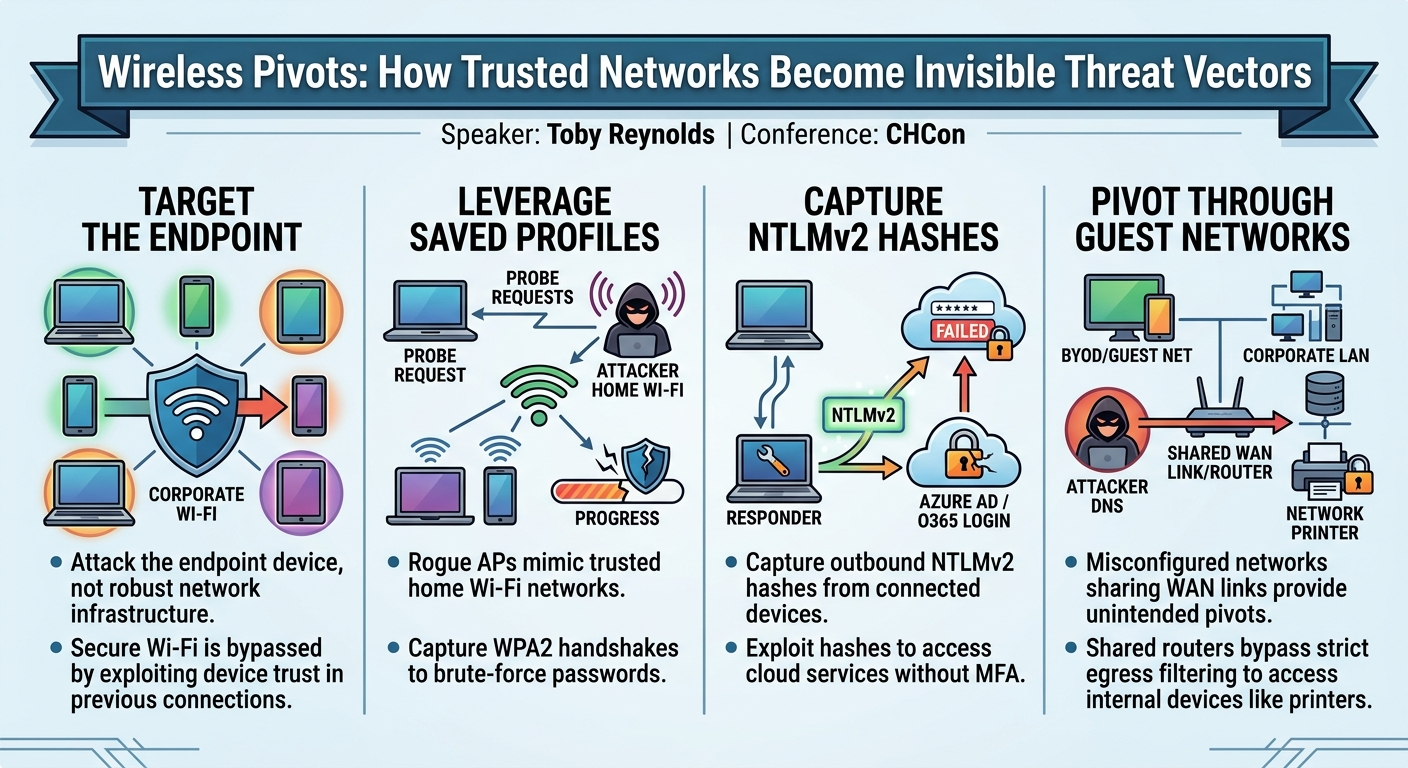
In his compelling CHCon presentation, "Wireless Pivots: How Trusted Networks Become Invisible Threat Vectors," Toby Reynolds challenges the conventional wisdom in Wi-Fi penetration testing. Rather than solely focusing on the often robust and perfectly configured corporate wireless infrastructure, Reynolds advocates for a shift in perspective: attacking the endpoint device itself. He argues that even the most meticulously secured Wi-Fi networks, such as those employing Enterprise Transport Layer Security (ETLS), can be bypassed by exploiting the inherent trust devices place in previously connected networks.
Key moments
- 1:12 Defining wireless pivots and neglected security boundaries
- 6:00 Mobile devices saving home networks as trusted SSIDs
- 8:20 Attacker sets up rogue AP exploiting fast transition
- 9:50 Extracting pre-share key hash material from M1/M2 frames
- 13:30 Pivoting to internal assessment and NLM2 hash collection
- 15:00 Using harvested credentials for Azure AD and Office 365
- 17:30 BYOD captive portal bypass using shared WAN link
Wireless Pivots: How Trusted Networks Become Invisible Threat Vectors
Speakers: Toby Reynolds
Conference: CHCon
YouTube: https://www.youtube.com/watch?v=MwwVqDV4cBc
Overview
In his compelling CHCon presentation, "Wireless Pivots: How Trusted Networks Become Invisible Threat Vectors," Toby Reynolds challenges the conventional wisdom in Wi-Fi penetration testing. Rather than solely focusing on the often robust and perfectly configured corporate wireless infrastructure, Reynolds advocates for a shift in perspective: attacking the endpoint device itself. He argues that even the most meticulously secured Wi-Fi networks, such as those employing Enterprise Transport Layer Security (ETLS), can be bypassed by exploiting the inherent trust devices place in previously connected networks.
Reynolds' talk delves into two primary scenarios that illustrate this paradigm shift. The first explores how an attacker can leverage a user's saved home Wi-Fi network profiles to trick corporate laptops into connecting to a rogue access point, subsequently harvesting valuable credentials. The second scenario highlights the dangers of poorly segmented Bring Your Own Device (BYOD) or guest networks, demonstrating how a shared internet link can provide an unexpected pivot point into an organization's internal network. This article dissects Reynolds' insights, providing a technical deep dive into these attack vectors and outlining critical defensive implications for organizations.
Background
▶ Watch: Defining wireless pivots and neglected security boundaries (1:12)
To understand the vulnerabilities discussed, it's crucial to grasp the fundamental workings of Wi-Fi connections. Reynolds begins by outlining the Wi-Fi state machine, which dictates how devices connect to wireless networks. States one, two, and three are typically associated with less secure Open or WEP-encrypted networks, which ideally should no longer be in use. State four, however, is exclusive to more modern and secure WPA (Wi-Fi Protected Access) networks, including WPA2 and WPA3. This state involves the crucial 4-way handshake for authentication and key exchange.
A critical aspect of device behavior, particularly for mobile devices like laptops, is their tendency to remember and continually search for previously connected networks. This is facilitated by probe requests sent out by devices, actively seeking out SSIDs they've encountered before. As Reynolds points out, "If they've ever connected to a network, it will always look for that network, no matter where it is." This behavior forms the bedrock of the "wireless pivot" concept. When a device connects to a new network – be it a home Wi-Fi, a public hotspot, or a BYOD network – that network's profile is saved and implicitly "trusted." Even if a home network uses a simple WPA2-Personal key or, in a rare case, is entirely open, the device remembers it as a trusted connection, making it susceptible to impersonation. The core problem, Reynolds identifies, is that while corporate Wi-Fi might be perfectly configured, the client device itself is often exposed to less secure environments and retains that exposure.
Key Findings
▶ Watch: Attacker sets up rogue AP exploiting fast transition (8:20)
Toby Reynolds' talk reveals two significant avenues for attackers to bypass seemingly secure wireless infrastructure by focusing on client-side vulnerabilities and network misconfigurations:
- Exploiting Trusted Home Networks for Credential Harvesting: Even when a corporate network employs robust ETLS with internal Certificate Authorities and public/private key authentication, a mobile device's habit of remembering and prioritizing trusted SSIDs from less secure environments (like a home Wi-Fi network) can be weaponized. An attacker can set up a rogue access point (AP) mimicking a common home network, lure the corporate device into attempting to connect, and capture the WPA2-Personal 4-way handshake. This handshake contains salted hash material that, when combined with the SSID (which acts as the salt), can be brute-forced to reveal the Wi-Fi password. Once connected to the rogue AP, the attacker can then leverage tools like Responder to capture NTLMv2 hashes from the client's outbound traffic (e.g., MDNS, NetBIOS), which can then be used to gain access to cloud services like Azure AD or Office 365 if multi-factor authentication (MFA) is not universally enforced. The key insight here is that the secure corporate network becomes irrelevant when the client is tricked into connecting elsewhere.
- Pivoting Through Misconfigured BYOD/Guest Networks: Organizations often deploy separate BYOD or guest Wi-Fi networks, assuming they are isolated and secure. However, Reynolds highlights a common misconfiguration where these networks share the same WAN link to the public internet as the corporate LAN. Despite strict firewall rules limiting guest access to only HTTP and DNS traffic, the shared router becomes an unwitting pivot point. If the attacker can determine the internal IP space, they can exploit the router's routing function to send HTTP/DNS requests from the guest network into the corporate LAN. This allows them to query internal DNS servers and access web interfaces of internal devices, such as network printers on port 80, potentially exposing sensitive information stored on printer hard drives or network shares. The finding underscores that perceived isolation is often an illusion if the underlying network architecture is not rigorously segmented.
Technical Deep Dive
▶ Watch: Extracting pre-share key hash material from M1/M2 frames (9:50)
Reynolds meticulously details the technical underpinnings of his wireless pivot attacks, focusing on how an attacker exploits device behavior and network architecture.
Scenario 1: Abusing Trusted Networks and Client-Side Weaknesses
The first scenario targets organizations that have implemented ETLS perfectly. This means they utilize an internal Certificate Authority (CA), deploy unique public and private key pairs for each server and client, and enforce rigorous authentication. The ETLS flow involves states one to three for data link setup, followed by state four for the secure connection. An identity request is sent, which can be anonymized if the "enable identity privacy" setting in Windows is active. Authentication relies on proving possession of the private key via the public key, making it highly secure against typical Wi-Fi attacks.
However, the Achilles' heel lies in mobile devices. Laptops, unlike hardwired desktops, move. They connect to various networks – home, public, etc. – and crucially, they remember these connections. Reynolds explains that a device, once connected, will "always look for that network." Furthermore, features like Fast Transition (FT), designed to allow seamless roaming between multiple APs in an office, exacerbate this by constantly searching for stronger signals and, critically, for any trusted SSID.
The attack unfolds as follows:
- Reconnaissance and Rogue AP Setup: An attacker, positioned near the target's office, uses a monode adapter to listen for probe requests from corporate devices. These requests reveal SSIDs of networks the devices have connected to in the past, often including home networks (e.g., a default ISP router SSID).
- Impersonation and Signal Boosting: The attacker sets up a rogue AP mimicking one of these trusted home SSIDs. To ensure the corporate device prioritizes the rogue AP over legitimate networks, the attacker can change their country code, for example, to Bolivia, which has more lenient Wi-Fi power regulations, allowing them to boost their transmission signal and appear stronger.
- WPA2-Personal Handshake Capture: When the corporate device detects its trusted home SSID with a strong signal, it automatically attempts to connect. If the home network uses WPA2-Personal (as approximately 90% of home networks do), the device initiates the 4-way handshake. The attacker's rogue AP will capture the first two frames of this handshake (M1 and M2).
- Reynolds breaks down the 4-way handshake:
- M1: AP sends a "some stuff" (nonce) to the client.
- M2: Client uses its Pairwise Master Key (PMK) to generate a Message Integrity Check (MIC) and sends it back, proving it knows the pre-shared key (PSK).
- M3: AP performs calculations and sends a message proving it also knows the PSK.
- M4: Client acknowledges trust.
The crucial part is that M1 and M2 contain the hash material for the pre-shared key. The hash is salted with the SSID, which is easily obtainable from beacon frames.
- Password Cracking: With the salted hash material, the attacker can use a tool like Hashcat (specifically mode 22000 for WPA2) to brute-force the Wi-Fi password. Reynolds provides an example: cracking an 8-character numeric password could take around 7 hours on an Nvidia H100 series GPU. Since this targets a home user's network (who rarely changes their Wi-Fi password), time is on the attacker's side.
- Internal Assessment Pivot: Once the password is cracked, the attacker reconfigures their rogue AP with the correct password and enables a "fake internet" flag. The corporate device, now successfully connected to its "home" network with a strong signal, believes it's at home and on a trusted network. This effectively turns an external Wi-Fi assessment into an internal assessment against the client device itself.
- NTLMv2 Hash Collection: With the client on the attacker's network, the attacker can port scan the device. While most inbound ports might be blocked, outbound traffic is typically enabled. The attacker observes local link multi-name class resolution, MDNS, and NetBIOS traffic – all multicast/unicast. By running Responder, a common pentesting tool, the attacker can capture NTLMv2 hashes from this traffic.
- Hashcat mode 5500/5600 (for NTLMv2) can then be used with wordlists like Rocky or Rocky 2024 to crack these hashes.
- Cloud Credential Exploitation: While these NTLMv2 hashes cannot be used to connect to the corporate ETLS Wi-Fi, they are often valid for Azure AD or Office 365 logins. If the organization lacks multi-factor authentication (MFA), the attacker can gain access to services like Outlook Web Access (OWA). Reynolds notes he has even seen clients use public folders in Outlook for file storage, providing a potential data exfiltration vector.
Scenario 2: Shared WAN Links and BYOD Network Pivots
The second scenario focuses on a common misconfiguration in Bring Your Own Device (BYOD) or guest Wi-Fi networks. The setup typically involves an open captive portal network, allowing HTTP and DNS traffic only, with a seemingly separate IP space from the corporate LAN.
The vulnerability arises when both the BYOD network and the corporate LAN share the same WAN link to the public internet. Reynolds demonstrates this by showing how a device on the BYOD network and a device on the corporate network might have the same public IP address, indicating a shared internet egress.
- Router as Pivot: The core principle is that "a router routes traffic." If the BYOD network and corporate LAN are on different subnets but share the same router for internet access, and if there are overly permissive firewall rules (e.g., "any location from any address to any address"), the router can be used as an unintended pivot point.
- Internal Network Access: By knowing the corporate IP space (which can often be inferred or discovered), an attacker on the BYOD network can send HTTP and DNS traffic from the BYOD network into the internal corporate network, despite the intended isolation.
- Targeting Internal Services: While SMB traffic (and thus Responder) might be blocked, the attacker can still query internal DNS servers and access HTTP services on internal devices. Reynolds specifically mentions network printers, which often have web interfaces on port 80. These printers can store frequently printed jobs on hard drives or have network shares, potentially exposing sensitive documents or configurations.
This scenario highlights that even with seemingly strict egress rules for a guest network, the internal routing logic and firewall rules between internal segments are critical.
Demo / Proof of Concept
▶ Watch: Using harvested credentials for Azure AD and Office 365 (15:00)
While Toby Reynolds' talk is rich with practical scenarios and detailed technical explanations, it did not feature a live, step-by-step demonstration or a recorded proof-of-concept video. Instead, the presentation walked through hypothetical but realistic attack narratives, outlining the methods, tools (e.g., Hashcat, Responder), and expected outcomes an attacker would encounter in each "wireless pivot" scenario. The detailed descriptions serve as a strong conceptual proof of the attack methodologies.
Defensive Implications
▶ Watch: BYOD captive portal bypass using shared WAN link (17:30)
Toby Reynolds' talk provides crucial insights for defenders, emphasizing a shift from solely securing infrastructure to also hardening endpoints and scrutinizing network segmentation.
For Scenario 1 (Abusing Trusted Networks):
- Strong Wi-Fi Passwords & Unique SSIDs: Employees must be educated on the importance of strong, unique passwords for their home Wi-Fi networks. Default ISP SSIDs and passwords are a significant risk.
- Endpoint Configuration Management:
- Disable "Connect Automatically": Enforce policies to disable automatic connection for unknown or untrusted networks on corporate devices.
- Disable Fast Transition (if not critical): While useful for seamless roaming, Fast Transition can increase the likelihood of devices searching for and connecting to rogue APs. Assess its necessity against the security risk.
- Enable Identity Privacy: For ETLS networks, ensure "enable identity privacy" is active on Windows clients to prevent identity leakage during the initial authentication phase.
- Robust Endpoint Detection and Response (EDR): Implement EDR solutions that can detect suspicious network connections, unusual outbound traffic (like MDNS/NetBIOS scans), and Responder activity on corporate devices, regardless of the Wi-Fi network they are connected to.
- Outbound Traffic Filtering: Implement strict outbound firewall rules on corporate devices, blocking unnecessary protocols like MDNS and NetBIOS over Wi-Fi when not connected to the corporate LAN.
- Universal Multi-Factor Authentication (MFA): This is paramount. Even if NTLMv2 hashes are compromised, MFA for all cloud services (Azure AD, Office 365, OWA) will prevent unauthorized access.
- Regular Password Changes: Encourage or enforce regular password changes for user accounts, especially if they are also used for cloud services.
- User Awareness Training: Educate users about the dangers of connecting corporate devices to untrusted networks, the importance of strong home Wi-Fi security, and the potential for rogue AP attacks.
For Scenario 2 (Shared WAN Links and BYOD Pivots):
- Strict Network Segmentation: This is the most critical defense. BYOD/Guest networks must be truly isolated from the corporate LAN. This means:
- Separate WAN Links: Ideally, BYOD/Guest networks should have completely separate internet egress points from the corporate network.
- Rigorous Firewall Rules: If a shared router is unavoidable, implement extremely granular firewall rules that explicitly deny any traffic from the BYOD/Guest network to the corporate LAN, beyond what is absolutely necessary (e.g., DNS queries to specific, hardened DNS forwarders, and only if strictly required). Deny by default.
- Internal Network Hardening:
- Disable Unnecessary Services: Disable web interfaces (e.g., HTTP on port 80) and other network services on internal devices (like printers, IoT devices, or management interfaces) if they are not strictly required or if they are not accessed through a secure, authenticated channel.
- Secure Network Printers: If web interfaces are necessary, ensure they are protected with strong, unique passwords. Regularly audit printer hard drives for sensitive data and ensure secure wiping policies are in place. Disable network shares if not essential.
- Internal DNS Security: Ensure internal DNS servers are configured securely and do not leak sensitive internal network information to external or guest networks.
- Regular Network Audits: Conduct frequent audits of network architecture, firewall rules, and routing configurations, especially for BYOD/guest networks, to identify and remediate unintended pathways or overly permissive rules.
Key Takeaways
- Shift Focus to Endpoints: Traditional Wi-Fi pentesting often focuses on infrastructure; however, the client device itself is a crucial, often neglected, security boundary.
- "Trusted" Networks are Vulnerable: Devices remember and prioritize previously connected networks, regardless of their security posture, making them susceptible to rogue AP impersonation.
- WPA2-Personal is Crackable: Common home Wi-Fi networks using WPA2-Personal are vulnerable to offline brute-force attacks against their 4-way handshake, especially with weak passwords.
- NTLMv2 Hashes are High-Value: Once a device is on a rogue network, NTLMv2 hashes can be captured and often lead to access to cloud services if MFA is not enforced.
- Segmentation is Key: Misconfigured BYOD/guest networks sharing WAN links can provide unexpected pivot points into internal corporate networks, even with strict egress filtering.
- Printers are a Target: Network printers and other IoT devices with web interfaces and storage capabilities can be exploited from "isolated" networks if internal routing and firewall rules are not stringent.
About the Speaker(s)
Toby Reynolds is an experienced penetration tester with a career spanning approximately 13 years, having started in 2012. He is a passionate advocate and educator in the field of Wi-Fi security, running his own training company where he specializes in teaching Wi-Fi-related topics. Reynolds has presented on Wi-Fi at various conferences, holds multiple certifications, and has several CVEs (Common Vulnerabilities and Exposures) to his name, reflecting his deep technical expertise and contributions to the security community. His talk draws from his personal experiences in real-world pentesting engagements, albeit with modified scenarios for client confidentiality.
Reviews
Dr. Zero (Offensive Security Researcher) — SOLID
Competent walkthrough of client-side Wi-Fi attack vectors that any working pentester should already know. Reynolds presents clearly and the scenarios are grounded in real engagement experience, but there's nothing here that wasn't in Vivek Ramachandran's courses a decade ago or covered in countless WLAN security talks since.
Heather Calloway (CISO) — SOLID
Useful reminder that endpoint Wi-Fi behavior undermines corporate wireless investments. The two scenarios are real and actionable, but neither is novel—this is a good practitioner talk, not a strategic shift. Worth your wireless security lead's time; not a board conversation.