Hack The Hacker (aka I’ve Been Pwned)
Jose Martinez (Penetration Tester)
Overview
In his CypherCon talk, "Hack The Hacker (aka I’ve Been Pwned)," Jose Martinez, a penetration tester specializing in web applications, recounted a personal incident where his self-hosted WordPress website was compromised. This presentation offered a unique perspective: an offensive security professional forced into a defensive and forensic role to remediate his own digital assets. Martinez meticulously detailed the discovery, investigation, and recovery process, transforming a frustrating personal security breach into a valuable learning experience and a cautionary tale for fellow practitioners.
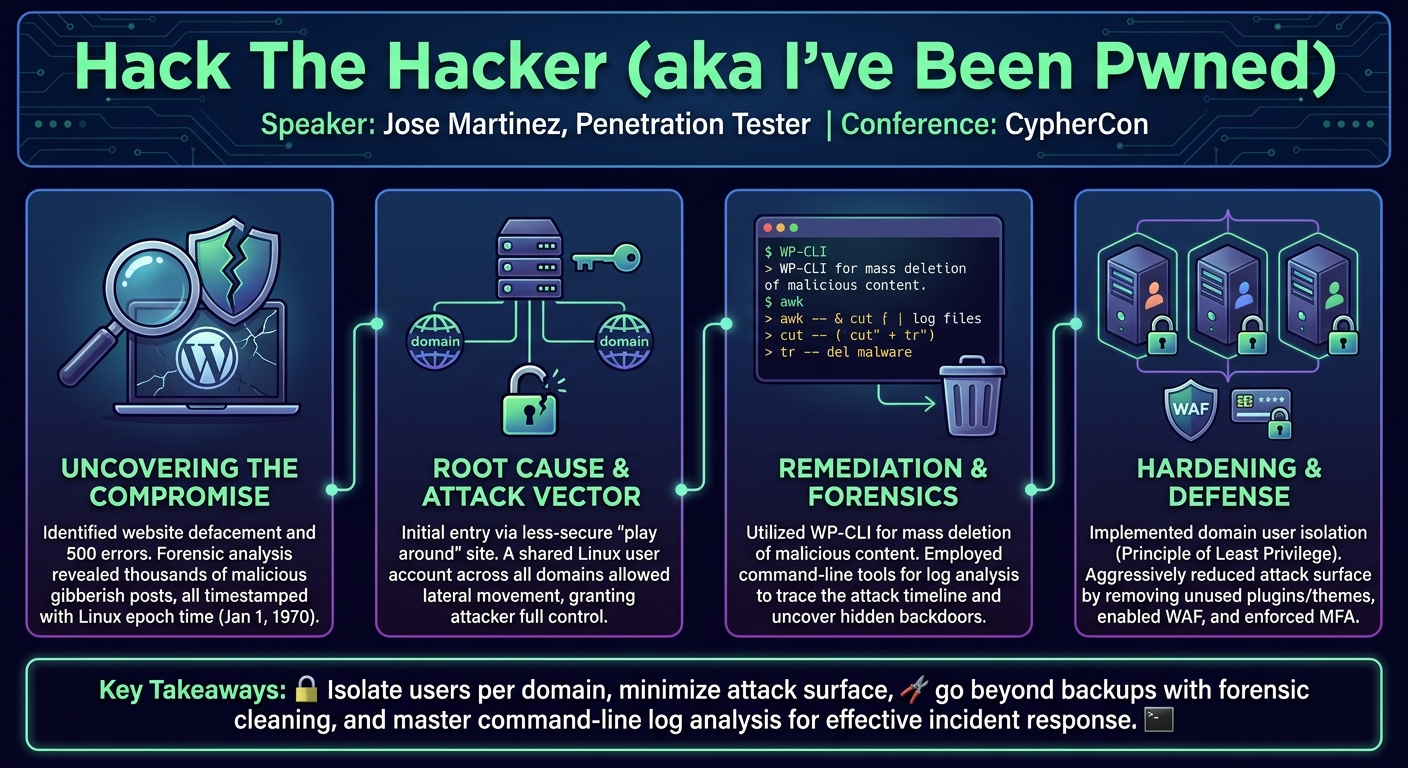
Key moments
- 4:15 Website defacement discovered during vacation
- 5:30 Root cause: insecure common domain user
- 8:30 Efficiently deleting vandalism with WP-CLI
- 10:30 Post-incident security hardening measures
- 13:00 Detecting malware via homograph attacks
- 14:00 Tracking down the BDKR28 threat actor
- 18:40 Previous personal SIM swap incident
- 21:15 Q&A: Hardening approach and log analysis
Hack The Hacker (aka I’ve Been Pwned)
Speakers: Jose Martinez, Penetration Tester
Conference: CypherCon
YouTube: https://www.youtube.com/watch?v=tc73PON3taM
Overview
In his CypherCon talk, "Hack The Hacker (aka I’ve Been Pwned)," Jose Martinez, a penetration tester specializing in web applications, recounted a personal incident where his self-hosted WordPress website was compromised. This presentation offered a unique perspective: an offensive security professional forced into a defensive and forensic role to remediate his own digital assets. Martinez meticulously detailed the discovery, investigation, and recovery process, transforming a frustrating personal security breach into a valuable learning experience and a cautionary tale for fellow practitioners.
The talk delved into the practicalities of incident response for a common web stack, highlighting the pervasive challenges of balancing usability with robust security. Martinez outlined the specific Indicators of Compromise (IOCs) he identified, the methods he used to clean his site, and his subsequent efforts to harden his infrastructure. Beyond the technical specifics, the presentation also touched on the psychological impact of being compromised and the continuous learning required in the ever-evolving threat landscape.
This discussion is particularly relevant for anyone managing web applications, from individual bloggers to enterprise security teams. It underscores the importance of fundamental security practices, such as proper user isolation, attack surface reduction, and diligent log analysis. By sharing his journey from victim to investigator, Martinez provided actionable insights and reinforced the notion that even experienced security professionals are not immune to attacks, making continuous vigilance and proactive hardening essential.
Background
▶ Watch: Website defacement discovered during vacation (4:15)
Jose Martinez's incident began with a classic setup: a self-hosted WordPress website running on a LAMP stack (Linux, Apache, MySQL, PHP) through a hosting provider, DreamHost. WordPress, while celebrated for its ease of use, rich features, and vast market share, inherently expands the attack surface due to its extensibility through plugins and themes. Martinez acknowledged the common debate around WordPress security, emphasizing the perpetual trade-off between functionality and security—a perfectly secure website is often an inaccessible one.
Attackers commonly identify WordPress sites through various enumeration techniques. These include inspecting HTML headers for tell-tale signs, examining robots.txt files, and employing specialized tools like WPScan for vulnerability scanning. More advanced reconnaissance might involve Google dorking or leveraging search engines like Shodan to find publicly exposed WordPress installations. In Martinez's case, the compromise became apparent through 500 errors and a blatant website defacement, noticed while he was on vacation.
The root cause of the initial compromise was suspected to be a misconfiguration by his hosting provider, DreamHost. At the time of the incident, DreamHost's default setup allowed all domains under a single account to share a common base Linux user. Martinez maintained three websites, one of which was a "play around" site with intentionally less secure configurations. He theorized that this less-secure site served as the initial entry point. Once compromised, the shared Linux user allowed the attacker to pivot and escalate privileges, gaining control over all associated domains, including his primary personal website. This fundamental flaw in user isolation proved to be the critical vulnerability.
Martinez also briefly referenced an earlier personal security incident from 2018—a pseudo SIM swap attempt targeting his T-Mobile Digits account. While not directly related to the WordPress hack, this prior experience instilled in him an early awareness of real-world threats and the importance of robust Two-Factor Authentication (2FA), particularly hardware tokens, over less secure SMS-based methods. These cumulative experiences underscored his journey in understanding and mitigating digital risks, transforming him from a novice to a more seasoned security practitioner.
Key Findings
▶ Watch: Efficiently deleting vandalism with WP-CLI (8:30)
Martinez's investigation uncovered a range of Indicators of Compromise (IOCs) that painted a clear picture of the attack and the attacker's methods. The most immediate and visible sign was the website defacement and widespread 500 errors, rendering the site unusable. Upon deeper inspection, he found thousands of newly created, gibberish posts. A critical forensic detail was that these posts were all timestamped with a Linux epoch time corresponding to January 1st, 1970. This specific timestamp is a strong indicator of an automated attack, as it represents a default or zero value often used by scripts when a proper timestamp isn't set.
Further analysis revealed the creation of two unauthorized administrative users within his WordPress installation, granting the attacker full control over the CMS. Suspicious IP addresses were also logged, though their true origin was likely obscured by VPNs or other anonymization techniques. More concerning were the persistent backdoors and malware. Martinez discovered numerous malicious files hidden within legitimate-looking directories, often accompanied by unusual file permissions.
A sophisticated technique employed by the attacker was the homograph attack. This involves creating files with names that visually mimic legitimate system files but use subtly different characters (e.g., lndex.php instead of index.php, or styl.php instead of style.php using a capital 'I' for 'l'). These files are designed to blend in and evade casual detection. Additionally, the attacker modified the robots.txt file, presumably to influence search engine indexing or hide their defacement from certain crawlers.
Through diligent Open-Source Intelligence (OSINT), Martinez was able to identify the threat actor as BDKR28 (also referred to as BDKR or BDKR28). This actor maintained a public presence across various platforms, including YouTube, GitHub, and Pastebin, where they apparently shared their techniques. Martinez noted their "edge-lordy" persona, suggesting they might be a teenager or college student. Checkpoint, a prominent cybersecurity firm, had even published a blog post about BDKR28 around the time of Martinez's talk, confirming their wider notoriety. The attacker's primary objective appeared to be mass defacement and the installation of backdoors, without any clear intent to exfiltrate sensitive data, which was fortunate given Martinez kept no such information on his personal site.
Technical Deep Dive
▶ Watch: Detecting malware via homograph attacks (13:00)
The technical remediation and forensic process undertaken by Jose Martinez provided a masterclass in practical incident response for a compromised web application. His immediate response to the 500 errors and defacement was to contact his hosting provider, DreamHost, to leverage their backup system. While restoring from a backup was a critical first step, Martinez correctly identified that it merely reverted the visible changes; any backdoors or persistent malware could still reside within the restored files, necessitating further investigation.
To facilitate a thorough analysis without risking further compromise, Martinez created an isolated copy of all the affected files. This allowed him to perform post-mortem forensics on the compromised system. The pivotal discovery regarding the initial compromise vector was the shared Linux user account across all his domains, a misconfiguration by DreamHost. This meant that a vulnerability on his less-secure "play around" website could directly lead to compromise of his primary blog, illustrating a critical failure in the principle of least privilege and proper user isolation.
Cleaning the WordPress installation required a multi-pronged approach. Martinez first deleted the two unauthorized administrative users created by the attacker. For the thousands of defacement posts, manual deletion through the WordPress graphical user interface (GUI) was impractical. Instead, he utilized WP-CLI (WordPress Command Line Interface) via SSH. This powerful tool allowed him to execute commands directly against the WordPress database and file system. By targeting posts with the specific timestamp of January 1st, 1970 (Linux epoch time zero), he was able to mass delete all the malicious content with a single command, demonstrating the efficiency of command-line tools in incident response.
Beyond the database, Martinez meticulously scanned the file system for persistent artifacts. He looked for unusually named folders, files with suspicious permissions (e.g., 777), and especially files exhibiting homograph attacks, such as lndex.php or styl.php where an 'l' was replaced by a capital 'I'. He used command-line utilities like awk, cut, and tr to parse server logs, searching for anomalous activity around the suspected time of compromise. This log analysis was crucial for identifying the timeline of the attack and potential entry points.
One of the more interesting findings was a PHP shell script backdoor. This script was designed to allow remote command execution on the Linux server. It functioned by listening for a GET request containing a specific parameter and a basic password, which would then execute arbitrary commands passed by the attacker. This provided the attacker with a persistent method to control the server even after the initial defacement was cleaned. Martinez also identified and removed other malware files and significantly reduced his attack surface by deleting unused WordPress extensions and plugins.
His subsequent hardening strategy included:
- User Isolation: Creating separate, independent domain users for each website, each with its own SFTP credentials, ensuring that a compromise of one site would not automatically affect others.
- Attack Surface Reduction: Eliminating all unnecessary WordPress themes, plugins, and extensions.
- Automated Updates: Configuring all software to auto-update to mitigate known vulnerabilities promptly.
- Credential Management: Rotating all keys and credentials, and redoing security certificates.
- WAF (Web Application Firewall): Ensuring his WAF was active to provide an additional layer of protection against common web exploits.
- MFA: Maintaining Multi-Factor Authentication on his core DreamHost account to prevent account takeover.
- File Integrity Checks: Continuously monitoring for new suspicious files or changes in permissions.
This detailed, hands-on approach showcased a robust incident response workflow, moving from initial detection to comprehensive remediation and proactive hardening.
Demo / Proof of Concept
▶ Watch: Tracking down the BDKR28 threat actor (14:00)
This talk was a retrospective analysis of a real-world compromise rather than a live demonstration or a proof of concept of an exploit. Jose Martinez detailed the artifacts and methods discovered during his incident response, such as the specific malware code snippets, log entries, and file names, providing concrete evidence of the attack without needing to recreate it. His presentation focused on the "how-to" of remediation and hardening based on the evidence he collected.
Defensive Implications
▶ Watch: Q&A: Hardening approach and log analysis (21:15)
Jose Martinez's personal incident provides a wealth of defensive implications for individuals and organizations managing web applications, particularly those built on WordPress. The core takeaway emphasizes the critical importance of foundational security principles, even for seemingly low-value assets.
Firstly, the incident highlighted the catastrophic consequences of insufficient user isolation. The shared Linux user account across multiple domains was the primary enabler for the attacker's lateral movement. Defenders must enforce the principle of least privilege by ensuring that each application, service, or domain operates under its own distinct user account with only the necessary permissions. This compartmentalization prevents a breach in one area from cascading into a full compromise of the entire environment.
Secondly, attack surface reduction is paramount. Martinez's decision to remove all unnecessary WordPress extensions, plugins, and themes significantly minimized potential entry points. Every piece of software, especially third-party components, introduces potential vulnerabilities. Regular auditing and pruning of unused functionality are essential to maintain a lean and secure posture.
Thirdly, the talk underscored the necessity of robust backup and recovery strategies. While backups saved Martinez's website from permanent loss, he correctly identified that a simple restore is often insufficient. Defenders must understand that backdoors and persistent malware can be restored along with legitimate files. Therefore, post-restore hardening, including thorough forensic analysis and file integrity checks, is non-negotiable.
Proactive monitoring and log analysis were shown to be invaluable. Martinez's use of command-line tools like awk, cut, and tr to sift through logs for suspicious activity around the compromise timeline is a vital skill. Organizations should implement robust log management solutions and regularly train their teams in log analysis techniques to detect anomalies, unauthorized access, and post-exploitation activities.
The discovery of homograph attacks and files with suspicious timestamps (e.g., January 1st, 1970) serves as a reminder that attackers employ subtle methods to evade detection. Defenders should implement file integrity monitoring (FIM) systems to alert on unauthorized file creations, modifications, or changes in permissions, especially for critical system files or web root directories. Furthermore, an awareness of common attacker obfuscation techniques, like homograph characters, is crucial for manual inspection.
Finally, the incident reinforced the importance of multi-factor authentication (MFA) for all critical accounts, especially hosting provider logins. While his website was defaced, Martinez's core hosting account remained secure due to MFA. Regular credential rotation, ensuring Web Application Firewalls (WAFs) are enabled, and setting up automatic updates for all software components are non-negotiable steps to maintain a continuous security posture against evolving threats. Martinez's journey from victim to investigator exemplifies that continuous learning and adaptation are fundamental to effective defense in the cybersecurity landscape.
Key Takeaways
- Implement Principle of Least Privilege: Ensure distinct user accounts for each domain or application to prevent lateral movement across services in case of a compromise.
- Aggressively Reduce Attack Surface: Regularly audit and remove all unnecessary plugins, themes, and extensions from web applications to minimize potential vulnerabilities.
- Beyond Backups: Comprehensive Remediation: While backups are crucial for recovery, always assume persistence. Follow restores with thorough forensic analysis, malware removal, and hardening to eliminate backdoors.
- Master Log Analysis: Develop proficiency with command-line tools like
awk,cut, andtrfor efficient log analysis to detect Indicators of Compromise and understand attack timelines. - Beware of Subtle Persistence Mechanisms: Actively look for homograph attacks (e.g.,
lndex.php), suspicious file permissions (like777), and anomalous timestamps (e.g., January 1st, 1970) as signs of compromise. - Proactive Security is Continuous: Implement auto-updates, strong MFA on critical accounts, WAFs, and continuous monitoring as part of an ongoing security posture, acknowledging that no system is unhackable.
About the Speaker(s)
Jose Martinez is a penetration tester based in Chicago, specializing primarily in web application security. With a background firmly rooted in offensive security, his work typically involves identifying vulnerabilities and exploiting systems. However, the incident detailed in this talk provided him with a unique opportunity to apply his skills from a defensive and forensic perspective, delving into incident response, malware analysis, and system hardening on his own compromised website. This experience broadened his expertise and provided valuable insights into the full lifecycle of a security incident.
Reviews
Dr. Zero (Offensive Security Researcher) — WEAK
Martinez got his shared-hosting WordPress site popped by a known script kiddie and decided to give a talk about basic LAMP stack forensics. It’s an honest war story, but cleaning up a 1990s-style shared user misconfiguration and finding a PHP web shell named lndex.php doesn’t belong on a conference main stage. This is a beginner blog post.
Heather Calloway (CISO) — SOLID
This is a practical walkthrough of a routine web application compromise and the subsequent incident response. While the context is a personal WordPress site, the root cause—a vendor default that failed to isolate tenants—is a direct lesson in third-party risk and blast radius. It is a solid tactical refresher for junior responders, but not required viewing for leadership.