CLR DLL Side-Loading, a secret technique used by APT41
Georgy Kucherin (Security Researcher · Kaspersky)
DefCamp 2025 · Main Stage
Overview
In this insightful talk, Georgy Kucherin, a security researcher from Kaspersky's Global Research and Analysis Team, unveils a sophisticated and often overlooked technique for DLL sideloading leveraged by the notorious threat actor APT41. While DLL sideloading is a known method for injecting malicious code into legitimate processes, Kucherin demonstrates how .NET applications fundamentally alter the standard Windows DLL loading mechanism, creating a unique vulnerability that allows attackers to sideload even known DLLs and those already present in memory, a feat previously considered impossible. This talk exposes not only a critical blind spot in application development but also a significant gap in many security solutions, highlighting how advanced persistent threats (APTs) exploit seemingly minor issues for stealthy persistence and evasion.
Key moments
- 0:00 Introduction to DLL sideloading and its purpose
- 1:30 Live demo of a basic DLL sideloading attack
- 5:40 Explaining why NTDLL.DLL sideloading should be impossible
- 11:30 APT41's discovery: .NET's unique DLL loading behavior
- 19:50 Bypassing Avira's self-defense via .NET DLL sideloading
- 23:00 Microsoft's response and the importance of fixing 'minor' issues
- 27:50 Q&A: How EDR userland hooking is affected
CLR DLL Side-Loading, a secret technique used by APT41
Speakers: Georgy Kucherin, Security Researcher, Kaspersky
Conference: DefCamp
YouTube: https://www.youtube.com/watch?v=oHWkx9HtSqU
Overview
In this insightful talk, Georgy Kucherin, a security researcher from Kaspersky's Global Research and Analysis Team, unveils a sophisticated and often overlooked technique for DLL sideloading leveraged by the notorious threat actor APT41. While DLL sideloading is a known method for injecting malicious code into legitimate processes, Kucherin demonstrates how .NET applications fundamentally alter the standard Windows DLL loading mechanism, creating a unique vulnerability that allows attackers to sideload even known DLLs and those already present in memory, a feat previously considered impossible. This talk exposes not only a critical blind spot in application development but also a significant gap in many security solutions, highlighting how advanced persistent threats (APTs) exploit seemingly minor issues for stealthy persistence and evasion.
The presentation delves into the technical intricacies of Windows DLL search order versus the .NET runtime's approach, revealing how threat actors like APT41 can bypass conventional security defenses. Kucherin illustrates this with real-world examples, including how APT41 achieved persistence on Windows Server machines and how popular applications like Discord, as well as antivirus solutions like Avira, can be rendered vulnerable. The core message emphasizes that what Microsoft might deem a "low bar" security issue can be weaponized by sophisticated adversaries, demanding greater vigilance from developers and security vendors alike.
This deep dive into .NET-specific DLL sideloading is crucial for understanding modern attack vectors. It provides actionable intelligence for developers to harden their applications and for security professionals to enhance their detection capabilities against advanced threats that exploit subtle architectural differences. The talk serves as a stark reminder that security is a continuous process, where even long-standing assumptions about operating system behavior can be challenged and subverted by determined adversaries.
Background
▶ Watch: Introduction to DLL sideloading and its purpose (0:00)
DLL sideloading is a well-established technique in the arsenal of cyber attackers, enabling them to execute malicious code within the context of a legitimate, often signed, process. The fundamental principle involves tricking a legitimate executable into loading a malicious Dynamic Link Library (DLL) supplied by the attacker, rather than its intended, benign counterpart. This is typically achieved by placing the malicious DLL in a directory that is searched by the operating system before the legitimate DLL's location, or by exploiting applications that use relative paths to load DLLs instead of full, absolute paths. The primary motivation for this technique is stealth; security solutions often trust signed executables and their spawned processes more, potentially scrutinizing their loaded modules less thoroughly.
The standard Windows API defines a specific search order for DLLs. Key points in this order include:
- The directory from which the application loaded.
- The system directory.
- The Windows directory.
- The current directory.
- Directories listed in the PATH environment variable.
Crucially, before these common search paths, Windows also checks the loaded module list (for DLLs already in memory) and a list of known DLLs. This search order is critical because it dictates whether a malicious DLL can be loaded. For instance, NDLL.dll, a foundational system library, is always among the first DLLs loaded into any process and is present in the loaded module list. Based on the standard Windows API search order, it was widely believed that NDLL.dll could not be sideloaded by simply placing a malicious copy in the application directory because the "loaded module list" check (point 4 in some enumerations) occurs before the "application directory" check (point 7). If NDLL.dll is already loaded, the process finds it and terminates the search successfully, never reaching the application directory where an attacker might place a malicious version.
This conventional understanding was challenged by an investigation into an infection linked to APT41, a sophisticated Chinese-speaking state-sponsored threat actor known for both cyber espionage and financially motivated cybercrime, including hacking video games. During an incident involving a video game company in Southeast Asia, Kaspersky observed a new version of the Pipmon malware, previously discovered by ESET in 2020 and attributed to APT41. What caught the researchers' attention was APT41's peculiar persistence technique: they placed a malicious NDLL.dll not in the system's system32 folder, but in an unusual directory: C:\Windows\Microsoft.NET\Framework64\v4.0.30319\NDLL.dll (or similar .NET framework paths). This location, far from the standard system32 for NDLL.dll, strongly suggested a sideloading attempt. The central question then became: how did APT41 manage to sideload NDLL.dll if the Windows DLL loading algorithm explicitly prevents it?
Key Findings
▶ Watch: Explaining why NTDLL.DLL sideloading should be impossible (5:40)
The talk's central revelation is that applications written in the .NET programming language do not strictly adhere to the standard Windows DLL loading algorithm, especially when it comes to system libraries. This divergence creates a critical vulnerability that APT41 successfully exploited and which Kucherin demonstrates can be abused in various contexts.
The primary key findings are:
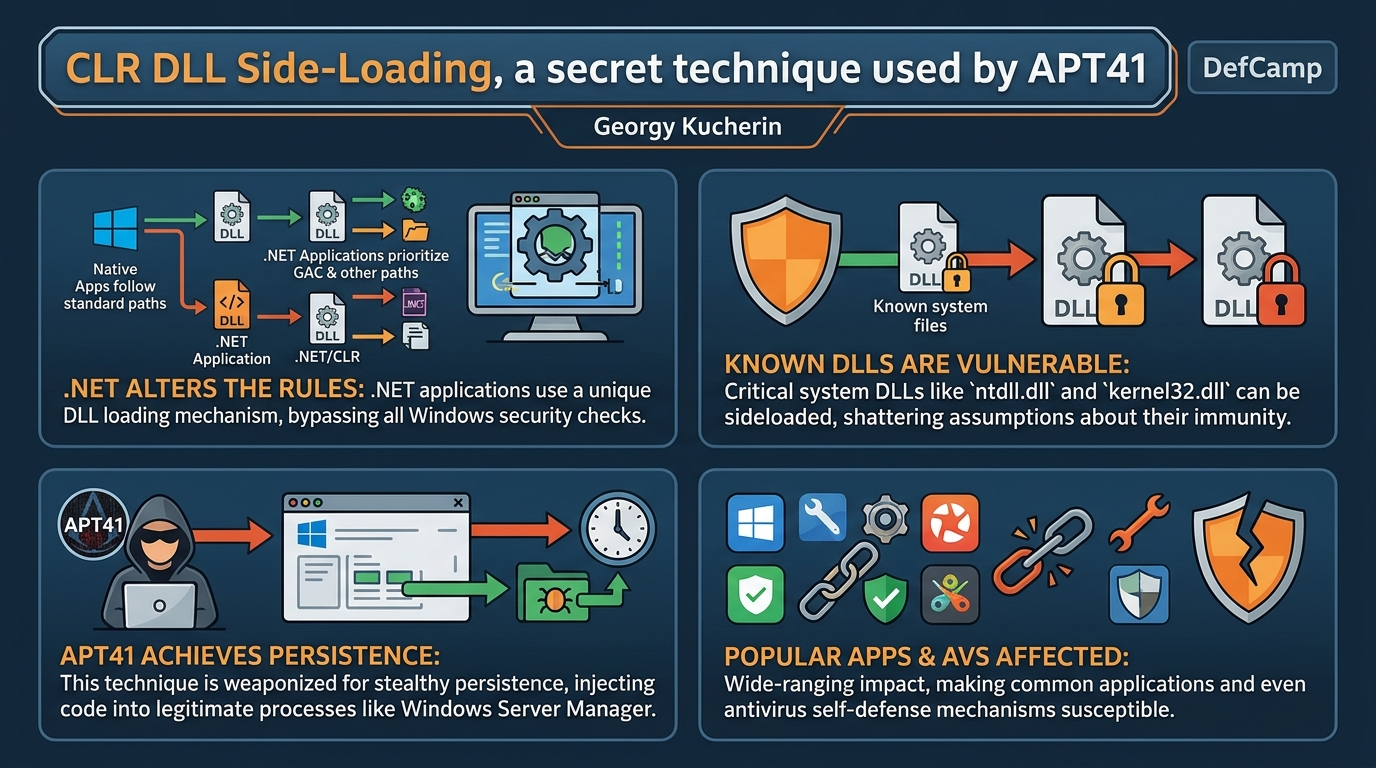
- .NET's Modified DLL Search Order: Unlike native Windows applications, .NET applications, particularly those built with .NET Core, employ a different DLL loading mechanism. This modified search order prioritizes the Global Assembly Cache (GAC) before checking the application's current directory or the system directory for certain DLLs. This altered priority is the fundamental enabler for the novel sideloading techniques.
- Sideloading of Known DLLs and Loaded Modules: Contrary to previous assumptions about Windows security, .NET applications can be tricked into sideloading known DLLs (like
kernel32.dll) and even DLLs that are already loaded into memory (likeNDLL.dll). This capability shatters the long-held belief that these critical system components are immune to sideloading due to their protected status and early loading in the standard Windows process. - Microsoft's Awareness and Inaction: This specific issue regarding .NET's DLL search path was reported to Microsoft years prior to the APT41 attack. Microsoft acknowledged the problem but deemed it "does not meet the bar for servicing with an immediate security update," classifying it as a minor issue to be potentially fixed later. As of the talk, it remains unfixed, demonstrating a critical disconnect between perceived severity by vendors and actual exploitability by APTs.
- Limited Workaround and Developer Awareness: Microsoft did propose a workaround: developers can explicitly add a rule,
Switch.System.Reflection.Assembly.EnableUnsafeDllInputSearchPath, to their applications. However, this rule is not enabled by default, and Kucherin asserts that very few developers are aware of it or implement it, leaving a vast number of .NET applications vulnerable. - Impact on Security Solutions: The non-standard DLL loading behavior in .NET applications can confuse security solutions, especially those relying on machine learning models trained on traditional Windows DLL loading patterns. Such models might incorrectly classify these sideloading attempts as benign, or worse, be explicitly trained to ignore known DLLs as potential attack vectors. This can lead to bypasses of detection mechanisms and even the self-defense mechanisms of antivirus software.
- Real-World APT Exploitation and Persistence: APT41 actively leverages this .NET-specific sideloading for stealthy persistence. By targeting legitimate .NET applications that automatically launch on system startup (like Windows Server Manager or Discord), they can inject malicious
NDLL.dllfiles, ensuring their code executes within a trusted process context every time the machine starts.
These findings collectively expose a significant architectural vulnerability within the .NET ecosystem that has been actively exploited by sophisticated threat actors, serving as a cautionary tale about underestimating "minor" security flaws.
Technical Deep Dive
▶ Watch: APT41's discovery: .NET's unique DLL loading behavior (11:30)
The crux of this vulnerability lies in the fundamental difference between how the native Windows Loader handles DLLs and how the Common Language Runtime (CLR) in .NET applications manages its assembly and DLL loading.
Under the standard Windows API, when an executable attempts to load a DLL using a relative path (i.e., just the filename, like WSC.DLL), the operating system follows a specific search order. This order typically prioritizes:
- The directory from which the application was loaded.
- The system directory (
%SystemRoot%\System32). - The 16-bit system directory.
- The Windows directory (
%SystemRoot%). - The current directory.
- Directories listed in the PATH environment variable.
However, two critical checks occur before even the application's own directory is considered: the loaded module list and known DLLs. The loaded module list contains DLLs already mapped into the process's address space. Known DLLs are a specific set of critical system libraries (e.g., kernel32.dll, ntdll.dll, user32.dll) that Windows loads from a protected, fixed location (%SystemRoot%\System32) and are generally considered immutable for security reasons. Because NDLL.dll is the very first library loaded into any process (containing essential startup code), it is always on the loaded module list. This is why, in a native application, placing a malicious NDLL.dll in the application directory will not result in sideloading; the system finds the legitimate NDLL.dll in the loaded module list first, preventing the malicious one from ever being loaded.
The game changes with .NET applications. When a .NET application needs to load a native DLL (e.g., via P/Invoke), the CLR's loading mechanism deviates from the standard Windows search order. Specifically, the .NET runtime often prioritizes the Global Assembly Cache (GAC). The GAC is a machine-wide cache for .NET assemblies, but its search priority in the context of native DLL loading can be exploited. Kucherin demonstrates that for .NET applications, the search order can effectively become:
- Global Assembly Cache (GAC)
- Application directory
- System directory
- And so on...
This altered order has profound implications. If a malicious NDLL.dll is placed in a location that the .NET runtime checks before the legitimate system32 path (and potentially before the "known DLLs" or "loaded module list" checks are fully respected by the CLR for native DLLs), then sideloading becomes possible. The speaker specifically highlights that this is particularly true for .NET Core applications, which exhibit this behavior more readily than older .NET Framework versions.
Furthermore, the talk reveals that .NET applications can even sideload known DLLs like kernel32.dll. Kucherin demonstrates this by running a simple .NET program designed to call a function from kernel32.dll. By placing a malicious kernel32.dll in the application's directory, the .NET application loads the malicious version, something considered "near to impossible" for native applications due to the protected nature of known DLLs. This occurs because the .NET runtime, when searching for native DLLs, does not enforce the same strict limitations on system DLLs as the native Windows loader. Microsoft itself acknowledged this, stating that ".NET doesn't limit system DLLs when searching for a DLL."
Microsoft's proposed "fix" for developers is to explicitly enable Switch.System.Reflection.Assembly.EnableUnsafeDllInputSearchPath by setting it to false within the application's configuration. This switch is designed to prevent the .NET runtime from searching for native DLLs in potentially unsafe locations. However, the crucial point is that this switch is not enabled by default. This means developers must proactively opt-in to a more secure loading behavior, a step that most developers are unaware of or neglect, leaving a vast ecosystem of .NET applications vulnerable. The technical detail here is that the default behavior allows the unsafe search path, and the switch is there to disable it, making the default insecure.
This technical divergence provides a robust explanation for APT41's success. By placing their malicious NDLL.dll in a .NET framework directory, they exploited the altered search order of the Windows Server Manager (a .NET application) to achieve persistence. Every time Server Manager starts (which often happens automatically on Windows Server machines), it attempts to load its required DLLs, and due to the .NET loading rules, it picks up the malicious NDLL.dll from the attacker-controlled path, executing the payload within a highly privileged and trusted process.
Demo / Proof of Concept
▶ Watch: Microsoft's response and the importance of fixing 'minor' issues (23:00)
The talk features several compelling demonstrations and real-world proof-of-concept scenarios, progressively building from basic DLL sideloading to the advanced .NET-specific techniques exploited by APT41.
- Basic DLL Sideloading:
The first demonstration uses file.exe, an executable signed by Avast. When launched, file.exe attempts to load WSC.DLL using a relative path. By placing a malicious WSC.DLL in the same directory as file.exe, Kucherin successfully injects code, triggering a popup confirming "DL has been injected into this process successfully." This illustrates the fundamental principle of DLL sideloading when an application uses a relative path and the malicious DLL is found earlier in the standard search order.
- Initial
NDLL.dllSideloading Failure (Expected Behavior):
Kucherin then attempts to sideload NDLL.dll using the same method. He renames the malicious WSC.DLL to NDLL.dll and places it next to file.exe. When file.exe is launched, nothing happens, and no popup appears. This confirms the expected behavior under standard Windows DLL loading: NDLL.dll is already in the loaded module list (point 4 in the search order) before the application directory (point 7) is checked, thus preventing sideloading. This sets the stage for the revelation of .NET's different behavior.
- APT41's Persistence Technique (Windows Server Manager):
The speaker demonstrates APT41's technique on a Windows Server VM. The Server Manager application, which automatically starts with the server, is shown to be a .NET application. By placing a malicious NDLL.dll in a specific .NET Framework directory (e.g., C:\Windows\Microsoft.NET\Framework64\v4.0.30319\NDLL.dll), and then restarting Server Manager, the malicious DLL is loaded, and a popup appears. This proves how APT41 achieved stealthy persistence: the malicious code runs in the trusted ServerManager.exe process every time the server boots, without creating any easily detectable artifacts like scheduled tasks or services. This technique is "unique" and bypasses tools like Autoruns.
- Sideloading a Known DLL (
kernel32.dll) in .NET:
To further emphasize the .NET-specific vulnerability, Kucherin presents a simple .NET program designed to call GetTickCount from kernel32.dll. When a malicious kernel32.dll is copied into the application's folder, the .NET program loads it, displaying a message about successful injection. This demonstrates that for .NET applications, even a highly protected known DLL like kernel32.dll can be sideloaded, a significant departure from native Windows behavior.
- Discord Vulnerability:
A popular application, Discord, written in .NET, is shown to be vulnerable. Discord typically launches on startup using a command like Discord.exe --processStart. Kucherin explains that if this command is modified to Discord.exe --processStartAndWait, Discord will call the NtQueryInformationProcess function from NDLL.dll. By placing a malicious NDLL.dll in the Discord application folder and modifying its startup command, the malicious code is injected into the Discord process every time the machine starts. This offers a "free way to run code inside Discord," leveraging a legitimate, widely used application for persistence.
- Avira Self-Defense Bypass:
Perhaps the most impactful demonstration involves bypassing the self-defense mechanism of the antivirus product Avira. The speaker shows that even with administrator rights, directly copying a malicious NDLL.dll into Avira's main directory is blocked by its self-defense. However, by moving the malicious NDLL.dll to a folder within the Global Assembly Cache (GAC) (e.g., C:\Windows\Microsoft.NET\assembly\GAC_MSIL\some_avira_component\...\NDLL.dll), and then restarting the virtual machine, the malicious DLL is injected into the Avira process before the desktop even loads. This grants the attacker system privileges within the antivirus's own process, potentially allowing them to disable the AV, prevent detections, or launch further malware with elevated trust. This highlights a severe flaw where an AV's own self-defense can be circumvented due to its underlying .NET architecture and the priority of the GAC in DLL loading.
These demos collectively underscore the severity and real-world applicability of this .NET-specific DLL sideloading technique, from stealthy persistence to direct compromise of security solutions.
Defensive Implications
▶ Watch: Q&A: How EDR userland hooking is affected (27:50)
The revelations from this talk have significant implications for software developers, security solution vendors, and system administrators. Understanding and mitigating this nuanced DLL sideloading technique is crucial for improving overall cybersecurity posture.
For Software Developers:
- Always Use Full Paths: The most fundamental defense against DLL sideloading is to specify the full, absolute path when loading DLLs, particularly for system libraries. Relying on relative paths or the system's default search order, especially in .NET applications, introduces unnecessary risk.
- Understand .NET's Loading Behavior: Developers working with .NET (especially .NET Core) must be acutely aware that the CLR's DLL loading mechanism differs from the native Windows loader. Do not assume the standard Windows API search order applies universally.
- Implement Microsoft's Workaround: Explicitly enable the
Switch.System.Reflection.Assembly.EnableUnsafeDllInputSearchPathsetting by setting it tofalsein your application's configuration. This will force the .NET runtime to adhere to a safer DLL search path. This should be a default setting, not an optional opt-in. - Prioritize System Directories: When loading system DLLs, ensure that the system directory (
%SystemRoot%\System32) is explicitly prioritized and verified. Do not allow the application's directory or the GAC to take precedence for critical system components. - Secure Application Directories: Ensure that the directories where your application and its dependencies reside are properly secured with strict Access Control Lists (ACLs) to prevent unauthorized users from placing malicious DLLs.
For Security Solution Vendors:
- Update Detection Models: Machine learning models and heuristics used to detect DLL sideloading must be updated to account for the .NET-specific loading behavior. They need to recognize that sideloading of known DLLs and already loaded DLLs (like
NDLL.dll) is possible in .NET contexts. Models trained solely on traditional Windows behavior may have blind spots or misclassify such events as benign. - Strengthen Self-Defense Mechanisms: Antivirus and EDR solutions that are built on .NET platforms must thoroughly review their own architecture for this vulnerability. The Avira bypass demonstrates that even the most critical self-defense mechanisms can be subverted if the underlying .NET loading logic is exploited. Consider implementing kernel-side hooks in addition to userland hooks, as userland hooks can be bypassed once an attacker injects into the process and can unhook libraries.
- Monitor GAC and .NET Framework Paths: Pay close attention to unusual or suspicious DLLs appearing in the Global Assembly Cache (GAC) and other .NET Framework directories. These are prime locations for attackers leveraging this technique.
- Don't Dismiss "Minor" Issues: This talk serves as a critical reminder that security vulnerabilities deemed "low bar" or "not meeting the bar for servicing" by vendors can be weaponized by APTs. Security vendors should proactively investigate and address such issues, understanding that an attacker's perspective on severity often differs from a vendor's.
For System Administrators and Incident Responders:
- Monitor for Unusual DLLs: Regularly scan and monitor for unexpected DLL files in non-standard directories, especially within .NET Framework paths and the Global Assembly Cache. Tools like Autoruns may not detect this specific persistence technique.
- Scrutinize Application Startup Commands: Be vigilant about modified startup commands for legitimate applications, especially those that launch automatically. The Discord example shows how a subtle change in arguments can enable sideloading.
- Educate on Administrative Privileges: Reiterate that granting administrative privileges on a machine should be done with extreme caution. While this technique doesn't involve privilege elevation, administrative access is often required to place the malicious DLLs in the necessary locations.
- Patch and Update: While Microsoft hasn't issued a direct fix for this .NET behavior, staying updated with the latest security patches for both the operating system and installed applications is always a baseline defense.
In conclusion, this vulnerability underscores the importance of a layered security approach and a deep understanding of platform-specific behaviors. What appears to be a minor architectural quirk can become a powerful tool for sophisticated adversaries, necessitating a proactive and adaptive defensive strategy.
Key Takeaways
- .NET Changes the Rules: The .NET runtime, particularly .NET Core, diverges from the standard Windows DLL loading mechanism, creating unique opportunities for sideloading that do not exist in native applications.
- Known and Loaded DLLs Are Vulnerable: Contrary to long-held beliefs, critical system DLLs like
NDLL.dll(already loaded) andkernel32.dll(a known DLL) can be successfully sideloaded within .NET application contexts. - APT41 Exploits This for Stealthy Persistence: The Chinese-speaking threat actor APT41 actively leverages this .NET-specific sideloading to achieve stealthy and persistent code execution within trusted processes like Windows Server Manager, bypassing common detection tools.
- Popular Applications and AVs Are Affected: Widely used applications like Discord and even the self-defense mechanisms of antivirus software like Avira are vulnerable to this technique, allowing attackers to gain control within highly privileged processes.
- Microsoft's "Low Bar" Issues Lead to APT Exploitation: Microsoft has been aware of this .NET DLL loading issue for years but deemed it a "low bar" security concern, choosing not to issue an immediate fix. This illustrates how seemingly minor flaws can be weaponized by sophisticated adversaries.
- Developers and Security Vendors Must Adapt: Developers must explicitly use full paths for DLLs and enable the
Switch.System.Reflection.Assembly.EnableUnsafeDllInputSearchPathworkaround. Security vendors need to update their detection models and self-defense mechanisms to account for .NET's unique DLL loading behavior and the possibility of sideloading known/loaded DLLs.
About the Speaker(s)
Georgy Kucherin is a Security Researcher at Kaspersky, a global cybersecurity company. He is a member of Kaspersky's Global Research and Analysis Team (GReAT), where his work focuses on investigating and tackling some of the most complex and advanced threats encountered in the cyber landscape. His expertise lies in dissecting sophisticated attack techniques and understanding the intricacies of operating system internals and malware operations to uncover novel vulnerabilities and threat actor methodologies.
Reviews
Dr. Zero (Offensive Security Researcher) — STRONG ACCEPT
Solid technical research from GReAT showing how .NET's CLR loader diverges from the standard Windows DLL search order, enabling sideloading of known DLLs and even ntdll.dll. Real APT41 case, working demos against Discord and Avira's self-defense. Not groundbreaking exploitation science, but a genuinely useful blind spot that defenders and vendors need to internalize.
Heather Calloway (CISO) — STRONG ACCEPT
Solid technical research on a .NET-specific DLL sideloading vector actively exploited by APT41. The strategic value is clear: any organization running .NET applications—including security tools themselves—has an unpatched attack surface Microsoft has declined to fix. Worth flagging to your security engineering and vendor management teams.