C2 by Microsoft: What can go wrong if SCCM ends up in the wrong hands
Alexander Rodchenko (Senior SOC Analyst · Kaspersky)
DefCamp 2025 · Main Stage
Overview
In the modern enterprise, Microsoft System Center Configuration Manager (SCCM) stands as a powerful, indispensable tool for managing a vast array of endpoints. It streamlines everything from operating system deployment and software updates to application distribution across an organization's entire fleet of Microsoft-based systems. However, as Alexander Rodchenko, a Senior SOC Analyst at Kaspersky, highlights in his DefCamp talk, this immense power becomes a critical vulnerability when SCCM falls into the wrong hands. Rodchenko, alongside his colleague Gleb (who was unable to attend), delves into the myriad ways adversaries can abuse SCCM to establish Command and Control (C2), achieve lateral movement, escalate privileges, and execute malicious code across an entire domain, often under the guise of legitimate system activity.
Key moments
- 0:00 Introduction and SCCM's attacker appeal
- 4:00 Understanding SCCM architecture and key roles
- 14:00 Credential access via PXE boot and Network Access Account
- 22:00 Critical vulnerability: Disable SCCM Client Push Account
- 25:00 Detecting fake SCCM administrators using WMI analysis
- 31:00 Live demo: Monitoring suspicious SCCM deployments with WMI
- 41:00 Q&A: Hardening the Network Access Account
C2 by Microsoft: What can go wrong if SCCM ends up in the wrong hands
Speakers: Alexander Rodchenko (Senior SOC Analyst, Kaspersky)
Conference: DefCamp
YouTube: https://www.youtube.com/watch?v=KyN3QFNxz24
Overview
In the modern enterprise, Microsoft System Center Configuration Manager (SCCM) stands as a powerful, indispensable tool for managing a vast array of endpoints. It streamlines everything from operating system deployment and software updates to application distribution across an organization's entire fleet of Microsoft-based systems. However, as Alexander Rodchenko, a Senior SOC Analyst at Kaspersky, highlights in his DefCamp talk, this immense power becomes a critical vulnerability when SCCM falls into the wrong hands. Rodchenko, alongside his colleague Gleb (who was unable to attend), delves into the myriad ways adversaries can abuse SCCM to establish Command and Control (C2), achieve lateral movement, escalate privileges, and execute malicious code across an entire domain, often under the guise of legitimate system activity.
This presentation serves as a stark warning to defenders: SCCM, by its very nature, is a high-value target that, if compromised, offers attackers an unparalleled platform for widespread, stealthy operations. Rodchenko meticulously dissects various attack techniques, from initial reconnaissance and credential theft to sophisticated privilege escalation and execution methods. He also introduces a custom tool designed to demonstrate real-time detection capabilities, emphasizing the critical need for advanced monitoring beyond traditional, often ineffective, approaches. The talk underscores that overlooking SCCM's security posture is akin to leaving the keys to the entire enterprise kingdom exposed.
Background
▶ Watch: Introduction and SCCM's attacker appeal (0:00)
SCCM is Microsoft's on-premises solution for managing corporate environments, primarily focusing on Windows operating systems, though it can support Linux and mobile devices. Its core function is to centralize and automate IT tasks across an organization. At its heart, SCCM relies on a distributed architecture that includes a Site database server (typically SQL Server) storing all configuration and client information, and various roles such as Distribution Points (DPs) for content delivery, Management Points (MPs) for client communication, and optionally a Central Administration Site (CAS) for large, hierarchical deployments. Data flow within SCCM heavily utilizes Windows Management Instrumentation (WMI), with WMI classes processing almost every piece of information before it's written to the SQL database or applied to client systems. Client-side, the SCCM exec.exe process manages policies and applies changes.
The very capabilities that make SCCM so valuable to IT administrators — its pervasive access, ability to deploy software, and execute commands on thousands of machines — also make it an extremely attractive target for attackers. Once compromised, SCCM transforms from a management tool into a potent weapon, capable of orchestrating sophisticated attacks that are difficult to detect due to their resemblance to normal administrative activities. The speaker notes that understanding these attack vectors requires a specialized framework, introducing a "misconfiguration manager" matrix (distinct from the MITRE ATT&CK framework) tailored specifically to SCCM exploitation techniques. This problem exists because many organizations either underestimate the security implications of SCCM or lack the specialized knowledge and tools to effectively monitor it for malicious activity.
Key Findings
▶ Watch: Credential access via PXE boot and Network Access Account (14:00)
Alexander Rodchenko's presentation unveils several critical findings regarding the exploitability of SCCM:
- Extensive Attack Surface: SCCM presents a broad attack surface, encompassing reconnaissance, credential access, privilege escalation, and pervasive execution capabilities. Adversaries can leverage legitimate SCCM functionalities at every stage of the kill chain.
- Credential Theft Pathways: Multiple avenues exist for attackers to steal sensitive credentials directly from SCCM. This includes extracting the Network Access Account (NAA) from PXE boot media, leveraging fake computer registrations to obtain NAA passwords, dumping NAA from client policies, and extracting various service accounts directly from the SCCM SQL database using tools like Mimikatz.
- Dangerous Default Configurations: Several default or common SCCM configurations significantly increase risk. The Client Push Account feature, which allows the SCCM server to force client installations using a potentially highly privileged account, is a major vulnerability. Additionally, Microsoft's recommendation to disable antivirus scanning for SCCM script download folders provides a stealthy avenue for malware deployment.
- Stealthy Privilege Escalation and Takeovers: Attackers can achieve privileged access within SCCM through coercion attacks (e.g., using PetitPotam-like techniques against SCCM services) or by exploiting weak configurations. Detecting these can be challenging, as the normal logging of
SMS_Adminclass additions might not differentiate legitimate from malicious activity without deeper analysis. - Widespread Execution as C2: SCCM's primary function—deploying applications and scripts—can be repurposed by attackers for widespread malicious execution. This allows them to effectively establish C2 over an entire domain, deploying anything from Mimikatz to custom malware, often bypassing traditional endpoint detection mechanisms.
- Ineffective Traditional Monitoring: Rodchenko demonstrates that relying on methods like SQL database dumps and diffing for detection is largely impractical due to the massive volume of data and the cryptic nature of stored information (e.g.,
ApplicationManagementDigestXML blobs). - WMI Event Subscription for Real-time Detection: The most significant contribution is the proposal and demonstration of using WMI event subscriptions for real-time monitoring of critical SCCM object changes. This method allows defenders to proactively detect suspicious deployments, administrative changes, and credential access attempts as they happen, providing a far more effective detection strategy than post-incident analysis.
Technical Deep Dive
▶ Watch: Critical vulnerability: Disable SCCM Client Push Account (22:00)
The technical core of the talk meticulously details how adversaries can exploit SCCM, categorizing techniques by stages of attack.
Reconnaissance
Adversaries begin by identifying SCCM infrastructure.
- Active Directory Schema Extensions: When SCCM is installed, it extends the Active Directory (AD) schema, adding a
system management containerand numerousMSSMSclasses. Attackers can query AD to locate SCCM servers and gather configuration details. - SMB and HTTP Recon:
- Distribution Points often expose content via SMB shares (e.g.,
SMSorSCCMin their names). Attackers can enumerate these shares to understand content distribution. - Management Points communicate with clients via IIS, using special
SMS_POSTHTTP requests. Monitoring these requests or IIS logs can reveal management point locations and client activity. Rodchenko notes that IIS 3C logging, available via an ETW provider, can provide detailed user agent and request information.
Credential Access
This is a critical phase, as SCCM holds or facilitates access to powerful accounts.
- PXE Boot Environment: The Preboot Execution Environment (PXE) allows bare-metal OS installation. PXE boot media, distributed via TFTP, often contains a Network Access Account (NAA) to authenticate with SCCM during installation. Attackers can download this media via TFTP, extract the NAA credentials, and use them for broader access.
- Fake Computer Registration: A common user can create up to 10 computer objects in AD. Attackers can create a fake computer, register it with SCCM, and request policies. These policies may contain the encrypted NAA password. By knowing the computer's password, attackers can decrypt the NAA password blob. Detection involves analyzing
SMS_CombinedDeviceResourcesinstances for missing MAC addresses or anomalous data, indicating a fake client. - Dumping NAA from Policies on Clients: The NAA, though encrypted with the machine account key, is present in policies on normal client machines. Attackers can retrieve the encrypted password blob from the WMI repository (specifically the
object.datafile) and, if they obtain the machine key, decrypt it. Monitoring WMI activity and detailed file sharing (especially access toobject.data) can help detect this. - SQL Database Credential Extraction: The SCCM Site database server (SQL Server) stores various service account passwords. Tools like Mimikatz have modules that can extract these password blobs from the SQL database and decrypt them using server-protected keys. This attack requires administrative access to the SQL server. Monitoring SQL server account activity and processes is crucial.
Privilege Escalation and Takeover
Gaining higher privileges within SCCM or the domain.
- Client Push Account: This is a highly dangerous default. SCCM uses a "Client Push Account" to force client installations by connecting to target machines. If this account is highly privileged (e.g., a Domain Admin, or a powerful default account), its credentials can be compromised or abused for lateral movement. Rodchenko strongly advises disabling this functionality entirely.
- Coercion Attacks: Similar to PetitPotam, attackers can force SCCM services to authenticate to attacker-controlled services, potentially leading to privilege escalation or the ability to add unprivileged users to the SCCM administrator group.
- Detecting Admin Promotion: While direct events for adding users to
SMS_Admingroups might appear legitimate, attackers often bypass the full SCCM administrative workflow. By monitoring the properties of newSMS_Adminclass instances, defenders can identify anomalies (e.g., missingModifiedByorTimevalues) that indicate a malicious, forced promotion rather than a standard one.
Execution
The ultimate goal for many attackers is widespread execution.
- Application and Script Deployment: SCCM's core function is to deploy software and scripts. Attackers, once privileged, can leverage this to deploy malicious scripts (e.g., Mimikatz) or applications to every single computer in the domain. Tools like SharpSccm facilitate this.
- Antivirus Exclusions: A critical vulnerability arises from Microsoft's recommendation to disable antivirus scanning for SCCM's downloaded script folders. This creates a perfect blind spot for attackers to deploy malware without being detected by endpoint protection. Rodchenko emphatically states, "Don't do that."
Demo / Proof of Concept
▶ Watch: Live demo: Monitoring suspicious SCCM deployments with WMI (31:00)
Alexander Rodchenko’s presentation includes a practical demonstration of his custom detection tool, SSM_info.exe. This program, written in C# and with its source code available (implied GitHub link), is designed to connect to the local SCCM site server and proactively monitor for suspicious activities.
The core of the tool's functionality lies in its use of WMI event subscriptions. Unlike traditional, reactive methods such as dumping and comparing SQL databases (which Rodchenko explicitly dismisses as "fake way" due to the huge data volumes and cryptic nature of the information, citing a simple attack generating a half-megabyte difference in a "completely virgin small lab"), SSM_info.exe leverages WMI to subscribe to Instance Creation Events for specific SCCM WMI classes. This allows it to receive real-time notifications whenever a new instance of a monitored class is created.
During the demo, Rodchenko illustrates this by running SSM_info.exe on an SCCM server. He then uses SharpSccm, an attacker-tool, to create an application deployment to "All Systems" on the SCCM site, with the application simply attempting to ping Google. Immediately, SSM_info.exe captures the DeploymentCreated event. The tool then enriches this event with contextual information about the deployed application and the affected clients, writing this detailed log entry to the Windows Application log. It also generates a TSV (Tab Separated Values) file listing every single host involved in that deployment, providing immediate visibility into the scope of the potential compromise.
This demonstration powerfully contrasts the effectiveness of real-time WMI monitoring with the futility of SQL database analysis for detection. He shows that even if one were to dump the SQL database, finding relevant information like a "ping exact command" would involve parsing complex XML blobs within fields like ApplicationManagementDigest, a process he describes as "really weird" and impractical for timely incident response. The demo clearly advocates for WMI event-based monitoring as a superior, proactive defense mechanism.
Defensive Implications
▶ Watch: Q&A: Hardening the Network Access Account (41:00)
Securing SCCM is paramount, as its compromise can lead to widespread organizational impact. Defenders must adopt a multi-faceted approach, focusing on proactive monitoring and hardening.
- Monitor SCCM Extensively: SCCM is a central hub; many attacks will originate or propagate through it. Implement comprehensive logging and monitoring specifically for SCCM server activities.
- Secure Critical Accounts:
- Network Access Account (NAA): This account is a prime target. Prohibit local logins and RDP for NAA. Restrict its usage to specific, necessary hosts. Monitor any console or Distribution Point logins, or processes running under this account, as these are highly suspicious.
- SQL Server Accounts: Regularly audit and monitor activity on the SCCM Site database server for unusual access patterns or credential extraction attempts.
- Client Push Account: Disable this functionality entirely. If it absolutely must be used, ensure it operates with the absolute minimum necessary privileges and is not a highly privileged domain account.
- Active Directory Hardening and Monitoring:
- Audit for new computer object creations. Investigate any suspicious computer accounts registered with SCCM that lack MAC addresses or have unusual properties in
SMS_CombinedDeviceResources, as these could be fake registrations by attackers.
- Network-Level Monitoring:
- Monitor TFTP port activity for PXE boot environments. Unusual connections or file transfers could indicate NAA extraction attempts.
- Capture and analyze
SMS_POSTrequests to Management Points. Look for anomalous source IPs or user agents. - Audit SMB share access on Distribution Points, specifically looking for access to shares named
SMSorSCCMby non-SCCM administrative accounts.
- Endpoint and Server-Side Monitoring:
- Enable detailed file sharing auditing, particularly for access to
object.datafiles within the WMI repository, which could indicate attempts to dump NAA password blobs. - Implement robust WMI activity monitoring on SCCM servers and clients to detect suspicious queries or instance manipulations (e.g., for credential extraction or admin promotion).
- Utilize IIS 3C logging (available via ETW provider) on Management Points to gain deeper insights into client communication and identify suspicious agents.
- Monitor SCCM-specific logs, such as
SMS_PXL_Log, for PXE-related anomalies.
- Antivirus Configuration Review: Crucially, do NOT disable antivirus scanning for SCCM script download folders. This creates a significant blind spot for malware deployment. Ensure endpoint detection and response (EDR) solutions are fully active and configured to scan all relevant SCCM paths.
- Proactive WMI Event Subscription for Detection: As demonstrated in the talk, implement custom tools or leverage existing security products to subscribe to WMI instance creation/modification events for critical SCCM classes (e.g.,
SMS_ApplicationDeployment,SMS_Admin,SMS_CombinedDeviceResources). This enables real-time detection of malicious deployments, unauthorized administrative changes, or suspicious client registrations. - Regular Audits and Configuration Reviews: Periodically audit SCCM configurations, roles, and permissions to ensure they adhere to security best practices and least privilege principles.
By adopting these defensive measures, organizations can significantly reduce the attack surface of SCCM and enhance their ability to detect and respond to sophisticated threats that attempt to weaponize this powerful management platform.
Key Takeaways
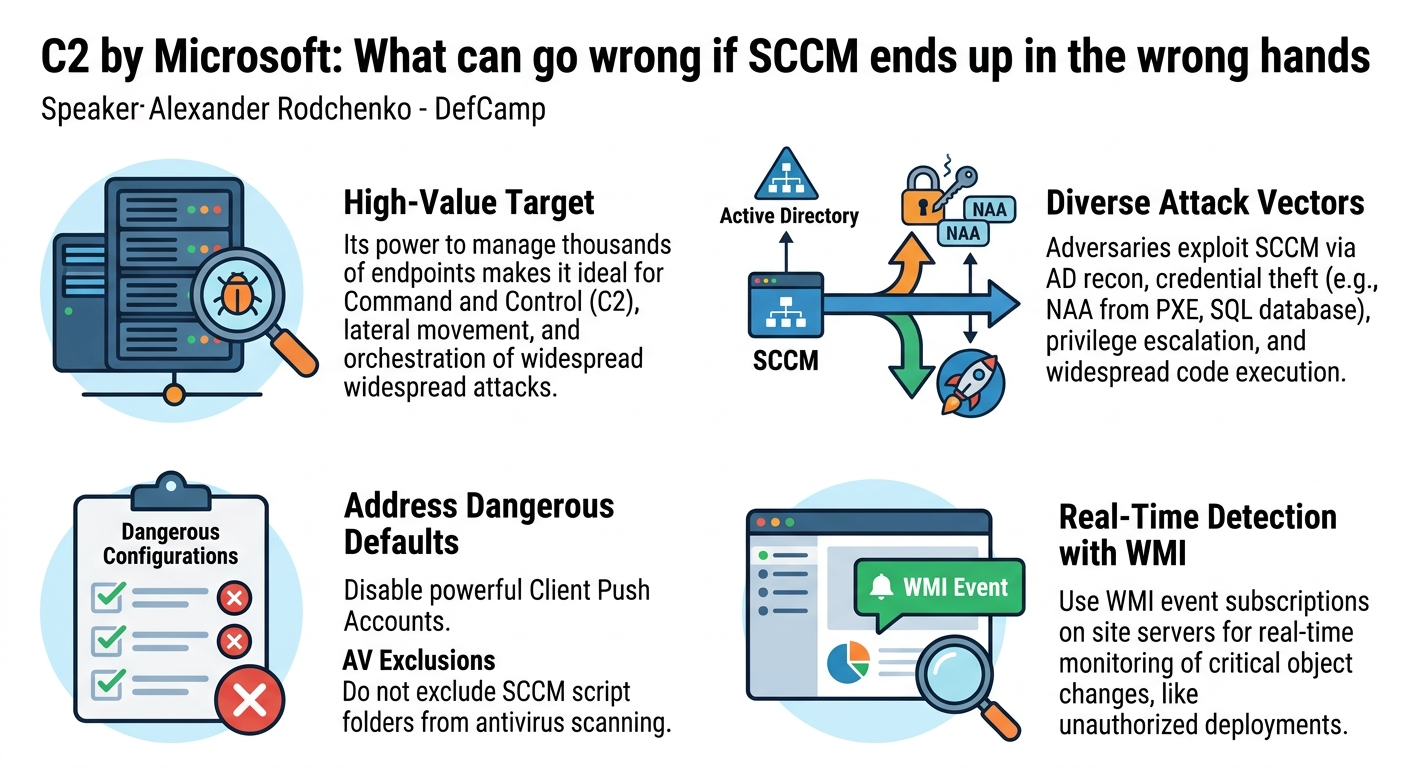
- SCCM is a High-Value Target: Its inherent power to manage and execute code on thousands of endpoints makes it an ideal platform for adversaries to establish C2, achieve lateral movement, and orchestrate widespread attacks.
- Diverse Attack Vectors Exist: Attackers can exploit SCCM through various means, including Active Directory reconnaissance, credential theft (e.g., Network Access Account from PXE or policies, SQL database credentials), privilege escalation (e.g., Client Push Account abuse, coercion attacks), and widespread malicious execution via application/script deployments.
- Dangerous Defaults Must Be Addressed: Critical vulnerabilities often stem from default or commonly misconfigured settings, such as the use of a powerful Client Push Account or the dangerous practice of disabling antivirus scanning for SCCM script folders. These must be reviewed and hardened.
- Traditional Monitoring is Insufficient: Relying on retrospective methods like SQL database dumps for detection is impractical due to data volume and complexity. Real-time detection requires a more dynamic approach.
- WMI Event Subscriptions are Key for Detection: Implementing WMI event subscriptions on SCCM servers offers a powerful, proactive method for real-time monitoring of critical object creations and modifications, enabling immediate detection of suspicious activities like unauthorized deployments or admin promotions.
- Monitor Critical Accounts and Anomalies: Closely monitor the activity of high-privilege SCCM-related accounts (like the Network Access Account) for unusual logins or process executions. Furthermore, analyze SCCM object instances for anomalies (e.g., fake computer registrations lacking MAC addresses or incomplete
SMS_Adminclass data) that signal malicious manipulation.
About the Speaker(s)
Alexander Rodchenko is a Senior SOC Analyst at Kaspersky. In his role, he is at the forefront of enterprise security, processing threats and generating reports. His work is further empowered by collaboration with Kaspersky's Threat Intelligence and Antimalware Research departments, providing him with a deep understanding of real-world enterprise security challenges.
Gleb (full name not provided in the transcript) is Alexander Rodchenko's colleague and co-author of this research. Although unable to attend the conference due to visa issues, Gleb made significant contributions to the presentation, including developing detection logic, creating security rules, and offering numerous ideas for the research.
Reviews
Dr. Zero (Offensive Security Researcher) — STRONG ACCEPT
Solid operational security talk that actually names the techniques, shows the tooling, and delivers a practical detection approach using WMI event subscriptions. Not novel research—these SCCM attacks are well-documented—but the synthesis is clean and the detection framework is immediately deployable.
Heather Calloway (CISO) — STRONG ACCEPT
This is operationally valuable work for any enterprise running SCCM. Rodchenko lays out a comprehensive attack surface that most security teams underestimate, then delivers a practical detection approach using WMI event subscriptions that actually works in production. Worth your detection engineering team's time.