Interface Anti Patterns: Exploiting Insecure Navigation in 3rd Party Android App Lockers
Edward Warren (Principal Security Researcher)
Ekoparty Miami 2026 · Main Track
Overview
In his Ekoparty Miami talk, "Interface Anti Patterns: Exploiting Insecure Navigation in 3rd Party Android App Lockers," Edward Warren, a Principal Security Researcher, shed light on a pervasive and critical vulnerability affecting a significant portion of the Android ecosystem. The presentation meticulously detailed how third-party app lockers, widely used for privacy and parental control, are fundamentally flawed and easily bypassable. Warren's research exposes how the very design and monetization strategies of these applications create exploitable "interface anti-patterns" that undermine their stated security goals.
Key moments
- 0:00 What are third-party Android app lockers?
- 4:15 Android security primer: Intents and WebViews explained
- 8:00 Understanding the threat model: Advertisement overlay
- 10:30 First demo: Bypassing Chrome using the 500ms window
- 14:30 Second demo: Reddit bypass and widespread impact
- 16:00 Why third-party app lockers are redundant
- 17:00 Demo three: Bypassing app uninstall protection
- 20:00 Mitigations, native solutions, and key takeaways
Interface Anti Patterns: Exploiting Insecure Navigation in 3rd Party Android App Lockers
Speakers: Edward Warren, Principal Security Researcher
Conference: Ekoparty Miami
YouTube: https://www.youtube.com/watch?v=lq0xclTS07w
Overview
In his Ekoparty Miami talk, "Interface Anti Patterns: Exploiting Insecure Navigation in 3rd Party Android App Lockers," Edward Warren, a Principal Security Researcher, shed light on a pervasive and critical vulnerability affecting a significant portion of the Android ecosystem. The presentation meticulously detailed how third-party app lockers, widely used for privacy and parental control, are fundamentally flawed and easily bypassable. Warren's research exposes how the very design and monetization strategies of these applications create exploitable "interface anti-patterns" that undermine their stated security goals.
The talk is particularly relevant given the widespread adoption of these applications, with vulnerable apps collectively boasting hundreds of millions of downloads on the Google Play Store. Users install these app lockers believing they add an extra layer of security or control over specific applications, often for sensitive data or to restrict children's access. However, Warren demonstrates that these apps not only fail to deliver on their promises but also introduce new attack vectors, rendering them ineffective and potentially misleading. His findings underscore the importance of relying on native, platform-level security features rather than third-party solutions that operate on an insecure foundation.
Background
▶ Watch: What are third-party Android app lockers? (0:00)
To understand the vulnerabilities discussed, it's essential to first grasp the foundational security principles of Android and how applications interact. Android applications operate within a sandbox model, meaning each app runs in its own isolated process, preventing direct interference with other applications. Warren visualizes this as "two islands surrounded by sand," with communication facilitated by a component called Binder, which enables interprocess communication (IPC).
Android applications are built from several core components:
- Activities: These are the visible UI elements of an application, akin to web pages, that users interact with.
- Services: These components run in the background without a UI, often performing tasks like data synchronization.
- Broadcast Receivers: Similar to services, they also lack a UI and run in the background, waiting to respond to specific system events, such as low battery or changes in Wi-Fi connectivity.
- Content Providers: These are designed to allow secure data transmission and sharing between different applications.
A crucial mechanism for inter-app communication is the Intent. An Intent is an object that encapsulates an application's intention to perform an action, such as opening a web browser or displaying an image. Intents can be explicit, targeting a specific application (e.g., opening google.com in Chrome), or implicit, allowing the system to resolve the action to any suitable application (e.g., opening a webpage in any available browser). The exploitation of app lockers, as Warren explains, often involves manipulating implicit intents or the URI payload within them.
Another key technical element is the WebView. A WebView is a stripped-down, embedded web browser component that developers can integrate directly into their applications. While convenient, WebViews typically lack the robust security mitigations and memory protections found in full-fledged web browsers like Chrome. This reduced security posture makes them a prime target for insecure navigation exploits, especially when used to display dynamic content like advertisements within critical security interfaces.
Warren also references related work by Jose Rodriguez at a previous EcoParty conference. While not directly focused on third-party app lockers, Rodriguez's research demonstrated how insecure navigation and interaction with visible elements on a locked screen (e.g., pausing music, interacting with maps) could bypass locking mechanisms. This concept of exploiting "insecure paths" laid a conceptual groundwork for Warren's investigation into app locker vulnerabilities.
Key Findings
▶ Watch: Understanding the threat model: Advertisement overlay (8:00)
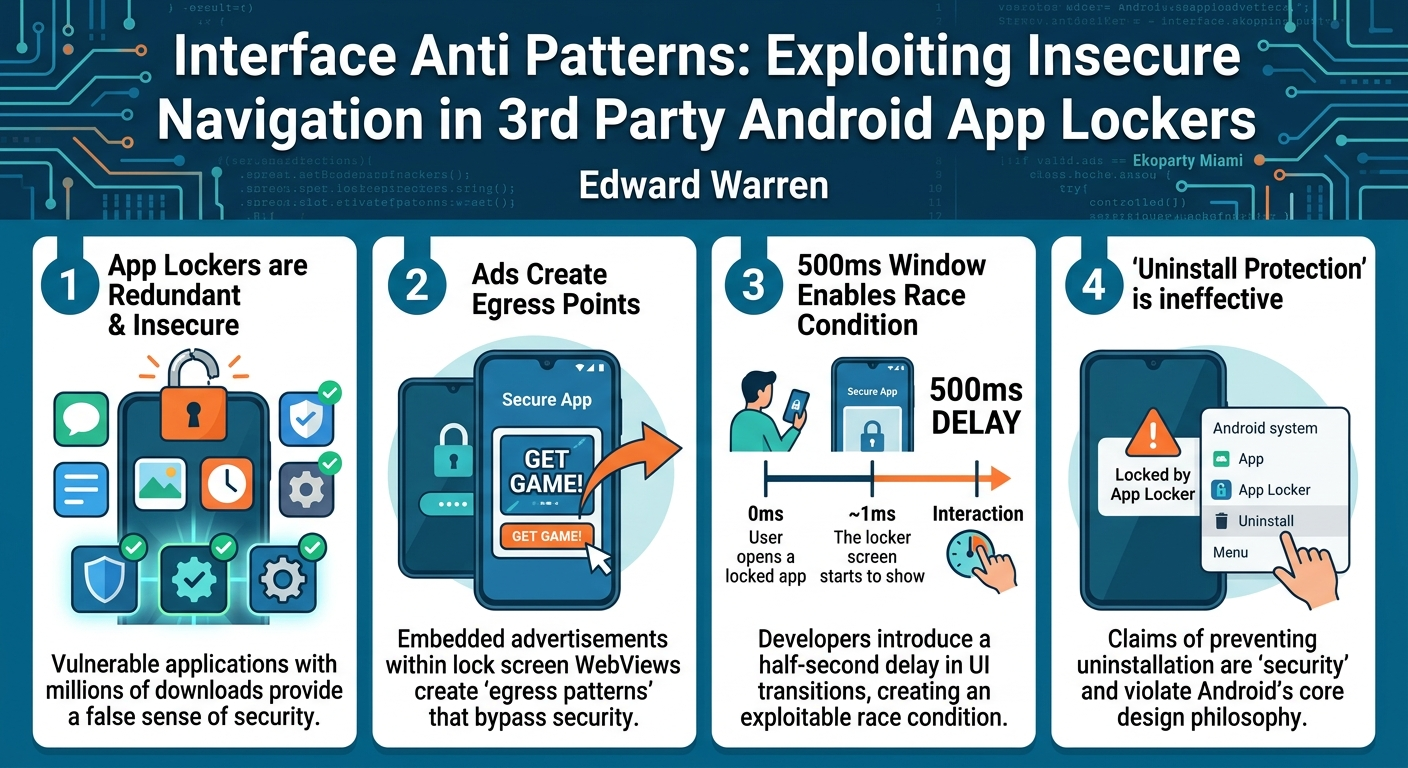
Edward Warren's research unequivocally demonstrates that third-party Android app lockers, despite their promises, are fundamentally insecure and trivial to bypass. The central finding is that the monetization model employed by these applications, specifically the ubiquitous integration of advertisements within their lock screen overlays, introduces critical security vulnerabilities. These advertisements create an "egress pattern" that allows an attacker to navigate away from the lock screen and into the protected application.
The core of the exploit hinges on a race condition created by the app locker's UI transition logic. Warren discovered that many app lockers implement show and hide functions with a deliberate delay, typically around 500 milliseconds (half a second), to provide a smoother user experience during the display and removal of the lock screen. This small window, however, becomes an exploitable opportunity. If a user (or attacker) can interact with the underlying application or system during this brief 500ms period, the lock screen UI fails to reattach, granting full access to the protected app.
Warren's investigation spanned "about a dozen apps," and he noted that "almost all of them are vulnerable to the same issue," with "at least like a hundred of these app lockers in the Play Store." These vulnerable applications collectively account for "somewhere around I'd say like around 300 million downloads in total." Beyond simple bypasses, the research also exposed the ineffectiveness of features like "uninstall protection," which these apps falsely claim to offer. This class of applications, according to Warren, has been "deprecated and left redundant" by native Android and OEM security features.
Technical Deep Dive
▶ Watch: Second demo: Reddit bypass and widespread impact (14:30)
The technical foundation of these vulnerabilities lies in a combination of insecure UI implementation, the nature of embedded WebViews, and Android's intent system. The threat model for this attack is straightforward: a local user with access to an unlocked device, a targeted app configured to be locked by an app locker, and the presence of an advertisement overlay on the lock screen.
The exploit chain unfolds as follows:
- User taps a protected app: When a user attempts to open an application configured to be locked, the app locker intercepts the launch.
- Lock screen overlay appears: Instead of the protected app, the app locker displays its lock screen, typically a PIN or pattern input, often with an embedded advertisement.
- Advertising element provides egress: The crucial vulnerability point is the advertisement displayed within the lock screen's WebView. As WebViews often lack the full security mitigations of a dedicated browser, they can be configured to navigate away from the app locker's UI if a user clicks on an ad. This creates an "egress pattern."
- Interaction within the 500ms window: When the user clicks an advertisement, the app locker's UI temporarily navigates away. The underlying implementation of the lock screen often involves
showandhidefunctions, which manage the display and removal of the overlay. Developers introduced a 500ms delay in these transitions, likely to make the UI feel less "glitchy" and smoother. However, this delay creates a race condition. If the attacker can interact with the operating system or the protected application's UI during this half-second window, the lock screen's UI is not properly reattached upon return, effectively bypassing the lock.
Warren elaborated on how the monetization model directly influences the attack surface. The "slot machine" effect of advertisements means that different ads can appear each time a protected app is accessed. These advertisements typically do one of two things:
- Open a web page: In this scenario, clicking the ad attempts to open a web page via an implicit intent. This is where the 500ms window exploit is most effective. By rapidly interacting with the system (e.g., hitting the back button, navigating to the home screen) during the transition, the attacker can prevent the lock screen from reasserting itself.
- Deep link to another app: For popular applications (e.g., Instagram), advertisements might contain deep links that, when clicked, directly launch the corresponding application if installed. If the protected app is one of these popular apps, clicking its deep-linked ad can directly bypass the lock. Attackers can "refresh" the ads by repeatedly trying to open the app until a suitable deep-link ad appears.
The WebView's inherent lack of robust security features compared to full browsers further exacerbates the problem. Without features like built-in memory protections, the WebView becomes a less secure conduit for displaying external content, making the egress pattern more reliably exploitable.
Beyond the navigation bypass, Warren also addressed the false promises of "uninstall protection." Many app lockers claim to prevent users from uninstalling or disabling them. However, as Warren explained, this goes against Google's design philosophy for Play Store applications. Unless it's malware, a legitimate Play Store app cannot prevent its own uninstallation. Features like "legacy device admin" permissions, sometimes used by these apps, are effectively "security theater." They might superficially appear to block uninstallation while active, but there's nothing to stop a user from simply disabling the device admin permission or pausing the application directly through Android's settings, rendering the "protection" useless.
Demo / Proof of Concept
▶ Watch: Why third-party app lockers are redundant (16:00)
Edward Warren provided compelling demonstrations to illustrate the various bypass techniques, showcasing the practical implications of his findings.
Demo 1: Bypassing Chrome Lock
The first demonstration focused on bypassing an app locker protecting the Chrome browser. The video showed Chrome locked behind an app locker. Upon attempting to open Chrome, the app locker's overlay appeared with an embedded advertisement. Warren demonstrated that by clicking the advertisement and then rapidly interacting with the device (e.g., pressing the back button or home button) within the critical 500ms window during the UI transition, the lock screen failed to reattach. This allowed direct access to the Chrome browser, completely bypassing the app locker's protection. He noted that Chrome is "probably the worst application to attempt to try to lock behind an app locker" due to the high proliferation of advertisements within WebViews, making it an "easy egress pattern."
Demo 2: Bypassing Reddit Lock via Advertisement
The second demo featured the Reddit application, protected by an app locker displaying a PIN overlay. Warren highlighted how the developers "conveniently included an advertisement" at the bottom of the screen. He stressed that "by simply including one ad is enough to break the chain." This demo reinforced the idea that any embedded advertisement provides an egress point. Whether it opens a web page (allowing the 500ms window exploit) or deep-links to another app, the ad fundamentally compromises the lock screen's integrity. He stated that "most apps can be defeated by literally refreshing until you got a different app" or by "spamming clicking the advertisement."
Demo 3: Defeating Uninstall Protection
The final demonstration tackled the app lockers' claims of "uninstall protection." Warren showed an app locker configured to protect an application and also claiming to prevent its uninstallation. He then navigated through the Android settings, demonstrating how to simply pause the app locker application or uninstall it directly. This proved that the app locker's "uninstall protection" was ineffective. He explained that this functionality is "not possible in practice" for a Google Play Store application because Google's policies prevent apps from blocking their own uninstallation, except in the case of malware. The "legacy device admin" permissions, sometimes used for this purpose, are merely "security theater" as they can be easily disabled by the user.
Warren mentioned that his research led to several CVEs being listed, with "a few more apps" having pending CVEs. He reiterated the scale of the problem, noting that the collectively vulnerable applications have "somewhere around I'd say like around 300 million downloads in total," making their trivial bypass a significant concern for user privacy and security.
Defensive Implications
▶ Watch: Mitigations, native solutions, and key takeaways (20:00)
The findings presented by Edward Warren carry significant implications for both app developers and end-users regarding Android security. The most critical defensive measures are surprisingly straightforward, yet challenging for third-party app locker developers given their business models.
- Remove Advertisements from Lock Screens: This is the most direct mitigation for developers. The primary attack vector stems from the embedded advertisements within the app locker's UI. By removing dynamic, clickable content, especially from WebViews, developers can eliminate the "egress pattern" that initiates the bypass. However, Warren acknowledged that this is unlikely to happen for many developers, as these advertisements are often a core part of their monetization strategy. He stated, "I would say all this sounds good on paper, but I still don't think it's very effective" because the fundamental incentive structure remains.
- Do Not Rely on Third-Party App Lockers: For end-users, the clearest defensive implication is to entirely abandon the use of third-party app lockers from the Google Play Store. Warren's research conclusively demonstrates their ineffectiveness and the false sense of security they provide. He highlighted that these applications are "essentially useless apps" when it comes to enforcing granular access control.
- Utilize Native Android and OEM Solutions: The most robust and recommended defense is to leverage the app locking and access restriction features built directly into the Android operating system or provided by device manufacturers (Original Equipment Manufacturers). Warren specifically mentioned that "Android 16" will have "app lockers natively built into the phone," and "Samsung has an implementation for this as well." These native solutions are designed to operate at a deeper, more secure level within the OS sandbox model, unlike third-party apps that attempt to overlay security on top. He stressed that "the lock screen that comes with your phone makes all of these applications essentially redundant."
- Understand Android's Security Design for App Uninstallation: Users should be aware that any Play Store application claiming "uninstall protection" is making a misleading promise. Android's design prevents legitimate applications from blocking their own uninstallation. Attempts to do so, such as using "legacy device admin" permissions, are easily circumvented and represent "security theater." This awareness helps users avoid being misled by ineffective security features.
In summary, the defensive strategy boils down to a fundamental shift: trust the platform's native security capabilities over third-party applications that are inherently constrained by the very system they try to secure, especially when their business model introduces vulnerabilities.
Key Takeaways
- Third-party Android app lockers are fundamentally insecure: Their design and implementation flaws, particularly the integration of advertisements, make them trivial to bypass.
- Embedded advertisements create exploitable egress points: Ads within app locker lock screens, often displayed via WebViews, provide a critical "egress pattern" that allows users to navigate away from the lock screen and into protected applications.
- A 500ms UI transition window enables race condition attacks: Developers' attempts to create smoother UI transitions with a half-second delay inadvertently create a window during which attackers can interact with the system and bypass the lock.
- "Uninstall protection" offered by these apps is ineffective: Claims of preventing uninstallation are "security theater" and cannot be guaranteed by legitimate Play Store applications due to Android's core design principles.
- Native Android and OEM app locking solutions are the only trustworthy option: Users should rely on built-in features provided by the Android OS (e.g., future Android 16 features) or device manufacturers (e.g., Samsung) for true application access control.
- The entire class of third-party app lockers is redundant and insecure: Given the availability of native solutions and the inherent vulnerabilities, these apps offer a false sense of security and should be avoided.
About the Speaker(s)
Edward Warren is a highly experienced security professional with a dual role as a Senior Security Analyst at a Fortune 500 company by day and the founder of X for your security labs by night. His expertise spans IoT and Android reverse engineering, demonstrating a deep understanding of device and mobile platform security. Warren is a recognized speaker in the security community, having previously presented at prestigious conferences such as Def Con 33. At Def Con, he shared his research on hacking 5G and 4G hotspots, highlighting his proficiency in exploring vulnerabilities in embedded Android systems. His work focuses on uncovering and explaining critical security flaws, providing valuable insights to both developers and the broader security community.
Reviews
Dr. Zero (Offensive Security Researcher) — SOLID
Competent applied security research on a real-world target class, but the core finding—ads in overlay UIs create egress paths, race conditions in UI transitions let you slip through—is not technically deep. It's useful awareness for Android users and app reviewers, not novel exploitation technique.
Heather Calloway (CISO) — SOLID
Useful research demonstrating that third-party Android app lockers are security theater—ad-funded overlays with trivial race condition bypasses. Worth knowing if you have BYOD or parental control policies that might rely on this class of app, but the fix is simple: don't use them.