Why Chrome Removed the Lock Icon
serena chen (UX Lead, Chrome Security · Google)
purplecon 2024 · Day 1 · Main Room
Overview
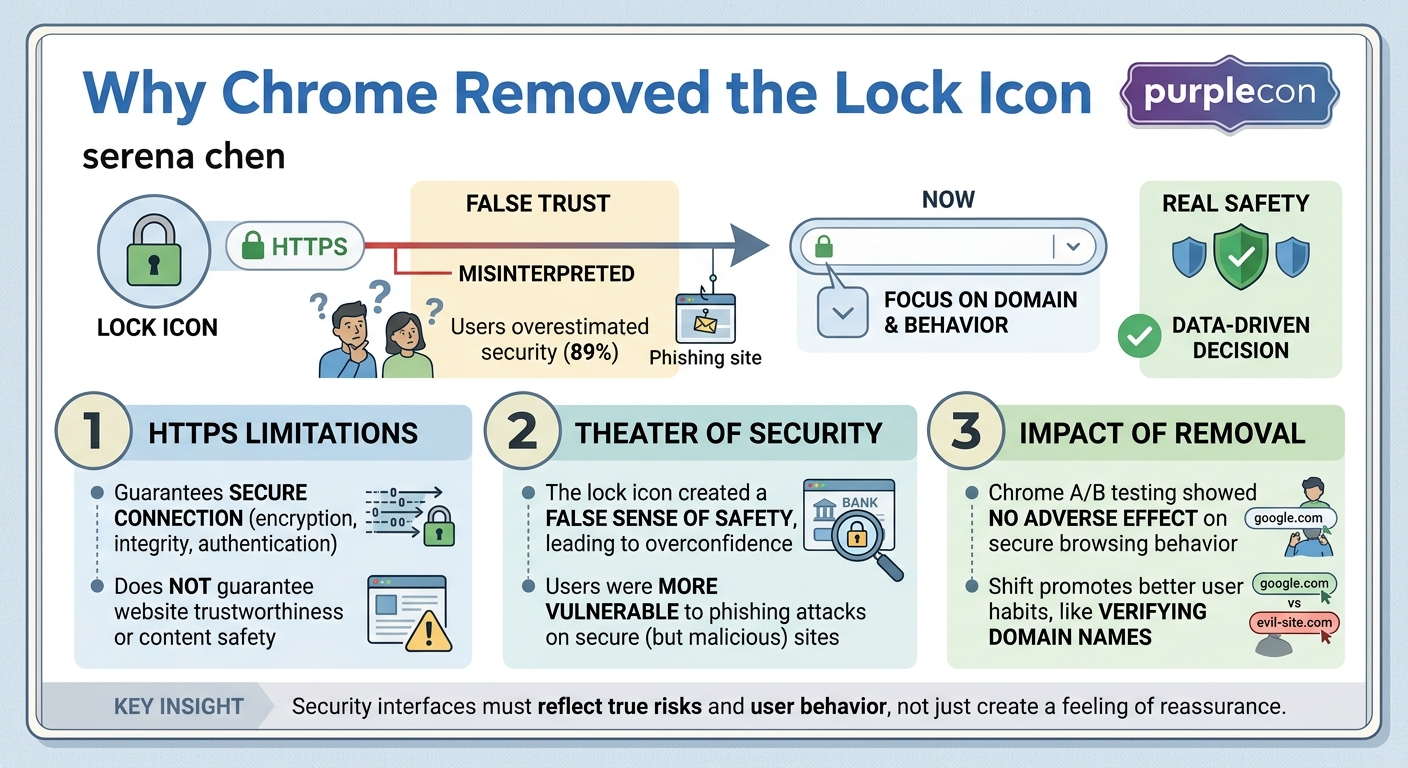
In a significant shift for web security and user experience, Google Chrome, the world's most widely used web browser, recently removed the familiar lock icon from its address bar. This talk, delivered by Serena Chen, a UX Lead on the Chrome Security team at Google, delves into the deep-seated reasons behind this seemingly minor 16x16 pixel change, revealing it as the culmination of a decade-long effort to secure the web. Chen meticulously explains that while the lock icon was initially intended to signify a secure HTTPS connection, it had evolved into a dangerous miscommunication, leading a vast majority of users to overestimate a website's overall trustworthiness.
Key moments
- 0:00 Introduction: Why Chrome removed the lock icon
- 1:00 History of HTTPS and its actual meaning
- 6:00 User study reveals lock icon misinterpretations
- 8:00 Snowden revelations accelerate HTTPS adoption
- 12:00 Understanding the concept of security theater
- 17:00 Ecosystem change takes time: a philosophical takeaway
- 18:30 Current state and future of web security
Why Chrome Removed the Lock Icon
Speakers: Serena Chen, UX Lead, Chrome Security, Google
Conference: purplecon
YouTube: https://www.youtube.com/watch?v=iUAxmOFl78w
Overview
In a significant shift for web security and user experience, Google Chrome, the world's most widely used web browser, recently removed the familiar lock icon from its address bar. This talk, delivered by Serena Chen, a UX Lead on the Chrome Security team at Google, delves into the deep-seated reasons behind this seemingly minor 16x16 pixel change, revealing it as the culmination of a decade-long effort to secure the web. Chen meticulously explains that while the lock icon was initially intended to signify a secure HTTPS connection, it had evolved into a dangerous miscommunication, leading a vast majority of users to overestimate a website's overall trustworthiness.
The talk highlights how this misinterpretation contributed to the phenomenon of "security theater"—performative security measures that offer a false sense of safety without providing actual protection, and sometimes even increasing risk. Chen argues that as HTTPS became the default for web traffic, the lock icon ceased to be a useful indicator of exceptional security and instead became a liability, inadvertently guiding users toward phishing scams and other dangers. Her presentation is not just a technical explanation but a compelling narrative about the evolution of web security, the complexities of user perception, and the painstaking process of driving large-scale ecosystem change.
This decision by Chrome, and the rationale behind it, is crucial for anyone involved in web development, cybersecurity, or user experience design. It underscores the critical importance of clear communication in security interfaces, the need to base design decisions on user behavior rather than intuition, and the ongoing challenge of adapting security paradigms to a rapidly changing digital landscape. The removal of the lock icon serves as a powerful reminder that symbols, however well-intentioned, can lose their meaning or even become counterproductive over time, necessitating bold, data-driven interventions to protect users effectively.
Background
▶ Watch: Introduction: Why Chrome removed the lock icon (0:00)
To understand why Chrome removed the lock icon, it's essential to trace the history and technical underpinnings of HTTPS (Hypertext Transfer Protocol Secure). The journey began in 1994 when Netscape Navigator first conceived HTTPS, though its initial release was plagued by security issues. The protocol saw its first stable release with SSLv2 in 1995. Despite its early introduction, HTTPS remained a niche technology for many years. As late as 2004, a full decade after its inception, it was still so rare that Internet Explorer famously displayed a warning before connecting via HTTPS, treating it as an unusual and potentially risky deviation from the norm. This era, as Chen's colleague David Adrian termed it, was characterized by an "everything's okay alarm" for HTTP, with HTTPS being the exception.
HTTPS fundamentally guarantees three critical aspects of communication between a user's browser and a web server:
- Authentication: It ensures that the website the user is connecting to is genuinely who it claims to be (e.g., google.com is actually Google).
- Encryption: It scrambles the data exchanged between the browser and server, making it unreadable to any eavesdroppers. This prevents third parties from spying on communications.
- Data Integrity: It confirms that the data transmitted has not been altered or tampered with in transit.
The latter two, encryption and data integrity, are primarily achieved through public key cryptography. This involves complex mathematical functions where it's easy to encode a message into gibberish using a public key, but practically impossible to decode it without the corresponding private key. Both the browser and server possess a public and private key pair, enabling them to establish a secure, encrypted channel. The challenge, however, has always been authentication: how does a browser know it's talking to the legitimate server?
This is where the Public Key Infrastructure (PKI) comes into play. Authentication on the web relies on a "chain of trust." Websites obtain digital certificates from Certificate Authorities (CAs), which act as trusted third parties. These CAs, in turn, are vouched for by higher-level authorities, ultimately leading back to a root certificate pre-installed and trusted by the user's operating system or browser. This complex system ensures that when a browser connects to google.com, it can verify that the certificate presented by the server was issued by a trusted CA, thereby confirming the server's identity. Crucially, as Chen emphasizes, the PKI and HTTPS guarantee the security of the connection and the identity of the server, but they make no promises about the trustworthiness of the website itself—they don't guarantee the site is free of malware, won't phish you, or will protect your personal data.
For years, the adoption of HTTPS remained slow, with estimates placing traffic over secure connections as low as 15% to 27% of page loads in the early 2010s. A pivotal moment arrived in 2013 with the revelations by Edward Snowden, which brought issues of privacy and pervasive surveillance to the forefront of public consciousness. This event catalyzed a widespread, aggressive push across the tech industry to secure the web. Google played a significant role, announcing in May 2014 that it would use HTTPS as a ranking signal for search results, incentivizing website owners to adopt it. Complementary initiatives, such as Let's Encrypt offering free SSL/TLS certificates, removed a major financial barrier to HTTPS adoption. Over the subsequent decade, this concerted effort transformed HTTPS from a rare exception into the expected default for web communication, fundamentally altering the context in which security indicators like the lock icon were perceived.
Key Findings
▶ Watch: User study reveals lock icon misinterpretations (6:00)
Chrome's decision to remove the lock icon was not arbitrary but rooted in extensive research into user behavior and perception, revealing a dangerous disconnect between the icon's technical meaning and its user interpretation. A large-scale study conducted by Chrome in 2021 provided compelling evidence. While most participants correctly associated the lock icon with "connection security," an overwhelming 89% of participants overestimated the security guarantees it provided. Specifically, over half of the respondents believed the icon meant they were "safe to enter data on the website," and nearly half thought it indicated the website was "trustworthy in general." Only a mere 11% of people correctly identified the actual, limited guarantees of HTTPS.
This widespread misinterpretation was not merely a benign misunderstanding; it had tangible, negative consequences. Prior research from 2019 had already demonstrated that this overestimation of trustworthiness led to an increased click-through rate on phishing links. Attackers could easily set up convincing phishing pages for well-known banks or services, secure them with an HTTPS certificate (which is cheap and readily available), and present users with the reassuring lock icon. This created a potent trap where users, misled by the visual cue, would confidently enter sensitive information on malicious sites. The severity of this problem prompted the FBI in June 2019 to issue a public service announcement, explicitly warning users not to trust a website solely because it displayed a lock icon.
The core issue, as Chen articulates, is that the lock icon had become a prime example of security theater. Coined by security expert Bruce Schneier in 2008 in the context of airport security, "security theater" refers to performative security measures that make people feel safe without actually enhancing their real safety. Often, such measures can even make individuals less safe by fostering a false sense of security. Chen cited examples such as TSA airport security (which has shown 80-95% failure rates in undercover tests), VPNs that advertise strong security but snoop on traffic, or mandatory password rotations that lead users to write down passwords. In the context of the web, the lock icon on a phishing site was actively harmful, lulling users into a false sense of security where they were most vulnerable.
To validate the impact of removing the icon, Chrome conducted an A/B test, swapping the lock icon with a security-neutral dropdown menu for 1% of its users. The results were crucial: while users did notice the change (evidenced by increased clicks on the new icon), there was no adverse impact on actual secure browsing behavior. Users did not spend less time on HTTPS pages, nor did they send fewer form submissions over HTTPS (meaning credit card numbers and passwords continued to be submitted at the same rate). This demonstrated that the lock icon, while providing a feeling of reassurance, was not actually driving safer behavior. Its presence, however, was actively luring people towards danger in phishing scenarios. This behavioral evidence decisively placed the lock icon in the category of dangerous security theater, necessitating its removal.
Technical Deep Dive
▶ Watch: Snowden revelations accelerate HTTPS adoption (8:00)
The technical foundation for understanding the lock icon's role lies in the mechanisms of HTTPS, particularly its reliance on public key cryptography and the Public Key Infrastructure (PKI). HTTPS ensures three core properties for web communication: authentication, encryption, and data integrity.
Encryption and Data Integrity are achieved through a combination of symmetric and asymmetric cryptography. When a browser initiates a connection with an HTTPS server, they engage in a TLS handshake. This multi-step process, simplified, involves:
- Parameter Agreement: The browser and server exchange capabilities and agree on cryptographic algorithms to use.
- Key Exchange: Using public key cryptography, they securely exchange information. Each party has a public key (widely distributed) and a private key (kept secret). It's mathematically easy to encrypt data with a public key, but computationally infeasible to decrypt it without the corresponding private key.
- Shared Secret Derivation: Through a series of exchanges where data is mixed with their respective private keys, both the browser and server independently arrive at a shared secret key. This key is then used for symmetric encryption (e.g., AES), which is much faster for encrypting large amounts of data.
- Secure Channel Establishment: Once the shared secret is established, all subsequent communication is encrypted and authenticated using this key, ensuring both privacy (encryption) and that the data hasn't been tampered with (data integrity).
The most challenging aspect, as Chen highlights, is Authentication – how does the browser verify that the server it's communicating with is genuinely, for example, google.com? This is where the PKI comes in.
- Digital Certificates: A website wishing to use HTTPS obtains a digital certificate from a Certificate Authority (CA). This certificate contains the website's public key, its domain name, and is digitally signed by the CA.
- Chain of Trust: CAs are trusted entities. Your browser and operating system come pre-configured with a list of trusted root CAs. When a server presents its certificate, the browser checks its digital signature. If it's signed by an intermediate CA, the browser then checks if that intermediate CA's certificate is signed by another trusted CA, and so on, until it reaches a root CA that is explicitly trusted. This forms a "chain of trust."
- Verification: If the chain validates, and the domain name in the certificate matches the domain the user is trying to reach, the browser authenticates the server's identity.
Crucially, the lock icon was designed to indicate that this entire HTTPS process – authentication, encryption, and data integrity – was successfully established. However, the fundamental limitation, which became the core argument for its removal, is that **HTTPS guarantees the security of the connection and the identity of the server, but it does not guarantee the *trustworthiness of the content or the entity behind the website***. A malicious actor can obtain a valid HTTPS certificate for evil-phishing-site.com (or even a lookalike domain like gooogle.com) and display a lock icon. The connection to that specific domain would be secure and authenticated, but the site itself would be designed to steal user data. This subtle but critical distinction was consistently lost on the vast majority of users, turning the lock icon into a misleading symbol rather than a helpful security indicator.
Demo / Proof of Concept
▶ Watch: Ecosystem change takes time: a philosophical takeaway (17:00)
While the talk did not feature a live technical demonstration or a specific proof of concept in the traditional sense, Serena Chen vividly described and illustrated scenarios that functioned as conceptual demonstrations of the lock icon's misleading nature.
One key "demonstration" involved a hypothetical phishing attack. Chen walked the audience through a scenario where a malicious actor could "scarily easily" set up a login page for a well-known bank. By configuring a secure HTTPS connection for this fraudulent site, the attacker could then present users with the familiar lock icon in the browser's address bar. This visual cue, which most users mistakenly equated with general trustworthiness, would then lure them into entering their sensitive login credentials. This narrative served as a powerful illustration of how the lock icon, far from being a protective measure, could be actively weaponized by attackers due to widespread user misunderstanding.
Furthermore, the talk detailed Chrome's own "scientific" A/B testing methodology, which acted as a robust, large-scale proof of concept for the impact of the icon's removal. Chrome swapped the lock icon with a "security-neutral dropdown" for 1% of its global user base. This experiment was designed to observe real-world user behavior. The "results" of this "demo" were critical: users noticed the change (indicated by increased clicks on the new icon), but their actual browsing habits on HTTPS pages remained unchanged. Specifically, there was no reduction in time spent on HTTPS sites, nor was there any decrease in the submission of sensitive data like credit card numbers or passwords via HTTPS forms. This data-driven approach served as a powerful "proof" that the lock icon was indeed security theater – its removal did not diminish actual user safety or engagement with secure sites, while its presence was demonstrably contributing to overconfidence and vulnerability.
Therefore, while no live code or exploit was shown, the talk effectively used illustrative scenarios and the results of a real-world, large-scale experiment to prove the speaker's central thesis about the lock icon's detrimental effect on user security.
Defensive Implications
▶ Watch: Current state and future of web security (18:30)
The removal of the lock icon by Chrome carries significant defensive implications for users, website administrators, and security professionals. The primary takeaway is a fundamental shift in how security should be communicated and perceived on the web.
For end-users, the message is clear: the absence or presence of a generic lock icon should no longer be the sole, or even primary, indicator of a website's trustworthiness. Users must be educated to look beyond superficial symbols and develop a more nuanced understanding of web security. This includes:
- Verifying the URL: Always check the domain name in the address bar carefully for typos or subtle character substitutions (e.g.,
micros0ft.comvs.microsoft.com). - Exercising General Skepticism: Be wary of unsolicited links, suspicious emails, or urgent requests for personal information, regardless of any browser iconography.
- Understanding HTTPS Limits: Recognize that HTTPS only guarantees a secure connection to the specific domain being visited, not the inherent benevolence or security practices of that domain's operator.
For website administrators and developers, the defensive implications emphasize the critical need to implement robust security practices beyond merely acquiring an HTTPS certificate. While HTTPS remains foundational, it is no longer a differentiator in terms of user trust perception. Instead, focus should be on:
- Comprehensive Security Posture: Implementing strong authentication (MFA), regular security audits, secure coding practices, and robust data protection policies.
- Clear Communication: Explicitly communicating privacy policies and data handling practices, rather than relying on browser UI elements to convey trustworthiness.
- Phishing Awareness: Proactive measures to detect and mitigate phishing attempts targeting their brand, understanding that attackers will continue to leverage social engineering tactics.
For security professionals and browser vendors, the insights from Chrome's decision reinforce several key principles:
- Prioritize User Behavior over Intuition: Security UI/UX decisions must be driven by empirical data on how users actually interpret and react to indicators, rather than designers' or experts' assumptions. The lock icon's failure to prevent phishing despite its good intentions is a stark reminder.
- Combat Security Theater: Actively identify and eliminate security measures that provide a false sense of security, as these can be more dangerous than no security at all.
- Ecosystem-Wide Change: Recognize that improving web security is a marathon, not a sprint, requiring sustained, collaborative effort across the entire ecosystem (browsers, CAs, website owners, standards bodies). Chrome's current efforts reflect this, including:
- Default HTTPS Upgrades: Automatically attempting to upgrade all
http://connections tohttps://by default. - Stronger Insecure Warnings: Making warnings for truly insecure
http://connections more prominent and harder to ignore. - Post-Quantum Preparations: Actively preparing for future cryptographic challenges, such as the threat posed by quantum computing to current encryption standards.
- PKI Maintenance: Continuously maintaining and strengthening the underlying Public Key Infrastructure to ensure the integrity of the web's foundational trust model.
Ultimately, the removal of the lock icon is a defensive move that aims to remove a misleading crutch, forcing a more accurate and robust understanding of web security for all parties involved. It shifts the emphasis from a single, easily misinterpreted symbol to a holistic approach involving user education, strong site-side security, and continuous browser-level enhancements.
Key Takeaways
- The lock icon, once a symbol of web security, became a dangerous miscommunication, with 89% of users overestimating its guarantees.
- This misinterpretation led to increased vulnerability to phishing, turning the icon into a form of "security theater" that provided a false sense of safety.
- HTTPS guarantees connection security (authentication, encryption, data integrity), but not the overall trustworthiness or benevolence of a website.
- Chrome's A/B testing demonstrated that removing the lock icon did not negatively impact user behavior on secure sites, validating its status as an ineffective and potentially harmful indicator.
- Driving large-scale web ecosystem changes, like the widespread adoption of HTTPS and the evolution of security UI, requires sustained effort over long periods, often decades.
- Users should focus on verifying domain names and exercising general skepticism, rather than relying on a single browser icon to determine a website's safety.
About the Speaker(s)
Serena Chen is a UX Lead on the Chrome Security team at Google. In her role, she focuses on the user experience aspects of web security, working to ensure that Chrome's interface effectively communicates security information to users. Her work involves extensive research into user perception and behavior, driving design decisions that enhance real-world safety rather than merely perceived security. Her talk at purplecon highlights her expertise in translating complex technical security concepts into accessible and intuitive user interfaces, and her commitment to improving the security and privacy of the web for everyone.
Reviews
Dr. Zero (Offensive Security Researcher) — STRONG ACCEPT
A well-executed case study on security UX that actually backs its claims with data. Chen walks through Chrome's decade-long journey on HTTPS adoption and makes a compelling, empirically-grounded case for why the lock icon became net-negative for user safety. Not groundbreaking research, but solid work that practitioners can learn from.
Heather Calloway (CISO) — STRONG ACCEPT
This is exactly the kind of UX-security decision that affects every organization's user base and phishing exposure. Chen makes a compelling, data-backed case for why a decade-old security indicator became a liability. Worth your security awareness team's time.