Building Your First Windows Malware Loader
Royce Yaezenko (Assistant Researcher)
RTV Overflow 2026 (Red Team Village) · Day 1 · Main Stream
Overview
In his RTV Overflow talk, "Building Your First Windows Malware Loader," Assistant Researcher Royce Yaezenko provides a comprehensive, beginner-focused workshop on the fundamental concepts and practical implementation of Windows malware loaders. The presentation delves into the intricacies of injecting malicious code into running processes, offering attendees a foundational understanding of how such tools are developed and operated. Yaezenko emphasizes that the goal is not to create fully undetectable malware, but rather to equip aspiring security professionals with the core knowledge necessary to build upon these techniques and better understand adversary capabilities.
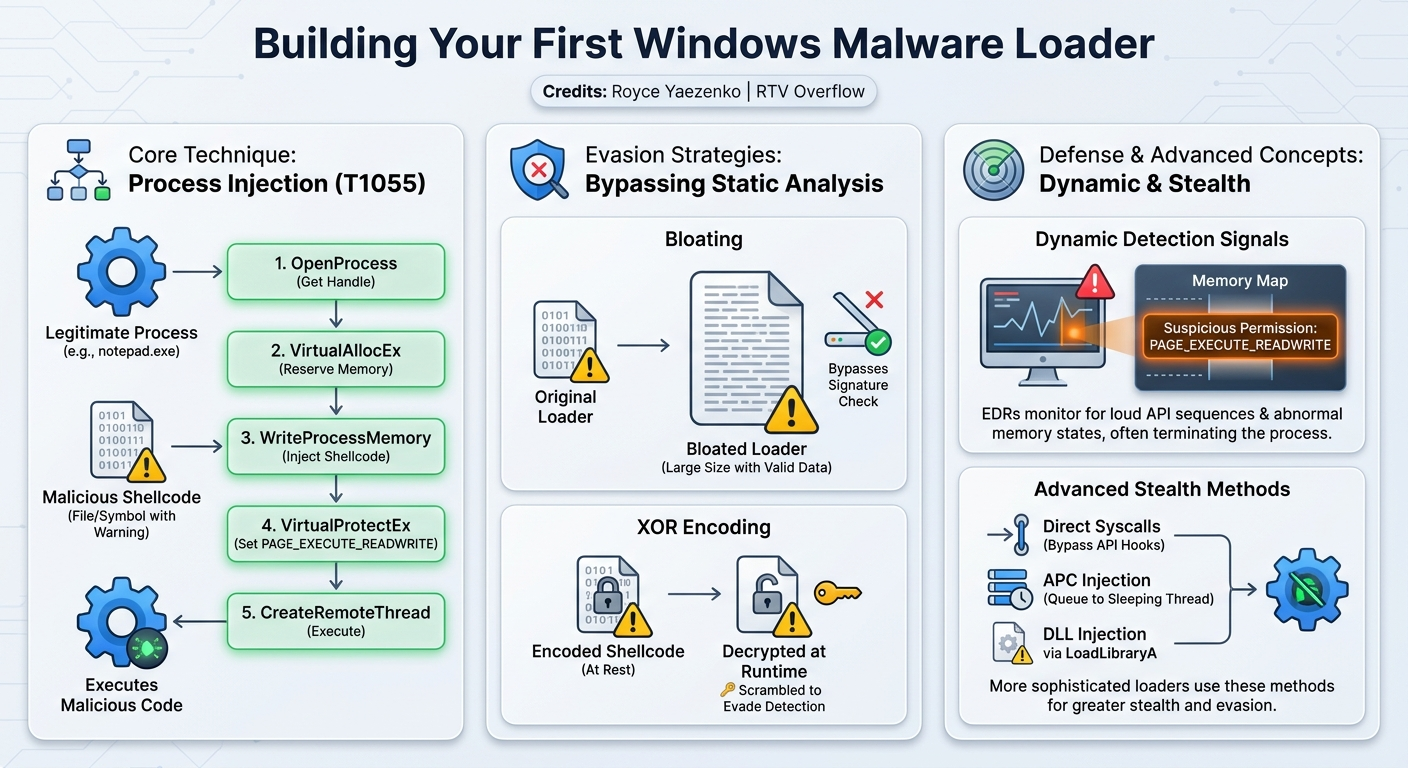
Key moments
- 0:00 Introduction, agenda, and environment setup
- 6:00 Windows internals (DLLs, APIs) and PE file format
- 27:00 Explaining the 6 core steps of process injection
- 38:00 Live demo: Injecting shellcode into Notepad
- 40:00 Bypassing static detection using bloating and XOR encoding
- 52:00 DLL injection demo: Running Doom from Notepad
- 55:00 Q&A: Why Windows increasingly uses Unicode for strings
Building Your First Windows Malware Loader
Speakers: Royce Yaezenko, Assistant Researcher
Conference: RTV Overflow
YouTube: https://www.youtube.com/watch?v=9DhMQIavX2k
Overview
In his RTV Overflow talk, "Building Your First Windows Malware Loader," Assistant Researcher Royce Yaezenko provides a comprehensive, beginner-focused workshop on the fundamental concepts and practical implementation of Windows malware loaders. The presentation delves into the intricacies of injecting malicious code into running processes, offering attendees a foundational understanding of how such tools are developed and operated. Yaezenko emphasizes that the goal is not to create fully undetectable malware, but rather to equip aspiring security professionals with the core knowledge necessary to build upon these techniques and better understand adversary capabilities.
The talk highlights the critical role of loaders in the cyber attack kill chain, positioning them squarely between the exploitation and installation phases. By demystifying the process of crafting custom loaders, Yaezenko aims to empower defenders. The underlying philosophy is that by understanding how advanced malware is constructed, security teams can proactively develop more effective detection and prevention strategies, staying ahead of evolving threats in a rapidly changing landscape.
Attendees are guided through essential Windows internals, memory management, and the Portable Executable (PE) format, all crucial prerequisites for effective loader development. The workshop then pivots to hands-on demonstrations, showcasing various process injection techniques, including basic remote thread injection, dynamic process discovery, shellcode encoding, and DLL injection. Each step is meticulously explained, providing both theoretical context and practical application, ultimately fostering the ability for participants to continue their own research and development in this vital area of cybersecurity.
Background
▶ Watch: Introduction, agenda, and environment setup (0:00)
Malware, broadly defined, is any software designed to disrupt, abuse, or perform unwanted actions on a system. In this context, Yaezenko clarifies the distinction between a loader and a payload: the loader acts as the "Trojan horse," responsible for initial access and execution, while the payload represents the "soldiers inside," carrying out the malicious objective. The talk focuses specifically on building these loaders.
The choice of programming language for malware development is critical, with C being the predominant choice due to its ability to interact cleanly and directly with the operating system. While Rust and Go are gaining traction for cross-compatibility, and .NET is relevant for specific environments, C and C++ offer the low-level control essential for manipulating system processes and memory. From an attack cycle perspective, loaders operate primarily in the exploitation and installation phases, bridging the gap between gaining initial access and establishing persistence or executing the primary malicious agent.
A foundational understanding of Windows internals is paramount. Yaezenko provides a "light" overview, emphasizing key architectural layers:
- User Applications: Standard programs like Notepad or Calculator, which often serve as targets.
- Subsystem DLLs: Dynamic Link Libraries such as kernel32.dll and user32.dll, providing standard Windows API functions.
- Native API Layer: Found in ntdll.dll, offering lower-level NT functions that interact more directly with the kernel.
- Kernel Mode: The core of the operating system, handling drivers, hardware, and core system operations.
The talk illustrates the user-to-kernel transition, where a user-mode API call (e.g., ReadFile from kernel32.dll) translates into a native API call (e.g., NtReadFile from ntdll.dll), which then performs a system call to cross from userland to kernel land. This boundary crossing is a prime area for advanced malware techniques.
Memory management is another critical aspect. Each process in Windows has its own virtual address space, which is mapped to physical memory via pages (4 kilobytes or 4096 bytes). These pages can be in free, reserved, or committed states. Crucially, memory protection flags dictate how these pages can be accessed, such as PAGE_EXECUTE_READWRITE, which allows memory to be executed, read, and written to – a loud indicator of suspicious activity. Key Windows APIs like VirtualAllocEx are used to reserve and commit memory, while VirtualProtectEx allows flipping these protection flags.
Finally, the Portable Executable (PE) format is briefly discussed. This standardized structure for .exe, .dll, and .sys files includes the DOS header (identifiable by the MZ magic bytes), the NT header (containing the file header and optional header), data directories (listing imports, exports, etc.), and various sections (e.g., .text for code, .data for initialized data, .rsrc for resources). Understanding this structure allows attackers to identify potential areas for manipulation or hiding malicious code.
Key Findings
▶ Watch: Explaining the 6 core steps of process injection (27:00)
The central finding and contribution of this talk revolve around the practical application of process injection, a technique (mapped to MITRE ATT&CK T1055) that remains one of the top 10 most used malware techniques observed in the wild. Yaezenko breaks down the core principle: dropping malicious code into another running process to execute it under the target process's existing permissions and trust level. This allows an attacker to leverage the privileges of a legitimate application, potentially leading to privilege escalation or evasion of security controls.
The talk outlines the classic process injection workflow in six steps:
- Obtain a handle to the target process.
- Allocate memory within the target process's virtual address space.
- Write the shellcode into the newly allocated memory.
- Set appropriate memory permissions (e.g.,
PAGE_EXECUTE_READWRITE). - Execute the shellcode within the target process, typically by creating a remote thread.
- Perform cleanup by closing handles.
Yaezenko notes that while simple, this foundational approach is highly versatile. He mentions several advanced variations of process injection, including thread hijacking, APC injection (often associated with "early bird" techniques), memory mapping, process hollowing, and the use of direct syscalls or indirect syscalls. He specifically highlights Gargoyle, a technique from 2017, as a significant revolution in modern memory-based process injection, recommending it for further study.
A crucial aspect of modern malware development is evasion. The talk demonstrates two primary initial bypasses:
- Static Analysis Evasion through Bloating: By appending a large volume of legitimate, valid Windows strings to an executable, the loader's file size increases dramatically. This "bloating" technique can trick security products during static analysis, making the file appear benign due to the sheer volume of non-malicious data.
- Shellcode Encoding: Simple XOR encoding of the raw shellcode bytes can alter its signature, preventing immediate detection by signature-based antivirus solutions. The shellcode is decrypted at runtime, just before execution.
These findings underscore that while the core injection mechanism might be straightforward, the continuous cat-and-mouse game with defensive tools necessitates constant innovation in evasion techniques, even at the most basic level.
Technical Deep Dive
▶ Watch: Live demo: Injecting shellcode into Notepad (38:00)
The workshop environment was set up on Windows 11 (tested up to 25H2), with development primarily conducted using Visual Studio 22. Yaezenko strongly recommends using a virtual environment with snapshots for malware development. Auxiliary tools like System Informer (or Process Hacker 2) for process monitoring, PE-bear or DIE for analyzing Portable Executables, and x64dbg (which supports x86 and x64) for debugging were also recommended. A key practical tip was to add an exclusion for the development folder in Windows Security/Defender to prevent compiled loaders from being immediately quarantined.
Shellcode for the demonstrations was generated using MSFVenom from the Metasploit Framework, with examples including simply opening notepad.exe or creating a reverse shell.
The core of the technical deep dive focuses on the implementation of process injection in C:
Version 0: Basic Remote Thread Injection (Skeleton)
This foundational loader utilized standard C libraries (stdio.h) alongside Windows.h for Windows API interaction. For simplicity, the initial examples used a hardcoded Process ID (PID) of the target.
The six steps of process injection were implemented using specific Windows APIs:
- Open Target Process:
OpenProcesswas called withPROCESS_ALL_ACCESSand the target PID, returning a handle (HPROCESS). - Allocate Memory:
VirtualAllocExwas used to reserve and commit memory in the target process (MEM_COMMIT | MEM_RESERVE) with initialPAGE_READWRITEpermissions. - Write Shellcode:
WriteProcessMemorytransferred the raw shellcode bytes into the allocated memory region. - Set Permissions:
VirtualProtectExwas then called to change the memory region's permissions fromPAGE_READWRITEtoPAGE_EXECUTE_READWRITE, making the injected shellcode executable. This staged approach (write then protect) is considered good practice for potentially evading some detections. - Execute Shellcode:
CreateRemoteThreadwas the execution vector, creating a new thread within the target process that started execution at the address of the injected shellcode. - Cleanup:
CloseHandlewas used to release the process and thread handles.
Version 1: Enhanced Process Injection (Dynamic PID and XOR Encoding)
This version introduced improvements for realism and basic evasion:
- Dynamic PID Discovery: Instead of hardcoding PIDs, the loader used
CreateToolhelp32Snapshot,Process32FirstW, andProcess32NextWto enumerate running processes and find the target (e.g.,MsPaint.exe) by name. Yaezenko highlighted the importance of using Unicode (Wsuffix) API functions for better compatibility and coverage on modern Windows systems, as they yield more hits than Ansi (Asuffix) functions. - Shellcode Decryption: The shellcode was pre-encoded using a simple single-byte XOR encoding. At runtime, the loader performed a quick XOR decryption loop on the shellcode buffer before writing it to the target process, thus ensuring the shellcode on disk was not immediately recognizable by signature-based antivirus.
Version 2: Advanced Concepts (Briefly Touched)
Yaezenko briefly showcased a more complex loader incorporating advanced techniques:
- AMSII Bypass: A function to patch
AmsiScanBuffer, a common technique to bypass the Anti-Malware Scan Interface. - Direct Syscalls: The loader demonstrated manual construction and execution of NT functions (direct syscalls) to interact with the kernel, bypassing higher-level Windows APIs that are more easily monitored by EDRs.
- APC Injection: This technique involved injecting into a sleeping thread. The loader would queue an Asynchronous Procedure Call (APC) to a suspended thread using
QueueUserAPC. When the thread was later resumed (ResumeThread), it would execute the injected shellcode. This is a more stealthy execution vector compared toCreateRemoteThread.
DLL Injection
The final technical demonstration involved DLL injection, a distinct but related technique. Instead of injecting raw shellcode, the loader injected the path to a malicious DLL (e.g., benign.dll which ran Doom) into the target process's memory. A remote thread was then created to call LoadLibraryA (an API found in kernel32.dll) within the target process, pointing it to the path of the injected DLL. Since kernel32.dll is typically mapped to the same address across all processes, the target process would then load and execute the malicious DLL.
Demo / Proof of Concept
▶ Watch: DLL injection demo: Running Doom from Notepad (52:00)
The workshop was heavily demonstration-driven, with Royce Yaezenko switching to a virtualized Windows 11 environment to showcase each stage of loader development.
- Memory Allocation Basics:
- An initial C program was used to allocate memory and store the string "You found me."
- Using Visual Studio 22's debugger, Yaezenko demonstrated setting a breakpoint and then locating the string in the process's memory space via the "Memory 1" window, illustrating the fundamental concept of memory manipulation that underpins all injection techniques.
- Process Injection (Version 0):
- Target:
notepad.exe. Yaezenko used System Informer to find the PID of a running Notepad instance. - Shellcode: An MSFVenom payload designed to open another
notepad.exeinstance. - Demonstration: The loader successfully injected the shellcode into the target Notepad. Using System Informer, Yaezenko navigated to the target Notepad's memory, searched for the allocated address, and showed the raw shellcode (identifiable by MSFVenom's characteristic
notepad.exestring) residing in the process's memory. - Result: Upon execution, a new Notepad window appeared. Crucially, the original target Notepad process often crashed or was terminated by Windows Defender/UAC, highlighting the stability challenges and detection risks of basic injection.
- Static Analysis Bypass (Bloating):
- Demonstration: Yaezenko showed that the
v0.exeexecutable (without any evasion) was immediately detected and quarantined by Windows Defender. - He then introduced
bloated.exe, an executable created by appending thousands of lines of valid C strings (found in Windows) to the original loader. - Result: When
bloated.exewas double-clicked, Windows Defender allowed it to run, demonstrating successful evasion of static analysis by making the binary appear legitimate due to its content.
- Process Injection (Version 1 with XOR and Dynamic PID):
- Target:
mspaint.exe. - Shellcode: Still the MSFVenom
notepad.exepayload, but now XOR-encoded. - Demonstration: The loader was executed. It dynamically found the
mspaint.exeprocess, decrypted the shellcode, injected it, and executed it. - Result: A new
notepad.exeinstance opened, and similar to the previous demo, the targetmspaint.exeoften crashed, again showcasing the challenges of maintaining process stability post-injection and the effectiveness of Windows's dynamic analysis.
- DLL Injection:
- Target:
notepad.exe. - Malicious DLL: A custom DLL named
benign.dllthat, when loaded, would run the classic Doom game. - Demonstration: The DLL injector was run, targeting a fresh
notepad.exeinstance. - Result: The "Doom DLL" was successfully injected. Yaezenko used System Informer to show
benign.dllloaded as a module within thenotepad.exeprocess, proving the successful injection and execution of an arbitrary DLL. This imaginative demonstration effectively highlighted the power and simplicity of DLL injection.
Defensive Implications
▶ Watch: Q&A: Why Windows increasingly uses Unicode for strings (55:00)
Understanding the mechanics of Windows malware loaders is paramount for effective defense. The talk provides several crucial insights for defenders:
- Monitor for Suspicious API Call Sequences: Defenders should implement robust monitoring for the specific sequence of Windows API calls used in process injection:
OpenProcess,VirtualAllocEx,WriteProcessMemory,VirtualProtectEx, andCreateRemoteThread(orLoadLibraryAfor DLL injection). While individual calls might be legitimate, their combination and order are highly indicative of malicious activity. EDRs are designed to flag these chains.
- Memory Forensics and Protection Flags: Pay close attention to memory regions within legitimate processes that suddenly acquire
PAGE_EXECUTE_READWRITEpermissions. This is a strong indicator of injected executable code. Memory analysis tools should be used to inspect process memory for unexpected executable regions or unknown modules (in the case of DLL injection). The speaker explicitly states that settingPAGE_EXECUTE_READWRITEis "a little loud," meaning it's easily detectable.
- Behavioral Analysis (Dynamic Analysis): While static analysis can be bypassed by techniques like bloating or simple XOR encoding, behavioral analysis remains critical. Windows Defender and UAC effectively detected and often terminated the target processes (
notepad.exe,mspaint.exe) when arbitrary code was injected. Defenders should look for:
- Legitimate applications exhibiting unusual behavior (e.g.,
notepad.exespawning anothernotepad.exe). - Processes crashing unexpectedly after suspicious memory modifications.
- Unusual child processes being spawned by seemingly benign parents.
- Syscall Monitoring: For advanced loaders employing direct syscalls, traditional API hooking methods might be bypassed. This necessitates kernel-level monitoring and advanced EDR capabilities that can detect suspicious syscall activity directly at the operating system kernel interface.
- Process Enumeration and Module Loading: Defenders should monitor for processes attempting to enumerate other running processes (e.g., via
CreateToolhelp32Snapshot) if not part of their normal operational behavior. Similarly, the loading of unexpected DLLs into legitimate processes (as demonstrated with the "Doom DLL") is a clear sign of compromise.
- Unicode Awareness: As Windows increasingly favors Unicode (
Wsuffix) API functions, defenders should ensure their monitoring and detection systems are equipped to handle and analyze Unicode strings and API calls effectively, as adversaries will leverage them for broader coverage.
Key Takeaways
- Process injection (MITRE ATT&CK T1055) remains a fundamental and widely used technique in modern malware, allowing malicious code to execute within the context and permissions of legitimate processes.
- Basic loader development hinges on a sequence of Windows API calls:
OpenProcess,VirtualAllocEx,WriteProcessMemory,VirtualProtectEx, andCreateRemoteThreadform the core mechanism. - Initial evasion strategies target static analysis: Techniques like "bloating" executables with legitimate data or simple XOR encoding of shellcode can bypass signature-based detections at rest.
- Dynamic analysis by EDRs and Windows Security is effective at detecting basic injection: Suspicious memory permissions (
PAGE_EXECUTE_READWRITE) and abnormal process behavior often lead to target process termination or crashes. - Advanced loaders leverage sophisticated techniques such as dynamic PID discovery, direct syscalls to bypass API hooks, and alternative execution vectors like APC injection for increased stealth.
- DLL injection offers a straightforward method to execute arbitrary code by forcing a target process to load a malicious dynamic link library via
LoadLibraryAwithin a remote thread.
About the Speaker(s)
Royce Yaezenko is an Assistant Researcher who specializes in security workshops. He is actively involved in sharing knowledge and practical skills with the community, as evidenced by his dedicated GitHub repository for workshop materials, including the Linux Rootkit workshop and the Windows malware loader materials discussed in this talk. His work focuses on providing foundational understanding to help individuals progress in malware development and, by extension, enhance defensive capabilities.
Reviews
Dr. Zero (Offensive Security Researcher) — WEAK
This is a 101-level workshop teaching malware techniques from 2005. Throwing XOR-encoded MSFVenom shellcode into VirtualAllocEx and calling CreateRemoteThread has been blogged to death a thousand times. It fills a beginner slot, but no one is learning anything they couldn't get from a ten-minute Google search.
Heather Calloway (CISO) — WEAK
This is a 101-level technical workshop on Windows malware loaders and process injection primitives. It is not for your leadership team or your risk committee. However, it represents the exact baseline curriculum your junior SOC analysts need to master to effectively interpret EDR telemetry.