Forensic analysis on real incidents inside Microsoft Remote Desktop Services
Catarina de Faria Cristas (Incident Response Consultant · WithSecure)
TROOPERS23 · Day 2 · Defense & Management · Defense & Management
Overview
In an era defined by the rapid adoption of remote work and cloud computing, Microsoft Remote Desktop Services (RDS) has emerged as a critical, yet frequently targeted, remote access solution. This talk, presented by Catarina de Faria Cristas, an Incident Response Consultant at WithSecure, delves into the intricacies of conducting forensic analysis on real-world incidents within RDS environments. Cristas highlights the challenges faced by incident responders due to the fragmented and often undocumented nature of RDS-specific forensic artifacts, emphasizing the need for a consolidated resource to guide investigations.
Key moments
- 0:00 Introduction and talk objectives
- 4:00 Detailed RDS components and architecture
- 10:20 Demo: Enumerating users & brute-forcing credentials
- 15:30 Detecting initial compromise using event logs
- 23:00 Demo: Bypassing AppLocker and command restrictions
- 32:00 Real-world incident: LockBit ransomware via RDS
- 35:50 Real-world incident: LV ransomware on GCP RDS
- 38:00 Key recommendations for securing RDS environments
Forensic analysis on real incidents inside Microsoft Remote Desktop Services
Speakers: Catarina de Faria Cristas, Incident Response Consultant, WithSecure
Conference: TROOPERS
YouTube: https://www.youtube.com/watch?v=AJsgCE_Lkzc
Overview
In an era defined by the rapid adoption of remote work and cloud computing, Microsoft Remote Desktop Services (RDS) has emerged as a critical, yet frequently targeted, remote access solution. This talk, presented by Catarina de Faria Cristas, an Incident Response Consultant at WithSecure, delves into the intricacies of conducting forensic analysis on real-world incidents within RDS environments. Cristas highlights the challenges faced by incident responders due to the fragmented and often undocumented nature of RDS-specific forensic artifacts, emphasizing the need for a consolidated resource to guide investigations.
The presentation provides a comprehensive overview of RDS architecture, common attack vectors, and detailed detection opportunities through a series of simulated attacks. Cristas then reinforces these concepts with insights drawn from actual incident response cases, showcasing how threat actors compromise and move laterally within these environments, often culminating in devastating ransomware deployments. The talk concludes with actionable defensive recommendations, equipping organizations with the knowledge to better protect their RDS infrastructure against sophisticated adversaries.
This article aims to distill the key technical insights and practical guidance offered in Cristas's presentation, serving as a valuable resource for security professionals grappling with the complexities of securing and investigating RDS environments. By dissecting the attack methodologies and correlating them with specific forensic evidence, we can enhance our detection and response capabilities against the persistent threats targeting these critical systems.
Background
▶ Watch: Introduction and talk objectives (0:00)
The pervasive shift towards remote work models and cloud-based infrastructures has significantly increased the reliance on remote access solutions. Among the most popular, alongside Citrix XenApp/XenDesktop and VMware Horizon, is Microsoft Remote Desktop Services (RDS). RDS is favored for its native integration with Windows Server, ease of deployment, and reliance on the ubiquitous Remote Desktop Protocol (RDP). However, its widespread adoption and frequent public exposure have made it a prime target for threat actors and malware campaigns.
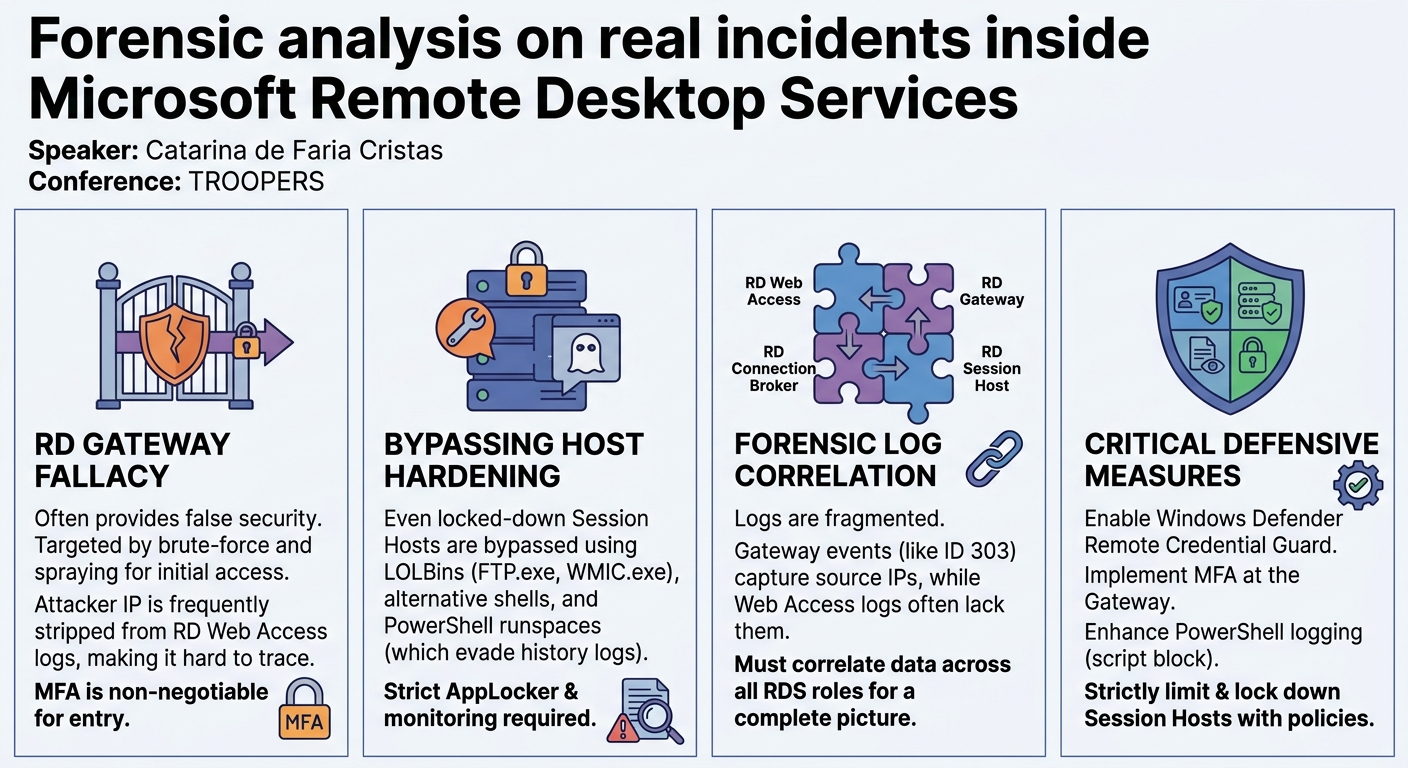
Cristas highlighted a critical gap in the cybersecurity landscape: a lack of consolidated, specific guidance for forensic analysis within RDS environments. Incident responders often find themselves navigating scattered information, making investigations unnecessarily complex and time-consuming. This problem is exacerbated by the common misconception that deploying an RD Gateway inherently secures the environment, when in reality, it merely shifts the attack surface without eliminating the underlying RDP vulnerabilities.
The historical context underscores the severity of this issue. In 2020, a proof-of-concept for a Denial of Service (DoS) exploit targeting RD Gateways quickly evolved into a Remote Code Execution (RCE) vulnerability, sending ripples through the cybersecurity community. More recently, in October 2022, the Venus ransomware threat actor was reported to be actively targeting RDS infrastructures. A quick scan using Shodan in May 2023 revealed approximately 43,000 potentially exposed RD Web Access servers, which typically front an RD Gateway, illustrating the vast attack surface available to adversaries.
To understand the attack and defense mechanisms, it's crucial to grasp the core components of an RDS deployment:
- RD Web Access: Provides users with a web portal to access remote desktops or applications, often allowing RDP configuration files to be downloaded.
- RD Gateway: The public-facing entry point, encapsulating RDP sessions in TLS and forwarding them to internal servers. It defines Connection Authorization Policies (CAPs) (who can connect) and Resource Authorization Policies (RAPs) (what resources they can access). Crucially, it prevents internal RDS components like session hosts from direct public exposure.
- RD Connection Broker: Responsible for forwarding RDP sessions to appropriate RD Session Hosts and can act as a load balancer. It also manages user reconnections to existing sessions.
- RD Session Host: The server where users' remote desktops or applications run. It supports both session-based virtualization and Virtual Desktop Infrastructure (VDI) deployments. User-specific files can be stored in User Profile Disks (UPDs), which are VHD-format files automatically mounted upon user login.
- RD License Host: A dedicated server managing the necessary RDS client access licenses.
A typical on-premises deployment places the public-facing RD Web Access and RD Gateway roles in a DMZ, with internal components residing within an Active Directory domain (a requirement since Windows Server 2012). This architecture, while designed for security, still presents multiple points of compromise if not meticulously secured and monitored.
Key Findings
▶ Watch: Demo: Enumerating users & brute-forcing credentials (10:20)
The talk highlighted several critical findings derived from both simulated attacks and real-world incidents, providing a holistic view of the RDS threat landscape. A primary finding is that the RD Gateway, despite its security benefits, often instills a false sense of security. Attackers commonly target the RD Gateway and RD Web Access servers first, leveraging techniques similar to regular RDP compromises, such as brute force and password spraying attacks, to obtain valid domain credentials. The RD Web Access server can even be exploited to identify valid domain user accounts without requiring a password, through techniques like anonymous authentication timing attacks.
A significant challenge for forensic analysis is the inconsistency of logging across different RDS components. For instance, the attacker's public IP address is often stripped from RD Web Access logs, making it difficult to trace initial access attempts solely from that source. However, the RD Gateway logs (specifically the Microsoft-Windows-TerminalServices-Gateway event log) are crucial, as they capture the source IP, bytes transferred, and session duration, offering invaluable insights into attacker activity.
The simulated attack scenarios demonstrated that even hardened RD Session Hosts can be bypassed. Common hardening measures, such as blocking cmd.exe and powershell.exe via Group Policy and AppLocker, can be circumvented using alternative command-line interpreters (e.g., cmd.exe from ReactOS), Living Off The Land Binaries (LOLBins) like FTP.exe and WMIC.exe, and executing PowerShell commands directly via PowerShell runspaces (e.g., from a C# project compiled with MSBuild). Furthermore, attackers can identify and leverage writable, authorized directories (like C:\Windows\Tasks) to execute their tools, bypassing AppLocker path restrictions. A critical forensic finding related to PowerShell runspaces is that commands executed this way do not appear in the PowerShell history file, making detection more challenging.
In real-world incidents, the talk revealed that threat actors exploit a combination of known vulnerabilities, misconfigurations, and social engineering. One case involved LockBit ransomware deployment after an attacker gained access via compromised employee credentials, exploiting an abusable certificate to escalate privileges and reach the domain controller. Another alarming case involved an RDS deployment on Google Cloud Platform (GCP) where RD Session Hosts were publicly exposed (bypassing the RD Gateway entirely) and compromised via a wrongfully configured service account with a weak, unchanged password. This allowed lateral movement, compromise of a second service account belonging to the Backup Operators group (granting remote access to the domain controller), and ultimately a DC Sync attack using Mimikatz, leading to LV ransomware deployment via GPO. These incidents underscore the devastating consequences of inadequate hardening, poor credential management, and insufficient monitoring.
Technical Deep Dive
▶ Watch: Demo: Bypassing AppLocker and command restrictions (23:00)
Understanding the technical underpinnings of RDS attacks and their detection requires a granular look at the methods and artifacts.
Initial Access and Credential Acquisition:
Attackers typically begin by enumerating exposed RDS components. An nmap scan on an RD Web Access server will reveal open ports like 80 and 443. By inspecting the RD Web Access login page, an attacker can identify the workspace ID hidden input field, which often contains the machine and domain names. This information, combined with OSINT for common username patterns (e.g., from LinkedIn), forms the basis for credential enumeration.
The talk demonstrated an anonymous authentication timing attack using a Metasploit module to identify valid domain user accounts. This technique leverages subtle timing differences in server responses to invalid vs. valid but incorrect password attempts. While this attack generates numerous failed logon events (Event ID 4625) in the security event log of the targeted RD Web Access server, the Metasploit module can still identify valid usernames based on response timing. Once valid usernames are identified, a subsequent brute-force or password spraying attack (also using Metasploit) attempts to guess passwords. Successful logons will generate Event ID 4624 on the RD Web Access server. Crucially, the attacker's public IP address is often absent from these RD Web Access logs.
Upon successful authentication, an attacker can download an RDP configuration file from the RD Web Access page. This file contains critical information, including the RD Connection Broker and RD Gateway addresses, and load balancing details. Tools like Remmina can then be used to establish an RDP session, with the connection initially directed to the Connection Broker, which then forwards it to an available RD Session Host. Attackers often configure shared folders during this connection to easily transfer their tools.
Forensic Artifacts for Initial Access:
- RD Web Access Server Security Event Log:
- Event ID 4625: Failed logon attempts (numerous during timing/brute-force attacks).
- Event ID 4624: Successful logons. Note that the
Subject UsernameandSubject Domain Nameindicate successful login via the web page, but the source IP will likely be stripped. - RD Gateway Server
Microsoft-Windows-TerminalServices-GatewayEvent Log: - Event ID 302: User connection authorization policy checks.
- Event ID 303: User connection/disconnection from an RD Session Host. This event is critical as it contains the attacker's public IP address, bytes transferred, bytes received, and the duration of the RDP session, providing a detailed overview of the attacker's activity.
- RD Connection Broker Server Event Logs: Contain events about received and processed connection requests, and the redirection of users to specific RD Session Hosts. A brief RDP session is established on the Connection Broker itself to facilitate forwarding.
- RD Session Host Security Event Log:
- Event ID 4624: Successful logons. A peculiar observation mentioned was that the
Workstation Namemight match the session host itself, but theIP Addresscould point to the RD Gateway, indicating an RDP connection from the Gateway to the session host. - Events related to User Profile Disks (UPDs) being mounted, revealing the path to user-specific registry files like
NTUSER.DATandUSRCLASS.DAT. - Chainsaw: The talk highlighted Chainsaw, an open-source tool developed by WithSecure, as instrumental for parsing lesser-known Windows event logs and identifying patterns indicative of brute-force attacks. A new version of Chainsaw was released to incorporate the detection opportunities discussed.
Bypassing Hardening on RD Session Hosts:
Session hosts are often hardened to limit user capabilities. Common restrictions include:
- Blocking
cmd.exeandpowershell.exevia Group Policy. - AppLocker rules preventing execution of unauthorized binaries or scripts, especially from user-writable directories.
- Disabling machine shutdown (as it's a shared host).
Attackers employ various techniques to circumvent these controls:
- Alternative Command Interpreters: Using
cmd.exefrom ReactOS (a free and open-source Windows implementation) can bypass AppLocker rules specific to the nativecmd.exe. - LOLBins: Living Off The Land Binaries are legitimate system executables that can be abused for malicious purposes. Examples include:
FTP.exe: Can be used with the!cmdcommand to execute arbitrary commands, providing a limited command-line interface.WMIC.exe: Thewmic process call create "cmd.exe /c <command>"command can execute commands, effectively bypassingcmd.exerestrictions.
- PowerShell Runspaces: If PowerShell itself is blocked, attackers can execute PowerShell commands directly within a PowerShell runspace by compiling a C# project (e.g., using
MSBuild.exe) that hosts the runspace. This method is stealthy as commands executed within a runspace do not appear in theConsoleHost_history.txtfile. - Identifying Writable Authorized Directories: AppLocker often allows execution from trusted directories like
C:\WindowsorC:\Program Files. Attackers can use PowerShell scripts (e.g.,Get-AppLockerPolicyto list policies, then a custom script to find writable paths) to identify subdirectories within these trusted paths that are also writable (e.g.,C:\Windows\Tasks), then copy their tools there for execution.
Detection Opportunities for Bypass Techniques:
- AppLocker Event Logs: Monitor for events indicating allowed or blocked executables and DLLs. Focus on unusual executions of LOLBins or attempts to run unauthorized binaries.
- PowerShell Event ID 4104: If PowerShell script block logging is enabled, this event can contain the content and path of executed scripts, even if run through a runspace (though the history file might be empty).
- Windows Defender/EDR: Monitor for detections of malicious activity or unusual process executions.
Lateral Movement and Privilege Escalation:
Once on a session host, attackers perform discovery, attempting to enumerate other machines in the domain and escalate privileges.
- Privilege Escalation: Tools like WinPwn might be attempted. If a CVE affecting the specific Windows version (e.g., a Windows 11 version from January 2023 was mentioned as vulnerable) is available, it can be exploited to gain
SYSTEMprivileges (e.g., using apopexploit with a process PID). - Lateral Movement via RDP: Attackers will seek out other machines allowing RDP connections (e.g., a Windows 11 workstation). Using credentials obtained earlier, they can RDP into these machines. An attempt at RDP hijacking (taking over an active administrator session) might be thwarted by modern Windows versions requiring a password for reconnection.
- Credential Dumping: If RDP hijacking fails, attackers with local admin privileges can retrieve registry hives to extract credentials. The talk mentioned recovering an MS cache hash of a domain administrator, which, while not usable in a pass-the-hash attack, can be cracked offline.
- Domain Controller Compromise: With cracked domain administrator credentials, the attacker can then log into the Domain Controller (DC), achieving full control over the domain.
Real-World Incident Insights:
The talk presented two compelling real-world cases:
- LockBit Ransomware on On-Premises RDS:
- Initial Access: Compromised employee credentials (no brute force).
- Lateral Movement: Drive sharing enabled on RD Session Host allowed direct tool deployment (e.g., Kerberoast, Rubeus). Attacker used PowerShell console (session host was not locked down) for extensive reconnaissance (checking CVEs like SamAccountName spoofing and ZeroLogon), credential access, and privilege escalation.
- Privilege Escalation: Suspected exploitation of an abusable certificate allowed lower-privileged users to escalate and reach the DC.
- Impact: LockBit ransomware deployed, likely via the compromised DC. Extensive lateral movement, including to an employee's laptop.
- LV Ransomware on GCP RDS:
- Initial Access: Publicly exposed RD Session Hosts (bypassing the RD Gateway). A misconfigured service account with a weak, never-changed password was used to log directly into session hosts.
- Lateral Movement: Network scans with Angry IP Scanner. Compromise of a second service account belonging to the Backup Operators group, which granted remote connectivity to the DC.
- Credential Access: A DC Sync attack was performed using Mimikatz on the host where the second service account was compromised. An EDR detected this but was not in blocking mode.
- Impact: LV ransomware deployed using a Group Policy Object (GPO) from the compromised DC.
These incidents underscore that attackers leverage a combination of technical vulnerabilities, misconfigurations, and human factors to achieve their objectives.
Demo / Proof of Concept
▶ Watch: Real-world incident: LockBit ransomware via RDS (32:00)
Catarina de Faria Cristas presented three distinct demonstrations to illustrate the attack lifecycle within an RDS environment, from initial access to lateral movement and privilege escalation.
Demo 1: Initial Access and Credential Acquisition
The first demo simulated an attacker gaining initial access to an RDS environment.
- Reconnaissance: The attacker started with an
nmapscan on the RD Web Access server, confirming open ports 80 and 443. They then navigated to the RD Web Access login page, inspected its HTML source, and extracted the domain name from theworkspace IDhidden input field. - User Enumeration: Using the discovered domain name and a list of potential usernames, the attacker employed a Metasploit module to perform an anonymous authentication timing attack against the RD Web Access server. This technique generated numerous failed logon events (Event ID 4625) but allowed the identification of valid domain user accounts based on subtle response timing differences.
- Password Brute-Forcing: With a list of valid usernames, the attacker then used the same Metasploit module for a password spraying attack, testing common passwords against the identified valid accounts. This eventually yielded valid credentials for a domain user.
- RDP Connection: The attacker then used the compromised credentials to log into the RD Web Access page, download an RDP configuration file, and used Remmina to establish an RDP session. The connection was directed to the RD Connection Broker, which then forwarded it to an RD Session Host (rdsh01). A shared folder was configured to mount the attacker's tools directly onto the session host.
- Initial Reconnaissance on Session Host: Once connected to
rdsh01, the attacker confirmed tool access and investigated the location of User Profile Disks (UPDs) via the registry, noting that they were stored on the Connection Broker. They also checked the running Windows Defender version.
Detection Observations from Demo 1:
- RD Web Access logs showed
Event ID 4625(failed logons) andEvent ID 4624(successful logons), but the attacker's public IP was absent. - RD Gateway logs (specifically
Microsoft-Windows-TerminalServices-Gatewayevents like303) were crucial, revealing the attacker's public IP, bytes transferred, and session duration. - RD Session Host logs showed
Event ID 4624with the source IP belonging to the RD Gateway, and events indicating the mounting of User Profile Disks.
Demo 2: Bypassing Hardening on RD Session Host
This demo illustrated how an attacker circumvents common hardening measures on a locked-down RD Session Host.
- Initial Obstacles: The attacker immediately faced restrictions: unable to shut down the machine,
cmd.exewas blocked by a Group Policy, andpowershell.exe(including its editor and both 32-bit/64-bit versions) was blocked by AppLocker. Attempts to run custom tools (like ReactOScmd.exe) also failed initially. - GPO Identification: The attacker used
gpresult /h gpresult.htmlto output applied Group Policies, confirming a rule preventing command prompt access. - CMD Bypass: To regain a command-line interface, the attacker leveraged LOLBins:
WMIC.exe: Usedwmic process call create "cmd.exe /c ipconfig"to execute a command, demonstratingWMIC's ability to bypasscmd.exerestrictions.FTP.exe: Executedftpand then used the!cmdcommand to obtain a basic shell.
- PowerShell Bypass: To execute PowerShell commands, the attacker used a C# project (
PowershellRunspace.exe) compiled with MSBuild.exe. This allowed direct execution of PowerShell commands within a runspace, bypassing AppLocker's restrictions onpowershell.exe. The attacker then usedGet-AppLockerPolicyto list the active AppLocker rules and determine directory restrictions. - Tool Execution Bypass: To run custom tools blocked by AppLocker, the attacker used a PowerShell script to identify writable directories that were also authorized by AppLocker (e.g.,
C:\Windows\Tasks). They then copied their ReactOScmd.exetoC:\Windows\Tasksand successfully executed it.
Detection Observations from Demo 2:
- AppLocker logs showed events for both allowed binaries (e.g.,
gpresult,ftp,wmic,msbuild) and blocked attempts (e.g.,cmd.exe,powershell.exe, initial custom tool attempts). - PowerShell Event ID 4104 (if enabled) would log the content of the PowerShell script used to find writable directories.
- Crucially, commands executed within the PowerShell runspace were noted not to appear in the
ConsoleHost_history.txtfile, making them harder to detect via traditional PowerShell logging.
Demo 3: Lateral Movement and Privilege Escalation
The final demo showcased post-compromise actions to expand control within the network.
- Privilege Escalation Attempt: The attacker attempted to escalate privileges on the session host using WinPwn, but it failed.
- Discovery: The attacker performed network discovery to enumerate other machines in the domain.
- Lateral Movement to Workstation: They identified a Windows 11 machine allowing RDP and used another set of compromised credentials (obtained during the initial brute-force) to RDP into it.
- Local Privilege Escalation on Workstation: The Windows 11 machine (a January 2023 version) was vulnerable to a specific CVE that allowed privilege escalation to
SYSTEM. The attacker copied an exploit (pop.exe) to the machine and used it with the PID of acmd.exeprocess to gainSYSTEMprivileges. - Credential Access Attempt: The attacker attempted to RDP hijack an active administrator session but was prompted for a password (due to modern Windows 11 security features). They then opted to retrieve registry hives to find credentials.
- Domain Controller Compromise: The attacker successfully recovered the MS cache hash of the domain administrator. For simplicity, the demo assumed this hash was cracked, allowing the attacker to successfully log into the Domain Controller, thus achieving full domain compromise.
These demos collectively illustrated a realistic attack chain, emphasizing the importance of multi-layered defenses and comprehensive logging across all RDS components.
Defensive Implications
▶ Watch: Key recommendations for securing RDS environments (38:00)
Securing Microsoft Remote Desktop Services (RDS) environments requires a multi-faceted approach, addressing initial access, lateral movement, and privilege escalation vectors. Based on the insights from the talk and real-world incidents, several critical defensive measures are recommended:
- Enable Windows Defender Remote Credential Guard: This feature protects RDP connections by preventing users' credentials from being left on the target server. It is crucial for mitigating Pass-the-Hash attacks and can thwart tools like Mimikatz from listing available provider credentials, significantly hindering RDP hijacking attempts.
- Implement Multi-Factor Authentication (MFA) on RD Gateway/Web Access: The RD Gateway is the primary public-facing entry point, and relying solely on passwords is insufficient. Deploying MFA at the RD Gateway or RD Web Access level (e.g., using Duo Authentication for Microsoft Remote Desktop Web and Gateway or Azure Multi-Factor Authentication) is paramount to prevent brute-force attacks and credential theft from leading to network compromise.
- Improve Logging and Monitoring: Enhance logging across all RDS components. Ensure that event logs are configured to capture a high volume of relevant security events. This includes enabling PowerShell script block logging (Event ID 4104) to capture the content of PowerShell commands, even those executed within runspaces, which might otherwise bypass traditional history files. Centralized log collection and analysis are essential for timely detection.
- Strictly Lock Down RD Session Hosts: These shared hosts are critical pivot points for attackers. Implement Group Policies and AppLocker to limit the damage a regular user can inflict. This includes:
- Blocking execution of
cmd.exeandpowershell.exe(and their respective editors). - Restricting execution of unsigned binaries or scripts from user-writable directories.
- Implementing whitelisting for approved applications and tools.
- Disabling unnecessary features and services. The goal is to severely limit an attacker's ability to run custom tools or abuse LOLBins.
- Keep All Operating Systems, Software, and Firmware Up to Date: Regular patching is fundamental. Many successful attacks, including privilege escalation and lateral movement, rely on exploiting known CVEs. Even the latest Windows versions can have vulnerabilities, so a robust patch management program is non-negotiable.
- Properly Segment Public-Facing Roles in a DMZ: The RD Web Access and RD Gateway roles, being internet-facing, must be placed in a Demilitarized Zone (DMZ). Strict firewall rules should limit communication between the DMZ and the internal network to only the necessary ports and protocols, minimizing the attack surface.
- Place Internal RDS Servers Behind a VPN or RD Gateway with MFA: RD Session Hosts and Connection Brokers should never be directly exposed to the internet. Access should be mediated through a VPN or the RD Gateway, with MFA enforced at the entry point to prevent dictionary attacks and credential leakage exploitation.
- Deploy Cloud Bastions for Cloud Infrastructure: For RDS deployments in cloud environments (like GCP, Azure, AWS), leverage cloud-native bastion services. These provide secure, just-in-time access to virtual machines, further protecting public-facing roles and servers from direct exposure.
- Strictly Limit the Usage of RDP and Other Remote Desktop Services Within the Network: RDP, while convenient, is notoriously difficult to detect lateral movement over, especially if not adequately monitored. Limit RDP access to only necessary administrative tasks and specific users. Consider alternative, more auditable remote access solutions for internal administrative activities where possible. Regularly review and audit RDP access permissions.
By implementing these recommendations, organizations can significantly enhance the security posture of their RDS environments, making them more resilient against sophisticated cyberattacks and improving their ability to detect and respond to incidents.
Key Takeaways
- RDS environments present a complex and attractive target for adversaries, necessitating specialized forensic knowledge and defensive strategies due to their critical role in remote access and often public exposure.
- The RD Gateway provides a false sense of security; MFA is non-negotiable. While it encapsulates RDP in TLS, it remains a prime target for credential-based attacks. Multi-factor authentication on the RD Gateway and RD Web Access is crucial for preventing initial compromise.
- Hardening RD Session Hosts is paramount to preventing lateral movement. Attackers will bypass common restrictions using LOLBins, alternative shells, and PowerShell runspaces. Comprehensive AppLocker policies, GPOs, and strict execution controls are essential, alongside enhanced logging for these bypass attempts.
- Logging inconsistencies require careful correlation across multiple RDS components. The attacker's true source IP may be stripped from RD Web Access logs but will be present in RD Gateway events. Incident responders must correlate logs from the Web Access, Gateway, Connection Broker, and Session Host to build a complete picture of an attack.
- Attackers leverage a blend of credential theft, bypass techniques, and known CVEs. Real-world incidents demonstrate that misconfigurations (e.g., publicly exposed session hosts, weak service account passwords), compromised credentials, and unpatched vulnerabilities are frequently combined to achieve domain compromise and deploy ransomware.
- Cloud RDS deployments introduce unique misconfiguration risks. While cloud platforms offer security features, incorrect configuration (e.g., publicly exposed session hosts, over-privileged service accounts) can negate these benefits and lead to severe breaches, as seen in the GCP incident.
About the Speaker(s)
Catarina de Faria Cristas is an Incident Response Consultant at WithSecure, formerly known as F-Secure Business, based in Helsinki, Finland. With a strong background in cybersecurity, she previously served as a security researcher and malware analyst at F-Secure and WithSecure. For several years, Catarina has also contributed to the academic community as a guest lecturer at The Finnish Aalto University, where she imparts her expertise on Windows forensics and Android malware analysis. Her experience in both proactive research and reactive incident response provides her with a comprehensive understanding of threat actor methodologies and effective defense strategies.
Reviews
Dr. Zero (Offensive Security Researcher) — SOLID
Cristas delivers a highly competent, necessary compilation of RDS forensic artifacts and standard bypasses. It doesn't drop any novel attack vectors, but it gives incident responders the exact Event IDs they need when Microsoft's fragmented logging inevitably screws them over.
Heather Calloway (CISO) — SOLID
This is a highly competent operational talk that exposes a strategic blind spot in how we architect remote access. It proves that deploying an RD Gateway does not solve the underlying risk of RDP, it just moves the goalposts.