Reportly - keep your head in the clouds. A new Azure visualization tool for analyzing user activities.
Sapir Federovsky (Security Researcher · Semperis)
TROOPERS23 · Day 2 · Defense & Management · Defense & Management
Overview
In the evolving landscape of cloud security, efficient incident response (IR) in Azure Active Directory (Azure AD) remains a significant challenge for security teams. The sheer volume and scattered nature of logs across various portals and services often hinder rapid analysis and correlation, making it difficult to understand user activities over time. Sapir Federovsky, a Security Researcher at Semperis, addresses this critical pain point with the introduction of Reportly, a novel visualization tool designed to streamline Azure AD IR investigations. This talk, delivered at TROOPERS, highlights a new bypass for a previously identified Azure AD synchronization abuse and demonstrates how Reportly can be instrumental in detecting and analyzing such sophisticated attacks.
Key moments
- 0:00 Speaker introduction, tool purpose, and agenda
- 6:00 Explaining the SMTP/Soft Match abuse bypass
- 8:00 Challenges of Azure AD incident response without tools
- 9:27 Introducing Reportly's user-friendly interface and unified view
- 13:40 Reportly showing application admin privilege escalation scenario
- 17:30 Reportly detecting the SMTP/soft match abuse
- 19:45 Future features and development plans for Reportly
- 22:15 Q&A: Graph API integration and suspicious event heuristics
Reportly - keep your head in the clouds. A new Azure visualization tool for analyzing user activities.
Speakers: Sapir Federovsky, Security Researcher, Semperis
Conference: TROOPERS
YouTube: https://www.youtube.com/watch?v=phVvgzOK1Wg
Overview
In the evolving landscape of cloud security, efficient incident response (IR) in Azure Active Directory (Azure AD) remains a significant challenge for security teams. The sheer volume and scattered nature of logs across various portals and services often hinder rapid analysis and correlation, making it difficult to understand user activities over time. Sapir Federovsky, a Security Researcher at Semperis, addresses this critical pain point with the introduction of Reportly, a novel visualization tool designed to streamline Azure AD IR investigations. This talk, delivered at TROOPERS, highlights a new bypass for a previously identified Azure AD synchronization abuse and demonstrates how Reportly can be instrumental in detecting and analyzing such sophisticated attacks.
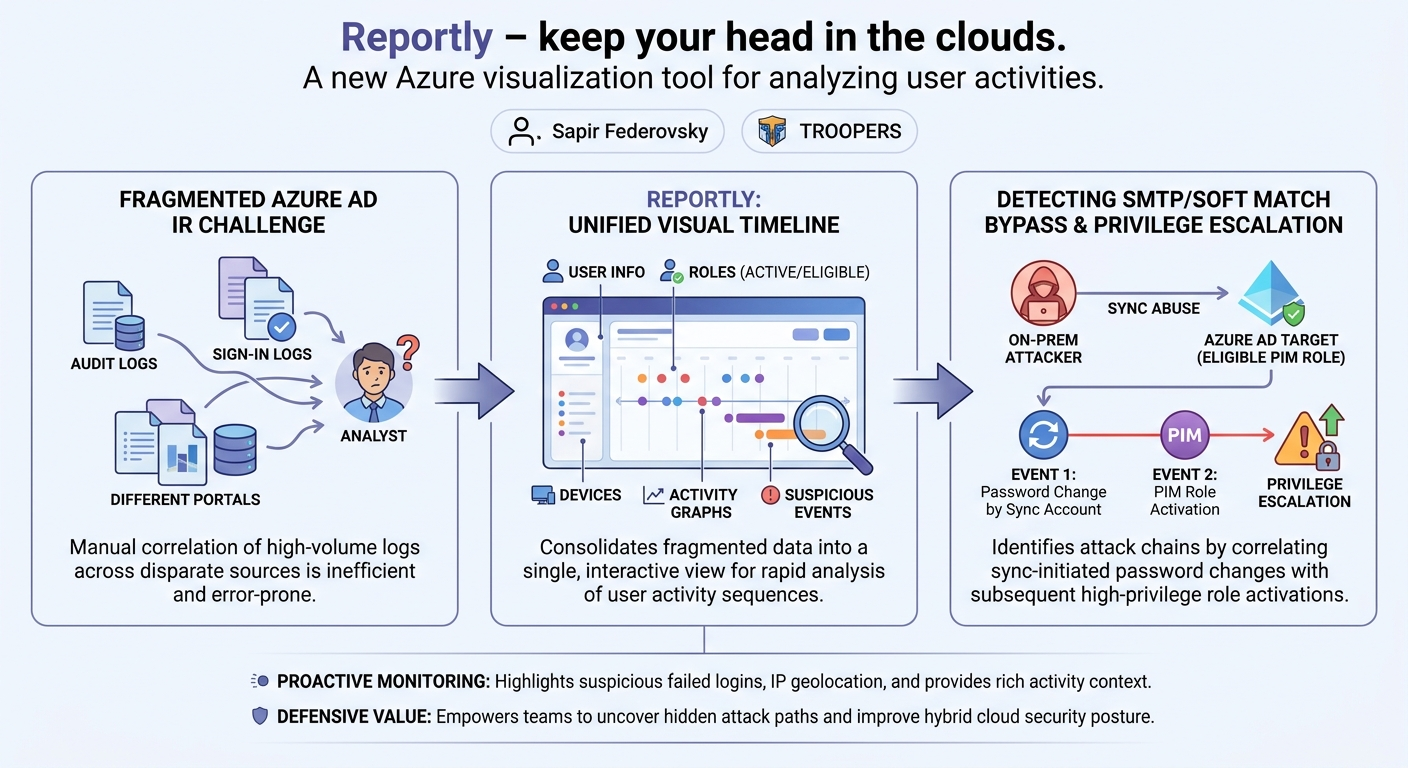
Federovsky's presentation meticulously details the complexities faced by IR professionals, from navigating disparate audit and sign-in logs to piecing together a coherent timeline of events. Reportly aims to consolidate this fragmented information into a single, intuitive interface, providing a comprehensive overview of a user's actions, roles, and associated entities. By presenting activity timelines, suspicious login attempts, and detailed contextual information, Reportly empowers defenders to quickly identify anomalous behavior and uncover attack paths that might otherwise remain hidden within mountains of log data.
The significance of this work extends beyond just a new tool; it sheds light on persistent vulnerabilities within hybrid cloud environments and offers a tangible solution for enhancing security posture. Federovsky’s discovery of a bypass for the SMTP/soft match abuse, targeting users with eligible high-privilege roles, underscores the continuous need for robust monitoring and analytical capabilities. Reportly emerges as a vital asset for organizations seeking to improve their detection and response capabilities against increasingly sophisticated cloud-native and hybrid attacks.
Background
▶ Watch: Speaker introduction, tool purpose, and agenda (0:00)
The genesis of Reportly stems from a critical observation: performing effective incident response in Azure AD is inherently problematic due to the fragmented nature of its data and interfaces. Federovsky articulates the common struggles faced by IR teams, including the necessity to navigate countless pages within the Azure portal to gather basic user information, roles, groups, applications, and devices. The audit logs themselves are presented across three separate tabs (Activity, Targets, Modify), requiring extensive scrolling and manual correlation, which often leads to missed information and analyst fatigue. A particularly frustrating aspect highlighted is the segregation of authentication logs and sign-in logs, forcing investigators to manually correlate events across different pages to understand a user's actions post-login. This cumbersome process makes it nearly impossible to gain a quick, holistic understanding of a user's activities over a given timeframe.
Prior to introducing Reportly, Federovsky delves into a specific SMTP/soft match abuse that she discovered, which serves as a compelling use case for her tool. The SMTP/soft match process is a synchronization mechanism in hybrid environments, where an existing Azure AD user is linked to a newly created on-premises Active Directory user. This synchronization relies on matching two key attributes: the user principal name (UPN) and the proxy address (typically an email address with an SMTP: prefix). Crucially, when this sync occurs, the Azure AD user's password is overwritten by the on-premises user's password.
This vulnerability was first brought to light by Dirk-Jan Mollema (Dirk-Jan) at TROOPERS 2018, where he demonstrated how an attacker with control over an on-premises environment could create a user with matching UPN and proxy address to an existing high-privileged Azure AD user (e.g., a Global Administrator). Upon synchronization, the on-premises password would overwrite the Azure AD user's password, granting the attacker full control. Microsoft subsequently addressed this specific scenario by preventing on-premises synchronization into high-privileged Azure AD users. However, Federovsky's discovery reveals a bypass that targets users eligible for, but not actively assigned, high-privilege roles. This nuance forms the basis of her attack demonstration and the subsequent analysis using Reportly, underscoring the persistent challenges in securing hybrid cloud identities.
Key Findings
▶ Watch: Challenges of Azure AD incident response without tools (8:00)
Federovsky's research yields two primary contributions: the discovery of a critical bypass for the previously patched SMTP/soft match abuse, and the development of Reportly, a tool designed to address the systemic challenges of Azure AD incident response.
The SMTP/soft match bypass represents a significant privilege escalation vector. While Microsoft patched the direct synchronization into active high-privileged Azure AD roles, Federovsky identified that this protection does not extend to users who are eligible for such roles. An eligible role assignment in Azure AD, typically managed through Privileged Identity Management (PIM), allows a user to temporarily elevate their privileges when needed. The attacker's strategy is as follows:
- Identify an unsynchronized Azure AD user who is eligible for a high-privileged role (e.g., Global Administrator, Application Administrator).
- From a compromised on-premises environment, create an Active Directory user with an identical UPN and proxy address to the target Azure AD user.
- Upon the next synchronization cycle, the on-premises user's password overwrites the Azure AD user's password.
- If the Azure AD user does not have Multi-Factor Authentication (MFA) configured or if the attacker can bypass it, they can then log in as the compromised user.
- Finally, the attacker activates the eligible high-privileged role via PIM, thereby escalating their privileges in Azure AD. This technique leverages a gap in Microsoft's prior fix, demonstrating that the protection did not account for the "eligible" state of roles.
Reportly, the tool presented, directly addresses the practical difficulties of detecting and investigating such attacks. Its key findings regarding Azure AD IR are:
- Consolidated View: Reportly provides a "single pane of glass" for all relevant user information, including general details, group memberships, active and eligible roles, owned objects (groups, applications, service principals), and registered devices. This eliminates the need to navigate dozens of different Azure portal pages.
- Timeline Visualization: The tool generates interactive graphs that visualize initiated and targeted activities, as well as sign-in attempts, over a specified time range. This timeline-based approach is crucial for understanding the sequence of events during an attack.
- Activity-Specific Detail: When hovering over an activity in the graphs, Reportly displays parsed, relevant details specific to that activity (e.g., for an "add user" activity, it shows the name of the added user; for "eligible member to role," it shows the member and the role). This rich context is often buried or difficult to extract from raw logs.
- Suspicious Event Highlighting: Reportly includes a dedicated section for "suspicious failed logins" and plans to expand this to other activities, proactively identifying events that might indicate brute-force attacks, credential stuffing, or other malicious activity.
- IP Information and Geolocation: For each IP address used in sign-in events, Reportly provides geolocation data, associated applications, and the frequency of use, aiding in the detection of logins from unusual locations.
- MFA Status: The tool quickly indicates whether a user has MFA registered, which is a critical piece of information for assessing the exploitability of certain attacks, including the SMTP/soft match bypass.
These findings collectively highlight Reportly's potential to transform Azure AD incident response from a tedious, error-prone manual process into a more efficient, insightful, and proactive capability.
Technical Deep Dive
▶ Watch: Reportly showing application admin privilege escalation scenario (13:40)
Reportly is designed as a Python-based tool that leverages the Microsoft Graph API to pull and process a comprehensive set of data related to a specific Azure AD user within a defined timeframe. The core functionality revolves around aggregating fragmented log data and user attributes into a unified, interactive HTML report.
At its foundation, Reportly interacts with two primary log sources: the audit logs and the sign-in logs. These logs, while comprehensive, are notoriously difficult to parse and correlate manually within the Azure portal. Reportly automates this aggregation, drawing out specific details for different types of activities and presenting them contextually.
The data acquisition process, in its current Proof of Concept (POC) version, requires users to create an Azure application and assign it the necessary read permissions to access the required data. This application then acts as the authentication mechanism for Reportly. Federovsky acknowledges this as a hurdle and plans to streamline the authentication process to a simpler username and password model in future iterations.
Once authenticated, Reportly collects the following categories of information about the target user:
- General User Information: User principal name, creation date, and synchronization status (including on-premises UPN if synchronized).
- Group Memberships: Details about all groups the user is a member of, including any roles assigned to those groups.
- User Roles: Separated into eligible roles (assigned via PIM) and active roles. This distinction is critical for identifying potential privilege escalation paths.
- Owned Objects: A list of high-privileged groups, applications, and service principals that the user owns or manages.
- Devices: Information about devices registered to the user, which can sometimes reveal new or suspicious endpoints.
- Activity Logs (Initiated): This section generates a graph displaying all activities initiated by the target user within the specified time range. Each activity point on the graph is interactive; hovering over it reveals specific details parsed by Reportly. For example, an "add user" activity will show the name of the user added, and an "eligible member to role" activity will display both the member and the role involved. This granular parsing requires a unique parser for each activity type, and Federovsky is continually expanding the number of supported activities.
- Activity Logs (Targeted): Similar to initiated activities, this graph visualizes activities where the target user was the subject or target. This helps identify actions performed on the user, such as password changes or role modifications, and can also show if the user was both the initiator and target (e.g., updating their own profile).
- Sign-in Logs: This interactive graph allows filtering for both successful and failed login attempts. For failed logins, it displays the error code, reason, application used, and timestamp. For successful logins, it shows the resource accessed, status, and time. The ability to zoom in on specific timeframes within these graphs helps pinpoint critical events.
- IP Information: Reportly extracts all unique IP addresses associated with the user's sign-in events. For each IP, it provides geolocation, the applications used, the number of times the IP was observed, and the resources accessed. This is invaluable for detecting suspicious access locations.
- Suspicious Failed Logins: A static list that highlights specific failed login events deemed potentially malicious, such as repeated incorrect password attempts leading to account lockout. This serves as an initial filter for analysts.
- MFA Information: Details on whether the user has registered MFA, a crucial security control to verify.
The tool's backend relies on these specific parsers to translate the raw JSON output from the Graph API into human-readable, contextual information presented in the HTML report. This modular approach allows for continuous expansion of supported activities and the depth of information extracted. The ultimate goal is to provide a "user-friendly interface" that offers an "easier overview" and a clear "timeline" for understanding attack flows, addressing the fundamental challenges of Azure AD IR.
Demo / Proof of Concept
▶ Watch: Reportly detecting the SMTP/soft match abuse (17:30)
Federovsky presents Reportly through several live demonstrations, showcasing its capabilities in analyzing various user activities and identifying attack patterns.
1. General Report Walkthrough:
The first demonstration provides a comprehensive overview of a standard Reportly report for a non-malicious user. Federovsky walks through the various tabs and visualizations:
- User Information: Displays the user's UPN, creation date, and whether they are synchronized (including the on-premises UPN).
- Groups: Lists group memberships and associated roles.
- Roles: Separates eligible and active roles, highlighting potential PIM-related privileges.
- Owned Objects: Shows high-privileged applications or service principals owned by the user.
- Devices: Lists registered devices, which can sometimes reveal anomalous device registrations.
- Initiated Activities Graph: Shows events performed by the user. Federovsky demonstrates hovering over activities like "add user" to see the name of the user added, or "eligible member to role" to identify the role and member involved.
- Targeted Activities Graph: Illustrates events performed on the user. For instance, an "update user" activity might show the user as both initiator and target if they updated their own profile.
- Sign-in Graph: Allows filtering for successful and failed logins. For failed attempts, it displays error codes, reasons, and applications. For successful ones, it shows resources accessed. The ability to zoom in on specific timeframes is emphasized.
- IP Information: Provides geolocation and usage statistics for IPs seen in sign-ins.
- Suspicious Failed Logins: A static list of notable failed login events, acting as a quick filter for potential brute-force attempts.
- MFA Information: Indicates the user's MFA registration status.
2. Application Administrator to Global Administrator Privilege Escalation:
This scenario demonstrates a common privilege escalation path and how Reportly helps uncover it. The attack involves an Application Administrator escalating to Global Administrator. An Application Administrator can add permissions to any application but cannot grant admin consent for those permissions to act on behalf of the application. The bypass involves finding an existing application that already has the required permissions and was previously consented to by a Global Administrator, then adding a secret to it. With this secret, the attacker can then act as the application and perform high-privileged actions.
Reportly identifies this by:
- Showing the user (
up_admin) is an Application Administrator. - In the initiated activities graph, an immediate clue is a "consent to application failed" event for an application (
test44), preceded by "update" events for the same application. This suggests the attacker tried to grant permissions and failed. - Immediately after, successful events for a different application (
high_drive_app) appear, specifically "update application certificates and secret management." This strongly indicates the attacker added a secret to the pre-consented application after failing with the first one, a clear sign of the privilege escalation. - The report also shows a series of "failed logins" with an "account locked" error, suggesting a brute-force attack led to the initial compromise, followed by a successful login just before the attack flow began.
3. Solving the SMTP/Soft Match Abuse:
This demonstration focuses on the SMTP/soft match bypass previously described. The report is generated for a user named the_almost_admin, who is eligible for the Application Administrator role.
Key indicators in Reportly's output include:
- The user is shown as "synchronized" under the on-premises information, which is a prerequisite for the attack.
- In the targeted activities graph, a crucial event is "change user password" where the initiator is identified as the sync account. This is highly suspicious, as it indicates the password was changed as a result of the synchronization process, not by the user themselves. The report also shows the on-premises UPN, helping identify the source of the sync.
- Following the password change, events related to "role activation using PIM" are observed. This directly correlates with the final step of the abuse, where the attacker activates the eligible high-privileged role after gaining access.
By presenting these specific events in a correlated timeline, Reportly effectively highlights the entire attack chain, from the password overwrite via sync to the subsequent role activation, providing clear leads for further investigation in the on-premises environment.
Defensive Implications
▶ Watch: Q&A: Graph API integration and suspicious event heuristics (22:15)
The insights and capabilities offered by Reportly, coupled with the demonstrated SMTP/soft match bypass, provide several crucial defensive implications for organizations operating in hybrid Azure AD environments:
- Prioritize MFA for All Users, Especially Eligible High-Privilege Roles: The SMTP/soft match bypass heavily relies on the absence or bypass of MFA. Even if a user is merely eligible for a high-privilege role, ensuring MFA is enforced for their account activation via PIM significantly mitigates this specific attack vector. Defenders must review PIM configurations to ensure MFA is a mandatory requirement for role activation.
- Monitor Sync Account Activities Closely: The sync account (often
Azure AD Connector a similar service account) is a critical component in hybrid environments. Any activity initiated by this account that involves changing user passwords, especially for users not previously synchronized, should be considered highly suspicious and investigated immediately. Reportly's ability to highlight "change user password" events initiated by the sync account is a powerful detection mechanism.
- Implement Robust Monitoring for Role Activations (PIM): Organizations should establish alerts for all PIM role activations, particularly for high-privileged roles. Anomalous activations (e.g., outside business hours, from unusual IPs, or by users who rarely activate these roles) warrant immediate investigation. Reportly directly aids this by visualizing "role activation using PIM" events.
- Regularly Audit Eligible Role Assignments: Attackers specifically target users eligible for high-privilege roles, even if they aren't actively assigned. Regular audits of PIM assignments, ensuring the principle of least privilege is applied to eligible roles, can reduce the attack surface.
- Proactive Use of Reportly for User Activity Analysis: Beyond incident response, Reportly can be used proactively by security teams for routine audits of suspicious users or to establish baselines of normal user behavior. Its consolidated view and timeline approach simplify the identification of outliers or anomalous activity patterns.
- Enhance Brute-Force and Credential Stuffing Detection: The demo highlighted account lockouts due to failed logins preceding an attack. Implementing strong password policies, account lockout thresholds, and advanced threat protection features (like Azure AD Identity Protection) can help detect and prevent initial compromise attempts. Reportly's "suspicious failed logins" section serves as a valuable indicator.
- Investigate Unusual IP Addresses and Geolocation: Reportly's IP information, including geolocation and associated applications, provides critical context for sign-in events. Defenders should configure alerts for logins from rare or blacklisted geographic locations or from IPs not typically associated with the user.
- Understand and Monitor Application Permissions and Secrets: The Application Administrator escalation vector underscores the importance of carefully managing application permissions and secrets. Regularly audit applications with high-privileged consents and monitor for the addition of new secrets to existing applications, especially by users with administrative roles.
By integrating tools like Reportly into their security operations and focusing on these defensive strategies, organizations can significantly improve their ability to detect, analyze, and respond to sophisticated attacks targeting Azure AD identities and hybrid cloud environments.
Key Takeaways
- Azure AD Incident Response is Challenging: Manual correlation of fragmented audit and sign-in logs across multiple Azure portal pages is inefficient and prone to human error, making it difficult to understand user activity timelines.
- Reportly Consolidates and Visualizes Azure AD Data: The tool centralizes user information, roles, groups, devices, and activity logs into a single, interactive HTML report, providing a clear timeline of initiated and targeted actions.
- New SMTP/Soft Match Bypass Discovered: While direct sync to active high-privileged Azure AD users is patched, attackers can still synchronize into users eligible for high-privilege roles via PIM, leading to privilege escalation if MFA is not enforced or bypassed.
- Reportly Detects Complex Attack Chains: The tool successfully identifies the SMTP/soft match bypass by highlighting password changes initiated by the sync account followed by PIM role activations, and uncovers Application Administrator privilege escalation by correlating failed consent attempts with successful secret additions to pre-consented applications.
- Essential for Proactive Monitoring and Reactive IR: Reportly's features, including suspicious failed login highlighting, IP geolocation, and activity-specific details, empower defenders to both proactively audit user behavior and reactively investigate incidents more effectively.
- Future Enhancements Will Improve Usability and Coverage: Planned features include streamlined authentication, more extensive suspicious event highlighting, additional user information, and expanded activity parsing, promising to make Reportly an even more robust tool for cloud security.
About the Speaker(s)
Sapir Federovsky is a Security Researcher at Semperis, a company specializing in hybrid identity protection. Before joining Semperis, Sapir spent over four years serving in the Israeli Air Force as a security researcher, gaining valuable experience in the field. She holds a bachelor's degree in computer science. In her free time, Sapir is an active developer, having contributed to projects like aad internals and developed an Android application, simple neural network models, and an HTTP plugin, in addition to creating Reportly. Her passion for development and security research is evident in the innovative tool she presented, which aims to simplify incident response in complex Azure AD environments.
Reviews
Dr. Zero (Offensive Security Researcher) — SOLID
Federovsky delivers a desperately needed Graph API parser to fix Azure's garbage IR visibility, but the real star is the identity research. Microsoft patched Dirk-Jan's 2018 soft-match attack for active admins, but completely missed PIM-eligible roles, and she caught them slipping.
Heather Calloway (CISO) — SOLID
An excellent operational talk that introduces a practical incident response tool while exposing a dangerous gap in Microsoft's hybrid identity protections. Federovsky proves that 'eligible' admin roles in PIM are just as vulnerable to on-prem sync attacks as active ones. Worth a direct watch by your SOC lead and your identity architecture team.