A New Era of Brute Forcing in Active Directory
David Horak
Blue Team Con Online 2026 · Day 1 · Blue Team Con Online
Overview
In this insightful talk from Blue Team Con Online, security engineer and team leader David Horak unveils a critical design flaw within Active Directory (AD) replication that can be exploited for persistent brute-forcing, effectively bypassing configured account lockout policies. Titled "A New Era of Brute Forcing in Active Directory," Horak's presentation highlights that despite the industry's shift towards cloud solutions and passwordless authentication, on-premises Active Directory remains the backbone of countless organizations, including critical state infrastructures. His extensive experience auditing over 30 companies, from small businesses to large enterprises, provides a grounded perspective on the security realities of these environments, often contrasting sharply with theoretical best practices.
Key moments
- 0:46 Speaker intro and real-world AD challenges
- 2:40 Announcing the 'new era' topic and AD 'flow'
- 4:00 Evolution of password length recommendations (NIST, CIS)
- 6:00 Explaining the single domain account policy limitation
- 7:00 Introducing Fine-Grained Password Policies (FGPP)
A New Era of Brute Forcing in Active Directory
Speakers: David Horak
Conference: Blue Team Con Online
YouTube: https://www.youtube.com/watch?v=3NyVMy8-U14
Overview
In this insightful talk from Blue Team Con Online, security engineer and team leader David Horak unveils a critical design flaw within Active Directory (AD) replication that can be exploited for persistent brute-forcing, effectively bypassing configured account lockout policies. Titled "A New Era of Brute Forcing in Active Directory," Horak's presentation highlights that despite the industry's shift towards cloud solutions and passwordless authentication, on-premises Active Directory remains the backbone of countless organizations, including critical state infrastructures. His extensive experience auditing over 30 companies, from small businesses to large enterprises, provides a grounded perspective on the security realities of these environments, often contrasting sharply with theoretical best practices.
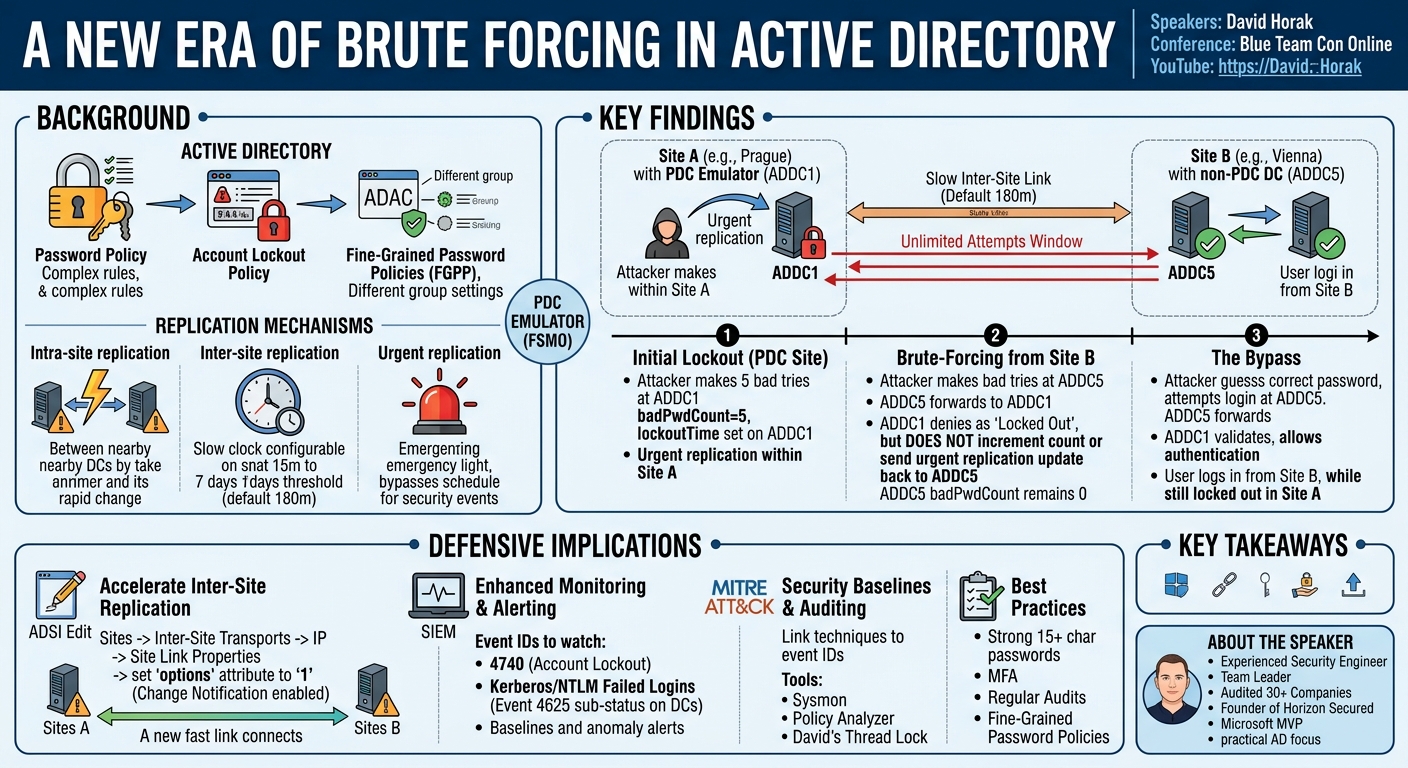
The core of Horak's discovery lies in how Active Directory handles account lockouts and replication across multiple sites, particularly when a Primary Domain Controller (PDC) emulator is involved. While urgent replication is designed to propagate critical security events like account lockouts almost instantly, Horak demonstrates a scenario where a specific interaction between a locked-out account on the PDC and subsequent authentication attempts on a non-PDC domain controller in a different site can lead to a state where an account appears locked out but is, in fact, still vulnerable to brute-force attacks. This "feature, not a vulnerability," as described by Microsoft, presents a significant blind spot for defenders if not properly understood and mitigated.
This talk is crucial for any security practitioner managing Windows environments, especially those with multi-site Active Directory deployments. Horak not only meticulously details the technical mechanics of this flaw but also provides actionable defensive strategies, including specific configuration changes and monitoring recommendations. His emphasis on practical, real-world security for Active Directory underscores its enduring importance and the continuous need for vigilance against sophisticated attack techniques.
Background
▶ Watch: Speaker intro and real-world AD challenges (0:46)
To understand the subtle yet impactful flaw David Horak discusses, it's essential to first grasp the foundational components of Active Directory account management and replication. Active Directory relies on Account Policies to enforce security settings for user accounts. These policies are broadly categorized into Password Policy, Account Lockout Policy, and Kerberos Policy.
The Password Policy dictates requirements such as password age, length, and complexity. While older recommendations might have been lax (e.g., NIST's former 8-character minimum), current standards, such as NIST's updated guidance, recommend at least 15 characters for single-factor authentication. In some critical infrastructures, like those in the Czech Republic, specific decrees mandate even longer passwords—12 characters for regular users and up to 17 characters for privileged accounts. A significant challenge with traditional Active Directory is that a domain can only have one account policy, typically defined in the Default Domain Policy. This limitation makes it difficult to apply different password or lockout requirements to various user groups, such as administrators versus standard users.
To address this, Microsoft introduced Fine-Grained Password Policies (FGPP), configurable via the Active Directory Administrative Center (ADAC). FGPPs allow administrators to create multiple password and lockout policies and apply them to specific users or groups, offering much-needed flexibility.
The Account Lockout Policy is a critical defense mechanism against brute-force attacks. It defines how many unsuccessful login attempts (e.g., five) will lock out an account and for how long (e.g., 15 minutes). For this policy to be effective, consistent monitoring of events like Event ID 4740 (account locked out) and failed password attempts is paramount.
Active Directory also relies on a sophisticated replication mechanism to ensure data consistency across all Domain Controllers (DCs). There are three primary types:
- Intra-site replication: Occurs between DCs within the same Active Directory site. It's fast, using a change notification system where changes are replicated almost immediately, typically within 15 seconds.
- Inter-site replication: Occurs between DCs in different Active Directory sites (e.g., Prague and Vienna). By default, this is much slower, with a replication threshold configurable from 15 minutes up to 10,080 minutes (7 days). This delay is a critical factor in Horak's finding. While it can be configured to use change notification via ADSI Edit, it’s not the default.
- Urgent replication: This is an immediate replication mechanism reserved for critical security events, such as account lockouts, password changes, and modifications to account policies. It bypasses the standard replication schedule.
A key architectural component is the PDC (Primary Domain Controller) emulator Flexible Single Master Operation (FSMO) role holder. In a multi-DC environment, the PDC emulator is the authoritative DC for handling bad password attempts and synchronizing time. When a non-PDC DC receives a bad password attempt, it forwards this information to the PDC emulator. The PDC emulator then increments the bad password count and, if the lockout threshold is met, performs the lockout and triggers urgent replication to notify other DCs within its own site. This centralized role of the PDC emulator in account lockouts is crucial to understanding the replication flaw.
Key Findings
▶ Watch: Announcing the 'new era' topic and AD 'flow' (2:40)
David Horak's central discovery reveals a significant design characteristic within Active Directory that can be exploited to bypass account lockout policies under specific multi-site replication conditions. While urgent replication is designed to immediately propagate critical security events like account lockouts across the entire AD forest, Horak found that this mechanism does not always behave as expected, particularly when an account is already locked out on the PDC emulator.
The core finding is as follows:
- PDC Emulator Authority: The PDC emulator is the central authority for tracking bad password attempts and initiating account lockouts. All other domain controllers forward bad password attempts to the PDC.
- Urgent Replication Scope: When the PDC emulator locks an account, it triggers urgent replication for this event. However, this urgent replication primarily notifies other DCs within the same site as the PDC emulator.
- The Flaw: If an account is locked out on the PDC emulator (e.g., in Site A), and an attacker then attempts to authenticate to a different domain controller in another site (e.g., Site B) where inter-site replication is set to its default, slower schedule (e.g., 180 minutes):
- The non-PDC DC in Site B will forward the bad password attempt to the PDC emulator in Site A.
- The PDC emulator, seeing that the account is already locked out, will deny the authentication request. Critically, it does not increment the bad password count further, nor does it send an urgent replication update back to the non-PDC DC in Site B regarding the lockout state or the non-incremented bad password count.
- The non-PDC DC in Site B, therefore, remains unaware of the current bad password count and does not update its own internal state for that account. It might report that the account is locked out based on the authentication failure from the PDC, but it does not effectively enforce the lockout for subsequent attempts.
- This creates a window of opportunity, lasting for the duration of the inter-site replication interval, during which an attacker can continue to make bad password attempts against the DC in Site B. Although the authentication will fail (because the PDC denies it), the bad password count on the non-PDC DC in Site B will not increase, and the PDC will not trigger a new lockout event.
- Crucially, if the attacker eventually guesses the correct password during this window, the non-PDC DC in Site B will successfully authenticate the user, even though the account remains officially locked out on the PDC emulator and other DCs in Site A.
Horak confirmed this behavior with Microsoft, who classified it as a "feature" or "design characteristic" of Active Directory, rather than a vulnerability. This distinction emphasizes that the behavior is consistent with AD's design, but its security implications, when exploited, are profound. It effectively means that the account lockout policy, a fundamental defense against brute-forcing, can be circumvented across AD sites if default inter-site replication settings are maintained.
Technical Deep Dive
▶ Watch: Evolution of password length recommendations (NIST, CIS) (4:00)
The technical underpinnings of this brute-forcing bypass are rooted in the specific interactions between Active Directory's replication model, the PDC emulator FSMO role, and the handling of authentication failures for locked-out accounts.
Let's break down the normal flow and then how it deviates:
Normal Account Lockout Flow (Intra-site or with fast inter-site replication):
- A user attempts to log in with an incorrect password to a Domain Controller (DC) (DC1).
- DC1 forwards this bad password attempt to the PDC emulator.
- The PDC emulator increments the
badPwdCountattribute for that user account. - If
badPwdCountreaches the configuredlockoutThreshold(e.g., 5), the PDC emulator sets thelockoutTimeattribute for the account, effectively locking it out. - The PDC emulator then triggers urgent replication for the
lockoutTimeattribute change. This urgent replication ensures that all other DCs, especially those within the same site, are immediately informed of the account's locked status. Subsequent authentication attempts to any DC will then correctly report the account as locked out.
The Brute-Force Bypass Scenario (Multi-site with default inter-site replication):
Consider a setup with two Active Directory sites: Prague (containing the PDC emulator, ADDC1) and Vienna (containing a regular DC, ADDC5). The inter-site replication link between Prague and Vienna is configured with its default, slow schedule, typically 180 minutes. The account lockout threshold is set to 5 bad password attempts, with a lockout duration of 15 minutes.
- Initial Lockout in PDC Site: An attacker or legitimate user intentionally (or unintentionally) makes 5 bad password attempts against
ADDC1(the PDC emulator) for a target account (e.g.,T0 Dave).
- The
badPwdCountonADDC1reaches 5. ADDC1sets thelockoutTimeforT0 Dave, locking the account.ADDC1triggers urgent replication, notifying other DCs in the Prague site of the lockout.- At this point,
T0 Daveis locked out across the Prague site, and any attempt to log in there will fail.
- Brute-Forcing from Another Site: The attacker then shifts their brute-force attempts to
ADDC5in the Vienna site.
- An incorrect password attempt for
T0 Daveis made againstADDC5. ADDC5forwards this bad password attempt to the PDC emulator,ADDC1, in Prague.ADDC1receives the request. It checks the accountT0 Daveand finds thatlockoutTimeis set (i.e., the account is locked out).- **Crucially,
ADDC1does not incrementbadPwdCountfurther because the account is already locked out.** More importantly,ADDC1simply denies the authentication and does not trigger an urgent replication event for the lockout state back toADDC5. It essentially tellsADDC5"authentication failed, account is locked out," but without providing any updated state information thatADDC5could use to enforce the lockout locally or update itsbadPwdCount. ADDC5receives the authentication failure. It might display a message indicating the account is locked out, but internally, its localbadPwdCountforT0 Daveremains at 0 (or whatever it was before the lockout was propagated via the slow inter-site link).- The attacker can continue to make thousands of bad password attempts against
ADDC5. Each attempt will be forwarded toADDC1, denied, and reported back as "account locked out." However, thebadPwdCountonADDC5will never increment beyond 0, andADDC1will not initiate a new lockout-related urgent replication. - The Bypass: If the attacker, during this window (which can last up to the 180-minute inter-site replication interval), guesses the correct password for
T0 Daveand attempts to log in viaADDC5: ADDC5forwards the correct password toADDC1.ADDC1validates the password as correct. Despite the account still being technically locked out (itslockoutTimeis still set),ADDC1allows the authentication to proceed for the correct password.- The user successfully logs in through
ADDC5. - Meanwhile, the account remains locked out on
ADDC1and other DCs in the Prague site, and itsbadPwdCountonADDC5never increased.
This behavior allows an attacker to conduct a brute-force attack indefinitely against a non-PDC DC in a separate site, effectively bypassing the lockout policy, until the inter-site replication eventually updates ADDC5 with the true locked-out state. This is particularly dangerous for accounts with long-standing, weak passwords, like many legacy service accounts, as the attacker has a prolonged, unthrottled window to guess the credentials.
From a monitoring perspective, while badPwdCount might not increase on the non-PDC DC, the system will still generate numerous authentication failure events. Specifically, Event ID 4740 indicates an account lockout. However, for the bad password attempts themselves, defenders should monitor for Kerberos and NTLM failed authentication attempts (e.g., specific sub-status codes related to Event ID 4625 on DCs, as 4625 on endpoints can be noisy). A sudden peak in these failure events from a specific source IP targeting a single account, even if the account appears locked out, would be a strong indicator of this attack.
Demo / Proof of Concept
▶ Watch: Explaining the single domain account policy limitation (6:00)
David Horak meticulously demonstrated this Active Directory brute-force bypass using a controlled lab environment. The setup consisted of:
- Two Active Directory Sites:
DC Prague: HostingADDC1, which held the PDC emulator FSMO role. This DC was running Windows Server Core.DC Vienna: HostingADDC5, a standard domain controller.- Inter-Site Replication: The link between
DC PragueandDC Viennawas configured with the default replication interval of 180 minutes. This slow replication was critical for the demonstration. - Account Lockout Policy: Set to a threshold of 5 bad password attempts and a lockout duration of 15 minutes.
- Target Account: A privileged account named
T0 Dave, which an attacker would naturally target.
The demonstration proceeded through the following steps:
- Initial State Verification: Horak first showed
T0 Dave's attributes in Active Directory, confirmingbadPwdCountwas 0 and the account was not locked out. He also confirmedADDC1was the PDC emulator. - Intentional Lockout (PDC Site - Prague):
- Horak simulated four bad password attempts against
T0 DaveonADDC1(the PDC in Prague). - He verified that
badPwdCountforT0 DaveonADDC1incremented to 4. - A fifth bad password attempt was then made against
ADDC1. This locked out theT0 Daveaccount. - Verification showed
badPwdCountas 5 andlockoutTimepopulated forT0 Davein the Prague site.
- Brute-Force Attempt (Non-PDC Site - Vienna):
- Horak then switched to
ADDC5in the Vienna site. - He made a bad password attempt for
T0 DaveagainstADDC5. - The system immediately responded with "The referenced account is currently locked out and may not be logged on to." This message, while seemingly correct, was misleading.
- Crucially, Horak then showed
T0 Dave's attributes onADDC5. ThebadPwdCountonADDC5remained 0, and itslockoutTimewas not yet set (as the 180-minute inter-site replication had not occurred). This confirmed thatADDC5was not locally counting the bad password attempts. - He continued with several more bad password attempts against
ADDC5. Each attempt produced the "account locked out" message, but thebadPwdCountonADDC5never increased.
- The Bypass - Successful Login:
- After these failed attempts, Horak entered the correct password for
T0 DaveonADDC5in Vienna. - To the surprise of many (and the "What the hell?" reaction from Horak himself), the login was successful! The user
T0 Davewas able to log in from the Vienna site. - Immediate verification in Active Directory showed that
T0 Davewas still locked out in the Prague site (PDC emulator), withbadPwdCountat 5 andlockoutTimestill active. However, onADDC5in Vienna,badPwdCountstill showed 0, and thelockoutTimewas not set, explaining why the login was permitted.
This demonstration powerfully illustrated that an attacker can effectively brute-force an account indefinitely via a non-PDC DC in a separate site, despite the account being officially locked out on the PDC emulator. The non-PDC DC reports "account locked out" based on the PDC's denial but does not enforce the lockout or count bad passwords locally, creating a significant window of vulnerability until the slow inter-site replication eventually propagates the true lockout state.
Defensive Implications
▶ Watch: Introducing Fine-Grained Password Policies (FGPP) (7:00)
David Horak's findings highlight a critical area where Active Directory's default configurations can leave organizations vulnerable to persistent brute-force attacks. Mitigating this flaw requires a combination of architectural changes and robust monitoring.
1. Accelerate Inter-Site Replication (Primary Mitigation):
The most effective defense against this specific bypass is to eliminate the window of opportunity created by slow inter-site replication. This can be achieved by configuring inter-site replication to use the change notification system, making it behave like intra-site replication.
- How to implement: This configuration change is performed using ADSI Edit. Navigate to the
Sitescontainer, thenInter-Site Transports, thenIP. Locate your specific IP site link object (e.g.,DEFAULTIPSITELINK). Open its properties and modify theoptionsattribute. Set its value to 1. This change forces immediate replication of changes, including lockout events, across sites. - Considerations: While this significantly enhances security, it will increase network traffic between sites. However, as Horak notes, with modern network infrastructures, the impact is usually negligible and well worth the security improvement. Microsoft itself has shared this as a recommended configuration in some forums, suggesting it's a known best practice for environments with multiple sites.
2. Enhanced Monitoring and Alerting for Failed Authentication Attempts:
Even with accelerated replication, it's crucial to have comprehensive monitoring in place. The attack, while bypassing the lockout count on the non-PDC DC, still generates numerous failed authentication events.
- Event ID 4740: This event ID explicitly indicates an account lockout. While the attack aims to prevent this from being universally enforced, monitoring this event is still foundational.
- Kerberos and NTLM Failed Attempts: Focus on specific event IDs related to failed Kerberos and NTLM authentication attempts on your Domain Controllers. Horak mentions that Event ID 4625 (Account failed to log on) can be noisy on client machines, so it's more effective to monitor the DC-specific Kerberos/NTLM failure events. Look for unusual spikes or patterns in these events, especially targeting a single account from a consistent source IP, even if the "account locked out" message is observed.
- Establish Baselines: Implement a baseline for normal failed login attempts in your environment. Any activity significantly above this baseline should trigger an alert. This involves collecting logs for a period (e.g., a month), analyzing the normal patterns, and then configuring alerts for deviations.
- SIEM Integration: Ensure all relevant security logs from Domain Controllers are forwarded to a Security Information and Event Management (SIEM) solution. The SIEM should be configured with correlation rules to detect suspicious patterns that might indicate this brute-force attack.
- Threat Hunting: Regularly hunt for patterns indicative of this attack, such as:
- Repeated authentication failures for a single account from a single source IP.
- Authentication failures reported as "account locked out" but without a corresponding increase in
badPwdCounton the local DC, or without thelockoutTimeattribute being set locally.
3. Implement Security Baselines and Auditing:
- Proper Log Configuration: Configure Active Directory and Windows operating system auditing policies to capture all necessary security events. Default logging is often insufficient. Tools like Sysmon can enrich event data. Horak recommends creating auditing baselines based on the MITRE ATT&CK framework, aligning specific techniques and procedures of known threat actors to relevant event IDs. He also mentioned his free tool, Thread Lock, for this purpose.
- Policy Analyzer: When applying security baselines or GPO changes, use Microsoft's Policy Analyzer tool to understand the effective state and potential impact before deployment. This helps prevent unintended disruptions to production environments.
- Least Privilege and FGPP: While not directly addressing the replication flaw, enforcing Least Privilege and utilizing Fine-Grained Password Policies (FGPP) remain critical. FGPPs allow for stronger, longer passwords for privileged and service accounts, making them inherently harder to brute force.
4. General Active Directory Security Best Practices:
- Strong Password Policies: Implement strong, long passwords (e.g., 15+ characters) for all accounts, and even longer for privileged accounts.
- Multi-Factor Authentication (MFA): Deploy MFA wherever possible, especially for privileged accounts and remote access, as it fundamentally thwarts password-based attacks.
- Regular Audits: Conduct regular security assessments of your Active Directory environment to identify misconfigurations and vulnerabilities.
- Stay Informed: Keep abreast of new Active Directory attack techniques and defensive strategies.
By implementing these defensive measures, organizations can significantly reduce their exposure to this specific brute-force bypass and enhance the overall security posture of their Active Directory environment.
Key Takeaways
- Active Directory's Enduring Relevance: Despite the push towards cloud and passwordless solutions, on-premises Active Directory remains a critical component of most enterprise infrastructures, demanding continuous security vigilance.
- Replication Delays Create Brute-Force Windows: Default, slow inter-site replication intervals (e.g., 180 minutes) can be exploited to bypass account lockout policies. An attacker can continue brute-forcing an account via a non-PDC domain controller in a separate site, even if the account is officially locked out on the PDC emulator.
- PDC Emulator's Unique Behavior: When an account is already locked out on the PDC emulator, subsequent bad password attempts from other sites do not trigger an increment of the
badPwdCountor a new urgent replication event for the lockout state. This allows the non-PDC DC to appear to enforce the lockout while still allowing a correct password to authenticate. - Mitigation through Accelerated Replication: The primary defense is to configure inter-site replication to use the change notification system (setting the
optionsattribute to1on the IP site link in ADSI Edit), ensuring immediate propagation of lockout states across all DCs. - Robust Monitoring is Essential: Defenders must implement comprehensive monitoring and alerting for failed authentication attempts, specifically focusing on Kerberos and NTLM failed login events on Domain Controllers, as well as Event ID 4740 for account lockouts. Baselines are crucial to identify anomalous spikes.
- Beyond Defaults: Relying solely on default Active Directory configurations or basic log collection is insufficient. Proactive security involves configuring detailed auditing, establishing baselines, and leveraging tools like Sysmon and frameworks like MITRE ATT&CK for enhanced detection and response.
About the Speaker(s)
David Horak is a highly experienced security engineer and team leader based in the Czech Republic. His professional responsibilities, and those of his team, revolve around analyzing and securing Windows infrastructures and Active Directory Domain Services for a diverse range of clients. Throughout his career, David has conducted security assessments for over 30 companies, spanning from small businesses to large enterprises, including state critical infrastructures. This extensive hands-on experience has provided him with a realistic understanding of the security challenges prevalent in production environments, often highlighting the disparity between theoretical security concepts and practical implementation.
In addition to his professional role, David is the founder of Horizon Secured, a platform where he shares practical resources related to Active Directory and Windows security through articles, tools, guides, and courses. His commitment to contributing back to the community has earned him the prestigious Microsoft Most Valuable Professional (MVP) award. David is known for his practical, no-nonsense approach to cybersecurity, emphasizing the importance of securing foundational technologies like Active Directory.
Reviews
Dr. Zero (Offensive Security Researcher) — STRONG ACCEPT
Horak delivers a genuinely useful finding about AD inter-site replication behavior that most defenders don't know exists. It's not a zero-day, it's not a CVE, but it's a real operational gap that could let an attacker brute-force a locked account indefinitely across site boundaries. The demo is clean, the mitigation is concrete, and the talk respects your time.
Heather Calloway (CISO) — STRONG ACCEPT
This is operationally consequential work. Horak documents a design characteristic in AD replication that lets attackers brute-force locked-out accounts indefinitely via non-PDC DCs in separate sites. If you run multi-site AD with default inter-site replication intervals, your lockout policy is theater until you fix it.