Web-based Password Managers Under Attack – A Bitwarden Case Study
Julien Bedel (Pentester/Red Teamer · Orange Cyberdefense)
BruCON 0x11 · Day 1 · Gouden Carolus
Overview
In this compelling talk at BruCON, Julien Bedel, a Pentester and Red Teamer at Orange Cyberdefense, sheds light on the significant security challenges posed by web-based password managers in post-compromise scenarios. Titled "Web-based Password Managers Under Attack – A Bitwarden Case Study," Bedel's presentation dissects various sophisticated techniques attackers can leverage to extract sensitive credentials, using Bitwarden as a primary, yet illustrative, example. The core message resonates beyond Bitwarden, emphasizing that these attack vectors are largely generic and applicable across the landscape of cloud-synced, browser-integrated password management solutions.
Key moments
- 3:00 Why web-based password managers are targeted
- 9:00 Bitwarden's internal data storage and access
- 16:00 Extracting decryption key from memory dump
- 21:00 JavaScript injection via Chrome remote debugging
- 29:00 Backdooring extensions via secure preferences file
- 36:00 Immutable laws of security; protecting admin workstations
- 48:30 Q&A: Hardware-based key protection using TPMs
Web-based Password Managers Under Attack – A Bitwarden Case Study
Speakers: Julien Bedel, Pentester/Red Teamer, Orange Cyberdefense
Conference: BruCON
YouTube: https://www.youtube.com/watch?v=aAdD2z6uA7w
Overview
In this compelling talk at BruCON, Julien Bedel, a Pentester and Red Teamer at Orange Cyberdefense, sheds light on the significant security challenges posed by web-based password managers in post-compromise scenarios. Titled "Web-based Password Managers Under Attack – A Bitwarden Case Study," Bedel's presentation dissects various sophisticated techniques attackers can leverage to extract sensitive credentials, using Bitwarden as a primary, yet illustrative, example. The core message resonates beyond Bitwarden, emphasizing that these attack vectors are largely generic and applicable across the landscape of cloud-synced, browser-integrated password management solutions.
The talk is particularly relevant for security professionals, red teams, and blue teams alike, as it moves beyond theoretical vulnerabilities to demonstrate practical, real-world exploitation methods. Bedel's research highlights that while password managers significantly enhance user convenience and credential hygiene, they also consolidate valuable targets for adversaries once a system is compromised. Understanding these advanced extraction techniques is crucial for developing proactive defense strategies and hardening critical assets, especially administrative workstations that often house the "crown jewels" of an organization's secrets.
Bedel's work serves as a stark reminder of the "immutable laws of security," asserting that no system is truly secure once an attacker gains code execution. The presentation aims to educate the audience on how attackers operate, enabling defenders to anticipate threats and build more resilient security postures, rather than falling into the trap of believing any single tool is an impenetrable fortress against a determined adversary.
Background
▶ Watch: Why web-based password managers are targeted (3:00)
Julien Bedel's journey into password manager exploitation began with his extensive work on KeePass, a desktop-based solution. During his penetration testing and red teaming engagements at Orange Cyberdefense, he frequently encountered KeePass, leading to the development of tools like KeePwn and KeyReborn to extract passwords from its databases. However, a noticeable shift in client environments prompted Bedel to broaden his research: more and more organizations were migrating to web-based password managers.
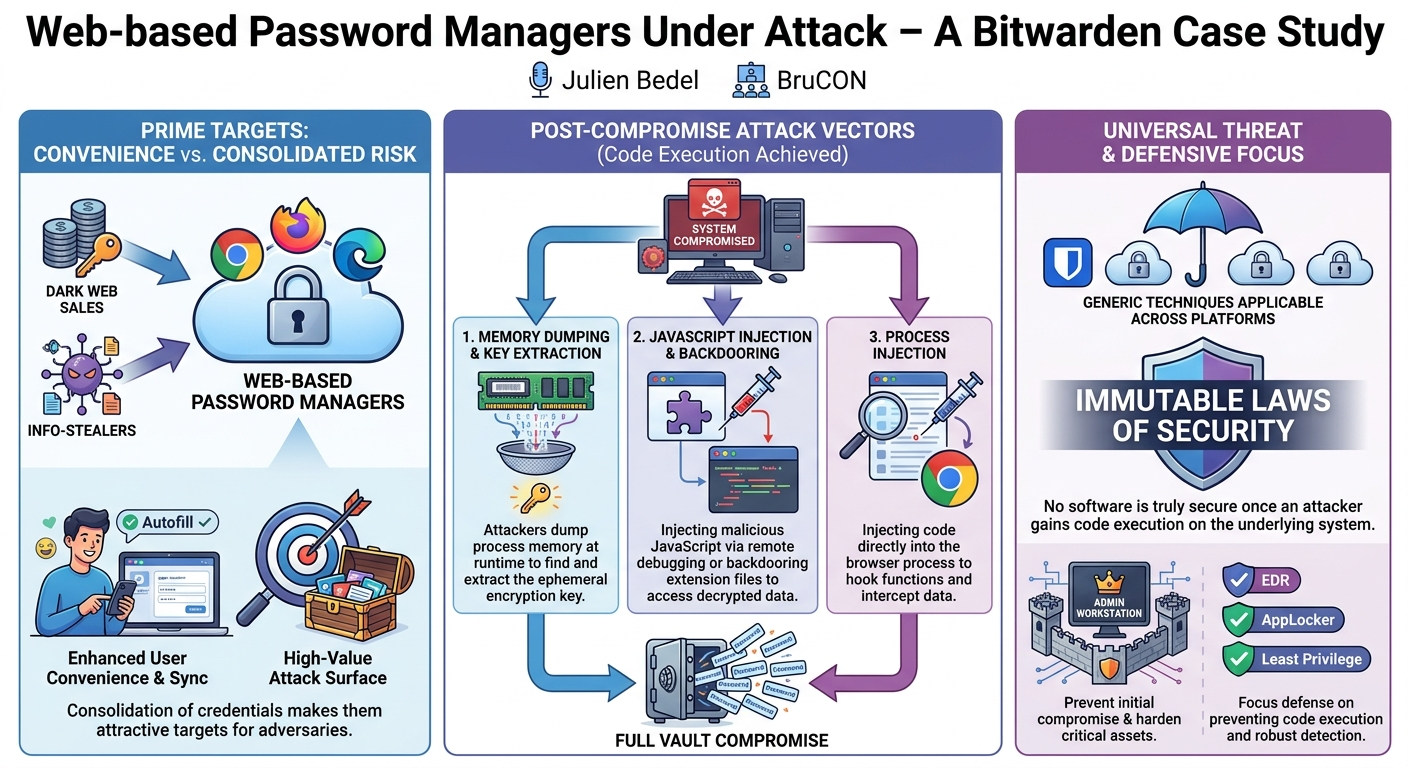
This transition is driven by several compelling advantages: cloud access for easy synchronization across devices, cross-platform compatibility (mobile, Linux, Windows), and the convenience of browser extensions with features like autofill. While these benefits enhance user experience and productivity, they also make these solutions increasingly attractive targets for threat actors. Bedel presented examples of this trend, including dark web markets where access to Bitwarden vaults is openly sold, and info-stealers that specifically target browser extension IDs associated with popular password managers like Bitwarden and LastPass. These observations underscore the critical need to understand how attackers exploit these platforms.
To conduct his research, Bedel selected Bitwarden as a case study for several reasons. It is one of the most popular password managers, estimated to hold approximately 25% of the market share, comparable to LastPass and KeePass. Its popularity is attributed to its compliance with various regulatory requirements, particularly in Europe, and its open-source nature, which often instills greater trust in the security community. Bitwarden offers various client applications (mobile, web, desktop), all interacting with a common backend, but Bedel's focus, reflecting common corporate environments, was on the web extension with its autofill feature. The chosen attack scenario is critical: a post-compromise situation where the attacker already has command execution capability on the target machine. This could be achieved through phishing, lateral movement, or other means, often targeting administrator workstations to gain access to critical network secrets. For the demonstrations, Cobalt Strike was used as the command and control (C2) interface, though any C2 framework could serve the same purpose. The target environment comprised the latest versions of Bitwarden, Chrome (the most popular browser), and Windows 11, with the user utilizing a password and a Time-Based One-Time Password (TOTP) for authentication.
Key Findings
▶ Watch: Extracting decryption key from memory dump (16:00)
Bedel's research meticulously deconstructs the Bitwarden authentication and data handling processes to identify critical data points vulnerable to extraction once an attacker has a foothold on the system. Drawing insights from Bitwarden's whitepaper, he outlined the core mechanism: a user logs in with an email and password, which are processed by a cryptographic function to derive a stretched master key and a master password hash. The master password hash, combined with multi-factor authentication (MFA), authenticates the user to the Bitwarden server. This communication is secured via bearer tokens. Upon successful authentication, the server returns the encrypted database, a JSON file containing encrypted credentials. This database is then decrypted locally using the stretched master key, making the plaintext passwords accessible to the user.
Crucially, Bedel identified several high-value data elements that become accessible at various stages of this process, each presenting an opportunity for an attacker:
- Bearer Token: Used to authenticate subsequent requests to the Bitwarden server, potentially allowing an attacker to impersonate the user.
- Encrypted Database: The JSON file containing all encrypted vault entries. While encrypted, it's a critical component that, if paired with the decryption key, unlocks the entire vault.
- Encryption Key (Stretched Master Key): The symmetric key required to decrypt the entire database. This key is paramount for full vault compromise.
- Decrypted Database: The plaintext JSON structure containing all usernames, passwords, and other sensitive information.
These elements are stored in different locations within the browser environment. The local storage and session storage might hold parts of the encrypted data or tokens. However, the most critical elements—the decryption key and the decrypted database itself—are primarily available at runtime within JavaScript variables, specifically when the user has unlocked their vault. This temporary presence in memory, rather than persistent storage on disk, makes memory a prime target for attackers. Bedel's key finding is that while preventing direct access to these runtime variables is challenging, understanding their ephemeral nature and location is fundamental to developing effective extraction techniques. The goal, therefore, shifts to capturing these elements when they are most vulnerable: in memory, during active use of the password manager.
Technical Deep Dive
▶ Watch: JavaScript injection via Chrome remote debugging (21:00)
Julien Bedel demonstrated several sophisticated attack vectors, each leveraging different aspects of the browser and operating system to extract Bitwarden credentials. These techniques are designed for a post-compromise scenario where the attacker already has command execution on the target machine.
Attack Vector 1: Memory Dumping and Encryption Key Extraction
The first major technique focuses on extracting the encryption key from memory. While previous research (like the Pandora tool) demonstrated extracting cleartext passwords from memory dumps, this often yields only partial results. Bedel's approach aimed for the entire database.
- Memory Dump Acquisition: Attackers can obtain a memory dump of the browser process (specifically the Chrome process launched with the
--extension-processargument for the Bitwarden extension). This can be achieved using legitimate Windows tools like Task Manager or ProcDump, or even less obvious LOLBins (Living Off the Land Binaries) like the Steam game launcher, which also has process dumping capabilities. Preventing process dumping is inherently difficult due to the multitude of methods available. - Encryption Key Pattern Discovery: Bedel developed a methodology to find the 32-byte encryption key within these memory dumps. This involved:
- Dumping process memory under various conditions (different Windows versions, Chrome versions, Bitwarden databases).
- Identifying known encryption keys within these dumps.
- Analyzing the bytes immediately before and after the known keys to discover recurring patterns.
- Using statistical analysis to refine a regular expression (regex) that could reliably identify encryption key candidates. Bedel noted that the regex doesn't need to be perfectly precise; even a few hundred candidates are acceptable, as they can be brute-forced offline against the encrypted database.
- Attack Plan for Memory Extraction:
- Step 1: Obtain Encrypted Database: The encrypted database (a JSON file) is stored on disk in the browser's local storage and is accessible from a non-administrator account. Tools like Cobalt Strike can easily retrieve this file.
- Step 2: Wait for Vault Unlock: The attacker waits for the user to unlock their Bitwarden vault, as this is when the decryption key is loaded into memory.
- Step 3: Dump Process Memory: At this point, the attacker dumps the memory of the relevant Chrome process.
- Step 4: Parse and Decrypt: A custom tool, using the developed regex, parses the memory dump to find encryption key candidates. These candidates are then tested against the previously acquired encrypted database. Once the correct key is found, the tool decrypts the entire database, yielding all stored credentials in a well-formatted JSON file.
Attack Vector 2: JavaScript Execution and Backdooring
This vector exploits the fact that JavaScript running within the extension's context has access to all storage locations (local, session) and runtime variables, including the decrypted database and decryption key.
- JavaScript Payload: A simple JavaScript snippet can access
chrome.storageto retrieve encrypted ciphers and the decryption key from local and session storage. This payload is sufficient to extract the entire vault if executed in the correct context. - Backdooring Extension Files: Key files like
main.js(frontend) andbackground.js(backend) contain functions related to database decryption. By injecting a payload into these functions, an attacker can automatically extract the decrypted database (e.g., by logging theivariable, which holds the decrypted database) and exfiltrate it to local storage or a webhook.
Bedel detailed two methods to achieve JavaScript execution/backdooring:
Sub-Technique 2.1: Chrome Remote Debugging
- Mechanism: Chrome offers a WebSocket API for remote debugging, essentially providing full access to the browser's developer tools and, by extension, the entire browser context. This feature can be enabled via command-line arguments (e.g.,
--remote-debugging-port). - Bypass for Patched Versions: While Chrome patched this feature to prevent its abuse by requiring a non-default user data directory, Bedel demonstrated a bypass: an attacker can duplicate the existing user profile and then launch Chrome with the debugging parameters pointing to this duplicated profile.
- Attack Plan:
- Duplicate User Directory: A Cobalt Strike snippet can copy the user's Chrome profile directory.
- Backdoor Chrome Shortcut: The attacker modifies existing Chrome shortcuts to include the
--remote-debugging-portand--user-data-dirarguments, pointing to the duplicated profile. - Wait for Vault Unlock: After the user relaunches Chrome via the backdoored shortcut and unlocks their vault.
- Remote Debugging Access: The attacker sets up a SOCKS proxy (e.g., with Cobalt Strike) to access the remote debugging API on the target machine. They then query the API endpoint to get a list of WebSocket URLs, identifying the one associated with the Bitwarden extension's
background.js. - Execute JavaScript: Using a WebSocket client, the attacker connects to the identified URL and sends a JSON payload containing their JavaScript (e.g., to print
chrome.session.storage). The response will include the decryption key, which can then be used to decrypt the database offline.
Sub-Technique 2.2: Extension Backdooring via Secure Preferences File
- Challenge: Directly modifying extension files like
background.jsfails because Chrome performs integrity checks, flagging the extension as corrupted. - Solution: Unpacked Extension Sideloading: Chrome's "developer mode" allows loading "unpacked extensions" from disk, bypassing the web store. This configuration is stored in the
Secure Preferencesfile, which also contains integrity checks. - Secure Preferences File Manipulation: Bedel explained that the
Secure Preferencesfile's integrity checks can be reproduced and bypassed, a technique described in prior research. The attacker needs the user's Security Identifier (SID), which is easily obtainable. - Attack Plan:
- Drop Backdoored Extension: The attacker drops a modified, unpacked Bitwarden extension (containing their JavaScript payload) onto the target's disk.
- Update Secure Preferences: The
Secure Preferencesfile is downloaded, modified to point to the attacker's unpacked extension and enable developer mode, and its integrity checks are recomputed. The modified file is then uploaded back to the target. - Wait for Vault Unlock: When the user next unlocks their vault, the backdoored extension is loaded automatically. The JavaScript payload executes, immediately exfiltrating the decrypted database (e.g., via a webhook callback, showing base64-encoded database data).
Attack Vector 3: Process Injection
This is a classic technique, still highly effective. It involves injecting and executing arbitrary code within the context of the Chrome process itself.
- Mitigation Bypass: While Chrome has several mitigations against process injection, Bedel noted that these can often be bypassed through various means (e.g., COM hijack was mentioned as one possibility, though not detailed).
- Capabilities Post-Injection: Once code is executing within Chrome, the attacker can:
- Parse Memory: Similar to the first technique, but with direct in-process access.
- Function Hooking: Intercept calls to Windows API functions (e.g., file I/O functions like
ReadFileorCreateFile). - Attack Plan for Process Injection:
- Inject into Chrome: The attacker injects a DLL or shellcode into the target Chrome process.
- Hook File I/O: They hook functions involved in reading extension files.
- On-the-Fly Modification: When Chrome attempts to read a critical file like
main.js, the hook intercepts the call. The attacker's injected code then replaces the legitimate JavaScript content with a backdoored version, also adjusting the reported file size to match the new content. - Profit: The browser loads the backdoored JavaScript, which executes the attacker's payload (e.g., exfiltrating the decrypted database).
Generality of Attacks
A crucial point emphasized by Bedel is the generality of these attack techniques. While Bitwarden and Chrome were used as case studies, the underlying principles apply broadly:
- Memory Parsing: Any password manager needs to hold its encryption key in memory to decrypt the database at runtime. It's a matter of finding the correct memory patterns for other solutions (e.g., LastPass, Keeper).
- JavaScript Execution: All web-based extensions have frontend and backend JavaScript components. Adapting the JavaScript payload for a different manager is required, but the execution methods remain valid.
- Browser Debugging Features: Similar debugging interfaces (e.g., for Firefox, potentially using
XPI sideloadingfor extensions) often exist, requiring only parameter adjustments. - Process Injection: The fundamental ability to hook browser functions and alter runtime behavior is a constant across browsers.
These techniques highlight that the vulnerability often lies not in specific flaws of the password manager itself, but in the inherent trust boundaries (or lack thereof) within the operating system and browser environment once an attacker achieves code execution.
Demo / Proof of Concept
▶ Watch: Immutable laws of security; protecting admin workstations (36:00)
Julien Bedel provided live demonstrations and detailed explanations of the Proof of Concept (PoC) for each major attack vector, primarily leveraging Cobalt Strike for C2 operations and custom tools written in Python.
Memory Dumping and Key Extraction Demo
- Retrieving Encrypted Database: Using Cobalt Strike's built-in capabilities, Bedel showed how to easily download the
data.jsonfile, which contains the encrypted Bitwarden database, from the user's local storage directory. This file is accessible even from a non-administrator account. - Dumping Chrome Process Memory: The next step involved waiting for the target user to unlock their Bitwarden vault. Once unlocked, Bedel demonstrated using Cobalt Strike to execute ProcDump (or a similar utility) to create a memory dump of the specific Chrome process associated with the Bitwarden extension. He highlighted that the correct process could be identified by the
--extension-processargument. - Offline Decryption: The memory dump and the encrypted database were then fed into a custom Python tool. This tool implemented the regex pattern discovered earlier to search for encryption key candidates within the memory dump. It then brute-forced these candidates against the encrypted database until the correct decryption key was found. Finally, the tool used this key to decrypt the entire database, outputting a well-formatted JSON file containing all the plaintext credentials. This demonstrated full vault compromise from a memory dump.
Chrome Remote Debugging Demo
- Bypassing Debugging Restrictions: Bedel showcased a custom Cobalt Strike snippet designed to automate the bypass for Chrome's remote debugging restrictions. This snippet first duplicated the user's existing Chrome profile directory. Then, it backdoored a Chrome shortcut (e.g., on the desktop) by adding the necessary command-line arguments:
--remote-debugging-port(e.g.,127.0.0.1:9222) and--user-data-dirpointing to the newly duplicated profile. The tool confirmed that "on the next browser restart, remote debugger will be made available." - Remote Access and JavaScript Execution: After the user relaunched Chrome via the backdoored shortcut and unlocked their vault, the attacker needed to access the remote debugging port. Since the attacker's machine is typically external, a SOCKS proxy was set up using Cobalt Strike's built-in capabilities to tunnel traffic.
- Using
proxychains(to route traffic through the SOCKS proxy), Bedel demonstrated making a web request to the Chrome debugging API endpoint onlocalhost:9222. This request returned a JSON list of available debugging targets, including one specifically for the Bitwarden extension'sbackground.jsscript, along with its unique WebSocket URL. - A WebSocket client (also proxied via
proxychains) was then used to connect to this specific URL. Once connected, Bedel sent a JSON payload containing a JavaScript command (e.g.,Runtime.evaluateto executeconsole.log(chrome.session.storage)). The response from the WebSocket included the contents of the session storage, clearly showing the decryption key. This key was then used with an offline tool to decrypt the previously obtained encrypted database, again achieving full vault access.
Extension Backdooring via Secure Preferences Demo
- Dropping Unpacked Extension: Bedel explained that Cobalt Strike does not natively support dropping entire folders, so the backdoored unpacked Bitwarden extension files would be dropped file by file, or via an automated script, onto the target's disk.
- Manipulating Secure Preferences: The attacker first downloaded the
Secure Preferencesfile from the target machine. This file is not locked and can be overwritten. A custom tool was then used to modify this downloaded file:
- It enabled "developer mode."
- It changed the extension path for Bitwarden to point to the attacker's locally dropped, backdoored unpacked extension.
- Crucially, the tool recomputed the integrity checks within the
Secure Preferencesfile, a process requiring the user's Security Identifier (SID), which is easily acquired in a post-compromise scenario.
- Uploading and Exfiltration: The modified
Secure Preferencesfile was then uploaded back, overwriting the original. - Automated Decryption: The next time the user unlocked their Bitwarden vault, the backdoored extension was loaded. The injected JavaScript payload immediately executed, automatically exfiltrating the decrypted database to a predefined webhook URL. The demo showed a Cobalt Strike listener receiving a base64-encoded string, which, when decoded, revealed the entire decrypted Bitwarden vault.
While a brief mention and visual of process injection were included, the primary focus of the detailed demos was on the memory, remote debugging, and extension backdooring techniques, illustrating their practical application in a red team context.
Defensive Implications
▶ Watch: Q&A: Hardware-based key protection using TPMs (48:30)
Julien Bedel's research delivers a sobering message for defenders, firmly rooted in the "immutable laws of security" articulated by Microsoft decades ago: "Once an attacker has access to your system, it's not your system anymore." This fundamental principle dictates that if an attacker achieves code execution on a machine, nothing can truly prevent them from accessing sensitive data, including passwords in memory or through other means. This isn't a flaw in Bitwarden or any specific password manager, but rather an inherent limitation of software security in a compromised environment.
Despite this alarming truth, Bedel offered practical defensive strategies and insights:
- Limitations of Kernel-Level Protection: Some password managers, like Keeper, have attempted to implement kernel module protection to prevent techniques like process dumping. While these can make it harder for an attacker to extract data from memory, Bedel highlighted their limitations:
- They often require administrator access to install or configure, and according to Microsoft, the boundary between administrator and kernel is not considered a security boundary. An administrator is expected to have kernel-level access.
- Kernel modules can introduce system instability (e.g., the CrowdStrike incident was mentioned), potentially causing more harm than good. Bedel expressed skepticism about them being a "silver bullet."
- Prioritizing Admin Workstation Protection: The most effective defense lies in preventing initial compromise and securing the most critical targets: administrator workstations. These machines hold the "crown jewels" of an organization's secrets. Defensive measures should include:
- Network Segmentation: Isolate admin workstations from less secure parts of the network.
- Principle of Least Privilege: Ensure administrators only have the necessary permissions and access.
- Hardening: Implement robust security configurations.
- Preventing Code Execution: Focus on preventing phishing, malware execution, and lateral movement onto these critical systems.
- Endpoint Detection and Response (EDR): Deploy EDR solutions to detect suspicious activity.
- Application Whitelisting (e.g., AppLocker): Restrict unauthorized applications from running.
- Trade-offs with Browser Extensions: During the Q&A, the idea of not using browser extensions for password managers was discussed. While this might eliminate some JavaScript-based attack vectors, Bedel noted that memory dumping would still be possible, albeit potentially harder or "noisier" (more detectable). He reiterated that even desktop-only password managers like KeePass have multiple exploitation methods, reinforcing the "immutable laws" principle. User convenience is a significant factor, and sacrificing it for marginal security gains might not be a viable solution for widespread adoption.
- Defensive Suggestions for Browser Developers (Talking Points): Bedel also offered suggestions for Chrome developers, acknowledging their expertise but proposing areas for improvement:
- Separate Developer Builds: Create separate browser builds that exclude developer-specific features like remote debugging and extension developer mode for standard users.
- Encrypt Secure Preferences File: Add an encryption layer to the
Secure Preferencesfile, though this raises the perennial problem of where to store the encryption key. - Verify COM-Loaded DLL Signatures: Implement signature verification for DLLs loaded via COM interfaces to counter process injection techniques.
- Avoid Hardcoded Extension Rights: Address hardcoded extension rights to mitigate cross-extension data extraction attacks.
- Deception and Detection: Bedel briefly touched on the effectiveness of honey pots and other deception technologies to slow down attackers and increase detection opportunities. He also noted that a highly capable Security Operations Center (SOC), which can detect subtle attacker actions, can deter sophisticated adversaries.
Ultimately, Bedel's talk emphasizes that while web-based password managers are invaluable for credential management, they are not a panacea against a post-compromise attacker. The focus must shift from preventing the inevitable (data access after code execution) to preventing code execution itself on critical assets and developing robust detection and response capabilities.
Key Takeaways
- Web-based password managers are prime targets: Their convenience and centralized storage make them highly attractive to attackers, as evidenced by dark web sales and info-stealers.
- Post-compromise, multiple sophisticated attack vectors exist: Once an attacker has code execution on a system, they can leverage memory dumping, JavaScript injection (via remote debugging or extension backdooring), and process injection to extract full password vaults.
- Attacks are largely generic: The techniques demonstrated against Bitwarden and Chrome are broadly applicable to other web-based password managers and browsers (e.g., LastPass, Keeper, Firefox), requiring only adaptation of memory patterns or JavaScript payloads.
- The "Immutable Laws of Security" prevail: No software solution can fully protect data once an attacker achieves code execution on the underlying system. The system is no longer trustworthy.
- Defensive focus must be on prevention and hardening: The most effective defense is to prevent initial compromise and code execution on critical systems, especially administrator workstations, through network segmentation, the principle of least privilege, and robust hardening measures (EDR, AppLocker).
- Kernel-level protections have limitations: While some password managers use kernel modules to prevent memory dumping, these are not a "silver bullet" due to reliance on administrator privileges and potential system instability.
About the Speaker(s)
Julien Bedel is a dedicated Pentester and Red Teamer at Orange Cyberdefense, a cybersecurity company based in France. With a background firmly rooted in offensive security, Julien specializes in uncovering vulnerabilities and demonstrating real-world attack techniques. His prior work includes extensive research into the KeePass password manager, which led to the development of well-known tools like KeePwn and KeyReborn. His expertise in password manager exploitation and his practical experience in red team engagements make him a credible voice on the topic of credential security in compromised environments. He brings a pragmatic, attacker-centric perspective to understanding and mitigating cyber threats.
Reviews
Dr. Zero (Offensive Security Researcher) — SOLID
Bedel brings proper red team tradecraft to post-compromise Bitwarden extraction. It doesn't break the fundamental paradigm that 'local admin wins,' but the weaponization of Chrome's Secure Preferences and remote debugging bypasses is genuinely slick.
Heather Calloway (CISO) — SOLID
A highly effective red-team demonstration proving that browser-based password managers cannot protect credentials on a compromised endpoint. It’s a deeply technical talk, but the architectural mandate for leadership is clear: critical enterprise credentials cannot live in browser extensions on general-purpose workstations.