Oh My Phish!
Dhruv Bisani (Head of Adversarial Simulation · Starling Bank), Theram (Red Teamer · Resillion)
Security BSides London 2023 · Day 1 · Track 3
Overview
In "Oh My Phish!", Dhruv Bisani and Theram deliver a highly technical and experience-driven talk on the evolving landscape of phishing and red team operations. The speakers, both seasoned experts in adversarial simulation and red teaming, share their collective insights and the innovative techniques their team developed to bypass advanced email security controls and achieve initial access in modern enterprise environments. This presentation is particularly relevant for cybersecurity professionals, red teamers, and blue team defenders, as it highlights the increasing sophistication of phishing tactics and the challenges in ensuring email delivery and user engagement in the face of robust security measures like Office 365 Safe Links and Mimecast.
Key moments
- 0:00 Welcome and Speaker Introductions
- 2:20 Talk Goals: Phishing Challenges and Deep Dive Structure
- 8:30 Example of a Successful Employee Wellbeing Phishing Scenario
- 20:20 "Double the Trouble" Email Delivery Bypass for O365
- 22:50 Bypassing Microsoft Safe Links using Azure CDN Domains
- 32:00 Advanced Phishing with Microsoft Forms API URL Modification
- 36:00 Q&A: Bypassing Conditional Access and Passwordless Future
- 43:00 Q&A: Detecting Evilginx and Duo MFA's Strong Protection
Oh My Phish!
Speakers: Dhruv Bisani (Head of Adversarial Simulation, Starling Bank); Theram (Red Teamer, Resillion)
Conference: BSides London
YouTube: https://www.youtube.com/watch?v=_wl5GW7Yh08
Overview
In "Oh My Phish!", Dhruv Bisani and Theram deliver a highly technical and experience-driven talk on the evolving landscape of phishing and red team operations. The speakers, both seasoned experts in adversarial simulation and red teaming, share their collective insights and the innovative techniques their team developed to bypass advanced email security controls and achieve initial access in modern enterprise environments. This presentation is particularly relevant for cybersecurity professionals, red teamers, and blue team defenders, as it highlights the increasing sophistication of phishing tactics and the challenges in ensuring email delivery and user engagement in the face of robust security measures like Office 365 Safe Links and Mimecast.
The talk moves beyond basic phishing methodologies, delving into the intricate debugging and problem-solving processes required when initial campaigns inevitably fail. Bisani and Theram meticulously detail how their team iterated through various roadblocks, from emails not landing in inboxes to malicious URLs being blocked by sophisticated filtering systems. Their work underscores the critical need for red teams to adapt continuously and for organizations to understand the advanced methods attackers employ to circumvent traditional defenses, emphasizing a defense-in-depth strategy.
This article dissects their methodology, from meticulous reconnaissance and campaign planning to the technical deep dive into bypassing specific security products. It aims to provide a comprehensive understanding of the challenges faced, the ingenious solutions developed, and the practical implications for both offensive and defensive security postures in today's threat landscape.
Background
▶ Watch: Welcome and Speaker Introductions (0:00)
The talk begins by acknowledging a significant shift in the phishing landscape over the past few years. It has become increasingly difficult for red teams to ensure email delivery, maintain realistic campaign aesthetics, and achieve user engagement, all while bypassing advanced security controls. This section outlines the structured approach the speakers' team employs, starting with thorough reconnaissance, moving into strategic campaign planning, and culminating in the technical execution and, crucially, the debugging process.
Reconnaissance is presented as the foundational phase, categorized into three key areas:
- Organizational Information: Gathering details beyond mere structure, such as internal communication styles, document formats, corporate color schemes, and fonts. This also includes identifying upcoming events, recent acquisitions, or policy changes that could be leveraged for compelling pretexts.
- Personal Information: Compiling a targeted list of individuals, focusing on names, email addresses, and job titles. Profiling targets helps avoid security personnel and tailors campaigns to specific roles, increasing relevance.
- Technical Information: Enumerating the client's digital footprint, including root domains, subdomains, owned IP addresses, and mailing infrastructure. Crucially, this involves identifying internal tools (e.g., Microsoft Teams, Slack) and searching for misconfigurations like open email relaying, broken SPF records allowing impersonation, or external messaging permissions in collaborative platforms. The goal is to build a comprehensive picture of the target environment and its security posture.
Following reconnaissance, the Planning phase defines the campaign's objectives and pretext. Campaign goals are typically one of three:
- Reconnaissance Campaign: Generic campaigns aimed at gathering more information.
- Credential Capture: Designed to harvest user credentials, often using fake login pages.
- Malware Deployment: Aimed at achieving initial access within the client's network. The speakers note that vishing (voice phishing) has recently proven more successful for malware deployment, as calendar invites appear more trustworthy than direct email requests.
A notable strategy is linking campaigns, where success from one phase (e.g., credential capture) informs the next (e.g., using a "leaked password" pretext for malware deployment). Pretexts are also categorized, often leveraging subdomains (e.g., IT.clientname becoming IT-clientname), third-party domains, or internal policy-based scenarios. Every pretext is rigorously evaluated against five elements:
- Trust: Building familiarity and credibility, often by impersonating internal departments or using recognizable company terminology.
- Relevance: Ensuring the campaign makes sense to the target, ideally incorporating technologies or themes familiar to them (e.g., using Microsoft Forms if the client uses it).
- Urgency: Creating a time limit without being overly aggressive (e.g., "do this now," which can be a red flag).
- Emotion: Triggering fear, curiosity, or excitement to compel action.
- Simplicity: Keeping emails concise and to the point, acknowledging the high volume of daily emails users receive.
An example scenario presented was an "employee well-being survey" sent from [email protected], impersonating an internal HR subdomain. This campaign aimed for credential capture using a fake Office 365 login page before redirecting to a legitimate Microsoft Form. The technical stack for such an attack often involves Office 365 email accounts and the EvilGophish framework.
The Campaign Building phase focuses on infrastructure setup and operational security (OpSec):
- Domain Acquisition: Domains are aged (6+ months), have domain privacy enabled (preferring TLDs like
.com), include relevant SSL certificates, and are categorized as "finance" or "health" to improve reputation. - Website Design: Cloud infrastructure is preferred for ease of deployment and teardown. Websites are professionally designed, mimicking client branding, sometimes with the aid of AI tools like ChatGPT and DALL-E.
- Mailing Infrastructure: Reputed services like G Suite, Office 365, or SendGrid are used, often replicating the client's own email provider. All necessary DNS records (DKIM, SPF, DMARC) are correctly configured to enhance email maturity and reputation. A crucial addition is domain warm-up services, borrowed from marketing, where non-malicious emails are sent to dummy inboxes daily to build sender reputation.
- Attacking Infrastructure: Typically involves Gophish for mailing and Evilginx 3 for reverse proxying and MFA capture. The speakers highlight EvilGophish (an internally updated, archived project combining Gophish and Evilginx) as their preferred tool.
- Email Crafting & Spam Check: Emails are meticulously written, and their spam score is checked using various online services to avoid common triggers.
Finally, the Pre-Execution phase involves internal trial runs. Emails are sent to team members not involved in their creation for fresh eyes, checking for realism, grammar, spelling, and end-to-end kill chain functionality. For vishing, internal runs simulate client calls to build operator familiarity. A key step for verifying email delivery is using out-of-office replies. By sending non-malicious emails to known out-of-office addresses (identified via reconnaissance or generic campaigns), the team can confirm if their emails are successfully landing in target inboxes. A critical observation is that out-of-office replies are typically sent only once every 24 hours per sender, requiring multiple sending accounts or targets for repeated testing.
Key Findings
▶ Watch: Example of a Successful Employee Wellbeing Phishing Scenario (8:30)
Despite meticulous planning and execution, the speakers frequently encountered significant roadblocks in their red team engagements. Their initial campaigns, even with sophisticated setup, often failed to achieve their objectives. The core issues and their groundbreaking solutions form the "key findings" of their talk:
- Email Delivery Failure: Even with domain warm-up and proper DNS records, emails containing URLs or attachments frequently failed to land in inboxes, particularly in aggressive Office 365 instances, often ending up in spam.
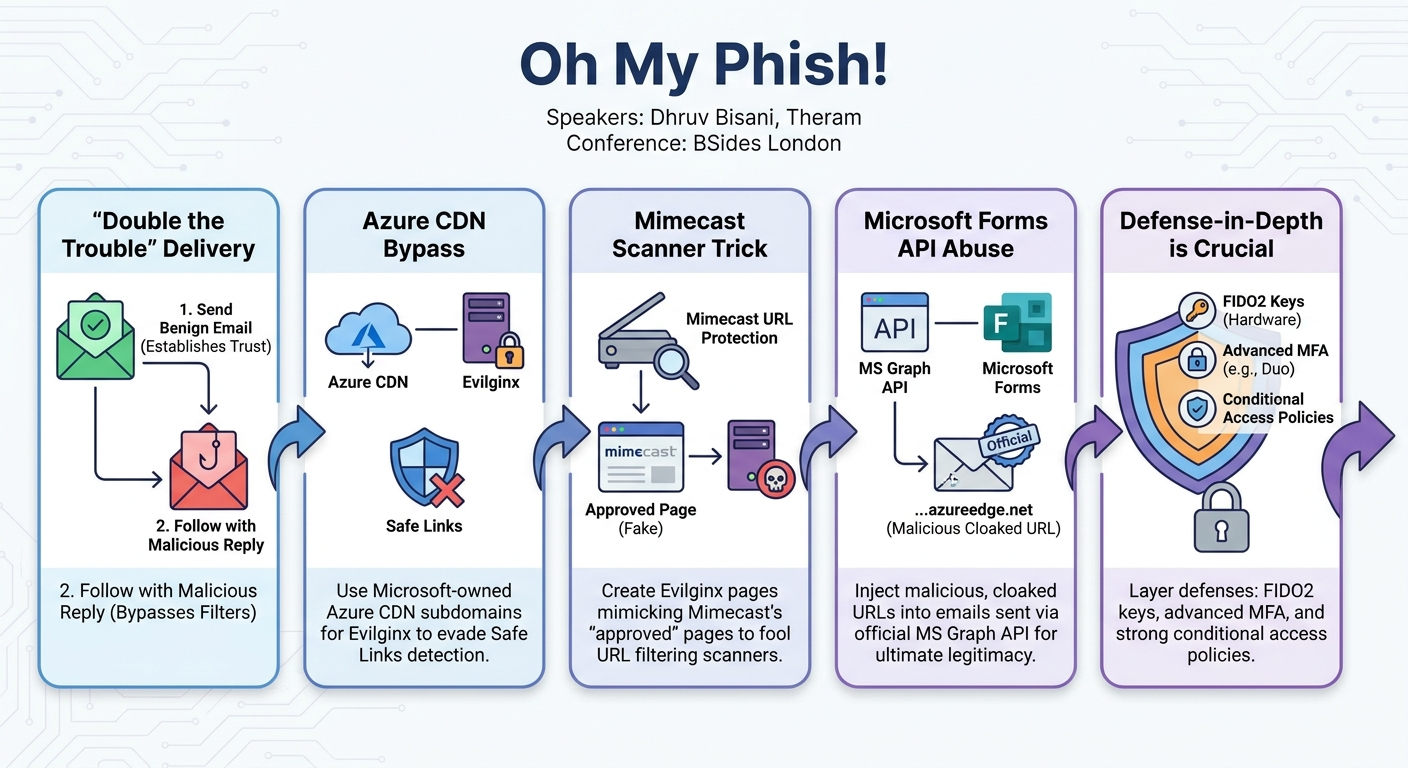
- Solution: The "Double the Trouble" Approach: This innovative technique involves sending a completely benign first email (no URLs, no attachments) followed by a reply email containing the malicious content (URL or attachment). The hypothesis, consistently proven in their engagements, is that once the initial email establishes a trusted chain, subsequent replies within that chain are more likely to bypass filters and land in the inbox.
- URL Blocking by Microsoft SmartScreen/Safe Links: When emails did land, users attempting to click malicious links were often met with Microsoft SmartScreen or Safe Links warnings, flagging the page as a phishing threat. This occurred because Microsoft's systems were adept at detecting non-Microsoft domains hosting Microsoft login pages.
- Solution: Leveraging Microsoft-Owned CDN Subdomains for Evilginx: Instead of using their own custom root domains, the team configured Evilginx to operate on subdomains of Microsoft Azure CDNs (e.g.,
company-login.azureedge.net). By setting a DNS label for their public VM in Azure, they could request an SSL certificate for this Microsoft-owned domain. This made the phishing URL appear as a legitimate Microsoft domain, complete with a Microsoft-issued certificate, significantly enhancing its credibility and bypassing Safe Links. They emphasized disabling caching and compression on these CDNs as they were used as redirectors, not for traditional content delivery.
- Mimecast URL Protection Bypass: While the CDN approach defeated Microsoft's native protections, other third-party URL filtering products like Mimecast still detected and blocked the malicious links, even with the CDN in place.
- Solution: Custom Mimecast Landing Pages: By analyzing web logs from their Evilginx server, the team observed that Mimecast's URL protection feature would make requests to the redirect page. They then created an Evilginx landing page that mimicked Mimecast's own "approved page" or warning page. When Mimecast scanned the link, it would see what appeared to be its own legitimate page, allowing the actual malicious redirect to proceed unhindered for the end-user.
- Lack of User Engagement and Ultimate Legitimacy: Even with the technical hurdles of delivery and URL blocking overcome, the final URL structure of Evilginx (e.g.,
company-login.randomUID.azureedge.net) could still appear suspicious to a vigilant user.
- Solution: Advanced URL Cloaking with Multiple CDNs and Microsoft Forms Email Integration: To achieve maximum legitimacy, they introduced a second Azure CDN (e.g.,
company-health.azureedge.net). This CDN was configured with a 301 redirect rule so that a seemingly benign URL likecompany-health.azureedge.net/employee-well-beingwould silently redirect to the malicious Evilginx CDN (company-login.azureedge.net). The ultimate bypass involved exploiting Microsoft Forms' native email sending functionality. By capturing the MS Graph endpoint request for sending a Forms email and modifying its HTML content, they replaced the legitimate Forms URL with their cloaked, malicious CDN URL. This resulted in an email that was sent from Microsoft's official API, looked identical to a legitimate Microsoft Forms invitation, and contained a URL that, upon hovering, displayed a Microsoft-owned CDN subdomain. This combination created an incredibly convincing phishing vector, making it nearly impossible for an average user or even some security tools to detect.
These findings represent a significant leap in red team capabilities, demonstrating the lengths to which sophisticated attackers will go to overcome modern security defenses.
Technical Deep Dive
▶ Watch: Bypassing Microsoft Safe Links using Azure CDN Domains (22:50)
The technical prowess demonstrated in this talk is a testament to the continuous innovation required in adversarial simulation. The speakers meticulously broke down their methodologies, from initial information gathering to the intricate bypasses for advanced security controls.
Reconnaissance and Planning Refinements
The foundation of any successful phishing campaign, as emphasized, is reconnaissance. Beyond collecting basic domain information, the team delves into granular details. For organizational information, they seek nuances like the internal nomenclature for departments (e.g., "IT Security" vs. "SOC"), the specific fonts and color schemes used in corporate communications, and recent company-wide announcements or policy changes that can serve as highly relevant pretexts. This level of detail builds immediate trust and relevance with the target.
Technical reconnaissance extends to enumerating the client's full attack surface:
- Root Domains, Subdomains, and IP Ranges: Identifying all digital assets.
- Mailing Infrastructure: Determining the client's email provider (e.g., Office 365, G Suite) to replicate it for the attack.
- Internal Tools: Identifying collaboration platforms like Microsoft Teams or Slack, as these can be leveraged for internal communication style and potential misconfigurations (e.g., external messaging enabled).
- DNS Misconfigurations: Actively searching for weak SPF records that permit impersonation or open email relaying on self-hosted mail servers.
During the planning phase, the choice of pretext is critical. The "employee well-being survey" example highlights their strategy:
- Impersonation: Using
hr-clientname.comto mimic a legitimate internal HR subdomain (hr.clientname.com). - Incentive: Offering a £20 Amazon voucher to trigger excitement and urgency.
- Familiar Technology: Directing users to a fake Office 365 login page before a legitimate Microsoft Forms survey, leveraging a familiar workflow.
- Simplicity: A short, four-line email to ensure readability and action.
Campaign Building: The Devil in the Details
The infrastructure setup is designed for OpSec and reputation:
- Domain Reputation: Domains are acquired at least six months in advance to appear "aged," improving their reputation with email filters. Domain privacy is enabled, and TLDs like
.comare preferred over those that mandate public WHOIS information (e.g.,.co.uk). All domains are secured with SSL certificates and categorized as "finance" or "health" to align with common legitimate business activities. - Mailing Infrastructure: The team opts for reputable cloud email services like Office 365 or G Suite rather than self-hosting, often matching the client's provider. Crucially, all DNS records (DKIM, SPF, DMARC) are correctly configured. The use of domain warm-up services is a unique insight from marketing, where non-malicious emails are sent daily to build a positive sender reputation over time, preventing immediate flagging as a new, suspicious sender.
- Attacking Tools: EvilGophish, an internally updated combination of Gophish (for email sending) and Evilginx 3 (for reverse proxying and MFA capture), is their primary tool. Evilginx 3 is vital for its ability to man-in-the-middle authentication flows, capturing credentials and MFA tokens.
Debugging and Advanced Bypasses
The core of the technical deep dive lies in the solutions developed when initial campaigns inevitably failed:
- "Double the Trouble" for Email Delivery:
- Problem: Aggressive Office 365 instances were blocking external emails containing URLs or attachments, even with proper sender reputation.
- Solution: The team sends a first, completely benign email (e.g., a simple notification) with no malicious content. Once this email lands, they send a second email as a reply to the first, this time including the malicious URL or attachment. The hypothesis, which proved consistently effective, is that the established "trusted chain" from the first email allows the subsequent malicious reply to bypass filters.
- CDN-Based URL Evasion for Microsoft Safe Links:
- Problem: Microsoft SmartScreen and Safe Links effectively detected and blocked phishing pages hosted on non-Microsoft domains, even if they perfectly mimicked Office 365 login pages.
- Solution: The team leveraged Microsoft Azure Content Delivery Network (CDN) subdomains. When creating a public Azure VM, it's possible to set a DNS label (e.g.,
company-login). This allows the attacker to request an SSL certificate for a subdomain that appears to belong to Microsoft (e.g.,company-login.azureedge.net), even though the attacker controls the specific subdomain. Evilginx 3 is then configured to use this Azure CDN subdomain. This makes the phishing URL look like a legitimate Microsoft property, complete with a Microsoft-issued certificate, rendering Safe Links ineffective against it. Crucially, the CDN's default caching and compression features are disabled, as the CDN is used solely as a redirector.
- Mimecast URL Protection Bypass:
- Problem: While the CDN approach defeated Microsoft's native protections, third-party URL filtering solutions like Mimecast could still detect and block the malicious links, even when using the Azure CDN. Mimecast's URL Protection feature scans URLs and identifies malicious content.
- Solution: By analyzing the web logs generated by their Evilginx server, the team observed that Mimecast would make requests to the phishing page during its scanning process. They then created a custom Evilginx fishlet that served a landing page designed to look exactly like Mimecast's own benign "approved page" or a standard warning page. When Mimecast scanned the URL, it would interpret the custom landing page as its own legitimate content, allowing the actual malicious redirect to proceed for the end-user. This effectively tricked Mimecast's scanner into believing the URL was safe.
- Ultimate Legitimacy with Microsoft Forms Email Integration:
- Problem: Even with the CDN and Mimecast bypasses, the final Evilginx URL structure, while using an Azure CDN subdomain, might still contain a unique identifier (e.g.,
company-login.randomUID.azureedge.net) that could raise suspicion. The overall campaign needed to feel natively Microsoft. - Solution: This was the most advanced technique presented. The team utilized Microsoft Forms' native email sending functionality. When a user creates a form and uses the "Send" option to email it, the request goes through the MS Graph API. By capturing this API request and modifying its HTML payload, the team replaced the legitimate Microsoft Forms URL with their cloaked, malicious Azure CDN URL (e.g.,
company-health.azureedge.net/employee-well-being). - The 301 redirect rule on the
company-health.azureedge.netCDN then redirects to the Evilginx CDN (company-login.azureedge.net). The result is an email that: - Is sent from Microsoft's official API, ensuring maximum deliverability and trust.
- Looks identical to a genuine Microsoft Forms invitation.
- Contains a URL that, upon hovering, displays a seemingly legitimate Microsoft-owned CDN subdomain (e.g.,
company-health.azureedge.net) before the user even clicks. - Upon clicking, the user is redirected through the Evilginx proxy, prompted for Office 365 credentials and MFA, and then seamlessly redirected to the actual Microsoft Forms page, completing the illusion.
This multi-layered approach demonstrates an unparalleled level of sophistication in phishing, making it exceedingly difficult for users to discern malicious intent and for automated systems to block the attack. The speakers also hinted at similar techniques being applicable to other Microsoft products, specifically mentioning Microsoft Teams meeting URLs, suggesting a broader pattern of abusing native Microsoft functionalities.
Demo / Proof of Concept
▶ Watch: Advanced Phishing with Microsoft Forms API URL Modification (32:00)
While an initial live demonstration of the CDN redirect for Evilginx encountered technical difficulties, the speakers successfully showcased the "Ultimate Legitimacy with Microsoft Forms Email Integration" bypass.
The demonstration walked through the user experience of receiving a highly convincing phishing email:
- Email Receipt: A target user receives an email that appears to be a legitimate Microsoft Forms invitation.
- Hovering Over Link: The user hovers over the "Start Now" button. Crucially, the displayed URL is not a suspicious random domain but rather the attacker-controlled, yet Microsoft-owned, Azure CDN subdomain (e.g.,
company-health.azureedge.net). This visual confirmation of a seemingly legitimate Microsoft domain significantly reduces user suspicion. - Clicking the Link: Upon clicking, the user is seamlessly redirected to the Evilginx-proxied login page, which perfectly mimics the official Office 365 login portal.
- Credential and MFA Capture: The user enters their credentials and completes the MFA prompt. Evilginx captures these details and the associated session tokens.
- Final Redirection: After successful "authentication" (i.e., credential capture), the user is transparently redirected to the actual, legitimate Microsoft Forms survey. This completes the attack chain, leaving the user unaware that their credentials and MFA tokens have been compromised.
This demo powerfully illustrated the efficacy of combining Microsoft Forms native email sending with Azure CDN URL cloaking and Evilginx for credential harvesting, creating an extremely stealthy and effective phishing vector.
Defensive Implications
▶ Watch: Q&A: Detecting Evilginx and Duo MFA's Strong Protection (43:00)
The advanced phishing techniques presented in "Oh My Phish!" highlight critical areas for defenders to strengthen their security posture. The speakers directly addressed defensive strategies in the Q&A, offering valuable recommendations:
- Defense-in-Depth Posture: This is the overarching recommendation. No single control is foolproof. Organizations must deploy multiple layers of security, from email gateways and endpoint detection to identity management and user awareness. The red team's success often relies on finding a single weak link; a robust defense-in-depth strategy forces attackers to make more mistakes, increasing their chances of detection.
- Enhanced User Awareness Training: Despite the technical sophistication of these attacks, a vigilant user remains a critical detection point. The speakers noted that if the victim who sent them the SmartScreen screenshot had instead forwarded it to their internal IT security team, the campaign would have been immediately compromised. Training should focus on:
- Hovering over links: While the CDN bypass makes this harder, users should still be trained to scrutinize URLs, looking for any subtle discrepancies.
- Reporting suspicious emails: Establishing clear, easy-to-use channels for users to report anything that feels "off," even if it appears legitimate at first glance.
- Questioning urgency and emotion: Training users to be skeptical of emails that trigger strong emotions or demand immediate action.
- Conditional Access Policies: Implementing stringent conditional access policies (CAPs) is crucial. These policies can restrict access based on device compliance, location, IP address, and application. While the speakers acknowledged that CAPs are "relatively hard to bypass at the moment," they also noted that once initial access is gained (e.g., via malware deployment), it might be possible to proxy connections from an infected machine, thereby bypassing certain CAP restrictions. However, for credential capture attacks, strong CAPs can prevent the reuse of stolen tokens from untrusted locations or devices.
- FIDO2 Keys: The speakers explicitly mentioned FIDO2 security keys as a highly robust defense mechanism they have not yet had the opportunity to bypass. Organizations deploying FIDO2 for authentication would significantly raise the bar for attackers, as these hardware-backed keys are largely phishing-resistant.
- Advanced MFA Solutions (e.g., Duo Security): The talk highlighted Duo Security as a particularly challenging MFA provider for red teams. Duo's aggressive detection capabilities can identify spoofed domains and even automatically notify IT security teams when suspicious activity is detected, sometimes within hours of a campaign launch. This indicates that some third-party MFA solutions offer superior phishing resistance compared to native cloud provider MFA. Organizations should evaluate their MFA solutions carefully, considering those with active anti-phishing capabilities.
- Monitoring and Alerting on Microsoft API Usage: The "Ultimate Legitimacy" technique relies on abusing the MS Graph API to send emails. Defenders should investigate logging and alerting capabilities around Microsoft Forms and other MS Graph API email-sending activities, looking for anomalies or unauthorized modifications to email content.
- Regular Red Teaming and Adversarial Simulation: The entire talk underscores the value of internal red team engagements or external adversarial simulations. By actively testing their defenses against sophisticated, evolving attack techniques, organizations can identify weaknesses before real attackers exploit them.
In essence, while attackers are constantly innovating, defenders must match this pace by adopting a layered security approach, investing in robust identity and access management, maintaining strong user awareness, and continuously testing their defenses.
Key Takeaways
- Phishing Landscape Evolution: Modern phishing requires advanced techniques to bypass sophisticated security controls like Office 365 Safe Links and Mimecast, as traditional methods are increasingly ineffective.
- "Double the Trouble" for Delivery: Sending a benign email first, followed by a malicious reply, significantly improves email delivery rates by leveraging a trusted email chain, bypassing aggressive email filters.
- Abusing Microsoft-Owned Infrastructure: Configuring Evilginx to use Azure CDN subdomains (e.g.,
*.azureedge.net) and obtaining SSL certificates for these, makes phishing URLs appear legitimate and bypasses Microsoft's native URL protection. - Custom Landing Pages for Third-Party Filters: For solutions like Mimecast, creating Evilginx landing pages that mimic the security product's own "approved" or warning pages can trick scanners and allow malicious redirects to proceed.
- Ultimate Legitimacy via Microsoft Forms API: By modifying HTML content within Microsoft Forms' native email sending via the MS Graph API, attackers can embed malicious, cloaked CDN URLs into emails that are sent from official Microsoft infrastructure, making them nearly indistinguishable from legitimate communications.
- Defense-in-Depth is Paramount: Effective defense against these advanced techniques requires a multi-layered approach, combining robust conditional access policies, strong user awareness, advanced MFA (like FIDO2 or proactive solutions like Duo), and continuous security testing.
About the Speaker(s)
Dhruv Bisani is the Head of Adversarial Simulation at Starling Bank. Prior to this role, he established and led the red team at Resillion, where he had the opportunity to work closely with Theram. Dhruv specializes in delivering red team engagements and managing adversarial simulation teams. His recent focus has been on less common environments, such as Mac systems, adding another dimension to his expertise.
Theram (Theram) is a Red Team Consultant at Resillion, a global cybersecurity company. His primary focus and specialization lie in red team and purple team operations, with a particular emphasis on achieving initial access. Theram holds several offensive security certifications, including those from Offensive Security and Zero-Point Security, underscoring his deep technical skills in penetration testing and adversarial tactics. He credits the work presented in this talk to his former team at Resillion.
Reviews
Dr. Zero (Offensive Security Researcher) — STRONG ACCEPT
This is exactly what practical red team talks should look like. No hypothetical frameworks, just operators showing exactly how they weaponized Azure CDNs, MS Graph, and Evilginx to walk right past modern email gateways. Highly practical, incredibly effective tradecraft that will ruin a SOC analyst's week.
Heather Calloway (CISO) — MUST SEE
This is a mandatory reality check for any leadership team relying on secure email gateways and user awareness to prevent credential theft. The researchers demonstrate how attackers are weaponizing native cloud infrastructure to seamlessly bypass Microsoft Safe Links and Mimecast. The era of training users to spot bad domains is over; defense now begins entirely at the identity layer.