Slightly SOSL'ed - Locating and Testing SOSL Injection
Nick Dunn (Security Consultant)
Security BSides London 2023 · Day 1 · Track 3
Overview
Nick Dunn's talk, "Slightly SOSL'ed - Locating and Testing SOSL Injection," delivered at BSides London, shines a critical light on a frequently overlooked and poorly documented vulnerability within custom Salesforce applications: Salesforce Object Search Language (SOSL) injection. Dunn, a security consultant with a background in secure software development, highlights a significant gap in publicly available information, payloads, and tutorials for identifying and exploiting this specific attack vector. His research aims to provide a much-needed foundation for both offensive and defensive security practitioners operating within the Salesforce ecosystem.
Key moments
- 0:00 Introduction and talk agenda
- 7:30 What is SOSL (Salesforce Object Search Language)?
- 10:30 Understanding the SOSL injection vulnerability
- 17:00 Identifying SOSL injection via application testing payloads
- 24:30 Exploiting 'ALL FIELDS' search to bypass permissions
- 34:50 Mitigations and defenses against SOSL injection
- 40:40 Q&A: Automated tools like SQLMap for SOSL?
- 42:50 Q&A: Prevalence of SOSL injection in real-world apps
Slightly SOSL'ed - Locating and Testing SOSL Injection
Speakers: Nick Dunn, Security Consultant
Conference: BSides London
YouTube: https://www.youtube.com/watch?v=VYCy1VXmklw
Overview
Nick Dunn's talk, "Slightly SOSL'ed - Locating and Testing SOSL Injection," delivered at BSides London, shines a critical light on a frequently overlooked and poorly documented vulnerability within custom Salesforce applications: Salesforce Object Search Language (SOSL) injection. Dunn, a security consultant with a background in secure software development, highlights a significant gap in publicly available information, payloads, and tutorials for identifying and exploiting this specific attack vector. His research aims to provide a much-needed foundation for both offensive and defensive security practitioners operating within the Salesforce ecosystem.
The core of the issue lies in dynamically constructed SOSL queries within Apex code—Salesforce's proprietary Java-like programming language—that fail to properly validate or sanitize user-supplied input. While not leading to typical command execution or data modification, SOSL injection primarily facilitates information disclosure, allowing an attacker to retrieve sensitive data that their user account should not normally have access to. This vulnerability is particularly relevant for organizations leveraging Salesforce for critical business operations and those building custom extensions, as it empowers them to identify and mitigate a flaw that existing tools and knowledge bases often miss.
Dunn emphasizes that this vulnerability is not a Salesforce platform zero-day but rather a flaw introduced in custom Apex code, making it a persistent risk in many bespoke Salesforce implementations. The talk provides practical methodologies for discovery through both code review and application/API testing, offering specific payloads and regex patterns to aid in identification. By demystifying SOSL injection, Dunn contributes significantly to the security community's understanding of Salesforce-specific attack vectors, urging a more responsible approach to secure coding within the Apex ecosystem.
Background
▶ Watch: Introduction and talk agenda (0:00)
Salesforce is a widely adopted cloud-based Customer Relationship Management (CRM) system that allows businesses to manage sales, service, marketing, and more. Beyond its out-of-the-box functionalities, Salesforce provides a robust platform for customization and extension through features like Sites and Lightning Apps. These allow developers to build custom applications and user interfaces on top of the Salesforce core, often utilizing Apex, Salesforce's proprietary object-oriented programming language, which is syntactically similar to Java.
Data within Salesforce is organized into objects, which can be conceptually understood as database tables, with fields as columns and records as rows. Access to these records and fields is governed by a CRUD (Create, Read, Update, Delete) permission model, which can vary significantly across different user roles and profiles. This fine-grained access control is a fundamental security mechanism within the Salesforce platform, designed to ensure data confidentiality and integrity.
To interact with this data, Salesforce provides several specialized languages:
- SOQL (Salesforce Object Query Language): Highly similar to SQL, used for querying specific Salesforce data when the object and fields are known. It allows for precise
SELECTstatements, often returning structured results from a single or related objects. - DML (Data Manipulation Language): Used for modifying and deleting Salesforce objects, akin to SQL's
INSERT,UPDATE,DELETEstatements. - SOSL (Salesforce Object Search Language): This is the focus of Dunn's talk. Unlike SOQL, SOSL is designed for searching across multiple objects and fields, even when the exact object or field is unknown. It's often used for global search functionalities, providing a more "free and easy" search capability across all data a user has permission to see. Its syntax is distinct, typically starting with a
FINDkeyword, followed by a search string and optional clauses likeIN ALL FIELDSorRETURNINGspecific objects and fields. SOSL is unique to Salesforce and not found elsewhere.
The problem of SOSL injection arises when developers construct dynamic SOSL queries in Apex code by concatenating user-supplied input directly into the query string without adequate sanitization or validation. While Salesforce provides mechanisms like String.escapeSingleQuotes() to mitigate such risks, and recommends using parameterized queries via the colon operator (:), these are often overlooked or incorrectly implemented in custom development. The prevalence of this issue is compounded by the fact that building applications with Salesforce's low-code/no-code tools (like Lightning App Builder) generally prevents such vulnerabilities, but custom Apex development opens the door for these coding errors. Dunn highlights that the lack of public information and readily available payloads for SOSL injection has led to a general unawareness of this specific attack vector within the security community, making it a ripe area for new research and discovery.
Key Findings
▶ Watch: Understanding the SOSL injection vulnerability (10:30)
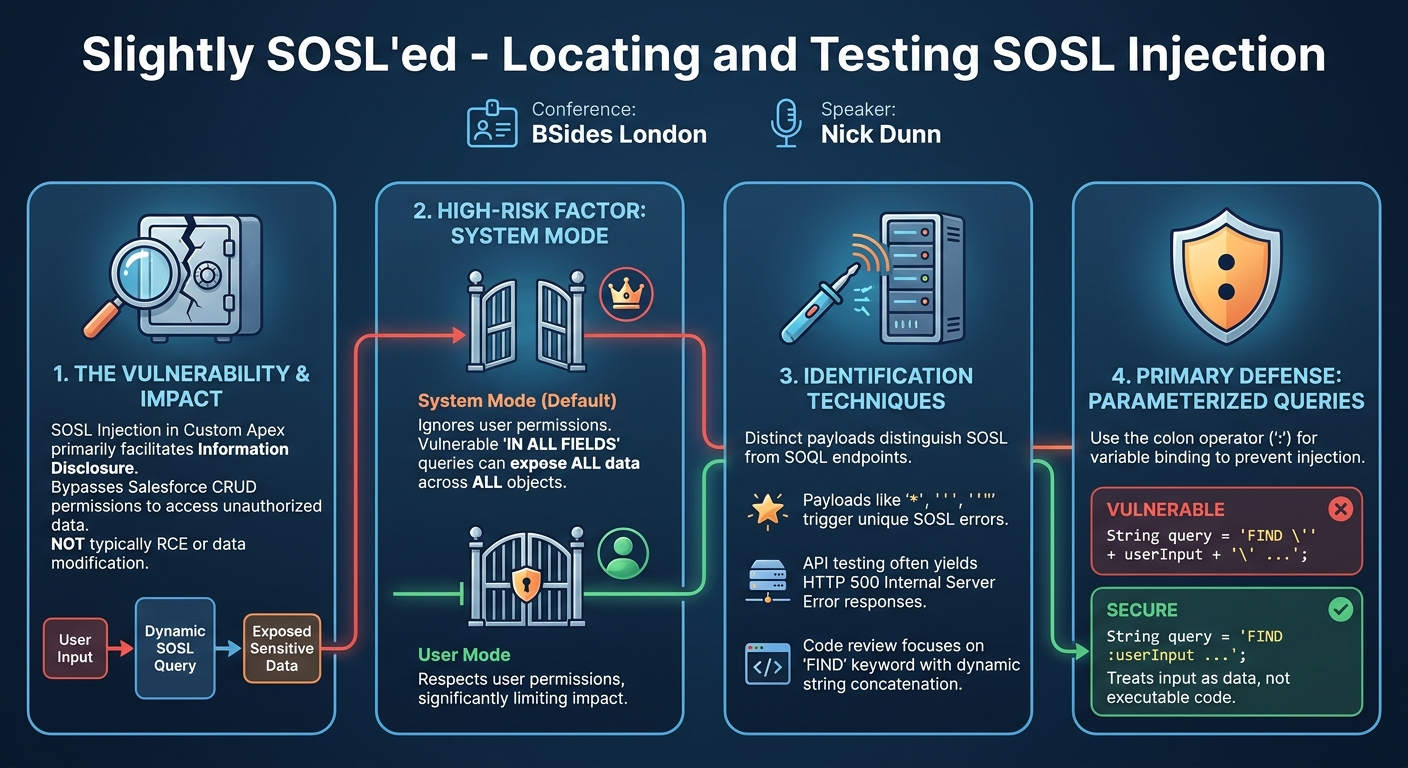
Nick Dunn's research into SOSL injection yielded several critical findings that address the longstanding knowledge gap surrounding this Salesforce-specific vulnerability. The primary discovery is that SOSL injection is a viable attack vector within custom Apex code, leading almost exclusively to information disclosure. Unlike traditional SQL injection, it does not typically enable remote code execution, operating system interaction, or direct data modification. Instead, its danger lies in allowing an attacker to bypass Salesforce's granular CRUD permissions and access data they are not authorized to see.
A significant finding is the stark lack of public documentation, payloads, or tutorials for SOSL injection. Dunn's personal experience of having to "do the own research and writing it up" underscores this void, making his contribution particularly valuable. This absence of information often leads security testers and developers to overlook SOSL injection during assessments, even when performing thorough code reviews or penetration tests.
Dunn details how to differentiate between SOSL and SOQL endpoints during application or API testing. He identified specific payloads (e.g., single quote ', wildcard , ' within quotes, empty string "" within quotes) that reliably trigger distinct error messages or behaviors in SOSL-based search functionalities compared to SOQL. For instance, SOSL typically requires "two or more non-wildcard characters" for a valid search, causing common wildcard or single-character inputs to fail, whereas SOQL might process them differently. For API testing, an SOSL injection error often manifests as an HTTP 500 Internal Server Error, providing a clear and rapid indicator for automated enumeration.
Crucially, Dunn highlighted the role of Apex execution modes in determining the severity of SOSL injection:
- System Mode: This is the default. When Apex runs in system mode, it executes with full permissions, ignoring the current user's object- and field-level security permissions. If a vulnerable SOSL query runs in system mode, especially one utilizing the powerful
IN ALL FIELDSclause, it can expose all data across all objects within the Salesforce instance, irrespective of the attacking user's assigned permissions. This is where the most significant information disclosure risk lies. - User Mode: If explicitly enforced by developers, Apex code runs in user mode, respecting the current user's permissions. While still potentially vulnerable to injection, the impact is significantly reduced as it will only return data the user is already authorized to see.
Finally, the research revealed that SOSL's syntax, while restricted compared to SQL, still offers various injectable clauses beyond the main search string, such as RETURNING and WHERE clauses, which can be manipulated to craft more precise information disclosure attacks. The speaker also noted the absence of a comment character in SOSL, making traditional SQL injection techniques like truncating queries impossible.
Technical Deep Dive
▶ Watch: Exploiting 'ALL FIELDS' search to bypass permissions (24:30)
SOSL injection exploits vulnerabilities in dynamically constructed SOSL queries within Apex code. Understanding the basic SOSL syntax and how it differs from SOQL is fundamental to identifying and exploiting these flaws.
SOSL Syntax and Characteristics
The general structure of an SOSL query is:
FIND {search_string} [IN {search_group}] [RETURNING {object_type} ({field_list}) [WHERE {condition}]]
Key characteristics:
FINDkeyword: Always present, initiating the search. It is case-insensitive.search_string: The value being searched for. This is often enclosed in single quotes (') or curly braces ({}) when embedded in Apex.IN {search_group}: An optional clause specifying where to search (e.g.,IN ALL FIELDS,IN Name Fields,IN Email Fields). TheIN ALL FIELDSclause is particularly significant for exploitation.RETURNING {object_type} ({field_list}): An optional clause to specify which objects and fields to return (e.g.,RETURNING Account(Name, Phone), Contact(Name, Email)).WHERE {condition}: An optional condition applied to theRETURNINGclause, similar to SQL'sWHERE.
Unlike SQL, SOSL has a more restricted syntax, lacks traditional comment characters, and does not support data modification. Its primary strength is searching across various objects simultaneously.
Identifying Vulnerabilities via Code Review
For code review, the primary objective is to locate instances where user-controlled input is directly concatenated into an SOSL query. Given that all SOSL queries begin with FIND, this keyword serves as a reliable anchor for initial searches. Developers typically enclose the search_string in single quotes or curly braces when embedding it in Apex or Java (for external API calls to Salesforce).
A simple regex can be used to identify potential SOSL query constructions:
(?i)find\s*['{](?i)makes the match case-insensitive (asFINDcan be uppercase or lowercase).findmatches the literal keyword.\s*matches zero or more whitespace characters.['{]matches either a single quote or a curly brace, indicating the start of the search string.
Once identified, the code around these FIND statements needs to be inspected for:
- Dynamic String Concatenation: Look for
+operators combining user input variables with parts of the SOSL query string. - Lack of
String.escapeSingleQuotes(): Salesforce provides this method to escape single quotes in user input, preventing basic injection. Its absence is a strong indicator of vulnerability. - Absence of the Colon Operator (
:): The colon operator (:) before a variable name in Apex acts as a bind variable, effectively parameterizing the query and preventing injection. Its absence suggests a dynamic, potentially vulnerable construction. - Apex Execution Mode: Determine if the Apex class or method is running in system mode (default) or user mode. System mode significantly escalates the risk of information disclosure. This is typically controlled by
with sharingorwithout sharingkeywords on classes, or by explicitly setting the execution context.
Identifying Vulnerabilities via Application and API Testing
During application or API testing, the challenge is first to distinguish SOSL-backed search functionalities from SOQL-backed ones. Nick Dunn discovered specific payloads that elicit distinct responses:
| Payload | Expected SOSL Behavior (Vulnerable) | Expected SOQL Behavior |
| :---------- | :----------------------------------------------------------------- | :----------------------------------------------- |
| ' | Error: "You must have two or more characters" (or similar) | Usually an error, but context-dependent |
| * | Error: "You must have two or more non-wildcard characters" | Often a valid wildcard search |
| *' | Error: "You must have two or more non-wildcard characters" | Often a valid wildcard search |
| "" | Error: "You must have two or more non-wildcard characters" | Often a valid search for an empty string |
| known_good" | Valid search for known_good (if known_good is a valid term) | Error due to invalid syntax, or partial match |
For APIs, these SOSL-specific errors often result in an HTTP 500 Internal Server Error, which can be a clear indicator for automated fuzzing tools. A successful SOSL query, conversely, returns either search results or a response indicating no matching records.
Exploitation Techniques
The primary exploitation goal is information disclosure, particularly leveraging the IN ALL FIELDS clause in conjunction with system mode execution. The IN ALL FIELDS clause is powerful because, when executed in system mode, it ignores the user's CRUD permissions and searches across all fields of all objects within the Salesforce instance.
Consider a vulnerable Apex query fragment where userInput is dynamically concatenated:
String query = 'FIND \'' + userInput + '\' IN ALL FIELDS RETURNING Account(Name), Contact(Name, Email)';
If userInput is not properly sanitized and the Apex runs in system mode:
- Normal Input:
userInput = 'Acme Corp' - Query:
FIND 'Acme Corp' IN ALL FIELDS RETURNING Account(Name), Contact(Name, Email) - Result: Returns Account and Contact names/emails matching "Acme Corp" that the user should normally see.
- Injected Input (Information Disclosure): An attacker might craft
userInputto break out of the search string and inject additional SOSL clauses. For example, the slide showed an injected string like:secret contract\' IN ALL FIELDS RETURNING Contact(Name, Email) WHERE Name = \'Nick' - If the injection successfully breaks out of the original
search_stringand the parser accepts the new clauses, the query could effectively become:FIND 'secret contract' IN ALL FIELDS RETURNING Contact(Name, Email) WHERE Name = 'Nick' - This allows the attacker to specify arbitrary
RETURNINGandWHEREclauses, potentially overriding the original query's intent. The critical aspect here is that the injectedIN ALL FIELDSclause, when executed in system mode, will bypass the user's permissions, revealing data from "secret contracts" or other sensitive information the user typically wouldn't access. As Dunn noted, evenString.escapeSingleQuotes()might not be entirely foolproof against certain "quirks" of SOSL injection, particularly when manipulating clauses likeIN ALL FIELDSto bypass user permissions.
Other clauses like RETURNING and WHERE can also be injected if the input point is within them. For instance, if an application dynamically builds the WHERE clause:
String query = 'FIND \'searchterm\' RETURNING Contact(Name, Email) WHERE ' + userFilter;
An attacker could inject userFilter = 'Name = \'Admin\' OR 1=1' to broaden the search results or target specific data.
Attackers can leverage Salesforce's extensive documentation to discover standard object names (e.g., Account, Contact, Opportunity, Lead) and their fields, which are crucial for crafting effective RETURNING clauses in their injection payloads.
Demo / Proof of Concept
▶ Watch: Mitigations and defenses against SOSL injection (34:50)
During the talk, Nick Dunn intended to provide a live demonstration of SOSL injection, showcasing its effects within a custom Salesforce application he developed for testing purposes. However, due to unforeseen web connectivity issues at the conference, the live demo could not proceed as planned.
Instead, Dunn presented screenshots from his "homemade Salesforce app" (likely a Salesforce free developer version instance). These screenshots illustrated the behavior of vulnerable search functionalities when targeted with SOSL-specific payloads. He showed:
- A screenshot of a failed search within his custom web application, indicating an SOSL error. This visually represented the "You must have two or more characters" type of error message that helps distinguish SOSL from SOQL.
- A screenshot of a successful search, demonstrating how valid SOSL queries (even injected ones) would return data.
- An example of an API response, illustrating how a successful SOSL query would return JSON-formatted query results, and conversely, how an injected query might yield an HTTP 500 error in an API context, which greatly aids in enumeration.
While a live demonstration would have provided a more dynamic and interactive experience, the static examples and explanations effectively conveyed the concept of identifying and exploiting SOSL injection. Dunn also mentioned that the default Salesforce web application's built-in SOQL search bar (typically at the top of the page) could be used as a baseline to compare results from custom API or web app tests, helping to confirm if unexpected data was being returned due to an SOSL injection.
Defensive Implications
▶ Watch: Q&A: Prevalence of SOSL injection in real-world apps (42:50)
Defending against SOSL injection primarily revolves around secure coding practices in Apex and understanding the implications of Salesforce's execution modes. Nick Dunn provided several key recommendations for developers and security teams:
- Execute Queries in User Mode Where Possible: This is the most fundamental defense. By default, Apex code runs in system mode, which bypasses the user's object and field-level security. If an API or application function does not absolutely require access to all data (e.g., a global administrator's report), it should be explicitly configured to run in user mode. This can be achieved using the
with sharingkeyword on Apex classes, which enforces sharing rules, or by leveragingSecurity.stripInaccessible()methods introduced in later Salesforce versions. While user mode doesn't prevent the injection itself, it significantly limits the impact by ensuring only data the current user is authorized to see will be disclosed.
- Utilize the Colon Operator for Variable Binding: The most effective way to prevent SOSL injection (and SOQL injection) is to avoid direct string concatenation for user input. Instead, developers should use the colon operator (
:) to bind Apex variables directly into the query string. This mechanism is Salesforce's equivalent of parameterized queries in traditional SQL.
- Vulnerable:
String query = 'FIND \'' + userInput + '\' IN ALL FIELDS'; - Secure:
String query = 'FIND :userInput IN ALL FIELDS';
This approach ensures that userInput is treated as a literal search string value, not as executable code, regardless of its content.
- Avoid Indirect Use of User-Controlled String Literals for Clauses: When constructing parts of the SOSL query beyond the main search string (e.g.,
IN {search_group},RETURNING {object_type},WHERE {condition}), developers should avoid allowing users to directly control these parts. Instead of letting a user specifyALL FIELDS, provide a dropdown list that maps to a predefined, server-side validated set of allowed search groups or objects. For instance, if a user wants to select fields, map their selection (Name,Email) to a secure list of fields that are then safely incorporated into the query.
- Escape Single Quotes for Dynamic Queries (If Binding is Not Possible): While parameterized queries are preferred, if dynamic query construction is unavoidable,
String.escapeSingleQuotes()should always be applied to user-supplied input before concatenation.
- Example:
String escapedInput = String.escapeSingleQuotes(userInput); String query = 'FIND \'' + escapedInput + '\' IN ALL FIELDS';
However, as indicated in the talk, this method might not be a foolproof solution against more complex injections involving clauses like IN ALL FIELDS if the overall query structure is poorly designed, so it should be considered a secondary defense.
- Implement Robust Input Validation: Beyond escaping, validate user input against expected formats, lengths, and character sets. If a search term should only contain alphanumeric characters, reject anything else. This can help prevent malformed injection attempts from reaching the query engine.
- Review Post-Query Actions: Security teams should also analyze what happens after an SOSL query executes. If the results of a potentially injected SOSL query are used as input for further actions, such as DML (Data Manipulation Language) operations (e.g., mass record updates or deletions) or mass mailings, the severity of the vulnerability escalates significantly. While SOSL itself doesn't modify data, using its output in a subsequent DML operation could lead to a more critical impact.
By adhering to these defensive strategies, organizations can significantly reduce their exposure to SOSL injection vulnerabilities, protecting sensitive Salesforce data from unauthorized disclosure.
Key Takeaways
- SOSL Injection is a Real and Undocumented Threat: This vulnerability exists in custom Apex code within Salesforce applications, leading to information disclosure, yet there is a critical lack of public information, payloads, and tutorials on how to find and exploit it.
- Information Disclosure, Not RCE: Unlike traditional SQL injection, SOSL injection primarily enables attackers to bypass CRUD permissions and access data they are not authorized to see, rather than achieving remote code execution or direct data modification.
- System Mode is the High-Risk Factor: When vulnerable Apex code runs in Salesforce's default system mode, it ignores user permissions, making SOSL injection highly effective at exposing sensitive data across all objects, especially when combined with the powerful
IN ALL FIELDSclause. - Distinct Identification Payloads: Specific payloads (e.g.,
*,',"") can be used during application and API testing to differentiate SOSL-backed search endpoints from SOQL-backed ones, often indicated by unique error messages or HTTP 500 responses. - Prioritize Parameterized Queries: The most robust defense is to use the colon operator (
:) for variable binding in SOSL (and SOQL) queries, which securely treats user input as data rather than executable code. - Multi-faceted Defense Strategy: Implement a combination of user mode execution, strong input validation, and careful construction of dynamic queries to mitigate the risk effectively. Always check the impact of query results on subsequent application logic.
About the Speaker(s)
Nick Dunn is a Security Consultant with a robust background in software development, particularly in the financial sector. His journey began with developing secure software, which provided him with a strong foundation for transitioning into security consultancy. In his current role, Dunn's work encompasses various security disciplines, including code review, application testing, and threat modeling. It was through this hands-on experience in security assessments that he initially encountered the overlooked issue of SOSL injection, prompting his in-depth research and subsequent presentation at BSides London. Dunn's practical, research-driven approach to security is evident in his commitment to uncovering and documenting vulnerabilities that lack widespread awareness.
Reviews
Dr. Zero (Offensive Security Researcher) — STRONG ACCEPT
Nick Dunn delivers a highly practical primer on SOSL injection in custom Salesforce Apex code. It's not an RCE zero-day, but it's exactly the kind of undocumented, vendor-specific attack surface that breaks Fortune 500 data boundaries. Mandatory viewing for anyone assessing enterprise SaaS environments.
Heather Calloway (CISO) — SOLID
Nick Dunn’s research highlights a dangerous blind spot in how we handle custom development inside enterprise SaaS platforms. SOSL injection in Salesforce Apex code allows attackers to bypass granular permissions and dump data. It proves that when business units write custom code outside the core engineering SDLC, you inherit critical application risk.