Not Only On Apple: Spying on Android Users Through The Camera
Enrique Serrano (Security Expert · Simulate Security)
Swiss Cyber Storm 2019 · Day 1 · Main
Overview
In a revealing talk at Swiss Cyber Storm, security expert Enrique Serrano demonstrated a stealthy method to surreptitiously capture photos and videos from Android devices, effectively turning a user's smartphone into a persistent surveillance tool. Titled "Not Only On Apple: Spying on Android Users Through The Camera," Serrano's presentation highlighted how common application permissions, combined with a subtle manipulation of Android's UI components, can be abused to bypass user awareness and privacy controls.
Key moments
- 0:00 Introduction: The hidden dangers of app permissions
- 1:00 Flashlight app example: Questionable camera permissions
- 8:40 Technical solution: One-pixel transparent camera preview
- 10:00 Malware architecture and social engineering excuse
- 18:30 Live demo: Covertly taking pictures from a tablet
- 21:30 Q&A: Chances of a spy app on Google Play
- 23:00 Q&A: Legal aspects of ethical hacking research
- 24:40 Q&A: Android 9 and standby limitations
Not Only On Apple: Spying on Android Users Through The Camera
Speakers: Enrique Serrano, Security Expert, Simulate Security
Conference: Swiss Cyber Storm
YouTube: https://www.youtube.com/watch?v=9icnZUJGj5c
Overview
In a revealing talk at Swiss Cyber Storm, security expert Enrique Serrano demonstrated a stealthy method to surreptitiously capture photos and videos from Android devices, effectively turning a user's smartphone into a persistent surveillance tool. Titled "Not Only On Apple: Spying on Android Users Through The Camera," Serrano's presentation highlighted how common application permissions, combined with a subtle manipulation of Android's UI components, can be abused to bypass user awareness and privacy controls.
Serrano's research addresses a critical blind spot in mobile security: the assumption that if an app has camera permission, its usage will always be overt and visible. By illustrating a practical proof-of-concept, he exposed how a malicious application, disguised as a legitimate utility or contest entry, can continuously snap pictures in the background without any discernible indication to the user. This talk serves as a stark reminder of the inherent risks associated with granting broad permissions to mobile applications and underscores the need for greater user vigilance and more robust platform-level protections.
Background
▶ Watch: Introduction: The hidden dangers of app permissions (0:00)
The genesis of Serrano's research stemmed from a common observation: the seemingly innocuous permissions requested by everyday applications. He began by highlighting a prevalent example: a flashlight application found on Google Play that, inexplicably, requested camera permission. While some might assume this is merely to access the flash component, Serrano questioned the duration and true purpose of such access, pointing out that users often accept permissions without fully understanding their implications or how long they might be utilized. He drew a parallel to a past vulnerability in iOS 12, where similar camera permission issues were fixed, prompting the rhetorical question: "if this happened in iOS, imagine in Android?"
Serrano, with a background spanning six years at IBM Security and a role as an entrepreneur and researcher, brings a wealth of practical experience to the topic. He co-founded "Mundo Hacker," a Spanish national TV show that conducts real cyber attack simulations in public to educate and raise awareness about cybersecurity threats. This experience, combined with his current role at Simulate Security—an Israeli startup specializing in cyber attack simulations—informs his approach to identifying and demonstrating real-world vulnerabilities. While acknowledging broader concerns about state-sponsored surveillance (like the mention of an NSA library in Android's open-source components), Serrano explicitly focused his talk on a more accessible, yet equally dangerous, threat: the misuse of legitimate permissions by a rogue developer or malicious actor. The core challenge he sought to overcome was Android's inherent requirement that a camera preview must be visible before a picture can be taken, a mechanism designed to prevent covert surveillance.
Key Findings
▶ Watch: Technical solution: One-pixel transparent camera preview (8:40)
Enrique Serrano's presentation unveiled several critical findings regarding the covert exploitation of Android camera access:
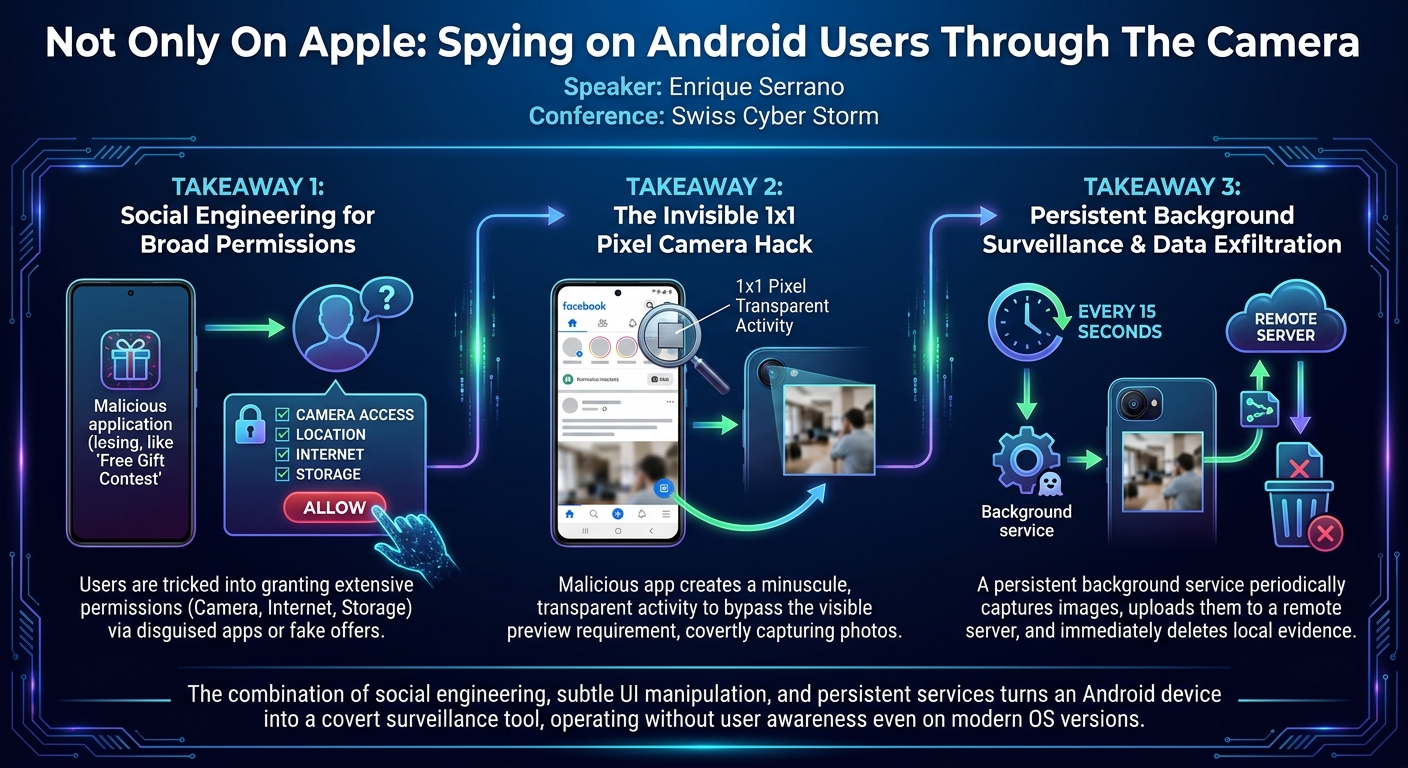
- Bypass of Camera Preview Requirement: The most significant finding is the ability to circumvent Android's mandatory camera preview display. Serrano demonstrated that by creating an Activity that is both transparent and sized to a minuscule one pixel by one pixel, the camera's output can be rendered imperceptibly to the user while still fulfilling the system's preview requirement. This allows photos to be taken without any visible on-screen indication.
- Leveraging Social Engineering for Permission Acquisition: The technique relies heavily on social engineering to trick users into granting necessary permissions. Serrano showcased a "contest" application requiring permissions for the camera (for a "selfie"), location (for area-specific offers), internet (to upload the selfie), and SD card (to save temporary files). This plausible cover story makes users more likely to accept broad permissions.
- Persistent Background Surveillance: Once permissions are granted, the malicious application establishes a persistent background service. This service is designed to periodically launch the hidden camera activity, capture images, and upload them to a remote server. The service utilizes a restart mechanism, firing every 15 seconds, ensuring continuous operation even if Android attempts to terminate it.
- Evading On-Device Detection: The malware employs several tactics to avoid detection on the device itself. Besides the invisible camera preview, it deletes captured images from the device's gallery immediately after upload, preventing users from stumbling upon suspicious photos. The 15-second interval for picture taking also helps balance persistence with minimizing battery drain and data usage, which could otherwise alert the user.
- Robust Image Capture: To ensure the quality of covertly captured images, the technique incorporates Android's
setContinuousAutofocus()function. This feature ensures that even if the user or device is moving, or lighting conditions change, the camera will re-focus, yielding clear and usable pictures for the attacker. The images are uploaded at a 90% quality setting, providing good resolution. - Vulnerability in Modern Android: The demonstration was performed on an Android 9 Pie device (a Samsung Galaxy Tab S3), indicating that this technique is effective even on relatively modern Android versions, suggesting that platform updates alone may not fully mitigate this class of attack.
Technical Deep Dive
▶ Watch: Live demo: Covertly taking pictures from a tablet (18:30)
The core challenge Serrano faced was Android's architectural design, which mandates that a camera preview must be displayed to the user before an image can be captured. This is a fundamental privacy control, but Serrano found an ingenious way to bypass it.
The solution revolves around manipulating an Android Activity. An Activity is a single, focused thing that the user can do. Normally, an Activity occupies a significant portion of the screen, providing a user interface. Serrano's innovation was to create an Activity specifically for the camera preview that is:
- Transparent: He utilized an official transparent color provided by Android for development, making the
Activityvisually undetectable. - Minimal in Size: Instead of a full-screen preview, the
Activityis rendered at one pixel by one pixel (1x1). This minuscule size, combined with transparency, makes it practically impossible for a human user to detect its presence on the screen. ThisActivityis referred to asmain_twoin his code.
The overall architecture of the malicious application is as follows:
- User-Facing Application (
MainActivity): This is the legitimate-looking application that the user initially installs. Serrano used a "Swiss contest" app as an example, promising a free dinner. This app serves as the social engineering vector, requesting permissions that seem reasonable for its stated purpose: android.permission.CAMERA: To take a "selfie" for the contest.android.permission.ACCESS_FINE_LOCATION: For area-specific offers.android.permission.INTERNET: To upload the selfie to the contest server.android.permission.WRITE_EXTERNAL_STORAGE: To save pictures or other data.
After the user interacts with this app (e.g., takes a simulated selfie and "uploads" it), the covert operation begins.
- Hidden Service (
spy): Upon completion of the user's interaction with theMainActivity, a backgroundServicenamedspyis initiated. This service is crucial for persistence. Serrano initially considered using a "sticky service," which Android attempts to restart if it's killed. However, he clarified that a normal foreground service, coupled with a mechanism to restart activities, was sufficient. The service's primary function is incredibly simple: every 15 seconds, it launches themain_twoactivity.
- Camera Interaction (
main_twoActivity): This is the transparent, 1x1 pixelActivitythat handles the actual camera operations. When launched by thespyservice:
- It initializes the device camera.
- It sets the image quality to 90%.
- Crucially, it enables
setContinuousAutofocus(). This Android API ensures that the camera constantly adjusts its focus, even if the device or subject moves, guaranteeing clear images. Without this, early versions of his malware produced blurry results. - It checks if the device's camera is supported; if not, the service stops to avoid making unnecessary "noise."
- Once the camera is ready, it captures a picture.
- The captured image is then immediately uploaded to a remote web service using a multi-part POST request.
- After successful upload, the image file is deleted from the device's internal storage/gallery to remove any local evidence.
- The
main_twoactivity then closes, waiting for thespyservice to restart it after the 15-second interval.
- Persistence Mechanisms:
- Service Restart: The
spyservice is programmed to restart themain_twoactivity every 15 seconds. This interval was chosen carefully: shorter intervals (e.g., 5 seconds) would lead to excessive battery drain and data usage, likely alerting the user. A 15-second interval provides a balance between continuous surveillance and stealth. start_at_boot: The service is also configured to start automatically when the Android device boots up, ensuring persistence across reboots.
The development was facilitated by a framework created by an IBMer, which allows for cross-platform development (Android, iOS, BlackBerry, Windows) using Visual Basic that compiles into Java. This flexibility allowed Serrano to rapidly prototype and test his approach across different environments.
Demo / Proof of Concept
▶ Watch: Q&A: Chances of a spy app on Google Play (21:30)
Enrique Serrano conducted a live demonstration of his covert surveillance technique using an Android tablet, specifically a Samsung Galaxy Tab S3 running Android 9 Pie. This choice was significant as it showed the vulnerability was not limited to older Android versions.
The demonstration setup included:
- Victim Device: The Android tablet, which was connected to a desktop computer for monitoring purposes but otherwise operated as a normal user device.
- Attacker's Monitoring System: A custom Java desktop application running on Serrano's laptop. This application acted as the receiver for the exfiltrated images, displaying them in real-time as they were uploaded from the tablet. A counter on the application indicated the number of images received.
- Web Service: An intermediary web service hosted by Serrano, acting as the target for the multi-part POST requests containing the captured images.
The demo unfolded in several stages:
- Installation: Serrano compiled his malicious Android application and installed it on the tablet. The application presented itself as a "Swiss contest" offering a free dinner, prompting the user to take a "selfie" to participate.
- Permission Granting: The user (Serrano, simulating a victim) granted the requested permissions: camera, location, internet, and SD card access.
- Initial Interaction: The user tapped through the contest interface, took a simulated "selfie" (which triggered the initial camera access and subsequent stealth service launch), and saw a message indicating the "upload" of their picture, followed by a "Good luck, thanks for participating" message. The app then closed, and the tablet appeared to return to normal operation.
- Covert Operation: Immediately after the initial interaction, the hidden
spyservice began its operation. The Java desktop application, which was actively listening for incoming images, started to show logs indicating "service started," "camera picture taken," and "deleting evidence from mobile phone." - Real-time Surveillance: Every 15 seconds, a new image appeared on the attacker's monitoring application. Serrano then interacted with the tablet normally, demonstrating how a user might be texting on WhatsApp or browsing Instagram, completely unaware that their device was actively capturing photos of their surroundings and activities. The images, taken at 90% quality with continuous autofocus, were clear and provided a continuous stream of the tablet's environment.
- Real-World Context: Serrano also shared anecdotes from similar "social engineering" campaigns he conducted in Madrid. These involved setting up QR codes in public squares or having individuals approach tourists with offers for local deals, encouraging them to install similar applications. These real-life scenarios underscored how easily unsuspecting users, especially tourists seeking local information or deals, could fall victim to such tactics.
The demo successfully illustrated how the combination of social engineering, subtle UI manipulation, and persistent background services can transform an Android device into a powerful, covert surveillance tool.
Defensive Implications
▶ Watch: Q&A: Android 9 and standby limitations (24:40)
Enrique Serrano's demonstration carries significant defensive implications for both individual users and security professionals. The primary takeaway is that the conventional understanding of mobile application permissions is often insufficient to guarantee privacy.
- Scrutinize App Permissions: The most immediate defense lies in rigorous scrutiny of application permissions. Users must develop a habit of questioning why an app requires certain permissions, especially if they seem unrelated to its core functionality. A flashlight app requesting camera access (beyond just the flash control) or a contest app demanding location and internet access should raise red flags. If an app's permission requests seem excessive or illogical, it should not be installed.
- Emphasize "Common Sense" as Antivirus: Serrano explicitly stated that "common sense" is the "main antivirus." This means avoiding installing unnecessary applications, being wary of promises of "free iPhones" or unrealistic offers, and exercising caution with apps downloaded from unofficial sources or through social engineering tactics like QR codes or direct solicitations.
- Monitor Battery and Data Usage: While the malicious app was designed to minimize its footprint, continuous background operations, especially those involving image capture and upload, will inevitably consume more battery and mobile data. Users should regularly check their device's battery usage statistics and data consumption by individual apps. Unusually high consumption from an app that isn't actively being used could be an indicator of malicious activity.
- App Store Review Process Limitations: Serrano acknowledged that Google Play's review process has improved, with checks like simulating taps and analyzing logs. However, he expressed confidence that his application, which uses legitimate Android features (transparent activities, services, camera APIs), could potentially bypass the review. This highlights a gap where technically "legitimate" API usage can still be exploited for malicious ends, underscoring that app stores are not foolproof guardians.
- Consider Physical Camera Covers: While Serrano humorously presented a "paranoid" solution of physically covering a phone's camera, it underscores the fundamental vulnerability. Just as many users now cover laptop webcams, the ubiquity of front and back cameras on smartphones means they represent a constant surveillance risk if compromised. While impractical for daily phone use, it highlights the lack of a simple, physical "off switch" for mobile cameras.
- Understand Service Behavior: For developers and advanced users, understanding how Android services operate is crucial. While the demo showed the service only operating when the screen was on (to conserve battery and data, and potentially avoid detection in the pocket), persistent services that restart themselves or launch activities should be scrutinized. Android's newer power management features (like Doze mode and App Standby) might offer some mitigation but are not a complete defense against well-crafted persistent services.
- Education and Awareness: Ultimately, the most powerful defense is user education. Serrano's work with "Mundo Hacker" and corporate training programs emphasizes making individuals aware of these threats. Understanding how such attacks are possible empowers users to make more informed decisions about app installation and permission granting, fostering a culture of digital skepticism.
Key Takeaways
- Covert Camera Access is Feasible on Android: Android's requirement for a visible camera preview can be bypassed using a transparent, 1x1 pixel
Activity, allowing malicious apps to capture photos without user awareness. - Social Engineering is the Gateway: Acquiring broad permissions (camera, location, internet, storage) for surveillance relies heavily on social engineering, often through seemingly innocuous apps or enticing offers.
- Persistence Enables Continuous Surveillance: Background services configured to restart periodically (e.g., every 15 seconds) and at boot-up can maintain long-term covert surveillance on a compromised device.
- Modern Android Versions are Susceptible: The demonstrated technique successfully operated on Android 9 Pie, indicating that it is not limited to older or less secure versions of the operating system.
- User Vigilance is Paramount: The most effective defense against such attacks is user common sense, critical evaluation of app permissions, and careful monitoring of unusual battery or data consumption.
- App Store Controls May Be Insufficient: Even with improving review processes, app stores might struggle to detect sophisticated misuse of legitimate Android APIs for malicious purposes.
About the Speaker(s)
Enrique Serrano is a distinguished security expert currently working with Simulate Security, a cybersecurity company specializing in cyber attack simulations. He boasts a rich and varied career that encompasses roles as a researcher, entrepreneur, and public speaker. Serrano spent six years at IBM Security, including a European-focused position where he performed cyber attack simulations.
Beyond his corporate experience, Enrique is notably recognized for his contributions to cybersecurity awareness through "Mundo Hacker," a community and national TV show in Spain where he and his team conduct real-world cyber attack simulations to educate the public on potential threats. His extensive background has led to him being named one of Spain's young cyber experts and a top influencer in the new technology revolution. Serrano's work consistently focuses on bridging the gap between theoretical vulnerabilities and practical, real-world implications, making complex security concepts accessible and actionable for a wider audience.
Reviews
Dr. Zero (Offensive Security Researcher) — WEAK
This is an awareness demo dressed up as research, rehashing a 1x1 transparent Activity trick that has been public since at least 2014. It might be a neat parlor trick for a consumer TV show audience, but presenting basic UI manipulation as a novel attack vector at a technical conference is a waste of a slot.
Heather Calloway (CISO) — SOLID
A demonstration of bypassing Android's camera preview mandate using a 1x1 transparent Activity to conduct silent surveillance. While the attack relies entirely on users willingly granting broad permissions to rogue apps, it is a clean proof-of-concept that highlights the limits of OS-level privacy constraints.