A short introduction to Memory Forensics
Eddi Blenkers (BLS)
Swiss Cyber Storm 2022 · Day 1 · Scenario
Overview
In an era where sophisticated cyberattacks are commonplace, understanding the true state of an infected machine is paramount for effective incident response. This talk, "A short introduction to Memory Forensics," delivered by Eddi Blenkers of BLS at Swiss Cyber Storm, delves into the critical discipline of memory forensics. Blenkers highlights that while malware can employ various techniques to hide its presence on a system, it ultimately must execute and reside in the computer's Random Access Memory (RAM). This fundamental principle makes memory a rich, albeit complex, source of truth for uncovering malicious activity that traditional disk-based or host-based tools might miss.
Key moments
- 1:30 What memory forensics is and its goal
- 2:30 How to obtain a memory dump and use Volatility
- 6:50 Understanding kernel, user land, and memory address space
- 10:00 Kernel PatchGuard bypass and malicious driver implications
- 16:00 Using Modscan to detect hidden kernel modules
- 18:30 Identifying malicious SVC Host processes in userland
- 20:50 Using strings to extract C2 domains and other artifacts
A short introduction to Memory Forensics
Speakers: Eddi Blenkers, Incident Responder, BLS
Conference: Swiss Cyber Storm
YouTube: https://www.youtube.com/watch?v=-q5DpR5y_ZU
Overview
In an era where sophisticated cyberattacks are commonplace, understanding the true state of an infected machine is paramount for effective incident response. This talk, "A short introduction to Memory Forensics," delivered by Eddi Blenkers of BLS at Swiss Cyber Storm, delves into the critical discipline of memory forensics. Blenkers highlights that while malware can employ various techniques to hide its presence on a system, it ultimately must execute and reside in the computer's Random Access Memory (RAM). This fundamental principle makes memory a rich, albeit complex, source of truth for uncovering malicious activity that traditional disk-based or host-based tools might miss.
Blenkers, an experienced incident responder who admits to a long-standing fascination with hex code, emphasizes that memory forensics is a method to analyze a computer's RAM to find Indicators of Attack (IOA). These indicators often include encrypted IP addresses or URLs used by attackers for Command and Control (C2) communication. While reverse engineering can be a time-consuming process to decrypt such information, memory forensics frequently uncovers these critical details in plain text, making it an indispensable tool for security professionals. The talk serves as a practical guide for incident responders, outlining the essential techniques and tools required to navigate the intricate landscape of a system's memory.
Background
▶ Watch: What memory forensics is and its goal (1:30)
The necessity for memory forensics stems from the inherent limitations of conventional security tools and the evolving sophistication of malware. Attackers consistently develop methods to evade detection, often by manipulating operating system functions or injecting malicious code into legitimate processes. Standard tools like Task Manager or even many Endpoint Detection and Response (EDR) solutions, which rely on querying the operating system's kernel for information, can be rendered ineffective if the malware has successfully "hooked" or modified these kernel routines. This allows malicious processes, files, registry entries, or network connections to become invisible to the user and many security products.
Historically, rootkits were notorious for operating at the kernel level, directly manipulating core operating system data structures to hide their presence. Microsoft introduced Kernel PatchGuard in Windows XP and subsequent versions to counteract this, making it significantly harder for attackers to modify the kernel without triggering a system crash. This defense mechanism greatly reduced the prevalence of kernel-level malware for a period. However, as Blenkers explains, the landscape shifted dramatically in 2019 when a researcher, Lucra Genital, presented a detailed talk at Offensive Con explaining how PatchGuard works. Shortly thereafter, source code for disabling PatchGuard emerged on GitHub, effectively bringing kernel-level manipulation back into play. Attackers now leverage signed drivers—sometimes obtained through deceptive means by creating fake companies to acquire legitimate certificates from Microsoft—to load malicious code directly into the kernel, bypassing traditional detection and hiding mechanisms. While kernel malware is still relatively rare compared to userland infections, its resurgence necessitates advanced analytical techniques like memory forensics.
Key Findings
▶ Watch: Understanding kernel, user land, and memory address space (6:50)
The talk presents several key findings and principles that underscore the power and necessity of memory forensics in modern incident response:
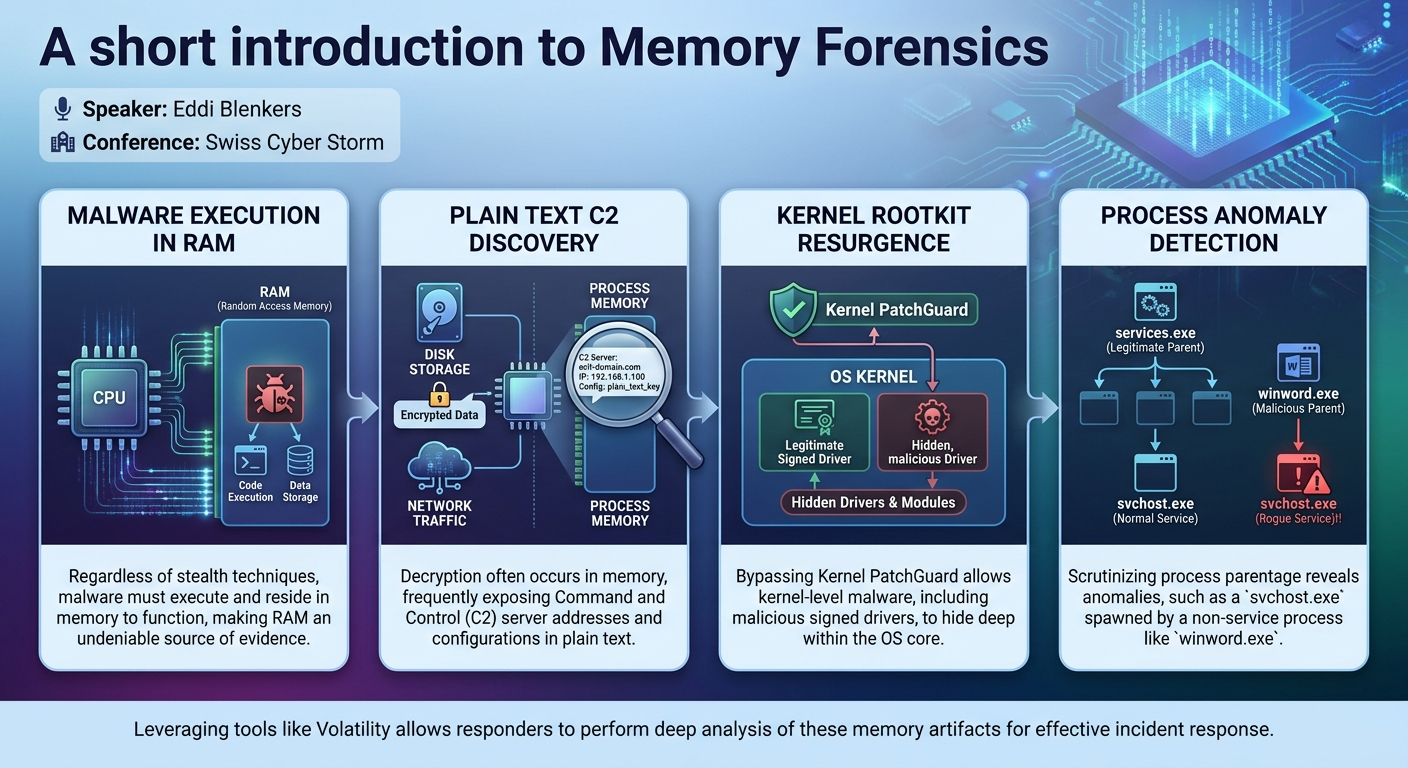
- Malware must run, therefore it must reside in memory: This is the foundational principle. No matter how sophisticated its hiding mechanisms, malware needs CPU cycles and memory space to execute. This makes RAM an undeniable source of evidence.
- Plain text C2 information in memory: Even if malware employs encryption for network communication or on-disk storage, the decryption process often occurs in memory. This means that critical Command and Control (C2) server IP addresses, URLs, or other configuration details can frequently be found in plain text within a process's memory space.
- Kernel PatchGuard bypasses revive advanced rootkit techniques: The ability to circumvent Microsoft's Kernel PatchGuard has enabled a resurgence of kernel-level malware. This means attackers can once again hide processes, files, and network connections directly within the operating system's core, rendering traditional host-based detection tools useless.
- Malicious drivers use legitimate signing: Attackers are exploiting the driver signing process by creating fake companies to obtain trusted Microsoft certificates. These legitimately signed, yet malicious, drivers can then be loaded into the kernel, making them appear legitimate to the operating system and harder for defenders to identify.
- SVC host processes as camouflage: The ubiquitous
svchost.exe(Service Host) process, which hosts numerous Windows services, is a prime target for malware camouflage. Its widespread presence makes anomalous instances difficult to spot without detailed inspection of process parentage. - Memory compression is an obstacle, but not insurmountable: Modern Windows versions (Windows 8 and later) employ memory compression, which can complicate direct analysis. However, Blenkers notes that these compressed pages can be decompressed using specific functions, allowing for continued forensic analysis.
Technical Deep Dive
▶ Watch: Kernel PatchGuard bypass and malicious driver implications (10:00)
The technical core of memory forensics revolves around obtaining a reliable memory dump and then systematically analyzing its contents using specialized tools. Eddi Blenkers focuses primarily on Windows systems, outlining a workflow centered on Volatility, a powerful open-source memory forensics framework.
The first crucial step is obtaining the memory dump. For virtual systems, the easiest method is to request a snapshot from the administrator, as these often include the full RAM contents. For physical systems, specialized tools are required. Blenkers recommends RamCapture from Backersoft, a free tool that generates a dump file typically as large as the computer's physical RAM. A critical best practice emphasized is to store the dump file locally, ideally on a connected thumb drive, rather than a network share. Writing a multi-gigabyte dump file over a network can pollute the system's memory with I/O operations, potentially overwriting crucial volatile evidence.
Once the dump file is acquired, Volatility becomes the primary analysis tool. Volatility is a Python-based application maintained by the Volatility Foundation. Blenkers notes the ongoing transition from version 2 to version 3, with version 3 offering faster workflows but not yet incorporating all functionalities from version 2. Notably, Volatility 3 does not support older operating systems like Windows XP, a detail relevant for organizations still managing legacy infrastructure. All examples provided by Blenkers utilize Volatility 2 syntax.
The initial command for any Volatility analysis is imageinfo (vol.py -f dump.mem imageinfo). This command is vital for Volatility to correctly interpret the memory data by identifying the specific operating system (e.g., Windows 7, Windows 10 with a specific build number, or a server OS) and creating a profile. Without an accurate profile, subsequent analysis commands will fail or yield incorrect results.
Understanding the memory address space is fundamental. Blenkers differentiates between physical addresses (the actual locations on the RAM chips) and virtual addresses (the addresses used by the CPU and processes). The Windows operating system divides memory into two main halves:
- The upper half is reserved for the Windows kernel, containing drivers, metadata about processes (security authorizations, open files), and network connections.
- The lower half is allocated to application processes, each with its own isolated virtual memory space. The kernel ensures these spaces are "disjunct," preventing processes from directly interfering with each other. Within each process, there can be multiple threads, which Blenkers defines as "a unit of work for the scheduler." Complex applications, like web browsers displaying animated content, can easily host dozens or even hundreds of threads.
The investigation then branches into two main areas: the Windows kernel and the userland (individual processes).
Kernel Investigation:
Despite Kernel PatchGuard, kernel-level malware persists through bypasses and malicious signed drivers. Blenkers details several Volatility plugins for kernel analysis:
ssdt(System Service Descriptor Table):vol.py -f dump.mem --profile=<profile> ssdtchecks for hooks in kernel functions. Legitimate entries should point towin32k.sys. Any deviation, such as anantivirus.sysentry (especially for older antivirus models that hooked the kernel), is highly suspicious and warrants immediate investigation.modlist: Lists all officially known loaded drivers in the kernel.modscan: Scans for all loaded modules, including those that might be hidden frommodlist. By comparing the output ofmodlistandmodscan(e.g., piping to files and usinggrepto find differences), incident responders can identify stealthy, hidden drivers injected by malware. If an extra entry frommodscanshows a valid base address and filename, it's crucial to extract that memory block for further analysis (e.g., sending it to an antivirus vendor).- Malware can also hide by copying its code into a non-paged pool memory block and creating a worker thread to execute it, avoiding a visible
.sysfile. Volatility can help identify such anomalies.
Userland Investigation:
This focuses on individual user processes, where most malware resides.
pstree:vol.py -f dump.mem --profile=<profile> pstreedisplays processes in a tree-like form, showing parent-child relationships. This is crucial for identifying anomalous process creation. For example,svchost.exe(Service Host) processes should typically be spawned byservices.exe. If asvchost.exeis found to be a child ofwinword.exe(Microsoft Word), it's a strong indicator of a malicious document creating a rogue service host for malware.- Dumping suspicious memory: Once a suspicious process is identified (e.g., a rogue
svchost.exe), its entire memory can be dumped using Volatility. - Analyzing dumped memory:
- Look for memory pages with Read/Write/Execute (R/W/X) permissions. While not exclusively malicious, legitimate code usually resides in read-only or read-execute pages, and data in read-write pages. R/W/X pages are often used by malware for injected code.
- Run the
stringscommand on the dumped memory. This is where Blenkers finds the "holy grail" of memory forensics: plain text C2 server domain names or IP addresses. While many legitimate strings (e.g., Microsoft DLLs, URLs) will appear, a single anomalous string (e.g., a connection to an unknown university in South America) can be a direct giveaway for the attacker's infrastructure. This provides immediate intelligence for network defenders. - Other userland artifacts: Memory forensics can also reveal open files (potentially config files or exfiltration data), active network connections, interesting registry keys (with timestamps of modification), and even file system metadata. The Master File Table (MFT), an invisible file on Windows that stores metadata for all files on the disk (creation, access, modification timestamps), is often resident in memory. Combining timestamps from the MFT, registry, and running processes allows responders to reconstruct a detailed timeline of infection, configuration changes, and data exfiltration.
Finally, Blenkers touches on memory compression introduced in Windows 8 and later. While this compresses memory pages, making direct string searches challenging, these pages can be decompressed using "predefined functions" (though currently outside of Volatility), allowing the analysis to proceed.
Demo / Proof of Concept
▶ Watch: Identifying malicious SVC Host processes in userland (18:30)
While Eddi Blenkers' talk does not describe a live, real-time "demo" in the traditional sense of executing malware and then analyzing it on stage, it effectively functions as a conceptual proof-of-concept for the methodologies. Throughout the Technical Deep Dive section, Blenkers illustrates the practical application of Volatility commands and the expected outputs.
For instance, he shows how vol.py -f dump.mem imageinfo would identify the operating system, a critical first step. He then demonstrates the theoretical output of ssdt and highlights a suspicious antivirus.sys entry as an example of a hook. Similarly, the comparison between modlist and modscan is presented as a method to uncover hidden kernel modules, with the expectation that modscan might reveal extra lines indicative of stealthy drivers. In the userland, the concept of using pstree to identify a rogue svchost.exe process spawned by winword.exe serves as a clear example of how process parentage can betray malicious activity. The subsequent steps of dumping the memory of such a process and running strings on it, with the anticipation of finding plain-text C2 domains, is a powerful demonstration of the technique's efficacy.
These examples, complete with specific Volatility commands and descriptions of typical (and atypical) outputs, provide a clear roadmap for how incident responders can apply these techniques in real-world scenarios, effectively serving as a step-by-step proof of concept for memory forensics.
Defensive Implications
▶ Watch: Using strings to extract C2 domains and other artifacts (20:50)
The insights from Eddi Blenkers' talk offer critical defensive implications for organizations and incident responders:
- Embrace Memory Forensics as a Core Capability: Relying solely on disk-based or traditional host-based detection tools is insufficient against modern, stealthy malware. Incident response teams must develop proficiency in memory forensics to uncover threats that hide from the operating system's standard APIs.
- Proactive Memory Acquisition Planning: Organizations should have a clear, tested plan for quickly and safely acquiring memory dumps from potentially compromised systems. This includes having appropriate tools (like RamCapture) readily available and ensuring local storage options (e.g., USB drives) are part of the incident response toolkit to prevent evidence contamination.
- Scrutinize Process Trees for Anomalies: Regularly reviewing process parentage, especially for commonly abused processes like
svchost.exe, is crucial. Anysvchost.exenot spawned byservices.exeshould be immediately flagged for deeper investigation. Similarly, other suspicious parent-child relationships (e.g., a legitimate application spawning an unexpected system utility) warrant attention. - Monitor for Kernel-Level Modifications: While challenging, defenders should be aware of the resurgence of kernel-level rootkits. Tools and techniques that can detect hidden kernel modules (like comparing
modlistandmodscanoutputs) or hooks in the System Service Descriptor Table (ssdt) are essential. Organizations should also leverage Attack Surface Reduction (ASR) rules within Windows to block known malicious drivers, although this is not a panacea against zero-day or custom drivers. - Prioritize Analysis of R/W/X Memory Pages: During memory analysis, specific attention should be given to memory regions with Read/Write/Execute (R/W/X) permissions. These are common indicators of injected or modified code by malware.
- Leverage String Extraction for C2 Identification: The ability to extract plain-text C2 domains or IP addresses directly from memory is a golden opportunity for network defense. This intelligence can be immediately used to update firewalls, IPS/IDS rules, and proxy blocks, effectively disrupting attacker communication channels and containing the incident.
- Reconstruct Timelines with All Available Data: The talk highlights the value of combining timestamps from the Master File Table ($MFT), registry keys, and process execution times to build a comprehensive timeline of an attack. This holistic approach is vital for understanding the full scope of compromise, including initial infection vectors, lateral movement, and data exfiltration.
- Stay Updated on Memory Compression Techniques: For environments running Windows 8 and newer, incident responders need to be aware of memory compression and have access to tools or methods that can decompress these pages for thorough analysis.
Key Takeaways
- Malware's Inherent Vulnerability: Despite advanced stealth techniques, malware must execute and reside in memory, making RAM an undeniable source of forensic evidence.
- Volatility as an Essential Tool: The Volatility Framework is a powerful, open-source platform indispensable for Windows memory forensics, enabling deep analysis of both kernel and userland activities.
- Plain Text C2 Discovery: Critical Command and Control (C2) server details, often encrypted on disk or during transit, can frequently be found in plain text within a process's memory, providing immediate intelligence for defenders.
- Resurgence of Kernel Rootkits: The ability to bypass Kernel PatchGuard means advanced kernel-level malware and malicious signed drivers are back in play, necessitating sophisticated kernel analysis techniques like
modscanandssdtchecks. - Process Anomaly Detection: Scrutinizing process parentage (e.g., with
pstree) is vital for uncovering malware disguised as legitimate processes, particularly for common executables likesvchost.exe. - Comprehensive Timeline Reconstruction: Combining memory artifacts such as
$MFTtimestamps, registry changes, and process execution logs allows for a detailed and accurate reconstruction of an attack's timeline, from initial compromise to data exfiltration.
About the Speaker(s)
Eddi Blenkers is an Incident Responder at BLS, the second-largest train company in Switzerland. With extensive experience in IT security, he describes himself as "an old guy who actually likes to look at hex code," a passion that directly informs his expertise in deep-dive technical analysis like memory forensics. His presentation at Swiss Cyber Storm reflects his practical, hands-on understanding of uncovering hidden threats within complex computing environments.
Reviews
Dr. Zero (Offensive Security Researcher) — WEAK
This is a time capsule, not a technical briefing. Teaching Volatility 2 profiles and imageinfo to incident responders today is just handing them tech debt. If you still need a talk explaining that malware lives in RAM, you shouldn't be on the DFIR desk.
Heather Calloway (CISO) — SOLID
This is a baseline primer on memory forensics and the Volatility framework. It breaks no new ground, but it reinforces a structural reality: when EDR gets blinded by a malicious driver, RAM is the only ground truth left.