Hello passkeys! Goodbye passwords
Nikos Karapanos (Futura system)
Swiss Cyber Storm 2022 · Day 1 · Arena
Overview
In this insightful talk from Swiss Cyber Storm, Nikos Karapanos of Futura system delves into the evolving landscape of digital identities, focusing on passkeys as the promising successor to traditional passwords. The presentation addresses the long-standing quest for a truly passwordless future, a vision that has repeatedly been announced but failed to materialize. Karapanos argues that this time, with passkeys, the industry is closer than ever to achieving this goal by tackling the critical issues of security, usability, and widespread adoption.
Key moments
- 0:00 Introduction: The promise of a passwordless future
- 1:40 FIDO authentication crash course and adoption problems
- 5:55 What is a Passkey? Definitions for different audiences
- 8:00 Passkey security spectrum: comparing with passwords and MFA
- 12:00 Familiar user experience leveraging password managers
- 14:00 Cross-ecosystem and cross-platform passkey usage
- 16:00 High security use cases: device public key for risk analysis
- 20:30 Key takeaways: passkeys as a password replacement
Hello passkeys! Goodbye passwords
Speakers: Nikos Karapanos, Futura system
Conference: Swiss Cyber Storm
YouTube: https://www.youtube.com/watch?v=5Mtna_DvPdE
Overview
In this insightful talk from Swiss Cyber Storm, Nikos Karapanos of Futura system delves into the evolving landscape of digital identities, focusing on passkeys as the promising successor to traditional passwords. The presentation addresses the long-standing quest for a truly passwordless future, a vision that has repeatedly been announced but failed to materialize. Karapanos argues that this time, with passkeys, the industry is closer than ever to achieving this goal by tackling the critical issues of security, usability, and widespread adoption.
The core of the discussion revolves around how passkeys, built upon the FIDO (Fast IDentity Online) Alliance framework, aim to overcome the limitations that have hindered previous passwordless initiatives. By leveraging existing hardware, offering a familiar user experience, and providing robust security features, passkeys present a compelling solution to the pervasive problems associated with passwords, such as phishing, credential stuffing, and poor user management. This article will dissect the technical underpinnings, security implications, and user experience enhancements that passkeys bring to the table, positioning them as a pivotal advancement in digital authentication.
The significance of this talk lies in its exploration of a technology designed for global scale, impacting billions of users. Karapanos outlines the vision for passkeys to be as ubiquitous and easy to use as passwords, while dramatically elevating the security posture. He details how passkeys offer phishing resistance, cross-device synchronization, and an adaptable security spectrum, including advanced features like Device Public Keys for high-value use cases. This comprehensive look at passkeys provides a roadmap for enterprises, developers, and consumers towards a more secure and user-friendly authentication paradigm.
Background
▶ Watch: Introduction: The promise of a passwordless future (0:00)
The journey towards a passwordless future has been fraught with challenges. For decades, passwords have remained the dominant authentication method despite their inherent vulnerabilities to attacks like phishing, brute-force, and credential stuffing. The introduction of multi-factor authentication (MFA), including SMS OTPs, TOTPs, and push notifications, significantly improved security but often came at the cost of user experience, requiring additional steps and devices. While these methods offered better protection, many remained susceptible to sophisticated phishing techniques.
The FIDO Alliance, an open industry association, emerged with the goal of developing open, royalty-free standards for more secure authentication. This led to the creation of specifications like FIDO2, which includes WebAuthn (Web Authentication API) and the Client to Authenticator Protocol (CTAP). FIDO introduced the concept of authenticators, categorizing them into two main types: roaming (or external) authenticators like physical USB security keys, and platform (or internal) authenticators embedded within devices such as smartphones (iPhone, Android) or computers (MacBook). These authenticators leverage strong cryptographic keys, often protected by hardware, and user verification methods like biometrics (fingerprint, facial recognition).
However, FIDO's initial adoption faced hurdles. Roaming authenticators, while highly secure, required users to purchase and carry extra hardware, often needing two for backup purposes, which deterred widespread consumer interest. Platform authenticators, while more convenient, often needed a roaming authenticator for secure bootstrapping. Furthermore, the technical jargon surrounding FIDO, WebAuthn, and security keys proved intimidating for the average user. The FIDO Alliance recognized that for a truly global password replacement, the solution needed to be:
- As easy to use as a password.
- Intuitive and easy to understand.
- Leverage existing hardware (phones, computers).
- Capable of surviving device loss or upgrades.
- Scalable to billions of users globally.
This recognition spurred the development of passkeys, aiming to build upon FIDO's strong security foundations while addressing its usability and adoption challenges. Passkeys are essentially a refinement of the FIDO concept, specifically designed for a multi-device, user-friendly, and globally scalable passwordless experience.
Key Findings
▶ Watch: What is a Passkey? Definitions for different audiences (5:55)
The central finding of Karapanos's talk is the introduction and detailed explanation of passkeys as the next evolution in secure, user-friendly authentication. A passkey is defined not as a specific product or logo, but as a noun—a direct, interchangeable replacement for "password." Its core objective is to be safer, easier, and faster to use than traditional passwords.
Karapanos provides several levels of definition for a passkey:
- User-friendly: "You use your fingerprint or face to sign in into Apps instead of using a password." This straightforward explanation emphasizes the intuitive biometric interaction.
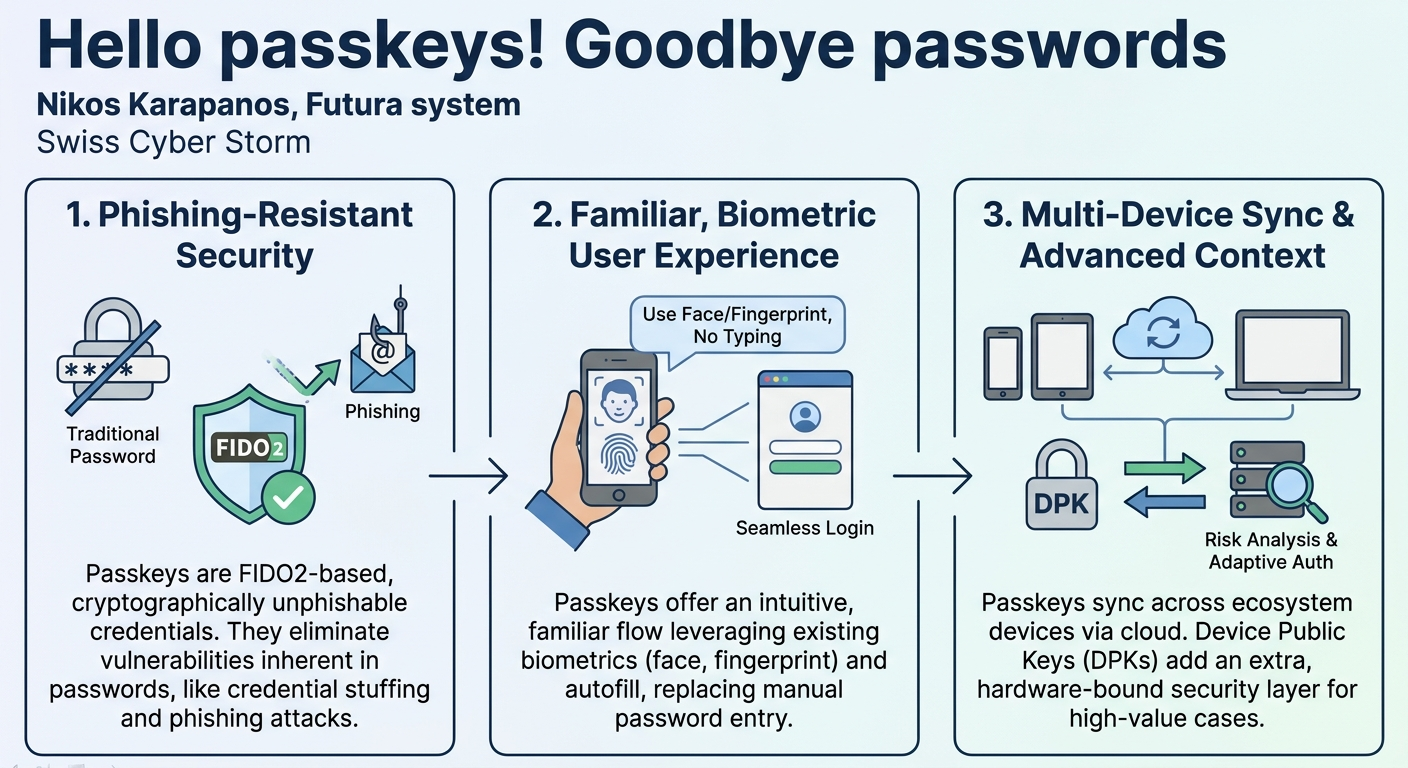
- Tech-savvy: "A phishing resistant password replacement FIDO credential that is usable across all your devices." This highlights its security against phishing, its FIDO foundation, and its multi-device capability.
- Technical: "A FIDO2 discoverable credential, requires user verification (Biometrics most often) and is backed up to survive device loss." This pinpoints the underlying technical features that enable its functionality and resilience.
A critical innovation of passkeys is their multi-device nature. Unlike earlier FIDO authenticators that were often bound to a single physical key or device, passkeys are designed to synchronize across a user's ecosystem (e.g., all Apple devices, all Google devices). This means a passkey created on an iPhone can automatically appear on a MacBook, and critically, it is backed up to the cloud to survive device loss or upgrade. This cloud synchronization is a game-changer for usability and recovery, addressing a major pain point of previous hardware-bound solutions.
In terms of security, passkeys represent a significant leap. Karapanos places them on a security spectrum:
- Passwords: Least secure, prone to various attacks.
- Conventional Multi-Factor Authentication (MFA): Improves security over passwords, but often decreases usability and can still be phished (e.g., SMS OTPs).
- FIDO Security Keys / Platform Authenticators (Single-Device Passkeys): Highly secure, as the cryptographic key stays in hardware, excellent for enterprise but low usability for consumers due to device binding.
- Multi-Device Passkeys: Built on FIDO, inherently phishing-resistant, and offer significantly improved usability due to cross-device syncing and cloud backup. This is more secure than many traditional MFA techniques.
- Multi-Device Passkeys + Device Public Key: For the highest security requirements (regulated industries, financial, government, high-value individuals, enterprise), an additional layer is introduced. The Device Public Key (DPK) is a cryptographically bound key unique to a specific device, providing an extra "fingerprint" that can be used for risk analysis, detecting logins from new or untrusted devices, and enabling step-up authentication. This combines the convenience of multi-device syncing with granular control over device context.
These findings collectively demonstrate that passkeys address the fundamental trade-off between security and usability, offering a solution that is both robustly secure against prevalent attacks like phishing and intuitively easy for users across a multitude of devices and platforms.
Technical Deep Dive
▶ Watch: Familiar user experience leveraging password managers (12:00)
Passkeys are built on the robust cryptographic foundations of the FIDO2 specification, particularly WebAuthn. At its core, FIDO involves a relying party (your application or website), a client (your browser or mobile app), and an authenticator (the device or hardware securing your cryptographic key). When a user registers or authenticates, the client communicates with the authenticator to generate or sign a cryptographic challenge, which is then sent to the relying party for verification. This process ensures that the user possesses the correct cryptographic key, without ever transmitting the key itself.
The "discoverable credential" aspect of passkeys is crucial for their enhanced user experience. Traditionally, FIDO authentication required the relying party to initiate the authentication flow, often by prompting the user for a username. With a FIDO2 discoverable credential, the client (browser/OS) can proactively identify that a passkey exists for a specific website or application, even before the relying party explicitly requests it. This enables the familiar autofill-like behavior seen in password managers, where clicking on a username field automatically presents available passkeys for that site. This client-side intelligence is a key differentiator, making passkeys feel more integrated and less like a separate security step.
The multi-device synchronization of passkeys is achieved through secure cloud mechanisms provided by platform vendors (e.g., Apple Keychain, Google Password Manager, Microsoft Authenticator). When a user creates a passkey on one device, the underlying private key material is securely synchronized to other devices within their linked ecosystem. This allows for seamless authentication across all owned devices without re-registration. The cloud backup also ensures that if a device is lost or upgraded, the user's passkeys can be restored, preventing account lockout and maintaining the passwordless experience.
Cross-ecosystem authentication is another critical technical challenge addressed by passkeys. While syncing within a single vendor's ecosystem is handled by platform providers, authenticating across different ecosystems (e e.g., an Android phone logging into a Windows laptop) requires a different approach. The current protocol supports this via a QR code-based mechanism. A user on a new device (e.g., Windows laptop) scans a QR code displayed on the screen using their mobile device (e.g., Android phone). This initiates a secure, Bluetooth-based communication to verify proximity and establish a secure channel. The mobile device then acts as a temporary authenticator for the desktop, allowing the user to sign in. Crucially, after this initial cross-device authentication, the user can then create a new platform authenticator (a passkey) directly on the new device, eliminating the need for subsequent QR code scans. From that point onward, authentication on the new device becomes native, leveraging local biometrics.
For high-value use cases, the Device Public Key (DPK) feature provides an additional layer of security context. The DPK is a relying party device-bound key, meaning it is a cryptographic key pair uniquely generated and bound to a specific physical device in the context of a particular relying party. It is not a standalone credential but is used in addition to the main passkey. When a user authenticates with a passkey from a device that supports DPK, the device generates a hardware-bound key pair. It then sends two signatures to the relying party: one derived from the user's passkey and another derived from the DPK. The relying party can use this DPK signature as a cryptographic "fingerprint" of the device. If an authentication request comes from a device with an unknown DPK, it signals that this is a new or unrecognized device. This information can be fed into risk analysis engines, triggering step-up authentication challenges or other security measures, providing granular control over device trust in sensitive environments.
While passkeys address many challenges, Karapanos also acknowledges areas not directly covered by the current specification:
- Cross-platform cloud synchronization: The vision is for third-party passkey providers (like existing password managers) to offer cloud-based synchronization across all platforms and ecosystems, allowing users to manage their passkeys centrally regardless of device vendor. This is not natively supported by current platform-level syncing.
- Payment/transaction confirmation: For sensitive actions like financial transactions, a separate initiative called Secure Payment Confirmation (SPC), developed by FIDO Alliance, W3C, and EMVCo, is building on FIDO to provide explicit user confirmation for specific transactions, ensuring non-repudiation and preventing unauthorized financial movements.
Demo / Proof of Concept
▶ Watch: Cross-ecosystem and cross-platform passkey usage (14:00)
While Nikos Karapanos did not perform a live technical demonstration during the talk, he vividly described the user experience (UX) and the underlying mechanisms that enable it, effectively outlining a conceptual proof of concept. The design philosophy behind passkeys' UX is to emulate and improve upon the familiarity of existing password managers.
The envisioned user flow is as follows:
- Familiar Autofill: When a user navigates to a website or application that supports passkeys, and clicks on the username field, the browser or operating system automatically presents a dropdown list of available passkeys for that specific service. This mirrors the behavior of integrated browser password managers.
- Biometric Authentication: The user selects their desired passkey from the list. The system then prompts for user verification, typically a biometric scan (fingerprint via Touch ID/Windows Hello, or facial recognition via Face ID/Android Biometrics). This biometric step replaces the need to type a password.
- Seamless Login: Upon successful biometric verification, the user is instantly logged in.
Key aspects of this described UX include:
- Familiarity: Users accustomed to password managers will find the interface intuitive and easy to adopt.
- Platform Support: The entire UI/UX for passkey selection and biometric prompts is handled by the underlying operating system and browser, ensuring consistency, security, and ease of implementation for developers.
- Privacy-Preserving: The relying party (website) remains unaware of the user's available passkeys until the user explicitly selects one and initiates the authentication process. The client-side "discoverable credential" feature allows the browser to present options without the server's immediate involvement.
- Developer Simplicity: Developers can integrate passkey support with minimal effort, often by simply annotating HTML input fields with specific flags to notify supporting browsers of passkey availability.
For cross-ecosystem logins, the process involves an initial, slightly more involved step:
- QR Code Scan: On a new device (e.g., a Windows laptop), the user selects the "log in with a passkey from another device" option. A QR code is displayed.
- Mobile Device Interaction: The user scans this QR code with their mobile device (e.g., an Android phone).
- Proximity Verification: A secure Bluetooth communication occurs under the hood to verify the proximity of the two devices.
- Biometric Confirmation: The user confirms the login on their mobile device using biometrics.
- New Passkey Creation: Crucially, after this one-off cross-device authentication, the system prompts the user to create a new passkey (a platform authenticator) directly on the new device. This means subsequent logins on that device will be as simple as local biometric authentication, without needing the mobile phone or QR code again.
This conceptual demonstration highlights how passkeys are designed to offer a highly secure, phishing-resistant, and remarkably user-friendly authentication experience, even across diverse hardware and software ecosystems.
Defensive Implications
▶ Watch: Key takeaways: passkeys as a password replacement (20:30)
The advent of passkeys presents a transformative opportunity for defenders to significantly bolster their security posture against some of the most pervasive and damaging cyber threats. The primary defensive implication is the inherent phishing resistance of passkeys. Unlike passwords and many forms of MFA (e.g., SMS OTPs, even some push notifications), passkeys use cryptographic challenges that are bound to the origin of the relying party. This means an attacker cannot simply trick a user into entering credentials on a fake website, as the passkey authentication will only succeed if the cryptographic challenge is signed for the legitimate domain. This fundamentally undermines phishing as a primary attack vector.
Organizations should strategically plan to migrate away from password-based authentication wherever possible, prioritizing services that are high-risk or frequently targeted by phishing. This involves:
- Enabling Passkey Support: Developers should integrate passkey support into their applications and websites using the simple HTML annotations and FIDO2 APIs described.
- Phased Rollout: Start with internal systems or less critical consumer-facing applications to gain experience before rolling out to high-value targets.
- User Education: Crucially, users need to be educated on the benefits of passkeys, how they work (e.g., using biometrics instead of typing passwords), and how they differ from traditional passwords. This will drive adoption and maximize defensive impact.
For environments requiring the highest levels of assurance, such as regulated industries, financial services, government, or enterprise access, the Device Public Key (DPK) feature offers a powerful defensive tool. Defenders can leverage DPKs for:
- Advanced Risk Analysis: Integrate DPK information into existing risk engines to detect logins from new, unverified, or potentially compromised devices. An authentication attempt from a device without a known DPK can be flagged as suspicious.
- Adaptive Authentication: Implement step-up authentication challenges (e.g., requiring an additional verification method) when a login is detected from a device with an unrecognized DPK, providing an extra layer of defense for critical operations.
- Device Trust Posture: Over time, DPKs can help build a cryptographic "fingerprint" of trusted devices, allowing for more granular access control and continuous verification, moving beyond a simple one-time authentication event. However, defenders should be aware that not all vendors have committed to implementing DPKs, so its widespread availability might vary.
Furthermore, defensive strategies should consider the future landscape of passkey management:
- Third-Party Passkey Providers: As the vision for cross-platform cloud synchronization through third-party passkey managers materializes, organizations will need to evaluate and potentially integrate with these providers, ensuring they meet security and compliance requirements. This could shift some responsibility for passkey backup and recovery to these specialized services.
- Secure Payment Confirmation (SPC): For organizations handling financial transactions or other sensitive actions, closely monitoring and preparing for the adoption of the SPC standard is essential. SPC will provide a robust, FIDO-based mechanism for explicit transaction confirmation, mitigating risks of unauthorized payments and bolstering non-repudiation.
In summary, passkeys enable a proactive defensive posture by shifting the authentication paradigm from vulnerable secrets to unphishable cryptographic proofs. By embracing passkeys, leveraging DPKs for context-aware security, and staying abreast of evolving standards like SPC, defenders can significantly enhance their resilience against a wide array of cyber threats, paving the way for a more secure digital ecosystem.
Key Takeaways
- Passkeys are a secure, phishing-resistant replacement for passwords, built on FIDO2 standards, offering enhanced security against common cyber threats.
- They provide a familiar and intuitive user experience, leveraging existing biometric authentication (fingerprint, face ID) and mirroring the autofill functionality of password managers.
- Passkeys are multi-device and cross-ecosystem, automatically syncing across devices within a platform (e.g., Apple, Google) and enabling secure, one-off cross-platform logins via QR codes and Bluetooth.
- For high-security and regulated environments, Device Public Keys (DPKs) offer an additional layer of device context, enabling advanced risk analysis and adaptive authentication based on cryptographic device fingerprints.
- While passkeys address core authentication, future developments include third-party passkey managers for truly cross-platform cloud synchronization and Secure Payment Confirmation (SPC) for sensitive transaction verification.
- The vision is for passkeys to achieve global adoption and scale, overcoming previous FIDO limitations by prioritizing usability, leveraging existing hardware, and providing robust recovery mechanisms for device loss.
About the Speaker(s)
Nikos Karapanos is a representative from Futura system, specializing in digital identities and authentication technologies. His expertise lies in understanding the complexities of online identity management and advocating for more secure and user-friendly authentication methods. In this talk, he demonstrates a deep understanding of FIDO Alliance initiatives and the strategic importance of passkeys in shaping the future of passwordless authentication.
Reviews
Dr. Zero (Offensive Security Researcher) — WEAK
This is a FIDO Alliance press release read out loud. Karapanos walks through the WebAuthn spec and passkey syncing mechanics without adding any novel research, implementation war stories, or even a live demo. If you've read a single blog post on passkeys in the last year, you already know everything here.
Heather Calloway (CISO) — SOLID
A competent overview of FIDO2 passkeys and their underlying mechanics, heavily skewed toward the consumer user experience. It's a useful primer on the standards, though it under-develops the enterprise management controls required to actually deploy them at scale.