Fact Based Post Exploitation - Office365 Edition
Melvin Langvik (Security Consultant · TrustedSec)
TROOPERS23 · Day 1 · Attack & Research · Attack & Research
Overview
In this compelling talk from TROOPERS, Melvin Langvik, a Security Consultant with TrustedSec, presents a paradigm shift in red team operations targeting Microsoft Office 365 environments. Moving beyond traditional on-premise kill chain methodologies, Langvik advocates for a "fact-based post-exploitation" approach, where initial compromise of an Office 365 account immediately pivots to extensive data exfiltration. This strategy aims to gather intelligence that fuels more effective social engineering campaigns and facilitates lateral movement, both within the cloud and to on-premise systems.
Key moments
- 0:00 Introduction and Red Team Approach to O365
- 2:00 Proposed Red Team Kill Chain for O365
- 6:00 Decoding and Understanding JWT Tokens
- 8:00 Essential Tools for Token Manipulation (Roadtools)
- 10:00 Post-Compromise Strategy & Data Goldmines
- 14:50 Data Exfiltration Targets: Teams, Graph, Outlook
- 22:00 Introducing TeamFiltration: Automating O365 Data Exfil
Fact Based Post Exploitation - Office365 Edition
Speakers: Melvin Langvik (Security Consultant, TrustedSec)
Conference: TROOPERS
YouTube: https://www.youtube.com/watch?v=QqcRe-8tc7A
Overview
In this compelling talk from TROOPERS, Melvin Langvik, a Security Consultant with TrustedSec, presents a paradigm shift in red team operations targeting Microsoft Office 365 environments. Moving beyond traditional on-premise kill chain methodologies, Langvik advocates for a "fact-based post-exploitation" approach, where initial compromise of an Office 365 account immediately pivots to extensive data exfiltration. This strategy aims to gather intelligence that fuels more effective social engineering campaigns and facilitates lateral movement, both within the cloud and to on-premise systems.
Langvik, a seasoned red team operator and former developer, draws upon his extensive experience performing targeted attacks against large US clients. He highlights the inherent richness of data available within Office 365 services like Outlook, Teams, SharePoint, and OneDrive, which often contain sensitive information such as passwords, API keys, and internal infrastructure details. The talk not only dissects various initial access vectors but more importantly, provides a structured methodology and introduces open-source tools, including his own TeamFiltration, designed to automate the rapid collection and analysis of this critical intelligence.
The significance of Langvik's approach lies in its realistic portrayal of modern cloud-centric attacks. As organizations increasingly migrate to Office 365, the attack surface shifts, and traditional perimeter defenses become less relevant. By demonstrating how readily accessible data within these platforms can be weaponized, Langvik provides invaluable insights for both offensive security practitioners seeking to enhance their red teaming capabilities and defensive teams striving to understand and mitigate advanced threats in their cloud environments.
Background
▶ Watch: Introduction and Red Team Approach to O365 (0:00)
The traditional red team kill chain, often depicted as a linear progression from reconnaissance to privilege escalation, lateral movement, and persistence, frequently falls short in modern cloud environments, particularly when targeting Office 365. Langvik argues that this conventional model, which is heavily geared towards on-premise network exploitation, doesn't always make sense when the primary target is a cloud service. Hard misconfigurations in Azure Active Directory (AAD) are becoming less common, pushing red teamers to adapt their strategies.
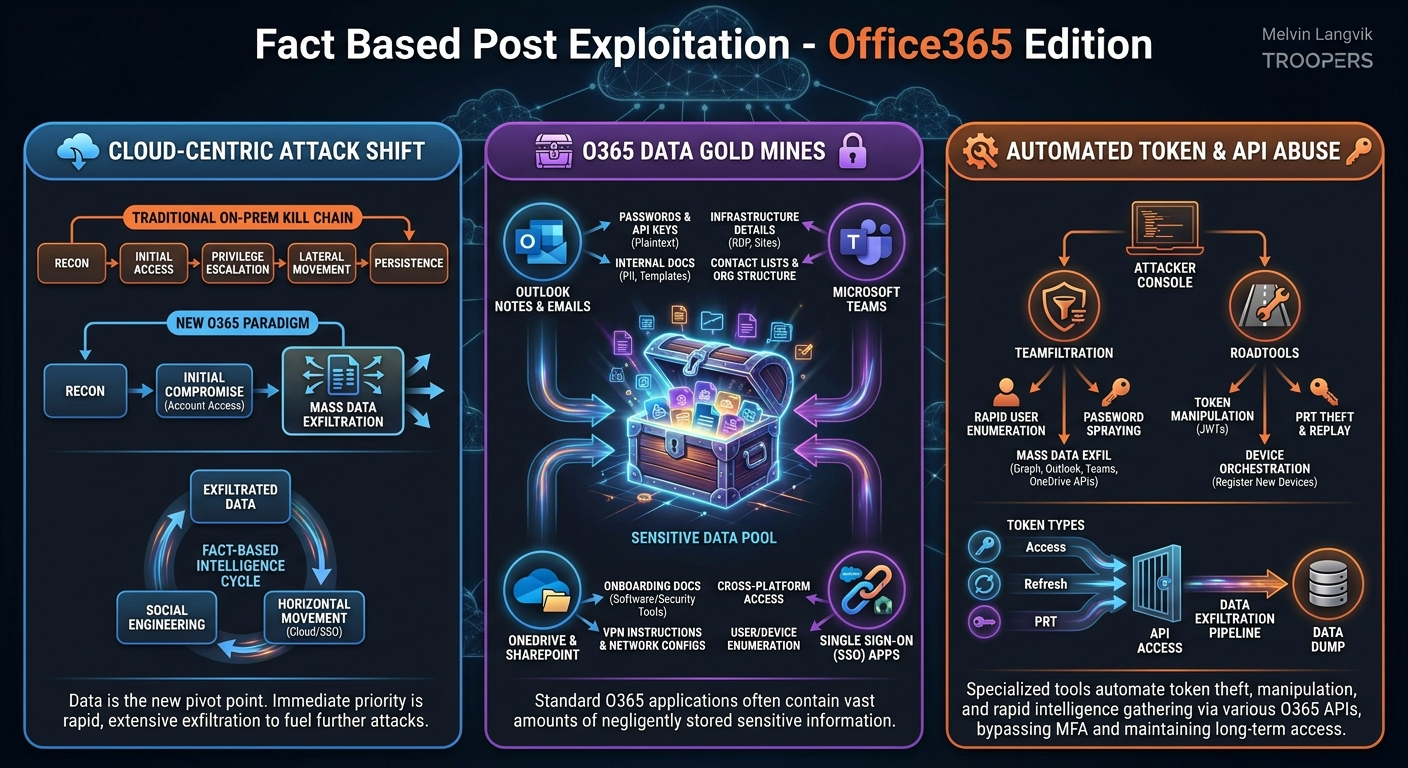
Langvik proposes an alternative kill chain for Office 365 engagements: Reconnaissance -> Initial Compromise (gaining access to an account) -> Data Exfiltration. This exfiltrated data then becomes the foundation for a continuous cycle of Horizontal Movement (cloud to on-prem or between single sign-on services) and Social Engineering. The core problem this addresses is the vast amount of sensitive, unmonitored, and often negligently stored data within Office 365 applications, which, once accessed, can bypass many traditional security controls.
Initial access methods for Office 365 are diverse. Common techniques include password spraying, where common passwords like "Summer2023" or "Welcome123!" are attempted against numerous accounts. Credential phishing, through SMS or email, remains highly effective. More advanced methods include device code phishing, which tricks users into authorizing malicious Azure applications to access data on their behalf. Post-compromise, attackers can leverage token exfiltration (from disk caches used by OneDrive and Office applications, or scraped from memory), cookie exfiltration from browsers, credential exfiltration from compromised hosts, and Primary Refresh Token (PRT) theft, which provides a long-lived session equivalent to a persistent login for up to 90 days. These methods underscore that even a brief moment of access can yield significant long-term compromise capabilities.
Key Findings
▶ Watch: Decoding and Understanding JWT Tokens (6:00)
Langvik's central thesis revolves around the idea that data is the new pivot point in Office 365 post-exploitation. His "fact-based" approach emphasizes that once initial access is gained, the immediate priority should be to exfiltrate as much data as possible from every accessible Office 365 service. This data, rather than misconfigurations or zero-day exploits, becomes the primary fuel for subsequent attack phases, including sophisticated social engineering and lateral movement.
A key finding is the sheer volume and sensitivity of information inadvertently stored within standard Office 365 applications. Langvik repeatedly highlights that services like Outlook Notes, OneDrive files, and Microsoft Teams chats are "gold mines" for attackers. They frequently contain:
- Passwords and API Keys: Often stored in plain text within notes, documents, or chat logs.
- Personal and Identifiable Information (PII): Scanned passports, internal documents with sensitive employee data.
- Internal Infrastructure Details: Information about RDP access, internal SharePoint sites, outdated systems, and network configurations from Teams conversations or shared documents.
- Contact Lists and Organizational Structure: Who talks to whom, reporting lines, and departmental responsibilities, crucial for effective impersonation.
- Software and Tooling Identification: Screenshots in onboarding documents can reveal security solutions (e.g., CrowdStrike, Arctic Wolf, Cortex, Symantec) or other internal applications.
- Company Templates: Email newsletter templates, which can be leveraged to craft highly convincing phishing lures.
- Calendar Information: Meeting schedules, travel plans, PTO, offering operational opportunities for timely social engineering attempts (e.g., calling service desk during an "important business trip").
Furthermore, Langvik points out that Single Sign-On (SSO), while intended as a security feature, often becomes an attack enabler. Access to Office 365 credentials frequently grants immediate access to a plethora of other connected enterprise applications like Salesforce, ServiceNow, Atlassian, and GitHub. This horizontal movement significantly broadens the attack surface and potential data exfiltration opportunities. For instance, even low-privileged users in ServiceNow can typically enumerate computers and users, providing valuable internal reconnaissance.
Technical Deep Dive
▶ Watch: Essential Tools for Token Manipulation (Roadtools) (8:00)
The technical foundation of Langvik's approach relies heavily on understanding and manipulating JSON Web Tokens (JWTs), often referred to as JOT tokens. These tokens are the backbone of authentication in Office 365 and Azure Active Directory. A typical JWT is a base64-encoded string found in the Authorization header of HTTPS requests, prefixed with Bearer. It comprises three main parts: a header, a payload, and a signature. The header specifies the token type and signing algorithm, while the payload contains claims about the user and permissions. The signature ensures the token's integrity. Tools like jwt.io allow for easy decoding of these tokens to inspect their contents.
Langvik differentiates between access tokens and refresh tokens. Access tokens are easily identifiable, unencrypted, and typically expire after about an hour. Their payload includes crucial information such as the aud (audience/resource) indicating the API the token is valid for (e.g., Graph API), exp (expiration timestamp), user details (display name, upn), tid (tenant ID), and most importantly, scp (permissions/scopes), which defines what actions the token can perform (e.g., Files.ReadWrite.All). Refresh tokens, on the other hand, are encrypted and have a much longer lifespan. Their primary purpose is to obtain new access tokens without requiring the user to re-authenticate, thereby maintaining a persistent session.
Several techniques are employed to obtain these tokens post-compromise:
- Token Caching: Office applications like OneDrive and other Office 365 services running on Windows systems often store access and refresh tokens on disk, encrypted by DPAPI. These can be decrypted and reused.
- Memory Scraping: Many Office 365 applications are C# based, making it possible to extract tokens from their memory space using string dumps.
- Cookie Exfiltration: Browser cookies from active Office 365 sessions can be stolen and used to reconstruct tokens or authenticate directly.
- Primary Refresh Token (PRT) Theft: A PRT is a special JWT issued to devices joined to Azure AD. It acts as a long-lived authentication token (up to 90 days) that allows the device to obtain access tokens for various services. Stealing a PRT and its associated session key can grant an attacker a persistent, interactive browser session.
To manage and leverage these tokens, Langvik strongly recommends Roadtools, a suite of Python tools developed by Dirk-jan Mollema. Specifically, roadtx allows manipulation of tokens, converting browser sessions (cookies) into usable tokens. Roadtools also supports authentication via KeePass vaults (where users sometimes store O365 credentials and MFA details), and enables device orchestration, allowing an attacker to register new devices (e.g., a "new Windows machine" or "mobile phone") on behalf of a compromised user to obtain a PRT and maintain long-term access.
The core of data exfiltration in Office 365 relies on interacting with various APIs:
- Microsoft Graph API: This is the primary, well-documented API for interacting with Office 365 data. It allows access to users, groups, files, emails, calendars, and more. Langvik notes there are actually two Graph APIs: the newer Microsoft Graph API and the older, deprecated Azure Active Directory Graph API. The older one often provides more granular data related to on-premise Active Directory structures when syncing between cloud and on-prem. Graph API is a goldmine for directory information, user enumeration, group details (including descriptions that reveal internal tooling), tenant information, and calendar data.
- Legacy Outlook API (Office 365 API): Despite Microsoft's efforts to deprecate it in favor of the Graph API, this older API is still widely used by Outlook clients. It provides access to emails, attachments, and notes. This is where attackers often find sensitive data like BitLocker recovery keys, internal documentation, screenshots (which can reveal installed software), and PII. It's also critical for understanding internal communication contexts and templates for social engineering.
- Microsoft Teams Endpoint: This is an "undocumented" API, meaning it's not publicly exposed for third-party integration but is used internally by the Teams client. Reverse engineering the Teams client's network traffic reveals endpoints that can be leveraged to extract passwords, PII, certificates, API keys, and, most importantly, internal infrastructure details from chat conversations. This includes information about RDP access, documentation locations, and outdated internal SharePoint sites.
- SharePoint and OneDrive Endpoints: These are documented APIs that provide access to files, shared documents, and synchronization information. OneDrive synchronization, particularly of desktop folders, often includes shortcuts (
.lnkfiles) that contain system paths, revealing on-premise SAM account names and shared server configurations. Attackers can also modify onboarding pages or VPN setup instructions on SharePoint to redirect new employees to malicious files.
Langvik's tool, TeamFiltration, automates the process of user enumeration, password spraying, and mass data exfiltration across these various Office 365 services. It maintains a database of valid accounts, attempted credentials, and lockout policies, streamlining the red teaming workflow.
Demo / Proof of Concept
▶ Watch: Data Exfiltration Targets: Teams, Graph, Outlook (14:50)
Melvin Langvik demonstrated the capabilities of his open-source tool, TeamFiltration, as the primary proof of concept for his fact-based post-exploitation methodology. The tool is designed to automate and streamline the process of initial access, data exfiltration, and intelligence gathering within Office 365 environments.
The demonstration showcased TeamFiltration's modular design, which guides operators through the various stages of an attack:
- User Enumeration: The tool can enumerate valid user accounts within a target Office 365 tenant. This information is then stored in an internal database, which TeamFiltration manages to track valid targets.
- Password Spraying: Leveraging the enumerated accounts, the password spraying module systematically attempts common passwords against the user list. Crucially, TeamFiltration keeps track of every username-password combination attempted and respects lockout policies, preventing account lockouts by pausing attempts for specific accounts. Upon finding valid credentials, this information is also stored.
- Data Exfiltration: This is the core of the "fact-based" approach. Once an account is compromised (either through spraying or by providing an existing token), TeamFiltration automatically enumerates the compromised user's access policies and stores any accessible tokens in its database. It then proceeds to exfiltrate vast amounts of data across all accessible Office 365 services. The demonstration showed the tool dumping:
- Emails: All emails from the user's mailbox, including attachments.
- OneDrive Files: The entire contents of the user's OneDrive, including synchronized desktop folders and shortcuts.
- Teams Chat Conversations and Attachments: All chat history and shared files from Microsoft Teams.
- SharePoint Documents: Shared files and documents from SharePoint sites the user has access to.
Langvik emphasized that TeamFiltration can perform this extensive data exfiltration rapidly, often within "two minutes" of gaining initial access to an account. This allows red teamers to download an entire trove of corporate intelligence offline, regardless of whether the initial access is quickly revoked.
The tool's integration with Roadtools was also highlighted. TeamFiltration can ingest output files from Roadtools (specifically Roadtools auth), allowing operators to use tokens obtained via Roadtools (e.g., from stolen cookies or PRTs) to initiate the data exfiltration process without needing to perform a new authentication or password spray.
Finally, the demonstration touched upon TeamFiltration's database module, which assists in the reporting phase of an engagement. It can summarize all discovered accounts, track password spraying start and stop times, and provide a comprehensive overview of the exfiltrated data, aiding in client reporting and suggesting areas for improved detection. Although specific live video footage was paused for privacy reasons during the talk, the detailed screenshots and explanations clearly conveyed the tool's effectiveness in automating the intelligence gathering phase of Office 365 red teaming.
Defensive Implications
▶ Watch: Introducing TeamFiltration: Automating O365 Data Exfil (22:00)
Melvin Langvik's talk provides critical insights for defenders looking to secure their Office 365 environments against sophisticated red team operations. The "fact-based post-exploitation" methodology highlights several key areas where organizations are vulnerable due to common practices and misconfigurations:
- Educate Users on Sensitive Data Storage: The prevalence of passwords, API keys, and PII in Outlook Notes, Teams chats, and OneDrive documents is a recurring theme. Organizations must implement strict policies and conduct ongoing user training to discourage storing sensitive credentials or proprietary information in these easily accessible locations. Tools for secure password management and secret storage should be enforced.
- Implement and Enforce Strong MFA: While not explicitly detailed in the defensive section, Langvik mentions getting "past MFA" as a lucky break. Robust Multi-Factor Authentication (MFA) is crucial, but defenders must understand that techniques like device code phishing or PRT theft can bypass traditional MFA challenges. Implementing phishing-resistant MFA (e.g., FIDO2 security keys) should be a long-term goal.
- Audit and Harden SharePoint Permissions: Langvik describes SharePoint as a "permission nightmare." Organizations must regularly audit SharePoint site permissions to ensure that users only have access to what is strictly necessary. Default "everyone" access or overly broad permissions create significant data exfiltration opportunities and allow attackers to tamper with critical internal pages (e.g., onboarding, VPN setup).
- Monitor for Token Exfiltration and Anomalous API Activity: Detecting token theft (from disk, memory, or cookies) is challenging but crucial. Endpoint Detection and Response (EDR) solutions should be configured to detect suspicious access to browser cookie stores, credential caches, or unusual process memory access. Furthermore, security teams need to monitor Office 365 audit logs for anomalous API calls, especially large-scale data exfiltration events (e.g., mass downloads from OneDrive, numerous email exports from the Graph API). Tools like Azure AD Identity Protection can help detect risky sign-ins and compromised identities.
- Review Single Sign-On (SSO) Integrations: While SSO enhances user experience, it also consolidates attack surface. Organizations must ensure that all applications integrated with Office 365 SSO are configured with the principle of least privilege. Regular audits of application permissions in Azure AD are necessary to prevent malicious or compromised applications from accessing excessive data.
- Improve Internal Reconnaissance Prevention: The ease with which attackers gather internal infrastructure details, contact lists, and software usage from Teams, emails, and shared documents underscores the need for better information hygiene. Organizations should review what information is shared internally and how. Red teams can help by simulating these reconnaissance efforts to identify leaked intelligence.
- Implement Data Loss Prevention (DLP) Policies: DLP solutions can help identify and prevent the exfiltration of sensitive data from Office 365 services. Policies can be configured to detect PII, financial data, or intellectual property being downloaded or shared externally, providing an additional layer of defense against mass data dumps.
By addressing these points, defenders can significantly reduce the efficacy of fact-based post-exploitation techniques and make their Office 365 environments more resilient to targeted attacks.
Key Takeaways
- Shift from traditional kill chains to data-centric post-exploitation in Office 365: The primary goal after initial access should be rapid and extensive data exfiltration to fuel subsequent social engineering and lateral movement.
- Office 365 services are "gold mines" for sensitive data: Outlook Notes, Teams chats, OneDrive files, and SharePoint documents frequently contain passwords, API keys, internal infrastructure details, and PII due to user negligence or lax permissions.
- Token theft (Access, Refresh, PRT) is a critical persistence and access vector: Attackers can exfiltrate tokens from disk, memory, or browser cookies to maintain long-term access without re-authenticating.
- Specialized tools like Roadtools and TeamFiltration automate token manipulation and data exfiltration: These tools streamline the offensive process, allowing rapid collection of vast amounts of intelligence from various Office 365 APIs (Graph, Legacy Outlook, Teams, OneDrive/SharePoint).
- Single Sign-On (SSO) can be an enabler for lateral movement: Compromising an Office 365 account often grants immediate access to numerous other enterprise applications (e.g., Salesforce, ServiceNow), broadening the attack surface.
- Defenders must focus on user education, strict permission management, and API monitoring: Training users to avoid storing sensitive data, rigorously auditing SharePoint and application permissions, and monitoring for anomalous API activity or token exfiltration are crucial for mitigating these threats.
About the Speaker(s)
Melvin Langvik is a Security Consultant at TrustedSec, where he works on their targeted operations team, focusing on red team engagements. Originally from Norway, he goes by the handle "Flangvik" online. Prior to his career in penetration testing, Melvin was a developer, creating C# applications for the Azure Cloud environment, including data formatting and transformation with legacy systems like BizTalk. His background in development provides him with a deep understanding of cloud architectures and application logic, which he now leverages in offensive security. Melvin has contributed to several open-source offensive security projects, including TeamFiltration (which he discussed in this talk), AMSI.fail, CobaltBus, and SharpCollection. He also streams regularly on Twitch and creates content on YouTube, sharing his expertise with the broader cybersecurity community.
Reviews
Dr. Zero (Offensive Security Researcher) — SOLID
Langvik stops pretending cloud attacks look like on-prem AD abuse and builds a methodology around what actually works: ripping JWTs and weaponizing unstructured data. He actually operates, and it shows. This is exactly how modern O365 tenants are getting dismantled in the wild.
Heather Calloway (CISO) — SOLID
Langvik demonstrates how attackers bypass traditional network kill chains by treating Office 365 data as the primary pivot point. It is a stark reminder that in a cloud-first environment, unstructured data is the new network perimeter. Worth your security engineering leadership's time to validate your tenant's token lifetime and conditional access policies.