Android Applications and APIs hacking
Gabrielle Botbol (Offensive Security Advisor · Desjardins)
AppSec Village @ DEF CON 31 · Day 3 · AppSec Village
Overview
In her compelling talk at AppSec Village @ DEF CON 31, Gabrielle Botbol, an Offensive Security Advisor at Desjardins, delved into the intricacies of Android application and API hacking. The presentation provided a comprehensive guide for security professionals, covering the entire penetration testing lifecycle for Android applications, from initial reconnaissance and lab setup to static and dynamic analysis, vulnerability identification, and reporting. Botbol underscored the critical importance of mobile application security, citing real-world examples of vulnerable and malicious apps that bypass even stringent store reviews, such as the Kitech malware family that subscribed 3 million users to premium services without their consent in July 2022, taking Google six months to remove.
Key moments
- 0:00 Introduction and Android application pentest overview
- 4:00 Android application pentest process and lab setup
- 9:00 Configuring Burp Suite for traffic interception
- 16:00 Static analysis: discovering hardcoded API keys
- 20:00 Dynamic analysis and example vulnerabilities
- 24:00 Using checklists for comprehensive API pentesting
- 26:00 Structuring effective vulnerability reports
Android Applications and APIs Hacking
Speakers: Gabrielle Botbol (Offensive Security Advisor, Desjardins)
Conference: AppSec Village @ DEF CON 31
YouTube: https://www.youtube.com/watch?v=k_QjBIVLnRk
Overview
In her compelling talk at AppSec Village @ DEF CON 31, Gabrielle Botbol, an Offensive Security Advisor at Desjardins, delved into the intricacies of Android application and API hacking. The presentation provided a comprehensive guide for security professionals, covering the entire penetration testing lifecycle for Android applications, from initial reconnaissance and lab setup to static and dynamic analysis, vulnerability identification, and reporting. Botbol underscored the critical importance of mobile application security, citing real-world examples of vulnerable and malicious apps that bypass even stringent store reviews, such as the Kitech malware family that subscribed 3 million users to premium services without their consent in July 2022, taking Google six months to remove.
The talk highlighted that while generalist pentesters exist, specialized expertise in mobile security is becoming increasingly vital due to the unique challenges posed by analyzing executable files (APKs) compared to web URLs or IP addresses. A significant portion of modern Android applications rely heavily on APIs for everything from fetching weather forecasts and integrating social media to processing payments and accessing cloud storage. This reliance introduces a vast attack surface, making API security an indispensable component of mobile application security. Botbol meticulously walked attendees through the methodologies and tools necessary to uncover vulnerabilities in both the Android application itself and the APIs it interacts with, providing practical insights for both aspiring and experienced mobile security practitioners.
The presentation served as a foundational resource, emphasizing the necessity of a structured approach to Android pentesting. It not only detailed the technical steps but also stressed the importance of critical thinking, context awareness, and ethical considerations throughout the assessment process. By demystifying the complex world of Android app and API security, Botbol empowered the audience with the knowledge to identify, exploit, and ultimately help remediate common and critical security flaws, thereby contributing to a safer mobile ecosystem.
Background
▶ Watch: Introduction and Android application pentest overview (0:00)
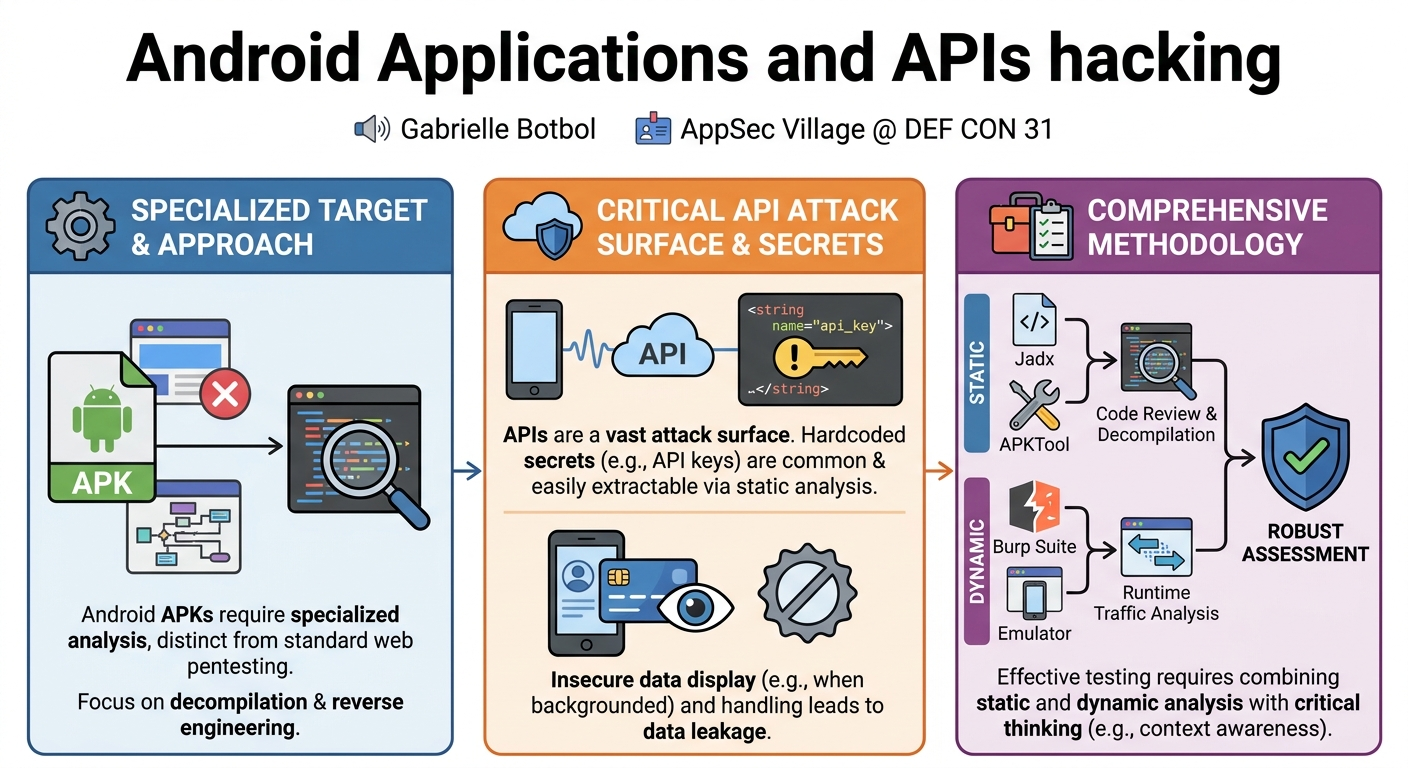
The landscape of Android application security is distinct from other forms of penetration testing, primarily because the target is often a compiled executable file (an APK – Android Package Kit) rather than a live web service or network endpoint. This necessitates a different set of tools and techniques for analysis, including decompilation and reverse engineering. Despite Google Play's efforts to curate secure applications, a significant number of vulnerable or even malicious apps still make their way onto the platform, as evidenced by the Kitech malware incident. This ongoing threat underscores the continuous need for thorough security assessments.
APIs (Application Programming Interfaces) are fundamental to the functionality of almost all modern Android applications. Developers leverage APIs for numerous reasons: to conveniently access remote data (e.g., weather, social media feeds), integrate third-party services (e.g., payment gateways), enhance app performance by reducing data transfer and enabling selective data requests, avoid code reuse, and achieve a clear separation between backend and frontend logic. The flexibility and scalability offered by APIs are undeniable, but this convenience often comes at the cost of increased complexity in securing the communication channels and data exchanges.
The Android application penetration testing process, as outlined by Botbol, generally follows a standard security assessment methodology but with mobile-specific nuances:
- Planning: Defining scope and handling legal agreements.
- Reconnaissance: Gathering information about the app and company, including details from Google Play.
- Static Analysis: Examining the decompiled code, manifest files, and resources for potential vulnerabilities without executing the app.
- Dynamic Analysis: Intercepting and analyzing network traffic, interacting with the app in a controlled environment to identify runtime flaws.
- Reporting: Documenting findings, their impact, and remediation recommendations.
A critical aspect highlighted is the often-overwhelming lab setup required for Android pentesting, which involves a complex array of tools and virtual devices. Understanding the purpose and configuration of each tool is paramount to conducting an effective assessment. This foundational understanding allows pentesters to systematically approach the unique challenges presented by Android applications and their associated APIs, ensuring comprehensive coverage of potential attack vectors.
Key Findings
▶ Watch: Configuring Burp Suite for traffic interception (9:00)
Gabrielle Botbol's talk illuminated several critical categories of vulnerabilities commonly discovered during Android application and API penetration tests. These findings span both the application's local code and its interactions with backend services, emphasizing that a robust security posture requires scrutinizing both layers.
One of the most prevalent and impactful findings discussed was the presence of hardcoded secrets. This includes sensitive information such as API keys, authentication tokens, and even private keys directly embedded within the application's code or resource files (e.g., strings.xml). As demonstrated with an example from the "Injured Android" application, a Google API key was found in strings.xml, a clear indicator of insecure development practices. Such hardcoded secrets can be easily extracted through static analysis, granting attackers unauthorized access to backend services, cloud resources (like AWS S3 buckets if AWS secret keys are found), or even enabling impersonation.
Another significant vulnerability category involves insecure data display and session management. Botbol presented an example using the "Piva" (Purposefully Insecure and Vulnerable Android Application) app, where sensitive user information remained visible on the screen even after navigating away and returning, or after the app was backgrounded. This can lead to shoulder surfing attacks or data leakage if the device is compromised or left unattended. This issue underscores the importance of implementing proper session invalidation, sensitive data redaction, and secure screen-capturing prevention mechanisms. Related to this is tapjacking (the mobile equivalent of clickjacking), where malicious overlays can trick users into performing unintended actions, although the talk primarily focused on data leakage examples.
The talk also touched upon API misconfigurations and broken access control in APIs. While not explicitly detailed with code examples, the mention of tools like Firebase Enum, Firebase Scan, and Cloud Enum implies that misconfigured cloud services and their APIs frequently expose sensitive data or allow unauthorized access. For instance, finding an AWS secret key during static analysis could allow an attacker to access AWS resources. Furthermore, general API vulnerabilities, such as the ability to access resources that do not belong to the user (a common form of broken access control), were highlighted as critical areas for dynamic analysis. This category often falls under the OWASP API Security Top 10, emphasizing the need for robust authorization checks at every API endpoint.
Finally, the talk implicitly highlighted the systemic issue of lack of security awareness among developers, leading to the introduction of these vulnerabilities. The continued prevalence of hardcoded credentials and insecure data handling practices indicates that security is often an afterthought rather than an integral part of the development lifecycle. These key findings collectively paint a picture of common pitfalls in Android application and API development that security professionals must actively seek out during penetration tests.
Technical Deep Dive
▶ Watch: Static analysis: discovering hardcoded API keys (16:00)
Conducting a thorough Android application and API penetration test requires a sophisticated lab environment and a systematic approach leveraging both static and dynamic analysis techniques. Botbol meticulously outlined the essential tools and methodologies for this process.
Lab Setup and Configuration
The foundational step is setting up the pentest lab, which can be considerably more complex than for other types of assessments. Key tools include:
- Jadx: A dex to Java decompiler that allows for static analysis of Android application bytecode. It provides a GUI for easy navigation and searching within the decompiled code.
- APKTool: A powerful tool for reverse engineering Android APK files. It can decompile resources to nearly original form, make modifications, and then rebuild them into a functional APK. This is crucial for deeper static analysis and for creating modified applications for dynamic testing.
- ADB (Android Debug Bridge): A versatile command-line tool that facilitates communication with an Android device or emulator. It enables actions like installing/uninstalling apps, pushing/pulling files, and executing shell commands.
- Android Studio: The official IDE for Android development, which includes the Android Virtual Device (AVD) Manager for creating and managing emulators. Selecting the correct API level for the emulator, matching the target application's
AndroidManifest.xml, is critical for compatibility. - Burp Suite: An industry-standard web proxy used for intercepting, inspecting, and modifying HTTP/S traffic. This is indispensable for dynamic analysis of API interactions.
Setting up the Android emulator involves selecting appropriate hardware and a system image that matches the target app's API level. Once the emulator is running, configuring Burp Suite is the next crucial step. This involves exporting Burp's CA certificate (cacert.der), pushing it to the emulator (e.g., via drag-and-drop or ADB), and then installing it as a user-trusted certificate within the emulator's security settings. Crucially, the proxy settings within the emulator's Wi-Fi network configuration must be updated to point to the Burp Suite listener's IP address and port (e.g., 192.168.1.10:8082), ensuring all HTTP/S traffic from the emulator is routed through Burp. Botbol emphasized remembering to click "Apply" after changing proxy settings in the emulator.
Static Analysis Techniques
Static analysis involves scrutinizing the application's code and resources without executing it.
- Decompilation: Using Jadx (
jadx-gui .apk) or APKTool (apktool d application.apk) to obtain human-readable Java code and XML resources. - Android Manifest Analysis: Examining
AndroidManifest.xmlfor declared permissions (especially network-related ones), activities, services, content providers, and other metadata that might reveal attack surfaces or misconfigurations. - String Resource Analysis: Checking
strings.xmland other resource files for hardcoded secrets like API keys, credentials, or sensitive URLs. Botbol demonstrated finding a Google API key instrings.xmlwithin the "Injured Android" app, located atres/values/strings.xml. - API Endpoint Discovery: Searching the decompiled code for keywords such as "http", "https", "API", "URL", or specific domain names. Identifying functions or classes responsible for network requests (e.g.,
AsyncTaskfor asynchronous operations) and responses is key. An example of anAsyncTaskmaking a GET request to an API endpoint was provided. - JavaScript Interface (JSI) and AIDL Files: If the app uses a WebView to display web content, analyzing JavaScript code for API calls is critical. AIDL (Android Interface Definition Language) files, used for inter-process communication, can also expose API endpoints. An example showed JavaScript code (
fetchDatafunction) making a GET request toapi.example.com. - Database Enumeration: Identifying and enumerating local databases for sensitive data storage.
- Cloud Misconfiguration Scanners: Tools like Firebase Enum, Firebase Scan, and Cloud Enum help identify misconfigured cloud instances (Firebase, AWS, GCP) that the app interacts with, potentially revealing exposed databases or resources and even AWS secret keys.
Dynamic Analysis Techniques
Dynamic analysis involves interacting with the running application and observing its behavior, particularly its network communications.
- Traffic Interception with Burp Suite: Using Burp to capture and analyze all HTTP/S requests and responses between the app and its backend APIs. This allows for:
- Vulnerability Identification: Looking for common API vulnerabilities such as Broken Access Control (accessing unauthorized resources), Mass Assignment, Insecure Direct Object References (IDORs), Injection flaws, and improper error handling.
- API Endpoint Fuzzing: Using wordlists (e.g., from
SecLists) to discover hidden API endpoints or parameters. - Authentication and Authorization Bypass: Testing for weak authentication mechanisms, insecure session management, and authorization flaws.
- OWASP Mobile Top 10 and API Security Top 10: Applying these industry standards as a checklist to systematically identify common mobile and API-specific vulnerabilities.
- Insecure Data Display: Observing the app's UI for sensitive information that persists on screen after navigation or when backgrounded, as demonstrated with the Piva app. This includes checking for tapjacking opportunities, though the primary focus was on data leakage.
- Automated Dynamic Analysis Tools: While not a replacement for manual critical thinking, tools like MobSF (Mobile Security Framework) and Quark can automate the discovery of common vulnerabilities and help generate proofs of concept (e.g., for tapjacking). Botbol stressed the importance of verifying findings to avoid false positives.
Context Awareness
A crucial aspect emphasized by Botbol is context awareness. A vulnerability exploitable in a web application context (e.g., CORS misconfigurations) may not be directly applicable to a mobile application. However, if the mobile app interacts with a web service that does implement CORS, then the vulnerability could still be relevant. Pentesters must critically evaluate if a finding is genuinely exploitable within the specific mobile application and API ecosystem, reporting ambiguous findings as informational rather than critical unless proven otherwise. This nuanced approach ensures accurate reporting and efficient remediation efforts.
Demo / Proof of Concept
▶ Watch: Using checklists for comprehensive API pentesting (24:00)
While Gabrielle Botbol's talk did not feature a live, interactive hacking demonstration, it effectively incorporated several video walkthroughs and specific examples that served as powerful proof-of-concept illustrations for the methodologies discussed. These demonstrations were integral to understanding the practical application of the tools and techniques.
The initial part of the technical deep dive included video demonstrations on how to set up the Android emulator using Android Studio's AVD Manager and how to configure Burp Suite for intercepting mobile traffic. These visual guides, though focused on setup, were crucial for audience members to replicate the necessary testing environment. They showed the step-by-step process of creating a virtual device, selecting the appropriate API level, exporting and installing Burp's CA certificate on the emulator, and finally, configuring the emulator's proxy settings to route traffic through Burp Suite. This foundational "demo" enabled the audience to grasp the practicalities of initiating a mobile pentest.
For static analysis, Botbol demonstrated the process of searching for hardcoded secrets. She highlighted a specific example from the "Injured Android" application where a Google API key was found directly within the strings.xml resource file (res/values/strings.xml). This was presented as a clear and common vulnerability, easily discoverable using tools like Jadx GUI's search functionality or command-line grep commands on decompiled code. This finding served as a concrete proof of concept for the dangers of embedding sensitive credentials within the application package.
In the context of dynamic analysis and observing application behavior, a video example from the "Piva" (Purposefully Insecure and Vulnerable Android Application) app was used to illustrate an insecure data display vulnerability. This demonstration showed a banking-like application where sensitive user information remained visible on the screen even after the user navigated to another part of the phone and then returned to the sensitive page. This behavior, where private information persists longer than necessary or is not properly cleared, serves as a proof of concept for potential data leakage through shoulder surfing or unintended access if the device is momentarily compromised. It underscored the importance of implementing proper UI security measures, such as clearing sensitive fields or requiring re-authentication for critical views.
Although not a live exploit, these carefully chosen examples and detailed setup instructions provided the audience with clear, actionable demonstrations of how vulnerabilities are identified and what they look like in a real-world (albeit intentionally vulnerable) application context. They effectively bridged the gap between theoretical concepts and practical application, reinforcing the talk's educational objectives.
Defensive Implications
▶ Watch: Structuring effective vulnerability reports (26:00)
The insights shared by Gabrielle Botbol offer crucial defensive implications for developers, security teams, and organizations building or deploying Android applications. Proactive measures can significantly mitigate the risks highlighted in the talk.
- Secure Storage of Secrets: The most critical defensive action is to never hardcode sensitive information such as API keys, authentication tokens, or private keys directly into the application's code or resource files (e.g.,
strings.xml). Instead, these secrets should be stored securely on the backend, fetched at runtime, or utilized through secure mechanisms like environment variables, secure key management services, or Android Keystore System. For cloud services, granular IAM policies and temporary credentials should be employed. - Robust API Security Practices: Developers must adhere to the OWASP API Security Top 10 throughout the API development lifecycle. This includes implementing strong authentication and authorization mechanisms at every API endpoint, ensuring proper input validation, rate limiting, and robust error handling that avoids leaking sensitive information. All API interactions should use HTTPS with proper certificate pinning to prevent Man-in-the-Middle attacks.
- Secure Data Handling and UI Management: Applications should implement secure practices for handling sensitive user data, especially in the user interface. This means:
- Clearing sensitive data from views when the app is backgrounded or navigated away from.
- Preventing screenshots of screens displaying sensitive information.
- Implementing session timeouts and requiring re-authentication for critical actions or after periods of inactivity to prevent unauthorized access to sensitive data (e.g., the insecure data display example from Piva).
- Being aware of and mitigating tapjacking vulnerabilities by verifying user intent for critical UI elements.
- Regular Security Assessments: Organizations should integrate regular Android application and API penetration testing into their development lifecycle. This includes both static and dynamic analysis, performed by experienced security professionals or teams. Leveraging automated tools like MobSF and Quark can aid in identifying common vulnerabilities, but these must be complemented by manual review and critical thinking to uncover complex flaws and validate findings.
- Utilize Security Checklists: Employing comprehensive checklists, such as those derived from the OWASP Mobile Top 10 or tools like M API, helps ensure consistent and thorough security coverage. These checklists serve as a systematic guide for developers and testers, minimizing the chance of overlooking common vulnerabilities. Organizations can also customize these checklists to fit their specific application architectures and threat models.
- Developer Security Training: A fundamental long-term defense is to invest in developer security awareness training. Educating developers on common mobile and API vulnerabilities, secure coding practices, and the importance of security throughout the SDLC can significantly reduce the introduction of flaws from the outset. Understanding the context of vulnerabilities (e.g., why CORS is different for mobile vs. web) is crucial for effective remediation.
- Monitor and Audit Cloud Configurations: Regularly audit and monitor configurations for cloud services (e.g., Firebase, AWS) that the Android app interacts with. Tools like Firebase Scan and Cloud Enum can help identify misconfigurations that expose sensitive data or allow unauthorized access to backend resources.
By integrating these defensive strategies, organizations can significantly enhance the security posture of their Android applications and APIs, protecting user data and maintaining trust.
Key Takeaways
- Android app pentesting is distinct: It requires specialized tools and methodologies for analyzing executable APK files, differing significantly from web or network pentests.
- APIs are critical attack surfaces: Modern Android apps heavily rely on APIs, making API security an indispensable part of mobile security assessments.
- Hardcoded secrets are common and dangerous: API keys, credentials, and sensitive information are frequently found hardcoded in
strings.xmlor code, easily extractable via static analysis tools like Jadx or APKTool. - Insecure data handling and display lead to leakage: Vulnerabilities like sensitive data remaining on screen after navigation or when backgrounded (e.g., Piva app example) can expose private information.
- A robust lab setup is essential: Tools like Android Studio (for emulators), ADB, Burp Suite (for traffic interception), Jadx, and APKTool are fundamental for comprehensive analysis.
- Combine static and dynamic analysis: Both code review (static) and runtime traffic analysis (dynamic) are necessary to uncover a full spectrum of vulnerabilities, from hardcoded secrets to API misconfigurations.
- Utilize checklists and critical thinking: Adhering to standards like OWASP Mobile Top 10 and OWASP API Security Top 10 with tools like M API helps ensure thoroughness, but always apply critical thinking, especially regarding vulnerability context (e.g., CORS applicability).
About the Speaker(s)
Gabrielle Botbol is an Offensive Security Advisor at Desjardins. She is actively involved in the security community, contributing to various advisory boards. Her expertise lies in offensive security, with a particular focus on areas like Android application and API penetration testing, which she shared in her detailed talk at AppSec Village @ DEF CON 31. She is also an author, having published articles in Pentest Magazine and blog posts on security topics, and has developed educational resources including quizzes and G-books for the community.
Reviews
Dr. Zero (Offensive Security Researcher) — WEAK
This is a day-one mobile pentesting tutorial masquerading as a DEF CON talk. If you don't already know how to decompile an APK with Jadx and proxy traffic through Burp Suite, you shouldn't be doing mobile assessments. It fills a slot for absolute beginners, but offers zero novel research or new techniques for practitioners.
Heather Calloway (CISO) — SOLID
This is a foundational methodology talk for application security engineers learning to test Android environments. It doesn't introduce new exploit classes, but it serves as a reliable baseline for building out internal mobile testing capabilities. Send your junior AppSec headcount to watch this if they are transitioning from web to mobile.