Dumping NTHashes from Azure AD
Nestori Syynimaa (Senior Principal Security Researcher · Secureworks Counter Threat Unit)
TROOPERS23 · Day 1 · Active Directory & Azure Security · Active Directory & Azure Security
Overview
In this insightful TROOPERS talk, Nestori Syynimaa, a renowned security researcher and Microsoft MVP, unveils a critical attack vector that allows for the exfiltration of NTLM password hashes (NT hashes) directly from Azure Active Directory. Titled "Dumping NTHashes from Azure AD," the presentation meticulously details how the deployment of Azure AD Domain Services (AADDS) inadvertently enables a mechanism through which these sensitive credentials, traditionally considered inaccessible to Microsoft or third parties, become retrievable. Syynimaa, known for his powerful AADInternals toolkit, shares the story of his discovery, the technical intricacies of the synchronization process, and a novel path for attackers to pivot from a compromised cloud administrative role to full on-premises domain administrator privileges.
Key moments
- 3:34 Introduction: Dumping NTHashes from Azure AD
- 6:50 Azure AD Domain Services (AADS) purpose and use cases
- 15:30 Initial attack: Getting domain admin on AADS and dumping hashes
- 20:50 Technical deep dive: NT hash blob structure and synchronization
- 24:30 AADS sync agent: Hidden application accessing special attributes
- 29:30 Microsoft's response: Unpatched AADS managed domain controllers
- 34:30 Live demo: Dumping NT hashes using AADInternals
- 42:40 Q&A: Current viability of the attack path after patches
Dumping NTHashes from Azure AD
Speakers: Nestori Syynimaa, Senior Principal Security Researcher, Secureworks Counter Threat Unit
Conference: TROOPERS
YouTube: https://www.youtube.com/watch?v=gT8t5A93qMw
Overview
In this insightful TROOPERS talk, Nestori Syynimaa, a renowned security researcher and Microsoft MVP, unveils a critical attack vector that allows for the exfiltration of NTLM password hashes (NT hashes) directly from Azure Active Directory. Titled "Dumping NTHashes from Azure AD," the presentation meticulously details how the deployment of Azure AD Domain Services (AADDS) inadvertently enables a mechanism through which these sensitive credentials, traditionally considered inaccessible to Microsoft or third parties, become retrievable. Syynimaa, known for his powerful AADInternals toolkit, shares the story of his discovery, the technical intricacies of the synchronization process, and a novel path for attackers to pivot from a compromised cloud administrative role to full on-premises domain administrator privileges.
The significance of this research lies in its direct challenge to common assumptions about Azure AD's password security posture. While Microsoft assures users that plaintext passwords are never stored and password hashes are protected by strong cryptographic processes, the necessity of AADDS to support legacy applications introduces a crucial exception. This talk illuminates how this architectural decision, coupled with specific synchronization mechanisms and certificate management practices, creates a persistent repository of NT hashes within Azure AD. For security professionals, understanding this attack surface is paramount, as it redefines the risk landscape for hybrid cloud environments and underscores the importance of stringent cloud administration security.
Nestori Syynimaa's work provides a comprehensive technical breakdown, from the initial compromise of AADDS domain controllers using undisclosed CVEs (leveraging the expertise of his Secureworks colleagues) to the painstaking reverse-engineering of Azure AD Connect and AADDS synchronization agents. The presentation culminates in a practical demonstration using AADInternals, showcasing how an attacker, with the right access and decryption certificates, can dump these hashes. Beyond the offensive implications, Syynimaa offers concrete defensive strategies and KQL queries to help organizations detect and mitigate this potent threat, making this talk an essential resource for anyone managing or securing Azure AD environments.
Background
▶ Watch: Introduction: Dumping NTHashes from Azure AD (3:34)
To understand the implications of dumping NT hashes from Azure AD, it's crucial to first grasp Microsoft's stated policies on password storage and the role of Azure AD Domain Services (AADDS). Microsoft has consistently maintained that plaintext passwords are never stored in Azure AD and are never exposed to Microsoft employees. For password synchronization, Azure AD uses a robust process: an MD4 hash (also known as an NT hash) of the password is first calculated. This hash is then salted and passed through a PBKDF2 function (specifically, HMAC-SHA256 with 1000 iterations) before being stored. This multi-layered hashing is designed to prevent direct access to or easy cracking of user passwords.
However, the landscape changes with the introduction of Azure AD Domain Services (AADDS). AADDS is a managed service that provides domain services (like NTLM and Kerberos authentication) for legacy applications that require traditional Active Directory functionality but are hosted in a cloud-only or hybrid environment. For example, an organization with no on-premises Active Directory might still have an old financial system that depends on domain controllers. AADDS allows them to deploy a fully managed domain in Azure without needing to provision, patch, or maintain their own domain controllers. This convenience comes with a critical requirement: AADDS needs access to the raw NTLM hashes for NTLM and Kerberos authentication protocols to function. This means that if AADDS is deployed, NT hashes must be stored and made available.
When AADDS is deployed, it automatically provisions two managed domain controllers (DCs) within a specified subnet in Azure. These DCs are fully managed by Microsoft, meaning users typically don't have full domain administrator privileges over them. Instead, a special group called AAD DC Administrators is created in Azure AD, and users added to this group gain administrative control over the AADDS domain. While these administrators don't have full Enterprise Admin or Domain Admin rights, there is a built-in Domain Admin account within the managed domain itself. User accounts from Azure AD (or synchronized from an on-premises AD via Azure AD Connect) are automatically synchronized to these AADDS domain controllers. Crucially, these are not direct replicas; the user objects in AADDS are copies with different Security Identifiers (SIDs) and potentially different NetBIOS domain names.
The core problem, and the starting point for Nestori Syynimaa's research, was to understand precisely how these NT hashes are synchronized to AADDS and whether they could be accessed. Microsoft's documentation states that Azure AD pushes these credentials to AADDS using an "internal synchronization mechanism" and that decryption keys are stored securely in Azure Key Vault, accessible only by Azure AD. This talk reveals a different reality, exposing the technical underpinnings that allow for the retrieval of these hashes, challenging the notion of their inaccessibility.
Key Findings
▶ Watch: Initial attack: Getting domain admin on AADS and dumping hashes (15:30)
Nestori Syynimaa's extensive research into Azure AD Domain Services (AADDS) and its interaction with Azure AD yielded several critical findings that fundamentally alter our understanding of password hash storage and accessibility in Microsoft's cloud ecosystem:
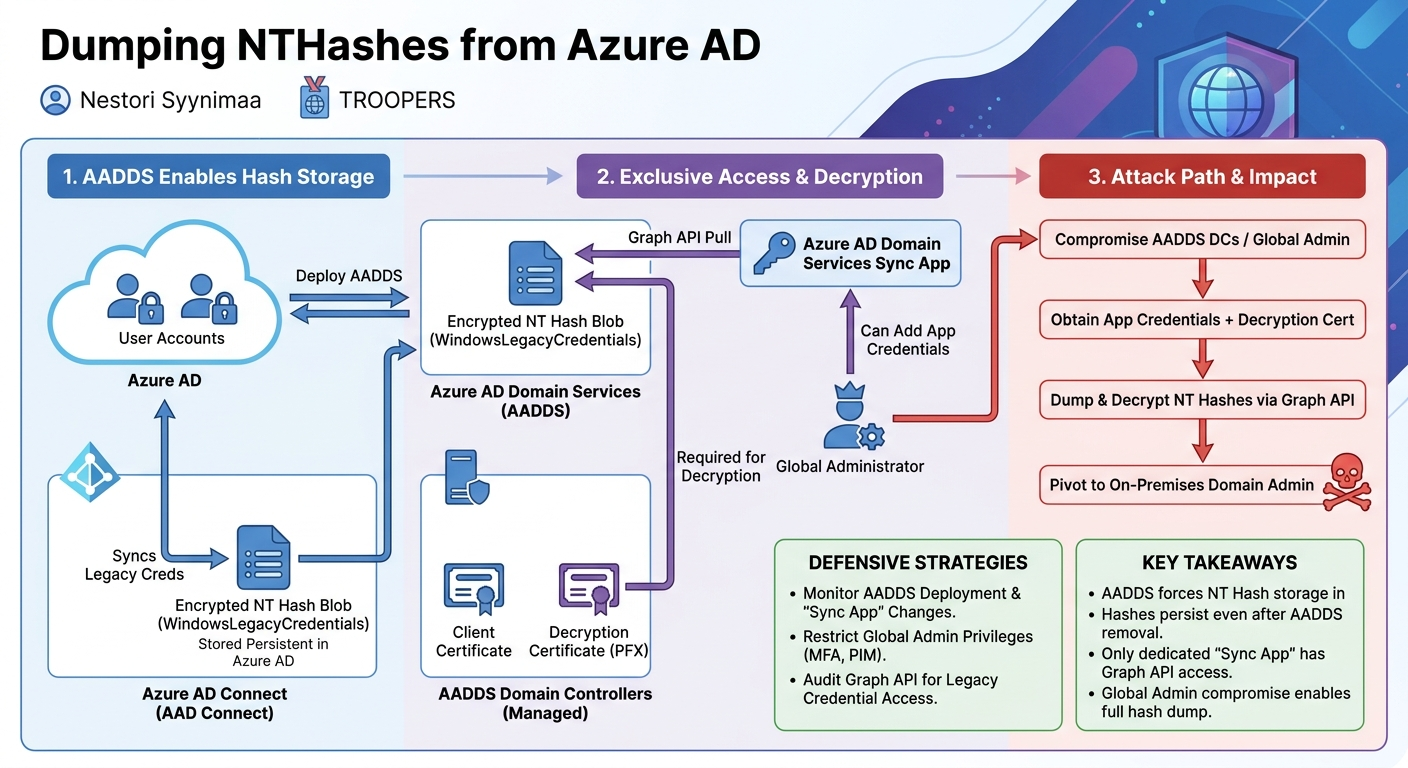
- NTLM Hashes are Stored in Azure AD: Contrary to general assumptions about Azure AD's password storage, the deployment of AADDS necessitates and consequently enables the storage of actual NTLM hashes (NT hashes) within Azure AD itself. These hashes are persistent and remain even if the AADDS instance is later deleted.
- AAD Connect Facilitates NT Hash Synchronization: When AADDS is enabled, Azure AD Connect (or AAD Cloud Sync) automatically starts synchronizing these legacy credentials. It retrieves a configuration (
GetWindowsCredentialSynchronizationConfig) from Azure AD, whereEnableWindowsLegacyCredentialsandEnableWindowsSupplementalCredentialsare now set totrue. AAD Connect then encrypts and sends two new attributes,WindowsLegacyCredentials(containing the NT hash blob) andSupplementalCredentials(containing Kerberos-related data), to Azure AD for user objects.
- AADDS Pulls Hashes via MS Graph API: The synchronization from Azure AD to AADDS is not a push model, but a pull model. A service within AADDS,
DC-AadSyncAgent, actively connects to Azure AD using the Microsoft Graph API to retrieve theseWindowsLegacyCredentialsandSupplementalCredentialsattributes. This occurs approximately every 30 seconds, utilizing Graph Delta queries for efficiency after the initial full sync.
- Exclusive Synchronization Application: A dedicated Azure AD application, named "Azure AD Domain Services Sync," is automatically created in the tenant when AADDS is deployed. Crucially, only this specific application is granted the permissions to access the otherwise hidden
WindowsLegacyCredentialsandSupplementalCredentialsattributes via the Graph API. Attempts to create other applications with similar permissions failed, indicating a tightly controlled access model.
- Local Certificate Storage: The documentation implies that decryption keys are stored in Azure Key Vault. However, Syynimaa discovered that both the client certificate used by the "Azure AD Domain Services Sync" application for authentication to MS Graph and the decryption certificate required to unencrypt the
WindowsLegacyCredentialsblob are stored locally on the AADDS domain controllers.
- Global Admin Manipulation of Sync App: A Global Administrator in Azure AD has the ability to add new credentials (e.g., a client secret or another certificate) to the "Azure AD Domain Services Sync" application. This provides a direct avenue for a cloud administrator to authenticate as the sync application, potentially bypassing the need to extract the client certificate from a compromised AADDS DC, provided they also have access to the decryption certificate.
- Vulnerable AADDS Deployment Images: During the research, it was found that the AADDS domain controllers deployed by Microsoft were vulnerable to specific, undisclosed CVEs. This allowed Syynimaa's colleagues to achieve Domain Administrator privileges on the managed DCs. Microsoft acknowledged the vulnerabilities and eventually patched them, but it highlighted a potential delay in patching managed services.
- Cloud Admin to On-Prem Admin Attack Path: The cumulative effect of these findings establishes a clear attack path:
- A cloud administrator (or an attacker who gains Global Admin access) deploys AADDS. This automatically enables NT hash synchronization.
- The attacker then gains Domain Admin privileges on the AADDS DCs (e.g., via a vulnerability, or other means).
- From the compromised AADDS DCs, the attacker can dump the NT hashes directly from Active Directory or retrieve the client and decryption certificates.
- Alternatively, using Global Admin privileges, the attacker can add new credentials to the "Azure AD Domain Services Sync" application.
- With the application credentials and the decryption certificate, the attacker can query Azure AD directly via the Graph API to retrieve and decrypt all stored NT hashes. These hashes can then be used for Pass-the-Hash attacks against on-premises systems or cracked offline.
These findings collectively demonstrate a significant security exposure, transforming an assumed secure storage mechanism into a potent attack vector for privilege escalation from cloud to on-premises environments.
Technical Deep Dive
▶ Watch: AADS sync agent: Hidden application accessing special attributes (24:30)
The technical mechanics behind dumping NT hashes from Azure AD involve a intricate dance between Azure AD Connect, Azure AD, and Azure AD Domain Services (AADDS). Nestori Syynimaa's research meticulously dissected each stage of this process.
The journey begins with Azure AD Connect, the tool responsible for synchronizing identities between on-premises Active Directory and Azure AD. When AADDS is enabled in an Azure AD tenant, Azure AD Connect's behavior subtly changes. It queries Azure AD for synchronization configuration, specifically the GetWindowsCredentialSynchronizationConfig endpoint. Syynimaa observed that two key settings, EnableWindowsLegacyCredentials and EnableWindowsSupplementalCredentials, which were historically false, now return true. This signals Azure AD Connect to start synchronizing additional credential types.
Upon receiving this instruction, Azure AD Connect begins to process and send these "legacy" credentials. It requests an encryption certificate from Azure AD. This certificate is crucial for securing the sensitive data in transit and at rest within Azure AD. Azure AD Connect then adds two new attributes to user objects that it synchronizes to Azure AD:
WindowsLegacyCredentials: This is the blob containing the encrypted NT hash.SupplementalCredentials: This attribute likely contains Kerberos-related credential material, which was not the primary focus of this research but is synchronized alongside the NT hash.
To understand the structure and encryption of the WindowsLegacyCredentials blob, Syynimaa employed reverse engineering techniques. Using dnSpy, a .NET decompiler, he examined Microsoft.Azure.ActiveDirectory.Synchronization.Server.dll, specifically the function GetAdAuthInfo. This function, responsible for encrypting the credentials, contained an Encrypt method that revealed the cryptographic details: a specific crypto provider, cipher mode, and padding mode. A curious detail was Microsoft's decision to reverse the encryption key after its initial encryption, a seemingly arbitrary step that adds complexity. For the native binary components, Syynimaa utilized Ghidra to decompile the WriteAdAuthInfo function, which outlined the blob's precise structure: a header with size information, the thumbprint of the encryption certificate, the encrypted encryption key, the initialization vector (IV), and finally, the encrypted data. The encrypted data itself was found to contain the UnicodePWD attribute, which is the raw NT hash.
The next phase involves the AADDS synchronization agent. Contrary to Microsoft's documentation suggesting a "push" mechanism from Azure AD, Syynimaa discovered that AADDS uses a pull model. A service named DC-AadSyncAgent running on the AADDS domain controllers is responsible for pulling objects from Azure AD. This agent communicates with Azure AD via the Microsoft Graph API. The initial request targets the v1.0/users endpoint, selecting specific attributes including the newly discovered WindowsLegacyCredentials and SupplementalCredentials. Subsequent synchronizations leverage Graph Delta queries to retrieve only changes, making the process efficient. This synchronization occurs approximately every 30 seconds, ensuring relatively rapid propagation of password changes.
A critical component of this pull mechanism is a specific Azure AD application named "Azure AD Domain Services Sync." This application is automatically provisioned in the tenant when AADDS is deployed. Syynimaa's tests revealed that only this particular application possesses the necessary permissions to access the WindowsLegacyCredentials and SupplementalCredentials attributes from Azure AD. Other custom applications could not replicate this access. This synchronization application authenticates to the Microsoft Graph API using a client certificate, which, along with the decryption certificate for the NT hashes, is stored directly in the personal certificate store on the AADDS domain controllers. This local storage of critical certificates, rather than a centralized, highly secured Key Vault, represents a significant finding.
The complexity further extends to certificate management. Azure AD typically uses only one current encryption certificate for new password synchronizations or updates. However, AADDS DCs might maintain both the current and previous certificates to ensure continuity during certificate rotation. This implies that within Azure AD, different user NT hashes, or even the same user's hash after multiple password resets, could be encrypted with different certificates over time. Successfully decrypting these hashes requires knowing which certificate was used for each specific hash blob.
In summary, the technical deep dive exposes a chain of events: AAD Connect encrypts NT hashes and sends them to Azure AD using a specific certificate. A dedicated AADDS sync application, using its own client certificate (both stored locally on AADDS DCs), pulls these encrypted blobs from Azure AD via the Graph API. The same local decryption certificate is then used by AADDS to make the NT hashes available for legacy authentication. This intricate process, while designed for functionality, creates multiple points of exposure for sensitive credentials.
Demo / Proof of Concept
▶ Watch: Microsoft's response: Unpatched AADS managed domain controllers (29:30)
Nestori Syynimaa demonstrated the practical implications of his research using his acclaimed open-source toolkit, AADInternals. While direct access to a live AADDS environment was no longer feasible due to Microsoft's post-disclosure suspension of his research tenant, he showcased the capabilities using a previously saved tenant configuration, including user data with stored NT hashes and the necessary decryption certificates.
The core of the demonstration revolved around the Get-AADIntNTHashes cmdlet within AADInternals. To execute this, the tool requires:
- The Client ID of the "Azure AD Domain Services Sync" application.
- A Client Password (or client secret) that a Global Admin would have added to the application, or the original client certificate.
- The PFX file containing the decryption certificate (which would have been extracted from a compromised AADDS DC).
Syynimaa executed a command similar to:
Get-AADIntNTHashes -ClientPassword <your_client_password> -ClientId <aad_ds_sync_app_id> -PfxFileName "decryption_cert_dec19.pfx"
Upon execution, the tool successfully dumped NT hashes for several users. To illustrate the challenge of varying encryption certificates, he then used the -Verbose switch. This revealed that for some users, decryption failed, indicating that their NT hashes were encrypted with a different certificate than the one provided. When he switched to another saved certificate (decryption_cert_dec21.pfx), different users' hashes were successfully decrypted, demonstrating the certificate-specific nature of the encryption.
Further highlighting the power of AADInternals, Syynimaa also showed how to manipulate these credentials. He demonstrated the ability to set a user's password using a hash value (e.g., "full of zeros") and encrypt it with a specific certificate, including the currently active Azure AD Connect certificate. While the immediate practical use case for this specific action might be limited, it underscores the profound control an attacker could wield over user credentials once the underlying mechanisms are understood and exploited.
The demo conclusively proved that, given the correct application credentials and the corresponding decryption certificate, an attacker can programmatically extract and decrypt NT hashes directly from Azure AD. This bypasses the need for direct access to the AADDS domain controllers for subsequent hash retrieval, as the hashes persist in Azure AD itself. The ease with which AADInternals could perform these actions emphasized the severity of the discovered attack vector.
Defensive Implications
▶ Watch: Q&A: Current viability of the attack path after patches (42:40)
The findings presented by Nestori Syynimaa carry significant defensive implications for organizations utilizing or considering Azure AD Domain Services (AADDS). Understanding this attack path is crucial for securing hybrid cloud environments and protecting against privilege escalation from cloud to on-premises.
- Re-evaluate AADDS Necessity: The most fundamental defensive measure is to critically assess whether AADDS is truly required. If legacy applications can be modernized or re-architected to avoid NTLM/Kerberos dependencies, deploying AADDS (and thus enabling NT hash synchronization) should be avoided entirely. If AADDS is indispensable, recognize that its deployment introduces a new, persistent repository of sensitive credentials in Azure AD.
- Strict Monitoring of AADDS Deployment: Organizations must actively monitor for the deployment of AADDS. The talk highlights specific indicators:
- Look for the creation of an application principal named "Azure AD Domain Services Sync" in Azure AD. This application is typically created by the
Domain Controller Servicesservice principal. Its presence is a direct indicator that NT hash synchronization has been enabled. - Monitor for the creation of new service principals, especially those linked to the AADDS deployment.
- Monitor Application Credential Changes: A critical attack vector involves a Global Admin (or compromised Global Admin account) adding new credentials (e.g., client secrets) to the "Azure AD Domain Services Sync" application. Defenders should implement robust monitoring for any modifications to the credentials of this specific application. Crucially, legitimate updates to certificates are performed by the
Domain Controller Servicesservice principal. Any changes made by any other user or service principal should be treated as highly suspicious and investigated immediately. Syynimaa provided a KQL query concept for this:
- Monitor Microsoft Graph API Activity (Future): Syynimaa anticipates the release of Microsoft Graph Activity Logs (announced in April) as a powerful tool for detection. Defenders should prepare to implement KQL queries to monitor for unusual Graph API calls targeting the
WindowsLegacyCredentialsattribute by the "Azure AD Domain Services Sync" application. Specifically, look forGETrequests to the Graph API endpoint for user attributes that do not include a Delta token, as this could indicate an attacker performing a full dump rather than a legitimate incremental sync. The application ID can be retrieved usingAADServicePrincipalSignInLogsto refine these queries.
- Strengthen Cloud Admin Security: The attack path originates from a cloud administrator's ability to deploy AADDS and potentially manipulate the sync application. This underscores the paramount importance of securing Global Administrator accounts and other highly privileged roles in Azure AD. Implement Multi-Factor Authentication (MFA), Privileged Identity Management (PIM), and Conditional Access policies for these accounts.
- Awareness of Managed Service Patching Delays: The discovery that Microsoft's managed AADDS instances were vulnerable to known CVEs highlights that "managed" does not always mean "immediately patched." Organizations should be aware of potential delays in patching managed services and understand that even these components can introduce vulnerabilities. While direct patching is not the customer's responsibility, monitoring for suspicious activity on AADDS DCs (e.g., RDP logins by unauthorized users, if event logs are streamed to Azure Event Hub) remains important.
- Incident Response Planning: Develop incident response plans specifically for detecting and responding to potential compromise of AADDS or the exfiltration of NT hashes from Azure AD. This includes procedures for revoking application credentials, rotating affected user passwords, and investigating the scope of compromise.
By implementing these defensive strategies, organizations can significantly reduce their exposure to the "Dumping NTHashes from Azure AD" attack vector and strengthen their overall security posture in hybrid cloud environments.
Key Takeaways
- AADDS Enables NT Hash Storage: Deploying Azure AD Domain Services (AADDS) causes NTLM password hashes (NT hashes) to be stored in Azure AD, challenging the perception that such sensitive credentials are never accessible.
- Hashes Persist Indefinitely: These NT hashes remain stored in Azure AD indefinitely, even after AADDS is undeployed, as long as the necessary decryption certificates are available.
- Dedicated Sync App is Key: A specific Azure AD application, "Azure AD Domain Services Sync," is created during AADDS deployment and is the only entity authorized to access these hidden credential attributes via the Microsoft Graph API.
- Global Admin Control: A Global Administrator can manipulate the "Azure AD Domain Services Sync" application by adding new client credentials, enabling them to impersonate the sync agent and dump hashes if the decryption certificate is also obtained.
- Cloud-to-On-Prem Attack Path: This discovery creates a powerful attack vector allowing a compromised cloud administrator to pivot to full on-premises domain administrator privileges by exfiltrating and cracking these NT hashes.
- Monitor for Compromise: Defenders must actively monitor for AADDS deployment, unauthorized changes to the "Azure AD Domain Services Sync" application's credentials, and unusual Microsoft Graph API calls targeting legacy credential attributes.
About the Speaker(s)
Nestori Syynimaa is a highly respected figure in the cybersecurity community, renowned for his deep expertise in Azure Active Directory security. He currently serves as a Senior Principal Security Researcher within the Secureworks Counter Threat Unit, where he focuses on uncovering critical vulnerabilities and developing advanced threat detection capabilities.
Often known by his Twitter handle, @DrAzureAD, Syynimaa is a Microsoft Most Valuable Professional (MVP) in the security category, a testament to his significant contributions to the Microsoft ecosystem and his willingness to share knowledge. His influence extends beyond the MVP program, as he has been recognized multiple times on Black Hat's list of 100 most helpful and valuable security researchers.
Syynimaa is the creator and maintainer of AADInternals, a powerful open-source toolkit that provides extensive functionalities for auditing, managing, and exploiting Azure AD environments. This tool was a central component of his demonstration, showcasing its capabilities in interacting with Azure AD's hidden mechanisms. Hailing from Finland, Nestori is a prolific speaker, having delivered numerous talks at major security conferences globally, sharing his groundbreaking research and insights.
Reviews
Dr. Zero (Offensive Security Researcher) — MUST SEE
This is what cloud research is supposed to look like. Nestori takes Microsoft's 'we don't store hashes' marketing and completely dismantles it by weaponizing their own sync architecture. It's a masterclass in reversing undocumented features to turn a managed service into a massive credential repository.
Heather Calloway (CISO) — MUST SEE
This research dismantles the assumption that Azure AD does not store accessible NTLM hashes. By simply deploying Azure AD Domain Services to support legacy applications, you silently synchronize and persist credentials that allow a cloud compromise to become an on-premises domain takeover. If your tenant runs AADDS, your cloud risk is now your forest risk.