(Windows) Hello from the other side
Dirk-jan Mollema (Founder · Outsider Security)
TROOPERS23 · Day 1 · Active Directory & Azure Security · Active Directory & Azure Security
Overview
In this insightful talk from TROOPERS, security researcher Dirk-jan Mollema, founder of Outsider Security, delves into the intricacies and surprising vulnerabilities of Windows Hello for Business (WHfB). Touted by Microsoft as a highly secure, passwordless authentication solution, WHfB aims to replace traditional passwords with cryptographic keys protected by hardware and unlocked by PINs or biometrics. Mollema's research, however, uncovers several critical flaws that challenge these claims, demonstrating how attackers could bypass multi-factor authentication (MFA), achieve persistence, and even move laterally from Azure AD to on-premise Active Directory.
Key moments
- 0:00 Introduction and talk agenda overview
- 3:55 Microsoft's promises for Windows Hello for Business
- 12:00 Technical simplicity of Windows Hello key enrollment
- 20:30 Vulnerability: Provisioning keys without strong MFA
- 28:50 Device code phishing to backdoor user accounts
- 36:30 Hybrid: Recovering NT hash from partial TGT
- 41:00 Escalation: Azure AD Global Admin to On-Prem Domain Admin
- 50:50 Q&A: Mitigating attacks with Protected Users Group
(Windows) Hello from the other side
Speakers: Dirk-jan Mollema, Founder, Outsider Security
Conference: TROOPERS
YouTube: https://www.youtube.com/watch?v=AFay_58QubY
Overview
In this insightful talk from TROOPERS, security researcher Dirk-jan Mollema, founder of Outsider Security, delves into the intricacies and surprising vulnerabilities of Windows Hello for Business (WHfB). Touted by Microsoft as a highly secure, passwordless authentication solution, WHfB aims to replace traditional passwords with cryptographic keys protected by hardware and unlocked by PINs or biometrics. Mollema's research, however, uncovers several critical flaws that challenge these claims, demonstrating how attackers could bypass multi-factor authentication (MFA), achieve persistence, and even move laterally from Azure AD to on-premise Active Directory.
Mollema's presentation provides a deep technical dive into WHfB's key provisioning and authentication flows, dissecting the underlying protocols and APIs. He meticulously details how he discovered and exploited vulnerabilities that allowed the registration of rogue WHfB keys, effectively circumventing hardware protection and MFA requirements. The talk culminates in a demonstration of powerful lateral movement techniques, particularly within hybrid Azure AD and Active Directory environments leveraging the Cloud Kerberos Trust, where a compromised Azure AD Global Administrator could escalate privileges to domain administrator equivalent in the on-premise environment.
This research is crucial for any organization deploying or considering WHfB, especially those operating in hybrid cloud environments. It highlights the importance of understanding the full attack surface of modern authentication mechanisms and provides actionable insights for defenders. Mollema not only exposes the weaknesses but also contributes open-source tooling (roadtx toolkit) to replicate and understand these attack paths, fostering a more secure ecosystem by enabling thorough testing and informed defense strategies.
Background
▶ Watch: Introduction and talk agenda overview (0:00)
Windows Hello for Business (WHfB) is Microsoft's enterprise-grade passwordless authentication offering, designed to provide a more secure and user-friendly alternative to traditional passwords. It leverages cryptographic keys, typically stored in a Trusted Platform Module (TPM), which are then unlocked using a PIN or biometric factors like fingerprint or facial recognition. Microsoft positions WHfB as a strong, phishing-resistant multi-factor authentication solution, emphasizing its device-bound nature and hardware-backed key protection.
Prior research into WHfB primarily focused on its implementation within purely Active Directory environments, notably Michael Grafnetter's work which inspired the Shadow Credentials attack by Elad Shamir. This earlier research explored lateral movement within on-prem AD using WHfB. Additionally, some efforts investigated the internal workings of Windows Hello, such as biometric bypasses or PIN handling. However, Mollema identified a significant gap: a lack of specific research into WHfB's behavior and security in Azure AD and hybrid Azure AD/Active Directory setups.
Microsoft's key assurances for WHfB, which Mollema critically examines, include:
- Strong Phishing Resistance & Multi-Factor Authentication: The combination of a cryptographic key (something you have) and a PIN/biometric (something you know/are) is presented as strong MFA, with initial provisioning requiring MFA.
- Device-Bound Keys: Keys are unique to a specific device, preventing their use on other machines.
- Hardware Protection: Keys are protected by a TPM if available, preventing extraction even with administrative privileges.
- Enhanced Security: Overall, it's pitched as significantly more secure than password-based authentication.
WHfB can operate in several configurations: purely Azure AD native, purely on-prem Active Directory, or various hybrid models (e.g., Hybrid Key Trust, Hybrid Certificate Trust, and the simpler Cloud Kerberos Trust). Mollema's research specifically targets the Azure AD native implementation due to its "always on" nature and the Cloud Kerberos Trust for its recommended status and ease of setup, making them prime targets for attackers.
Key Findings
▶ Watch: Technical simplicity of Windows Hello key enrollment (12:00)
Dirk-jan Mollema's research uncovered several critical vulnerabilities and design implications within Windows Hello for Business, challenging Microsoft's security assertions:
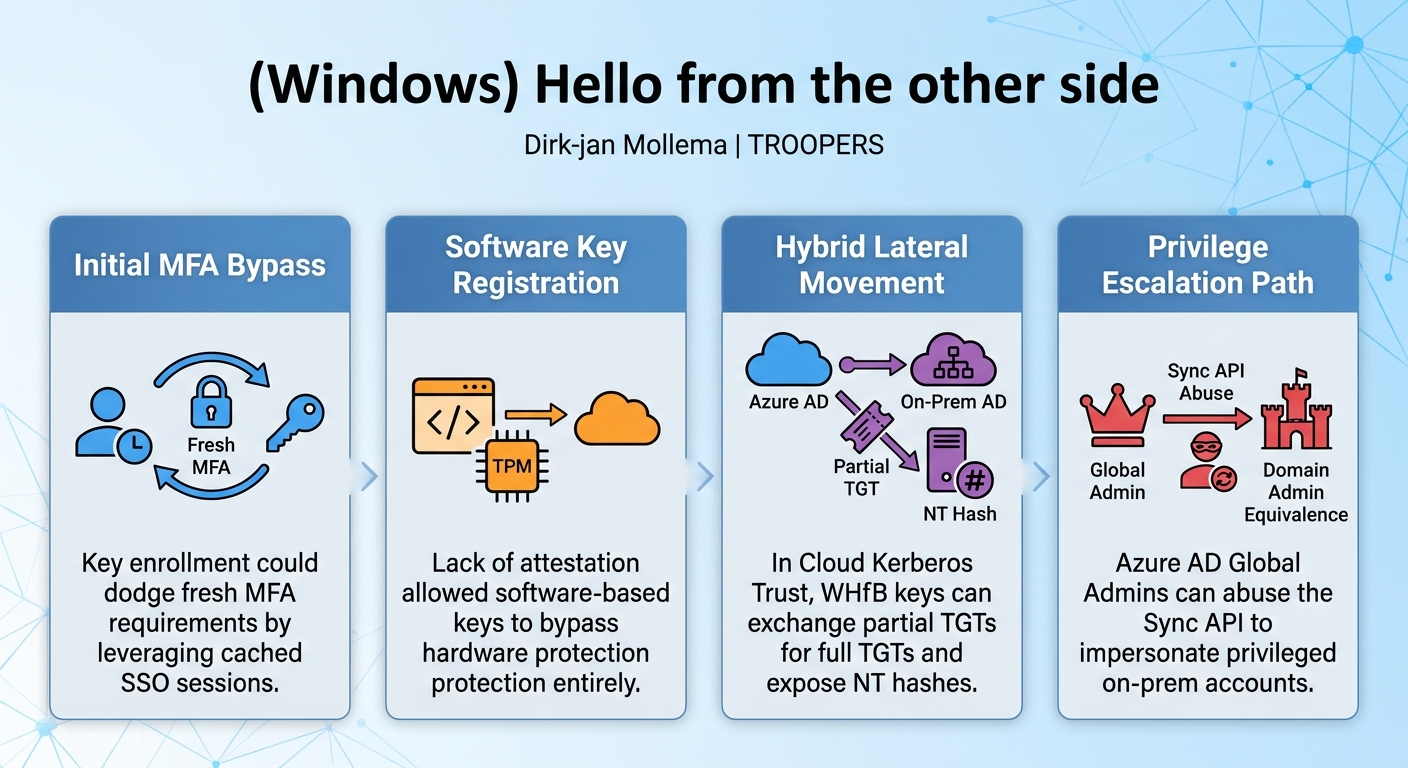
- MFA Bypass during Key Provisioning (Initially): Contrary to Microsoft's claims, the initial enrollment of a WHfB key did not always require fresh MFA. The
NGC MFAclaim, which signals recent MFA, was not strictly enforced. Attackers could leverage cached MFA status from an existing single sign-on (SSO) session on a compromised device (even from a low-privileged user process) to register a new WHfB key. This effectively allowed the registration of a new MFA method without performing MFA, providing a backdoor into the user's account.
- Circumvention of TPM Protection: Since the provisioning process lacked attestation mechanisms, attackers could register software-based WHfB keys. This means that instead of trying to extract a hardware-protected key from a TPM, an attacker could simply generate a new key on their own system and register it with Azure AD. This completely bypasses the hardware protection promised by WHfB, making the key easily portable and usable from any attacker-controlled environment.
- Persistence through Rogue Key Registration: Registered WHfB keys act as alternative credentials. The ability to register a new, software-based WHfB key provided a stealthy and persistent backdoor. No notifications were sent to the user or administrators upon key registration, making it difficult to detect and allowing continued access even after password resets. Attackers could also overwrite existing keys or register new ones, maintaining access.
- Azure AD Graph API Vulnerability: Mollema discovered that the
searchableDeviceKeysproperty of a user object in the Azure AD Graph API (graph.windows.net) could be modified by users themselves or by administrators. With a valid access token for this API, an attacker could inject new WHfB keys into a user's account without requiring any MFA, further undermining the security model. This allowed for even broader key injection scenarios.
- Device Code Phishing to Backdoor Accounts: Combining the Graph API vulnerability with device code phishing, an attacker could gain persistent access to a user's account. By tricking a user into authenticating an attacker's device code, the attacker would obtain an access token. This token could then be used to call the Azure AD Graph API, register a new WHfB key, and establish backdoor credentials, enabling access to any Azure AD-connected application, even after the user changes their password.
- Lateral Movement from Azure AD to On-Prem AD in Hybrid Setups: In environments configured with Cloud Kerberos Trust, a WHfB key could be used to obtain a partial Ticket Granting Ticket (TGT) from Azure AD. This partial TGT could then be exchanged with an on-premise Active Directory domain controller for a full TGT and, critically, the NT hash of the user. This allowed attackers to perform both Kerberos and NTLM authentication to any AD-connected resources, facilitating lateral movement within the on-premise network.
- Azure AD Global Admin to Domain Admin Equivalent (via Sync API Abuse): The most severe finding involved leveraging Global Administrator privileges in Azure AD to achieve domain administrator equivalent privileges in a hybrid on-premise Active Directory. By abusing the Azure AD Sync API, a Global Admin could manipulate the synchronization scope to create a new Azure AD user that impersonated a powerful on-premise account, such as the AD Connect sync account, by matching its Security Identifier (SID) and SAMAccountName. This allowed the Global Admin to obtain a partial TGT for this high-privileged on-prem account, exchange it for a full TGT and NT hash, and then use those credentials to synchronize all other password hashes from Active Directory, effectively gaining domain admin rights. This particular attack vector remains applicable as a design consequence.
Technical Deep Dive
▶ Watch: Device code phishing to backdoor user accounts (28:50)
The technical underpinnings of Windows Hello for Business involve a sophisticated interplay of cryptographic keys, device identities, and various Azure AD services. Mollema's research meticulously dissects these components to expose their vulnerabilities.
WHfB Key Provisioning Flow
The standard WHfB provisioning flow, as presented by Microsoft, begins with a user on an Azure AD joined or registered device. The process typically initiates during Windows setup or first sign-in.
- MFA Prompt: The user is prompted to perform multi-factor authentication (MFA). This is a crucial step intended to secure the enrollment of a powerful passwordless credential.
- Key Generation: Upon successful MFA, Windows generates a cryptographic key pair locally on the device. The private key is intended to be protected by the Trusted Platform Module (TPM) if present, while the public key is sent to Azure AD.
- PIN/Biometric Setup: The user then sets up a PIN, fingerprint, or facial recognition to unlock the private key.
- Authentication: Once configured, the user can sign into their device using the PIN or biometrics, which in turn uses the WHfB key to authenticate to Azure AD and connected resources.
From an HTTP request perspective, the initial MFA prompt during key provisioning is triggered by a GET request to the /authorize endpoint, including the amr_values=ngcmfa parameter. NGC stands for Next Generation Credentials, Microsoft's internal term for WHfB keys. This parameter explicitly requests a fresh MFA challenge, even if a cached MFA session exists.
The actual key enrollment is a surprisingly simple POST request to the Device Registration Service. It includes the public key and an access token authenticating the request. Crucially, Mollema found no attestation mechanism to prove that the key was generated by a TPM or a legitimate device.
WHfB Authentication Flow
Authenticating with a WHfB key involves a Primary Refresh Token (PRT) request using the grant_type=jwt_bearer. This means the request is embedded within a JSON Web Token (JWT), which is signed by the device's identity to prove its origin.
Inside this outer JWT, several key fields are present:
- Header: Contains the device's X.509 certificate (
x5c) to identify the device. - Payload: Includes a
nonce(to prevent replay attacks), theusername, and another nested JWT calledassertion.
The nested assertion JWT is the core of WHfB authentication. It is signed with the private key of the WHfB credential itself. Its payload typically contains:
kid(Key ID): Identifies the specific WHfB key being used.usage: Specifiesngc(Next Generation Credentials) for WHfB authentication.tid(Tenant ID): The Azure AD tenant.upn(User Principal Name): The user authenticating.exp(Expiration): Another timestamp to prevent replay.
The response to this request is a PRT, an encrypted PRT session key (intended to be TPM-bound), and, in hybrid scenarios, information for Kerberos authentication.
Vulnerability Deep Dive: MFA Bypass and TPM Circumvention
Mollema’s initial key finding was that the NGC MFA claim was not strictly enforced during key provisioning. If an attacker had access to an existing single sign-on (SSO) session (e.g., from a browser on a compromised device), that session's cached MFA status was often sufficient. This allowed the POST request to the Device Registration Service to succeed, registering a new WHfB key without a fresh MFA challenge.
The lack of attestation during key provisioning meant that Mollema could generate a WHfB key pair entirely in software using his roadtx toolkit. By extracting existing SSO data from a user's session (e.g., via LSASS data), roadtx could request an access token for the device registration service with the necessary (but flawed) MFA claim. This token, along with the attacker-generated public key, was then used in the POST request to Azure AD, registering the software-based key. This completely bypassed the TPM protection, as the private key was now on the attacker's disk.
Azure AD Graph API Injection
Further research revealed that the searchableDeviceKeys property of a user object in the Azure AD Graph API (graph.windows.net) was writable by the user or by administrators. This meant that an attacker with a valid access token for the Azure AD Graph API could craft a PATCH request to inject a new WHfB public key into this property. This method bypassed the NGC MFA claim requirement entirely, as any valid token for the Graph API would suffice, depending on Conditional Access policies.
Hybrid Scenarios: Cloud Kerberos Trust and Lateral Movement
The Cloud Kerberos Trust is a mechanism designed to enable seamless single sign-on to on-premise Active Directory resources from Azure AD joined devices using WHfB. When configured, Azure AD essentially gains "read-only domain controller" capabilities within the on-prem AD, sharing Kerberos keys.
The flow for hybrid authentication is:
- User authenticates to Azure AD with WHfB, receiving a PRT.
- Azure AD also issues a partial Ticket Granting Ticket (TGT), signed by the Kerberos keys of the virtual RODC in on-prem AD. This partial TGT is embedded in the
ttadfield of the PRT response. - The client (or an attacker) takes this partial TGT and exchanges it with an on-premise domain controller for a full TGT.
- During this exchange, an interesting extension to the Kerberos protocol allows for the recovery of the user's NT hash. This is requested via specific pre-authentication data (
PA-DATA) in the Kerberos request and returned encrypted in the session key. Decrypting this reveals the plain text NT hash, enabling NTLM authentication to legacy services that don't support Kerberos.
Azure AD Global Admin to Domain Admin Equivalent via Sync API Abuse
The most potent attack Mollema demonstrated leverages Global Admin privileges in Azure AD. If a Global Admin has network connectivity to an on-premise domain controller, they can escalate privileges to domain admin equivalent.
The attack chain involves:
- Sync API Manipulation: The Azure AD Sync API, typically used by Azure AD Connect to synchronize identities, can be invoked by a Global Admin. This API uses a complex binary XML data format. Mollema utilized existing open-source tools (from RW research) to encode/decode these messages.
- Impersonating On-Prem Accounts: A Global Admin can create a new Azure AD user or modify an existing one to match the
Security Identifier (SID)andSAMAccountNameof a powerful on-premise account not typically synced, such as the AD Connect sync account. This account often hasDirectory Synchronizationprivileges, which are effectively domain admin equivalent for hash synchronization. - Obtain Partial TGT: Once the Azure AD user is manipulated to impersonate the on-prem sync account, the Global Admin can obtain a PRT (and thus a partial TGT) for this user, even with a simple password authentication (not strictly requiring WHfB keys).
- Full TGT and NT Hash Recovery: The partial TGT is then exchanged with an on-prem DC for a full TGT and the NT hash of the impersonated sync account.
- Domain Admin Equivalent: With the NT hash of the AD Connect sync account, the attacker can then use its
Directory Synchronizationprivileges to synchronize all password hashes from Active Directory, effectively gaining domain administrator control.
This attack is filtered for highly privileged on-prem accounts (e.g., Domain Admins) by default RODC protections. However, the AD Connect sync account is typically not in these protected groups, making it a viable target.
Mollema's roadtx toolkit includes functionalities to automate all these technical steps, from key generation and PRT requests to partial TGT to full TGT exchange and NT hash recovery, and even the Sync API manipulation.
Demo / Proof of Concept
▶ Watch: Hybrid: Recovering NT hash from partial TGT (36:30)
Dirk-jan Mollema provided clear demonstrations of his findings using his custom roadtx toolkit, showcasing the practical exploitability of Windows Hello for Business vulnerabilities.
The core of his demo revolved around:
- Initial PRT Request: He first demonstrated obtaining a standard Primary Refresh Token (PRT) using a username and password, coupled with a pre-existing device certificate. This established a baseline authenticated session.
- MFA-Claimed Token for Key Enrollment: Next, he showed how to request a token specifically for the Device Registration Service that included a multi-factor authentication (MFA) claim. This step, as highlighted in the technical deep dive, was initially susceptible to bypass but in the demo, he manually triggered the MFA prompt. Upon successful MFA,
roadtxobtained an access token suitable for registering a new WHfB key.
- Provisioning a New WHfB Key: Using the
winhellocommand withinroadtx, Mollema generated a new cryptographic key pair locally. The public part of this key was then posted to Azure AD, authenticated by the previously obtained MFA-claimed token. The successful response from Azure AD confirmed the registration of a new WHfB key on the user's account, with the private key stored on the attacker's disk (not in a TPM).
- Authenticating with the Software-Generated Key: Finally, he demonstrated requesting a new PRT, this time using the freshly registered, software-generated WHfB private key along with the device credentials. The resulting PRT, when inspected, clearly showed the authentication methods as
RSAandMFA, confirming a successful Windows Hello for Business authentication using the attacker's rogue key. This PRT could then be used to comply with conditional access policies requiring phishing-resistant MFA.
Beyond this core demonstration, Mollema also referenced the capabilities of roadtx to handle the hybrid scenarios, specifically the partial TGT to full TGT script for exchanging partial Kerberos tickets obtained from Azure AD for full ones on-premise, and the ability to recover the NT hash during this process. He also mentioned roadtx (and adinternals for PowerShell users) as tools for manipulating the Azure AD Sync API to impersonate on-premise accounts, illustrating the full scope of his toolkit for these advanced attacks.
The demonstrations underscored the ease with which these vulnerabilities could be exploited in a real-world scenario, particularly the ability to register software-based keys and bypass hardware protection, providing attackers with persistent access.
Defensive Implications
▶ Watch: Q&A: Mitigating attacks with Protected Users Group (50:50)
Mollema's research has significant implications for organizations using or planning to deploy Windows Hello for Business, especially in hybrid environments. Fortunately, Microsoft has addressed several of the identified vulnerabilities.
Microsoft's Fixes:
- Enforced
NGC MFAClaim: Microsoft has patched the initial key provisioning flaw. TheNGC MFAclaim is now properly required, meaning a fresh multi-factor authentication challenge must be performed before a new WHfB key can be enrolled. This largely mitigates the ability to register rogue keys using only cached MFA status from existing SSO sessions. - Restricted
searchableDeviceKeysModification: The ability to inject new WHfB keys by directly modifying thesearchableDeviceKeysproperty via the Azure AD Graph API has also been restricted. This prevents attackers from bypassing MFA by simply having an access token for the Graph API.
Remaining Design-Related Risks (Still Applicable):
Despite these fixes, certain aspects of WHfB and hybrid integration remain a concern due to architectural design choices:
- Cloud Kerberos Trust Implications: The fundamental design of the Cloud Kerberos Trust, where Azure AD essentially acts as a virtual Read-Only Domain Controller (RODC) and shares Kerberos keys with on-prem AD, introduces a significant trust boundary. If an attacker achieves a full compromise of Azure AD (e.g., via a Global Administrator account), the shared Kerberos keys could be at risk, potentially exposing the on-premise Active Directory.
- Global Admin to Domain Admin Equivalent Lateral Movement: The most critical remaining risk is the ability for an Azure AD Global Administrator (with network connectivity to an on-premise Domain Controller) to achieve domain administrator equivalent privileges. This is possible through the manipulation of the Azure AD Sync API to impersonate high-privileged on-prem accounts (like the AD Connect sync account) and subsequently obtain their NT hash. This is a design consequence of how the sync process and Cloud Kerberos Trust operate.
Defensive Strategies:
- Protect Azure AD Global Administrator Accounts: These accounts are now a direct path to on-premise Domain Admin equivalent privileges in hybrid setups. Implement the strongest possible security controls, including Conditional Access policies, Privileged Identity Management (PIM) for just-in-time access, and hardware-backed MFA (e.g., FIDO2 keys).
- Monitor for Compromise of Azure AD Global Admins: Implement robust logging and alerting for any suspicious activity related to Global Administrator accounts, especially changes to user properties, device registrations, or sync configurations.
- Restrict RODC Replication: For the Cloud Kerberos Trust, review and restrict the default allow list for RODC replication in Active Directory. Specifically:
- Add Tier 0 accounts (including the AD Connect sync account) to the deny list for RODC replication. This prevents the virtual RODC (and thus Azure AD) from issuing TGTs or recovering NT hashes for these highly privileged accounts.
- Limit the allow list to only the explicit accounts that genuinely require hybrid Windows Hello authentication, minimizing the attack surface.
- Monitor for New Device Registrations and WHfB Key Enrollments: While Microsoft doesn't send notifications for WHfB key registrations, organizations should monitor for unexpected device registrations in Azure AD and review user
searchableDeviceKeysproperties for anomalies, though this can be cumbersome. - Implement Strong Conditional Access Policies: Ensure that Conditional Access policies are robust and enforce phishing-resistant MFA for all sensitive applications and administrative portals.
- Regularly Review Hybrid Configuration: Periodically audit the configuration of Cloud Kerberos Trust and Azure AD Connect to ensure it aligns with security best practices and least privilege principles.
- Understand WHfB Limitations: While WHfB is a significant improvement over passwords, it is not a silver bullet. Defenders must understand its architectural nuances, particularly in hybrid environments, and not solely rely on Microsoft's marketing claims.
Key Takeaways
- Initial WHfB Key Provisioning was Vulnerable: Previously, Windows Hello for Business key enrollment could bypass fresh MFA requirements, allowing attackers to register rogue keys using cached MFA status or existing single sign-on data.
- TPM Protection Could Be Circumvented: Due to a lack of attestation during key provisioning, attackers could register software-based WHfB keys, effectively bypassing hardware protection (TPM) and enabling persistent access from any attacker-controlled device.
- Azure AD Graph API Weakness: The
searchableDeviceKeysproperty in the Azure AD Graph API could be manipulated to inject new WHfB keys without MFA, providing another avenue for backdoor credential creation. - Device Code Phishing as an Attack Vector: These vulnerabilities enabled sophisticated attacks like device code phishing to provision persistent WHfB backdoor credentials, granting access even after password resets.
- Hybrid Cloud Kerberos Trust Enables Lateral Movement: In hybrid Azure AD/Active Directory setups, WHfB keys could be used to obtain partial Kerberos Ticket Granting Tickets (TGTs) from Azure AD, which could then be exchanged for full TGTs and, critically, the NT hash of the user from on-prem AD, facilitating lateral movement.
- Azure AD Global Admin to Domain Admin Equivalent is Possible: A severe design implication allows an Azure AD Global Administrator (with network access to a Domain Controller) to achieve domain administrator equivalent privileges in on-prem AD by abusing the Azure AD Sync API to impersonate high-privileged accounts like the AD Connect sync account.
- Microsoft Has Implemented Fixes: Key vulnerabilities regarding MFA bypass during provisioning and Graph API injection have been addressed by Microsoft, requiring proper MFA for key enrollment and restricting property modification.
- Ongoing Vigilance for Hybrid Setups: Despite fixes, the architectural design of Cloud Kerberos Trust still presents risks, necessitating strong protection for Azure AD Global Administrator accounts and careful configuration of RODC replication deny lists for Tier 0 accounts.
About the Speaker(s)
Dirk-jan Mollema is the founder of Outsider Security, a company based in the Netherlands. He is a prominent figure in the cybersecurity community, known for his extensive research, particularly in Active Directory and Azure AD security. Dirk-jan's work spans a mix of penetration testing, security research, and training. He is recognized for developing his own open-source tools to facilitate his research and testing, and he frequently shares his findings at conferences like TROOPERS and through his blog and Twitter account. His dedication to understanding how systems actually work and uncovering vulnerabilities makes him a valuable contributor to the security landscape.
Reviews
Dr. Zero (Offensive Security Researcher) — MUST SEE
Dirk-jan Mollema completely dismantles Microsoft's 'passwordless is unhackable' marketing in this TROOPERS session. It's a masterclass in pulling apart Azure AD and hybrid authentication flows to find the architectural seams vendors hope you ignore. If you run a hybrid environment, this is mandatory viewing.
Heather Calloway (CISO) — MUST SEE
Mollema dismantles the hardware-backed promises of Windows Hello for Business, exposing how hybrid setups bridge cloud and on-prem identity boundaries. The critical takeaway for leadership is architectural: an Azure AD Global Admin can pivot to on-premise Domain Admin by design. If you run a hybrid environment, this research requires an immediate review of your tiering models.