So You Performed A Forest Recovery. How Do You Reconnect Your AD Again With Azure AD?
Jorge de Almeida Pinto (Solutions Architect and Senior Incident Response Lead · Semperis)
TROOPERS23 · Day 1 · Active Directory & Azure Security · Active Directory & Azure Security
Overview
In this insightful TROOPERS session, Jorge de Almeida Pinto, a Senior Incident Response Lead at Semperis, addresses a critical, yet often overlooked, challenge in post-breach recovery: reconnecting Active Directory (AD) with Azure AD after a catastrophic forest recovery. Building upon his previous talk on resurrecting AD after a ransomware attack, Pinto dives deep into the intricate steps and crucial considerations required to restore hybrid identity synchronization, ensuring business continuity in a compromised environment.
Key moments
- 0:00 Introduction and problem statement for AD-Azure AD reconnection
- 2:00 Choosing the right AD backup and performing gap analysis
- 4:30 Authentication options after recovery: PHS recommended
- 6:30 Crucial step: Disabling sync scheduler, not cloud config
- 15:30 Cloud Sync limitations: no test mode, group deletion risks
- 21:30 Reconfiguring Azure AD Connect sync rules: user, group, contact
- 36:00 Cloud Sync risks and key takeaways for recovery
- 43:00 Q&A: Sync duration and password reset considerations
So You Performed A Forest Recovery. How Do You Reconnect Your AD Again With Azure AD?
Speakers: Jorge de Almeida Pinto, Solutions Architect and Senior Incident Response Lead, Semperis
Conference: TROOPERS
YouTube: https://www.youtube.com/watch?v=aIE1lEQAxRE
Overview
In this insightful TROOPERS session, Jorge de Almeida Pinto, a Senior Incident Response Lead at Semperis, addresses a critical, yet often overlooked, challenge in post-breach recovery: reconnecting Active Directory (AD) with Azure AD after a catastrophic forest recovery. Building upon his previous talk on resurrecting AD after a ransomware attack, Pinto dives deep into the intricate steps and crucial considerations required to restore hybrid identity synchronization, ensuring business continuity in a compromised environment.
The talk highlights the complexities that arise when an organization is forced to revert to an older AD backup, creating a significant "gap" in object states, passwords, and group memberships between the on-premises AD and Azure AD. Pinto meticulously details the technical procedures, potential pitfalls, and best practices for managing this desynchronization, emphasizing the importance of a robust disaster recovery plan that extends beyond the on-premises perimeter to encompass the hybrid identity ecosystem. His expertise, drawn from countless real-world incident response scenarios, provides a confident and analytical guide for security professionals grappling with the aftermath of a major AD compromise.
This session is particularly vital for organizations leveraging hybrid identity, where a seamless connection between on-premises AD and Azure AD is fundamental to operations. Pinto argues that while recovering AD is a monumental task, neglecting the subsequent reconnection with Azure AD can lead to prolonged outages, data loss, and severe operational disruption. He provides actionable advice on authentication mechanisms, synchronization tool management (Azure AD Connect vs. Cloud Sync), immutable ID strategies, and the often-necessary modifications to default synchronization rules, making this a must-watch for anyone involved in enterprise security, incident response, or hybrid identity management.
Background
▶ Watch: Introduction and problem statement for AD-Azure AD reconnection (0:00)
The premise of this talk stems from the harsh reality of modern cyberattacks, particularly ransomware, which frequently target and cripple Active Directory, the backbone of most enterprise IT infrastructures. When AD is rendered inoperable, organizations are often forced to perform a forest recovery, a complex process of restoring AD from backups. This recovery inherently introduces a significant challenge: the choice of backup. As Pinto explains, a very recent backup might contain the latest security vulnerabilities that led to the breach, making it a risky choice. Conversely, an older backup, while potentially more secure, will inevitably lead to a substantial "gap analysis" problem.
This gap refers to the divergence in the state of objects (users, groups, contacts) between the restored on-premises AD and the Azure AD tenant. Objects created or modified after the chosen backup date will be missing or outdated in the recovered AD. Objects deleted in the interim might reappear. Password changes, group memberships, and other attributes will likely be out of sync. This desynchronization creates a critical dilemma: Azure AD, having continued to operate and record changes, often holds a more current and authoritative view of user identities and their attributes than the newly recovered on-premises AD.
Historically, organizations focused solely on recovering the on-premises AD. However, with the pervasive adoption of hybrid identity, where Azure AD extends on-premises identities to the cloud, the recovery process must now explicitly account for this interconnectedness. Tools like Azure AD Connect and Azure AD Cloud Sync bridge this gap, but their configurations and operational states become critical points of failure or recovery enablers. Without a clear strategy for re-establishing this connection, the entire hybrid ecosystem, including SaaS applications, cloud resources, and user authentication, can remain broken, severely impacting business operations even after the on-premises AD is technically "up." This talk provides the necessary framework to navigate this complex recovery phase, building on the foundation of on-premises AD recovery discussed in Pinto's previous work.
Key Findings
▶ Watch: Authentication options after recovery: PHS recommended (4:30)
Jorge de Almeida Pinto's talk distills several critical findings and recommendations for successfully navigating the post-forest recovery landscape for hybrid environments:
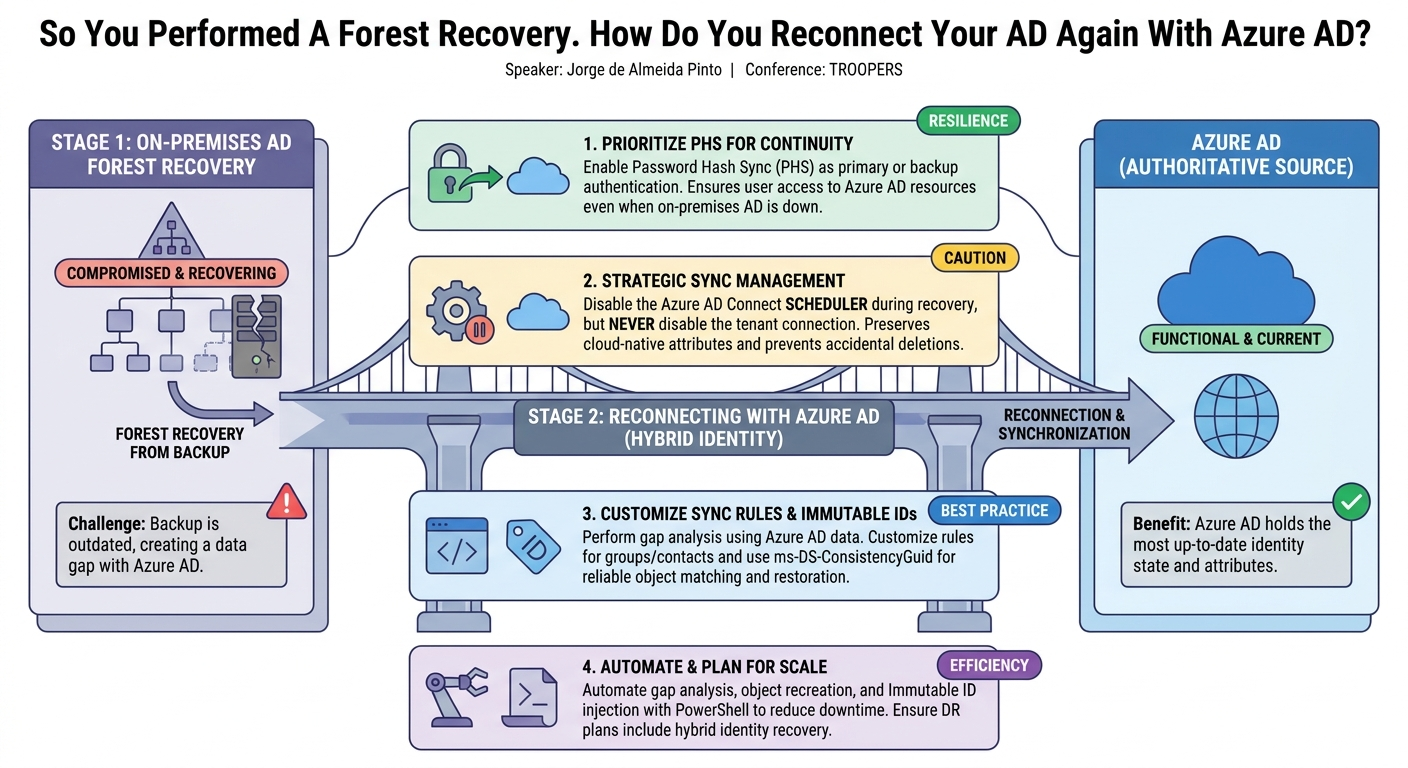
- Prioritize Password Hash Sync (PHS) for Resilience: The most significant finding is the unequivocal recommendation to use Password Hash Sync (PHS), either as the primary authentication method or, critically, as a backup mechanism. Pinto emphatically states that PHS provides business continuity by allowing users to authenticate against Azure AD even when on-premises AD is completely down. Organizations relying solely on Pass-Through Authentication (PTA) or Federated Authentication (e.g., ADFS) will experience total authentication outages for cloud resources if on-premises AD is unavailable.
- Strategic Disablement of Synchronization: When recovering AD, it is crucial to disable the Azure AD Connect scheduler (or Cloud Sync configuration in Azure AD) but never disable Azure AD Connect in the Azure AD cloud tenant. Disabling it in the cloud will make synchronized objects "cloud-native" and delete valuable on-premises sourced attributes, making the recovery and re-synchronization process significantly harder.
- Azure AD as the Source of Truth for Gap Analysis: In many post-breach recovery scenarios, especially when reverting to older backups, Azure AD will contain more up-to-date information about user and group objects than the recovered on-premises AD. Therefore, performing a gap analysis using Azure AD data (e.g.,
onPremisesSyncEnabledattribute,ImmutableId) is essential to identify missing or deleted objects on-premises that need to be recreated or reconciled. - The Criticality of Immutable IDs: Reconnecting objects between on-premises AD and Azure AD hinges on the Immutable ID. Pinto strongly advocates migrating from Object GUID to ms-DS-ConsistencyGuid as the source anchor attribute. This allows for manual injection of the Immutable ID into newly recreated on-premises objects, enabling them to correctly match their existing Azure AD counterparts.
- Customizing Azure AD Connect Sync Rules: Default synchronization rules in Azure AD Connect are often insufficient for a robust recovery. Pinto highlights specific deficiencies for group and contact objects, noting that critical write-back rules for the Immutable ID are often missing. Manual modification of these rules is necessary to ensure proper object matching and attribute flow.
- Azure AD Connect Offers Granular Control; Cloud Sync Lacks It: Azure AD Connect provides a manual step-through synchronization process and simulated syncs per object, allowing administrators to test changes and predict outcomes before committing to a full export. In contrast, Azure AD Cloud Sync operates on an "on or off" basis with an "on-demand provisioning" feature that immediately applies changes, making it riskier for complex recovery scenarios.
- Automation is Essential for Scale: For environments with hundreds or thousands of objects, manual gap analysis, object recreation, and Immutable ID injection are impractical. Automating these tasks through PowerShell scripts or similar tools is crucial for accelerating recovery time objectives (RTOs).
- Backup Configuration Exports: Organizations must maintain secure, offline, and ideally immutable backups of their Azure AD Connect and ADFS configurations. Rebuilding these systems from scratch without configuration data is a daunting task, requiring extensive manual effort to reverse-engineer OU scopes, flow rules, and attribute mappings.
Technical Deep Dive
▶ Watch: Cloud Sync limitations: no test mode, group deletion risks (15:30)
The technical core of Pinto's talk revolves around the nuanced management of hybrid identity synchronization after a forest recovery, differentiating between Azure AD Connect Sync and Azure AD Cloud Sync, and detailing crucial adjustments to authentication and synchronization processes.
Authentication Mechanisms and Resilience
Pinto emphasizes the stark differences in resilience offered by various authentication mechanisms when on-premises AD is compromised:
- Password Hash Sync (PHS): This method synchronizes a hash of the user's password hash from on-premises AD to Azure AD. Crucially, it has no dependency on the on-premises AD for authentication to Azure AD or connected cloud services. If AD goes down, users can continue to authenticate to Azure AD. Pinto strongly recommends PHS as the primary or, at minimum, a backup authentication method.
- Pass-Through Authentication (PTA): With PTA, Azure AD agents on-premises validate user passwords directly against the on-premises AD. If AD is unavailable, authentication fails.
- Federated Authentication (e.g., ADFS, PingFederate): This method delegates authentication to an on-premises identity provider (IdP) like ADFS. If the IdP or the underlying AD is down, authentication to Azure AD fails.
For organizations using PTA or Federation without PHS as a backup, a forest recovery means an immediate and complete outage for all Azure AD-connected services. Pinto outlines the process to switch:
- From PTA to PHS: Disable PTA using the agent's PowerShell module, which automatically switches to PHS.
- From Federation to PHS: Convert federated domains to "native" (managed) domains in Azure AD. This allows Azure AD to become authoritative for authentication, assuming PHS is enabled. This conversion can take time depending on the number of objects.
A critical consideration when reverting from a PHS-enabled state back to AD-dependent authentication is password mismatch. If users changed their passwords in Azure AD while on-premises AD was down, these changes will not automatically flow back to AD. The only way to reconcile this is often a forced password reset for affected users, highlighting the operational impact of such a recovery.
Synchronization Control and Configuration Preservation
Pinto provides specific guidance for managing the synchronization agents:
- Azure AD Connect Sync:
- Disable the scheduler: This is the first and most critical step. It prevents automatic synchronization cycles that could inadvertently delete or modify objects in Azure AD based on the outdated on-premises AD state.
- Do NOT disable Azure AD Connect in the Azure AD tenant: Doing so makes synchronized objects "cloud-native" and deletes on-premises sourced attributes, severely hindering recovery.
- Configuration Export: A robust disaster recovery plan must include secure, offline exports of the Azure AD Connect configuration. Without this, rebuilding the synchronization server requires painstaking reverse-engineering of OU scopes, custom attribute flows, and join rules. Pinto suggests using the
onPremisesSyncEnabledattribute and distinguished names from Azure AD users to reconstruct the scope of synchronized OUs if no export is available. - Azure AD Cloud Sync:
- Disable the configuration in Azure AD: Cloud Sync agents are stateless, with configuration stored in the cloud.
- Do NOT delete the configuration: Similar to Connect Sync, deleting the configuration has negative consequences.
Immutable IDs and Object Matching
The Immutable ID (also known as sourceAnchor) is the single most important attribute for linking on-premises AD objects to their Azure AD counterparts.
- Preferred Attribute: Pinto strongly advocates for using
ms-DS-ConsistencyGuidoverobjectGuid. WhileobjectGuidis immutable for an object's lifetime, if an object is deleted and recreated (e.g., during a recovery), it gets a newobjectGuid.ms-DS-ConsistencyGuid, however, can be manually injected into a new object, allowing it to reconnect to its original Azure AD identity. - Retrieving Immutable IDs:
- For user objects, Azure AD PowerShell or Graph API modules expose the Immutable ID.
- For groups and contacts, Azure AD does not expose the Immutable ID through standard modules.
- Azure AD Connect servers, if operational, can provide these values from their connector spaces.
- If Azure AD Connect is down or Cloud Sync is used, Pinto recommends Nestori's AADInternals PowerShell module, which leverages the synchronization API to extract all Immutable IDs, including those for groups and contacts.
Synchronization Rule Deep Dive and Customization
Pinto dedicates a significant portion to the internal workings of Azure AD Connect's synchronization rules, detailing the roles of the AD Connector Space, Azure AD Connector Space, and the Metaverse. He highlights crucial deficiencies in default rules:
- User Object Rules: Generally work well. Rules like
flow import ID user joinand attribute transformations ensurems-DS-ConsistencyGuidorobjectGuidis used forsourceAnchor, withms-DS-ConsistencyGuidbeing written back to AD if a new object is created. - Group Object Rules: Pinto identifies a critical missing rule: the default configuration does not sync back the Immutable ID (
ms-DS-ConsistencyGuid) from the Metaverse to on-premises AD for group objects. This means if a group is recreated on-premises, it cannot easily reconnect to its existing Azure AD counterpart using the preferred method. He recommends manually adding this rule. - Contact Object Rules: Even more problematic, contact objects often have several missing rules, particularly those related to
ms-DS-ConsistencyGuidmatching. The default rules might rely on themailattribute or prioritizeobjectGuid, making reconnection difficult if a contact is recreated. Manual intervention to add missing rules is essential.
Simulated Sync and Referential Integrity
Azure AD Connect's ability to perform simulated syncs per object is a powerful recovery tool. This allows administrators to test the impact of their fixes (e.g., recreating objects, injecting Immutable IDs) before committing changes to Azure AD. Pinto illustrates a potential "weird outcome" with group memberships during individual object syncs:
- Due to referential integrity, relationships (like memberships) are processed after the objects themselves.
- If a member object is recreated on-premises and gets a new
objectGuid(even if itsms-DS-ConsistencyGuidis correctly set), an individual sync of the group might initially show the old member as "deleted" because the group's relationship points to the oldobjectGuid. - This is expected and will resolve once all objects and their relationships are fully synchronized, but it can be misleading if not understood. A full sync after all fixes is necessary.
Cloud Sync Limitations
Pinto criticizes Azure AD Cloud Sync for its lack of granular control during recovery. Unlike Connect Sync, it offers no "test mode" or step-by-step processing. "Provisioning on demand" immediately applies changes. This "on or off" nature significantly increases the risk of accidental deletions, especially for groups, which are not recoverable from a recycle bin and can lead to immediate impact (e.g., loss of group-based licensing).
Demo / Proof of Concept
▶ Watch: Reconfiguring Azure AD Connect sync rules: user, group, contact (21:30)
While this specific talk did not feature a live, real-time demonstration of a forest recovery and Azure AD reconnection, Jorge de Almeida Pinto effectively leveraged his extensive experience and referenced practical methodologies. He alluded to his previous TROOPERS talk where he performed a live forest recovery in the background, making this session a direct, in-depth follow-up on the hybrid identity aspects.
The "demo" portion of this presentation was primarily conceptual, walking the audience through the crucial steps and the behavior of the synchronization engine. Pinto detailed how Azure AD Connect's manual synchronization capabilities serve as a critical "proof of concept" tool during recovery. He explained the process of performing a full import on both the AD and Azure AD connectors, followed by a full sync for the AD connector.
Crucially, he highlighted the ability to then perform a simulated sync per object. This allows an administrator to select specific user, group, or contact objects – particularly high-profile users or those that were recreated – and observe the exact changes that would be exported to Azure AD without actually committing them. This "what-if" analysis is invaluable for validating fixes, ensuring Immutable IDs are correctly matched, and preventing unintended deletions or modifications. Pinto illustrated how to inspect the pending exports in the Azure AD connector, looking for "adds," "modifies," and "deletes," and stressed the importance of understanding why each change is proposed. For example, he explained how a recreated group member might initially appear as a "delete" during an individual group sync due to a new objectGuid before full referential integrity is re-established.
In contrast, Pinto noted the absence of such granular testing capabilities in Azure AD Cloud Sync. He expressed his desire for Microsoft to implement a similar "test mode" for Cloud Sync, acknowledging that its current "on or off" nature or "provisioning on demand" (which immediately applies changes) presents a higher risk for complex recovery scenarios.
Therefore, while no live code or tool demonstration was performed in this session, the emphasis was on leveraging the existing, albeit sometimes limited, "proof of concept" features within Azure AD Connect to meticulously validate recovery steps.
Defensive Implications
▶ Watch: Q&A: Sync duration and password reset considerations (43:00)
The detailed technical guidance provided by Jorge de Almeida Pinto has profound defensive implications for organizations operating hybrid identity environments. Proactive measures and a well-defined incident response plan are paramount:
- Comprehensive Disaster Recovery Planning (DRP) for Hybrid Identity: A DRP must extend beyond merely restoring on-premises AD. It must explicitly include the recovery and reconnection of Azure AD, Azure AD Connect/Cloud Sync, and associated authentication mechanisms. This holistic approach ensures business continuity for both on-premises and cloud resources.
- Mandatory Password Hash Sync (PHS): Organizations must implement PHS. Whether as the primary authentication method or as a critical backup, PHS ensures that users can continue to access Azure AD-connected services even if on-premises AD is completely offline. Security officers who resist PHS due to "passwords in the cloud" concerns need to understand the catastrophic business impact of a total authentication outage.
- Secure, Offline, and Immutable Configuration Backups: It is non-negotiable to have regular, secure, and offline backups of Azure AD Connect, ADFS, and any other identity synchronization or federation infrastructure configurations. These backups should be stored in an immutable fashion, separate from the primary network, to prevent their compromise during a ransomware attack. Rebuilding these complex configurations from memory or incomplete documentation is a time-consuming and error-prone process.
- Migrate to
ms-DS-ConsistencyGuidfor Immutable IDs: Proactively migrating the Immutable ID source anchor toms-DS-ConsistencyGuidsignificantly simplifies object reconnection during a recovery. This attribute can be manually injected into recreated on-premises objects, allowing them to re-establish their link with existing Azure AD identities more reliably than relying solely onobjectGuid. - Audit and Customize Azure AD Connect Synchronization Rules: Default synchronization rules are often insufficient. Defenders should audit their Azure AD Connect environment and implement custom rules, particularly for groups and contacts, to ensure that
ms-DS-ConsistencyGuidis correctly written back to on-premises AD. This prevents object desynchronization and potential data loss (e.g., lost group memberships) during recovery. - Automate Gap Analysis and Object Remediation: For large environments, manual reconciliation of objects is impractical. Organizations should invest in scripting and automation to:
- Perform gap analysis between recovered AD and Azure AD.
- Recreate missing objects on-premises.
- Inject Immutable IDs into these recreated objects.
- Restore group memberships.
- This automation drastically reduces RTOs.
- Regularly Test Disaster Recovery Plans: A DRP is only as good as its last test. Organizations must regularly simulate forest recovery scenarios, including the Azure AD reconnection phase, in a segregated test environment. This identifies weaknesses in processes, documentation, and tooling before a real incident occurs.
- Proactive Security Assessment of On-Premises AD: Before reconnecting a recovered AD to Azure AD, it is crucial to perform a security assessment. Tools like Semperis Purple Knight or Forest Druid can help identify "short-term fixes" related to security hygiene (e.g., cleaning admin accounts, SPNs, high-privilege group memberships) that must be addressed before returning the AD to production. Reconnecting a vulnerable AD to Azure AD simply reintroduces the attack vector.
- Understand Cloud Sync Limitations: While Azure AD Cloud Sync offers simplified deployment, its lack of granular control and "test mode" makes recovery riskier. Organizations using Cloud Sync must be acutely aware of these limitations and factor them into their recovery strategies, potentially requiring more extensive pre-recovery validation.
By integrating these defensive strategies, organizations can significantly enhance their resilience against sophisticated attacks that target Active Directory, ensuring a faster, more secure, and less disruptive recovery of their hybrid identity infrastructure.
Key Takeaways
- PHS is a Non-Negotiable Backup: Implement Password Hash Sync (PHS) as either your primary or, at minimum, a backup authentication method. It is crucial for maintaining business continuity and enabling Azure AD access when on-premises Active Directory is unavailable due to a breach or recovery.
- Strategic Sync Disablement is Key: During a forest recovery, disable the Azure AD Connect scheduler (or Cloud Sync configuration in Azure AD), but never disable Azure AD Connect in the Azure AD tenant itself. This preserves critical cloud-native attributes and simplifies the reconnection process.
- Azure AD Guides Recovery: In many recovery scenarios, Azure AD will be the authoritative source for current object states. Perform a thorough gap analysis using Azure AD data to identify and reconcile missing or deleted objects, and use its Immutable IDs to correctly reconnect identities.
- Customize Sync Rules for Robustness: Default Azure AD Connect synchronization rules, especially for group and contact objects, are often insufficient. Proactively audit and customize these rules to ensure the correct write-back and matching of
ms-DS-ConsistencyGuidfor all object types. - Automate for Speed and Scale: Manual remediation of hundreds or thousands of objects post-recovery is impractical. Automate the gap analysis, object recreation, and Immutable ID injection processes using PowerShell or similar tools to significantly reduce recovery time objectives (RTOs).
- Comprehensive DR and Proactive Security: Disaster recovery plans must encompass the entire hybrid identity ecosystem, including secure, offline configuration backups. Furthermore, always perform a security assessment of the recovered on-premises AD (e.g., using Purple Knight) and address short-term vulnerabilities before reconnecting it to Azure AD and returning to production.
About the Speaker(s)
Jorge de Almeida Pinto is a Solutions Architect and Senior Incident Response Lead at Semperis. He is one of the experts who are called in when organizations experience a breach, compromise, or ransomware attack affecting their Active Directory. His primary role involves helping customers restore their Active Directory environments as quickly as possible, along with all related components such as Azure AD Connect and Azure AD itself. Semperis, his employer, is a cybersecurity company specializing in providing services and solutions throughout the entire lifecycle of an attack – before, during, and after – with a strong focus on Active Directory security and recovery. Pinto's expertise is rooted in real-world experience, dealing with the complex challenges of AD recovery and hybrid identity synchronization in high-stakes incident response scenarios.
Reviews
Dr. Zero (Offensive Security Researcher) — STRONG ACCEPT
Every CISO thinks their ransomware recovery plan is done the second the domain controllers boot back up. Pinto proves they're dead wrong. This is a mandatory masterclass in the hybrid identity nightmare that happens when you reconnect a restored on-prem AD to an Azure AD tenant that never stopped the clock.
Heather Calloway (CISO) — STRONG ACCEPT
Most disaster recovery plans stop when the on-prem Active Directory forest is restored. Pinto’s talk forces us to confront the reality that reconnecting a restored, out-of-date AD to a current Azure AD tenant can trigger a secondary outage that breaks access to all cloud apps. This is required viewing for your infrastructure and IAM leads to ensure our RTOs are grounded in reality, not just backup completion times.