Suppliers! Resist Phishing, Implement FIDO2
Yves Bieri (Security Analyst · Compass Security)
Swiss Cyber Storm 2021 · Day 1 · Scenario_1
Overview
In an era where cyber threats constantly evolve, phishing remains one of the most pervasive and successful initial attack vectors, reportedly initiating up to 90% of all cyber attacks. Despite widespread adoption of multi-factor authentication (MFA), many conventional methods, such as SMS-based one-time passwords (OTP), Time-based One-Time Passwords (TOTP) from authenticators like Google Authenticator, and push notifications, are surprisingly susceptible to sophisticated phishing techniques. This presentation by Yves Bieri, a Security Analyst at Compass Security, critically examines the inherent vulnerabilities of these traditional second factors and introduces FIDO2 (Fast IDentity Online 2) as a robust, phishing-resistant technical solution.
Key moments
- 1:00 The escalating problem of phishing attacks
- 3:00 Live demo: How traditional 2FA is phished
- 5:50 Evilginx2: Open-source tool for easy phishing
- 11:00 What is FIDO2? Fast Identity Online explained
- 18:50 FIDO2's anti-phishing mechanism explained
- 24:15 Q&A: What if you lose your FIDO2 key?
- 26:50 Q&A: Why isn't FIDO2 more widely adopted?
Suppliers! Resist Phishing, Implement FIDO2
Speakers: Yves Bieri, Security Analyst, Compass Security
Conference: Swiss Cyber Storm
YouTube: https://www.youtube.com/watch?v=8yujJr3mEjU
Overview
In an era where cyber threats constantly evolve, phishing remains one of the most pervasive and successful initial attack vectors, reportedly initiating up to 90% of all cyber attacks. Despite widespread adoption of multi-factor authentication (MFA), many conventional methods, such as SMS-based one-time passwords (OTP), Time-based One-Time Passwords (TOTP) from authenticators like Google Authenticator, and push notifications, are surprisingly susceptible to sophisticated phishing techniques. This presentation by Yves Bieri, a Security Analyst at Compass Security, critically examines the inherent vulnerabilities of these traditional second factors and introduces FIDO2 (Fast IDentity Online 2) as a robust, phishing-resistant technical solution.
Bieri's talk, "Suppliers! Resist Phishing, Implement FIDO2," serves as a crucial call to action for organizations and individuals alike. He meticulously demonstrates how easily traditional MFA can be bypassed using readily available open-source tools, underscoring the urgent need for a more secure authentication standard. FIDO2 emerges as the answer, leveraging public-key cryptography and origin binding to create an authentication mechanism that effectively neutralizes credential phishing attempts, offering both superior security and a streamlined user experience.
Background
▶ Watch: The escalating problem of phishing attacks (1:00)
The persistent threat of phishing is a well-documented challenge in cybersecurity. Organizations often deploy a combination of security awareness training and traditional second factors (2FA) to combat this menace. However, Bieri highlights the limitations of these approaches. Security awareness training, while beneficial, often suffers from diminishing returns; users tend to forget lessons over time and revert to risky behaviors, clicking on malicious links. More critically, the widespread belief that 2FA inherently protects against phishing is a dangerous misconception.
Bieri illustrates this vulnerability through a common attack scenario:
- Initial Compromise: A user receives a phishing email and, unaware, navigates to a phishing website (e.g.,
phishing-bank.cominstead ofbank.com). - Credential Capture: The user enters their username and password on the phishing site.
- Real-time Relay: An attacker, operating a reverse proxy or similar tool, immediately relays these credentials to the legitimate
bank.comwebsite. - 2FA Request: The legitimate bank website, having received valid primary credentials, prompts for the second factor. This request is relayed back to the phishing site, then to the victim.
- 2FA Capture: The victim, expecting a 2FA prompt after entering their details, retrieves their six-digit code from an SMS or authenticator app, or approves a push notification, and provides it to the phishing site.
- Full Access: The attacker relays the 2FA token/approval to the legitimate bank website, which grants access. The attacker now possesses both the user's primary credentials and a valid session, effectively bypassing the 2FA.
This man-in-the-middle (MitM) attack works because traditional 2FA methods only verify the user's possession of a second factor, not the legitimacy of the website they are interacting with. The attacker simply acts as an intermediary, forwarding all communication. The speaker emphasizes that what once required sophisticated hacking skills and custom setups can now be achieved in "five minutes" using open-source tools like Evilginx2, making these attacks accessible to a much broader range of malicious actors. This stark reality underscores the critical need for a fundamentally different approach to authentication, one that ties the authentication process directly to the legitimate service, which FIDO2 aims to provide.
Key Findings
▶ Watch: Evilginx2: Open-source tool for easy phishing (5:50)
The central findings of Yves Bieri's presentation revolve around the critical distinction between traditional 2FA and phishing-resistant authentication, primarily through the lens of FIDO2.
First, the talk unequivocally establishes that widely adopted 2FA methods—including SMS OTP, TOTP (e.g., Google Authenticator), and push notifications (e.g., Microsoft Authenticator)—are fundamentally not phishing-resistant. They can be easily bypassed by attackers employing reverse proxy phishing kits like Evilginx2, which facilitate the real-time relay of credentials and 2FA tokens. This capability turns what was once a complex, resource-intensive attack into a "five-minute" operation, significantly lowering the barrier to entry for attackers.
Second, the presentation highlights FIDO2 as the definitive technical solution to credential phishing. FIDO2 addresses the core vulnerability of traditional 2FA by incorporating origin binding and leveraging public-key cryptography. This ensures that authentication challenges are cryptographically linked to the legitimate website's domain, preventing attackers from replaying or forging authentication requests. The reliance on unique key pairs stored securely on the authenticator device for each registered service makes it impossible for an attacker to sign an authentication challenge for a domain for which they do not possess the corresponding private key.
Finally, Bieri underscores the practical accessibility and growing adoption of FIDO2. The standard is supported across virtually all major platforms, including Google Chrome, Mozilla Firefox, Microsoft Edge, and Apple Safari (since iOS 14). It is also compatible with various operating systems like Windows and Android, and is increasingly implemented by major online services such as Microsoft, Google, and Amazon. This broad ecosystem support, combined with the user-friendly experience of simply "plugging in the stick and pressing the button," positions FIDO2 as not just a technically superior solution, but also a viable and practical one for widespread deployment.
Technical Deep Dive
▶ Watch: What is FIDO2? Fast Identity Online explained (11:00)
FIDO2 represents a paradigm shift in authentication, moving beyond shared secrets (passwords, OTPs) to a system based on public-key cryptography and strong origin binding. The standard is overseen by the FIDO Alliance, founded in 2012 by industry giants like PayPal, Lenovo, and Google, with the goal of creating open, passwordless, and phishing-resistant authentication protocols. FIDO2 supersedes earlier FIDO specifications such as UAF (Universal Authentication Framework), which focused on passwordless experiences, and U2F (Universal Second Factor), which aimed for phishing-resistant 2FA.
The architecture of FIDO2 involves three primary building blocks:
- Client: Typically a web browser (e.g., Chrome, Firefox, Edge, Safari) or a mobile operating system, which initiates and facilitates the authentication process.
- Relying Party: The server or website (e.g., github.com) that wishes to authenticate the user.
- Authenticator: The hardware device or integrated biometric system (e.g., YubiKey, Windows Hello via TPM, mobile phone NFC/biometrics) that securely stores cryptographic keys and performs signing operations.
Communication between these components is governed by two key protocols:
- WebAuthn (Web Authentication API): This is a JavaScript API that enables the client (browser) to communicate with the relying party (website). It is a W3C standard and is the primary interface developers use to integrate FIDO2 into their web applications.
- CTAP (Client to Authenticator Protocol): This protocol defines how the client (browser/OS) communicates with the external authenticator device. CTAP supports various transport methods, including USB, NFC, and Bluetooth Low Energy (BLE). Developers typically do not interact directly with CTAP unless building custom authenticators or browsers.
The FIDO2 authentication process unfolds in two main phases:
1. FIDO2 Registration (Enrollment)
When a user first enrolls a FIDO2 authenticator with a service (relying party):
- The authenticator generates a unique public/private key pair specifically for that relying party.
- The public key is securely transmitted to and stored by the relying party.
- The private key remains securely on the authenticator device and never leaves it. This critical design choice ensures that even if a server is compromised, the private keys—and thus the ability to authenticate—remain secure on the user's device. Each website gets its own distinct key pair, preventing cross-site tracking or compromise.
2. FIDO2 Authentication (Login)
When a user attempts to log in using FIDO2:
- The user typically provides their username (passwords can be optional for passwordless flows).
- The relying party sends a challenge (a cryptographically random number) and its origin (the legitimate domain, e.g.,
github.com) to the client. - The client forwards this challenge and origin to the authenticator.
- The authenticator performs several crucial security checks:
- It verifies that the origin received from the client matches the origin it was registered with.
- It retrieves the stored private key associated with that specific origin.
- It uses this private key to sign the challenge.
- The signed challenge is returned to the client, which then sends it back to the relying party.
- The relying party, using the previously stored public key for that user, attempts to verify the signature. If the signature is valid, authentication succeeds, and the user is logged in.
How FIDO2 Defeats Phishing
FIDO2's robustness against phishing stems from its multi-layered verification of the origin:
- Browser-Side Origin Check: When the relying party sends the challenge and its origin to the client, the client (browser) performs an initial check. It compares the origin received from the server (e.g.,
github.com) with the actual URL displayed in the browser's address bar (e.g.,cyberstorm.compassdemo.com). If these do not match, the browser immediately terminates the FIDO2 protocol with a security error, alerting the user to a potential phishing attempt.
- Authenticator-Side Origin Check: Even if an advanced attacker were to somehow manipulate the browser's display or the server's reported origin to match their phishing domain (e.g.,
cyberstorm.compassdemo.com), the authenticator has its own defense. When prompted, the authenticator attempts to find a private key associated with the specific origin it was asked to sign for. If the user had never registered a FIDO2 key forcyberstorm.compassdemo.com, the authenticator would not find a corresponding private key. It would then refuse to sign the challenge, again stopping the authentication process and signaling an error.
- Relying Party-Side Signature Verification: In an extremely theoretical scenario where an attacker (e.g., Google impersonating GitHub) manages to trick the user into signing a challenge with a key registered for the attacker's domain, the final verification step on the legitimate relying party (GitHub) would still fail. GitHub would attempt to verify the signature using the user's actual public key for GitHub. Since the signature was created using a private key for a different domain (Google's), the public key from GitHub would not match, and the signature verification would fail, preventing the attacker from gaining access.
These combined checks ensure that FIDO2 authenticators only work with the precise, legitimate services they were registered with, making them inherently resistant to the credential relay and session hijacking tactics that plague traditional 2FA methods.
Demo / Proof of Concept
▶ Watch: Q&A: What if you lose your FIDO2 key? (24:15)
Yves Bieri provided a compelling live demonstration of how easily traditional 2FA can be bypassed using the open-source phishing tool Evilginx2. This tool, freely available on GitHub, democratizes advanced phishing attacks by providing a ready-to-use framework for setting up sophisticated reverse proxy phishing campaigns.
The demonstration scenario involved phishing a user attempting to log into github.com. Bieri set up a phishing website at cyberstorm.compassdemo.com (acknowledging that a real attacker would use a more convincing, typo-squatted domain).
Here’s how the demo unfolded:
- Evilginx2 Setup: Bieri showed the Evilginx2 interface, highlighting its ease of use. He activated a pre-made fishlet (a configuration file for specific target websites) for GitHub. Evilginx2 automatically handles the creation of a legitimate Let's Encrypt certificate for the phishing domain, making the phishing site appear secure with a padlock icon in the browser.
- Victim Interaction: The "victim" (simulated by Bieri using a green browser) received a phishing URL and navigated to
cyberstorm.compassdemo.com. The site looked identical to the legitimate GitHub login page. - Credential Capture: The victim entered their username and password. Evilginx2, acting as a transparent proxy, immediately captured these credentials.
- 2FA Bypass: The victim was then prompted for their second factor (in this case, a TOTP code). They provided the code, which Evilginx2 also captured and relayed to the legitimate GitHub server.
- Session Hijacking: Crucially, after successful authentication on the legitimate GitHub server, Evilginx2 intercepted the authentication cookie (or session token) issued by GitHub. This cookie is what allows a browser to maintain a logged-in session without re-authenticating for every request.
- Attacker Access: Bieri then switched to his "attacker" browser (red browser), which was initially not logged into GitHub. Using a browser plugin, he imported the stolen authentication cookie directly into his browser. Upon refreshing github.com, the attacker was instantly logged into the victim's GitHub account, demonstrating a complete session takeover, despite the victim having used a second factor.
The demo vividly illustrated that traditional 2FA, while adding a layer of friction, does not inherently protect against sophisticated phishing attacks that capture and relay both primary credentials and session tokens in real-time. The ability of Evilginx2 to transparently proxy all traffic, including TLS connections, and steal session cookies, renders many conventional 2FA methods ineffective against a determined attacker.
Defensive Implications
▶ Watch: Q&A: Why isn't FIDO2 more widely adopted? (26:50)
The insights from Yves Bieri's talk provide clear, actionable guidance for both individuals and organizations seeking to bolster their defenses against credential phishing. The primary defensive implication is a strong recommendation to adopt and implement FIDO2 wherever possible, moving away from vulnerable traditional 2FA methods.
For Organizations and Suppliers:
- Prioritize FIDO2 Implementation: Organizations, especially those managing sensitive data or critical infrastructure, must prioritize integrating WebAuthn into their applications and services. This includes internal systems, customer portals, and crucially, supplier access points, as the talk title suggests. FIDO2 offers the most robust protection against the initial access vector of phishing, which accounts for up to 90% of cyber attacks.
- Migrate from Legacy 2FA: Actively plan and execute a migration strategy away from less secure 2FA methods like SMS OTP, TOTP, and push notifications for high-value accounts. While these methods are better than no 2FA, their susceptibility to modern phishing tools like Evilginx2 makes them inadequate for critical security postures.
- Provide FIDO2 Authenticators: Consider the cost-benefit of providing hardware security keys (e.g., YubiKeys, which cost approximately 30-60 Swiss Francs) to employees, particularly those with elevated privileges or access to sensitive systems. This investment can significantly reduce the risk of account compromise.
- Developer Education: Developers should be trained on the WebAuthn API to ensure proper and secure implementation of FIDO2 in new and existing applications. Understanding the nuances of origin binding and cryptographic key management is crucial.
- Awareness Campaigns: While traditional security awareness training has limitations, it should be updated to specifically educate users on the difference between phishing-resistant FIDO2 and other 2FA types, emphasizing the importance of recognizing and using FIDO2.
For Individual Users:
- Embrace FIDO2-Compatible Authenticators: Seek out and use FIDO2-compatible security keys (like YubiKeys), Windows Hello (with a TPM), or mobile device biometrics where supported. These offer a superior level of protection compared to app-based or SMS 2FA.
- Register Multiple Keys (or use FIDO2 as Primary): To mitigate the risk of losing a single FIDO2 key, users should ideally register two FIDO2 keys and keep one in a safe, secure backup location. Alternatively, use a FIDO2 key as the primary authentication method for daily logins and, if necessary, configure a less secure method (like TOTP) as a backup recovery option only, to be used with extreme caution and explicit URL verification.
- Be Vigilant About URLs: Even with FIDO2, users should cultivate the habit of always inspecting the URL, especially during login. While FIDO2 provides technical protection, user awareness remains an important layer of defense.
- Demand FIDO2 Support: As consumers, advocate for and choose services that offer FIDO2 authentication, driving broader adoption of this critical security standard.
In essence, the defensive strategy boils down to recognizing that not all 2FA is created equal. FIDO2 is a technical solution to a technical problem (credential phishing) that traditional methods cannot fully address. By implementing FIDO2, organizations and individuals can significantly reduce their exposure to one of the most prevalent and damaging cyber threats.
Key Takeaways
- Phishing Remains a Dominant Threat: Despite advancements in cybersecurity, phishing continues to be the leading initial attack vector, responsible for initiating up to 90% of cyber attacks.
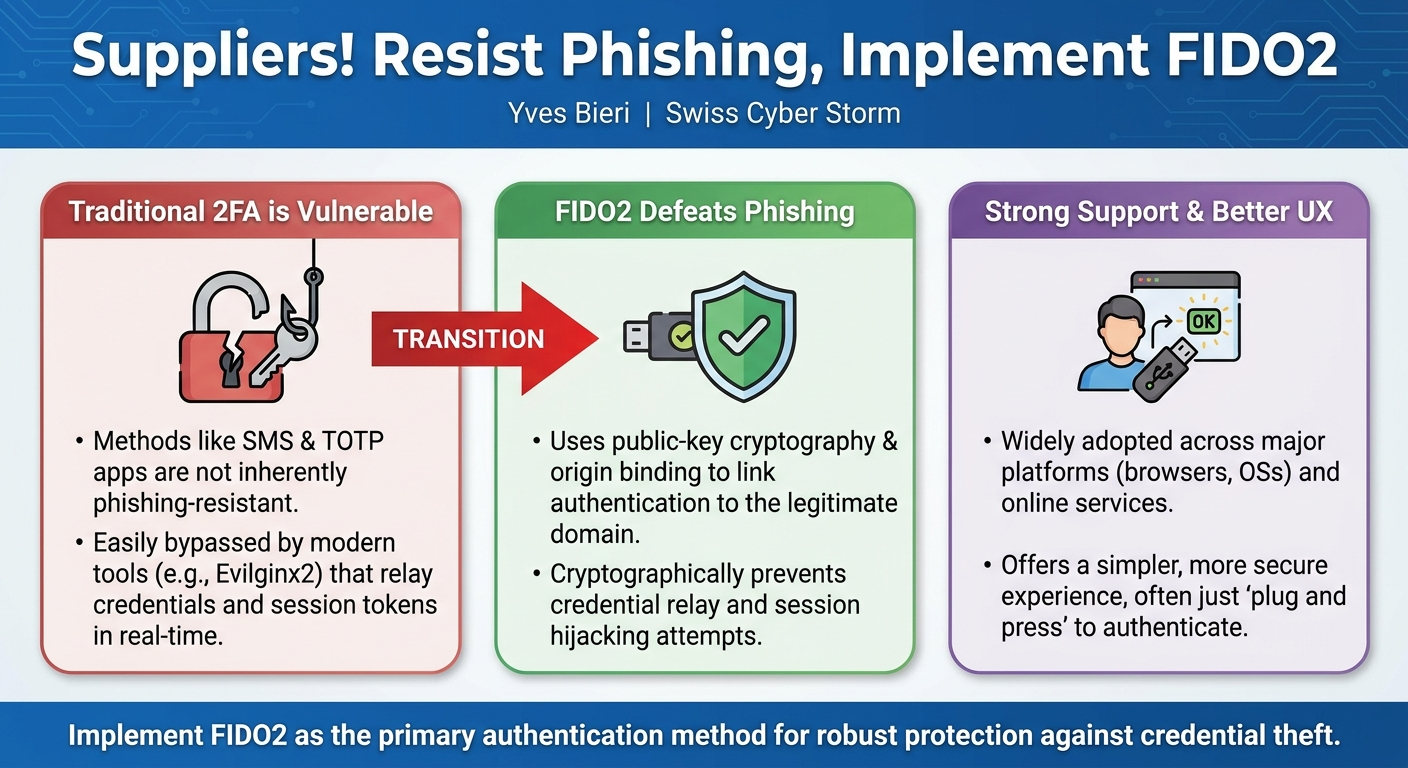
- Traditional 2FA is Vulnerable: Conventional multi-factor authentication methods, including SMS OTP, TOTP apps (e.g., Google Authenticator), and push notifications, are not inherently phishing-resistant and can be easily bypassed by sophisticated tools like Evilginx2.
- FIDO2 Offers True Phishing Resistance: The FIDO2 standard provides a robust, technical solution to credential phishing by employing public-key cryptography and origin binding, ensuring authentication is cryptographically linked to the legitimate website.
- Strong Platform Support: FIDO2 is widely adopted and supported across major web browsers (Chrome, Firefox, Edge, Safari since iOS 14), operating systems (Windows, Android), and prominent online services (Microsoft, Google, Amazon).
- Enhanced User Experience: Beyond its security benefits, FIDO2 offers a simpler, more user-friendly authentication experience, often requiring just "plugging in a stick and pressing a button."
- Call to Action for Implementation: Organizations and individuals are strongly encouraged to implement and utilize FIDO2 as the primary method of authentication to significantly enhance their security posture against credential theft and account compromise.
About the Speaker(s)
Yves Bieri is a Security Analyst at Compass Security, where he applies his expertise to help clients secure their diverse IT infrastructures. His work at Compass Security primarily focuses on safeguarding websites, but also extends to iOS and cloud environments. With over two years of experience in the field, Bieri has frequently encountered the challenges posed by phishing attacks and the complexities of second-factor authentication in his daily line of work, which motivated him to deliver this insightful presentation on the importance of FIDO2.
Reviews
Dr. Zero (Offensive Security Researcher) — WEAK
This is a 101-level public service announcement that is about five years late to the conversation. Bieri accurately explains how FIDO2's origin binding defeats reverse-proxy phishing, but the material is entirely rehashed from standard W3C documentation. It might be useful for a helpdesk, but it lacks the technical depth required for a practitioner conference.
Heather Calloway (CISO) — SOLID
A clean, competent demonstration of why traditional MFA is failing against reverse-proxy phishing, paired with a standard pitch for FIDO2. It is an effective primer if your executive team still thinks a TOTP app makes you bulletproof, but it glosses over the operational realities of a passwordless rollout.