Assessing and Securing Third-Party Maintenance Accessi
Fabian Gonzalez (Team Leader and Senior Penetration Tester · Oneconsult)
Swiss Cyber Storm 2021 · Day 1 · Scenario_1
Overview
In the contemporary enterprise landscape, the reliance on third-party providers for specialized software maintenance, updates, and configuration is ubiquitous. While these partnerships are essential for operational efficiency, they introduce a significant and often underestimated attack surface. Fabian Gonzalez, a Senior Penetration Tester at Oneconsult, addresses this critical security challenge in his talk, "Assessing and Securing Third-Party Maintenance Access." This presentation dissects the inherent risks when external entities are granted privileged access to internal application servers and outlines robust defensive strategies to mitigate potential compromises.
Key moments
- 0:00 Introduction: Assessing Third-Party Maintenance Access
- 2:00 Restricting Third-Party Access: Time, IP, MFA
- 4:00 Impact of Local Admin Rights and Credential Theft
- 10:30 Preventing In-Memory Credential Attacks (Mimikatz)
- 16:40 Advanced Security Measures: Separate AD, Jump Hosts
- 18:00 Applying Mitigations: Third-Party Access Scenario Recap
- 21:50 Q&A: Mitigations for Internal Employees Too?
- 23:00 Q&A: Motivation for Third-Party Access Research
Assessing and Securing Third-Party Maintenance Access
Speakers: Fabian Gonzalez, Team Leader and Senior Penetration Tester, Oneconsult
Conference: Swiss Cyber Storm
YouTube: https://www.youtube.com/watch?v=aKtnk3UuFaU
Overview
In the contemporary enterprise landscape, the reliance on third-party providers for specialized software maintenance, updates, and configuration is ubiquitous. While these partnerships are essential for operational efficiency, they introduce a significant and often underestimated attack surface. Fabian Gonzalez, a Senior Penetration Tester at Oneconsult, addresses this critical security challenge in his talk, "Assessing and Securing Third-Party Maintenance Access." This presentation dissects the inherent risks when external entities are granted privileged access to internal application servers and outlines robust defensive strategies to mitigate potential compromises.
Gonzalez's talk is particularly pertinent given the increasing sophistication of supply chain attacks and the constant threat of malicious insiders or compromised external accounts. He systematically demonstrates how seemingly controlled third-party access, particularly when involving local administrative rights, can be exploited to achieve lateral movement within an organization's network, dump sensitive credentials, and establish persistent backdoors. The core message underscores the critical need for organizations to move beyond basic access controls and implement comprehensive hardening measures that account for advanced attack techniques, even when dealing with trusted partners.
The importance of this discussion cannot be overstated. A single compromised third-party account with elevated privileges can serve as a beachhead for a full-scale breach, leading to data exfiltration, system disruption, or intellectual property theft. Gonzalez provides actionable insights for security professionals, network architects, and IT managers to reassess their current third-party access models and fortify their defenses against these potent threats, transforming theoretical risks into practical, mitigatable vulnerabilities.
Background
▶ Watch: Introduction: Assessing Third-Party Maintenance Access (0:00)
The fundamental scenario explored in this talk involves a third-party provider requiring access to an application server situated within an organization's internal network. This access is typically necessary for tasks such as installing, configuring, or updating services and applications. Common access methods include Citrix or VPN solutions, which initially allow for some level of control. Organizations often implement initial access restrictions, such as time-based access (e.g., only during weekdays), IP range restrictions (allowing connections only from the provider's IP space), or limiting access to selected employees of the third party. Further security layers might include multi-factor authentication (MFA) and proctored access, where an internal employee supervises the external party's actions. Some organizations even opt for internally-initiated access, such as screen sharing, to prevent direct, persistent external connections.
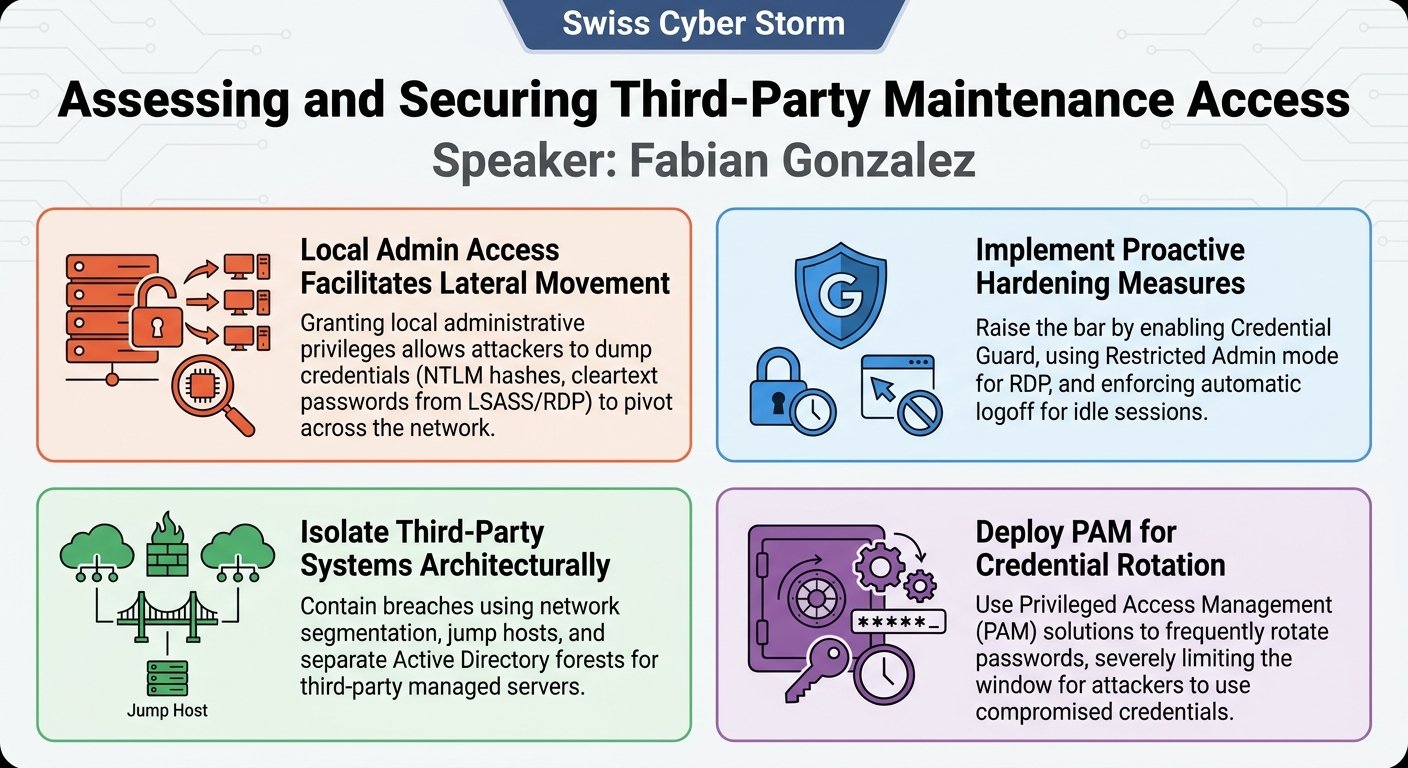
A critical point of vulnerability arises when these third-party providers require local administrative rights on the application server. While often deemed necessary for performing configuration changes, software updates, or other administrative tasks, granting such extensive permissions introduces a substantial attack surface. The problem stems from the fact that once local administrator privileges are obtained, an attacker (whether a malicious external employee or a compromised account) gains the ability to manipulate the operating system at a fundamental level. This elevated access allows for a wide range of post-exploitation activities that can bypass many initial perimeter defenses and lead to deeper compromise within the internal network. The talk highlights that many organizations, despite implementing initial access controls, often overlook the profound implications of granting local administrative rights on the target server itself, creating a blind spot in their security posture.
Key Findings
▶ Watch: Impact of Local Admin Rights and Credential Theft (4:00)
Fabian Gonzalez's presentation uncovers several critical vulnerabilities and attack vectors that become exploitable once a third-party provider gains local administrative rights on an internal application server. The overarching finding is that local administrative access, often considered a necessary evil for maintenance, can be leveraged for significant lateral movement and credential harvesting within an enterprise network.
The main discoveries can be categorized into several key areas:
- Local User Credential Compromise: A prevalent issue is the reuse of local administrator passwords across multiple servers, or the use of weak, easily guessable passwords. With local admin rights, an attacker can extract NTLM hashes from the Windows registry (specifically from the Security Account Manager - SAM database), which can then be used in pass-the-hash attacks to authenticate to other systems where the same credentials are used.
- Service Account and Configuration File Exposure: Service accounts, critical for running applications and services, often store their cleartext passwords directly within the Windows registry or in application configuration files. Local administrative privileges allow an attacker to dump these credentials, gaining access to other systems or databases that these service accounts interact with.
- In-Memory Credential Dumping: The Windows LSASS.exe (Local Security Authority Subsystem Service) process stores a wealth of credential information in memory, including NTLM hashes and, in some cases, cleartext passwords. Tools like Mimikatz can exploit local administrative rights to dump these in-memory credentials, particularly from active user sessions (e.g., RDP sessions), enabling an attacker to impersonate legitimate users, including domain administrators.
- Remote Desktop Session Exploitation: Active Remote Desktop Protocol (RDP) sessions are particularly vulnerable. Gonzalez demonstrates that Mimikatz can extract cleartext passwords directly from the memory of active RDP sessions, providing immediate access to the credentials of users currently logged into the server.
- Persistence and Backdooring: Local administrative access facilitates the establishment of persistent access mechanisms. This includes process injection (injecting malicious code into legitimate processes) and system backdooring (e.g., replacing legitimate binaries like
explorer.exewith malicious versions, or modifying auto-run entries to execute attacker-controlled code upon system startup or user login, potentially creating new domain administrator accounts).
These findings collectively highlight that granting local administrative access to third parties without robust, layered security controls creates a critical entry point for sophisticated attacks, allowing adversaries to escalate privileges, move laterally, and achieve deep compromise within an organization's infrastructure.
Technical Deep Dive
▶ Watch: Advanced Security Measures: Separate AD, Jump Hosts (16:40)
The technical core of Fabian Gonzalez's presentation lies in the detailed explanation of how local administrative rights on a Windows server can be abused to compromise an entire domain. Each attack vector is meticulously broken down, often referencing specific Windows functionalities and widely known penetration testing tools.
Exploiting Local User Accounts
A common vulnerability stems from the management of local user accounts, particularly the Local Administrator account. Organizations frequently reuse passwords for these accounts across different servers, especially within similar network zones or for similar application types. With local administrative rights, an attacker can leverage the built-in Windows reg tool to create a copy of the registry's Security Account Manager (SAM) database and SYSTEM hive. These files contain the NTLM hashes of local user passwords. Tools like Mimikatz or other specialized utilities can then extract these hashes. Once obtained, these NTLM hashes are equivalent to a password for authentication purposes, allowing an attacker to pass-the-hash and access other servers on the network that share the same local administrator credentials, effectively bypassing traditional password authentication.
Dumping Service Account Credentials
Service accounts are often configured to run critical applications and services. These accounts typically store their cleartext passwords within the Windows registry. An attacker with local administrative privileges can access these registry keys and extract the cleartext passwords. This provides immediate access to the resources and services that the compromised service account is authorized to interact with, often leading to access to databases, network shares, or other application components. The principle of least privilege is paramount here; service accounts should only have the minimum necessary permissions to perform their function.
Extracting Credentials from Configuration Files
Beyond the registry, many applications store sensitive credentials, such as database usernames and passwords, directly within their configuration files. These files are typically accessible with local administrative rights. An attacker can parse these files to obtain credentials that grant access to backend databases or other interconnected systems, further expanding their foothold within the network.
In-Memory Credential Dumping via LSASS.exe
The Local Security Authority Subsystem Service (LSASS.exe) is a critical Windows process responsible for enforcing security policies and managing user authentication. For single sign-on (SSO) and seamless access to network resources, LSASS.exe stores various credential types in memory, including NTLM hashes and Kerberos tickets. If a user is connected via RDP or has active processes on the server, their credentials may reside in LSASS memory. Mimikatz is the quintessential tool for exploiting this. With local administrative rights, Mimikatz can inject into the LSASS process and dump these credentials. By default, it can extract NTLM hashes, which are as effective as cleartext passwords for remote authentication. This technique allows an attacker to impersonate any user whose credentials are in memory, including highly privileged domain administrators.
Exploiting Active Remote Desktop Sessions
A more insidious variant of in-memory credential dumping targets active Remote Desktop Protocol (RDP) sessions. When users connect to a server via RDP, their cleartext passwords can be temporarily stored in memory associated with their active session. Gonzalez highlights that Mimikatz can specifically target these active RDP sessions (e.g., session 2 and session 5 as shown in illustrative screenshots) and extract the cleartext passwords. This is a direct path to obtaining high-value credentials from users currently performing administrative tasks.
Process Injection and System Backdoors
Local administrative rights also enable advanced persistence mechanisms. An attacker can perform process injection, where malicious code is inserted into a legitimate, running process. This technique allows the attacker to execute code under the context and privileges of another user or system process, often evading detection. Furthermore, attackers can establish backdoors on the system. This might involve replacing legitimate system binaries, such as explorer.exe, with a malicious version that includes the attacker's code. Alternatively, they can modify auto-run entries in the registry or file system to execute arbitrary commands or scripts. A particularly dangerous example given is modifying auto-run entries to create a new domain administrator account as soon as a legitimate domain administrator logs onto the server, ensuring persistent, high-level access.
These technical details underscore that local administrative access is not merely about managing a single server but represents a potential pivot point for broad organizational compromise.
Demo / Proof of Concept
▶ Watch: Applying Mitigations: Third-Party Access Scenario Recap (18:00)
While Fabian Gonzalez's presentation did not feature a live, interactive demonstration of these attack techniques, it effectively served as a conceptual proof-of-concept through the use of illustrative screenshots and detailed explanations. The talk leveraged visual aids to show the results and mechanisms of the attacks described.
For instance, when discussing the extraction of local user NTLM hashes, Gonzalez referred to a screenshot illustrating the output of tools capable of dumping these hashes from a copied registry hive. Similarly, the efficacy of Mimikatz in dumping in-memory credentials was underscored by screenshots depicting its output, showing extracted NTLM hashes and, for active RDP sessions, cleartext passwords. These visuals reinforced the technical feasibility of the exploits.
The presentation also used a "screenshot of users that are locked on" to visually represent different user session states (e.g., active, idle, disconnected sessions). This allowed Gonzalez to effectively demonstrate how an attacker could identify and target vulnerable sessions, such as those that have been idle for extended periods, to maximize their chances of credential harvesting. Although not a live execution, the combination of detailed technical explanation and supporting visual evidence served to concretely illustrate the attack methodologies and their potential impact, making the concepts tangible for the audience.
Defensive Implications
▶ Watch: Q&A: Motivation for Third-Party Access Research (23:00)
Securing third-party maintenance access requires a multi-layered defense strategy that extends beyond initial perimeter controls to encompass robust server-side hardening and architectural considerations. Fabian Gonzalez outlines a comprehensive set of measures that defenders should implement to mitigate the risks associated with privileged third-party access.
Restricting Access and Privileges
The first line of defense involves tightening access controls:
- Least Privilege Model: Crucially, third parties should only be granted the absolute minimum privileges required for their tasks. If local admin rights are indispensable, their implications must be fully understood and mitigated. This applies equally to service accounts, which should operate with the lowest possible permissions to limit lateral movement if compromised.
- Unique Passwords: Implement a strict policy of using unique, complex passwords for all local users across all servers. This prevents pass-the-hash attacks from spreading if one local admin credential is compromised.
- Group Policy Objects (GPOs) for Local Users: Configure GPOs to enhance security for local administrative users. Specifically, enable User Account Control (UAC) for all local administrative users (including the built-in administrator) to prevent administrative commands from running over the network without explicit elevation. Consider denying network access and even remote desktop access for local users if alternative management methods (e.g., domain accounts, jump boxes) are available.
Hardening Windows Servers and Credential Protection
Windows functionalities offer significant hardening capabilities:
- General Hardening: Apply industry best practices such as the CIS Benchmark for Windows server hardening. Harden the specific applications running on the server as well.
- Force Logoff for Idle Sessions: Implement GPOs to force logoff of idle or inactive user sessions after a defined period (e.g., two hours, or even half a day). This dramatically reduces the attack surface by ensuring that no processes or credentials remain in memory for extended periods, making in-memory credential dumping less effective.
- Credential Guard: For Windows 10 and Windows Server 2016 and later, deploy Credential Guard. This feature uses virtualization-based security (VBS) to isolate the LSASS.exe process, preventing direct memory access and thus making it significantly harder for tools like Mimikatz to dump credentials.
- Restricted Admin Mode for RDP: When connecting via RDP, use Restricted Admin mode. In this mode, commands run as the local system account on the target machine, and the user's credentials are not stored on the server. However, a drawback is that users cannot access additional network devices (e.g., network shares) using their account without re-entering credentials, which would then store them on the server again.
- Remote Credential Guard: Available in Windows 10 and Windows Server 2016+, Remote Credential Guard ensures that RDP connections exclusively use Kerberos authentication, eliminating the presence of NTLM hashes on the target system altogether.
Advanced Architectural and Management Solutions
For a more robust defense against sophisticated attacks:
- Deny Domain Admin Direct Access: Domain administrators should not directly log into application servers with their highly privileged accounts. Instead, they should use separate, less privileged server administrative accounts for day-to-day management. Domain admin accounts should be reserved for Active Directory management only.
- Privileged Access Management (PAM) Solutions: Implement a PAM solution to manage high-privileged accounts. PAM systems can frequently change passwords (e.g., hourly, or even generate unique, one-time passwords for each session), severely limiting the window of opportunity for an attacker to use compromised credentials.
- Separate Active Directory Forests/Non-Domain Joined Servers: For application servers managed by third parties, consider placing them in a separate Active Directory forest or making them non-domain joined. This isolates them from the main corporate domain, preventing lateral movement into the core AD infrastructure even if the server is fully compromised.
- Network Segmentation and Jump Hosts: Implement strict network-based isolation to restrict communication from third-party managed servers to other critical internal systems. Use jump hosts as an intermediate layer for administration, ensuring that only these hardened hosts can initiate connections to the application servers and that administrative ports are tightly controlled.
By integrating these defensive implications, organizations can significantly reduce the risk posed by third-party maintenance access, transforming a potential Achilles' heel into a resilient segment of their security architecture.
Key Takeaways
- Local Administrative Rights are a Major Attack Vector: Granting local administrative privileges to third parties, even for legitimate maintenance, creates a significant risk of lateral movement and credential harvesting if the account or system is compromised.
- Credential Dumping is a Primary Threat: Tools like Mimikatz can easily dump NTLM hashes from LSASS.exe and cleartext passwords from active RDP sessions, or extract them from the registry and configuration files, leading to widespread compromise.
- Least Privilege is Non-Negotiable: All accounts, especially service accounts and those used by third parties, must operate with the absolute minimum permissions required for their tasks to limit potential damage.
- Proactive Hardening is Essential: Implementing robust Windows hardening measures such as Credential Guard, Restricted Admin mode, and forceful logoff of idle RDP sessions significantly raises the bar for attackers.
- PAM Solutions are a Game Changer: Privileged Access Management (PAM) systems that frequently rotate or generate unique passwords for high-privileged accounts provide a crucial layer of defense against credential reuse and persistence.
- Architectural Isolation Enhances Security: Network segmentation, using jump hosts, and considering separate Active Directory forests or non-domain joined servers for third-party managed systems can contain breaches and prevent lateral movement into core infrastructure.
About the Speaker(s)
Fabian Gonzalez is a Team Leader and Senior Penetration Tester at Oneconsult, a cybersecurity firm. His professional focus lies in conducting red teaming assessments and Active Directory penetration tests, areas that directly inform the insights presented in his talk. With six years of experience as a penetration tester (as of January of the talk year), Gonzalez brings a wealth of practical knowledge from the front lines of cybersecurity. His motivation for researching and presenting on third-party access stems from his work in attack simulations, where he frequently evaluates the potential impact of malicious external employees and helps organizations understand and mitigate these often-overlooked vulnerabilities.
Reviews
Dr. Zero (Offensive Security Researcher) — WEAK
I don't know what year Swiss Cyber Storm thinks it is. 2014? We've known that giving vendors local admin leads to Mimikatz since Obama was in office. Gonzalez is just reading off a standard Active Directory pentest report here.
Heather Calloway (CISO) — SOLID
This is a meat-and-potatoes review of why unmanaged local admin rights for vendors will eventually burn down your Active Directory. It doesn't break new technical ground, but it provides a clean baseline for auditing your third-party access models. Send it to your infrastructure team if your vendor risk register is currently blinking red.